 Problems? See this thread at archive.org.
Guys, I think we need to get the buyer of my KPx cards on our team......
-
-
The HD 4000 Graphics isn't the most exciting hardware, but points is still points on the bot. As well it will help me on the way to reach 5th in Norwegian bot ranking

https://hwbot.org/submission/4352742_papusan_3dmark2001_se_hd_graphics_4000_38606_marks
![[IMG]](images/storyImages/2305624.jpg)
https://hwbot.org/submission/4352744_papusan_3dmark03_hd_graphics_4000_19588_marks
![[IMG]](images/storyImages/2305626.jpg)
https://hwbot.org/submission/4352743_papusan_3dmark05_hd_graphics_4000_14931_marks
![[IMG]](images/storyImages/2305625.jpg)
https://hwbot.org/submission/4352745_papusan_3dmark11___entry_hd_graphics_4000_1918_marks
![[IMG]](images/storyImages/2305627.jpg)
https://hwbot.org/submission/4352746_papusan_3dmark11___performance_hd_graphics_4000_996_marks
![[IMG]](images/storyImages/2305628.jpg) Last edited: Feb 13, 2020
Last edited: Feb 13, 2020 -
https://hwbot.org/submission/4352748_papusan_3dmark11___extreme_hd_graphics_4000_293_marks
![[IMG]](images/storyImages/2305629.jpg)
https://hwbot.org/submission/4352621_papusan_3dmark___cloud_gate_hd_graphics_4000_7679_marks
![[IMG]](images/storyImages/2305580.jpg)
https://hwbot.org/submission/4352653_papusan_3dmark___sky_diver_hd_graphics_4000_2298_marks
![[IMG]](images/storyImages/2305587.jpg)
https://hwbot.org/submission/4352651_papusan_3dmark___fire_strike_hd_graphics_4000_738_marks
![[IMG]](images/storyImages/2305585.jpg)
https://hwbot.org/submission/4352652_papusan_3dmark___fire_strike_extreme_hd_graphics_4000_341_marks
![[IMG]](images/storyImages/2305586.jpg)
-
Time to hit the hay. Have a good night guys... mañana
Yes, please invite him. He can get the password from me, John or Prema. Who bought them?Last edited: Feb 13, 2020Fire Tiger, Johnksss, Rage Set and 5 others like this. -
https://hwbot.org/submission/435275...age___performance_hd_graphics_4000_5703_marks
![[IMG]](images/storyImages/2305634.jpg)
https://hwbot.org/submission/4352864_papusan_3dmark_vantage___extreme_hd_graphics_4000_1826_marks
![[IMG]](images/storyImages/2305672.jpg)
https://hwbot.org/submission/4352856_papusan_geekbench4___compute_hd_graphics_4000_6698_points
![[IMG]](images/storyImages/2305665.jpg)
https://hwbot.org/submission/4352858_papusan_3dmark06_hd_graphics_4000_7739_marks
![[IMG]](images/storyImages/2305666.jpg)
https://hwbot.org/submission/4352760_papusan_aquamark_hd_graphics_4000_116582_marks
![[IMG]](images/storyImages/2305635.jpg) Fire Tiger, Johnksss, Rage Set and 4 others like this.
Fire Tiger, Johnksss, Rage Set and 4 others like this. -
https://hwbot.org/submission/435286...on___1080p_xtreme_hd_graphics_4000_143_points
![[IMG]](images/storyImages/2305671.jpg)
https://hwbot.org/submission/435276...ven___basic_hd_graphics_4000_447.24_dx9_marks
![[IMG]](images/storyImages/2305639.jpg)
https://hwbot.org/submission/435276...n___xtreme_hd_graphics_4000_180.09_dx11_marks
![[IMG]](images/storyImages/2305637.jpg)
https://hwbot.org/submission/4352860_papusan_3dmark___sky_diver_hd_graphics_4000_2342_marks
![[IMG]](images/storyImages/2305668.jpg)
https://hwbot.org/submission/4352898_papusan_3dmark06_hd_graphics_4000_8426_marks?recalculate=true
![[IMG]](images/storyImages/2305684.jpg)
The old "beauty" match the screen
![[IMG]](images/storyImages/2305640.jpg) Last edited: Feb 13, 2020Fire Tiger, electrosoft, Johnksss and 8 others like this.
Last edited: Feb 13, 2020Fire Tiger, electrosoft, Johnksss and 8 others like this. -
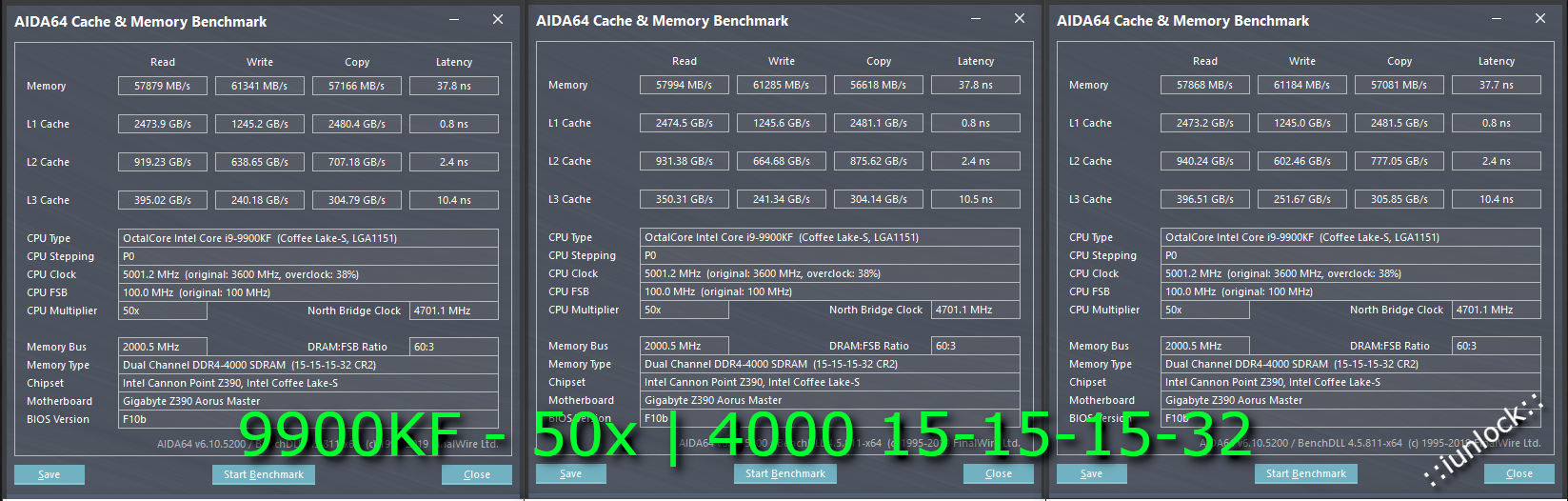
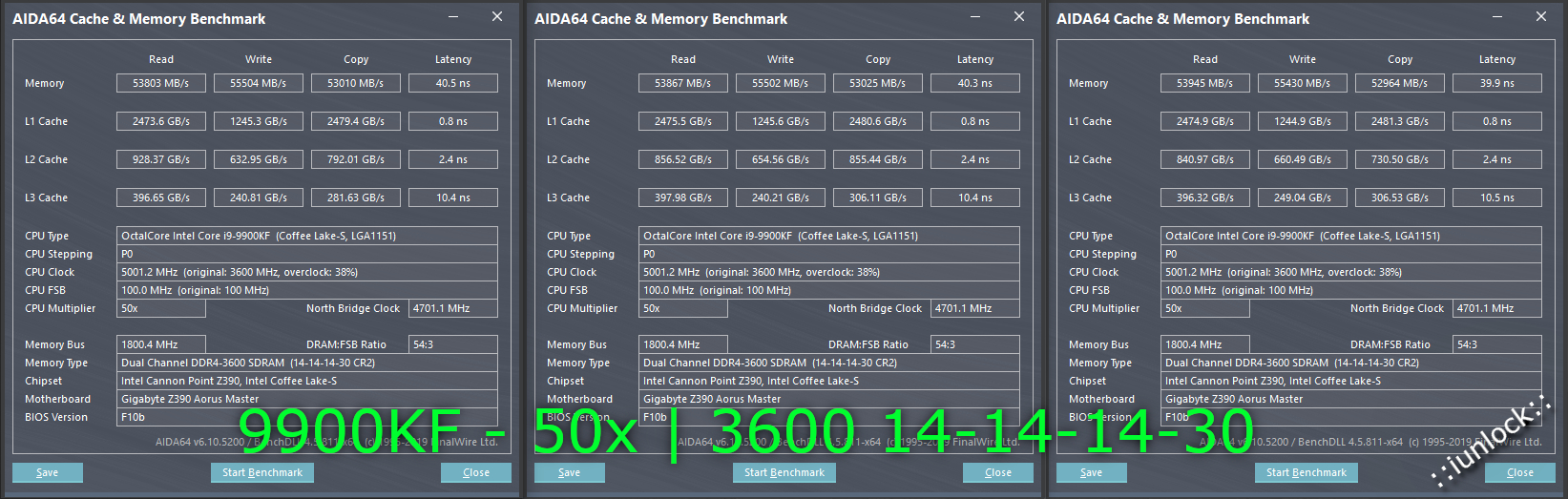
RAM Tuning and Testing:
(G.Skill Tridentz 4266MHz RGB 4x8GB Kit)
9900KF / 50x
I could get it to post at 4000MHz 14-14-14-30, which was pretty impressive, but it still needs some tuning... working on that now...
So far 4133 is the sweet spot for this Aorus Z390 Master board w/ the RAM kit...
Attached Files:
-
-
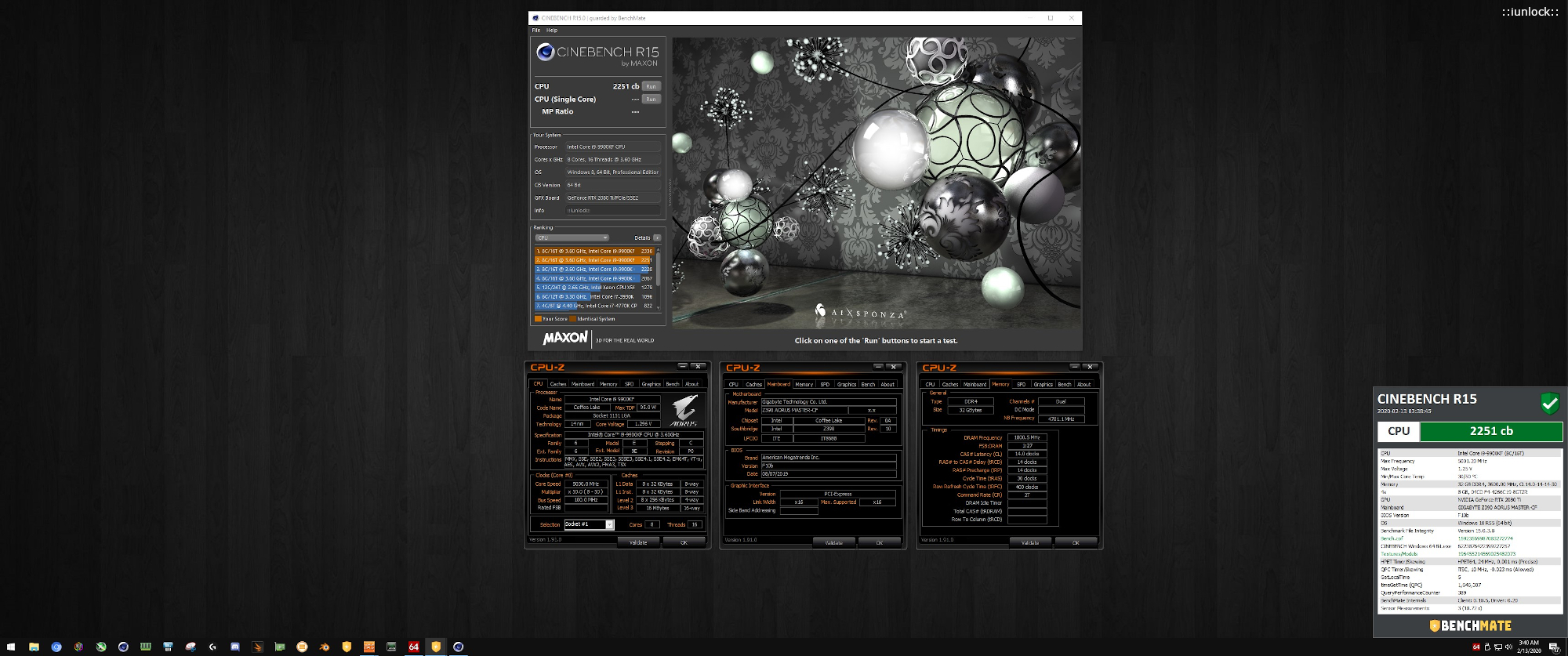
Cinebench R15: 2251
9900KF @ 50x on the Gaming Desktop.
New PR
Others at 50x clocks with the KF:
Others at 50x clocks with the K:
Attached Files:
Johnksss, Rage Set, jclausius and 1 other person like this. -
-
I would imagine your 4000Mhz CL15 config would give the best overall performance, as latency is lowest and read/write speeds are not far off from your 4133Mhz. Very nice RAM results, nice for some high refresh rate gaming!
-
Thanks. I ended up finding a solid base for a new daily driver setting... and it has some monster Writes, Reads/Copy and Latency that is very respectable for these speeds and board... The sweet spot for the Z390 Master is 4133 range...this might be the new mark for those with capable kits.
4266MHz @ 17-17-17-37
Attached Files:
Last edited: Feb 14, 2020Johnksss, Robbo99999 and Convel like this. -
-
I don't think I've ever seen RAM that tight & fast, ooooerrrrr!iunlock likes this.
-
My small contribution. Still haven't gotten my die frame issue situated. Will more than likely need a new block for that as my blocks seem to rock on the die...
Raiderman, sweepersc2, iunlock and 2 others like this. -
Nice score! I am glad you were able to identify the issue with the block fitting. Your temps should be excellent once that is sorted.
Your screen shot reminded me of something that probably would not hurt to bring up again. I know I posted it earlier in the thread so that everyone was in the loop. In case anyone has not seen it, HWBOT changed the rules on screenshot validations. They know longer allow cropped images and will disqualify submissions like that. So, it is not enough to have only the CPU-Z and GPU-Z windows, we are also required that the screenshot be full-screen. The quote below is the previous post.
Rage Set, iunlock, Papusan and 1 other person like this. -
Well, I have to actually buy it first. LOL. I put the IHS back on and am running it like that at the moment.
Yes, thank you very much for the advice on how to check it out, because I was pulling out my hair trying to understand what was the problem.
Oh snap, that's right. I totally forgot about that.
Edit:
And right after they corrected all my disabled scores....Last edited: Feb 14, 2020 -
-
Snag it. It has a watermark option for overlay or underlay.
Okay, fixed that last submission.
Rage Set, iunlock, Mr. Fox and 1 other person like this. -
DOH! Yeah, now that you say that I remembering you telling me. I love SnagIt. I have been using it for years, for work and for play, and totally forgot it had that feature. As a side note, it will work well for what you just fixed also.
Edit: works great.Attached Files:
Last edited: Feb 14, 2020Rage Set, iunlock, Johnksss and 1 other person like this. -
-
This is interesting. Not something I would spend much on, but it's worth the $3.99 price tag just for something to play with. The Arizona Monsoon wallpaper is something I can definitely relate to. Some are truly hellacious storms. It's a shame my favorite one is totally ruined with an icky Razer logo.
I did this desktop capture using SnagIt and forgot to max out the framerate in the settings, so the monsoon looks a little choppy. It is only the video. The actual live wallpaper is not choppy at all.
https://store.steampowered.com/app/431960/Wallpaper_Engine/Last edited: Feb 14, 2020Raiderman, Johnksss, Papusan and 1 other person like this. -
#5 in Norway.
https://hwbot.org/user/papusan/ -
Thanks mate. It's still a work in progress. I'm shooting for 4133 @ 15-15-15-35, but that's a stretch lol. With more voltages very likely, but I am wanting to stay under 1.50v since it's just my daily gaming rig...
Very nice! Which block are you using now on bare die? Have you seen the new Optimus blocks? They have two versions...the regular nickel surface plate and the super flat nickel plate one. The regular plate one is the one to use for direct die. I haven't tried it yet with direct die with the 7980XE, but hopefully soon.
Embossed does look great. I've uploaded some screenshots back in the day with my embossed handle and someone altered it and posted it in some ( trying to be P.C. here...*cough*) foreign language forum haha! Nuts right? This is one reason why I watermark all the images that I post, at the very least to post mark/date it... just recently I was thinking of going with a light emboss across the entire image from now on due to the previous odd encounter with people cropping and janking images that aren't even theirs lol. Crazy world...crazier peeps.
Awesome app... love it. @Mr. Fox there's a similar app called Flameshot for Linux that I also use... it's great.
@Mr. Fox if you could send me the link to that wall paper that you like I can see what I can do to clean it up for you.
Nice!Papusan, Johnksss, Robbo99999 and 1 other person like this. -
-
That and them dam tumble weeds!
I do like the "alive" look. Looks pretty awesome to me.
Great job!
EK Nickel and XSPC Copper are the blocks I have.
Yes, it was you and my long conversation with Brother Fox the other day, that got me to thinking about getting one. -
-
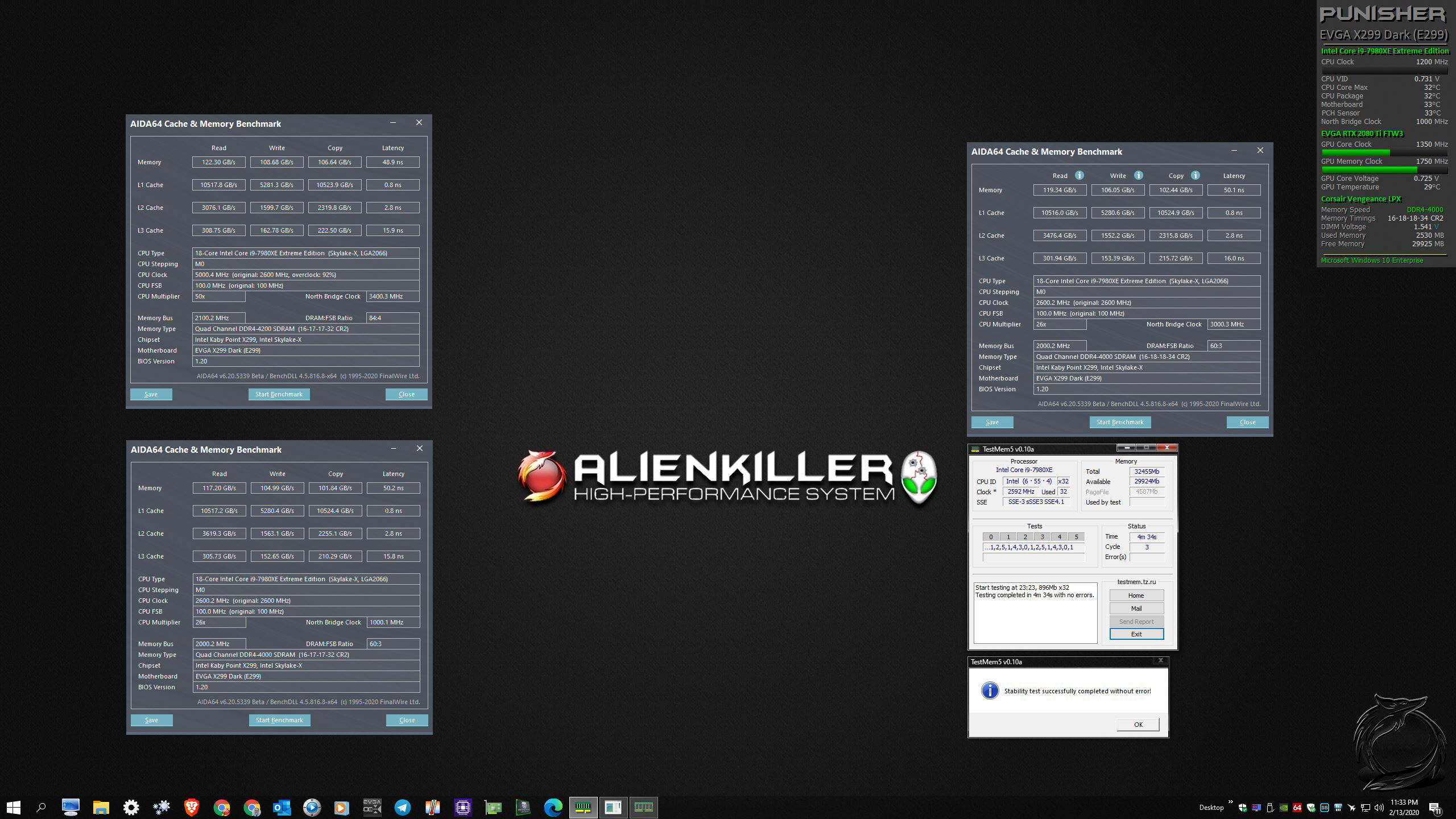
@Rage Set were you able to post 4800 on the dark board with the tridentZ sticks? Was it stable? Would you happen to have any screenshots? Thanks!
Last edited: Feb 16, 2020 -
No, the X299 Dark did not post with the XMP profile and I didn't expect it to. I didn't go far with testing the RAM at 4800. 4000 with tight timings was my aim when I had the 7980XE with the Royal.
-
Ah ok gotcha... as for the Optimus block... doooo iittt..
Rage Set likes this.
-
Awesome scores. Amazing that you got your Physics that high at 5.1GHz. I've never seen it that high at such a low clock speed. Gonna have to pick your brain on that one.Last edited: Feb 16, 2020Johnksss, Robbo99999, jc_denton and 3 others like this.
-
Been tinkering with Wallpaper Engine. More will follow. Was a pain in the butt to figure out, but once I did it's fairly easy. Lots of trial and error.
Here are the links to the Steam Workshop:
https://steamcommunity.com/sharedfiles/filedetails/?id=1999789822
https://steamcommunity.com/sharedfiles/filedetails/?id=1999789078
Animated gifs are low framerate preview. Check the above video for full motion. The animated wallpaper was created in 4K.
![[IMG]](images/storyImages/OzpbpH0.gif)
![[IMG]](images/storyImages/67y9sns.gif)
@FalkentyneLast edited: Feb 16, 2020 -
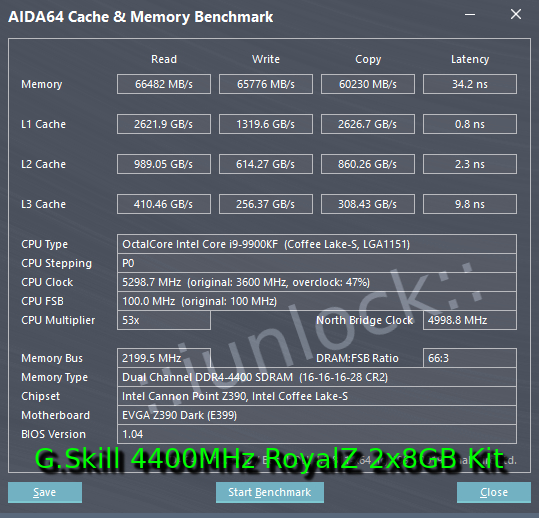
Here you go @Robbo99999
4400MHz @ 16-16-16-28!
Check out the 34ns Latency... crazy right? - And the 60K+ Copy Speeds.... on other runs I've hit 67K on Read/Write and 34.0nz on the dot for Lat.
Very tedious as it took a long long time tuning this kit, but wow it sure is rewarding...Attached Files:
-
-
Nice results. Were you able to boot that on the X299 Dark? If so, dual or quad channel?
I am able to boot my Corsair RAM at 4400MHz using "auto" timings, but it is not bench-stable and sometimes will not load Windows above 4200MHz.Rage Set, Papusan, Johnksss and 1 other person like this. -
Here's a new one. I think I like it best of all.
https://steamcommunity.com/sharedfiles/filedetails/?id=1999991463
Glass EVGA Logo surrounded by full-motion fire and lightning over a hexagonal abstract background. Rendered in 4K.
![[IMG]](images/storyImages/Micakkd.gif)
https://steamcommunity.com/sharedfiles/filedetails/?id=2000260264
![[IMG]](images/storyImages/HpWxz6P.gif) Last edited: Feb 17, 2020
Last edited: Feb 17, 2020 -
Thanks. Haven't tried on the x299 yet, but hopefully tomorrow. This was dual on the Z390.
It took forever to get it to stick. I've ran some stock benches just to see if it completes and so far so good.
I've tried to post 4700 and 4800 for giggles...it's right at the verge of training I feel, but haven't gotten into windows yet. -
Damn, I like that! That would be super good for high refresh rate gaming, I know RAM can make a difference for things like my 6700K, does it make a difference to your 9900K for fps and benchmark scores? And what RAM voltage are you at, are you comfortable leaving that as the daily driver?iunlock likes this.
-
I'm hoping for daily driver settings and to stay ~1.50v range. Both of my kits 4400 and 4600 post at 1.45v, which is crazy. As for games 100% you're right..they do indeed make a difference.... it's really exciting to be tuning RAM, which is often a very overlooked part of OC'ing..Robbo99999 likes this.
-
Interesting. I am assuming you mean the GeForce driver version? Or, are you referring to MEI or Chipset drivers?
I have wondered about the GeForce drivers. Since I moved from 1080 Ti to 2080 Ti, it seems to have degraded my Physics performance a little bit, but I did not know for sure if it was me imagining things or something else. I saw you were using 388 drivers for 1080 Ti. The oldest 2080 Ti driver (first release) is 411.63. Maybe I should test that and see if it moves the needle up or down on the Physics and Combined scores with 2080 Ti.
They added quite an extra payload of stuff (most of which is fluff/junk as far as I am concerned) with RTX cards for supporting new gamer-kids features. If that is real rather than imagined on my part, it might be something relating to the ray-tracing and DLSS and virtual reality features. -
Yes, talking about Geforce driver and 3D benching.
I'll have to let you know when I throw the 2080 TI back on.
By itself I can get to 29K, but once it runs in a bench...that changes...
-
New golds with the old but 2x 4hours run is a bit long time if you prefer see what happens on the screen
460M
https://hwbot.org/submission/4356463_papusan_gpupi___32b_geforce_gtx_460m_4h_0min_28sec_929ms
![[IMG]](images/storyImages/2307894.jpg)
https://hwbot.org/submission/4356366_papusan_gpupi_v3.3___32b_geforce_gtx_460m_4h_3min_5sec_744ms
![[IMG]](images/storyImages/2307855.jpg)
https://hwbot.org/submission/4356271_papusan_gpupi_v3.3___1b_geforce_gtx_460m_3min_36sec_161ms
![[IMG]](images/storyImages/2307807.jpg)
Edit. Last one. All 4 GPUI benches for 460M belongs now to @Prema Mod Team.
Waiting for final approvement from Hwbot (slow today).
https://hwbot.org/submission/4356859_papusan_gpupi___1b_geforce_gtx_460m_3min_3sec_760ms
![[IMG]](images/storyImages/2308114.jpg)
@PremaMod Team dropped to 49th place
https://hwbot.org/league/teams?offset=39Last edited: Feb 18, 2020Raiderman, Rage Set, Mr. Fox and 1 other person like this. -
I tried 411.63 and that didn't seem to be any different than 425.31. Totally within a margin of error (150~ points) doing 3 runs with each driver. But, both of those are old enough to probably be less influenced by "security" cancer and feature bloat.
I just checked and my best Physics score was 29157 (7960X) and that was with 2080 Ti, not 1080 Ti. So that part doesn't seem too relevant. I just couldn't remember. That was with 418.81, so I suspect that being in the middle might not make any difference, but I'd have to test it just to be sure.Last edited: Feb 17, 2020 -
Rage Set, Johnksss, Mr. Fox and 1 other person like this.
-
-
There is much left in the tank of your CPU, trust me.
-
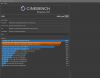
Not much left in my cooling... 87C in that Cinebench run fans maxed.. 2x 240mm Rads
-
I got into 15k with a single 60mm 360, push/pull config. You have more in the tank.Johnksss likes this.
*Official* NBR Desktop Overclocker's Lounge [laptop owners welcome, too]
Discussion in 'Desktop Hardware' started by Mr. Fox, Nov 5, 2017.







![[IMG]](images/storyImages/sRR5NRt.png)


![[IMG]](images/storyImages/2308189.jpg)
![[IMG]](images/storyImages/2308188.jpg)
![[IMG]](images/storyImages/2308186.jpg)