Problems? See this thread at archive.org.
Futuremark software can see and post max boost on single or dual core (their software is flawed as everything else - see also bro Fox posts above). I expect his results is from stock clocks.
-
-
I know lol... but just wanted to ask anyway.

-
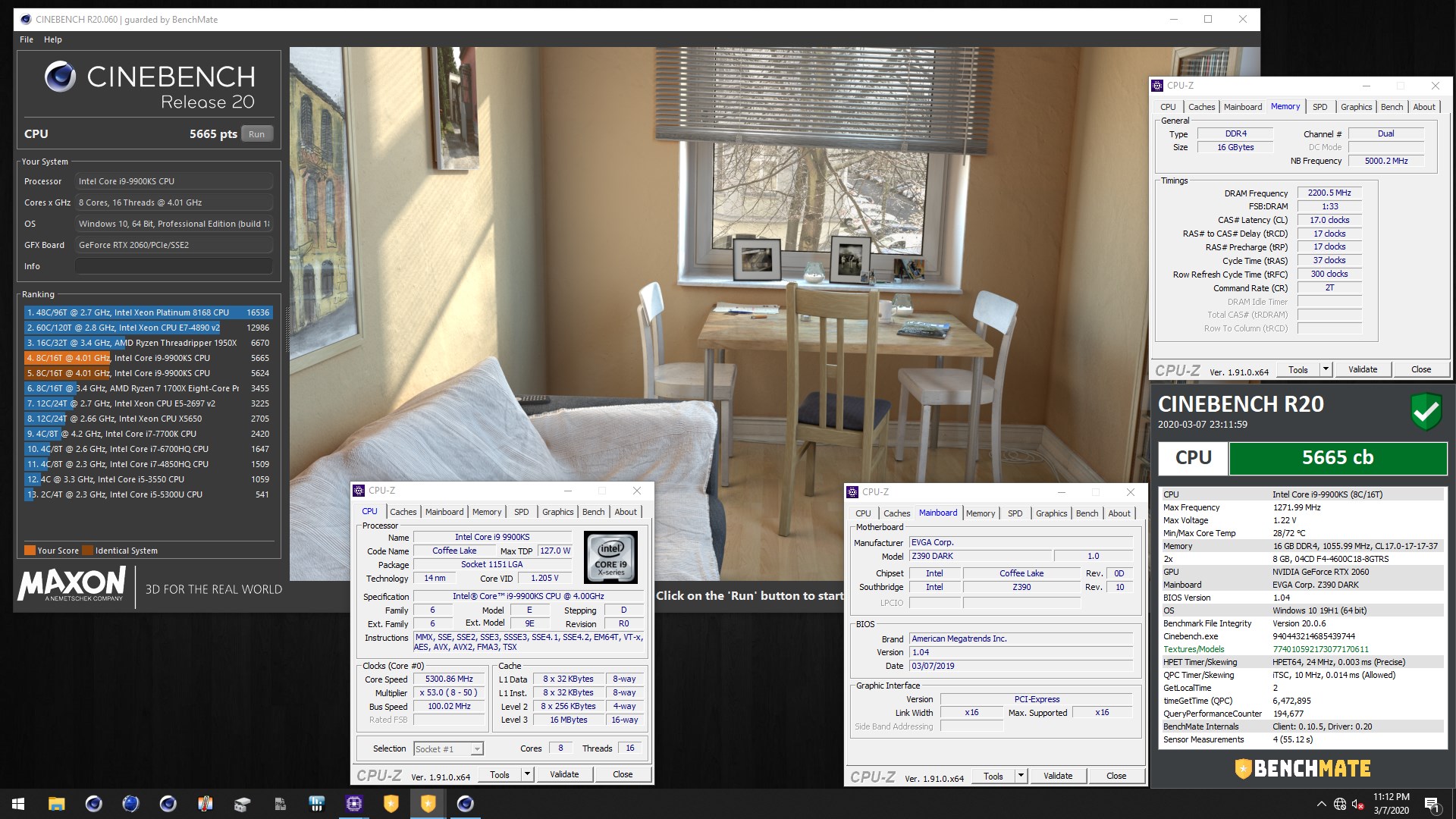
Cinebench R20 w/ Benchmate: 5665cb
9900KS at 5.3GHz (Ambient)
Fastest 9900KS @ 53x ... just 5pts away from taking the spot of the guy at 54x and this is just ambient. On the chiller I'm positive this chip will crush 54x - 55x and maybe possibly higher clocks.
Attached Files:
electrosoft, jc_denton, Papusan and 2 others like this. -
-
They say the 2 best days in a boat owners life is the day they buy it and the day they sell it. I can relate to that very much. The last straw in my computer owner days was when I had a leak from one of the fittings on my GPU water blocks. That leak took out my GPU and my board. So to get it up and running again I would have had to spend at least $1200. My wife was not having any of it and I don't blame her one bit. I sold it as is and of course I took a hosing on it but for me it was worth it. My marriage to my lovely wife is worth far more than chasing numbers. The stress level in my life and my relationship with Jan has dramatically improved. I do miss all you guys who have been so encouraging and loving especially when my son got hurt and I wish you all the best in your benching endeavors and in every area of your lives. A special bond with you @Mr. Fox will always be there as we are Blood brothers and the best friend I never met. Thanks, Joe
Last edited by a moderator: Mar 8, 2020Convel, electrosoft, Rage Set and 5 others like this. -
It's great to hear from you Joe and I agree 100%. The boat analogy is spot on and it's very relevant to owning expensive computer hardware in terms of the ratio of actual 'real-life-progressive-beneficial' gains (which is almost always all for fun, unless one makes a living with the hardware).
Sorry to hear about your computer. The luxury of water cooled systems can come at a cost for sure and it happens to the best of us at times.
I hope that your wisdom and outlook will be seen by others, because overbuying and chasing numbers is comical when compared to what actually matters in life. At the end of the day, this is all just a hobby and for fun, however, for some that are in this profession like me and others here who actually utilize the hardware for work, that's a different story. I'll be the first to admit that I could get by with a lot less than what I have as most would be able to as well. Oh that human nature of wanting the best...
Stay healthy and happy my friend. @Mr. Fox has always had great things to say about you and I'm sure we all hope that you poke in time to time to see how us crazy's are doing lol.Papusan, Convel, electrosoft and 3 others like this. -
So glad to hear that things are going well on the home front. Definitely an answered prayer. At the end of the day, family--especially your spouse--and friendships are the most important thing in this life, and relationships are the only thing that can last forever. Computers and other worldly possessions don't matter very much in the grand scheme of things.
-
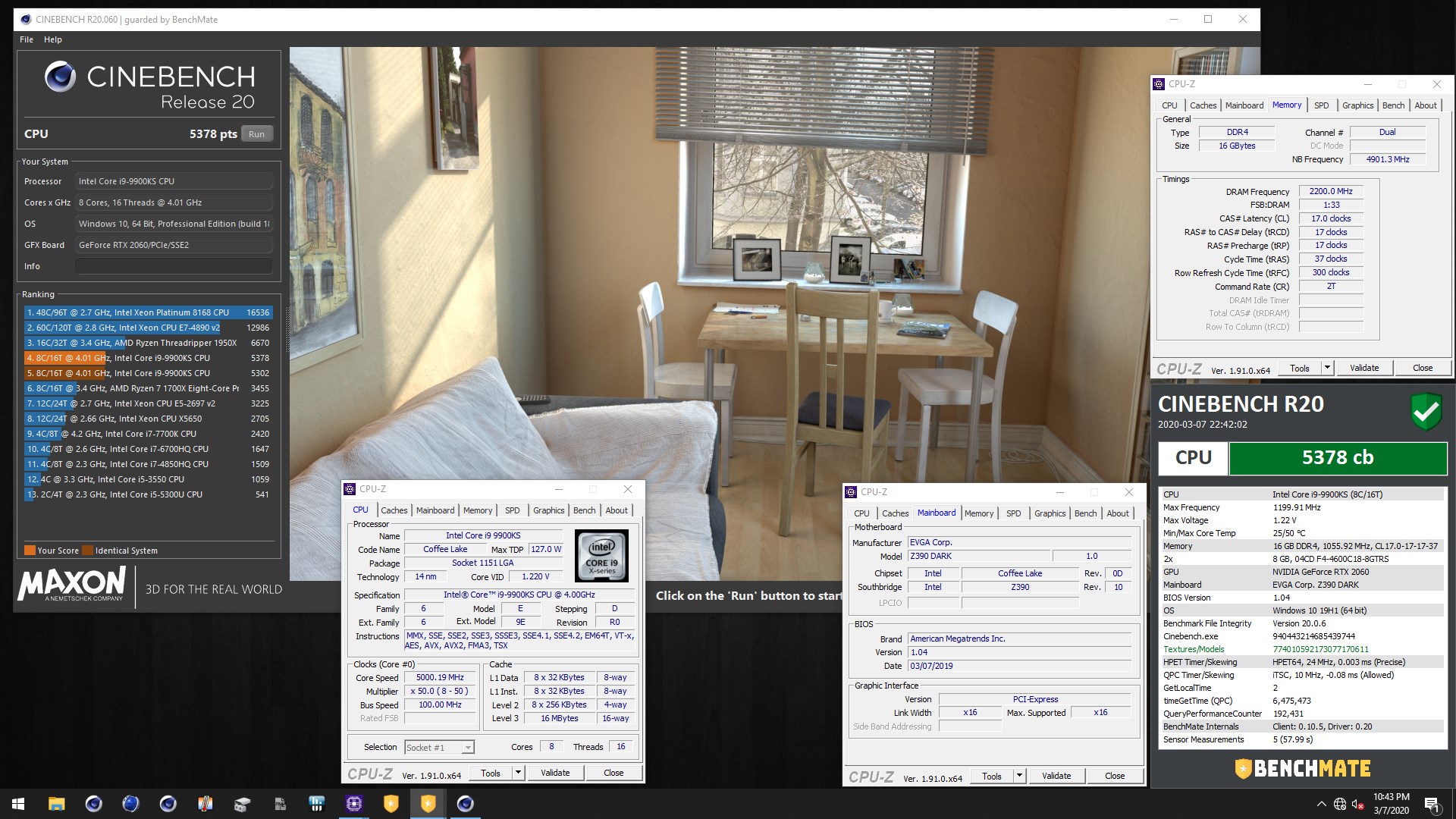
Cinebench R20 w/ Benchmate: 5378cb (New PR)
9900KS at 5.0GHz (Ambient)
Very interesting... My PR with the KF(P0) was 2531cb @ 50x, which was the fastest CBR20 at 50x, but this KS(R0) just beat it...huh... interesting... I guess not bad for an R0/KS eh? @jc_denton with our CPU talk recently thought you'd be interested to see this too...
@Papusan "search wizard," out of curiosity what's the lowest 9900KS @ 50x voltage have you seen around the web? My KS#1 does 1.14v and this KS#2 does 1.15v at 50x with 4200MHz RAM settings, but needs more for higher RAM as expected. From what I've seen the average for the KS at 50x is around 1.21v out of a data sample of 17 posts by other members. I've seen two other 1.14v chips out there.
@Mr. Fox have you tried running Benchmate on W10? Some of my scores are higher with BM than standalone. Interesting eh...
Attached Files:
Convel, electrosoft, Rage Set and 2 others like this. -
-
Incredible! That KS also beat my old P0 at 5G.
https://hwbot.org/submission/4309143_amnixou_cinebench___r20_core_i9_9900k_5330_marks
Perhaps only wPrime has a noticeable effect on R0's? -
From what I've noticed so far with my own samples and testing, the R0's can be a hit or a miss when it comes to how well it scales vs the original P0's. With higher overclocks, there are R0's (including my samples) that scale well with pretty solid IMC's... It's really a toss up. Ex. The KS being the higher binned chip, while still being a R0, would still be the better chip for a daily driver vs an average P0: K/KF. My KF(P0) that would have maybe been a KS bin, has a strong IMC compared to the average P0, but the KS(R0) still comes out on top in some scenarios as we've seen with the CBR20... Very interesting stuff. I didn't expect the KS(R0) to come out on top of my KF(P0)....
-
Funny you should mention IMC strength, since my old P0 might have actually had better IMC. On Clevo boards we are limited to trace quality + imc strength, in terms for what ram speeds that we can boot/bench. My P0 was able to do 3600, while this R0 won't for the life of it go above 3460. Not to say that it's absolute rubbish, but the stronger the IMC, the more likely the board will work at higher speeds.
(this is with 4x8gb b die ic's, no matter if it¨s just two sticks)
It's a shame that I can't test the vcore on this system, however P0 ran 173.1W according to hwinfo64 for R20 at 5G. Perhaps that can shed some light on it?
https://i.imgur.com/vZXBPmY.pngPapusan, Rage Set, Mr. Fox and 1 other person like this. -
Ah yes IMC and trace quality as you've mentioned plays a big role for sure... Luckily all my saved bios profiles for my KF(P0) RAM settings work with the KS(R0) even at very high clocks such as my 4400MHz bios/RAM profiles... I was pretty surprised and having the KS(R0) run them just fine helped me get a gauge on the KS(R0) IMC strength.
Your score is very good especially for it being a laptop... -
That was pretty much clutching the boards hardware amperage limit with both cheeks!
I wish I had @Papusan 's wizardly OC skills, which allow scores to be x1 multiplier above norm.
Not to mention, benching laptops has all sorts of problems. But that's actually part of the fun, solving some of them, in order to push the envelope that little bit further!
Last edited: Mar 9, 2020 -
-
LOL it's my girlfriend's laptop , she bought a new MacBook Air so this laptop has been sitting there.
I took it and told her I'm going to upgrade it and play with it
I already changed the AlienFX from Pink to Red, perhaps extreme calls for red or black color theme on windows
This thing is about to jump on that C20 list to at least middle maybe higher -
Haha nice. I've been benching several laptops the past few days and benching one right now as we speak. They are a ton of fun, especially when you can score on par or better than some desktops. I've missed benching the laptops for sure... Sometime this week I plan to put one of my KS into the Area 51m
Not at all! Benching is benching and always welcome. I must say.... it's very refreshing to see the older AW's...good days and good times.
Looking forward to your results! -
I expect pictures of the cooling setup akin to this!
-
Lol only if it wasn't for all the projects and builds on deck. Maybe one day.
-
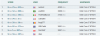
Night Raid: 39711
AW 17R5 - 8750H - 1070
https://www.3dmark.com/nr/233536
Attached Files:
Convel, Papusan, jc_denton and 1 other person like this. -
-
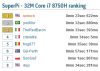
AW 17R5 - 8750H - 1070
SuperPi 1M: 8sec 938ms
SuperPi 32M: 8min 23sec 622ms
@jc_denton, I haven't done any benching on W7 yet. These are all on W10 bloat.
Attached Files:
-
-
You're welcome my son
![[IMG]](images/storyImages/giphy.gif_cid=790b7611a92ddd3e73dd66b3746792bf8ce305c886e4b778&rid=giphy.gif) Mr. Fox, electrosoft, Rage Set and 4 others like this.
Mr. Fox, electrosoft, Rage Set and 4 others like this. -
-
wPrime 1024M: 1min 0sec 301ms
9900KS #2 (Ambient)
New PR!
Fastest on water...
First place in H20 Class..right up there with the LN2'ers
Another win for the team. @PremaAttached Files:
Last edited: Mar 12, 2020Charles P. Jefferies, Rage Set and Convel like this. -
-
wPrime 32M: 2sec 155ms
9900KS #2 (Ambient)
New PR!
Fastest on H20.
Attached Files:
-
-
Alright the 2920XM is in! before I go crazy with OC I wanna figure out this stock issue.
So initially installing the CPU, I kept getting service exception BSOD, but everything passed Dell Diagnostics easily so I knew it had to be a windows driver issue. Reinstalling Intel HD 3000 drivers seems to have fixed it thus far.
When running CB15 it runs at full turbo 3.2Ghz but halfway during the test it downclocks to 3.0Ghz. Temps are fine (which BTW aren't bad considering 14" chassis, stock fan profile and 25C ambient temps).
Score is lower than usual because of the 3.0ghz downclock. Any ideas? I tried increasing turbo power limit and time in BIOS (unlocked BIOS btw) looks just like M18x BIOS.
![[IMG]](images/storyImages/oagCmSu.png)
-
Congrats with the "new" old
Follow what Hwinfo shows up when this happens. -
4.2Ghz single thread works fine
4.0Ghz 2 thread works fine
4 threads limits to 3.8Ghz
8 threads limits to ~3.3-3.4Ghz
I've noticed it seems to hit a 65W TDP ceiling. I can't pass this. Tried @Mr. Fox M18x youtube video settings as well by increasing pri plane to 1040 and all limits to as high as they go in BIOS. Maybe @Raidriar is right and there's a hard limit like in the M17x.
I don't think we ever had a @Prema BIOS for these ever either.
I won't give up doe I'll keep trying.
XTU didn't seem to help.
Package/Ring Power Limit exceeded. Don't know what else I can do to try and beat this. 65W seems to be the limit.
![[IMG]](images/storyImages/4aMdkcm.png) Rage Set likes this.
Rage Set likes this. -
This was svl7's scene, not Prema's. Unfortunately he quit since people wouldn't quit pestering him with dumb questions and requests. I'm sure it has a hard limit built into the circuit. M14x was never designed to run a high power chip.
-
Yeah I'm running slv7 BIOS I think.
Damn, well I guess I got a shiny 2920XM in this 14" LOL
I can do 4.1Ghz single core all day so that's at least good. -
NVIDIA Next-Gen GeForce 'Ampere' GPU Rumors - 10nm Process,
Q4 2020 Launch, Ray-Tracing Across Entire Lineup, RTX 2080 Ti's Successor Up To 40% Faster
"...reported that NVIDIA's next GPU architecture will be based on the Samsung 10nm process node and not go with TSMC as reported earlier. The new 10nm process node from Samsung will be utilized for the fabrication of NVIDIA's next-gen GeForce GPUs."
Thank goodness. -
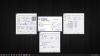
RAM Tuning: Gaming Desktop
9900KS @ (Ambient)
Getting the latency into the 36's...
Low 37ns at 51x...
That Copy speed at 51x.
Attached Files:
jc_denton, Papusan, Convel and 1 other person like this. -
-
2x performance than the original 3210M at least...lol
![[IMG]](images/storyImages/hRFo9MK.png)
Wait...this isn't a good thing lol
If they are going 10nm Samsung instead of 7nm TMSC then we won't get as much of an increase.
Weirdly their HPC series seem to be going 7nm TMSC. Probably wishful thinking hoping the Titan card gets HPC die.Last edited: Mar 14, 2020 -
-
When it comes to die size, smaller nm process does not necessarily equal better. Look at the weak integrity and degradation of the 7nm process with amd lol.
The maturity in nm process matters.
Actual over clockers, me included can no longer use the original profile settings anymore on our high end chips, 3970x in my case. It just doesn't stick and now it requires more voltages.
In the amd example 7nm is a very young process, whereas Intel is very mature with the 14nm process to where even til this day is holding its own.
My Intel 7980xe works just like it did on day one without any signs of degrading.
Can't say the same for amd with the 7nm. Going smaller die with the gpu doesn't mean that it'll magically be better for overclocking either.
So with gpu's if you plan to overclock... Going with Samsung is the obvious and better choice.
There a reason the Kingpin cards use Samsung.
Last edited: Mar 14, 2020Convel, jc_denton, Mr. Fox and 1 other person like this. -
Oh I completely get it and know what you mean... I originally had 256gb and the lag was horrific... Even tried 128gb and it was meh as well, but a little better. 64gb actually seemed to be the sweet spot.Mr. Fox likes this.
-
Welcome to the newest member of the PremaMod HWBOT Team! @TheReciever - Glad you joined us, bro. And congrats on the new Clevo P750ZM.
https://hwbot.org/team/premamod/
@Prema @JohnksssRage Set, Robbo99999, Convel and 3 others like this. -
Thanks for the invite, Prema had invited me before but I didnt feel I would do well with the Ranger at the time.
Now I have my desktop and a unassuming sleeper that is going to be the P750ZM.
I suppose I can get some submissions in with the AW 13 R3 while I still have it. Then get it up for sale. Got to justify the P750ZM with it
It seems that my 5700 XT places quite well, while my 2700x is kind of a dud. I got it for 150 USD so no complaints though.
To everyone else, I will be in your care. Im a gamer first, who is cheap and likes to make things run faster if possible. Benchmarking is validating those gains.Rage Set, Robbo99999, Convel and 4 others like this. -
It's all for fun anyhow. Benching is a game for people that love it. There is room at the table for everyone.
 Rage Set, Reciever, iunlock and 1 other person like this.
 -
-
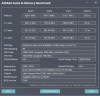
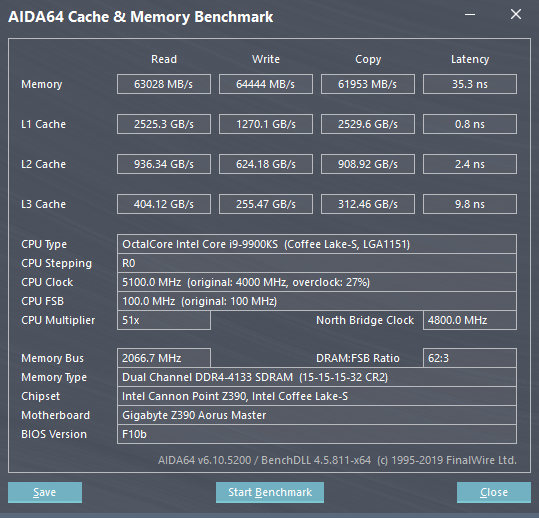
New RAM Settings: Gaming Desktop
9900KS @ (Ambient)
Phew...okay so after weeks of tuning here it is... I'm staying put here for now lol so that I can go enjoy the system. For every hour of RAM tuning = Grey hair lol...
Very tedious, but extremely rewarding. I was after the Copy and Latency as that's what really matters the most in real world applications.
4133MHz w/ ~62MB/s Copy and 35.3ns Latency! I'll take it!
G.Skill RoyalZ 4600MHz Kit.
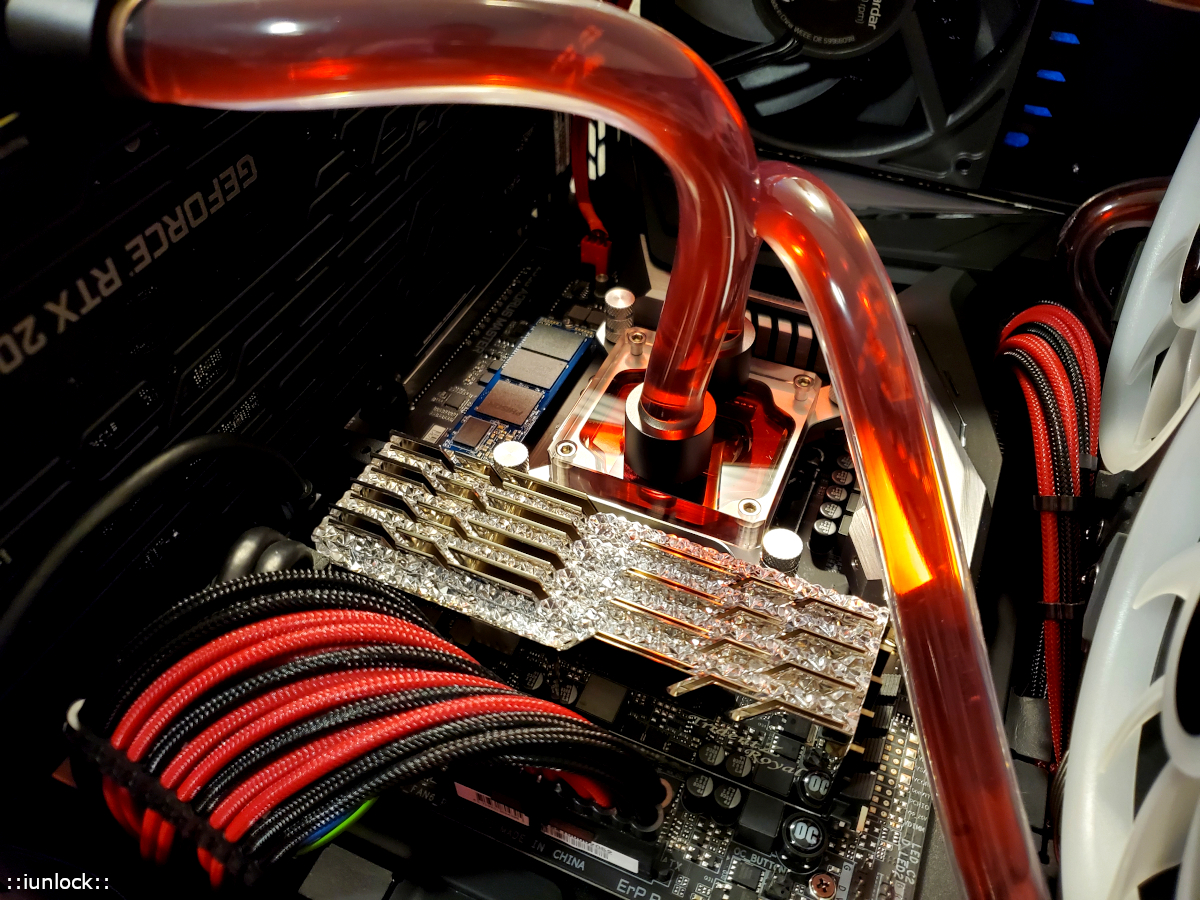
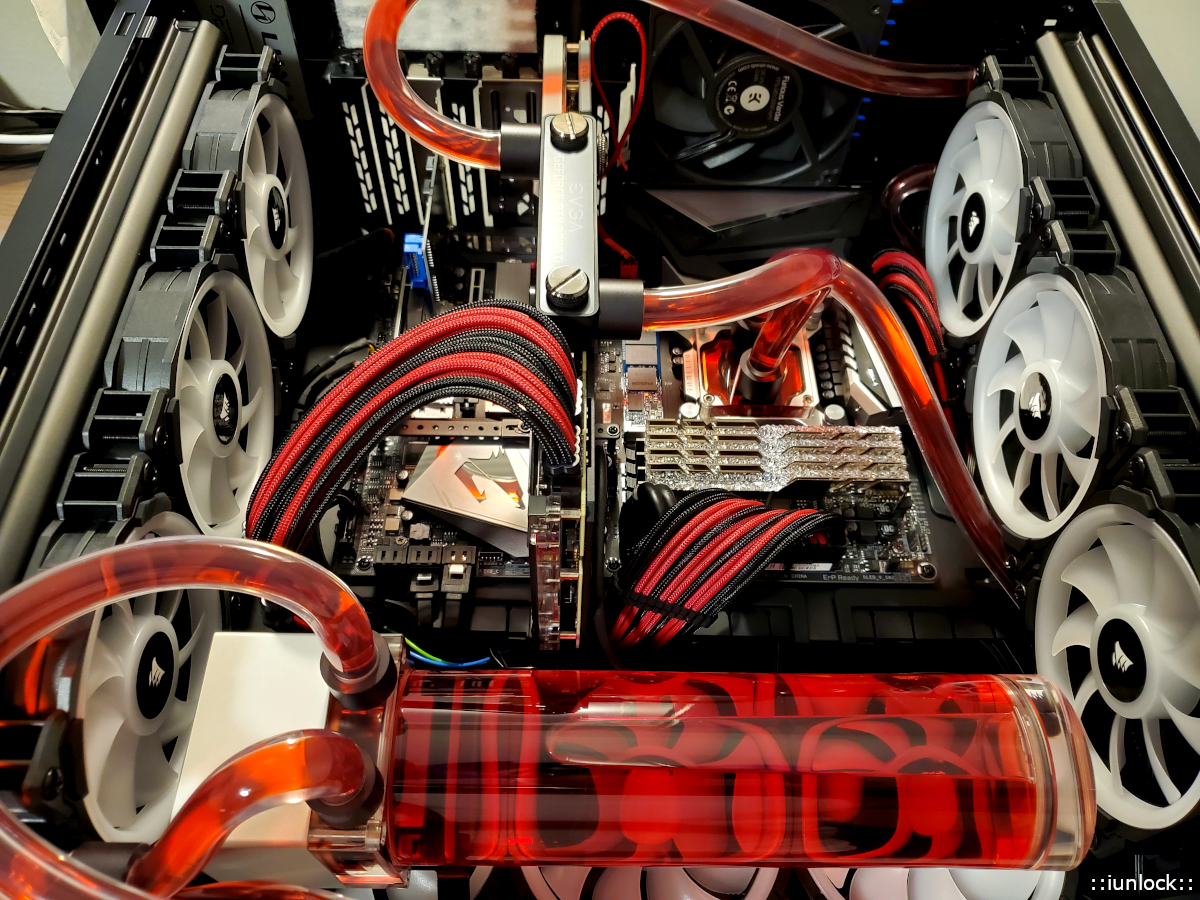
Gaming rig on its side...
Welcome to the team @TheRecieverAttached Files:
Last edited: Mar 15, 2020Rage Set, Reciever, Robbo99999 and 3 others like this. -
-
i5-2430M
https://hwbot.org/submission/4377347_papusan_hwbot_x265_benchmark___1080p_core_i5_2430m_6.182_fps
![[IMG]](images/storyImages/2319313.jpg)
https://hwbot.org/submission/4377349_papusan_hwbot_x265_benchmark___4k_core_i5_2430m_1.458_fps
![[IMG]](images/storyImages/2319316.jpg)
https://hwbot.org/submission/4377311_papusan_performancetest_core_i5_2430m_1789_marks
![[IMG]](images/storyImages/2319281.jpg)
https://hwbot.org/submission/4377318_papusan_superpi___1m_core_i5_2430m_12sec_933ms
![[IMG]](images/storyImages/2319289.jpg)
https://hwbot.org/submission/437728...ith_benchmate_core_i5_2430m_11min_23sec_268ms
![[IMG]](images/storyImages/2319257.jpg)
https://hwbot.org/submission/4377275_papusan_7_zip_core_i5_2430m_9836_mips
![[IMG]](images/storyImages/2319250.jpg)
https://hwbot.org/league/teams?offset=37
Last edited: Mar 15, 2020 -
If I can figure out how to get a stable overclock on the memory of my 5700xt I may be able to reach single digit placings for timespy extreme amongst other 5700 xt's
I may have to look back at more power tool and see if there are other options to allow for that. Right now even a single digit overclock starts flickering the screen.
Otherwise right now I'm sitting at 12th place. -
Very good, what version of windows 10 can I use ... to have more performance in games and in general?
-
Beautiful RAM timings, that's what I'm talking about. Although I have an idea, what board is this and you're running chilled yea? Keep it up! You should be able to top 5670's.
Robbo99999 and Mr. Fox like this.
-
The battle between Win 7 and Win 10 (Y-Cruncher) i5-2450M. For you bro @Mr. Fox
https://hwbot.org/submission/4378816_papusan_y_cruncher___pi_1b_core_i5_2430m_11min_16sec_610ms
![[IMG]](images/storyImages/2319957.jpg)
https://hwbot.org/submission/4378820_papusan_y_cruncher___pi_25m_core_i5_2430m_8sec_185ms
![[IMG]](images/storyImages/2319960.jpg)
-
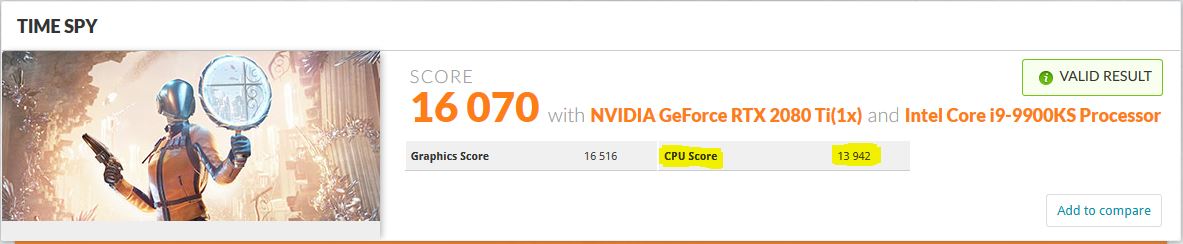
Time Spy (Physics Score): 13942
9900KS @ 53x (Ambient) almost hitting 14K - Gaming Desktop
I ran Time Spy on the gaming rig out of curiosity @ 5.3GHz. Stock GPU with a CPU Score of almost 14K? I was pretty surprised especially with it being at just 53x as it tops most others running at 54x and 55x... huh...interesting. - Is this chip begging to be on the test bench? I think so...
https://www.3dmark.com/spy/11014976Attached Files:
Rage Set, Convel, Reciever and 1 other person like this. -
*Official* NBR Desktop Overclocker's Lounge [laptop owners welcome, too]
Discussion in 'Desktop Hardware' started by Mr. Fox, Nov 5, 2017.

![9900KS[E] 53x CB20 5665 Ranking.PNG](images/storyImages/9900KS[E] 53x CB20 5665 Ranking-preview.PNG)


![9900KS[E] 50x CB20 5378 Ranking.PNG](images/storyImages/9900KS[E] 50x CB20 5378 Ranking-preview.PNG)


![[IMG]](images/storyImages/2317436.jpg)
![[IMG]](images/storyImages/2317434.jpg)
![[IMG]](images/storyImages/2317435.jpg)


![wP1024M Ranking 9900KS[H].PNG](images/storyImages/wP1024M Ranking 9900KS[H]-preview.PNG)
![wP1024M Ranking 9900KS[H] - 3.PNG](images/storyImages/wP1024M Ranking 9900KS[H] - 3-preview.PNG)
![wP1024M Ranking 9900KS[H] - 4.PNG](images/storyImages/wP1024M Ranking 9900KS[H] - 4-preview.PNG)

![wP32M Ranking 9900KS[H] - 1.PNG](images/storyImages/wP32M Ranking 9900KS[H] - 1-preview.PNG)
![wP32M Ranking 9900KS[H] - 2.PNG](images/storyImages/wP32M Ranking 9900KS[H] - 2-preview.PNG)



![[IMG]](images/storyImages/8mOgNtA.jpg)