 Problems? See this thread at archive.org.
An update:
I'm still around, mostly lurking. Nothing currently on the market really interests me. The 10980xe is essentially double its retail price and I'm leaving mainstream Intel alone for now. I've been mostly playing games and learning photography.
I'll be back though, Nvidia and AMD both will have new GPU'S soon.
-
-
I've been seeing and appreciating your lurking. Glad to know you are doing well, bro.
I agree with you. Nobody really offers anything interesting in hardware at this point. There's really nothing for anyone to be excited about.
I am passing my time waiting for something worth having to appear by becoming more intimate with Linux. Hating the Redmond Retards and the trash they produce has never been easier.Last edited: Jul 25, 2020 -
Intel lies in the dust with broken neck and try to please it's disappointed investors with new mainstream frankenstein chips (chips who lost in the binning process - but have a value for Intel) to fish in some cash. And for HEDT maybe even worse... Nothing there as well!
![[IMG]](images/storyImages/giphy.gif_cid=ecf05e47z4zvjac0go70vtdzyg3fcw66wbmvlykksh7z9eb2&rid=giphy.gif)
-
Well, the only good thing we can say is the i9-10980XE still beats AMD's competing CPU. Clock is still king, and since AMD sucks at clocks they're still taking a back seat. Their memory handling is also crap in comparison. I'd still pay extra for Intel rather than settle for AMD.
Intel does need to get their act together, and do something new and amazing. But, it's interesting and actually impressive they can keep tweaking their current antique technology generation, after generation, after generation, after generation and it still takes all of the efforts AMD can muster to keep up with it. Imagine how badly they would get stomped if Intel would get off of their lazy heiney and do something worth writing home about. -
Have you seen the A100 in that one bench only being about 40% over the 2080 Ti?
I think you are mistaken here. Intel's in a bad way and it is getting boring, not impressive. It was impressive up until around the 8700K. The 9 series on HEDT was nothing, not was the 10 series. Only reason mainstream was was due to rising core count.
But intel's losing on manufacturing basically is like a motorcycle racer breaking their back from a crash of their Ducati. It may take years to catch up to a couple scores, but thinking you'll immediately jump back on top is absurd.
Their yield is a year off target and the production was pushed 6 months, meaning if they truly only push it 6 months, they will be burning wafers, which is not going to be good when the competition is about ready to transition to 3nm at that point, which is equivalent to your 5nm, all while TSMC has had good yields on 7nm and now 5nm seems to be working. Samsung had late delivery of EUV equipment, so might miss a delivery window and yields for 5nm seem less. Intel will have to compete for fab time at one of them, and TSMC seems like the only one with a good HPC library.
Intel has good designs for future nodes, but a lot of good that is doing shelved. You'll have at least a couple generations before Intel really can get back in there. In fact, since they missed on 14nm with broadwell, then missed on 10nm for years and arguably still have a forked production on it, and now are further delaying 7nm beyond when it was due, Intel may need to spinoff its fab like AMD did.
It's no longer time to defend Intel. Rocket lake may not arrive this fall, and it may or may not even hit 20% now IPC, although looks to target 5GHz. If losing 2 cores and gaining 20% IPC, it is a wash. How does a wash stack up to 20% IPC and latency fixes from the competition?
On mobile, supposedly tiger will be here. That will be needed sorely.
On server, they have Cooper lake (coffee refresh) and ice lake, and both look craptastic versus AMD offerings, especially if AMD allows a higher boost this time and we'll see when the speed optimized chips drop this time.
Then, you get Zen 4 out against what? Sapphire rapids on server if they ever get yields enough to do a respectable 10nm server chip. Or mainstream Alderlake with big.LITTLE.
Intel seems to have stagnated harshly. It is fine to like what they have done. It isn't fine to overstate their current position and hand.Rage Set, Convel, Robbo99999 and 2 others like this. -
Yeah, I agree. There's really nothing to get excited about anywhere right now. I'm not defending, just stating my thoughts about the lackluster options. I don't see the alternative as being any better. If I had to buy something new it wouldn't be something from AMD. I'd grit my teeth and buy Intel again. That's all I am saying. That could certainly change in time, but not today. I'm just glad I don't need to waste any money on new hardware right now. That would suck.
Edit: And, to be fair to AMD, it's the first time in 15+ years that their CPU options are roughly equivalent performers by most measurements. That's a pretty stinking massive accomplishment for them and they deserve to be acknowledged for it. They're still not an option today because they suck at overclocking (CPU and memory) and their firmware absolutely blows chunks. If they fix those things, then they'll have my attention.Last edited: Jul 27, 2020electrosoft, Convel, Robbo99999 and 2 others like this. -
I'm on the other end. I'm grabbing the 9900k for the project of running it on my z170 board. That is a fun project, IMO. Meanwhile, I'd wait for zen 3 at this point if in the market. The 10 series on mainstream is overpriced for what it does except on gaming and Zen 2 is months away from replacement. Now Zen 2 has really brought down the cost of compute, with the 6 core at $160 or so and the 8 core priced at the price of intel's 6- core. Even though newer games are just now adopting core count optimizations, the 8 core smashes anything productivity over intel's equivalent proceed 6 core.
I differ on laptops. AMD is rumored to have skimped on pcie lanes on their laptop chips, supposedly being the reason they are not paid with high end Nvidia, although that doesn't fit with the desktop CPU models that still cap with the 2070.
What I'm waiting for is to see RDNA2 and Nvidia. Recent rumors have me thinking Nvidia may have more issues competing. These include Moore's law is dead mentioning the 72 CU rumor came from someone inside Nvidia, that the A100, which the A102 die is set to be the 3080 Ti or whatever similar offering they have, is only 40% over the 2080 Ti in the one benchmark, etc. It's really a question of what AMD can deliver, and that's a hard question. I'm just skeptical Nvidia is going to offer much. Sure, the rumor the 3080 is 20% better than the 2080 Ti, but to get excited, you have to expect the same normal separation between the 80 and Ti series, something I'm starting to doubt. Either way, it isn't 70% like before maxwell.
Just the percentages being thrown around about Nvidia makes me question some things, so AMD's to lose, which they've proven they can lose in spectacular fashion on the GPU side, so...
But, yeah, wouldn't buy Intel if not for owning the motherboard. Especially HEDT. On HEDT, I want an unlocked 8- channel TR pro. Nothing comes close. -
-
Decided to play with some Patriot Viper 4 Blackout RAM. Got tired of looking at the red Corsair sticks. Kind of clashed with my all black/silver and white LED theme. Runs fine and passes memory tests using the same BIOS profiles with the custom memory timings I was using on the Corsair sticks... makes sense since both are Samsung B-die.
Got to love that endless supply of Phoenix dust, LOL. Still 112°F at 6:45 PM.
Last edited: Jul 31, 2020Rage Set, Robbo99999, Convel and 2 others like this. -
How are the temps on these viper sticks compared to the Corsair? I've been struggling to keep the memory in my threadripper build under 60c and these viper sticks look like they have more effective heatspreaders than some other kits I've seen.
-
Hi bro. They do not have thermal sensors and neither do the Corsair Vengeance LPX sticks. So, I don't know what the temps are. Neither these nor the Corsair sticks ever feel warm to the touch. They always feel room temperature touching the heat sinks, even after being under heavy load like memory testing or benching. I've run the Corsair sticks at 4000 CL14 with 1.650V when benching and even then they are never even remotely warm to the touch.
The Viper sticks do have nice heat spreaders. Each stick feels like it weighs twice what the Corsair sticks weigh. They are very heavy and the heat spreaders are quite thick material.Rage Set, jc_denton and alaskajoel like this. -
@Mr. Fox. I may get a pre-delidded 7980XE in the coming week. What kind of temps do you think I would see if I used the best possible air cooling on a open case, would any overclock even be manageable?
I currently run a 8086K at 5.3 with 0 AVX with ease.
But,
I’m seriously wondering if I could even manage a 7980XE stock on the same cooler?
My 8086K at 220+ watts gets decently warm, around 88-90C with AVX small FFT’s in P95 after a few hours.
So, now I’m wondering. A 7980XE would pull well beyond that power stock right??
Am I wasting my time attempting to use this air cooler? I am trying to save on extra costs as much as possible with the platform switch to X299.Mr. Fox likes this. -
It all depends on the stable daily OC you're looking for. An allcore OC at 4.2/4.3 is what I would aim for on an air cooler (actually, 4.3 even on water) without the fans running at max. The 7980XE will pull a lot of power, there is no ways around that. RAM speed also plays a part in your stable OC. X299 will run wild if you let it.
-
Got a 3990X for a steal of a deal from someone who needed the money in our current economy. 4GHz 1.2v not to bad. I ran my 3960X 4.4GHz 1.406v but I heard these threadripper 3rd gens aren't supposed to pass 1.225v or something so I'm not sure if I should push this much further. I have 5 480mm rads 2 30mm thick 3 86mm thick 37 Noctua 3000RPM Fans so cooling isn't an issue. does anyone else have a 3990X what voltage and clock speed did you achieve?
Attached Files:
DaMafiaGamer, electrosoft, Papusan and 2 others like this. -
-
Hi bro. 7980XE overclocked to 50x on all core temps in something like CBR20 are utterly insane even bare die with a delid without chilled water. I am not familiar with your air cooler, but if you run it stock or a modest overclock (say 43x to 45x all core) it might be OK. At 50x on all cores my desktop is pulling 1000W+ from the wall in CBR20.
Edit: Brother @Rage Set is right on the money
If you are mostly playing games and not severely loading the CPU you can probably get away with a lot more CPU overclock using the air cooler.
Well... I run 50x on all cores and the RAM at 4000 24/7 as my daily driver. I literally never run it slower than that for any reason.
I have nothing running at the moment. One Chrome tab open, CPU usage it at 1% as I am replying to this message and...
That is probably the thing I love most about it. Plus, I really don't give a rat's butt how much power it draws as long as my PSU can put out enough to deal with it. The reviewers that mitch and boan about it crack me up. They complain about some of the dumbest things, LOL. I guess it is a popular idea with the tree-huggers to use less power. They have a knack for screwing up everything for all of the normal people.Last edited: Aug 1, 2020 -
that is some insane power draw! I just ordered a wattage meter like this.Mr. Fox likes this.
-
Anyone on here ever pre-order components with “ShopBLT”? They offer no price gouge service. They’re a lower budget online retailer, 100% legit. They order directly from the manufacturer. So it can take a few weeks from what I understand.
They have retail boxes 10980XE’s inbound for only $1,035 dollars. And tray 10980XE’s for $1,009 dollars.
This seems like a nice deal. Curious if anyone on here has used them? And how long did it take to receive your item?
https://www.shopblt.com/cgi-bin/sho...YX100P.shtml&order_id=230115904&sitem=B6YX100 -
https://hwbot.org/submission/4513479_papusan_cinebench___r20_core_i3_6100u_631_marks
![[IMG]](images/storyImages/2377236.jpg)
https://hwbot.org/submission/4513356_papusan_7_zip_core_i3_6100u_9983_mips
![[IMG]](images/storyImages/2377147.jpg)
https://hwbot.org/submission/4513350_papusan_black_hole_benchmark_core_i3_6100u_7592_marks
![[IMG]](images/storyImages/2377143.jpg)
https://hwbot.org/submission/4511804_papusan_pifast_with_benchmate_core_i3_6100u_28sec_50ms
![[IMG]](images/storyImages/2376479.jpg)
https://hwbot.org/submission/4513446_papusan_3dmark05_hd_graphics_520_(mobile)_15859_marks
![[IMG]](images/storyImages/2377201.jpg)
-
Fastest i3 6100U in the world right there!
-
Running bench as CBR20 with such type processors is very time consuming. Same cpu in this video performed the task at +12 min and got 50% lower score. If you have the time... Enjoy

https://hwbot.org/submission/4514207_papusan_superpi___1m_core_i3_6100u_15sec_958ms
![[IMG]](images/storyImages/2377545.jpg) Last edited: Aug 3, 2020
Last edited: Aug 3, 2020 -
New fan setup for keeping my 220+ watt intel 8086K cool (3) 120MM fans, and a 4th in the case sits nearly flush against the cooler for exhausting hot air. I’ll finally have my (2) 2080Ti’s installed tomorrow morning. I really need that 5.5Ghz daily for minimal bottleneck!
it does look a little silly though.
![[IMG]](images/storyImages/671-A601-F-7904-4-C11-8-DFA-C37-EA2-E88-E70.jpg) Mr. Fox, Rage Set, TheDantee and 1 other person like this.
Mr. Fox, Rage Set, TheDantee and 1 other person like this. -
Please I got a TU150 with a NH-D15, function over form in my book.
Mr. Fox likes this. -
Yep for sure. It would take a legit and good custom loop to outperform my current air cooling setup. The chip is already delidded, with a copper IHS. And my case is really cheap and small, so this is the easiest solution for now.Last edited: Aug 3, 2020Mr. Fox likes this. -
Here’s my little eGPU in a desktop project. Super COOL!! And still the fastest single graphics solution around lol.
http://forum.notebookreview.com/threads/the-proper-way-to-use-a-2080ti-egpu.833747/Mr. Fox likes this. -
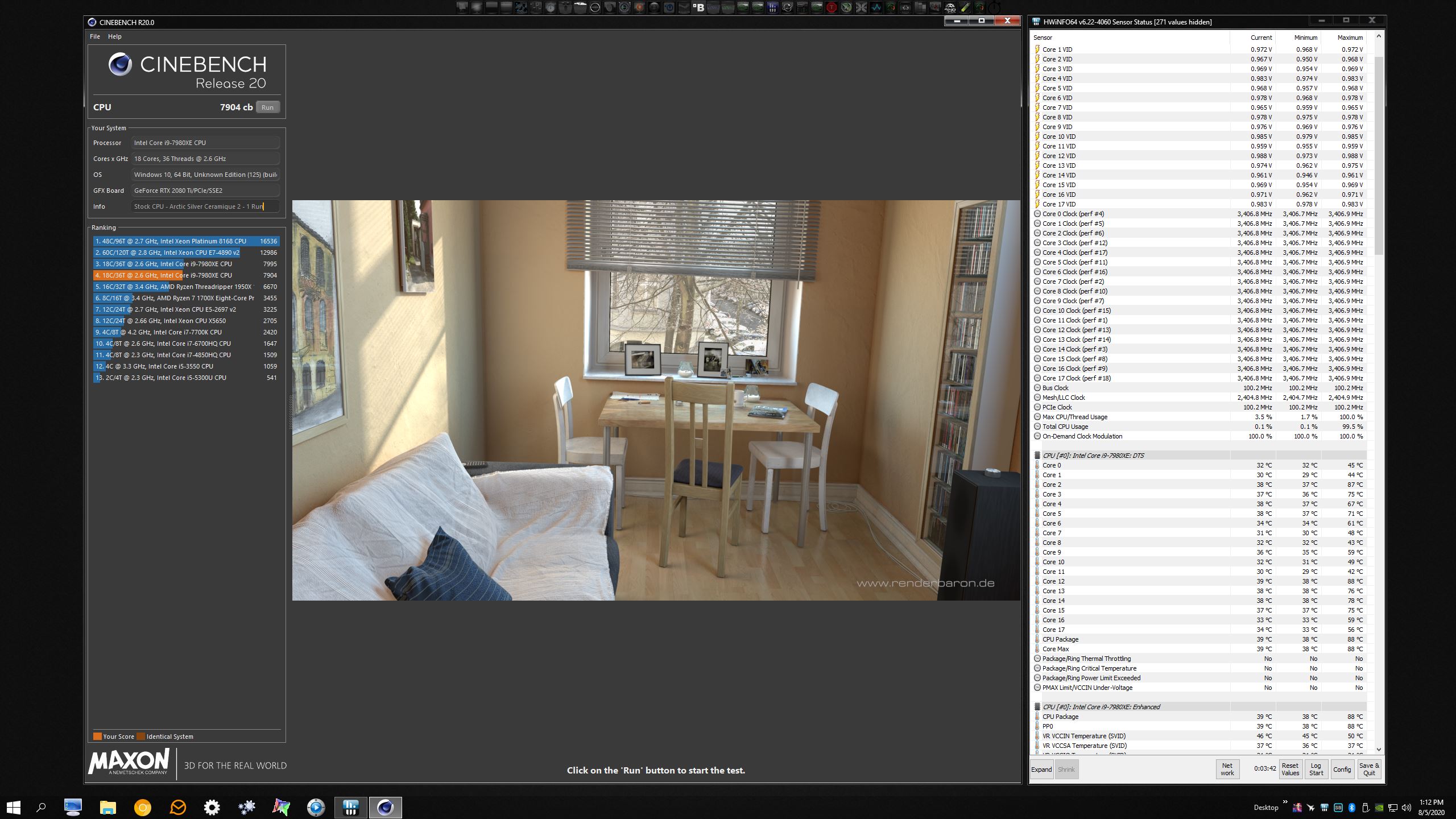
It was time to flush out my system. Took apart the Hydro-Copper GPU block and the Optimus CPU block last night and cleaned the fins, flushed out the rest of the system.
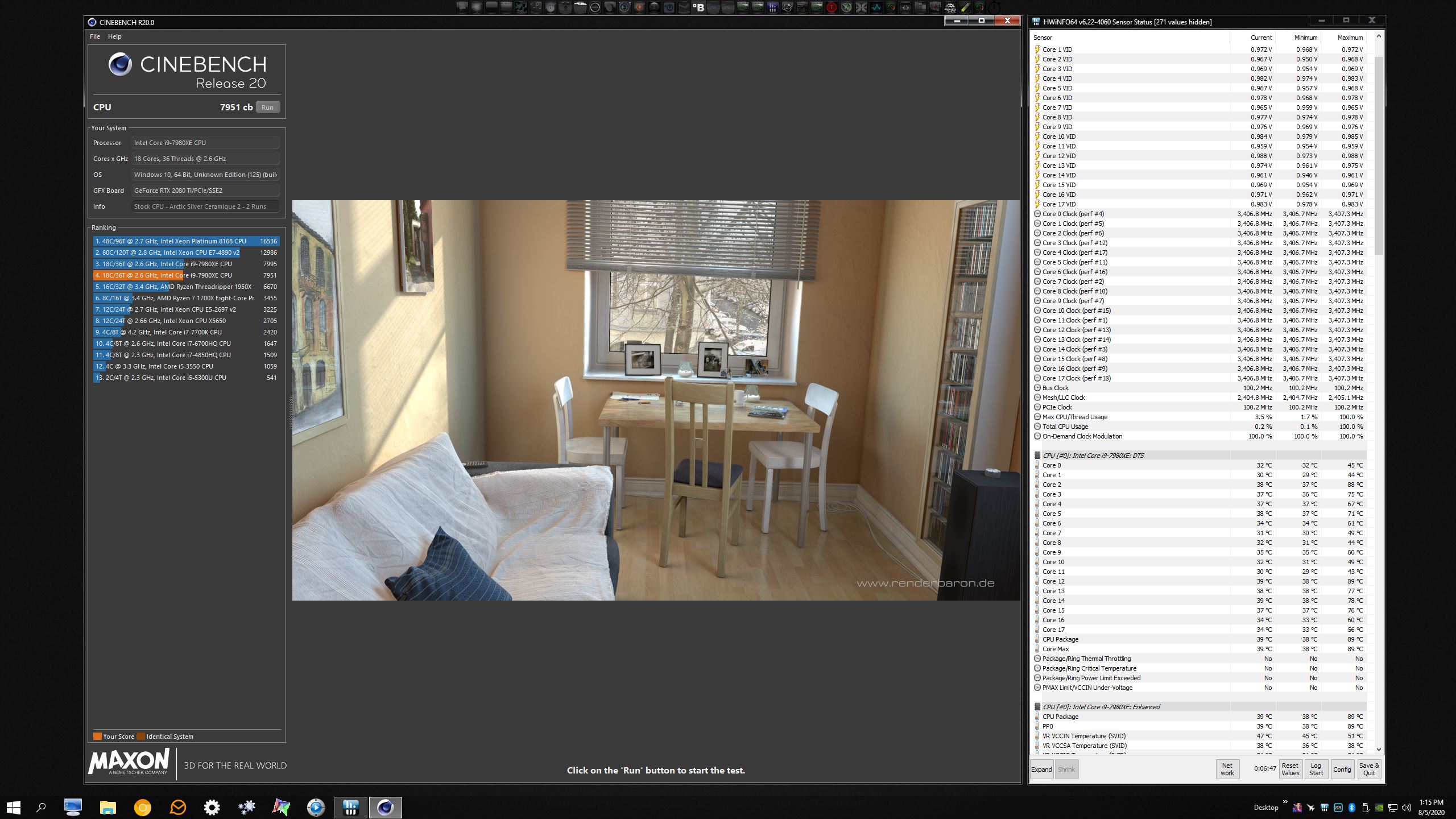
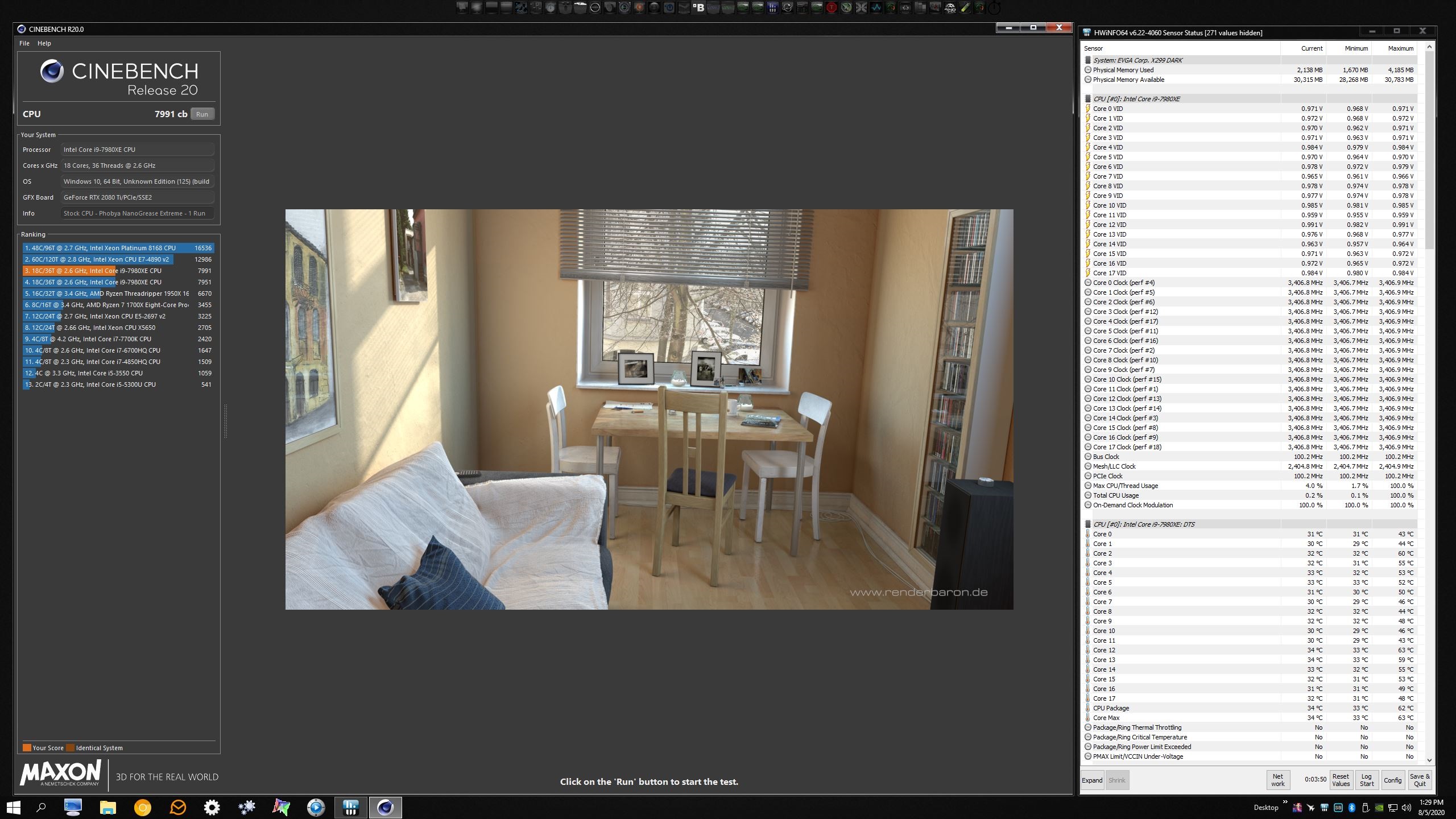
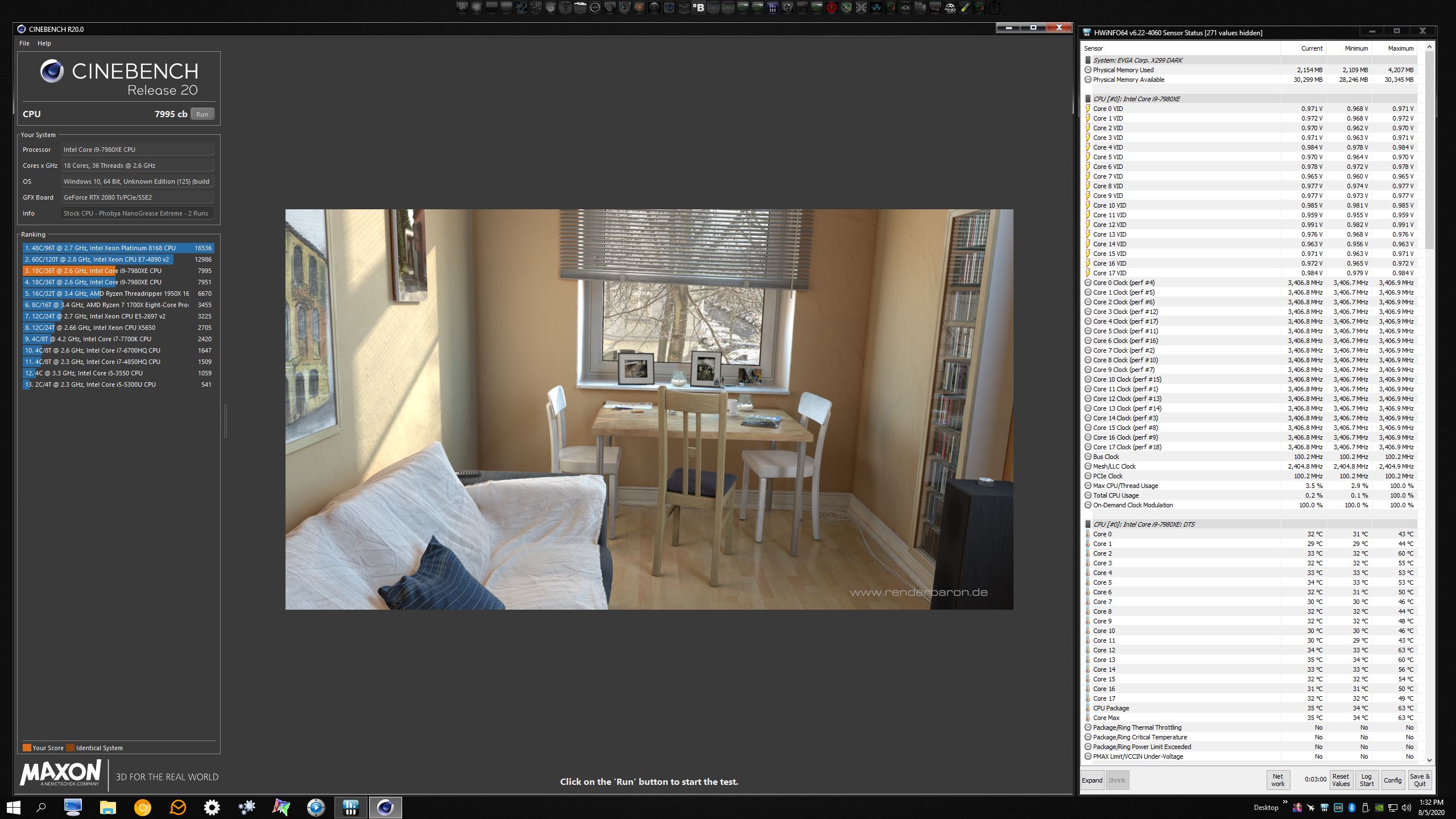
I thought while I was making a mess I would see how the Ceramique 2 thermal paste included for free with the Optimus water block compared to Phobya NanoGrease Extreme before putting on new liquid metal and resetting my CPU overclock profile.
As you can see, the Ceramique 2 is as crappy today as it was years ago. Not sure why they ship this garbage paste with such as great CPU water block. Makes no sense to me.
I ran CBR20 once, took a screenshot, then ran it twice in immediate succession. The NanoGrease is way better. @Spartan@HIDevolutionAttached Files:
Last edited: Aug 5, 2020Convel, Robbo99999 and Papusan like this. -
-
Hey, I would highly recommend the Thermalright TFX it has a higher conductivity than Kryonaut.
It is like 14.3 W/mk.
They also sell thermalright TF8 13.8W/mk which is a lot less expensive and still better than Kryonaut.
I have used TF8, which is just as good or Maybe better than Kryonaut. But, the TFX is certainly better than Kryonaut and would be good for every last drop
of performance, without destroying your IHS with liquid metal.
https://www.amazon.com/Thermalright-TFX-2g-14-3W-m-K/dp/B07MYJK8ZS/ref=sr_1_3?crid=KHW3BJDOC35Z&dchild=1&keywords=thermalright+tfx&qid=1596662989&s=electronics&sprefix=Thermalri,electronics,265&sr=1-3Last edited: Aug 5, 2020 -
Thank you for the recommendation. That is a good brand.
I use only liquid metal on my CPUs (also use it on the GPU for my laptop), as the improvement in temperatures is nothing short of incredible compared to normal thermal compounds. The Thermalright liquid metal is also very good. I find it better than Conductonaut. I've not had great results with Kryosnaut. It does OK when first applied, but it not particularly durable in my experience.
https://www.amazon.com/Thermal-Performance-Heatsink-Cleanser-Spreader/dp/B07S8VK1NL -
For sure liquid metal is the best. But, it does destroy your IHS.
-
Yes, it makes it to where the letters are no longer readable. It makes it look pretty darned skanky, but it does not affect the function or performance of the IHS. For that problem, you can use an aftermarket copper IHS to keep the original pristine in case you ever wish to sell it. It will look more attractive to potential buyers. My turdbook has a mobile CPU (no IHS) and I am running the desktop bare die.
-
I think Kryonaut sell well due the paste is so easy to apply (soft viscosity) and that the paste gets recommendations from the oc’er (Grizzly shareholder) der8auer. Got this from my son a few days ago. As expected. Even with a good Corsair waterblock (h150i).
Search my old posts. I cleaned of old liquid metal and l could easily read everything on the IHS.Rei Fukai, Ashtrix, Normimb and 1 other person like this. -
Sold off the Aorus eGPU 2080Ti box. It was so fun!!!
-
I failed to mention, this was absolutely a pain in the butt. This is a fantastic GPU block, but the things they did to make it so aesthetically pleasing made it a nightmare to disassemble. I was scared that overtightening the screws might crack the clear plastic, so I was too gentle when reassembling it. It leaked water all over my motherboard during leak testing and I had to disassemble it a second time to tighten the snot out of the screws to stop the leak.
The lighted cap on top (near the fittings) and the RGB LED diffuser panel underneath the cap, and the sliver EVGA logo on the bottom right corner, are held in place with really strong double-sided tape. To avoid breaking those items I had to carefully pry them apart to access screws hidden under both areas. There are two hidden screws under the lighted cap and RGB diffuser and one hidden screw under the silver EVGA logo. In addition to that nonsense, EVGA also used an odd-ball sized security-type Allen screw in one spot. I had to use a ton if downward force and hold my Allen-head driver tool at a 45° angle to get it to grab that screw well enough to remove it, and reinstalling it was no less of a challenge. It is blatantly evident EVGA does not want anyone to take it apart a Hydro-Copper judging from how difficult they purposefully made it. I don't understand why they did and it made me angry that they intentionally made it so difficult. There is no excuse for that.
I think next time I might choose a slightly inferior (and less expensive) GPU block for ease of maintenance. As much as I love the Hydro-Copper, I found the difficulty of completing such a simple thing to be nothing short of asinine. Homey don't play dat.
@Johnksss @Rage SetLast edited: Aug 5, 2020 -
https://hwbot.org/submission/4516505_papusan_cinebench___r11.5_with_benchmate_core_i5_2430m_2.73_pts
![[IMG]](images/storyImages/2378532.jpg)
https://hwbot.org/benchmark/cineben...Id=processor_2520&cores=2#start=0#interval=20
![[IMG]](images/storyImages/2378533.jpg)
https://hwbot.org/submission/4516508_papusan_cinebench___r20_with_benchmate_core_i5_2430m_532_pts
![[IMG]](images/storyImages/2378534.jpg)
https://hwbot.org/submission/451653...core_with_benchmate_core_i5_2430m_2488_points
https://hwbot.org/submission/451653...core_with_benchmate_core_i5_2430m_5090_points
![[IMG]](images/storyImages/2378547.jpg)
https://hwbot.org/submission/451654...core_with_benchmate_core_i5_2430m_3004_points
https://hwbot.org/submission/451654...core_with_benchmate_core_i5_2430m_5568_points
![[IMG]](images/storyImages/2378554.jpg) Last edited: Aug 6, 2020
Last edited: Aug 6, 2020 -
Kryonaut been really stable on my CPU, been on there for I guess 3yrs now. I just use it between IHS and NH-D14 (liquid metal between IHS & silicon). It's possible it comes down to what kind of temperatures it's exposed to, apparently in the marketing blurb they say if you keep it below 70 degC (IIRC) then it is immune to drying out, and my CPU is never above that so that might be why I've had such good longevity with it.
-
From Grizzly’s website “Kryonaut uses a special structure, which halts the drying out process at temperatures of up to 80° Celsius“.
I can’t grasp that so people with notebooks that know the Cpu will run at 95/100C want this thermal paste. On top pay premium. Many notebooks out there isn’t able to keep a fully loaded Cpu below 80C.Last edited: Aug 6, 2020electrosoft, jc_denton, Robbo99999 and 1 other person like this. -
I’d always run liquid metal on a laptop or device with limited cooling. We can get away with good thermal paste on desktops, but still need delid and liquid metal, or at least a really good soldered IHS at minimum.
The power of liquid metal is awesome. But, if you do not take the time to apply it correctly with soaking and reapplication over and over and reaching an equilibrium, it will not last long or work the way it should.
Seeing the application that some people apply on these YouTube videos is just laughable. They will literally apply it like its a thermal paste. No spreading, no soaking, no re-application, no nothing. And then talk crap about how it didn’t last long, and is a horrible option.Last edited: Aug 6, 2020jc_denton, Papusan, Robbo99999 and 1 other person like this. -
I never get tired of reposting this one
Robbo99999 and tps3443 like this. -
That is so funny. I’ve never done that personally. Maybe during application a LM ball is too big every now and then, but that’s it. And I have never killed anything from LM, even after tons and tons of reapplications.
I learned how to do this properly from you @jc_denton and @Papusan and @Falkentyne
Actually, this whole thread has me wanting to pull my 8086K and inspect under the IHS, for a good re-application! It has been about 4 months running at 5.3Ghz with original LM application since delid.Mr. Fox, jc_denton and Falkentyne like this. -
Check out this guys application of LM. Haha.
![[IMG]](images/storyImages/0-E4-C572-E-A556-4941-BB90-5-B71-D4972-E32.png)
![[IMG]](images/storyImages/3937-DF1-E-A074-46-C0-882-F-470-E63-E4-B730.png)
-
So, microcenter currently has 9900Ks on sale for $380. If you are near one and aren't someone that has been keeping up past Kaby, this isn't bad if you want a gaming rig.
https://www.microcenter.com/product...ake-36ghz-eight-core-lga-1151-boxed-processor
Now, this may get cheaper after Zen 3 drops. But wanted to throw that out. -
For a minute there I thought that was 9900KS for $380. I was about to drive 3 hours, and buy up as many as possible. The 9900KS seems to fetch $800 on eBay for some stupid reason?electrosoft, Mr. Fox, jc_denton and 1 other person like this.
-
Sorry, that's why I tried lower case, but knew the risk. Still, that is significantly low. I'm still waiting for Zen 3 to drop to pick one up for my Z170 board.
But considering 10 series isn't significantly improved, unless planning to grab rocket down the road, picking up a used z390 board for $120-180 and this for $380, you have the basis of a good gaming rig for $500-560. Wait for the new GPUs to drop and pick up some cheap ram...Mr. Fox likes this. -
-
He has nearly 60K subscribers. Haha. Here’s his video that I took the screenshots from.
jc_denton likes this. -
How do you guys think this would perform?
What if you mixed High quality thermal paste with liquid metal? So you’d take 75% liquid metal, and 25% thermal paste mixed it all up extremely well. And then used it like a standard thermal paste.
It would be very easily spread, and less splashy like liquid metal is. Wouldn’t this increase the conductivity of the paste?
I am curious about this. Maybe someone has tried it?
It sounds silly, I know. One or the other should be used. But, the thought just kinda popped in my head.
So I guess it would just become a conductive easily spreadable thermal gel.Mr. Fox likes this. -
Make sure to mix it with thermal grizzly kryonaut and don't read the ingredient list nor the warnings on either packages!!! /s
In all reality, it's a bad idea. Liquid metal is based on galinstan, the family of eutectic alloys. Primarily, it is a mix of gallium, indium, and tin. It is precisely that it is metals that are conductive, yet liquid, that gives it such great performance. But it is also the size of the molecules that allow migration, which is why it says clearly not to use with aluminum (look up what it does to aluminum, it's pretty cool, or putting gallium on a lock to break it, etc. ).
Overall, each paste has been made by people who specialize in it. There is chemistry and physics at its base.
Now, I do encourage you to research the scientific bases of the different compound that have been used as thermal interface materials. It is cool.
-
I mix my own liquid metal from ingredients purchased on Amazon. I have tons of it, since I started mixing it up my self. I still think it would improve thermal gel performance. And, it would make it a safer alternative for laptops when they are getting moves around to reduce splashing. It’s just a thought is all.
Obviously, I am all for 100% thermal performance. So I would just use 100% liquid metal. -
I feel like this should be a Linus Tech Tips video.Mr. Fox likes this.
-
I mean that sounds like a bad idea to me that wouldn't work....but if you've got loads of the liquid metal you mixed yourself then why not try it. Well hopefully there's not any bad chemical reactions between mixing the two pastes, and that's on you if there is, but might be worth a try if you want to risk it, but on balance it sounds like a bad idea to me.
-
The better deal is the 10700K they are selling for $349.99
Pick up the $189.99 Z490 Tomahawk and you’re good to go.
I am currently testing the tray i9 10850K I snagged online last Friday for $457. Essentially a badly binned 10900K, but still does 5.0ghz all core easily enough and smoke shows the 8 core parts. 5.1ghz seems to be the limit at around 1.42v. I’m doing some hwbot benching since I seem to be the only one that has one of these CPUs?Last edited: Aug 12, 2020temp00876, Mr. Fox, jc_denton and 1 other person like this.
*Official* NBR Desktop Overclocker's Lounge [laptop owners welcome, too]
Discussion in 'Desktop Hardware' started by Mr. Fox, Nov 5, 2017.


![[IMG]](images/storyImages/2376030.jpg)
![[IMG]](images/storyImages/2376471.jpg)






![[IMG]](images/storyImages/617960cfa3101bf2ed6ca9501f63b4c8.jpg)
