 Problems? See this thread at archive.org.
Seems to be doing alright with "NO SHUNT Mods", but time will tell.
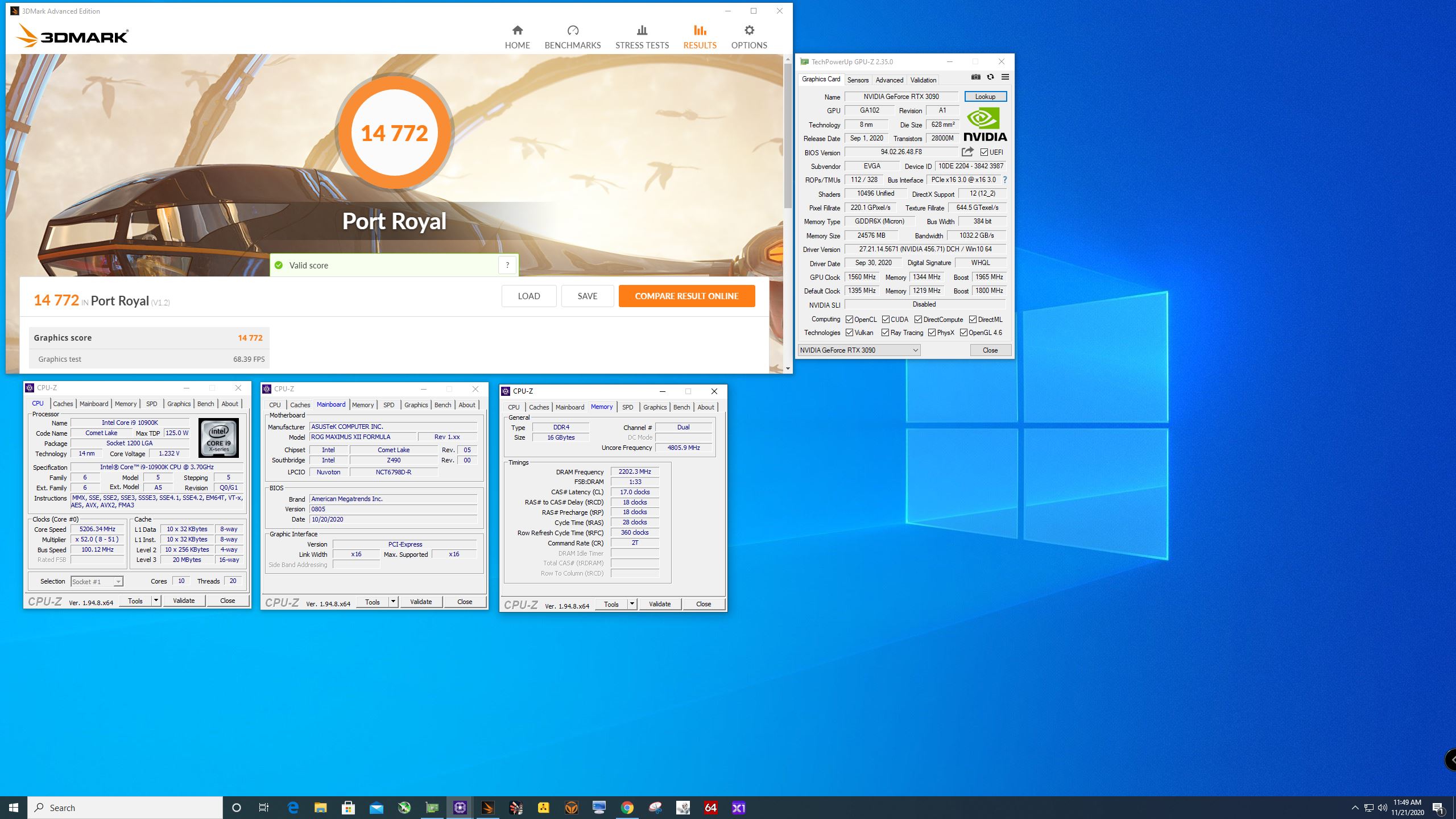
-
Well hello.....
I'm too cheap to pony up for Port Royal atm....ironic.
@tps3443 give your 2080ti a Port Royal run for comparison..... -
Im starting to think that my CPU temps climb mostly as a result of my GPU not having a proper exhaust due to the silly glass door my TU 150 has.
Im thinking about replacing my exhaust to the intake and install this as an exhaust....thoughts?
https://www.amazon.com/Noctua-Beari...-A14+iPPC&qid=1605995824&s=electronics&sr=1-3
I can just get a 140mm to 120mm adapter in an attempt to keep the noise down somewhat. -
He slayed me I get 10,500 at 49FPS lol.
-
AMD Radeon RX 6800 XT Overclocked To 2.8 GHz on LN2, Shatters 60K GPU Points in 3DMark Fire Strike Achieving New World Record
![[IMG]](images/storyImages/AMD-Radeon-RX-6800-XT-2.8-GHz-Overclock_3-1480x833.png)
Where is 3090 in this game? And 6900XTX is still not out. Hope the $2000 usd 3090 KP version can sign up and make some sun-shine on Nvidia.
-
They do great in Firestrike. But not so hot in port royal. Just a few months ago I didn’t care about ray tracing. But now I’m liking it.Johnksss likes this.
-
PORT ROYAL give you zero points on the bot.
-
Why would you say that? Their are 10 global benchmarks and so far a 6800XT leads in 1. (Not to mention all the other global Team Power Points categories.) So need to see how it fairs over the rest. Along with waiting for 6900XT to hit. Plus the other 10 global benchmarks it can even get due to no crossfire. (Bigger picture my friend - From a points point of view) And Port Royal is a GPU benchmark, so is TimeSpy.
Now don't think I didn't try to scoop up one for testing!
Side note, the guy with the world record has most of his other world records with a 3090.
Hummm, now all the 6800XT scores are hidden.....
EVGA 3090 FTW3 -
Isn’t it fine to wire standard 5V 120MM fans to 12V? They are definitely wired for 5V on the Molex. But I need more airflow for my radiators. My 2080Ti is sitting around 48C 100% load 2,115Mhz and I’m just not that satisfied with the airflow on my fans. If you put your hand against the rad it feels very weak. I am certain more airflow would knock 4-5C off maybe more. I’m moving tons of water and block to die contact is absolutely perfect on this 2080Ti
-
Could be that Futuremark screwed up so hard that the scores from 6800XT isn’t correct Or Wacko drivers from AMD. Even low scores from AMD’s new and shiny is hidden in FS leaderboard.
And 6800XT should be in same league as with 3080
-
When you first posted they were there big as day, then like 5 minutes later....nothing. :d
I will give it to that 6800XT though! There is also a 3080 ranking pretty damn high as well.
@temp00876
Don't think I don't see you passing me up with your shinny new 3090 there buddy!
Last edited: Nov 22, 2020 -
hi Mr.Fox
what mean 100 ? PS Current Threshold 1 ?? "80"
.,.my loadline not works on this model ,"auto or defaults"
,,need all time "1" 0.01 AC/DC
and max. 112A or max. voltage 1,275V - or I get a quick shutdown during AVX2 stress / high stress
bios / ec original + ADMIN mode
PLL voltage offset --not works on this model "not see any difference"
any better way how to get lower voltage + full stability "my limit is 1.275V" not more
or test only static voltage "but for notebook"
or it is the maximum for 7820hk ? -
Haha yes brother. I bought one last Thursday and then only got to test it yesterday and today. It was a Gaming X Trio, but I flashed it with the Evga 500W vbios. It is working well I also have a waterblock ordered and should be here by next week. The card gets pretty hot (71-72C) @500W even when at full fan speed.
Initially, I was planning on the 3080ti, but I think that is still 2-3months away.Rage Set, Robbo99999, Papusan and 1 other person like this. -
Well you're doing excellent for two days work! And card seems to be working really well. And without shunts so far. They just need to tweak the vbios one more time.
Where did you order your block from? Me, I'm waiting on the next round of optimus blocks to start up. I missed the second batch.
Edit:
We shall have to see how that pans out. Still need to see what the 6900XT will do as well.Rage Set, Papusan, electrosoft and 1 other person like this. -
Thanks brother. At first it was strange that the memory OC is not working at all in the Gaming X Trio, +100Mhz has the same score as +1000 lol. So I had to try the 500W Evga one. The waterblock was ordered locally, it is a Bykski one. I checked EK but they didn't have any for the Gaming X Trios. The optimus blocks look good. The AMD 6000 series are very scarce here, so if you ever got one, please post benchmarks brother.
-
Ah, I thought you had a FTW3.
So how do you like your card?
There only seems to be 1 block for the FTW3 Ultra and it's pretty damn scarce as well.
If I do find a 6800XT or 6900XT i'll be sure to post. Just hoping a 3080 TI isn't better than the 3090.
Rage Set, temp00876, Papusan and 1 other person like this. -
You can go the other way and the fans will run slower. They might work fine with 12V. The worse thing that can happen is that it blows a fuse in the fan or burns up, but you can always replace it with a 12V later if that happens. I doubt increasing the airflow is going to very change much if your max load temp is already 48°C on ambient air. That's actually very good.
I don't know what works on your system and unless somebody in this thread owns a laptop like yours it would be a guess. It may not be fixable. The only person that may know what works since he has tinkered a lot with MSI turdbooks is Brother @Falkentyne.
They're hard to find for all FTW3 cards. The PCB has just enough difference that the reference card water blocks don't fit. The couple that I found looking for an alternative to the Hydro Copper on 2080 Ti FTW3 did not look that great to me. I think Bykski made one, but I do not care for water blocks where the line fittings thread into plastic. But, I guess if it works well that is the only thing that matters at the end of the day.Last edited: Nov 22, 2020Rage Set, temp00876, Papusan and 1 other person like this. -
This is true, never a big fan of metal screwed into acrylic, but I sure hope that 10 year warranty covers that if it breaks.
Also trying to catch a hydro copper block but no telling when they will have those on hand.
@Papusan
Okay, getting some new numbers from him now. Ultra he is 4th and extreme he is 1st. Means the 6900XT will defiantly take first in all those categories.Last edited: Nov 22, 2020 -
See my older post. Okish air-flow doesn't mean it's the best options for liquid cooling.
-
My CPU block finally arrived. Mail ran on a Sunday, so strange! It is much larger than the photos make it look. I bought the cheapest waterblock I could find from a reputable company. It was $37 dollars brand new!
![[IMG]](images/storyImages/EE4-BBEB8-DCC7-4597-A7-C2-E0-A95-E345142.jpg) Rage Set likes this.
Rage Set likes this. -
All black parts. I love it!
![[IMG]](images/storyImages/7-EA2-A56-F-81-DD-4713-9-D80-2696-A218-F42-B.jpg) Rage Set, Robbo99999, temp00876 and 3 others like this.
Rage Set, Robbo99999, temp00876 and 3 others like this. -
-
I have reorganized a few things, and I am certain that AIO block and pump were causing some restrictions. After removing the AIO block my temps are settling at 42C on my 2080Ti.
I have it undervolted to 1.043 @2,130Mhz.
I think the AIO pump was slowing down my other pump. I have just a standard CPU block now, so GPU is running 42-43C.
Watercooling is so important for sustained system performance with modern GPU’s. I just can’t do air cooled anymore.
![[IMG]](images/storyImages/9-BBA2-C9-B-5805-4-A7-E-8-FB8-8417-CF6855-CD.jpg) Last edited: Nov 22, 2020
Last edited: Nov 22, 2020 -
Initially I wanted an FTW3, tried on ebay to get as close to MSRP with tax which should be around $1994. They sell around 2025-2050, but upon checking out, ebay is also applying taxes, so I just looked for alternatives locally
The Gaming X Trio looks like a good card, but its cooling can't handle the Evga 500W vbios without going to the high 70s. Let's see how it performs on water. Hopefully the 3080ti is around 5% slower haha
Ah by the way, I tried running the 3090 in Win 8.1...the drivers won't install even if it works on Win7. Also modded the inf, but did not work. -
I hover at 60c on air, but im only cooling about 320 watts, not much point in pushing higher in my scenario
EDIT: This is on my 5700XTLast edited: Nov 22, 2020 -
Anyone ever use these super cheap Chinese water pumps on Amazon? I am blown away by how impressive they are. My pump is kinda like a knockoff miniature D5. And it already has the clear Plexi top on it.
This pump moves some serious water! And for $20 dollars you just can’t beat it.
This thing pumps! If it broke tomorrow, I would still be impressed with it. I took it apart to make sure it was assembled correctly before trusting it in my machine.
If this piece of crap pump is this dang good, then I’m only left wondering about the some of the more expensive options on the market.
I’d love to hear you guys thoughts about these Chinese pumps? Are they hit or miss? I’m honestly shocked how well it works, and how much water it moves!
![[IMG]](images/storyImages/9-AB35-D7-B-17-BB-4678-B6-A7-37295-E9632-FA.jpg)
![[IMG]](images/storyImages/4-B75-FC3-A-A859-443-A-99-E2-794-FDD7-FFBE5.jpg)
-
If that's the case the seller would be taking a loss as paypal and ebay take about a total of 14%. So most would have to sell for at least 2200+ just to get their money back.
It should do better on water. That should net you at least 1 full bin maybe two. On just normal water.
Yeah, huh. LOL
@Mr. Fox
So it looks like I lost in the Asus battle. Customer induced damage by oxidation. Ouch! That was a $598.13 Hit!
"New board to me" being shipped out and attached to original warranty in the next few days. So once I get that I will be taking a serious look at it before even using it. since it's not considered brand new. -
-
I was trying to get the board back. So I could verify myself. (The only way to get it back was decline the repair - Which I already knew I wasn't going to do. It's a 50/50 chance it's my fault or theirs and that's the chance you take when using extreme cooling) They took some sorry looking pictures that doesnt really show me anything. I told them to take some 4K pictures. This is the USA, we have UHD cameras not some 3rd rate smart phone. The only thing I saw on the board was reminisce of solvent used to clean up the board. And that looks like what they tried to take pictures of. And with all that, they still don't have any burn marks, broken parts, busted caps or fried parts on the board. No burnt or damage pins or socket either. I would have rather seen something like that so I could be 100 percent sure it was my fault, which I have no problem with whatsoever, but some bs pictures not really showing anything isn't helping either. You tell me.
This is what they sent me:
Exactly why I ordered that ultrasonic cleaner!
Edit:
1080N for sale to help cover added cost. LOLLast edited: Nov 23, 2020Rage Set, Mr. Fox, electrosoft and 1 other person like this. -
Sooo....
To revisit the PSU / coil whine issue.
It is definitely my PSU is failing.
While trying to game, performance is extremely erratic. In HW Info, I was no longer hitting power caps like I always did with cards pulling as much as they can. I was so used to seeing "Yes, No, Yes, Yes, Yes, No" that to see "Yes, No, No, No, No, No" was odd to see.
I finally hunted down my kill A watt meter and plugged it in to monitor what's going on. As soon as I start to pull anything meaningful, total draw plummets to sub 200w total. I did the outdoor raid boss for wow Prepatch and literally, the wattage kept decreasing being pulled till it hit ~173w total pull (That's with my 9900k OC'd to 5ghz+ where CB20 will pull 225w+ itself) and the screen blanked and came back on. The game is basically a stuttering, unplayable mess.
If I run a GPU only benchmark like Uingine Superposition, I can draw 300-400w. If I OC and draw more than 400w, it will suddenly plummet back down to sub 200.
Same with if I run Superposition no OC and it is handling it then throw a CPU benchmark on it, BOOM instant plummet to sub 200w.
Any combination of GPU + CPU load and sub 200w total pull.
It's under EVGA's 10yr warranty (T2 850 titanium), so I'll be sending it in for replacement / repair.
And of course on launch day for the WoW Xpac.....of course.
Papusan, Rage Set, Mr. Fox and 1 other person like this. -
You better go get a rent-a-power supply till your comes back.Papusan, Rage Set, electrosoft and 1 other person like this.
-
Nah, they were just looking for an excuse to screw you over. I don't see anything in those photos to support what they are telling you. Maybe that's why they send poor quality photos. I would ask them to specifically point to the problem in the photos to validate what they are claiming as a basis for the warranty denial.
Remember when my Rampage board caught on fire? They tried to blow me off on the phone within the first 30 seconds of the call and tried to make me go away by telling me that it wasn't covered until I ripped the guy a new posterior orifice for being a dumbass and demanded to speak to his manager. The manager was equally worthless. Two weeks later I got a verbal apology on the phone with an engineer who listened to the recorded phone conversation after he officially verified it wasn't "my fault" so these people don't deserve our money. I think it was about a month before I got the replacement part. Screw 'em. EVGA warranty is too hassle-free to mess with losers and dishonest crooks like ASUS.Last edited: Nov 23, 2020Papusan, Rage Set, Johnksss and 1 other person like this. -
I have added 120MM fans to my front 360MM radiator push/pull/intake. The top 360MM radiator is still setup as pull/exhaust
I am able to sustain 2,130Mhz at 1.082V. And my hottest GPU temp at 100% load is 44C after an hour of playing.
My power usage is just ridiculous! Playing death stranding at 2560x1440P pulls around 715 watts at the wall.
It is so nice rendering timespy extreme and in the “Performance Cap” portion of GPU-Z, it reports NADA Or Idle. -
I already hit them up for better pictures. Waiting to see how long that takes.
As for EVGA, I have had to come out of pocket a few times over the years with them as well, but they showed the exact problem and why, other times they took care of it. -
I have no idea. You'll have to let us know how they hold up. I've never used them before. If they are inexpensive, durable, and move lots of water then I'd say, "What is not to love about them?" When something works well and doesn't cost a whole lot, that's definitely a win in my book.tps3443 likes this.
-
Port Royal RTX2080Ti run. Its equivalent to a RTX 3075 Super Ti lol
Really though not bad for a 2080Ti! This is legit 24/7 sustained performance!
41C max temp in port royal
44C max temp in timespy extreme
I love it! Locking down 2,130Mhz in games is so nice, and the memory is stable at 16,400 in games. I really missed my last 2080Ti.
![[IMG]](images/storyImages/Port-Royal.jpg) Last edited: Nov 23, 2020electrosoft, Johnksss, Mr. Fox and 2 others like this.
Last edited: Nov 23, 2020electrosoft, Johnksss, Mr. Fox and 2 others like this. -
BS. They sell an overclocking board for a premium and then when someone does overclock, they claim it is their fault. My Zenith II Alpha is also my last Asus board, especially after I was able to kill the first edition of the Zenith II. Too bad, EVGA doesn't make AMD boards but for future Intel, I'm going EVGA.Johnksss, electrosoft, Mr. Fox and 2 others like this.
-
My last was the Rampage III Extreme, one of the DIMM slots died rendering me back to dual channel and a terrible lottery on the northbridge.
I still put 3x 470s and a GTS450 on there, but its the principle of thing.Rage Set likes this. -
This is a Timespy Extreme run. Max GPU temp is 44C.
![[IMG]](images/storyImages/Timespy-Extreme.jpg)
-
PS Current Threshold is something strange for Serial VID. It has to do with phase "shedding", at which point all phases get used or when phases get dropped. Afaik, 20A=all phases, 5 amps=some phases, 1 amp=idk. When I asked Elmor about this, that is what he told me. he also directed me to some VRM datasheets which mention these values "20 amps, 5 amp, 1 amp".
So in other words, you don't touch these things.
This seems to be called "PSI1 Threshold" in Linux / coreboot datasheets. Some Intel datasheets also refer to them as PSI1 / PSi2 / PSi3.
Changing these on my Gigabyte Z390 or Z490 (the only desktop board I know which has access to these) does absolutely nothing. I tried setting them all to 1, and all to 512.
Changing PS Current Threshold 1 to 512 on the GT73VR laptop will cause it to fast shutdown during a non AVX load prime95 test after like 30 seconds at low voltage (1100mv'ish) with AC/DC Loadline set to 1.
But if you run an AVX / FMA3 small FFT, it won't shut down.
PS1=512 also will cause Throttlestop's CPU bench to shut down too. I think this starts happening at PS Current Threshold=256 or 300. I do not remember. but I do remember "255" did not cause this.
Setting PS Current Threshold3 to 256+ will cause the laptop to instantly shutoff and enter a permanent fast power off/on boot cycle loop. Power light will remain on for literally half a second before it trips again. The only way out of this is to reset CMOS by holding down the power button for 45 seconds, which will interrupt this cycle of death.electrosoft, Papusan and Mr. Fox like this. -
You can challenge this.
You MUST call Asus' Fremont headquarters line and politely speak to a Supervisor there. Reach the right person and explain your case politely and they should process the RMA.
People were doing this long ago when their video cards and motherboards were being sent to some midwest warehouse with teenagers running the shop and getting grass and dirt in "replaced" motherboards or boards being sent back in worse condition that were being sent to them.Rage Set, Johnksss, Papusan and 1 other person like this. -
My RTX 3090 FE just totally heated up my room in Overwatch running at 4k, with uncapped FPS (averaging around 175-240 FPS), max settings, but ingame anti-aliasing disabled.
(ok I was using 1080p + 200% render scale. same thing). Afterburner set to +135 / +500 at 114% power target.
Note that power target ONLY affects TDP, which is 8 pin power draw + PCI Express slot power. Stuff like GPU Chip Power, and the internal rails are not affected by this and require a shunt mod to bypass.
Pulling up to 566 watts and that GPU temp too. And boy did my room heat up after that match.
This is with a Seasonic Prime PX-1000 PSU with the Seasonic 12 pin cable.
Throttle flag was actually being called by GPU Chip Power hitting 281 "Uncorrected" watts to the Vbios, although there was no voltage or clock throttling yet.
The GPU chip will signal a 'slow down' power limit around 285 watts and will signal a "hit the brakes" throttle at the hard limit of 300 watts (uncorrected).
Total board power was around 380 watts to the vbios.
With a shunt mod, that is GPU Core NVVDD Input Power (sum).
Rage Set, temp00876, Papusan and 1 other person like this. -
-
I flashed to the Galaxy 2,000 watt XOC bios! The Galax XOC bios works on reference 2080Ti’s.
Im pulling some serious juice now!! I can send up to 1.125Volts. So cool!
And the custom voltage curve editor in MSI AB also works too.
![[IMG]](images/storyImages/A9-C99491-FE31-4-C3-F-8192-6619-FE00-F10-F.jpg)
uploadLast edited: Nov 23, 2020Johnksss, Rage Set, temp00876 and 1 other person like this. -
None of them cover water damage though.
It still doesn't cover water damage if that's really the case. And you are right about return boards not to mention new boards that are suppose to be factory sealed.
Side Note:
Guys, let's be clear here. If it is in fact my fault I accept that as I run negative (-30 to -50C) temps on the board. I do not need to game the system as I sure would not let customers game me on free parts if they are the ones who break them, but at the same time I need to also see what is actually broken and not some jack up phone camera pictures showing nothing. There is nothing wrong with admitting to breaking something, but the problem i have is if I didn't break it, you need to fix it or replace it.electrosoft, Rage Set and Mr. Fox like this. -
I agree but these boards are heavily marketed for overclocking with a premium price to match.
I am in the same boat when I'm investigating whether a workstation goes down due to "user error" or hardware failure or software configuration. More times than not, it's user error that caused the problem.
Your "user error" is confined within the marketed featureset that Asus proudly promotes, however, and should be accounted for in the price you paid. Don't sell a product with a featureset and expect a user not to use it.
*Official* NBR Desktop Overclocker's Lounge [laptop owners welcome, too]
Discussion in 'Desktop Hardware' started by Mr. Fox, Nov 5, 2017.


![[IMG]](images/storyImages/Timespy.jpg)