Problems? See this thread at archive.org.
I’m seeing the 3090 Kingpins on eBay for $2,800 OBO. Not too bad if someone really really really really really really wants one, and couldn’t order one.
-
Yikes...brings extra contrast to the definition "Gotta pay to play."
-
Seriously.
I am 100% happy with my 2080Ti@2,145
I wouldn’t mind a 3080Ti though. Wonder if they’ll make a kingpin for that model.iunlock likes this. -
I'm having a GPU conversation as we speak with some contacts overseas... The 2080ti is in some ways even more relevant now as it is more than adequate for high end gaming.
The reality is that there's no reason for me to jump to a 30 series, but I only did due to benching and my flight sim. For everything else and for most people the 2080ti is just fine.
As I've mentioned above, I installed the 1080ti to test out some games for fun and even that card running strong at 2100mhz+ still impresses me, let alone w/ 11GB of vram *cough* 3080 w/ only 10 lol.
The 3080ti IMO is the sweet spot for 30 series...the only thing the 3080 is lacking is the vram, but for most people the 3080 is a perfect sweet spot. -
I have done so much testing and comparing in Cyberpunk 2077. With a really heavy overclock I can practically match a RTX3080 or fall short by just a couple FPS. And with ray tracing disabled in the game on Ultra preset I still outpace even a overclocked 6800XT. So I’m surprised the GPU has held up this well. Why people all Panicked and sold them for practically nothing is beyond me. -
Especially when you're well into the higher frames, a few fps doesn't matter at all.
Here's the kicker with the early 2080ti off loaders, the value actually went up after the 3080 released when people realized that it wasn't a monster upgrade at all lol.
So for those who waited to sell their 2080ti's after the 3080 launch ended up getting more for the card.Mr. Fox likes this. -
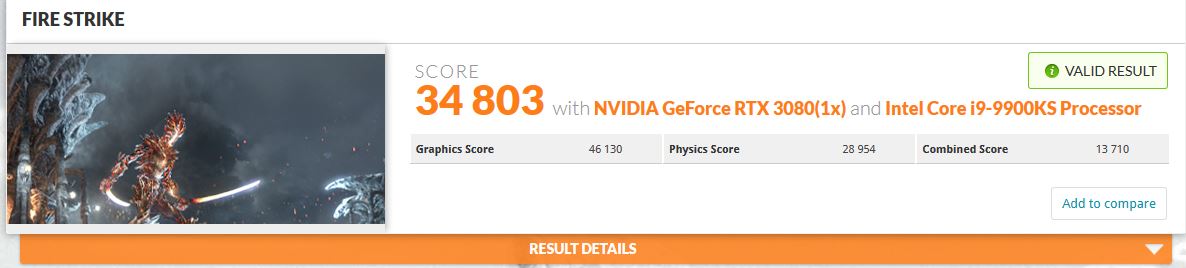
Main Gaming Desktop / 9900KS @ 53x / RTX 3080 Stock Blower
The best thing about doing these fun runs on the gaming desktop is that it's not even on my test bench yet. It's pretty fun, because you know it can do more.
https://www.3dmark.com/fs/24372637
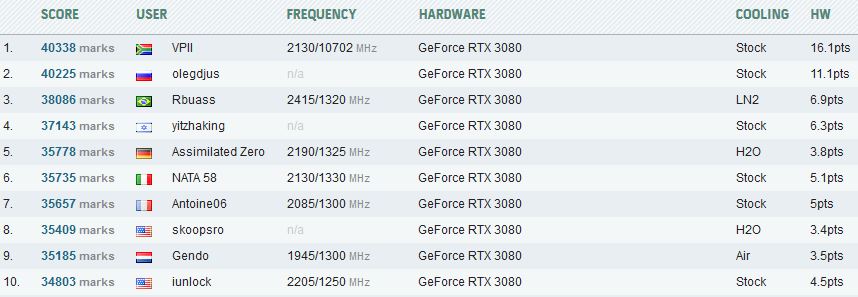
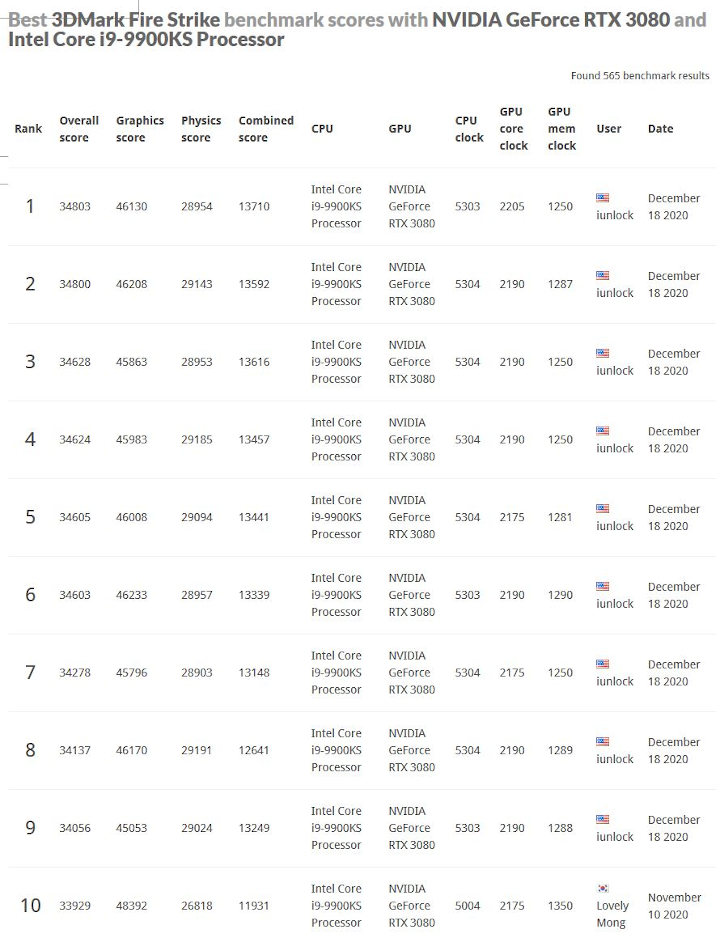
Just enough to slide into Top 10 lol...
As I've said before I'll take it...as this is just my gaming desktop. It'd be great to crack into the 35K's as the fellow in 9th is at 6.1GHz on a 9900K (Phase changer cooling) and the guy in 8th is a 16-Core AMD 5950x LOL. Ouch.Attached Files:
Last edited: Dec 18, 2020 -
-
For elite members, auto notify is still available so I guess their queue length hasn't been extinguished yet. Of course if you join the queue now.....well.....get ready to settle in.
For non elite members, it still says, Elite member only. -
I think yrekabakery is saying you're using the wrong version of Afterburner and so you can't select the correct option to see the actual amount of VRAM being actively used. I know you're showing dedicated & allocated in HWInfo, but I don't think that shows the true amount of VRAM actually being used. I'm pretty sure yrekabakery knows exactly how to configure these programs so that you can make sure you're seeing the correct information. In order to measure the true amount of VRAM being used then you have to use a certain version of MSI Afterburner and select the appropriate variables to measure in the settings of that program (it's quite specific) ....yrebakery can show you how to do it, I think he might have already (but didn't follow every minutia of the conversation between you two). I'm sure if you were showing valid "data" then he would admit that & wouldn't keep trying to explain to you how to measure it.
Last edited: Dec 18, 2020dmanti, Papusan and yrekabakery like this. -
The actual VRAM usage shown is both in AB and hwinfo64, not just hwinfo64. (Found on the screen shots). Humbly speaking, I don't need anyone to show me how to use two pieces of software that pretty much everyone in here knows how to use fairly well.
 It's not rocket science and believe me if it was I'd be the first to ask for some help.
The point is that DCS is exhausting the 10GB ram limit on the 3080, evidenced by the instability that can be experienced. That's the simple reality. I just don't get how that can be so hard to comprehend.
It's not worth putting anymore energy into something that is so obvious and simple, but I appreciate your input. Really do.Last edited: Dec 18, 2020 -
Card showed up in perfect shape. It came in a cardboard box.
Robbo99999, Rage Set, Mr. Fox and 3 others like this. -
Newegg Angers Loyal Customers In Its Efforts To Reduce Scalping
Newegg's New Policy Does Not Allow Partial Returns Anymore On Certain Combo Deals
The revision to the return policy has changed the dynamic of the combo deals. In previous years, buyers could return the components they did not want and keep the part they wanted. HotHardware saw the change and noted that certain combo deals now have to be returned fully in order to get a refund. Previous customers could only temporarily pay an inflated price and then return the part they did not need, but Newegg's thinking was that this would limit the scalping and bot issue. The parts were still ending up on eBay and it was not the solution they needed.
![[IMG]](images/storyImages/download-2-1-740x336.jpeg)
Newegg is not handling this issue well and their loyal customers are not happy with how they are handling the issue. Scalping will always be an issue, but better methods can be implemented that will both reduce the effect of scalping and please their loyal customers. More information on the scalping market and part shortage is available here.
Rage Set, Johnksss, Mr. Fox and 1 other person like this. -
Congrats Brother! That's awesome. Really happy for you and those who got their KP's...

There is a loose bill in the UK that is also floating around to address scalping by making it unlawful to sell the latest tech items above MSRP. Not sure if it's going to pass or not, but a contact overseas made me aware of it... have you heard anything about the anti-scalping bill? You're closer than I am to the source.
-
Awesome. Mine was delivered as well. My daughter went over and grabbed it off my front porch and put it in my office so it will be waiting for me when I get home tomorrow afternoon.
dmanti, Robbo99999, Rage Set and 5 others like this. -
Part of me wishes we had that here (for selfish reasons) and the other part of me (the more intelligent side) is glad we let the market dictate price. The MSRP can be whatever they feel like making it, but a product is worth as much, or as little, as buyers are willing to pay for it. The less regulation and government interference there is, the better off we are.
-
Not what I'm aware of.
The worst scalpers here home is the Government that add 25% on top of everything you buy
Rage Set, Johnksss, Mr. Fox and 1 other person like this. -
What a great treat that'll be waiting for you. Very happy for you Brother.I agree...it's a double edged sword for sure. Regulation's vs Freedom of choice... I think we both side on the freedom of choice at the end of the day.
Haha so true...Rage Set, electrosoft, Johnksss and 2 others like this.
-
You lucky duck! It’s so fun playing with a new GPU. Exploring new unknown boundaries of overclockingRage Set, Mr. Fox, Papusan and 1 other person like this.
-
Cyberpunk 2077:
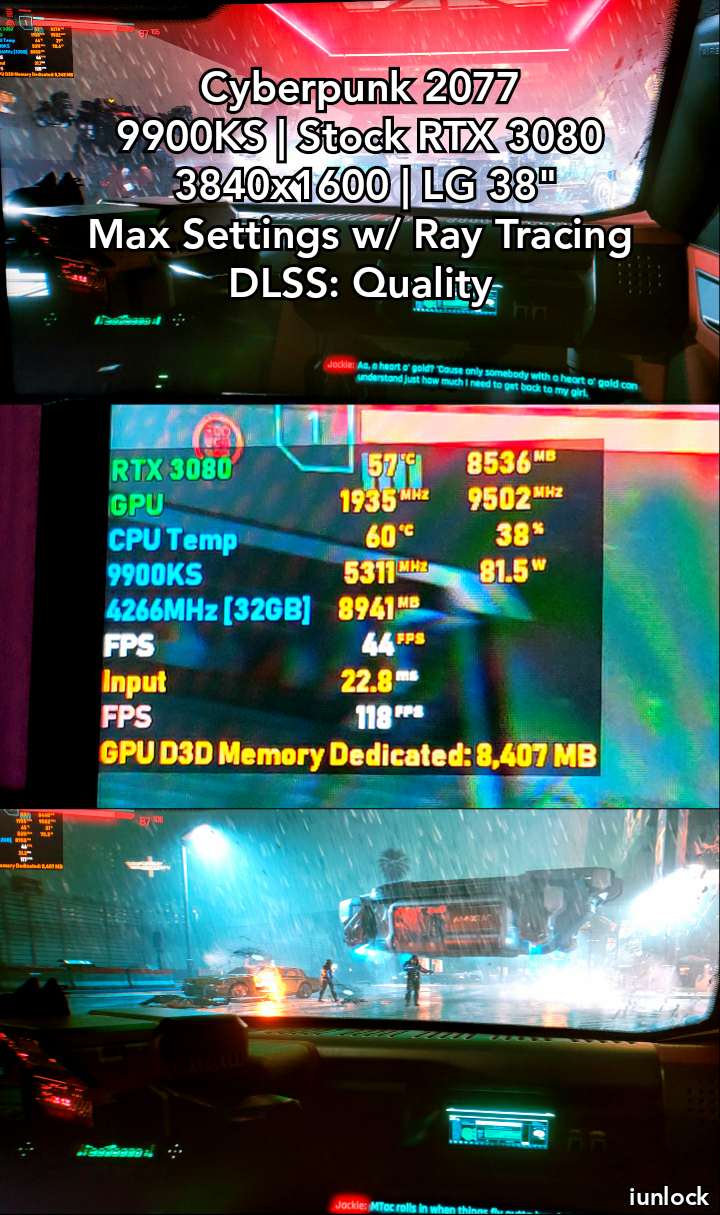
@Johnksss , at this scene in CB2077 I snapped a pic of the OSD. You should be familiar with this part yea? It's after finding that high profile women and when Jackie asks to borrow your car for a date. Anyhow... excuse the captures, as I don't use any of nvidia's software except just the basics and I've been in the middle of re-configuring my OSD and forgot to set the screen capture hot key, but here it is Brother..
The VRAM usage with these graphics settings float around 8.5GB's with the System RAM touching 9GB. The FPS isn't too shabby given the settings... mid 40's is playable. This is with ALL the Ray Tracing on and with DLSS set to Quality at the maxed out settings.
Also, the resolution that I'm playing at is 3840x1600 (The 21:9 4K) so it's a bit more to push than 1440p. As you may know it's ideal to tone down some of the settings as they really make no difference at all during game play to achieve much higher FPS in game.
Heck, even with just RT Reflections on (which is the only thing that really matters IMO), Settings Maxed out w/ DLSS on Quality is a pretty nice sweet spot for this game. It's just as visually stunning vs just maxing everything out.
How far are you on the game? About finished?
Attached Files:
Last edited: Dec 19, 2020 -
-
How is the game? I've been busy playing Tony Hawk Pro Skater 1+2 like crazy (aww my childhood) and trying to get through RDR. Lots of games on my plate, no extra time to play them all.Mr. Fox likes this.
-
The game is great! It is optimized very well. I’ve been playing since launch. So the 10th.
I am a level 15 with around 35 street credit.
The game uses a CPU properly. And it runs butter smooth on my system.
If your GPU overclock is stable in this game. It’s stable in anything! “Plain and simple fact”
I run 2,115Mhz on my 2080Ti and that’s all I can manage. Any higher and it’ll crash! Even though in other titles I can run 2,160Mhz just fine. It seems even people with Kingpins are having the same issue as me. It doesn’t matter how much voltage I send to my 2080Ti or power it has available to be pulled. It just can’t run beyond 2,115Mhz for long term gaming.
My GPU even running 35C now 2,130Mhz is not possible. It’ll crash in the menu lol.
Other than that, the game is fantastic. My performance is awesome! I played at 2,115Mhz for about 6 hours straight yesterday. With the game running all damn day lol. This ray tracing uses all of our tensor cores or RT cores, and it just pushes out GPU’s to new levels.
I recommend the game 100%. These minor bugs are no big deal. GPU usage is always 98-99% and the game uses all 36 threads of my CPU. Nothing more to ask for.Last edited: Dec 19, 2020 -
Unfortunately I can't play it at 30 to 50 FPS. There is just to much lag between me shooting and aiming or even with driving is like a seasick fest keeping the car straight on the road. There was a time that was good for me because I wasn't use to things moving faster.
Nope, not finished yet. Still trying to build my character up. And I still have 2 main missions and like 100+ side missions left. LOL
What is wrong with your pictures? They are really small. You can even use AB to take a screenshot. It comes with it. You only need to set a key combination to snap while in game. Then resize the picture if it's bigger than 2MB.
Hummm, that is and interesting resolution. I'll have to reconnect my 4K monitor to see where it's at.
@tps3443
I'm at level 20 32 street credit
Side note.
This game is cutting into my benching. LOL
Did pull some nice start numbers on the 450W bios, which happens to be on all 3 slots.Last edited: Dec 19, 2020Rage Set, Papusan, Mr. Fox and 1 other person like this. -
The game isn’t all that hard to run, in decent hardware. There are multiple options and choice to run it. Thankfully DLSS saved us all!
I run 2560x1440P
So if I run just straight Ultra pre-set with RT off, and DLSS off. The game averages about 77FPS. With minimums of 60FPS.
If I run Ultra Raytracing preset, then I must use DLSS. If I set DLSS to quality then I average 57FPS. And see minimums of 48FPS. So around 48-63 FPS. Which is pretty smooth with G-Sync on.
But if I run Ultra RT with DLSS on Auto “Balanced” I average 69FPS with minimums of around 57FPS.
I think the performance is great! And my GPU at 2,115/16,200 definitely helps the experience so much. There is no doubt that this game needs a water cooled 3090 with 650 watts of power available to it. For anymore than 1440P resolution.
Any less than 45FPS is not good for me though. So SUB 50FPS is my limit for sure.
Right now I run Ultra RT with Quality DLSS at 1440P and I manage a smooth experience. And I don’t ever feel strained to aim.
@Johnksss
You get to use the Sniper rifle at level 22! I still have a ways to go. I love the side missions. I’ve been doing those for so long now. I love the game though! I’m happy with it. $60 bucks well spent. I bought directly from GOG.com. And 100% of the proceeds went to cdprojektredLast edited: Dec 19, 2020Rage Set, Papusan, iunlock and 1 other person like this. -
I can play this game on a 2 in 1, but everything would be on super low quality! Did it with COD Cold war already. I was actually shocked! Looked crappy as hell, but I still went positive.
You want to run DLSS on all the time, else you wont get good FPS. Auto works well for most people.
And one doesn't need every single setting turnt on. Some of that stuff just makes it look worse actually and run crappy, but the brag factor is there for all settings to be turnt on.
-
Does Cyberpunk have a built-in benchmark feature?
Just got home and the GPU arrived unscathed. I will set it up later tonight.
I am glad that Cold War has a campaign. I skipped the last COD title because it was online MP only. That really sucked to have to skip one. I think that is the only one in the COD franchise that I have skipped.Robbo99999, electrosoft, Rage Set and 2 others like this. -
You mean Black Ops 4, right? That was the one which was multiplayer only. Modern Warfare 2019 had a campaign and it was decent.Rage Set likes this.
-
Unfortunately no built in benchmark feature on Cyberpunk 2077.
It’s a tough game to benchmark too without one being built in. Because there’s so many variations. Day/night/location/crowd density/rain etc etc.Rage Set, Papusan, Johnksss and 1 other person like this. -
Well said @tps3443. To add, the game is really refreshing for me as GTA ran its course and started to get stale. I think what ruined it for me in GTA was having Millions of dollars, so much so that all the shark cash couldn't even come through all at the same time as it was time released for security reasons! Ha! But I do really appreciate GTA for all the awesomeness it offers. The side stunt missions are a whole new game all together so it's a really unique title.
As for CB2077 It's everything that I love about open world games and the future. As I've mentioned above, it's like GTA meets Total Recall in so many ways. I think the game was really thought out and the attention to detail is pretty amazing. The title has been a huge success shattering sales and bandwidth records and it's clear as to why...
However, with all that said there are a few gripes, but this is just my personal opinion. It would have been better for me and maybe others if they cut back on the nudity. The game is very customizable. I mean very customizable (your character that is), where you can give females or males to have certain parts that they shouldn't have. It's a bit too far IMO... I can't help but to think all the kids playing this game... but more so, shame on their parents for even letting them... That is just my opinion. You do have the option to skip through certain parts, but then you'll miss the dialog. I know that for most of you this isn't a big deal, but just thought I'd let it be known, because I doubt any reviewer would put too much emphasis on the nudity and 'stuff' that the game has lol.
Other than that, it's a fantastic Title and the makers of the game are quick to address any bugs with updates. After all, these guys are the makers of The Witcher 3, so they are top brass for when it comes to making a quality game.
@Mr. Fox asked if there was a benchmark option like RDR2, GTA etc... Unfortunately it doesn't, but what I've been doing is just using my OSD to capture the avg. FPS at certain settings, by restarting MSi/AB once I'm already in the game (not menus etc..) so that the FPS is already leveled out instead of it being 100000FPS in the menus or during a transition. This is the same that I do in restarting hwinfo64 to capture accurate data with Core and Mem speeds.
CB2077 is a pretty demanding title with RT settings that can make your hardware sweat. It's nice for those that have higher end hardware to be able to really put things to the test, but even if you don't have the higher end RT GPU's, you can still have a fantastic gaming experience with some of the settings toned down, which honestly most of them can be toned way down and you wouldn't even notice the difference.
In CB2077 all you really need...:
+ To run the settings to the highest preset that your hardware will allow, giving you a desirable FPS.
+ Just turn on Ray Tracing - Reflections. That's it.
+ And play around with the DLSS settings...
* You really don't need the RT shadows etc...all you need is to have the RT Reflections on. (IMO)
Yea I understand, anything below 60FPS is a no go for me too normally. I've played it below 60FPS when toying with the Settings, but normally I have everything maxed out preset wise w/ RT Reflections and DLSS set to Quality. All the other RT stuff is turned off and at my resolution this gives me a really nice balance and FPS.
As far as the pics, I picked up my phone and snapped some pics real quick while in the game lol. Then I used a software on the phone to stitched them together real quickly with the text and just uploaded it. That's why I said to excuse the captures...
I usually have my hot key in MSi/AB set to the default F12, but for some reason it wasn't capturing as I didn't see the little animated indicator of the capture in the OSD like usual, nor was there anything in the screenshots folder... I had just installed the latest beta and was re-configuring the OSD, which I like so much better now btw... I'll be taking more actual screenshots now and posting them, now that I have my OSD almost perfect to my liking...
It's crazy how many small little missions there are eh?
Typical non wide screen 4K monitors and TV's are 3840x2160, but the LG 38" curved wide scree is 21:1 at 3840x1600, which is "4K," for 21:9. The reference to 4K has evolved in measuring the horizontal pixels. The 3840x1600 is ideal for native 4K movies and it's great for games too, especially flight sims, because the extra vertical height/real estate makes a huge difference.
The 2080Ti does great on this title and it's nice to be able to utilize the RT isn't it? Are you on discord by any chance? It'd be fun to compare fps and data with different hardware... I've ran CB2077 on the 1080Ti, 2080Ti, 3080 and soon 3090. I also will be testing it on a 2060 maybe tomorrow just to see what it can do for data and semi in game fps benching purposes.
With your current settings, do you have Reflections on too?
Very true... on the Ultra preset, you can turn down a lot of stuff just one notch and not even notice a difference.
I really wish it had a built in benchmark... maybe we can request it? This would be one heckava game to have a built in benchmark ... it'd be like Tomb Raider / RDR2 / GTA and more...Last edited: Dec 19, 2020 -
Nope, but like Iunlock was talking about. Game is intense on settings. Looks like the new "Can it play Cyperpunk 2077" But with SLI/Nvlink I think it can...
Congrats on getting your card!
Side note, card already beat my best FTW3 gpu scores by quite a bit. -
Linking this for you guys getting your KPE. They talk about voltages a bit.
Looks like 1.125 nvvdd, 1.4 fbvdd, & 1.20 msvdd.
Also recommend you stay away from the newest Precision X1 firmware update. It’s bricking KPE OLED screens and causing RMAs.
I’m not updating to newest precision x1 until they get it figured out.Robbo99999, Rage Set, Papusan and 1 other person like this. -
Trying to figure out the issues being reported here.
https://forums.evga.com/m/tm.aspx?m=3181832&fp=2 -
Hummm, they have like 3 versions... 1.1.2/1.1.3/1.1.4
I'm still on 1.1.1 -
I’m on the first version 1.1.2 that supported KPE in the notes and haven’t had any issues. I haven’t updated to the latest and will be waiting since I see no need yet and don’t need to risk having issues.
-
I just run Ultra RT preset with DLSS on Quality, so all Raytracing is enabled on Ultra. And I just turn off Filmgrain. I do not tweak any settings at all.
It runs perfect at 2560X1440P.
I just played a very demanding mission through the main quest and my minimum was 50FPS. And it usually stays around the 60-67FPS Mark all the time going up to 85fps in the easier parts to run.The game runs butter smooth. I am probably a good 25% faster than a stock air cooled 2080Ti though due to my sustained clock speeds and memory speeds.
I do have my Nvidia Control panel image quality set to “High Performance mode”
^ Doing this seems to boost about 1-3FPS.
Other than that, no tweaking is really needed for 2560x1440P with a 2.1+GHz RTX2080Ti.
Either run RT Ultra default Auto “Balanced” DLSS and get 69-70 FPS average.
Or RT Ultra “quality DLSS” easily averages 60FPS still.
Or Ultra Preset, RT off, DLSS off and get 78-80FPS average.Last edited: Dec 19, 2020 -
That's awesome. I usually keep my image quality to just Quality mode as most games have way more than enough fps to where it doesn't need any help. I really need it for the flight sims in order to clearly make out all the small letters and numbers on the HUD and MFD's inside of the cockpit.
BTW guys, @Johnksss @Rage Set @Mr. Fox @tps3443 @Talon etc...
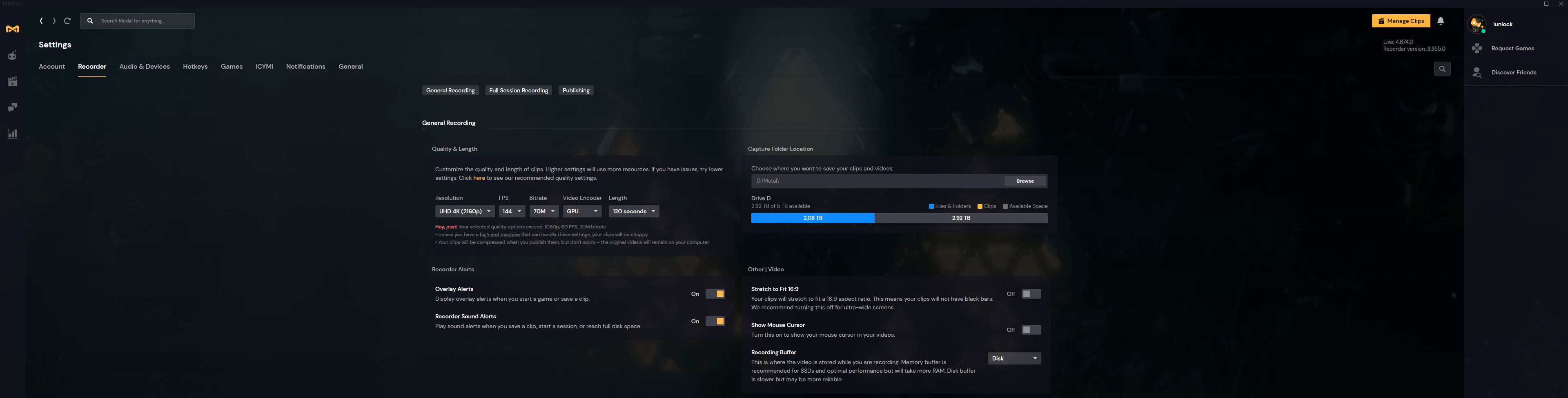
I was a big fan of plays.tv, but they went away for a while and it's because it is now an all new platform called: Metal.tv ... and it's awesome.
https://medal.tv/invite/iunlock
(All the link does is just automatically add each other to each others friends list.)
I prefer and like Metal.tv way over OBS.. .simple and easy... very high quality too.
Look at the quality you can record at... 4K / 144Hz / 70MB Bitrate... it's incredible.
It's a great way to record your game play and to capture it at very high quality, without having to fuss with OBS, which I have mixed feelings about til' this day. I've been a long long time user of OBS so I'm very familiar with it, it's just that a tool like Metal.tv makes it so much easier and is much more polished... give it a shot if you're interested.
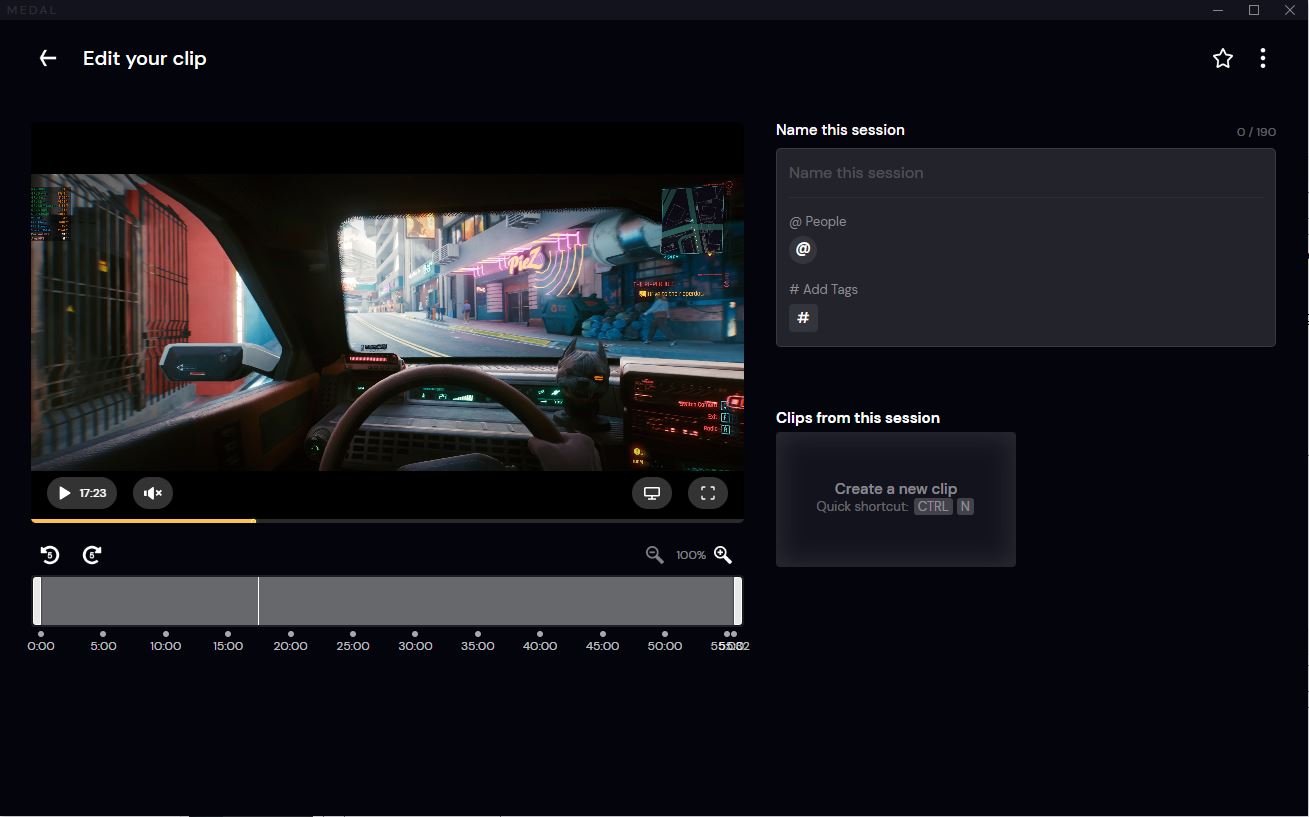
Here's the built in Editing screen:
Metal.tv is a great way to share game play like with Cyberpunk 2077 etc... simple link to the recording and bam...
Let me know what you guys think and how you like it if you end up using it.Attached Files:
Last edited: Dec 20, 2020 -
-
Cyberpunk is so crazy lol. So, I shot up a car through the windshield and killed the driver. I stole their car because I desperately needed a ride out of the desert as you just don’t see too many cars around these parts. Anyways, I saved my game and ALT+F4.
Here I am loading back in, and I am in my ole HOOP D that I stole earlier. Wind shield still riddled with bullet holes from killing the original owner lol!!
Pretty funny. Man, I love this game!
If you don’t have it, go buy it and support the devs. They did a good job! -
Yeah, gotta say the game is pretty damn fun.
-
Thanks for sharing, will definitely check this out for doing gameplay recordings. Was looking at getting a capture card that could do 4K 144Hz, but this looks really promising.iunlock likes this.
-
Apparently a 1000w 3090 Galax vBIOS is coming, with ability to flash via a patched nvflash according to someone over at overclock.net. I guess the patched nvflash is being tested and worked on at the moment.
1000w vBIOS showed up today, but unfortunately it won't flash as it's not officially signed by Nvidia. Might want to wait on getting that 1000w KPE vBIOS and signing away a good warranty.
https://www.techpowerup.com/vgabios/227671/227671Rage Set, iunlock, Papusan and 1 other person like this. -
Sounds good! Let me know how you like it. I'm stitching together some game play right now... really great program... maxed everything out for the recording quality. Looks fantastic.
-
Cyberpunk 2077: 9900KS | RTX 3080 | 21:9 - 4K (3840x1600)
Here are the quick preset: ULTRA settings that give me 60 FPS in the game, another screen shot showing the 35 FPS with DLSS: OFF, and another showing 56 FPS with DLSS: Quality.
I picked this specific location on purpose as it is pretty consistent overall with a lot of details on the screen.
CPU: 5.3GHz
System RAM: 11,000MB+
GPU VRAM: ~9500MB
Note the resolution that I'm gaming at. This is 21:9 - 4K.
Ray Tracing Ultra: Preset
Only changes:
Film Grain: OFF
RT: Reflections ONLY
RT Lighting: ULTRA
DLSS: OFF and AUTO and QUALITY
60 FPS w/ DLSS: AUTO
56 FPS w/ DLSS: QUALITY
35 FPS w/ DLSS: OFF
More to come...
@tps3443 @JohnksssAttached Files:
Last edited: Dec 20, 2020 -
-
Benchmarking using MSi Afterburner:
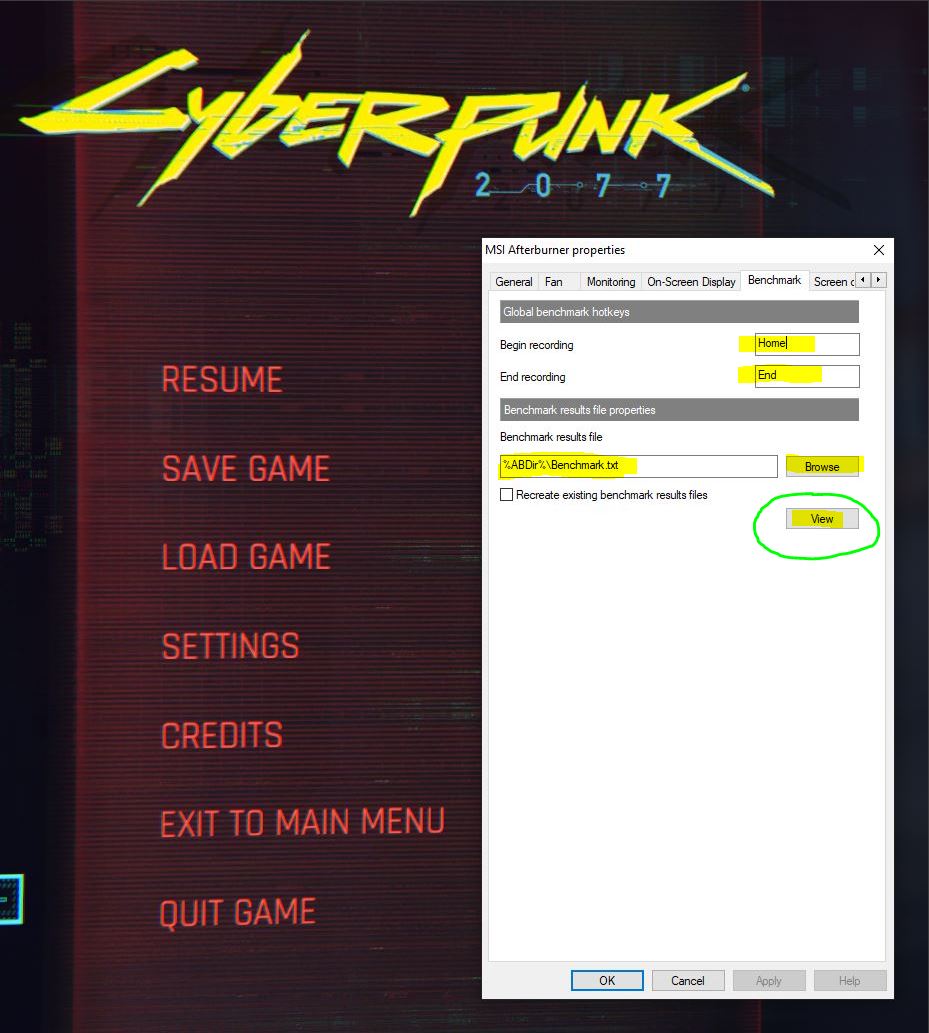
Since most games don't have a built in benchmark, we can use MSI Afterburner -> Benchmark, to grab some data at certain graphics settings to see how it performs.
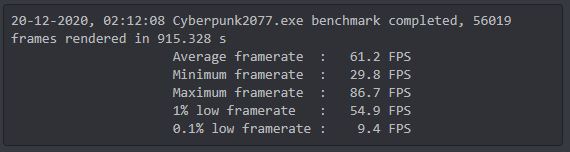
Just set your Begin and End keys and when you're in the game hit the Begin key to start the benchmark. After playing for a while just hit the End key and navigate either to the folder where the bench file is saved or simply just hit the " view," button and it'll open up a notepad with the data from the bench session.
This is how the bench data will look like.
This method is pretty sufficient as the data we're after is FPS anyway with games. Looking forward to seeing some data!
@Mr. Fox @Johnksss @tps3443 @Rage Set @Talon @Papusan and everyone else.Attached Files:
Mr. Fox, Johnksss, Rage Set and 1 other person like this. -
-
So, here is one of my runs. Can't really push like I want to until I get my ram back in.
Mr. Fox, Rage Set, electrosoft and 3 others like this. -
You'll see a bunch of data when the video finishes uploading and processing. I've spent the better part of the last 1.5 days gathering data and compiling it. It's probably going to be about an hour. And, I haven't even started overclocking yet, LOL. But, I am about to here in a bit. The chiller has the CPU down to 18°C, so it's almost ready.
@Talon - I could have sworn you posted a link for a new 3090 Kingpin Classified OC tool but I cannot find it. Am I imagining that, or just not finding it?Last edited: Dec 20, 2020 -
You better run some quick test as there seems to be all kinds of folks complaining about not getting 520W and what nots. I ran a few test runs to test it and mine seems to be fine. Need to make sure before i'm outside that return window.
temp00876, Papusan and Falkentyne like this. -
Do you think you can change your MSVDD to 1.12v and your FBVDD/MVDDC to 1.4v and see if you still get that nasty green thick throttle bar in Timespy Extreme?
-
Did you ever hear from Vince? I emailed him to ask for the XOC BIOS and Classified app. I cannot find the Classified app anywhere. Do you have it for the 3090? The one I have is not compatible.Johnksss likes this.
*Official* NBR Desktop Overclocker's Lounge [laptop owners welcome, too]
Discussion in 'Desktop Hardware' started by Mr. Fox, Nov 5, 2017.

![[IMG]](images/storyImages/9-CF1-F788-9-ABD-407-C-8-D8-D-F32-F1-F19-EB62.png)