 Problems? See this thread at archive.org.
This is actually a reason I strongly applaud AMD on the Zen and Zen+ lines. Even though not the top on performance, to get them working well, you have to learn basic overclocking of the CPU and RAM. I think budget gamers have bought those platforms, then, because it wasn't plug and play, they finally started learning more and seeking out that content. It no longer became as niche to try to get that performance, rather a requirement. Because otherwise you have Intel domination.
Something I've talked about recently is the 2600 or 2600X vs the 8400. At stock, Intel wins even on their locked 6c/6t chip. But once overclocked, the equation goes to AMD. Now you or I wouldn't really consider chips in the $150-200 range, but that is because it doesn't fit our needs. But there are those looking for $1K rigs. I even helped a person get 3200MHz running on their rig which was upgrading from 1600 to a 2600X. They didn't know anything before that about ram OCing, so I had to go through how to find the SOC voltage, the DRAM voltage, and basic stability testing. It feels really good getting more people involved and into taking control of their hardware.
I feel Intel being plug and play grew complacency, not that it is wrong for things to just work. In fact Zen 1 sucked for the reason it was released in such rough condition. Zen+ though really turned it around.
But, after people were less scared to learn memory overclocking, it really it's bringing more and more interest into the overclock community. The downside is the competitive overclocking segment is struggling. Let's hope these new overclockers can breath more life into it!
Sent from my SM-G900P using Tapatalk
-
-
![[IMG]](images/storyImages/9jam8gmtzdu11.png)
Finally got 1800pts in Cinebench R15 with my standard Corsair H100i V2. Just screwing around waiting for my 9900K to arrive. Intel, Bezos, send my freaking 9900K already!
8700K @ 5.35Ghz with 0 avx offset.Robbo99999, Convel, hmscott and 3 others like this. -
I decided to purchase NZXT 400i case, will return wth info on how it works!
jclausius, Papusan, Mr. Fox and 1 other person like this. -
-
Absolutely!
I have strong belief that this will look stunning when it is completed
Robbo99999, jclausius, Papusan and 2 others like this. -
A couple more new personal best scores...
http://hwbot.org/submission/3967148_ | https://www.3dmark.com/3dmv/5720473
![[IMG]](images/storyImages/hbsve9w.jpg)
http://hwbot.org/submission/3967160_ | https://www.3dmark.com/spy/4843221#
![[IMG]](images/storyImages/cAtvoIu.jpg)
Last edited: Oct 26, 2018 -
Sort of a cross post but 9900K in hand!
https://imgur.com/a/GrSXQ1ZConvel, Robbo99999, Papusan and 1 other person like this. -
-
O boy Mr.Fox going full RTX. I guess I expected you would eventually haha.
-
Yeah, sooner or later. I am not in a huge rush to spend that much money. Kind of makes me sick to think about it even. Still kicking booty with my modded 1080 Ti for now, but I definitely want to get in on the RTX action sooner or later, and there is no point in buying a cheaper 2080 Ti. If I am going to do it, then when I do I want something better than average. If I only cared about playing games, then I'd probably go for one of the ordinary models for a $200 less and call it a day.
-
I wouldn’t expect anything less. I’m sure you’ll be moving up those leader boards soon. Hope you get it soon.
Edit: agreed RTX price is just stupid. -
When I do eventually get one, I may also take advantage of having a backup GPU (in case I kill it on accident) to do more extensive hard modding of the 1080 Ti just to see how far I can push it on the core overclocking. Maybe I can squeeze between 2300-2400MHz out of it with a little more voltage... say maybe 1.250-1.300V instead of my current 2200 @ 1.200V limit.
Is this supposed to be viewed as an accomplishment? Seriously?
Radeon RX 590 Allegedly Up to 9 Percent Faster Than GeForce GTX 1060Last edited: Oct 26, 2018 -
https://imgur.com/a/iqQqfj9
First run with a shot in the dark on the voltage. Looks like a good chip from all reviews I've seen.Robbo99999, Papusan, Cass-Olé and 1 other person like this. -
Yeah, decent temps as well.
You should post over here as well. 9900k @ 5.0ghz asus maximus x codePapusan likes this. -
http://hwbot.org/submission/3968006_
![[IMG]](images/storyImages/KiwBLub.jpg)
Attached Files:
Last edited: Oct 27, 2018jaybee83, Papusan, Cass-Olé and 1 other person like this. -
-
Could you put up stock, 4.8 and 4.9GHz for 8 core boost. As well see if you can find and run with ok undervolt for mentioned clocks. Thanks
jaybee83, Mr. Fox, Robbo99999 and 1 other person like this.
-
Ya man give me a bit, I'm trying to get some testing done before I have to go to work.
1.25v set in BIOS with drops to around 1.2v under load. 8 cores at 5.0Ghz and just 1.2v lol. I think the 9900K was judged was too fast. Obviously this is only a few back to back Cinebench runs but usually stability isn't too far away. Also played some Battlefield 1 last night without issue. I'll keep shaving down because I haven't had a blue screen yet.
https://imgur.com/a/B7gXbBG -
For consideration in notebooks right!jaybee83, Papusan, Vasudev and 1 other person like this.
-
I disagree. Cinebench allows for low voltage compared to many other workloads. This is why, for my stable voltage and because p95 runs so blessed hot, I run blender runs (like the black sheep or harder) and sisoft Sandra, V-ray from chaos group, and maybe corona benchmark. Some of those you may want to loop. But the blender one mentioned is like a half hour or so, so fully saturated heatsink or loop under load, with a hard point to pass 2/3 of the way in. It runs cooler than p95, but still hot and still stresses like hell.
GN and OC3D both run custom blender runs, or did, for stress testing at one point. Unless running cinebench on loop from command line, that is actually a lighter test for CPU voltage stability.
Edit: blender even now has it's own benchmark - https://www.blender.org/news/introducing-blender-benchmark/
Sent from my SM-G900P using Tapatalk -
I'm pretty pleased with this, it's colder now that Winter is coming on, tweaked a new setting for my GPU (GTX 1070) which is literally my old overclock but instead with voltage slider maxed out & custom fan curve on MSI Afterburner, basically means 2088Mhz stable on the core during gaming, up from my usual 2050Mhz:
So that's 1.5 hours of BF1, you can see the average temperatures etc there on the left. Max temp 59 degC, max fan speed 69%, so it's still quiet. Yep, so 2088Mhz the whole time, with some short dips to 2075Mhz. Not bad for air cooling I guess! Just a little curiosity there from me amidst the high end talk of 9900K & 2080ti!jaybee83, Mr. Fox, Vasudev and 1 other person like this. -
Cinebench has always worked for to find a rock bottom point, and then I usually work up another 25-30mV to get near heavy load stability. I use it as a quick and dirty chip quality indicator.
Blender, BMW, 1.190v under load and around 70-72C all cores at 5.0Ghz.
https://imgur.com/a/enzkLKt
When I get home from work in couple days I will run Asus Realbench and call it good. My workloads will never push this chip as hard as the testing I'm using ever. I don't need to place my chip under unrealistic loads. For some that may be necessary but again, if it can push 5.0Ghz with 1.190v under load for minutes on end under 100% load I'm good. Usually I run realbench stress test for 1 hour and call it good. If I wasn't close to stability I would be throwing hardware errors and crashing. At a minimum I would be logging those little bastard errors. Also to note I am running 3900Mhz on the ram at CL16. Most reviewers were using 3200Mhz which is far easier to obtain higher overclocks on the CPU with.Last edited: Oct 27, 2018Convel, jaybee83, Papusan and 1 other person like this. -
As requested, rock bottom voltage. I would assume you need another 30mV for heavy work loads.
https://imgur.com/a/DwDYdQG
And 5.2Ghz all cores at 1.4V in BIOS.
https://imgur.com/hDdwbFjjaybee83, Robbo99999 and Papusan like this. -
Did I say BMW? https://www.blender.org/download/demo-files/
Grab Gooseberry, or even Classroom or Pavillion. BMW hasn't been an actual stress for blender for a long while. It is a quick speed run ran by media outlets to get quick data for rendering. Try running V-ray from chaos group: https://www.chaosgroup.com/vray/benchmark. I've seen Cinebench pass fine and V-ray crash my system once it gets to the small squares. Or try Corona: https://corona-renderer.com/download - That is one I would loop.
With Sisoft Sandra ( http://www.sisoftware.net/download-buy/), you'll find the financial tests using AVX instructions shoot that heat to the moon, and other tests find instability in your voltages. Here is my ranking on it: http://ranker.sisoftware.net/show_u...e8d5e4c2aa97a284fcc1f0d6b3d6ebdbfd8eb383&l=en
So saying BMW is NOTHING. Reason I mentioned the black sheep (Gooseberry) is it takes a 1950X between 19-22 minutes to complete. Intel's 16 core is a bit faster than that. That means your 8-core would take around 26-34 minutes to complete. That is enough time to properly stress the CPU. BMW doesn't stress anything, otherwise I would have said run BMW.
Now the Blender Benchmark includes those shorter ones up to Classroom. I cannot remember if Pavillion is included or not, and I couldn't find where people were running one called victor, but due to running them back to back, you get decent load with low downtime, and multiple workloads of different types, making it a good test.
Meanwhile, Realbench had a problem awhile ago where one version only loaded the 1950X from AMD at around 60-70% on all cores. Maybe a later version corrected that, but the version for HWBot didn't have that fix, which means it never fully stressed my CPU while also giving a lower score. I do think it was fixed in a later version, but been awhile since I was messing with it. Maybe the Intel chips didn't have that issue, but something worth noting to watch and make sure you get a full load on your cores with it and make sure to get the most recent version directly from Asus's website, not from HWBot. -
Yeah, I cannot get RealBench to work right. It has always been super buggy for me. Haven't been able to for a long time. And, it seems to be no longer supported. No leaderboard maintenance and unable to submit scores when it has (rarely) worked.
-
-
https://rog.asus.com/rog-pro/realbench-v2-leaderboard/
The download link on there is for version 2.56. Don't know the last version you tried, but I definitely hear you. I think that version resolved the issue for loading my 16-core chip, but in reviews of the 2990WX, the 32-core chip was loaded only 20-70% any given time ( https://www.techspot.com/review/1678-amd-ryzen-threadripper-2990wx-2950x/). So it may be breaking because of such high core counts, among other reasons (like needing more updates to its component tests that make it up, some of which the new versions are drastically newer than what is found in the benchmark package). For example, I think the included Luxmark is an older version, as is the open source GIMPS picture editing. Without the newer versions supporting these higher core count chips, even doing work arounds for iterative updates from Asus won't help, and then you have problems for score conversions, etc., due to the new versions (I updated one of the packages inside realbench with the newer software, and my score went up, the other one when trying to update it broke the benchmark entirely, but neither tries with those runs would allow submissions, not that I was trying, just mentioning that it made it known it was disabled).
It's one that I can understand using the stress side of it, so long as it fully stresses your chip. But that is why I like Blender which has a more active development cycle because it is used in actual production, which also means support for new high core count and extreme core count processors comes a lot quicker.Vasudev likes this. -
Worked very well last year when 8700K was launched
Thanks. +rep Don't forget stock clocks with expected stable undervolt
Maybe 105w?
Don't forget stock clocks with expected stable undervolt
Maybe 105w?
4.8GHz+ is well within reach. I expect 4.9/5.0GHz as well. For benchclocks If the heat output from the 9900K is equal 8700K...
Target 160w if same heat output.
Last edited: Oct 27, 2018Robbo99999 and jaybee83 like this. -
I think that was the last one I tried and I could not get it to work right on several systems, but I will try it again.
Here's this, for whatever it might be worth. Since I had never run it before, I ran the GPU stock, just to see how it behaved. (Didn't want to blow anything up, LOL.) Will try it with 2200 core @ 1.200V and see how it does now that I see it did not do anything too crazy.
I just noticed the settings in GPU-Z have been updated. I never look around in there (no good reason to for the most part) but I like what I found as far as options to configure the Sensors tab. Can default everything to max values and hide sensors that don't matter (like the fans that do not exist on my GPU). Not sure what version that got changed, but I like it.Last edited: Oct 27, 2018ajc9988 and Robbo99999 like this. -
I think you might be able to squeeze slightly more than 160W out of it in terms of cooling if you can currently do that with 8700K - the reason being that the heat density would be less, a bigger silicon die....although you might need to delid & grind down the chip to realise that potential, because I hear that the solder is not as good as liquid metal & the silicon is thicker. Well, it would be a beast either way! Are you gonna do it? I mean your 8700K is beastly enough, but "more" is fun!
-
I will most likely buy a Clevo with coming graphics. But I will continue have my old Clevo P870. More computers the better. Always a need. I will need to delidde 9900K because the Intel solder don't keep up vs. Liquid metal I use on my 8700K. But I don't know the heat density aka heat output vs. 8700K. Nothing is put in stone that it will be equal or better. Remember the thicker die. I'm not sure if I will sand the die. Because of the Liquid metal reaction with sanded die (You remove the protection barrier from the production).Last edited: Oct 27, 2018Ashtrix, jaybee83 and Robbo99999 like this.
-
(Yep, I mentioned the thicker silicon die). Well it'll be interesting to see what you can achieve with 9900K, wait for prices to come out of orbit! ;-)
-
-
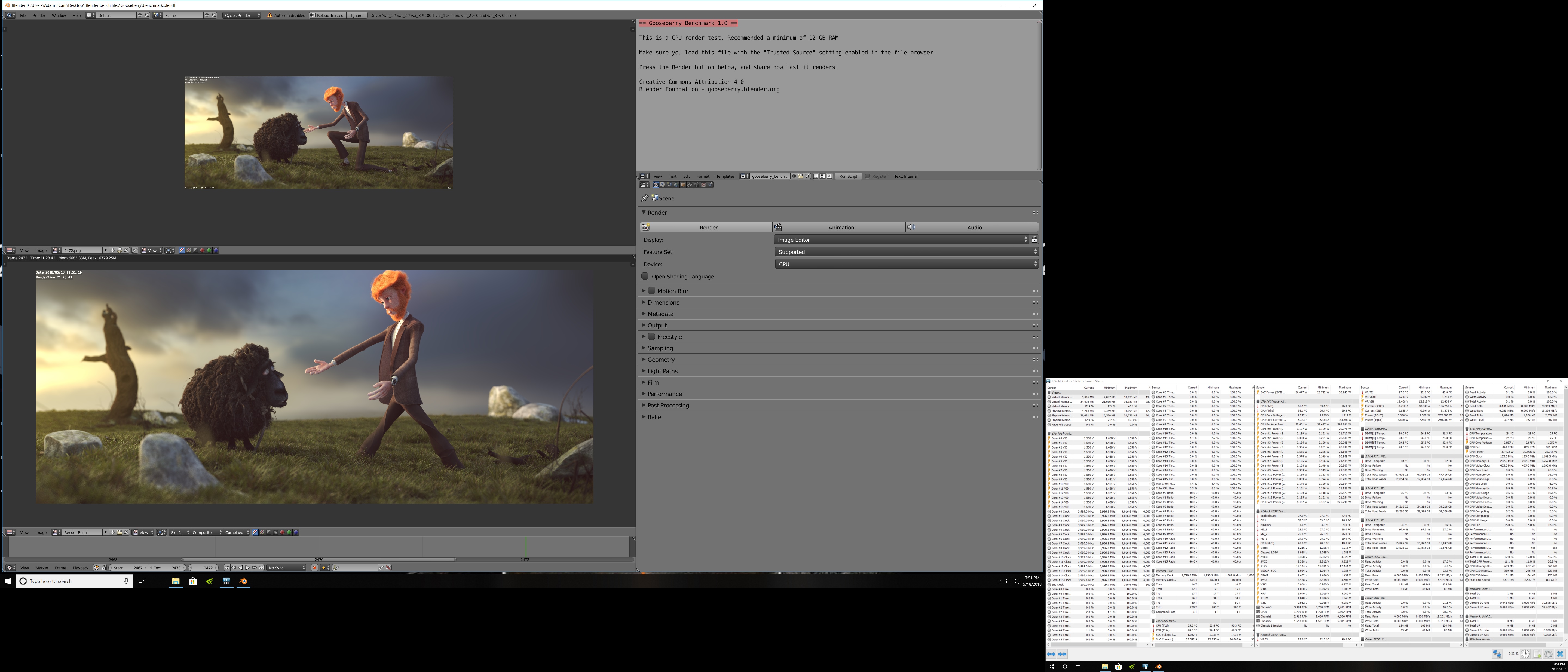
I've never even download blender before. Pretty damned boring... like running Cinebench on a first gen Pentium II-500, LOL. Not sure if I did it right or not. Just rendered the image and exported it when done. Don't know what a great render time is, but the CPU had no hiccups at all.
So, there is no "score" or leaderboard for this benchmark? Or, the render time is the "score" so to speak?
![[IMG]](images/storyImages/odWVW4u.jpg)
![[IMG]](images/storyImages/0RpjDXf.png)
-
Yeah, that is one I haven't explored much for the GPU, but as you can see, it does a pretty decent job loading the CPU side. I think you are running about 8-9 seconds quicker than I was while running either 4050MHz or 4.1GHz on the CPU (I get around 39 seconds or just under it on 4.05GHz. I'd have to look my score up again. So between the Intel advantage and the chiller vs my 1950X and beefy water cooling, you have me by a 25-30% premium.
And that is a nice Gooseberry run!
Edit: and yes, the time is what you are looking at. Here is one of mine, although TANWare has a 19min one. Haven't run it since we figured out it may have been the timer used that was the difference, which I have been mostly running using HPET on Win 10 Ent because of the RTC drift.jaybee83 likes this. -
Attached Files:
-
-
Given that my CPU is running about 1.0GHz higher clocks, that probably makes good sense. Seems like it is scaling with clock speed almost exactly if the difference is 25-30%.
Here is with the GPU overclocked. Shaved about 5 seconds off the GPU render time.
https://benchmark.chaosgroup.com/cpu/details?hw=Intel(R) Core(TM) i9-7960X CPU @ 2.80GHz x32, GeForce GTX 1080 Ti 11264MB&id=23487
The third place score was without the GPU overclocked. CPU did a little better on that one.
Papusan, Cass-Olé, jaybee83 and 1 other person like this. -
-
That is also where you can see the SMT advantage on AMD making up for a little bit of the IPC advantage on the Intel CPUs. Intel has better IPC and frequency, but AMD has better SMT than Intel's HT, which doesn't come into play until you start doing very heavy multithreading over longer periods. But, pretty good scaling and comparison, like you mentioned.
This is why I'm excited for Zen2, which supposedly has a 13% IPC jump, and I want to see what IPC jump the Ice Lake uarch brings to the table. First time in a long time AMD has had anything comparable like this (of course not being able to frequency scale, as Zen 1 could hit low to mid 5GHz under LN2, IIRC).Cass-Olé, Robbo99999 and Mr. Fox like this. -
Yes, it is fantastic for everyone that AMD is doing so much better now. I am very happy about that. Competition is always welcome and benefits all of us. I hope they can eventually get there on the GPU side, too.
I haven't seen or heard much from @TANWare lately. I hope Brother Andy is doing well.
My additional QD3 fittings are arriving today, so if I have time I will add the 1080 Ti to the water chiller loop with the CPU and see if that let's me do anything crazier with the GPU overclock.Papusan, Robbo99999 and ajc9988 like this. -
Well, on the GPU side, AMD is not going to have anything worth mentioning at the high end until 2020 most likely, or possibly 2021.
What Lisa Su did was take the money for developing high end graphics and dumped it into the CPU side, since it costs so much to compete at the high end and AMD still kept coming in behind. That got an awesome stack for AMD on the CPU side, finally back to being competitive, but hurt the GPU side. Su focused on gaining traction in the server market, with mainstream being an afterthought. HEDT Threadripper came from a couple of their engineers designing it in their off time. They brought it the Anderson, I think it was, who greenlit it and said you have 6 months to launch a product, or something like that (really short time to create a CPU line).
But, with that, she took engineers from Vega to work on Zen, then put 2/3 of the engineers at RTG onto working on Navi, leaving a small force to put out Vega. Part of that is because Sony was helping with developing Navi, and keeping their console and embedded customers happy means a lot to keep that market on lock.
Meanwhile, Super-SIMD (simple instruction, multiple data = GCN) is what they are working on, which will combine VLIW (think GPUs pre-GCN) with SIMD, which should help significantly. It is a really cool concept. AMD also has a patent for a GPU coprocessor, which some think is for an AI core to connect with the GPU. So, AMD may not be too far behind, but they won't have those new products out for a couple years, which sucks for us. Navi 20 is expected in 2020 and is the large die Navi, whereas Navi 10 is a polaris replacement. Around 2021 should be Arcturus.
Also, AMD is spending like $360M-$370M per quarter on R&D out of $511M operating expenses. And they improved their profit margin to 40%, mainly because Ryzen and TR made up 70% of sales in the graphics and CPU side (the combine enterprise with embedded). So, even though hurting from the crypto bust (like $100M likely missed just on crypto bust alone), they are still bringing it.
But I'm not expecting anything good for a couple years on GPUs from AMD (or hitting at the highest end, Navi 10 is thought to be at 1080/2070 levels).Mr. Fox likes this. -
I needed an hour to kill just for fun since I am waiting on the QD3 fittings. Made a couple of silly faces for the video, so you know I had nothing better to do.

-
-
That is indeed chilly! You got an extra 25Mhz added to your GPU overclock while at the same 1.2V by going chilled water? How much colder is it on chilled water vs your normal water cooling?Mr. Fox likes this.
-
http://hwbot.org/submission/3968806_ | https://www.3dmark.com/3dm11/12983477
![[IMG]](images/storyImages/q8KkC18.jpg)
About 18-20°C colder. Additional 40MHz on core. And, the air getting blown off the radiators feels like I am sitting directly in front of an air conditioning unit, LOL.
@jaybee83 @Papusan @Cass-Olé @aaronne @ArrrrbolLast edited: Oct 28, 2018 -
-
This 9900K is running 5Ghz without breaking a sweat on my crappy H100i V2.
1.208v under load LOL. It just smiled back and asked for more. Looks like I'll shave down more voltage today and keep testing.
https://imgur.com/a/hBkw8KBKY_BULLET, Robbo99999, Papusan and 2 others like this. -
Nice to see that performance on wattage with that voltage at 5GHz. Me being nitpicky, I don't like seeing a Vdroop of 44mV under load, but there is also nothing at all wrong with that, and allowing the system to Vdroop can increase the stability in many situations, so not really something to complain about in reality. Either way, looks good. Would you be willing to do a longer load running Gooseberry or the benchmark program itself, which includes barber shop? Here are my scores from that:
https://opendata.blender.org/benchmark/e70c05d3-11b9-4de5-8fbe-fc3d93b9514b
The benchmark itself can be downloaded here:
https://opendata.blender.org/
KY_BULLET likes this. -
Hahah me either. Trust me I've already fired off a report/complaint to Asus. 44mV of vDroop is completely unacceptable IMO considering this boards price. I do have one step higher to go in LLC but I am sure it will cause overshoot. For reference my old Z370-E Strix board did around 22mV of vdroop. However, I think the larger current requirements of this chip and clock speed might be the cause.
-
well, to be fair, voltage averaged around 1.24V but thats still quite a good sample u got there looking forward to more results!
KY_BULLET, Papusan, Talon and 1 other person like this.
-
The voltage under load is around 1.21v though which is why I specifically showed the load vcore mid test. I had my HWinfo64 open for about 25 minutes before the test, the idle voltage is around 1.25v because of the vdroop at my LLC setting.
I'm aiming for sub 1.2v @5.0Ghz all cores today though. I finally have a few days off to get some real testing in.
With so few 9900Ks in the wild and the "tech tubers" limited knowledge (IMO) coupled with their ES chips I think we might need to wait a bit for real results. No doubt I think I got a good sample, but it's entirely possible the ES samples some of them used are not representative of the final product. I also think the immature BIOS, large variance in default voltages applied, etc all are playing a role in the huge variance in performance metrics we are seeing.Robbo99999, Papusan, ajc9988 and 1 other person like this.
*Official* NBR Desktop Overclocker's Lounge [laptop owners welcome, too]
Discussion in 'Desktop Hardware' started by Mr. Fox, Nov 5, 2017.


![[IMG]](images/storyImages/NYIlvg0.png)


![[IMG]](images/storyImages/2i9tYVD.jpg)
