Problems? See this thread at archive.org.
Can I post this on HWBOT or do I have to buy the advanced edition
-
-
If there is ever a question of what is allowed and what is required for validation, just review the rules for each benchmark.
This list for all is here: https://hwbot.org/benchmarks/
For HWBOT Unigine Superposition 1080P Xtreme Benchmark Validation Regulations: https://hwbot.org/news/14880_application_255_rules/
HWBOT Unigine Superposition 1080P Xtreme Benchmark Validation Regulations
Allowed benchmark versions
- No version restriction
- Download
- All Windows based released before Windows 8
- See when Windows 8/10 based operating systems can be used
Score The score is obtained after running the 1080P Extreme preset.
Allowed optimisations
- LOD
- Change tessellation level in graphics driver
- Altering benchmark files or the rendering
- Any software or human interaction altering the perceived speed of the benchmark program, tricking it to believe it ran faster
- Lucid Virtu MVP
- Mipmap
- Change benchmark settings
Example screenshot
![[IMG]](images/storyImages/Unigine%20Superposition%20-%201080P%20Xtreme%20small.png)
Red: Mandatory Green: Optional
Additional notes This page contains the benchmark result regulation specifications for Unigine Superposition 1080P Xtreme. The rules as described in our General Rules section are still applicable even if they are not specifically mentioned on this page.
It is your responsibility, and the responsibility of your team captain(s) that these rules are followed properly. Your submission may be blocked by HWBOT moderators without notice if your submission is in violation of one of these rules. Multiple infractions may lead to a warning, and eventually an account ban.JoeT44 likes this. -
-
hello, I wanted to connect a problem that I have .... the system left stable and 0 problems, the problem is when I install battlefiel V .. after every 2 rounds the game is conjela and I get the desktop but I have blue screens. ..can it be because of lack of voltage? The ram is not because of stock ...
-
It might be due to that. I would see if running the CPU stock or lower overclock corrects it.makina69 likes this.
-
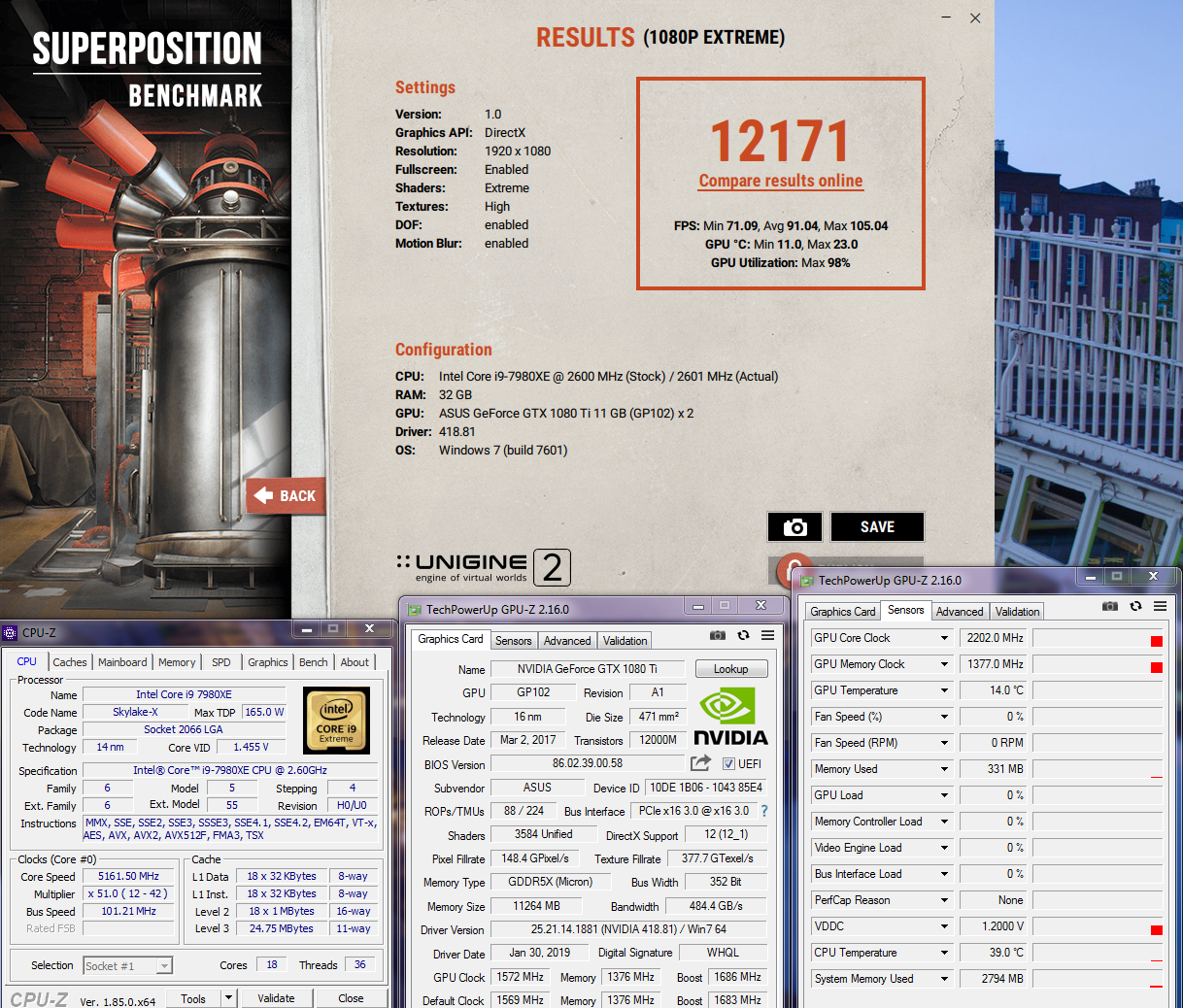
CPU doesn't do much for this benchmark. It is almost entirely a GPU benchmark.
https://hwbot.org/submission/4071995_ | https://benchmark.unigine.com/results/rid_95c345bc579845a383737d049e1bf77e
-
-
I have VRMark installed on Windows 10 Pro and it's a paid version. I tried running the Orange and Blue room benchmarks and each time after the bench finished it said "benchmark running" then it did not give me a score. I uninstalled it and reinstalled it with the same result. I downloaded it from Techpowerup and Guru. Any help would be appreciated.
-
Turn off the hardware monitoring part of the benchmark in the settings/options and it will most likely work fine after that is disabled. I have had issues with that causing problems exactly as you are experiencing with both 3DMark and VRMark.
-
Ok I did that and I still can not get a score. When the test starts, it starts not in full screen mode; I have to put it in full screen mode. Is it supposed to have a split screen with two of the same screens running? After the test is done I get this:
-
It should not run in full screen mode (window is correct) and, yes, it is supposed to be a split screen (to simulate virtual reality).
-
https://www.3dmark.com/spy/6223041
I'm having a love and hate relationship with the EVGA X299 Dark mobo. Robust board but it does not like my RAM at 4000 with the same timings I had on the Asus Extreme. It is going to take me some time to dial in the timings but I've already beat my best Time Spy Extreme score on GPU brute force alone. Working on getting 5.0 and 4000mhz to work together and I think I will jump into 15k. -
Oh man, I can totally relate to what you are experiencing. I've beaten everything I had done with the Rampage VI Apex, but it took a while to figure out. I've got zero regrets with switching to the X299 Dark at this point, but it was definitely a struggle for me to accept their firmware in the beginning. EVGA firmware does a lot of things "automatically" and executes all on of them extremely well, but that just doesn't feel right to me, LOL. I'm still not used to "missing" settings in the firmware. I don't mind the automatic part when it works as well as it does for the X299 Dark, but not having the option of overriding and controlling everything imaginable in absolutely ridiculous excess like you can with the Rampage boards is my personal preference.
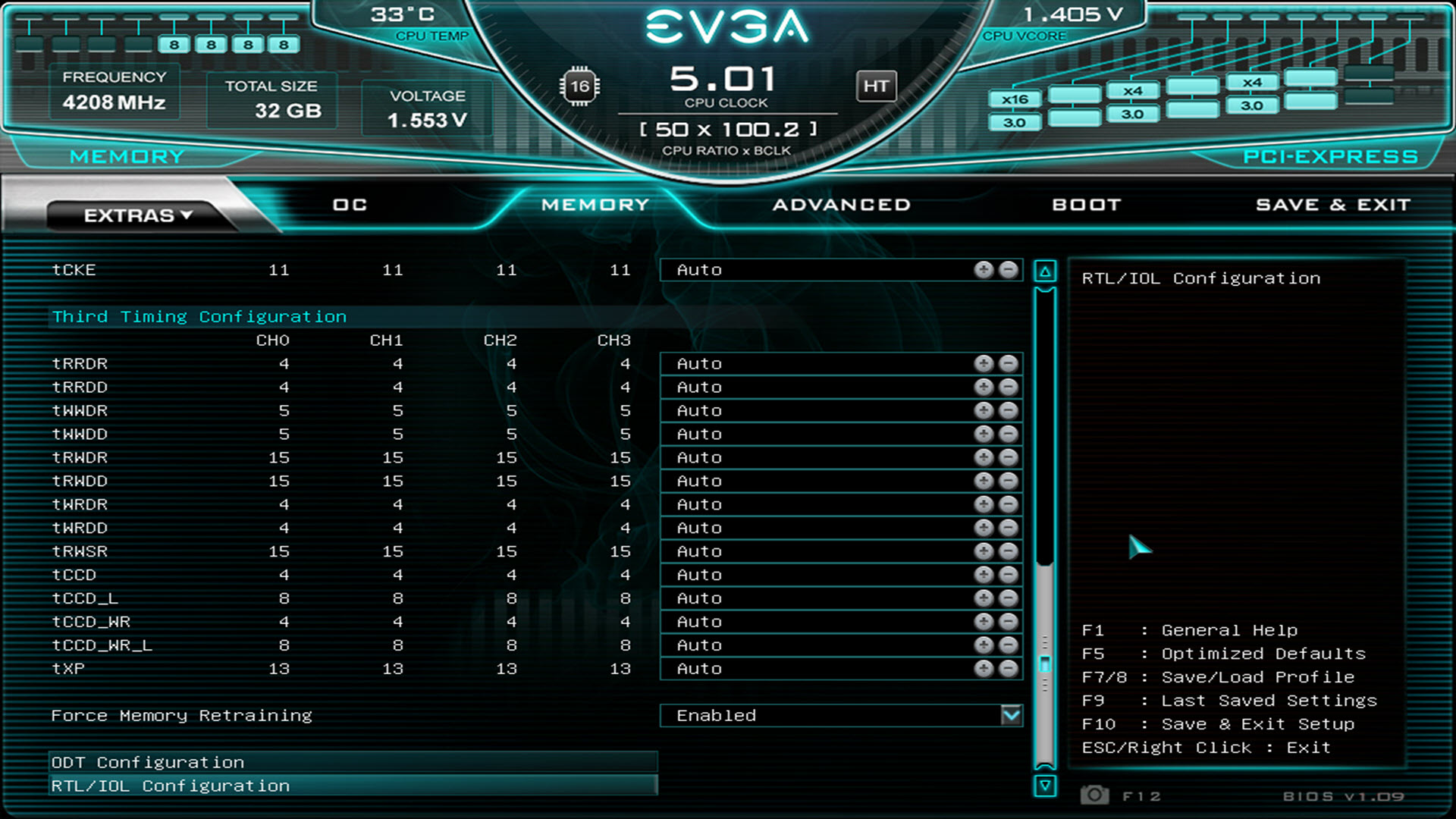
The key to the RAM overclocking with the X299 Dark for me was to stop being stingy with the voltage, and using the option down at the bottom to force memory retraining. If you are using less than 1.500V on the memory, try putting it there and I suspect all of your issues will fade into oblivion. My memory never gets hot and has never balked at 1.500V.Last edited: Feb 13, 2019 -
Did you ever do the secondary PSU? I snagged this photo during a Cinebench run a day or two ago. With two 2080 Ti and the CPU fully loaded, you might need that. In 3DMark 11 Test #1 I am seeing about 850W total system power with only one GPU. Not far behind that is Fire Strike (combined test) and Sky Diver. Interestingly, Time Spy seems to draw less total system power for some odd reason. Maybe because it is DX12 (a poorly optimized piece of crap API).
![[IMG]](images/storyImages/kAXGlQV.jpg)
Did you figure out which one overclocks better yet? Honestly, all of the fancy high power limit vBIOSes are totally worthless for me because they handle the voltage like absolute crap. The Galax HOF, MSI Lightning Z LN2, Strix OC firmware all suck for overclocking due to poor voltage management. The XC2, FTW3 and Gigabyte Aorus Extreme firmware all deliver the best performance due to better voltage management. The higher power limits get you a big zero when you cannot manage the voltage well enough to take advantage of the higher power limits that never get utilized. I never see VRel and VOps PerfCap reasons with the latter mentioned, and the higher power limit vBIOSes have those PerfCap reasons continuously and throttle due to voltage not holding at 1.093V. I end up pull fewer watts from the firmware with higher power limits due to the crippled voltage cancer.
Edit: Ooops, never mind. I forgot you answered that. I suspected the FTW3 would be better. We need ASUS to release a 2080 Ti XOC with unlocked voltage like the 1080 Ti XOC. (The regular 1080 Ti Strix OC GPU wasn't really anything to write home about due to the crippled voltage like all of the other firmware-castrated GPUs.)
If you dump your Strix vBIOS for later use and flash the FTW3 vBIOS to the Strix OC that might solve your performance mismatch/imbalance issues. Have you tried that already? The Strix will probably run identical to the FTW3 if you use that firmware on it.Last edited: Feb 13, 2019 -
-
I will be getting another PSU. I want another 1600W PSU, waiting for a sale price.
I have two FTW3 ultra's now, but one is a Hybrid. My strix is under water. So I have the Hybrid and Strix in SLI until I get two water blocks for the FTW3's. I'll try the FTW3 vbios with the Strix this weekend. -
So I tried VRMark in W7. Same problem; no score. I guess it's not W10
Mr. Fox likes this. -
it is not your computer. Remove it completely with Revo and download an older version, then ignore the update.
It is just more buggy crap from Futuremark. VRMark and 3DMark have both been a roller coaster of instability and bugs for several years. Their only stable products are those they no longer constantly screw with. On top of that, it really seems like almost anything that has been developed to include DX12 support is a buggy piece of feces.Last edited: Feb 14, 2019 -
Looking forward to the results.

Besides the memory voltage, I forgot to mention the uncore offset. For 4000 and 4200 CL15/CL16 you need between 500 to 600 for the offset or you will get code FF and Windows will have issues loading. I have tried 450 offset and it is not stable. 600 seems to be the best. -
That's likely why Windows kept BSOD's on me when I used my timings from the Rampage. I had it on an offset of 500, I'll increase it to 600. Thanks for the tip.
-
-
aaaaah uncore overvolting, got it! yeah alright, i was aware of that already with regards to stabilizing RAM clocks and timings. just thought this might be something new to consider. thanks for clarifying!
Mr. Fox likes this.
-
Memory Overclocking on Z390 Coffee Lake: What RAM Speed Do You Need? Tomshardware.com | February 14, 2019
Conclusion
After countless hours of testing, one thing is utterly clear: There isn't a single perfect memory speed for all applications. Enthusiasts ready to build a new system around one of Intel's 9th Gen, Coffee Lake Refresh processors should first decide what they'll use the system for, and then pick the most adequate memory speed accordingly.
Test setup
-
-
Well those numbers looks like my marks on report card.
-
Yeah, interesting, the highest frequency memory wasn't always the best, but in terms of gaming it was the best. Sure, it was only in 1280x720p that the highest speed memory made a big difference, but that would still apply to anyone with a high refresh rate 1080p monitor (e.g. 144Hz), because folks would be turning down graphics settings to hit 144fps, so they'd be needing that faster RAM to hit those higher framerates. Not all platforms need ultra fast RAM for gaming though, Z390 looks like it benefits a lot from it, probably because of the mesh type interface between the many many CPU cores, but on something like Skylake and Kabylake where you have the ring bus between the cores it's not as important - RAM speed still has an influence, but not as much as with Z390 I reckon.
-
New build picture, waiting for a Radeon VII, and a Ryzen 3850X.
![[IMG]](images/storyImages/c3f5b74707716a1c8a7acadc0259d97b.jpg)
Sent from my SM-G960U using TapatalkAshtrix, jaybee83, Robbo99999 and 6 others like this. -
-
-
Are you re-using older Mobo or bought new one? Don't forget to use metal washer mod from techpowerup to reduce t-junc temps by 10C.
-
It's a new X470 taichi ultimate.
Sent from my SM-G960U using TapatalkAshtrix, hmscott, Rage Set and 1 other person like this. -
AMD is sold out ATM. Seems the new drivers do wonders for this card.
Sent from my SM-G960U using Tapatalkjaybee83, hmscott, Rage Set and 1 other person like this. -
Try the Pro drivers and standard drivers.
-
I am kind of surprised both of you guys are actually purchasing a Radeon VII GPU. Nothing I have seen on YouTube or read in reviews impresses me at all. It just barely keeps up with a stock 2080 and doesn't overclock worth a damn from everything I have seen. Once you start overclocking, 1080 and 2080 both seem to rip it a new posterior orifice. Under those circumstances, I am thinking it is overpriced by at least $150.
I know AMD is stating they will have their own version of ray tracing later on, but that's an iffy proposition. Not that ray tracing actually matters much at this point, but there is a chance that it might in another year or two. (I did not purchase 2080 Ti for ray tracing and consider that "feature" irrelevant at the moment. But, it seems to be a popular topic with the talking heads.)Last edited: Feb 16, 2019 -
Seems the new driver is allowing for a much better overclock. I watched a video that @hmscott posted in the Polaris, ryzen thread. With the new drivers, it spanks the 2070 I currently have. I have been wanting to build an all AMD system, and this seems like a fairly decent time to do it. I do agree, that the price is too high, and should be perhaps $100 lower. Im hoping that they will drop a bit with the next batch that is released
-
According to some XOCers and a few Youtubers, the most fun they ever had OC'ing a GPU, was with the Vega cards. Vega GPU'S allow a lot more mods, including old fashioned registry mods than Nvidia. Look up GamersNexus power mod on the Vega 56 and you'll see what I mean.Last edited: Feb 16, 2019
-
I have seen that Vega responded to mods well and greatly improved over it's stock performance, but I haven't seen any benchmark scores that rival or beat overclocked 1080 Ti and 2080 Ti scores on HWBOT, or 3DMark.com. That would be when I would switch to the Red Team, but so far I am not seeing any likelihood that will happen any time soon. Also kind of sucks that R7 has no CrossFried support. If AMD could produce a killer of overclocked 2080 Ti with CrossFried support and sell it for about half the cost of a 2080 Ti, I would buy two in a heartbeat.
AMD's Radeon VII at least gives AMD a high-end contender for the first time in years. I wish they would stop aiming for mid-range mediocrity and go in for the kill. Until they start selling GPUs and CPUs that overclock like crazy and take all of the top scores, it is unlikely I will buy anything from them.Last edited: Feb 16, 2019 -
-
@Mr. Fox Do you get comparable overclocks on your Dark versus your Apex? Even with the latest BIOS, my Dark refuses my memory timings and I can't even get 5.0 on all cores as I can on the Rampage Extreme.
For example, at 1.415 vcore, I could get 5.0 on all cores, with the first two cores at 5.1. At the same voltage with the Dark, I can only get 10 cores at 5.0 and the last eight at 4.9. I even tried 5.0 at 1.450v and it would simply BSOD. The crazy thing is I'm nowhere near TJMax. During the benchmark, the hottest core is at 76C.
Memory is another story. I really want to love this mobo, but I think I might be going back to Asus.hmscott likes this. -
That was bound to happen. Nvidia has been trying to kill SLI since Maxwell. Next gen, I would be surprise if they allow the XX80 variant to SLI.Ashtrix, Papusan, Raiderman and 1 other person like this.
-
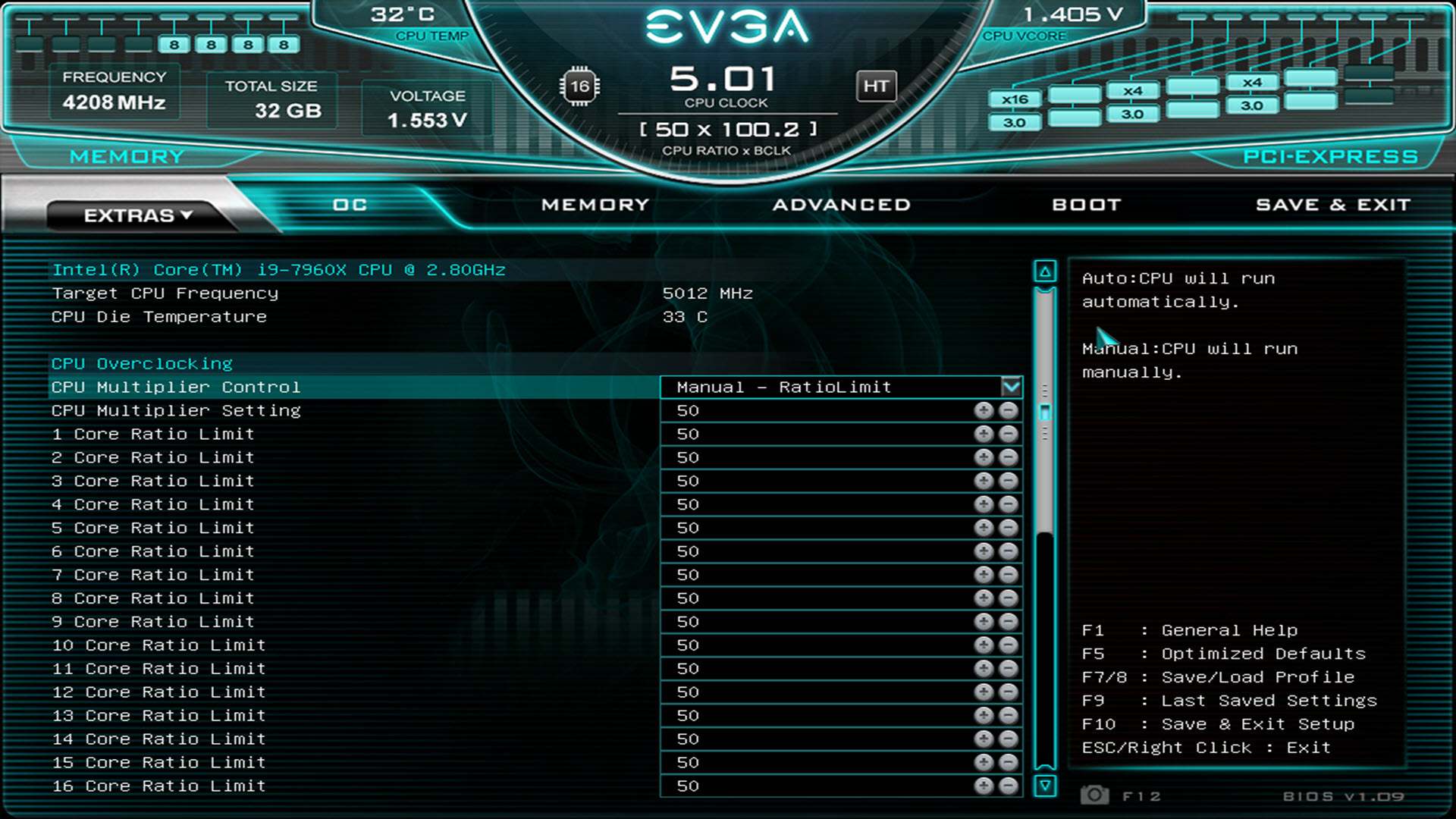
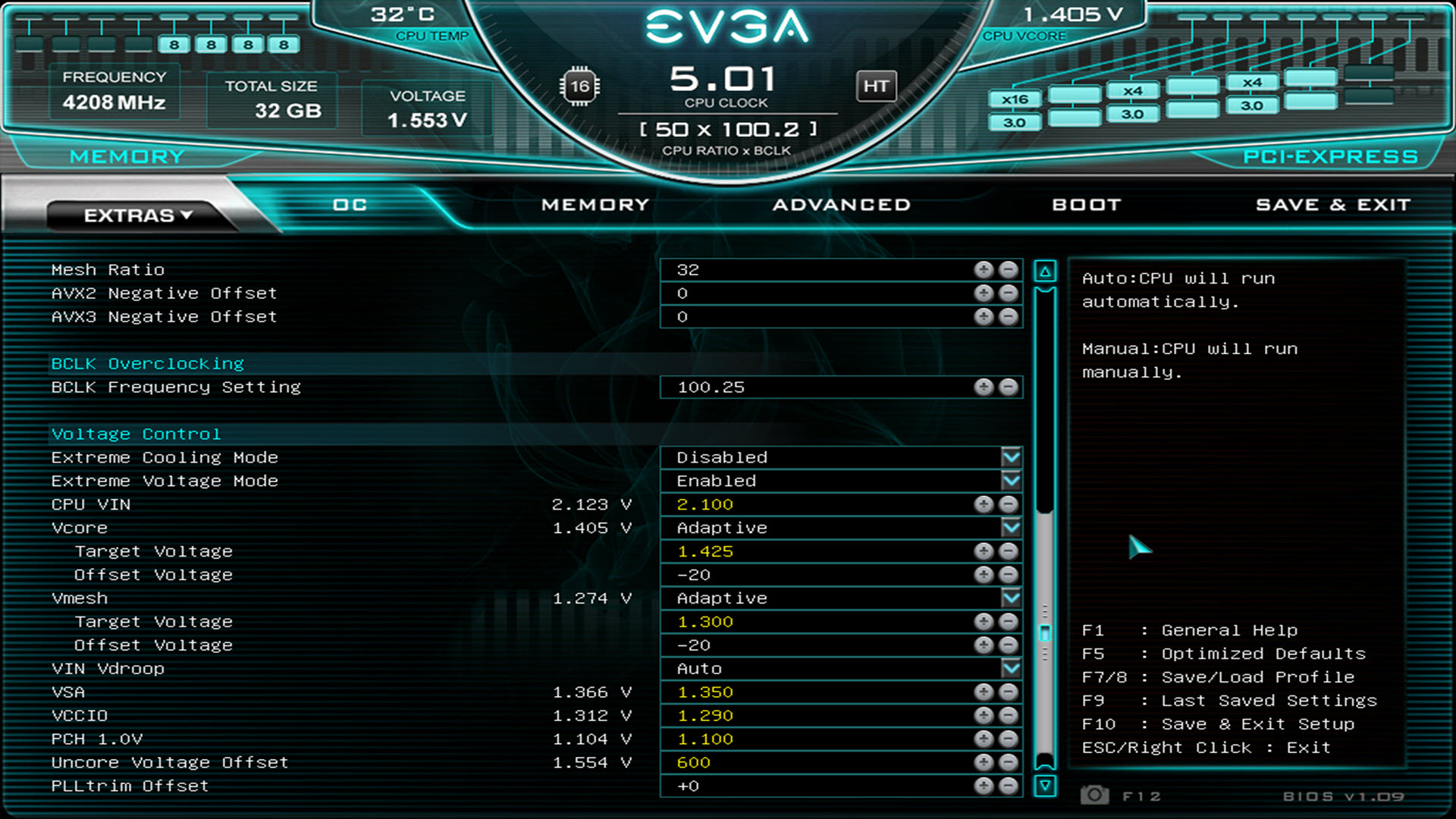
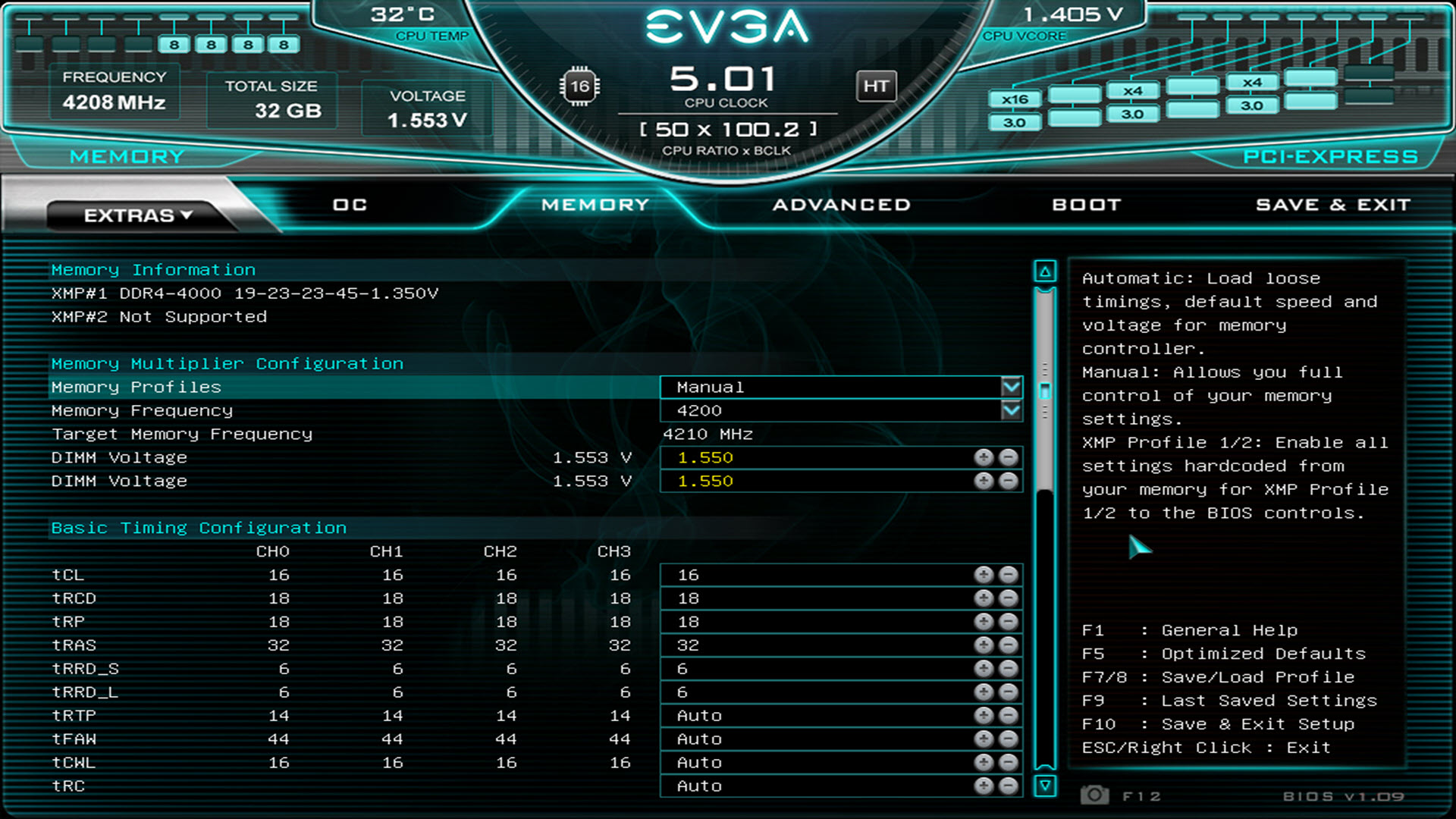
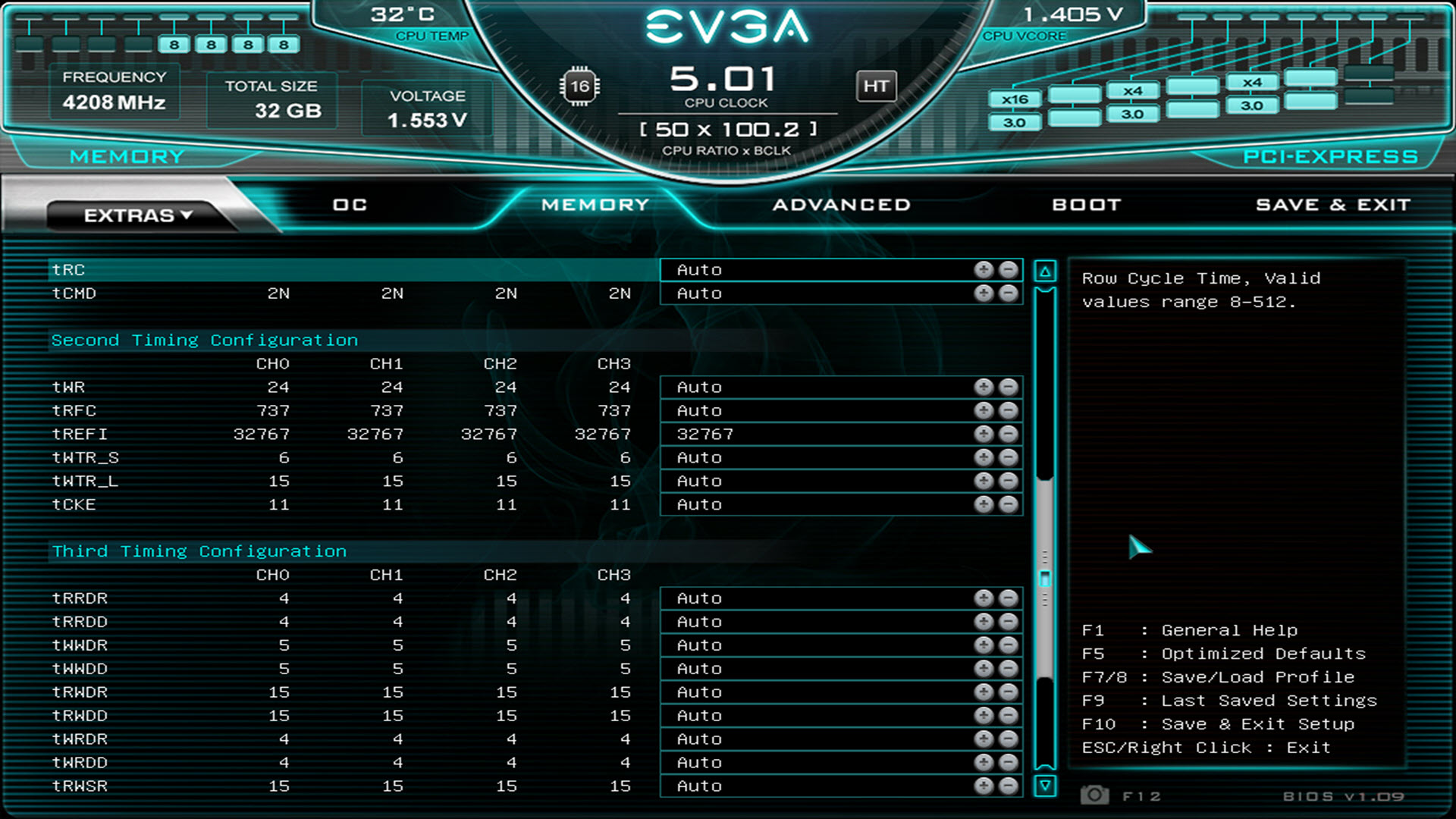
I have actually beaten just about every score I achieved with the Rampage VI Apex and I could not validate 5.3GHz before. But, everything is very different and I had to figure out what it liked. I do miss the more extensive settings of the ASUS a lot, but it hasn't held me back. As I mentioned when I was trying to decide between the two, I went with keeping the X299 Dark primarily because I found ASUS warranty service to be pretty damned sucky and EVGA is amazing. In spite of the firmware settings that I miss, I have no regrets.
Not sure they will help, but I am attaching some BIOS screen shots. Maybe I am setting something different on one of the menus that will be useful to you. Do you have Extreme Voltage enabled?
Yes, I agree. But, I guess that is mostly conceptually because I wouldn't purchase anything below than 2080 Ti in terms of performance tier so it would not affect me. But, it sucks for those that would... 100%.Attached Files:
-
-
Bought 2x8gb Trident Z 3600mhz, and I think it may be bad. Having a hard time with stability at stock speed. Running a windows memory diagnostic now. Does the built in test work very good? I've never used it before.
Sent from my SM-G960U using TapatalkMr. Fox likes this. -
Very interesting. Thanks very much. I didn't use auto on many of those timings but I'll try those now.
As for the Extreme Voltage, I have it enabled and most of my CPU OC settings match yours already.Mr. Fox likes this. -
Yes, it works fine. But, it takes a long time.
I like using TM5 in Windows. If there is a problem it will usually surface and if it passes TM5 it passes everything else for me. And, it doesn't take nearly as long. I don't run the long memory tests unless I experience an issue that I need to resolve. If my system is stable, I don't have enough patience for running those extra long memory tests "just for kicks" LOL.
You can test using TM5 and if you are still having an issue that seems to be memory related you can run a longer test like the Windows Memory Diagnostic or MemTest. Be sure to run as admin.Attached Files:
Last edited: Feb 16, 2019 -
-
Nice! Let us know how it performs with the latest BIOS. Curious to see if it can overclock as well with the new drivers.
-
I don't believe in benchmarks anymore because most Nvidia GPUs score high and kick out AMD GPUs. Vega 7 is aimed at Prosumers with higher FP64 TFLOPS than RTX.
AMD's Raytracing will be done using MS DirectX rather than waste time in proprietary SW garbage that becomes a nutjob as time progresses. Doing it in DirectX will help in better leverage for XBOX and PS consoles.
AMD vega 7 won't OC high as Nvidia but if you manage to get a sweet refurb Vega 7 you can try out the mods and sub zero operation for 24/7 workload. IIRC, they don't Sub Zero OC BIOS support on Vega 7. 99% of the people never buy AMD. Haha...
I might give it a try in AGA, the prices might be around 1800$ +/- 300$ in India. GTX 1080 Ti prices are around 1500-1800$ here for bare specced models and custom high OC cost even more!Raiderman likes this.
*Official* NBR Desktop Overclocker's Lounge [laptop owners welcome, too]
Discussion in 'Desktop Hardware' started by Mr. Fox, Nov 5, 2017.

![[IMG]](https://hwbotstatic.s3.amazonaws.com/img/examples/Unigine%20Superposition%20-%201080P%20Xtreme.png)


![[IMG]](images/storyImages/image_id_2139218.jpeg)
![[IMG]](images/storyImages/image_id_2139228.jpeg)
![[IMG]](images/storyImages/image_id_2139225.jpeg)
![[IMG]](images/storyImages/2u7HCys.jpg)


![[IMG]](images/storyImages/kiNWo9h.jpg)