 Problems? See this thread at archive.org.
Hello Kizwan thanks for kind reply. I'm trying to work eGPU on external display since couple of days, but at the last stage everything is ruined. I don't know why it fails.
Anyway here are details: as mentioned in last post eGPU gets detected in dos and after window loads. In windows xp display properties shows additional 3 and 4 displays. Actually there are only three 4th one comes after customization (I learned it hard way after clean formatting). Okay now when I activate 3rd display by dragging it beside primary display i.e. 1, windows shows message that you are about activating secondary display and you can do lablab.. stuff with it.
Then I check mark 'Extend my windows desktop onto this monitor' up to this step everything works fine. But when Click OK or Apply button laptop freeze, screen goes blank, on external monitor digital-analogue movement happens and it remains blank too. Thereafter laptop gets restarted and every effort taken wastes miserably.
Attaching screenshot of the display properties.
![[IMG]](images/storyImages/displayerror.jpg)
Uploaded with ImageShack.us
Please help me to solve this problem. I want to see it worked out for me as for many others.
Thanks.
-
1) Display 1 is external monitor, right? Does eGPU working with only Display 1 (games, 3dMark06)? Display 1 is connected using what cable?
2) Display 3 is external or internal monitor? Display 3 is connected using what cable?
3) Please post the PSU brand. -
The "(09-14-2011) $100 GTX460 & GTX470" deals are dead, but I spotted a GTX 560 for $165 AR (add $7.56 Shipping) plus it comes with a BATMAN Arkham City Coupon ($50 value!)
Newegg.com - ZOTAC ZT-50701-10M GeForce GTX 560 (Fermi) 1GB 256-bit GDDR5 PCI Express 2.0 x16 HDCP Ready SLI Support Video Card
Looks like a great deal
Edit:
It looks like most of the 560GTX are now being offered around this price range AR, and I've even found one with both Batman Arkham City & NBA2K11 codes.
http://www.newegg.com/Product/Product.aspx?Item=N82E16814127592 -
Is it possible with one of the docking stations from either Dell, HP or Lenovo to make a eGPU-dock?
My guess was that it's not possible, because there is no expresscard-slot on the docking stations, or is it? -
No, Display 1 is laptop screen.
Display 3 is Samsung B2030 LCD monitor connected by cable came with purchase, to graphic card.
ATX P4-350 which came with my previous desktop cabinet.
-
1) Did you installed DNA-drivers | Do Not Argue driver?
2) After you installed D.N.A. driver, does Catalyst Control Center recognized the ATI HD6570?
3) What type of cable are you using to connect Samsung B2030 LCD monitor to ATI HD6570? HDMI cable? DVI cable?
Try connect one external monitor only. Try get only one external monitor to work first. -
I have not installed DNA drivers. I don't know about it.
Currently without DNA driver Catalyst Control Center don't recognize the ATI 6570. I will give it a try and update the results.
It is DVI Cable.
Yes I'm trying to connect with only one external monitor.
Thanks.
-
Uninstall ALL ATI driver. Then install only DNA-drivers | Do Not Argue driver.
-
Okay but DNA driver in mentioned links are listed under vista, windows 7, windows 8 and I use windows xp?
Thanks.
-
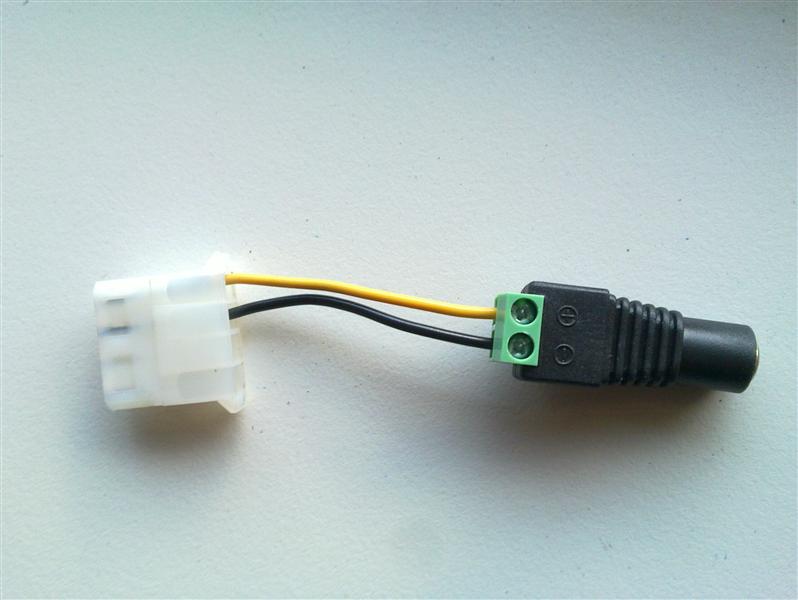
Been a while since I posted, tried using the FDD as a powersource while the pe4h is hooked up via the DC jack without success.
So now I just created my own solution and thought I'd share it.. who knows, there might be some folks wanting to do the same. Nice thing about it is that you don't really need anything special for it either, not even a soldering iron. Just cut off a female molex cable from basically anything, strip the last 5-6mm and secure the stripped part into place with the screws.
Got the DC plugs from dealextreme.Attached Files:
-
-
@lazyboy
gtx 560 is only 20 dlls more expensive that the gtx 460 and delivers 20% more performance, while the gtx 460 have a 192 bit memory bus , the gtx 560 has 256 bit. GeForce GTX 560 is essentially a GeForce GTX 460 overclocked to GeForce GTX 560 Ti levels. The zotac Amp! Version of Nvidia have been reviewed alot its already overclocked, good cooling (something you dont see with gtx 560) and not power hungry.
gtx 460 : good performance, cheap
gtx 560 : high performance , not so cheap.
gtx 560 ti: you wont have to worry about handling any game in about 2 years, this is not cheap, Best Card For Sli in the budget, Fast,Cool and Stable.
nvidia should hire me.
FREAKING NANDO WERE ARE YOU -
Download Windows XP driver for ATI HD6570 from ATiAMD website.
For the dGPU, install the driver using manual "update driver" method in "Device Manager". Then install the ATI HD6570 driver downloaded from ATiAMD website using normal driver installation method (launch the .EXE file). -
I have installed drivers from CD that came with graphic card. Is there any difference from online driver and CD driver?
Thanks.
-
EDIT: Wait a sec. Did you create devcon file per this instruction?
If you already look at the other two HP TX2 + eGPU successful implementation, yuutsumi & Chesniak, but still unable to get eGPU to work on your HP TX2, the mini-HDMI cable might be faulty. You'll need to replaced it.
<strike>Strange because you already reduced the amount of RAM to 2GB. Did you tried 32bitA compaction?
If it still doesn't work try " Using Win7 to re-do PCI allocation to overcome error 12" (step 0 to 7).
In the Setup 1.x main screen, at the upper-right-corner, you should see the TOLUD value. Please take a screenshot. The screenshot hotkey is ALT+DEL. Boot into windows & mount the Setup 1.x image. The screenshot image is located in DIAG folder. Post the image here.</strike> -
Please follow:-
1) Uninstall ALL ATI driver(s)
2) For the dGPU, install the driver using manual "update driver" method in "Device Manager".
3) Then install the ATI HD6570 driver downloaded from ATiAMD website using normal driver installation method (launch the .EXE file). -
I have uninstalled all the ATI drivers from control panel.
What is dGPU? Is it desktop drivers? means Intel drivers? I have already installed them.
I have already done it providing serial and installing product specific drivers. But I don't find any difference.
Thanks.
-
In the eGPU Troubleshooting FAQ page, you can find the definition of iGPU, dGPU & eGPU.
-
Hi All,
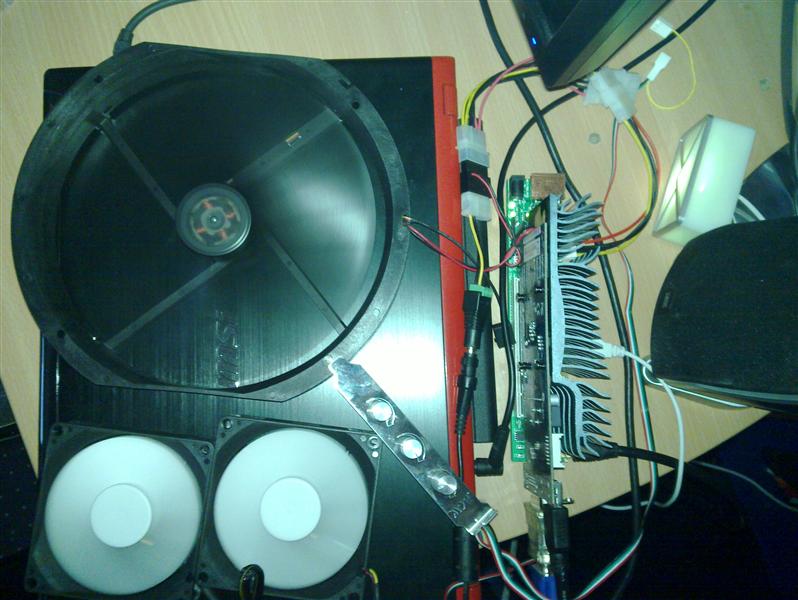
I have to abandoned my plexiglass casing project due to unable to procure the material in reasonable price. So, I bought myself an AeroCool QX-2000 casing. It's a micro-ATX casing without PSU. It only cost me USD78. I know it's not cheap but if I DIY the casing myself, the cost will be similar.
![[IMG]](images/storyImages/eGPUHD5870CorsairCX500QX-200001.jpg)
![[IMG]](images/storyImages/eGPUHD5870CorsairCX500QX-200002.jpg)
![[IMG]](images/storyImages/eGPUHD5870CorsairCX500QX-200003.jpg)
![[IMG]](images/storyImages/eGPUHD5870CorsairCX500QX-200004.jpg)
![[IMG]](images/storyImages/eGPUHD5870CorsairCX500QX-200005.jpg)
![[IMG]](images/storyImages/eGPUHD5870CorsairCX500QX-200006.jpg) Last edited by a moderator: May 7, 2015
Last edited by a moderator: May 7, 2015 -
After getting failures in running eGPU on Windows XP, I installed Windows Vista to give it a try. I followed all steps from scratch and first obstacle I found was chainload option is not available for Windows Vista. I tried chainload Windows 7 and it successfully gave me option to choose Windows Vista OS.
Although eGPU X2 link set, eGPU detected, compaction, chainload ran successfully in device manager I found display adapter as VGA. It is installed automatically by Windows Vista. I tried to update it with DNA installation where I get AMD option as unsigned driver. After installation it asks for reboot and thereafter cycle repeats. I also tried with drivers from original cd came with graphic card, drivers downloaded from xfx site, drivers from AMD ATI site. But nothing works.
Does it really going to work? or not?
Thanks.
By the way your set up is really nice. -
Your eGPU already working except unable to install driver. In the DNA-AMD GFX 11.5b.1 Vista/Win7 | Do Not Argue driver page, at the bottom of the page, there is a small note on how to install unsigned driver:-
Before installing the driver, reboot your computer & press F8. Original driver from CD is old version, so don't use it. -
Hello Kizwan, I followed instructions and end up with 'Code 43 Error'. Posting a screenshot of error for reference. Please guide.
![[IMG]](images/storyImages/code43error.jpg)
Uploaded with ImageShack.us
Thanks.
-
Vista doesn't support running two video adapters from different vendors (AMD-HD6570, Intel-X3100). You need to use either XP or Windows7 to do that.
-
A few more benchmarks with the X201 coming up as soon as I get a better power supply, in the meantime I just realised I can use my X200 to do a 4x link, will it definitely be better than the 1x.Opt link? Any reason why it wouldn't work apart from BIOS whitelisting problems? It's a bit expensive to buy three PM3N and cables so if anybody has any suggestions as to why it might or might not work let me know.
-
from my experience with x2 and x1 opt, x4 would outperform optimus in most cases. The only exception I can think of would be 3mark06. Even vantage was a mixed bag when it came to x1opt vs x2, where x1opt won by a landslide in the 1st test, but lost to x2 in the 2nd. optimus has some big fps drops now and then, which you would avoid with x4, so even if both would give you the same average fps in some cases, I think x4 would give you smoother fps.
If I were you, my main concern would be convenience. If you don't mind having to plug in and unplug all 4 cables, then go with x4. If you would find that as an issue, then go with opt. -
Hope you guys can help with this - kind of an overclocking/mod question really, but you guys have been helping me so much so far.
Just picked up a EVGA GTX 465 from Geeks.com and am crossing my fingers that it will unlock to a 470. I know there is only a slim chance with EVGA 465s, but PCB side is not missing transitors where the two extra chips would hopefully be, so I'm thinking this is a positive.
My questions are
1. If it has the right transistors on the PCB side does this mean it absolutely has 10 chips instead of the dreaded 8?
2. I have read that it must have the right core and chips to be able to unlock, not just 10 chips? Is this true and has anyone got a 10 chips worth of RAM, but with the newer processor?
3. Is the only was to check the core to remove the heatsink? I have never applied thermal paste and don't want to spend any more money, but do want to make sure of what I have so I don't brick this card. $110 is quite a lot of money for me at the moment.
Any suggestions about flashing and/or verifying what I have would be nice - Hope to be sittin in 470 territory soon.
EDIT: Just took the heatsink off the EVGA GTX 465 and it has the right core chip and the transistors are raised on the PCB. If I can make this into an OCed 470 running opt and all for $160 I will wear a t-shirt with Nando's face or at least avatar on it. -
So far 1x.Opt works very well but the fps drops you mention are noticeable, FSX is a demanding game and I can't run it with all the visual candy I want on. Since funds are really low right now do you think I could buy three HDMI-mHDMI cables and these PCI-E cards eBay - The UK's Online Marketplace
and with some soldering make a primitive PM3N + cable? Buying 3x PM3N and 3x mHDMI PCIE cables would cost around $95, really can't afford it at the moment, by contrast the DIY solution would cost less than $25. -
ithildin has analyzed the x2/x4 connectivity options with a Lenovo X200 here. If you want to go ahead with it then I'd suggest email bplus and explain you'd like to do the first x4 setup and ask for a 'pioneers' discount on the PM3Ns. If no go then consider a £3.28-delivered mPCIe adapter with the wired ends. The pci-e lines are the 'sata' lines, so just need to solder the 4 TX/RX lines + 3 GND (7 total) to the corresponding mHDMI cable lines.
-
Thanks for the advice, didn't realise that it's only 7 cables, I'll get in touch with BPlus as per your suggestion and see what happens.
-
Correction: lane2-4 only need 7 wires each. lane1 has a few more. Hope BPlus help you out
-
So I have to use the following ports in the correct order then:
Port #1: mPCIe full size (WWAN)
Port #2: mPCIe full size (Wifi)
Port #3: mPCIe half size (UWB/Turbo memory)
Port #4: Expresscard slot
Is it possible to have any PCI-E lane to any of the PCI-E ports available on the X200 or does it have to be lane 1 - port 1, lane 2 - port 2, etc? Ideally I would want to use my EC2C as the primary lane and the three mPCIe adaptors for the other three required lanes. -
I have a PSU that has enough power on a single 12V rail and zero 6-pin connectors, but my card has 2 6-pin connectors.
Can I get an adapter that splits the 12V into 2 6-pins and will that work?
If no can I get adapters that connect into the 6-pins from the older style connectors even though I have one 12V rail?
Or more simply - can this
http://www.amazon.com/iMicro-IM400W...ref=sr_1_1?s=pc&ie=UTF8&qid=1316195058&sr=1-1
power this
http://www.amazon.com/EVGA-Mini-HDM...MDNU/ref=sr_1_1?ie=UTF8&qid=1316204107&sr=8-1
with any sort of adapters? -
OK I keep getting a code 12 with my gtx 560 Ti (with the Y460 laptop in my sig) and I'm not entirely sure what to do... I have tried the pci compaction but I am not sure if I am doing it right and I am currently sort of just trying things blindly; what do I need to do to to free up resources for the card? I have already apparently succeeded in disabling the 5650m (if that will even help) as it no longer shows up in the device manager, but I still get the Code 12.
-
Hello everyone,
I've followed this thread for quite a while since I was thinking about buying a new notebook. I only need graphics power at home, so I thought that an eGPU might be the best way to achieve what I want.
Since this is a rather complicated topic (at least I think it is) I would like to first make sure that I understood correctly, what it is that I want.
The best way to go (if I don't have/want a MacBook) is to have an ExpressCard 2.0 slot. On that I want an x1 PCIe 2.0 link with Optimus, which would be an 5 Gbps link with Optimus. Is that what I want? Correct me please.
I think I've read that I can't use the ViDock 4+, because it doesn't establish a 2.0 link, although advertised.
Then I stumbled across this one NA221A-NB which is pretty pricey. A GTX 560 Ti would be my choice for the eGPU.
I also thought that this might pair up nicely with a Dell Latitude 6520. I thought about getting it without the NVIDIA graphics card and just the HD3000. FHD display 15" is very important to me, since I will be doing a lot of coding when I'm running in battery mode.
Is this a good setup? Should I change something? Is there a cheaper and as neat/clean alternative to the NA221A-NB?
When I put the latitude 6520 on the docking station at home, it doesn't disable the express card slot, does it? So, is it o.k. to put it on the docking station and plug in the express card? It would be great to have the express card replicated on the docking station, too. Just for the sake of convenience. -
We already gone through this. You should be able to differentiate between PSU total output power & PSU +12V power. And you should be able to calculate the PSU +12V power yourself. GTX465 power requirement is 200W. So, you'll need PSU with +12V power more than 200W. 240W or more is recommended. If you want overclock GTX465, you'll need a good PSU with more power.
-
Please try Error 12 FAQ#2 to solved the problem you're experiencing.
-
hey,
i tried my eGPU GTX 570 with my MacBook Pro 17 (2011) but get only less than 2/3 Points in 3dMark06 as without Vidock. What can i do? -
What are the numbers? If you get more than 15000 3DMarks with the MBP, it is fine.
-
I know, I apologize. I was just a bit confused about adapters and whether +12V@26A means it's on different cables or that comes from only one cable.
If the +12V@26A comes from more than 1 cable I could buy two double Molex to single 6-pin adapters. If it was on a single cable I would have to buy a single Molex to double 6-pin, which doesn't exist right?
Sorry, I understand how much power I need and that it needs to be 12V, but now that I have the PSU I'm just a bit confused about how to plug it up since it does not have any 6-pins. -
First thing first, GTX465 required two 6-pin PCIe power connector. So, you'll definitely need to buy two double 4-pin molex to 6-pin PCIe adapters. You'll need two of this:-
![[IMG]](images/storyImages/two4-pinmolexto6-pinPCIe.jpg)
Secondly, the PSU have +12V@26A=312W which is good.
That's all.Last edited by a moderator: Feb 6, 2015 -
Hi,
I tried to run eGPU on Windows 7, but I didn't get any success. After clean installation of Win 7, X1 setup, when I try to install DNA drivers with eGPU running screen goes blank nothing happens next. Thereafter when I reboot and chainload (after x2 port, compaction, f8 deactivate certificate) blue screen appears with Hardware failure message. I also tried to keep eGPU off after chainload but screen freezes goes blank when I resume it. Likewise I tried many permutation combination above one are just few. Worse I installed win 7 thrice, win xp twice to get it working. My hopes are derailing now.....
Thanks. -
@pyr0 i get only 6600points
I have a MacBook Pro 17 2011 ; 8Gb RAM; amd 6750m;2,3 GHz i7 2820QM
Installed NVDIAS display-driver and devicemanager says all okay. -
Are you running windows? Try eGPU setup 1.x to deactivate the 6750m, so only the HD3000 is active. You can find plenty of information in the first post. Then, Optimus should engage and give you an impressive 2.5-3x speed hit.
Report back if this has worked for you, we need a new Quadcore MBP in our database. -
..........
-
OK now when I try to run 36bit pci compaction, it hangs on the first line. Should this happen?
-
From my experience WoW is by far the most PCI-E intensive game besides flight simulators, and it's one of the few games that performs better on x2 than x1 optimus. Even on x2, wow cannot be run on ultra shadows. The best you can do is high, and that will get you down to the mid 20s in major cities during prime time. Anywhere else though should be smooth. I do not know how SWTOR and D3 are with pci-e.
BTW it should only be shadows that bog down your 9800. The rest of the setting I expect you could run on ultra with no noticeable fps loss. Basically with x2 on an eGPU you'd gain AA, AF, and high shadows, but at times could see fps in the 20s in org or SW.
If you can OC your PCI-E bus and do x2, I'd consider an eGPU if I were you. With x2 and no OC, I would stick with the 9800. -
Also, should the V drive for the setup 1.x disappear on every boot? Do I need to re mount the image every single time?
-
..........
-
In raids in WoW I never see fps below the mid 30s with an unoverclocked optx1 setup. I just signed up for the SWTOR beta testing to see how an eGPU system does in it.
-
I have tried the different compaction methods and I still get error 12.
Nando, I attempted to put this code:
setpci -s 2:0.0 BASE_ADDRESS_5=d001
setpci -s 0:1c.1 1c.b=d0 1d.b=d0
in the pci.bat, but I have no clue if I did it the right way or if it even stayed in there. Could you give me a specific procedure for putting that code in? I don't really understand what setup files stay from boot to boot (like the pci.bat) and what the compaction actually changes. Assuming I do somehow get the compaction to fix my problem, do I have to run it every single time I reboot for the GPU to not get the error 12? If so is there any way around this?
I am really stuck here. I can get the card recognized by windows but nothing I have tried so far can get rid of the code 12 error. I can't find any specific instructions on PCI compaction so I have literally no clue what I am doing (the instructions are kind of vague), and I have no clue what gets undone when I reboot. I would not call myself a novice when it comes to computers, but I definitely don't know the things necessary to actually figure this out by myself. Honestly, I am wondering how many other people set this up successfully without having a degree in computer science and years of experience with these specific types of systems...
My point is, is there ANY way to get this video card to have the PCI resources it needs with my computer or did I just waste $150 bucks on something that has no chance of happening? I would really appreciate if someone could give me a step by step tutorial in how to actually run the compaction so that it works.
DIY eGPU experiences
Discussion in 'e-GPU (External Graphics) Discussion' started by master blaster, Sep 18, 2009.
![[IMG]](http://imageshack.us/photo/my-images/690/displayerror.jpg/)




![[IMG]](http://i1236.photobucket.com/albums/ff457/Kizwan_Chronos/eGPUHD5870CorsairCX500QX-200001.jpg)
![[IMG]](http://i1236.photobucket.com/albums/ff457/Kizwan_Chronos/eGPUHD5870CorsairCX500QX-200002.jpg)
![[IMG]](http://i1236.photobucket.com/albums/ff457/Kizwan_Chronos/eGPUHD5870CorsairCX500QX-200003.jpg)
![[IMG]](http://i1236.photobucket.com/albums/ff457/Kizwan_Chronos/eGPUHD5870CorsairCX500QX-200004.jpg)
![[IMG]](http://i1236.photobucket.com/albums/ff457/Kizwan_Chronos/eGPUHD5870CorsairCX500QX-200005.jpg)
![[IMG]](http://i1236.photobucket.com/albums/ff457/Kizwan_Chronos/eGPUHD5870CorsairCX500QX-200006.jpg)
![[IMG]](http://imageshack.us/photo/my-images/153/code43error.jpg/)


![[IMG]](http://i1236.photobucket.com/albums/ff457/Kizwan_Chronos/two4-pinmolexto6-pinPCIe.jpg)
