Problems? See this thread at archive.org.
Full specification. What you can see available on your notebook; graphic card? switchable graphic card? Intel GMA 4500MHD? ExpressCard slot? "4 gig ram, Intel ICH9M Chipset, 2.1gig Intel core 2 duo t6500, windows 7" doesn't really tell us how you can fully utilized eGPU.
From the Device Manager screenshot, first PCI bus with 8 digits memory address is 0xC0000000. Which means TOLUD is 3GB. This show you can use 4G of RAM with eGPU.
-
There isn't any graphics card specified that I can see anywhere. It must be intel but how would you tell? And yes I have an ExpressCard slot
-
So, can a "PE4H 3.0" setup with a 560 Ti(can it handle a 570 for greater performance?) + X220 + external monitor perform better than a 6990M equipped laptop?
I'm currently torn between an X220 and PE4H solution, and a 6990M equipped laptop. -
 SLI and CROSSFIRE is a no go on laptops.
After a lot of unsuccessfull tries I am writing this post to discourage anybody who want to try to sli or cf two cards on a laptop, unless he can hack into the graphics drivers and change some settings.
Crossfire test
First I did a crossfire test on a Pi 2540 (PM965), on which I have removed the onboard graphics card. I used two 5850s Xtremes, one running @ x2 (EC and PM3N-wifi) and the other running @x1 (PM3N-turbo memory). Setup 1.x was needed to adjust the space needed (tested with 3GB memory on). Both cards worked perfectly and I could attach screens to both of them (a total of 6 screens were available). However, no matter how many times I tried it was impossible to make Catalyst to enable the crossfire tab.
SLI test
The SLI test was done on my current model (4530s HM65) with two EVGA FPB GTX460 1GB. The one was connected on with an EC2C and the other on the whitelisted wifi slot with a PM3N. Setup 1.x and proper pci compaction needed to boot to windows (Funny thing is that I could have also my 8GB on). Both cards loaded and I could attach screens to both of them (a total of 4 screens were available). I used the HyperSLI* since my laptop supports VT but no matter how many times I tried SLI tab won't show on the Nvidia Control Manager. I also tried SLIpatch* with modded driver but the result was the same.
Reason
Both SLI and Crossfire need more than x4 bandwith to be enabled in both control panels. Tested also on a desk rig (p55) and and I couldn't enable Crossfire under x4-x4 (if I use lower than that I cannot enable crossfire). SLI was tested on techpowerup forum with Hypersli (chipset p67 without SLI certification very similar to my hm65). There on speeds x16-x1 people couldn't enable SLI while when they change their configuration to x16-x4 or x4-x4 the sli tab was enabled. There is a possibility that it is possible to do an x1-x1 with older drivers (192.xx) but I haven't try it yet since I need 9xxx or older cards)
Solution?
Somebody will hack into the driver and change this. Either we hack windows to report both cards running @x4 (is that possible?) and we force the drivers to enable cf or sli.
*
Hypersli, SLIpatch
Those two patches are designed by anatolymik to enable SLI on non-SLI certified motherboards. You can find more about those programs on the techpowerup forum. -
Getting eGPU to work is more complicated than finding out what graphic card your notebook have. Did you try look in Device Manager, under "Display adapters"? Is this VGN-NW15G is your notebook?
VGN-NW15G have two things that important for eGPU:-
- Intel GMA 4500MHD iGPU
- ExpressCard (34mm) slot
eGPU kit
So, the kit you need is PE4L-EC2C ( here or here if you from US).
Power Supply
For PSU, choose the one that have enough +12V max current to drive graphic card, not the PSU total power.
With Intel GMA 4500MHD iGPU, you can do x1.Opt setup with Nvidia Fermi desktop graphic card. Opt=Optimus provide PCIe data compression which boost performance over PCIe x1 link. You also will get acceleration on internal LCD. Of course, you will get better performance if you use external monitor. -
Hello community

i have a new problem: the performance should be better with a external monitor right? so i put my GTX560 with a HDMI cable on my flat screen. the resolution is 1366x768 same my laptop monitor. but the performance is with the external monitor worse than the laptop screen.
what is wrong?
cheers and thanks
EDIT: Here is my system:
Intel Pentium Core 2 Duo 2.00 GHz
4GB Ram
Windows 7
Geforce GTX560
PE4H - ExpressCard -
You could be bottlenecked by the CPU, lowering the resolution moves the load from the GPU to the CPU, so having only a Core 2 Duo @ 2Ghz, could be the issue. Can you try a bigger resolution and publish the results?
-
okay, i understand.
but my TV Screen have a highest resolution by 1366x768. it is possible to change the load from CPU to GPU with a little tool or something else? -
Sadly I don't think so don't you have any other TVs to make the test? should be quite fast, due the nature of the eGPU setup ^^
-
Has anyone tried playing battlefield 3 on a DIY Vidock setup? I'm curious if the more recent games have made this solution less useful. Thanks.
-
There is a video on youtube with a PE4H + Lenovo x220 and a GTX560Ti
http://www.youtube.com/watch?v=36FNJsYhLb4
Meanwhile...I finished my enclosure! (Mechanical Part), now i'm waiting for the delivery of the PE4L!
I still have some finishes to do, but the major work is done
![[IMG]](images/storyImages/374675_10150483885829429_805309428_8367931_765078894_n.jpg)
-
PE4H winning #1 - YouTube - your link wasn't working, but you gave me the info to search for. Thanks
-
Link corrected
-
Even better. Thanks again
-
I once considered trying out SLI on my old laptop with a 3GB TOLUD. For SB systems, 1.2 opt SLI would have been pretty beastly if possible
Did you use an SLI bridge? Maybe x4 is only needed without one. -
for information SLI hack on desktop works only with intel 4 series and lower, so don't try with SB it willn't work.
Try better with an old one (the 9800GX2 bridge is successfully detected on laptop at x1.1 no opt)
Try to desable optimus and use an older computer -
I found that the 290.53 beta completely screwed up my system. Did you install this driver? around 40% of the time I get 50% performance or less and basic windows load slower, around 40% I get the driver cannot load, and the rest of the time it works properly. So basically I have to restart the computer over and over until it works. I've done a fresh driver install to the WHQL driver, but it didn't help. Next up is trying the old drivercleaner programs, and if that doesn't work I'm doing an OS reinstall.
-
Will this work?
Newegg.com - GIGABYTE GV-N550OC-1GI GeForce GTX 550 Ti (Fermi) 1GB 192-bit GDDR5 PCI Express 2.0 x16 HDCP Ready SLI Support Video Card
I am ordering it for my new desktop, but since that will take me a while because of prices I thought I'd use it for the laptop in the mean time.
And this is what I'd order?
http://www.hwtools.net/Adapter/PE4L.html -
Yes, that graphic card will work too. Specifically, the kit you need is PE4L- PM3N. PM3N is for eGPU using mPCIe port. If you're from US, you can get the kit from HIT. If not, you can buy from BPlus/HWtools.
GeForce GTX 550 Ti power requirement is 116W. It require one 6-pin PCIe power connector.
Did you check whether the mPCIe port is accessible or not? Please post screenshot of Device Manager (set View to " Resources by connection" & expand the Memory tree. No need to expand any sub-tree under Memory). What OS are you using? For eGPU, recommended to use Windows 7. -
Where can I get that connector?
I'm running XP, the laptop's internal GPU can't handle 7 sadly.
Here ya go.Attached Files:
-
-
The 6-pin PCIe power connector come with PSU. Since you're going to build desktop later, you might want to buy >500W PSU build by Corsair or FSP or Seasonic. You can use this PSU later for your desktop.
Thank you for the screenshot. No problem with TOLUD.
I think you can use XP but if I'm not mistaken, you need to disabled integrated graphic card. So, display will only active after windows loaded. I recommend Windows 7. -
Sorry, but I have another quick question, I can afford the GPU and the eGPU adapter, but I can't afford the PSU too at this time, but I have an extra lying here and was wondering if it could work with some kind of adapter?
Attached Files:
-
-
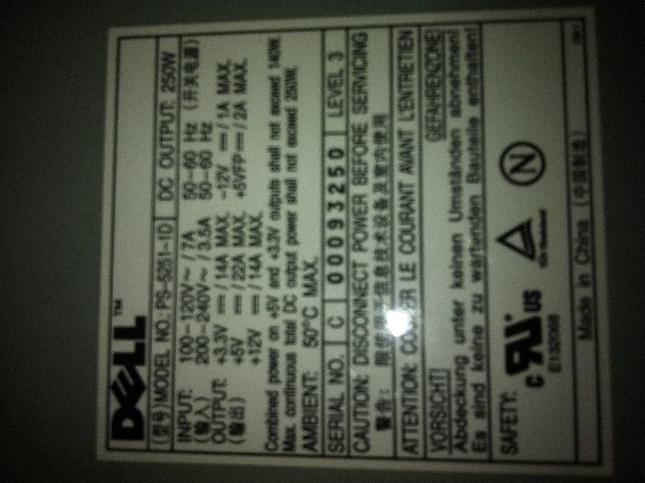
From the picture max current on +12V is 14A, 12V * 14A = 168W. This PSU should be able to drive GTX550Ti (116W). What you need is 2x4-pin molex to 6-pin PCIe adapter. Sometime this adapter come with graphic card.
-
Okay, thanks! You've been a big help!
-
Good day/night well i been reading this and i am thinking
i got a
Dell inspiron 1501
Athlon 64 x2
3 gb ram
radeon xpress 1150
is already unlocked optimus on non intel igp?
there is a equivalent on ati?
What would be a good solution for me
Thanks a lot i will whait for an answer -
Hey Guy!
After a successful set up with my 'PE4H ver2.4 with EC2C', Running PCIe x1, I've been luck enough to come by a generously powerful desktop rig for just over £100, used from my friend, who just upgraded to a ridiculously powerful i7.
So the purpose of this post is to see if anyone is interested in buying my PE4H ver2.4 with EC2C.
It's been used for around a month in full working order. I've decided it's better to get a gaming desktop for cheaps, rather than take my precious XPS 1645 apart for x2 or x4 links. I take it with me too many places for it to be justifiable.
SO, with that said, I'll ask on here before I chuck it up on eBay.
I'd quite happily take £50 + p&p.
The next best price brand new I can find is £66 with shipping, and it's all working a charm, so I'd say grab a bargain!
Anyway, Thanks alot for all your help on the eGPU side of things, couldn't of been part of it without you
*Edit - I can get pics up if needed, but i just assume you guys will know what it is! -
Optimus cannot be done on a non-intel igp. You also cannot do x2 on non-intel chipsets. In addition to these, you have a pretty weak CPU. If I were you I'd get a new laptop.
-
Got my new E6420 today and quickly hooked up my eGPU.
Setup: Dell E6420
i7 2720QM
8GB
iGPU = Intel HD
dGPU = NVS4200M (disabled in Setup 1.x)
eGPU = GTX 460v2
Win7 Pro x64
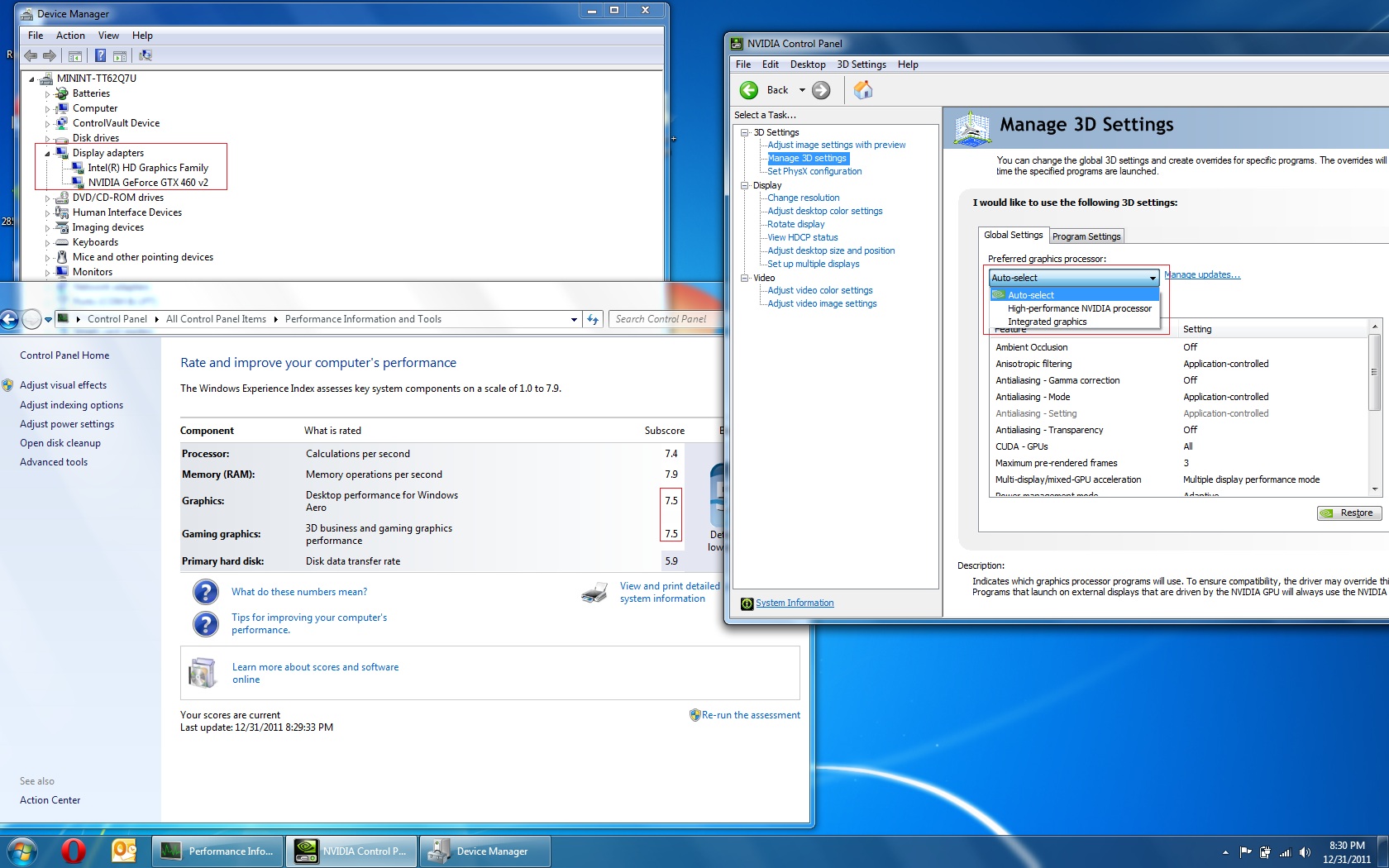
The reason I was originally doubting my Optimus functionality was due to my lack of success with getting the tweaked Verde .inf's to work. The nVidia installer kept saying no recognized device. Once at my wit's end I uninstalled everything nVidia, kept dGPU disabled in 1.x and installed the desktop drivers just so I could use my card for the time being. After a reboot (chainloaded to keep the dGPU off) it looks like Optimus functionality is working on mye external display setup.
I noticed in the Windows 7 Experience Index this same setup was only getting a 6.6 for both video ratings on my work E6420 that I was using while waiting for mine to arrive, which I know wasn't using Optimus (or 1.x), so I assume the 7.5 can be attributed to the difference gained by Optimus.
Update:
Benchmarks are attached. 15,495 in 3DM06
This was all done on an external display only (desktop drivers) - No drivers with updated inf's yet for the GTX 460v2 to get internal display numbers.Attached Files:
-
-
I think you will get your answer:
-
3DMark06 the standard for you guys?
-
Thanks for the answer and the info with no offense, i dont have money for a new laptop. so i will use this lap until it dies. thanks for everything
-
AFAIK 06 + 11
-
Alrighty, here we go. I believe this is pretty good lol. Been quite a while since I've run any version of 3DM, seeing those old vids brought back some good times...
This was all defaults as it installed, 1280x1024.
Score: 15,495Attached Files:
-
-
The modified Verde .inf's doesn't recognize your graphic card because GTX460 v2 have different device ID than older GTX460. Most likely nando's .inf doesn't contain GTX460 v2 device ID. I already added GTX460 v2 device ID in 32-bit inf but not yet in 64-bit inf.
-
I guess that explains it then, the v2 was exactly what I thought may be the issue, as the cards are fairly new. I still don't get how/why my Optimus works then, seeing as I obviously didn't have a Verde driver at all with the correct listing and only installed the desktop drivers from nVidia.
-
Are you using internal LCD or external monitor? Supposedly when using desktop driver, you'll only get acceleration on external monitor. Did you try run benchmarks/games with internal LCD only?
-
Ahh, that makes sense. I was under the impression Optimus wouldn't work without the modded drivers at all. I'm only using an external monitor (laptop is docked and screen can't even be opened).
Do you want my Device IDs or anything from my system to work on some Inf entries for the 460 v2 on an x64 platform? -
Hi,
Can I connect an eGpu to an acer aspire 7741g. -
If going a 17+" with a HD6990M then consider a refurb 17" Dell M6600. They have a M8900, equivalent to a HD6970M. Bonus is you get an expresscard slot so can add a eGPU if want to compare performance. a HD6990M gives very high performance so you'd need more than a GTX560Ti to try to better it.
-
Hey nando,
I recently replaced my HP 8460p +eGPU setup with a Firepro M8900 equipped M6600. The benefit of having everything portable and in one package CANNOT be beat, although I'm wondering what the benefits might be of finding a Quadro 3000m/4000m in the future to swap out and do another eGPU(570GTX) setup once the expresscard 2.0 parts are available. The performance of the M8900 is fantastic, but I'd like to be able to try to keep up with the newest generation of games at high/ultra settings and 1080p while I own the laptop. I suppose it would help if we knew what the next Firepro parts from AMD will be, but for now, I'm just tinkering with the upgrade idea.
What do you think? -
Hello all,
The holiday season is over, and i'm ready to try troubleshooting my failed DIY EGPU setup which i posted over 100 pages ago (WOW, this thread is HUGE!).
Summary:
Setup:
Laptop: Lenovo x220 - i7 2620M - 8GB - win7 x64 pro
BIOS: 1.24
GPU: ASUS ENGTX560
PSU: Antec NEO ECO 520W (single +12v rail @ 40a)
Implementation: PE4H + ExpressCard Adapter
Problem:
Cannot manage to make the video card detectable inside or outside of windows, or in setup 1.0x.
Previous Troubleshooting:
Confirmed components are working independently via the following method:
Used old 9800GT as a control.
ExpressCard Set to Gen1 in BIOS
520W PSU + 9800GT + PE4H = functional
520W PSU + ENGTX560 + PE4H = non-functional
This test shows that the PE4H + Adapter and PSU is at least functional.
520w PSU + 9800 GT + Mobo in desktop = functional (at load)
520w PSU + ENGTX560 + Mobo in dsktp = functional (at load)
This test shows that the 520w PSU has enough power (in practice, we know in theory it does) to push the ENGTX560 at load.
I am ready to troubleshoot this from the ground-up. Where should i start? Would you like screenshots of anything? -
First off your situation is really weird and it seems like the 560 should be working.
Are you booting with the 560 connected? If not, when are you connecting the card? What happens if you do boot with the card on and connected? Do the fans slow down to an inaudible or near inaudible level, or do they stay at full speed when you plug the card in? The fans should never shut down if the card has power.
Try all the different methods for connecting the card. Hotplugging from my experience is the hardest on the PE4H to get the card detected, Booting with the card on and doing sleep/resume seem to have higher success rates, especially on flaky hardware. I'm trying to get any reaction from your system towards the card. -
I have tried every method i can think of regarding plugging the GPU:
1.) Cold boot with eGPU connected
2.) Cold boot to setup 1.0x with eGPU connected
3.) Hot plugging eGPU while in setup 1.0x (also using delay timer on PE4H)
4.) Hot plugging while windows loading screen is up
5.) hot plugging after windows has loaded
6.) hot plugging after putting the laptop in sleep/standby
all to no avail.
Regardless of how/when i plug it in, the GPU fan and the PSU fan run at a very low/quiet speed. The only acknowledgement i can get from the laptop is that when i close the 120v bypass jumper (i think i mean closed, actually USING the jumper as opposed to no jumper at all) and plug the mHDMI cable into the ExpressCard adapter, everything slows down to a crawl. When i do this in side Windows, there is all kinds of CPU lag (i.e. any usually instant sounds take 10-15 seconds and are extremely jittery, mouse is nearly un-responsive, alt+tabbing between Chrome and another window takes 30-40 seconds). When i do this before windows loads, the login screen takes 5-7 minutes to come up, and then the actual login takes another 4-6 min, complete with input lag when typing in the password. When i enter setup 1.0x with the Jumper closed, the device is still not detected.
I work in IT, and this has me completely baffled at the moment. -
This is sounding like a driver issue. I have gotten some bizarre behavior due to drivers. The oddest is when I don't have a driver installed for my 460, I can boot with the 460 connected, but if I do have a driver installed, I get a black screen, even during POST (I don't get it either). So what I'm saying is that even though the driver should not have loaded yet in Nando's setup program and your card is never detected, it could still be a driver issue.
Starting with the 290.53 beta driver, I too have gotten lag when in windows, and I'll have to restart a couple times in order for the system to behave normally.
I'm thinking that since you first tried a 9800, then switched to a 560, that something may have gone haywire driver wise. I recommend uninstalling the video driver, then running drivercleaner, then install the 560 and see what happens. -
I will certainly give this a try. Initially, i tried the EN560GTX with a PSU that couldn't push it. That is what initially spurned me to try the 9800GT. After it worked, i figured out the PSU couldn't push the 560GTX and bought another. However, i don't think i did a clean install of the driver again.
My main question is: could a driver problem manifest before Windows during Setup 1.0x?
Thanks for the continued aid, and i'll be sure to post back with whatever results i get! -
Like I said, I get different POST behavior dependent on my driver situation. I have no idea why, but it happens. I just cleaned out my drivers and reinstalled, and now my system can boot with the 460 running and it no longer disables the IGP... I don't get it. TOLUD will drop to 3GB too if I boot with the 460. I can post pics for proof of this bizarre behavior. I'm thinking that part of it may have to do with the fact that I have a UEFI BIOS. Maybe UEFI BIOS's can access the Windows driver?
-
Used driver cleaner to wipe everything nVidia.
Setup 1.0x - same behavior, nothing detected. tried the couple troubleshooting steps in setup 1.0x, still nothing.
Windows - Now i get the massive slowdown whether or not i have the 120v bypass jumper active. -
I have added the GTX460 v2 device ID in 64-bit nvam.inf file. You can get the inf file here (second download link).
-
Hi,
Aspire 7741G doesn't have ExpressCard slot, so you can only connect eGPU to mPCIe port. Does your notebook have Intel HD Grphics active & enabled? If not, unless you can do x2 link using 2 mPCIe ports, you will not be able to utilized eGPU on Aspire 7741G notebook. -
The Dell Precision M6600 is my favorite 17" system atm given it's excellent dGPU options plus the expresscard slot so can play with eGPUs. Would love to see a performance comparison of say the M8900 (~HD6970M) dGPU vs a [email protected] eGPU.
DIY eGPU experiences
Discussion in 'e-GPU (External Graphics) Discussion' started by master blaster, Sep 18, 2009.