Problems? See this thread at archive.org.
I would probably tend to buy villagetronic 150W Vidock 4 if it was priced around 180 $ shipped. 259$ seems too high to me to go for it. Could drive very decent gpus with 150W especially since it supports PCi-e 2.0 and with low power kepler gpus coming. Actually i would love a 150W Vidock with the size of the vidock 3. We can find now decent gpus that are short enough to fit within 240mm. My actual GTX 560 is only 166mm long. There are also GTX 560 ti of that size.
I'm not a fan of the 225W Vidock. Two power adapters is a bit of a mess.
-
Why Japan? I tried to find some information on the location of the Village Instruments, but didn`t succeed. Honestly, "Mr.Chen" sounds for me very much like China. And we all know, how cheap is hardware in China... Vi Dock is like Blplus product + enclosure + PSU. C`mon, if you study the market, even retail prices in China for some electronics, chassis and PSU, you wont come to hundreds of bucks. And wholesale is cheaper...
Work? Work is chap in China to...
I`m making my own Expresscard to PCIe adapter and so far i came up to 20-30 Euros for the hardware, including a 203W PSU (xbox). OK, for the enclosure i will have to give another 20-30 Euros for the retail electronic devices housing. But 60 Euros doesn`t sound like 240-280$, right?
I`m sorry, but why do we have to care about someones profit? Its the DIY community, not venture funding community.
And, i`m sorry again, but that story with the redirection of customers with the 12 error to this thread sounds not like good support. That sounds like China...
I didn`t wont to offend anyone, but I come from Russia, and we are usually telling the truth and calling the things by it`s names. Not like this polite correct guys from the West. -
Hi guys,
I've read about the vidock but decided against it due to the cost... I just stumbled on this thread recently and it seems like something I'd be interested in. The details are a bit over my head though, could anyone be kind enough to help me understand a few things?
Ok, so from what I gather.. it is like a lego set and the layout is something like computer -> expresscard port -> some cable -> the adaptor that costs $90 -> graphics card -> output (to monitor, or use optimus drivers) and power supply (to wall outlet I suppose). Is this somewhat correct?
My first question is... does anyone know how much longer express card 2.0 will be around/how common it is, or will it soon be replaced by thunderbolt? Also, I assume that adapting the diydock for thunderbolt will require a whole new piece (thunderbolt -> pcie adaptor?) is there anything like that planned? Should I wait for that and see? I saw some preorder for a thunderbolt solution but $900 is excessive in my opinion....
The reason I am asking is because I currently have a quad core t520 right now which is my 'work' laptop and I plan on purchasing a 'gaming' laptop in the near future. By gaming laptop I don't mean those stupidly expensive ones, I was thinking maybe a dual core i5 paired with a kepler graphics card might be enough... but from my experience I don't think I've ever noticed an expresscard slot on 'cheaper' laptops...
Ideally I could get an even cheaper laptop (sacrifice graphics power for battery life/price/weight) and use the diydock for when I want to play games, but if I were to get a diydock I would either want it to work with both my future laptop and my current t520, or have it thunderbolt-based to take advantage of the full power of my eGPU.
My second question is... are there diminishing returns from how powerful your eGPU is due to the limited bandwidth of expresscard? I was thinking if a gtx560 attains, say, 60% of the performance of the same card in a desktop then maybe I could just get a card that runs at 60% of the performance of the gtx560 so it doesn't get throttled... but I'm guessing it doesn't work that way right? -
Yes. Making a DIY is cheaper. I'm pretty sure that applies to everything. There are so many factors that make the price of the Vidock higher. I would read the last few pages.
Why are we separating these communities? I mean really? I own a Vidock but its not to say I don't try and help out users on this site. What, do you think Vidock and diy egpu has a different goal? Every single one of us just wants a working external graphics solution. It's sad that we are separated even though we all have the same goal. -
I think we are comparing apples to oranges here. I believe the "profit" he is referring to is the extra desktop parts sold that can be gained by nVidia and AMD. I think we can all agree that whatever card we decide to put into our eGPU solutions is not going to benefit whoever manufactures the enclosure/PCB.
The issue Mr. Chen was likely talking about stems from our assumption that nVidia/AMD are not willing to make their desktop parts more accessible for eGPU purposes at the risk of angering their OEM customers who have lucrative high-end/gaming notebook businesses. Mr. Chen seems to be fairly optimistic that the chance of more desktop gfx cards sold is enough to convince AMD/NVIDIA to make products that play nice with eGPU connections. Remember my 7950 fiasco? -
I'm curious about this as well... I tried to contact them, but never got a response back.
-
lol thats bad...but thank you then i wont w8 for it

-
If you are sure your system does not need Setup 1.x, you could just buy the PE4L v2.1b from BPlus (if you really can't wait). I ordered mine from them and got it in 4 days
-
Hi,
after searching this thread for an comparision of an eGPU and a popular dGPu like an Nvidia GT 540 oder AMD 6650 I did some benchmarking because such an comparison is missing.
And for me it was one of the most important questions for how much better the games will run when I use an Nvidia 560 instead of my Radeon 6630 dgpu.
So I installed the goog old Crysis 1 and started the benchmark. And the result was was kind a impressive for me because the GTX 560 was 3 times faster then my Radeon 6630.
I tested Ultra High settings @ 1920x1080 without AA on my Vostro with the following specs:
I5 2410
4 GB Ram
AMD RAdeon 6630 1GB dGPU / Nvidia GTX 560 1 GB eGPU @ PCI Express 2.0
After that I am much more than before because I also tested Battlefield 3 and Modern Warefare 3 and in both games 1920x1080 and high settings was laggy and so I was a littel bit unsure wheter it was a good decision to get an eGPU. But Crysis showed me that now I am capable to Play on Ultra @ 1920x1080 instead of mid settings @ 1366x768
![[IMG]](images/storyImages/egpuvergleich.png)
In the picture you can see the results and I also tested the Intel HD just for fun to see how slow the Intel iGPU is
-
You can see an indirect comparison between my old xps 15 with a gt420 ocked to a 540 and my egpu setup on my youtube channel ^^
-
Non taken.
However I LOVE how you still can't come up with a "single, realistic, benefit for the collaboration" so instead you choose to turn your argument to me in at attempt to reduce my credibility and the validity of my argument.
I see a bright future in politics for you
If you ever come up with a tangible benefit to the DIY community, I'll be the first to listen to it.
Nicely said
-
With respect to my previous post ( http://forum.notebookreview.com/gam...851-diy-egpu-experiences-985.html#post8465079) it seems I was slightly confused. So, none of these solutions are ExpressCard 2.0 compatible yet, only PCIe 2.0? I'll be running on ExpressCard 2.0 on my Dell, and I have no intention of taking the bottom cover off just to use the wifi's mPCie slot...
-
According to Randy from HIT, he hopes to have stock in next week. See his email I just received in response to your question below:
Your E6420 uses a Series-6 chipset that delivers pci-e 2.0 link speed to it's mPCIe/expresscard slots. You'll need a PE4L 2.1b to get reliable transmission at that speed. In addition it is recommended that you get a NVidia Fermi as your system is x1.2Opt capable where link compression sees performance increase 20-333% performance. However, you'll need to disable your NVS4200M for that using the Setup 1.x software as no bios facility exists to do it. -
So, the version of ExpressCard is irrelevent in this case... the card runs at PCIe 2.0 speeds which is the fastest so far (3.0 is up and coming right?). I'm only doing 1x since it's ExpressCard only. Yes, eventually I'll get a newer graphics card (will 500 series work as well?). I thought for sure that the BIOS had a disable discrete option on it... I'll check. I was hoping not to need any fancy third party software.
I was thinking about waiting for the PE4H 3.0 since I might take apart my old laptop and do a 2x link. Will this work? Also, do you have a link to where I might find the PE4L 2.1b in the US? I was reading on the FAQ thing that it might be better to order from someone other than Bplus since I'm in the US. The other website linked to wasn't very clear on what versions things were, etc. -
Hi guys what is the best diy egpu for me?
Model Presario CQ62 Notebook PC
Total amount of system memory 8.00 GB RAM
AMD Phenom(tm) II N660 Dual-Core Processor
System type 64-bit operating system
AMD M880G with ATI Mobility Radeon HD 4250
i have no express card slot and i have a friend giving me a radeon 6780 (i think thats what it is)
thanks in advance -
Here are my latest results with following system:
Lenovo ThinkPad T520
Intel Core i7-2670QM
Intel Cougar Point QM67, Intel Sandy Bridge
8075 MB (DDR3-1333 DDR3 SDRAM)
HDD INTEL SSDSA2BW160G3L (160 GB, SATA-II)
64-bit Windows 7 Prof.
nVIDIA GeForce GTX 560 Ti together with a Dell U2412M (Digital) 24” LCD
PE4L 2.1b
BIOS:
GPU: Integrated Graphics
OS Detection NVIDIA Optimus: Enabled
Scores:
3DMARK05
With internal gpu (NVS4200M)
4175 3DMarks
Detailed Score
SM2.0 Score
1378
HDR/SM3.0 Score
1613
CPU Score
4934
GT1 - Return To Proxycon
10.93 FPS
GT2 - Firefly Forest
12.03 FPS
CPU1 - Red Valley
1.67 FPS
CPU2 - Red Valley
2.33 FPS
HDR1 - Canyon Flight
14.18 FPS
HDR2 - Deep Freeze
18.08 FPS
With Zotac 560ti
19537 3DMarks
Detailed Score
SM2.0 Score
7562
HDR/SM3.0 Score
9507
CPU Score
5288
Game Score
N/A
GT1 - Return To Proxycon
64.17 FPS
GT2 - Firefly Forest
61.87 FPS
CPU1 - Red Valley
1.79 FPS
CPU2 - Red Valley
2.5 FPS
HDR1 - Canyon Flight
111.2 FPS
HDR2 - Deep Freeze
78.94 FPSAttached Files:
-
-
Tom_ger
I havent gotten around to doing the egpu on my T520 yet.. (probably will within the next two weeks, I have my PE4L 2.1b and my 203w xbox psu right here. my gtx680 is on order)
did you have any issues or tips to give? I assume it was pretty plug and play after disabling the nvs4200m in the bios. -
Does anyone know what size the screws are that come with the PE4L 2.1b and SWEX? I'm trying to find the right size standoffs so I can mount them in a case i'm building.
-
Hi
I am new in this forum, so please do not upset with my question. I have searched this forum for any experience or issue with the F3SV and eGPU, but didn’t find any.
I have built an eGPU using guidance from your forum. I have used PE4H ver2.4 with EC2C and HD6540 graphic card to build this eGPU. Once I connected this eGPU to my ASUS f3sv laptop (and an external LCD monitor to the eGPU) it recognised by the laptop and asked me to install the graphic driver. After installing the driver I can see ATI HD6450 is active in the list of display adopter in the device manager with no error and no conflict with the resources allocation.
But when I try to select the 2nd display (via Windows Display Control Panel) to re-direct the display output to the external screen via the windows display property screen then the only screen is available is the laptop screen. Could someone please help me to resolve this issue.
My laptop spec is given below:
Model – Asus f3sv
Intel Core 2 Duo T7500 / 2.2 GHz
C2D T7500 2.2GHz, 800MHz, 4MB On-Die L2 Cache
2 x 1GB DDR2 667 MHz SDRAM
1GB NAND Turbo Memory
15.4" WSXGA+ Colourshine
nVidia Geforce Go 8600M G 256MB
OS - Windows® 7 32 bit professional
I really appreciate for your help.
Thanks in advance. -
DIY eGPU vs others (updated 5-7-2012)
Download: ->> DIYeGPU-vs-others.xls <<--
This above Excel spreadsheet contains the info as shown in the screencap below (links can't be clicked) to highlight the main differences b/w DIY eGPU vs other solutions. I do intend to make it HTML later on. I'm not including DIY eGPU or VT Thunderbolt solutions because if MSI market one for $200 (150W) then it will be very difficult to compete against.
I encourage reviews of this so an updated succinct and accurate version can be added to the first post Pre-sales area of this thread.
![[IMG]](images/storyImages/diyegpuvsothers.png)
Evaluating this table when considering VT collaboration
The amount of yellow in the DIY eGPU solution highlights just what great value it and the MSI TB solutions would also be in tighter GFC times. The amount of red highlights why VT sales would now be take a serious hit from these other competitors.
This also helps us maintain perspective on what we have and what any VT collaboration could offer us. The 'for-profit' and 'non-profit' and large difference in pricing means there is no place for VT's current products supported on here. Can't blame them for having a go to get a foot in for their products in this thread. They could change that if the made a non-profit product (VillageEco) to price compete with the BPlus/HIT products as discussed in the VT collaboration proposal summary (SimoxTav).
The reasons I don't support Villagetronic products here
I don't support VT here nor encourage others to do so either. VT's CEO VillageHubertChen made an debut appearance on NBR a week or so ago here then disappeared from discussion in this thread just as quickly when his costs, profits and reasons why his product should be discussed in this thread were questioned.
Clearly, if a community rallied and self-supported his product then it would reduce his support costs. That is great as long as the reduced costs are passed to the buyer. If reduced support costs are simply used to increase profit margin then it's taking advantage of the generous spirit of his customers.
The real test came when it was proposed that Villagetronic to come up with a VillageEco product to compete with PE4L/PE4H, but without support and no-ties with his other products (read: foot-in-the door to get them endorsed and supported on here). Making a VillageEco product would show his commitment to budget eGPU solutions.
We've not heard a word from Villagetronic's CEO since. Could it be that he is looking for larger rates-of-return elsewhere?
expresscard-to-pcie extenders/enclosures is $35 worth of technology
A Villagetronic ViDock is overpriced imho for what is basic technology. Consider that it's easy to purchase a basic notebook for $400. Comparatively, the technology to make these expresscard-to-pcie enclosures/extenders is not worth more than $35. That was the original aimed price for the BPlus gear.. which went to $55 then $70 (pci-e 2.0). Inflationary pressures I guess.
Can probably understand then why manufacturers are eagerly wanting TB chips.. same $35 worth of tech + TB chip could get them $200+. Magma is aiming for for $800. So it's a 500%-2300% return on investment. Lucrative to say the least with PCI-SIG, Intel, Microsoft and DIY eGPU community (error 12, x1.Opt/x1E, DSDT override) doing the hardyards to get it all to work.
Can see the comedy that results when someone grows their business anticipating those TB profits but is denied them at https://www.facebook.com/VillageViDock/posts/410559025650555 . Intel putting the brakes on VT's gravy train and now seeing a win-win legal stick being waved at them. I wouldn't want to be the monkey taunting that gorilla.
Villagetronic's CEO claims his company is non-profit amongst other questionable statements
Worth noting, Villagetronic's CEO is now claiming his company is non-profit in his most recent post. The mincing of words being 'non-profit, donation, community, open-source effort to resolve error 12 issues'. See the relevant remarks from his response here captured in the blurb:
* C² is backed by Village Tronic, a self funded, community-owned, beyond-profit organization ( English legal term "Nonprofit" organization, which in some cultures would be misinterpreted as no success ). Village Tronic is the pioneer in shipping low cost PCIe expansion boxes since 2008.
C² is independent
We have no investors to satisfy. We do not use any single source components. We do not need a critical contributor. We do not require the adaption in the Industry. C² stands on its own. It was created by the community and it is used by the community. We welcome every contribution. Every added engineering resource. Every donation. When you buy ViDock product-line from Village Tronic every surplus money goes into the C² development.
Management of Error 12 for external graphics cards
The industry remains deaf to fix the Error 12 issue. But we create an open source project C² Tuner to compile all knowledge of Error 12 and to support the open source community to develop a boot loader that fixes Error 12 on systems which BIOS does not grant enough resources.Last edited by a moderator: May 7, 2015 -
Hi !why in the possible solution for eGPU is never mentioned the AMD XGP?I tested it and so far with his x8/x16 line is a far superior solution compared with the x1 we can use via PCIe.All the Hardware is on the market since few years and proved working.Also in this case the only thingh stopping devolopment were the big computer names not supporting the EGPU.May be talk about that could push somone to reconsider? or not?If the real purpose of the comunity is to make eGPU a real possibility we should than live any possibility behind
-
.. because hardly any notebook manufacturers adopted XGP. Notebooks have expresscard, mPCIe, Thunderbolt and MXM ports that could be used for eGPU purposes. The first three are discussed here and the MXM is discussed in http://forum.notebookreview.com/gam...nal-mxm-connector-external-pci-e-x16-box.html .
-
Hi Nando4,
Going through this eGPU thred, I found you are the guru on DIY eGPU. Could you please read my message which I posted in this thread and help me out.
Thanks. -
eGPU is all detected and working OK. Your issue is now why the external LCD isn't working. Suggestion are to (1) try a newer NVidia + ATI driver and (2) test an external LCD with a straight HDMI connection without any adapters. There have been issues with DVI-HDMI, DVI-VGA adapters reported on here with symptoms like you describe.
-
Hi Nando4,
Thanks for the quick response. I am not using any adopter, eGPU is connecting to my LCD tv via direct HDMI cable. For NVidia (which is internal GPU) gives me error when I use latest driver from NVidia, it is only works with Windows generic driver. I will update latest ATI driver and give you an update.
Question: Do I need to have the NVidia driver for eGPU to work?
Thanks. -
OK Nando4 fair enough.It is just sad that what was since few years probably the best solution for eGPU is left in the dark and we have to use the "back door" to implement our eGPU
Take also chance to say you and other guys made a great job so far.At least we can show up our will against big names trying to make the the market a kind of "you buy wat we want".Cheers -
Very biased post.
NON PROFIT? REALLY?!? do you have any data to prove that? why they make the product? because they like spending money and resources? because they like you? OF COURSE they have profit.
And you compare other solutions to a thunderbolt one? that's like comparing a ferrari to a mini. not much sense there.
I don't known what your objective is here but if you are trying to make them compete between then sorry but you fail big time. you say that X company doesn't make any profit and expect other ones to compete with that?
No sane company will ever peruse that then. Doesn't seam like a viable product.
Also you are hiding hidden costs like psu, enclosure, cables and gpu cost that certain solutions already include in the final cost and others don't.
your post is misleading and very biased towards a certain product. it seams like you work for them or something.
AMD XGP is basically a custom external pci-e interface. unfortunately it's only implemented in very very few models.
Yes it works way better then thunderbolt and doesn't have any bottleneck. It could be the perfect solution if it was implemented.
The problem with the current solutions is that manufacturers provide external gpu's in form of MXM cards. This is, the external gpu is not a desktop one but rather a mobile gpu. So it has always the same problem. we need a pci-e to mxm converter that doesn't exist. And it's kind of impossible to a single person to develop that solution. Not impossible but difficult. IMO the best chance is to draw the specifications of the components and order them from a company that makes custom pcb and cables. There's several ones out there. Problem is it's not cheap, like 500$, and you need to draw your own specifications and that's kind of difficult. People are trying it for years and no one ever came with a solution.
That's why thunderbolt is your best chance.Last edited by a moderator: May 6, 2015 -
Please explain how I am being misleading or biased? I've listed the DIY eGPU hardware comes with 0W PSUs (no PSUs). If you believe something is inaccurate then please review the Excel spreadsheet and post me an update for review. I intend to place that on the first page and have requested for comments so I can give an an accurate picture of DIY eGPU vs other eGPUs.
Download: ->> DIYeGPU-vs-others.xls <<-- -
Make an explosion of the costs; i made mine.
92$ PE4L 2.1
5$ 1.5mt HDMI Cable
70$ SFX PSU 80 Bronze (450W)
65$ Enclosure
-----------------
232$ TOTAL for a complete solution (components speaking) with no limits in power drawing nor card length.
That's SURE that BPlus has margins on the PE4L manufacturing process (in fact check point (1) ).
As a "DIY thread", the modularity of the solution must be on top, because people have spare enclosures, spare PSUs and so on (or simply they don't want all the accessories). So it's incorrect to compare prices "as is", but if they provide a "PCB only solution, thay can become a great competitor and help to keep the price low + has the support of the board if the product is developed with the community.
Speaking about the competition with Thunderbolt.
As today we have no product, no official ETA (April is almost gone and MSI support said "by the end of April") and unless the Intel controllers are made available to third level partners, everything is simply "fried chicken". So in a global market analysis is correct to see the where the road goes (and this helps to see what should be the correct pricing for different solutions). Do not forget that while we have few EC2C slots, every laptop today has at least a mPCIe slot and almost none, instead, has a Thunderbolt port yet (excluding the Macs where the solution doesn't work on OSX and like they said me when i was choosing my future config "if you have to buy a Mac to bootcamp it only, get a PC").
My 2 cents. -
your 2 cents are correct but it would be more fair if you could include the total cost of a system. Just because you or someone have some components that doesn't mean that they were free or if others don't have the same components that you have. comparing tour described solution of 227$ to the 200$ GUS II makes more sense.
Speaking of thunderbolt. It wasn't me that added the thunderbolt solution to the table. If there's no current solution why did you add it?
Also I couldn't care less about Mac's. No sane DIYer (or any person) will buy a mac. I'm way more worried about linux support.
But yeah I agree a pcb only solution is better. But things aren't so linear.
I do agree competition is great so please avoid talking about profits because it isn't good for that porpoise. Also it's misleading unless you have data to prove those claims. -
I agree with your points pointed out earlier in this thread but I wouldn't judge mac users as unintelligent people. I have gotten my 2011 mbp to work via its thunderbolt port and borealiss on the forums got the diy egpu working via his TB port.
-
Chances are pretty high that my PSU is not strong enough if a weaker card works without problems and the new card runs in a desktop with better PSU and not with PE4L, right?
-
that is true... got to admit it. macs really do have the edge due to being first adopters.
-
Which begs the question why haven't Apple exploited the eGPU market.
Guess it isn't big enough or they are planning an 'iDock' or something. -
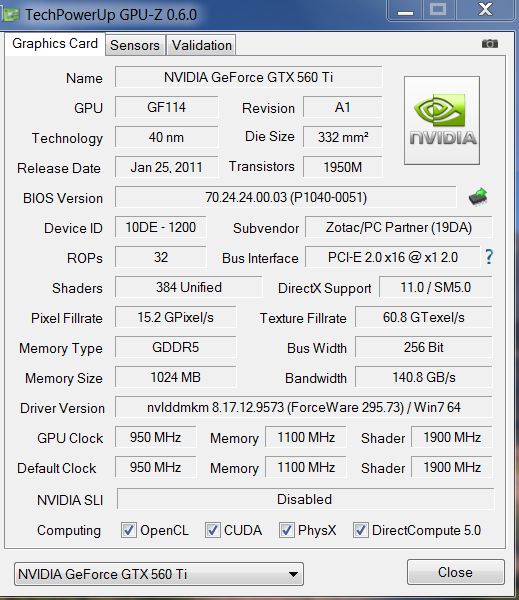
Weeeeee,
somehow it works now
Lenovo x220 i5 2520m 8gb - PE4L - EVGA 460 GTX SuperClocked 1GB
![[IMG]](images/storyImages/egpubench.th.png)
![[IMG]](images/storyImages/egpugpuz.th.gif)
-
I'm pretty sure Apple isn't going to show any love to any enclosure open to user selected parts because more variants means more support problems for them and the frail OS. So even if an iDock of sorts exist, it is probably going to be worse than the XGP. In short it would come with a mediocre or mid-range card that kind of defeats the whole purpose.
-
It's not big, it's enormous.
apple would never develop such a product. they are extremely closed as we all known. they would be the last company in the world to implement an egpu solution.
They prefer to sell new overpriced notebooks then selling gpu upgrades. they will make much more profit. Even the RAM they say it needs to be special mac compatible, which is not true. imagine an egpu...
actually apple doesn't make any product. they are just a ODM.
That's true but if it can be hacked then it's great. But anyway it doesn't matter anymore because in the next weeks we will have several non mac notebooks with thunderbolt. -
Thanks nando4 for obtaining info from HIT on when they'll be getting the 2.1b PE4L. I can wait so I'll shop for a video card and PSU for now. One question I have is that my Thinkpad W520 was pushing some serious heat when I was running the Diablo 3 beta, which may have been one of the causes the video was slowing down for me. I know that the CPU and GPU both have temp sensors, but could it be possible that the CPU was getting stressed more than it would be because the GPU was getting stomped on?
-
Hi Kuro-D,
I had no big troubles to get it running. As you already mentioned I just adjusted the display options in the BIOS and voilá.
If you have any problems just you can also ask me. -
Will try to go in order of posts. Damn.. too many people to quote.
This is pretty much what I have concluded yesterday, apart from the license of the Setup 1.x. More on that down the post
Товарищ, мои поздравления что ты живеш в России. Я и сам прописан в Москве.
Back on topic. Does everyone here has difficulty comprehending what I write? Firstly, to clarify why I use Japanese prices. That is because I live in Japan, made my eGPU in Japan, bought components in Japan, therefore I know Japanese prices. Electronics in Japan costs more, which is the reason my eGPU solution was that expensive.
Secondly, VT is in fact in China. I can confirm that because I did buy ViDock before PE4H and had to return it. And obviously electronics and labor there is cheap, but this has already been explained countless of times. Costs of running a company and have small sales is what makes ViDock expensive. And again, people are mis-comprehending that I care about VT's sales and such. I am just merely stating why BPlus has lower price than VT. That is it. Nothing more, nothing less.
What whole sale? He is a manufacturer. They are not buying pre-built PCBs and put them in pretty boxes.
The reason they do redirect here for the error12 is because they make electronics only. They don't have software developers and because Setup 1.x was made here ("buy to use" is even bigger reason why people should seek support here for this software) is a good reason to do so.
And I believe you misunderstood a lot here. Firstly, AMD on eGPU is mostly out of the game, solely due to the fact that there are not many laptops that can do 2x, Nvidia is a much better player here. Also, Nvidia seems to be showing SOME incentive on this buy improving card's hosting mechanism. I wont ever believe if someone told me that desktop doesn't have enough PCI hosting space. Intel on the other hand sees eGPU in greedy eyes as lost potential money. I wont explain it in tech terms to make this easy. What they did is they placed a lock on 2x and 4x links on new laptops, limiting us to low speeds. Meanwhile they are making new port for it so that if you want powerful eGPU you will be forced to buy new laptop and what ever other overpriced product they will spit out.
Now, the reason why those words were highlighted in a red box by Nando is this.
Copyleft, huh?
Thanks for the career advice.
I did mention I was tired and had no intention of racking my brains on this.
First is you idea of license agreement. I got to say that doesn't do anything good for us. Reason being is that VT users will purchase software one way or the other if they needed. Agreement will probably be settled (if) on cheaper license per copy, which for software means budget gets a reduction. Great for VT users and VT, not so great on software development.
The idea of them selling DIY version is the best one that can be thought of, next to "do nothing". It is entirely up to them to go for it. The reason why its best is because they are hardware seller, so its only logical that we request hardware. This has been discussed plenty (I though I would be bothered to write on it, but I am not) and has been put into prettier words than I can. As for VT, its up to them. And if Mr.Chen thinks this is a liable option, its his choice to go for. Again, not for us.
Exactly my point. I have already explained this before. The reason why they can make them so cheap is because their "break even" is really low. We have no idea how much it costs them for the components. For all we know, it could be as low as $20. No body wants to make a company to just run some sort of charity and provide employment.
Other than that, table seems to be legit. Can't think of anything that hasn't been thought off.
EDIT: One thing did become apparent to me though. How come the TB's box having 150W dedicated PSU makes it a good feature? We are getting limited here to their PSU and its useless if we want a more power hungry GPU. IMO, it is unwanted feature and should be marked as red. After all its like ViDock.
So, how is this not close to ViDock? Sure, you have more compatibility but you did it by hand for which you need access to required tool. ViDock does that for you + some form of portability.
Now, the reason I am bringing this up is directly relevant to the Collaboration subject here, and that being the overall "end cost" if you don't have required parts in your possession before building eGPU. This also allows us to compare the end prices of the products and differences in what we get. Sure some people made it cheaper but that doesn't mean it involves everyone.
Wolf -
It's somewhere close, but what i'm trying to say is excatly what you said in the conclusion. Only if a person has no components to recycle in the project, the final results could be almost the same in prices (even considering that the PSUs provided by ViDock are nowhere near a 80 Bronze certified SFX like mine and in that direction i could spend 30$ for an atx psu with the same "power output" lowering even further the costs). For anyone else is simply redundant. We're not a community of "noobs"; people swaps GPUs between desk and notes, mod their laptops, bring support, develop software and so on, so a working out of the box solution would fit only if there are people that need the "complete" solution (check how many people has done enclosure for their products on the first page compared to the user base that made benchmarks).
Anyway just to clarify, the prices i reported are the consumer ones i paid, that includes VAT, margins charged by the suppliers, but also the distributors ones (so considering that the B2B market has different rules than B2C in terms of shipping costs VAT and in case of VT direct distribution, the price IMHO should be arranged anyway).
Now i'm not blaming VT for their prices (as I said i work in a Sales Dept, so it's my work to bring margins to my company, better i do, better i work), but due the nature of this thread if you give support for a thing that isn't "DIY" what's the point in doing support? If i had no time, no skills, and the certainty that VT would work out of the box, I'm the first that would have moved to their product (and if you check back my first posts on this thread i was convinced to go that way). But:
I have *enough* skill to understand, specific needs (speaking of power) and enough time to invest on the project (i started talking about the solution back in september and it tooks 5 months to have it working), so if i can keep it cheap i'm happier. On their side VT has no "Working out of the box solution" provided directly by them (and that *simple* detail, would justify even a margin of 100% if it were true from my own vision if it was developed by them), but now each addressing issue is forwarded to a 1.x Setup or similar utility (that AFAIK doesn't exist right now). That's why i don't see the benefit in supporting a "commercial" product on a DIY board.
A new product is what we all need now:
- VT can raise their quotes in the market if they make it good enough
- Community can have the choice of the best components
Considering that i half replied above, i will finish the task speaking only of thunderbolt.
Today TB is the road that the market must follow, but if the product will be released as we all expect (and hope also in the near future), will be the proof that the costs can be lowered (and this is not a warning for VT only) because excluding the manufacturing cost, will be clear that the components of an older technology cannot cost more than the newer one (even considering the critical mass needed to lower the prices). Do not forget that if the GUS II will be sold for 150-200$, using it with a EC2C -> TB adapter (that today exists in the BPlus portfolio) the total would cost on par of the VT solution (having as a benefit also a TB connection ready for the future).
Simone -
Охренеть, товарищ, мир тесен, да.
-
I cant send private messages but I am trying to get a coupon for the NBR discount at Harmonic for the setup program, I have just gotten all my equipment.
-
Is there an ETA on the PE4H 3.0 or MSI's eGPU solution? I sold my PE4H v2.4 stuff last summer, and I want to buy another kit soon, but if there's something better coming out soon then I'd want to get that in the interest of future compatibility.
-
Hi,
im getting a new HP EliteBook 8560w with NVIDIA Quadro 1000M graphics for work and im looking into building a eGPU for some gaming. Would this laptop support an eGPU even if it does not have Optimus support? -
From BPlus on Facebook:
-
Apple doesn't even give out their drivers. There is no way that they would ever enter the market, as it means people could hold onto a laptop more much longer without the need to upgrade.
I support Apple, but I do question them time to time. -
Hello. I`am new here.
I bought PE4H-EC2C and tried to use it with my Fujitsu T900, 8 GB RAM, Intel HD video card. The eGPU is currently an old 8800GTS.
I connected it successfully with the tablet, but it only works with 2 GB RAM installed without error 12.
So I tried to use 36-bit root bridge DSDT override steps,
http://forum.notebookreview.com/8377566-post8941.html
but cant manage to compile the aml file. Stopped with 118 errors about missing objects.
Can u help me with fixing the errors?Attached Files:
-
-
Hi,
I have few questions, I hope anyone can answer me
I have Dell Latitude E6420, Intel® CoreTM i5 2520M (Intel chipset series 6), 8 GB RAM, Intel® HD Graphics 3000, 54 mm ExpressCard
1) Would PE4H ver2.4 works on it ? If not then which one ?
2) Would a high end graphics card works on it, ATI 6xxx ? or What is the maximum card it can operate ?
Thanks in advance -
Hi Nando4,
As you suggested I have updated the latest AMD Radeon HD6450 driver, but still no luck. Please see the attached screen shot, where I can not see the 2nd monitor. It is only showing the laptop monitor. Please advice.
Thanks once again.Attached Files:
-
DIY eGPU experiences
Discussion in 'e-GPU (External Graphics) Discussion' started by master blaster, Sep 18, 2009.


![[IMG]](http://www.imagebanana.com/view/zu2bc5c3/egpuvergleich.png)




![[IMG]](http://imageshack.us/photo/my-images/401/egpubench.png/)
![[IMG]](http://imageshack.us/photo/my-images/839/egpugpuz.gif/)