 Problems? See this thread at archive.org.
Hi kizwan,
there was a large memory Resource with a PCI-Address Range in it, but nothing else. Windows wont be able to re-allocate the eGPU. Additionally the PE4H v2.4+ wasnt able to initialize the 8800 GTS correctly because the 1st led went allways red when i tried this way.
Edit: If I follow exactly your orders to Power-On the eGPU before loading Windows it crashes during loading screen. The system hangs and nothing happens without a bsod.
-
-
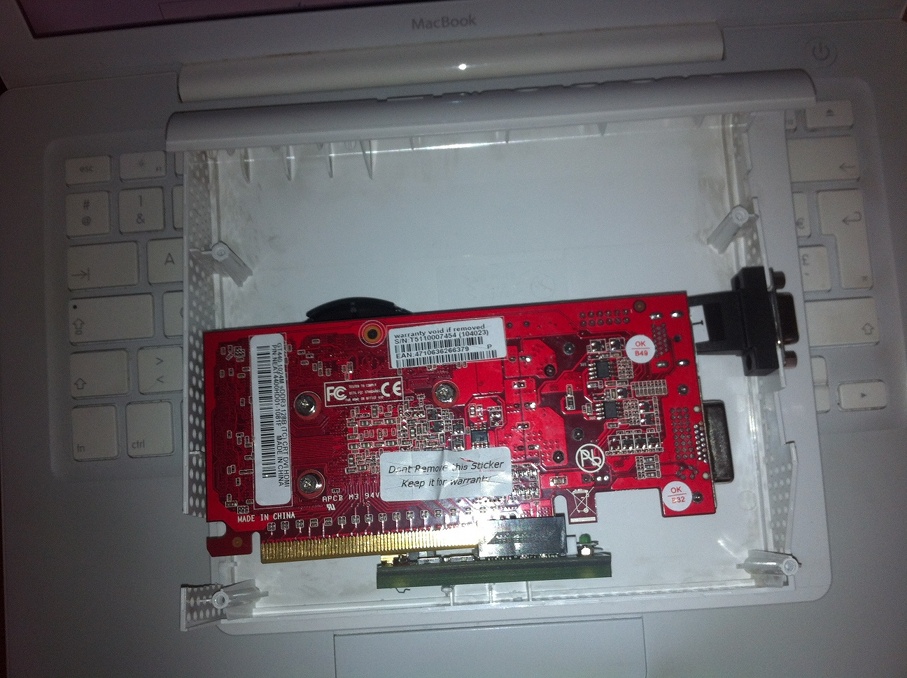
I got a PE4L from ebay (cheapest shipping to france), a 80W 12V PSU (used in a VIA computer I already had) and a GT 440, the aim is to have a portable setup that I can use in LAN, and if this is successful, maybe get a 460 GTX to power up this Phat 360 PSU that I have lying in the garage

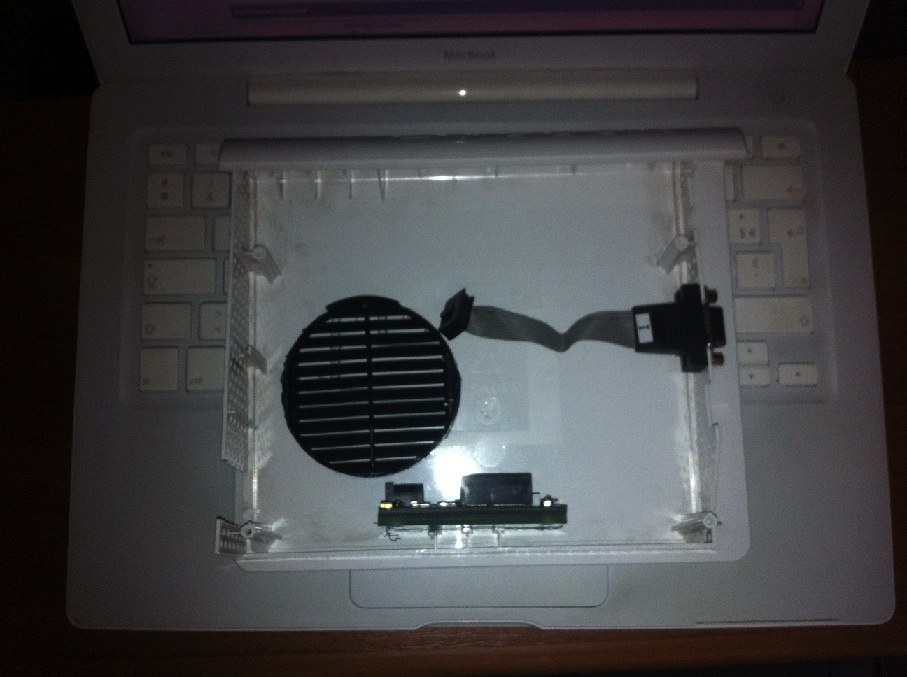
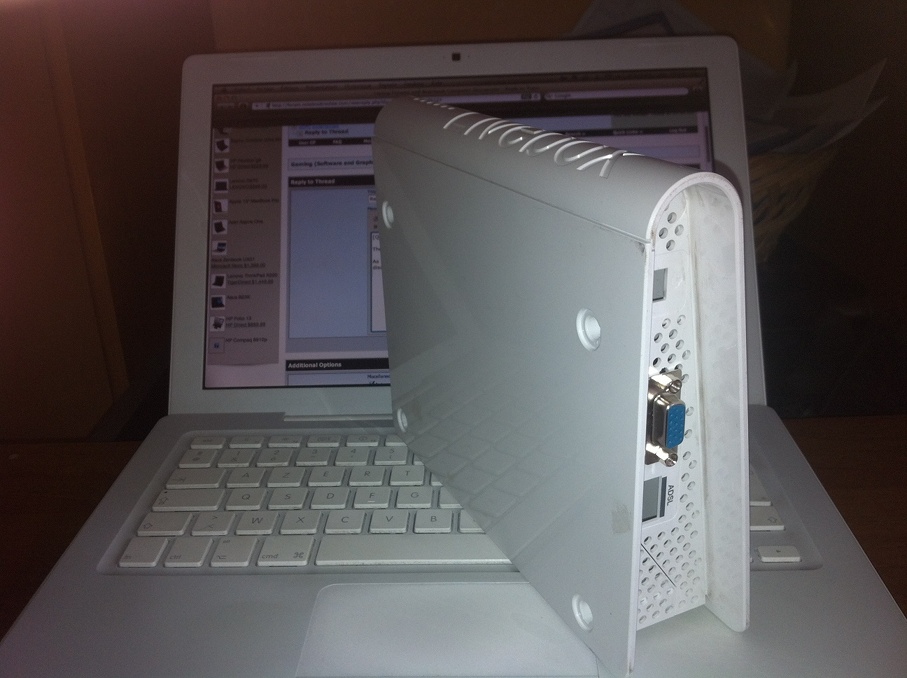
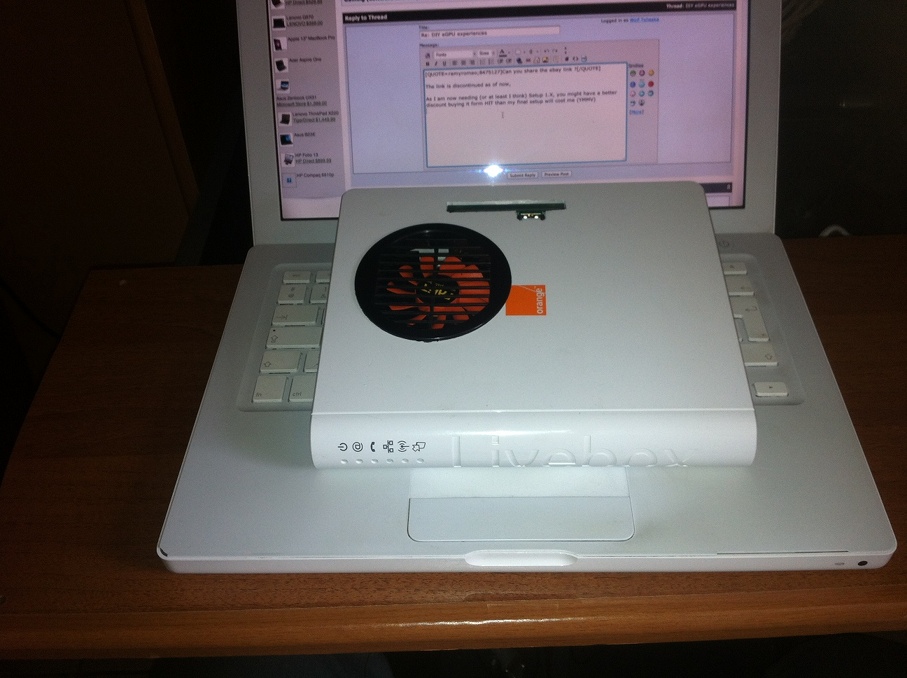
I used a Livebox Mini as the enclosure.
The target laptop is a DELL 5510 (1st gen i5), the GPU powers up, I was able to install the driver, but I am getting a code 12 error.
I then dug a hole in my 36bit space, as seen on the first page, but my card is still in error 12. I think I will need Setup 1.X in order to complete my setup. -
Can you share the ebay link ?
-
It was here: eBay: Neue und gebrauchte Elektronikartikel, Autos, Kleidung, Sammlerst?cke, Sportartikel und mehr ? alles zu g?nstigen Preisen
But it`s temporarily discontinued, i think. -
Can you explain when you connect eGPU? I mean, did you connect eGPU before or after notebook boot or after windows loaded?
-
Please uninstall the driver for eGPU. Try boot without the driver installed. See if it still hangs using the procedure. If it doesn't crash, re-install the driver.
-
The link is discontinued as of now,
As I am now needing (or at least I think) Setup 1.X, you might have a better discount buying it form HIT than my final setup will cost me (YMMV)
I attached some pictures of my case- still a bit rough, but should be portable
Attached Files:
-
-
Anyone interested in GW2 performance on a eGPU?
Sounds like this night (GMT) a video of how the system handles the MMO will be uploaded
-
How much RAM u got ? 32 or 64bits ? Keep feedbacks coming, i have the exact same computer, just bought PE4H today and im planning on using a GTX460 too with optimus...
Gotta be ready for may 15th
-
Hey guys, I have thermaltake power express and the PE4l. I connect a pci-e power connecter straight to the vid card (9600gt) and It's not staying powered on. The fan spins up for a second and the light goes on but powers off immediately. I am not using the molex power connecter to the PE4l as the thermaltake power express only has pci-e power connecters. Any ideas ???
-
I got 4 Gigs o' ram
7 64b
sure about the 15th
What case are you planning to do around the 460 GTX ?
If you encounter problems with the DSDT thingie, I can share you the files the DSDT tool has generated. -
if i want to install newer nvidia drivers, can i mod the nvam file by myself?
if yes how can i do it xD? or is it always the same file so i can use the old one for replacing it in the newest driver software? -
Well, I'm new here, and waiting for thunderbolt GUS... and out of sudden, I got this mad idea.
When pci-e is on wider bandwidth then x4 link, crossfire can be enabled. Right? and thunderbolt is supposed to be .2 x4 link.
Then can we hybrid crossfire mobile 6770m or 6750m to desktop HD 6670, which supposedly have same chip design?
You know, 67XXm can crossfire with mobile A8 APUs, and they have same GPUs as desktop A8 APUs.
And they can crossfire with HD 6670. So why not the same with 67XXm and desktop 6670? -
Hey guys I didn't know if anyone else follows ViDock on Facebook but their C2 standard will support USB 3.0 thanks to this PLX controller. ( PLX Technology : USB Controllers : USB 3380)
You can see a demo of the controller here. ( PLX Video)
So with the upcoming ViDock G4 you could expect ~PCIE 2.0 x1 speeds from your GFX cards. Not bad at all if you can't get ahold of a laptop with Thunderbolt.
In my situation I would use a ViDock via USB 3.0 for a sound card since it would have plenty of bandwidth. Then I'd use a Thunderbolt ViDock for a GPU since it would benefit more from the extra bandwidth.
Really cool stuff in the world of eGPUs! -
Yes, the DIY eGPU users can already do pci-e 2.0 expresscard solutions (PE4L 2.1b) for a third of the cost of a ViDock to do it, with more flexibility and will have the equivalent when Thunderbolt is released. So yeah, cool stuff is happening in the eGPU world.
Thunderbolt eGPUs whether by BPlus or Villagetronic are dependent on Intel/Apple releasing chips to make it a possibility. ATM large vendors like MSI have an advantage to take initial market share as they've been accepted by Intel as partner developers. BPlus/VT have not.
NOTE: Villagetronic provides a commercial eGPU solution so your purchases substains their profits! That means you must get pre/post-sales support from them. The more the community self-supports their products without them being discounted, the higher their profits. This is how you take advantage of someone's generosity spirit.
So then the best place to discuss Villagetronic products (product endorsement, requests for assistance) is on their facebook page.
USB 3.0 eGPUs
As to the USB 3.0 component of your message, per the Thunderbolt, USB 3.0, PCIe 2.0 eGPU update -
Hmm, way to shoot down my hopes and dreams Nando!!
Thanks for the insight, though. I didn't realize you had posted all of that info.
Also in no way am I trying to endorse Villagetronic. I have seen their products in the past and have heard great things about them. Their info of their C2 looks really promising. Despite Intel neglecting them support I bet they will be able to come up with a solution. -
Thunderbolt eGPUs will be massive due to the pro-notebook nature of computer sales. So you can count on BPlus and VT getting a product out likely at very similar release dates once Thunderbolt chips filter their way to them.
I don't support VT here nor encourage others to do so either. VT's CEO VillageHubertChen made an debut appearance on NBR a week or so ago here then disappeared from discussion in this thread just as quickly when his costs, profits and reasons why his product should be discussed in this forum were questioned.
Clearly, if a community rallied and self-supported his product then it would reduce his support costs. That is great as long as the reduced costs are passed to the buyer. If reduced support costs are simply used to increase profit margin then it's taking advantage of the generous spirit of his customers.
The real test came when it was proposed that Villagetronic to come up with a VillageEco product to compete with PE4L/PE4H, but without support and no-ties with his other products (read: foot-in-the door to get them endorsed and supported on here). Making a VillageEco product would show his commitment to budget eGPU solutions.
We've not heard a word from Villagetronic's CEO since. Could it be that he is looking for larger rates-of-return elsewhere? -
I just want to share, if you get BSOD like this, disconnect all external (USB) drive(s) prior connecting eGPU to notebook.
![[IMG]](images/storyImages/BUGCODE_USB_DRIVER.jpg) Last edited by a moderator: Feb 6, 2015
Last edited by a moderator: Feb 6, 2015 -
Going to try out crossfire-ing hd 6670 and 6750m.
Already ordered hd 6670 and just waiting for GUS II to launch...
Well... if it works, then probably it will be another way to use external graphic card with internal screen.
Probably it won't work. Even though it's the same chip, probably driver won't recognize it... but worth a try.
-
Finally I got my setup done and wanted to share it, as thanks to you I am the proud owner of this setup
my setup:
Zdj?cia - Pokazywarka.pl
3DMark results:
Zdj?cia - Pokazywarka.pl
3Dmark06 dGPU - 8130
3Dmark06 eGPU - 15974
3Dmark11 dGPU - P1217
3Dmark11 eGPU - P3754
Cheers!
Lenovo y460, i7 640m, 2x4GB RAM, PCI-e SSD 80GB, dGPU ATI 5650m, eGPU MSI GTX 560Ts 2GB OC
Only one question, it is possible to configure startup file not to select every time all the options in setup1.x ? can anyone share example of this file that actualy works? Please help! -
Congratulations on a successful implementation and thank you for sharing the Setup 1.x configuration video. I've linked it in the Setup 1.x page.
You can hit F3 after any menu you select and run successfully to add it to startup.bat. Shortcut: based on watching the video, your startup.bat should look like the following. You can edit your startup.bat by either selecting startup.bat->!Edit in Setup 1.x or WIN+R in Windows then type notepad v:\config\startup.bat Change it to contain:
I added the 'call speedup lbacache' (disk caching) to make start-to-end runtime a lot faster. When you select the Setup 1.10b5: automated startup via startup.bat menuitem it will take less than 1second to do this and get you back to the Win7 bootmenu. That's a lot faster than selecting the menus manually as you are now.Code:call speedup lbacache call iport dGPU off call vidwait 60 10de:1200 call vidinit -d 10de:1200 call iport reset 4 call pci call grub4dos mbr
-
~ deleted ~
-
He has actually been hard at work on the completion of his C2 article. This low cost cable would be especially made for egpus, giving much more bandwidth at a lower cost than thunderbolt.
Mr. Chen has always wanted a lower cost vidock, it seems logical that with more support/sales he would lower the price. If he sold more and kept the price the same, Vidocks would still not be competitive against Bplus. That right there would further lower sales.
I still do not see why you Redirect VT users away from these forums. Does that mean I should leave because I own a vidock? Me and many others come here to help solve other problems and discuss issues with our egpus (mostly error 12) -
Thank you Nando, it works great, now I am not afraid to reboot anymore, 1 second just as you said
As for the setup movie, sure you can use it, I am happy to contribute in this project
-
Hey everyone,
I just got an HP laptop on clearance the other day and was interesting in building an eGPU. I was wondering if anyone could help point me in the right direction as to which mpcie adapter to buy, and if its even possible?
First off, my laptop specs: HP Pavilion dv7-6b32us Entertainment Notebook PC Product Specifications HP Pavilion dv7-6b32us Entertainment Notebook PC - HP Customer Care (United States - English)
Second, Everest Screenshot:![[IMG]](images/storyImages/2qn36on.png)
Third, Memory:![[IMG]](images/storyImages/23k6d4x.png)
Fourth, I/O:![[IMG]](images/storyImages/2me7mgp.png)
---------------------------------------
I'll pretty much put any video card in there, obviously I prefer a Nvidia to take advantage of the Optimus LCD emulator. I'm not afraid to have to use a power supply either, the more powerful card the better haha!
Anything else you need just ask! Thanks! -
So I finally installed Windows 7 64-bit, and the same thing happens. I got the Windows found new hardware message the first time I plugged the express card adapter in, but both 295.73 and 285.62 with modded inf files don't recognize it. It also doesn't show up in the device manager and I don't get any found hardware messages when I plug it in now.
Any suggestions? Thanks in advance. -
Weird windows detected new hardware but it doesn't listed in Device Manager. We can't move forward until it is detected in Device Manager at least. Do you see any unknown device in Device Manager? Please download & run System Information Viewer >> click "PCI Bus". Look whether eGPU is listed or not in "PCI Bus" window.
-
While your DV7 is a Sandy Bridge Series-6 system, it has no expresscard slot. Only option would be to run x1.1Opt using a PE4L-PM3N or PE4H-PM3N. There you'd need to swap out the wifi via the underside covers if it's accessible. You'd probably also need to use Setup 1.x to overcome HP's whitelisting of mPCIe slots.
If you have a return policy I'd suggest returning it in favor of another system with an expresscard slot in the thin-and-light link in my sig. A Dell Vostro 3750 is a budget 17" system to consider. There you'd get a faster x1.2Opt link with a simpler cabling system plus a GT525M dGPU option. -
Kind of off topic, but I have found it quite odd that you have been in direct contact with Chen in regards to publishing a review of your Vidock + Sonnet Thunderbolt setup. Why can't / couldn't you post your comments about your solution? Why is Chen saying that they are working with you to get out a review? There could be perfectly valid reasons, but it is not very transparent what is going on (nor does it have to be).
I am commenting because I find it hard to take you as an unbias/serious advocate for the ViDock. -
Hi every body, i made a new eGPU box.
I use an external case for 2 5,25 SCSI device.
![[IMG]](images/storyImages/001dwu.th.jpg)
![[IMG]](images/storyImages/002dzl.th.jpg)
I use RCA connector for outsource power switch and power led near my external screen.
![[IMG]](images/storyImages/009rls.th.jpg)
![[IMG]](images/storyImages/003gmo.th.jpg)
![[IMG]](images/storyImages/010mpy.th.jpg)
![[IMG]](images/storyImages/011mfk.th.jpg)
![[IMG]](images/storyImages/012nt.th.jpg)
I use a Bequiet PSU, 300W, 2x18A for 12V, and a 14cm Fan scythe
![[IMG]](images/storyImages/004mgd.th.jpg)
![[IMG]](images/storyImages/006fyo.th.jpg)
![[IMG]](images/storyImages/007ocf.th.jpg)
![[IMG]](images/storyImages/008zo.th.jpg)
![[IMG]](images/storyImages/005mzc.th.jpg)
External view :
![[IMG]](images/storyImages/013wtv.th.jpg)
![[IMG]](images/storyImages/015ip.th.jpg)
![[IMG]](images/storyImages/014tgw.th.jpg)
![[IMG]](images/storyImages/016uvu.th.jpg)
![[IMG]](images/storyImages/017ry.th.jpg)
![[IMG]](images/storyImages/018dna.th.jpg)
![[IMG]](images/storyImages/019os.th.jpg)
![[IMG]](images/storyImages/020xe.th.jpg)
![[IMG]](images/storyImages/021utu.th.jpg)
![[IMG]](images/storyImages/022jl.th.jpg)
![[IMG]](images/storyImages/023cw.th.jpg)
-
OK, I think the issue is hardware-related. I actually have two PE4H cards, one is v1.0a and the other is v2.4a. I tried the v2.4a card again today, and the GT 430 was recognized intermittently both by Windows and SIV. I tried various combinations of the PE4H cards, express card adapters and cables and it finally stayed recognized with the v1.0a card long enough to install the NVIDIA drivers. Upon restarting Windows, the screen flickered for a while and now the GT 430 is not recognized again.
Also, I'm using a 12V 6A ac adapter. Any thoughts on trouble shooting? -
I just noticed that when I unplug and plug the express card adapter back in, if I watch the Windows device manager, the GT 430 will show up for a second and then disappear.
-
Nice!
![[IMG]](images/storyImages/017ry.jpg)
Hmmm... Can you test with ATX PSU? And do you have desktop computer to test your GT 430 is OK? I don't think either your PE4H are faulty though.Last edited by a moderator: Feb 6, 2015 -
ty again nando...works now with newest driver and a little bit more points xD
-
It was the ac adapter! I tried it with the ATX power supply from my desktop computer and it worked great. Thanks!
-
ok so i ordered a pe4l and a gtx 550 but now while im waiting im reading about pci-ex overclock and im wondering how its done ?
is it done via pll or some other hardware mod?
or do some laptops have a bios adjustment for pce -ex like desktops do?
and i apologize if i asked in the wrong section.
~edit~ i have a dell lat e5400 with ich9m chipset and slg8lp554v pll if this helps -
Dell wire their PLL's SMBUS interface via an EC controller which software like setfsb/setpll can't read. It's expecting the PLL to be wired to an Intel I/O controller instead. Making matters work, the EC controller they are using has no public datasheet available to see how to program devices via it. Software overclocking those systems isn't going to happen anytime soon.
I was however able to overclock a Dell E4300's CPU with the same PLL as yours by performing a simple pinmod. No pci-e overclock happens here. It still registered substantial DIY eGPU benchmark gains.
REF: Dell E4300 [email protected] dual-IDA FSLx overclock
DIY eGPU implementation: [email protected] 13.3" Dell Latitude E4300 + NVidia GTX560Ti @x1.Opt
The above pinmod cannot be applied to newer i-core Dell systems like say the E4310 successor since their PLL only has a 100/133Mhz settable option, with them already running at 133Mhz.
REF also: http://forum.notebookreview.com/har...pll-pinmod-overclocking-methods-examples.html -
We already reached 1,000 pages in this great thread !
-
@Joss27 : Very nice enclosure man !!
same color as your bike ! great job very precise and meticulous ! Maybe one of greatest of the NBR forum ! (made in France )
-
@Joss27 : Nice enclosure ! everything from the ground up to the finishing touches is made with logic & taste
-
Thank you Guy's! It's the case that i would like made at the beginning, and i found it only 3 weeks ago!
Now it's more quiet and more cold than the old box!!
-
Guys i dont understand why everyone is using a huge psu. A smaller psu like a xbox adapter would allow to create a more portable implementation, isn't it?
I think thunderbolt is basically the same of the current pci-e(3.0?) protocol but in a newer closed appearance. I guess they discovered people are creating cheap egpu solutions, now they can claim profits for egpu solutions since they have the market in their hands due to licences/encryption chips. I hope the DIYegpu is not going to die in future. -
I'm about do decide which gpu to buy in order to set up and running my egpu!
There is already one implementation with my system, i.e. Jeykhob's X59SL. He used an Nvidia Fermi GTS 450, which requires (I think) 128MB of free PCI-space, without needing any PCI compaction.
The point is: I was thinking of opting for an AMD card, since my system can't handle optimus and AMD is better at x1 1.0 bandwidth. How can I find out if the system will be able to accomodate the 256mb of contiguous PCI space that AMD cards need? -
im in possession of an m11x r3, im looking to create a portable on the move and is powerful which brings me here. when im on the move the m11x is perfect does everything i need but my problem is now when i get home im in need of a way to set up my m11x r3 to push multiple monitors specifically 30" monitors 2-3 at 2560x1600 i believe it requires dual dvi and seems one of these eGpu's/vidocks would be my solution can anyone confirm this for me? sorry im not too tech savvy
also i saw this post a few months ago if the m11x is 2.0 capable what kind of fps could i get? -
For one thing the xbox adapter is known to have some issues with burning up spontaneously (and I suspect the power quality isn't so good either). For another thing, 12V brick adapters tend to be quite expensive compared to a old computer PSU. For portability though, sure, it's a good idea.
Hey guys it's been a million years since I've dropped by this thread, got swamped by homework and stuff so never had the chance to run some tests for y'all before the pcie 2.0 capable PE4L and PE4H were released, sorry about that! It's exciting to see so many 1.2 opt systems with newer cards delivering absurd levels of performance, and it is pretty cool knowing I had the first ever 1.2 Opt capable system
Quick little update that's relevant for people trying to cheap out and get a PE3A. I noticed someone using a riser card with the PE3A, very nice. I noticed that after several months of use my PE3A seemed to have an unreliable electrical connection at times. I suspect it is my heavy GTX460 not being supported properly (I have one edge sitting against my laptop lid, and the other end is held up by the PE3A). The problems have gone away, but I haven't been playing games much anyways. Another issue is that even though I have the 5V on the PSU wired up to the PE3A, if I try to charge my phone off my USB hub connected to the USB port, all devices connected to the hub start going crazy and I hear the device connect/disconnect sounds playing over and over in Windows.
I bought a Dell RM112 PSU off Ebay because it was 23 dollars, my old Antec broke, and it's a 80+ Gold rated PSU. My first RM112 was defective and eventually stopped working after making buzzing noises for its short life, so I got a replacement from the seller which has been going strong ever since. -
Hey guys,
I just finished my eGPU, but I got some problems with it.
Laptop is:
HP Compaq 6720s ICH8 bridge,
T9300 2.5 GHz
4 GB DDR2
Intel X3100 iGPU
WinFast GTX 560 eGPU
In first stage I used a no-name 450 W power supply 12V/18A (1 FDD, 4 molex connectors, and that's it, all were used by the eGPU, because the FDD powers the PE4H, and the 4 molex converted to 2x6 pin PCIe) but when the GPU is at high capacity after 10 minutes it tends to shut-down (BSOD) and reboot. In desktop applications works like a charm.
So I decided and bought a Cooler Master GX 500W Lite, with 12V/36A. When I set it up and plug the express-card in, the 3 leds (3.3, 5, 12V) on the PE4H lights on but in 5 seconds when the monitor should turn on, the 12V led on the PE4H (v2.4a) shuts down, the cooler on the ePGU and PSU stops and I got a freeze or BSOD and reboot.
I have to mention that I tried with different drivers, same result, and tried with and without the 12V bypass jumper set on the PE4H.
Do you have any ideas what is this cause, some protection on the PSU (because it has OVP, SCP, OPP protections), the no-name has no protection and it's working while it's not heavy loaded, why does the PSU stopping? Has anyone else used a Cooler Master PSU with the eGPU? -
5~8 Euros for a used xbox PSU isn`t sooooo expensive
On Amazon you get a new one for 27$ -
Wohooo! 10000 posts in the DIY eGPU experiences thread - this is dedicated to one of the best communities on the internet:
![[IMG]](images/storyImages/egpu10000.jpg)
-
Anyone, any idea about http://forum.notebookreview.com/gam...51-diy-egpu-experiences-1000.html#post8482599 ?
-
Why 10000? Did you mean 1000?
DIY eGPU experiences
Discussion in 'e-GPU (External Graphics) Discussion' started by master blaster, Sep 18, 2009.




![[IMG]](http://i1236.photobucket.com/albums/ff457/Kizwan_Chronos/BUGCODE_USB_DRIVER.jpg)


![[IMG]](http://imageshack.us/photo/my-images/31/001dwu.jpg/)
![[IMG]](http://imageshack.us/photo/my-images/52/002dzl.jpg/)
![[IMG]](http://imageshack.us/photo/my-images/685/009rls.jpg/)
![[IMG]](http://imageshack.us/photo/my-images/193/003gmo.jpg/)
![[IMG]](http://imageshack.us/photo/my-images/845/010mpy.jpg/)
![[IMG]](http://imageshack.us/photo/my-images/845/011mfk.jpg/)
![[IMG]](http://imageshack.us/photo/my-images/59/012nt.jpg/)
![[IMG]](http://imageshack.us/photo/my-images/204/004mgd.jpg/)
![[IMG]](http://imageshack.us/photo/my-images/821/006fyo.jpg/)
![[IMG]](http://imageshack.us/photo/my-images/444/007ocf.jpg/)
![[IMG]](http://imageshack.us/photo/my-images/692/008zo.jpg/)
![[IMG]](http://imageshack.us/photo/my-images/52/005mzc.jpg/)
![[IMG]](http://imageshack.us/photo/my-images/88/013wtv.jpg/)
![[IMG]](http://imageshack.us/photo/my-images/534/015ip.jpg/)
![[IMG]](http://imageshack.us/photo/my-images/804/014tgw.jpg/)
![[IMG]](http://imageshack.us/photo/my-images/834/016uvu.jpg/)
![[IMG]](http://imageshack.us/photo/my-images/215/017ry.jpg/)
![[IMG]](http://imageshack.us/photo/my-images/7/018dna.jpg/)
![[IMG]](http://imageshack.us/photo/my-images/24/019os.jpg/)
![[IMG]](http://imageshack.us/photo/my-images/406/020xe.jpg/)
![[IMG]](http://imageshack.us/photo/my-images/209/021utu.jpg/)
![[IMG]](http://imageshack.us/photo/my-images/268/022jl.jpg/)
![[IMG]](http://imageshack.us/photo/my-images/843/023cw.jpg/)
![[IMG]](http://img215.imageshack.us/img215/6681/017ry.jpg)


