Problems? See this thread at archive.org.
Well, I had the card in a desktop while I was waiting for the PE4L to arrive, and it worked perfectly then, so I don't think that's it.
Neither the card nor PSU get even remotely warm, so I guess it must be the driver. I'm using 270.61 Verde drivers with the modded Nvam.inf, so I might try installing 270.51.
-
Is it too hard to test it again?
-
Heh, it is at the second. My family is a bunch of laptop lovers, so we only have one desktop between the 3 of us and it's being used at the moment.
-
Another thought; I tried to search for a quick guide on how to install two different gfx drivers if I decide to go for the ATI card, but I came up short.
Would it be easier to go for a Nvidia card even though I already have that as my internal gfx card?
Lurifax -
installing an external ATI along an internal Nvidia is just installing the respective drivers.
installing an external Nvidia with an internal Nvidia is in fact a bit trickier since you need to install both cards under the same driver. See one of my previous posts
if you are able to do an optimus setup then go for an external Nvidia. If not then ATI is seen to provide better performance at x1. -
Too bad (pricey) : http://www.pacificgeek.com/product.asp?c=216&s=1067&ID=52923&P=F
The only one :/ -
So it doesn't really matter which version + which revision will I get?
Do I have to use ATI as external graphics card if my internal is ATI? Thanks!
Also with DIY vidock will I have the ability to move windows from external to internal screen? -
PE4H provides a better stand for the GPU and the possibility to do x2 and up combos; get the latest version/revision is my recommendation, they include for example a delay so that it is possible to hook up the ViDock to the notebook at startup without the BIOS detecting it and causing a BSOD.
No, it is possible to use Nvidia external gpu with ATI internal gpu and vice versa. Any combination is theoretically possible.
There are some options. Best performance is through optimus, but some other methods are available, check the FAQ section part 2 on the first page of this thread for details. -
thanks for quick answer

I think you misunderstood me - I don't want to play games on internal screen.
When doing office stuff I want to have the ability to move windows from one screen to another as right now I do with dualscreen (1 internal + 1 external) setup. -
No problem. Note that i edited my post about the PE4H/PE4L, there are some slight differences.
As for your question, i did misunderstand. on my setup i am able to extend my desktop from the internal display to my external display. then you could move your windows from screen to screen. hope that answers your question. -
I've been looking for this kind of a setup for quite some time and now i'm ready to turn to the Dark Side
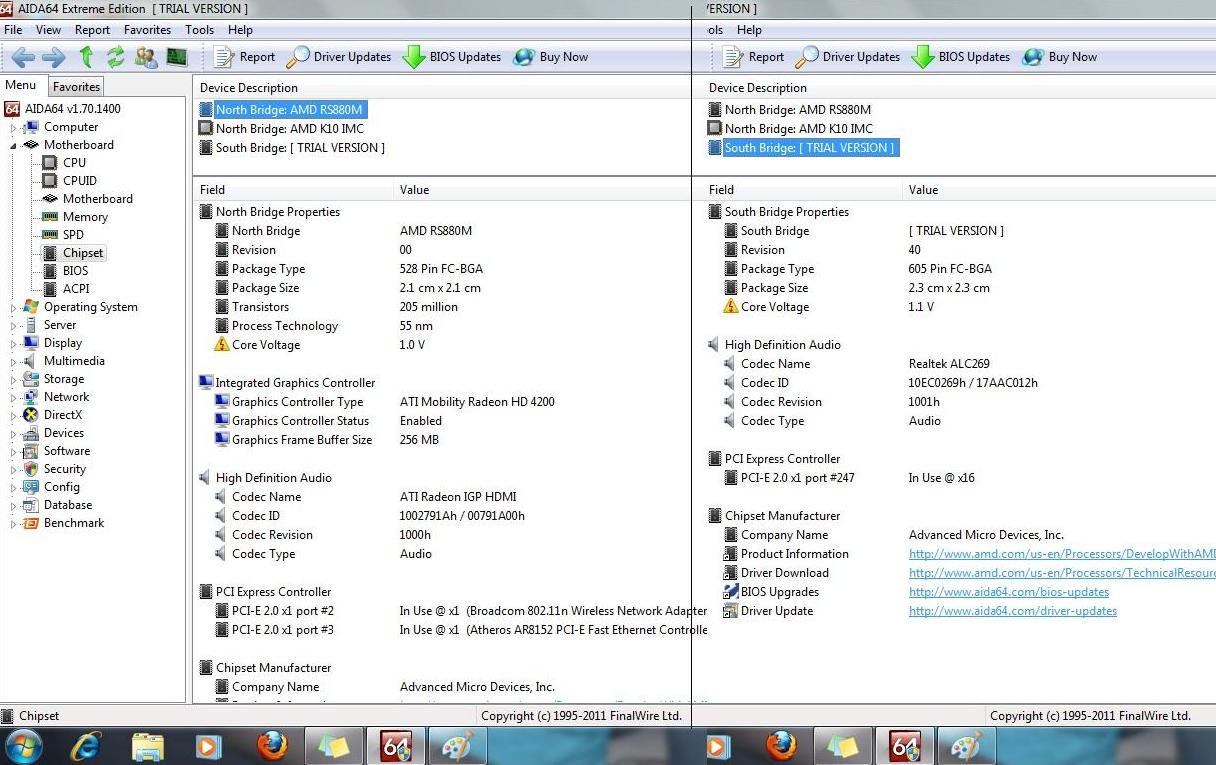
.. Thanks to Nando4 for coming up with this setup and others who have contributed with their knowledge and insight.. I'm in a Dilemma and need your advice.. I have 2 laptops a AMD based Lenovo Z565 and an Intel Based HP Pavilion dv6-3257cl and i'm not able to decide on what hardware I really need..
The Lenovo Z565 goes like this:
AMD N660 dual Core @3.0Ghz
3GB DDR3 1333Mhz
ATI HD 4270
with one express card slot
![[IMG]](images/storyImages/lenovonbsb.jpg) [/URL] Uploaded with
ImageShack.us[/IMG]
[/URL] Uploaded with
ImageShack.us[/IMG]
I can't understand which PCi E port the express card slot is using.
Also Port #247 in Use @x16 on the south bridge doesn't make sense to me atleast.
And can only see one physical port on the back of the laptop (Wireless card)..
I guess (Not Sure) x2 link is possible through the express card slot (if it is taking up Port #1 ) and the one PCi E slot (which takes port #2) on the back..
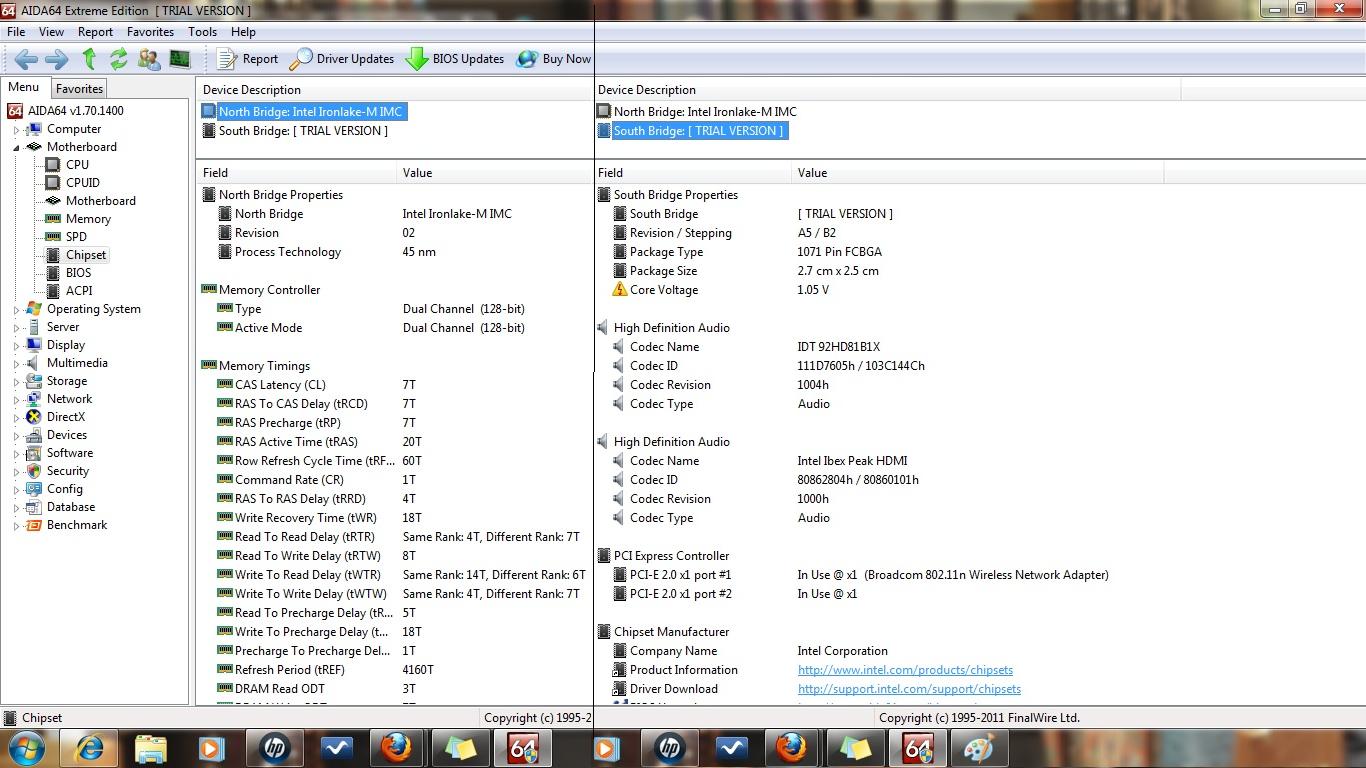
The HP Pavilion dv6-3257cl goes like this:
Intel i3 370M @2.4Ghz
4GB DDR3 1067Mhz
Intel HD Graphics
No Express card slots
![[IMG]](images/storyImages/hpdv6nbsb.jpg) [/URL] Uploaded with
ImageShack.us[/IMG]
[/URL] Uploaded with
ImageShack.us[/IMG]
I guess this one has only 2 PCi E x1 ports.. and i can only see one of them physically (Wireless card), I can only assume the other one is being used by the Memory card reader..
So i guess x2 is not possible on this one.. I wonder if x1E is possible.. i'm confused..
given my situation I want to know what options I have.. do you guys think I should go with a PE4L and live with x1 or is it possible to have an x2 link with PE4H.. Or is it atleast possible to get x1E on any of my laptops..
In Short I'm very very very confused
Please help guys!!!
P.S: I also have an Acer H5360 720P DLP 3D projector (Nvidia 3D vision certified), so I need advise on buying a good graphics card ATI/Nvidia which can do 3D at 720P despite being crippled with x1 or x2 bandwidths.. with ATI I can do with DLP glasses(Cheaper option), with Nvidia I can go for a 3D vision kit.. I'm really counting on you guys..Attached Files:
-
-
bugz_6891, what I'm thinking:
Your Lenovo: The x16 port is the ATI GPU, port 3 is the ethernet chip which is most likely soldered to the motherboard. So try any EC and see if it shows up as port 1. If so, you can do a x2 setup with PE4H/2x mHDMI/EC2C/PM3N by removing your WiFi card. This would be the fastest option for your Lenovo - see first post for GPU selection.
With your pavillion, if your WiFi card occupies the only PCIe port physically available to you, you can do a x1 Setup. However you can do x1E or not, with your i3 you are able to do a x1.Opt setup which might give you better performance anyways.
Now it's just a matter of how many you want to spend on a graphics card and what performance target you got. I think you might come off best with either a x2 on your Lenovo or a x1.Opt with your HP. Both would perform in the 10000-14000 3DMark06 score range with a NVidia 400 series GPU. There are less ATI results available in the first post but have a look there.
Concerning your 3D beamer, if you want to watch 3D movies, you can take any mid-range card. -
Pyr0, Thank you for the quick reply, So I need to find which port my EC slot takes up.. if it takes port #1, I can go for a P4EH to get x2 else switch to my Pavilion and setup a x1.Opt with a P4EL
I understand x2 > x1.Opt > x1E > x1
Sorry i was not clear, i'm also looking at gaming in 3D at 720P on my beamer. Hence I'm looking for a Gfx card which can do that at x1/x2 speeds.. I have about $300 for the gfx card and PE4h/PE4L Module together, If can save on PE4L I can spend a little extra on the Gfx card.. Any suggestions? -
I think that a GTX460/560 will give you a good performace per buck and should be able to render newer games med-high to high details in 3D and 720p. The AMD CPU is as strong as the i3 and I think both setups will be in the same performance range (x2 vs x1.Opt). If Opt compression gets available to x2 setups anytime (you can't tell for sure atm), of course you'll get better results with your lenovo and more expensive PE4H setup.
-
hi guys, for those that are interested, someone at the Let's figure out how to convert internal MXM connector an external PCI-E x16 box thread has posted a link to a torrent which provides documentation for PCI cabling which may provide more insight into making a x16 capable DIY Vidock.
-
i have a toshiba 3D laptop with integrated x16 GPU Nvidia GTS 350m which is more than enough for most 3D games @ 72op as it is powered by quad corei7-740qm..but for heavy games like burnout paradise or bad company 2 or just cause 2...you have to lower the details, and in some contexts it is not even enough...so i was expecting a lot from my Diy vidock setup at X2 pci-e gtx 460, but i was quite disappointed as if the details level is not an issue anymore, in these heavy load contexts where a lot of texture gets loaded, the constraints on the pci-e bandwith affect the fps in the same way the power of gts 350m was at first...so no real improvement overall here to play in 3d vision..but a lot of great 3d games are still playable : tomb raider underworld for instance,....hope this helps!
-
Yeah.. and it all depends on wether the EC takes port #1 or not... I'll have to check that before buying anything..
Pbareges, Thank you for the update.. I see that you have a 3D capable laptop.. Just to make sure did you use an external 120Hz display with your Vidock setup? I've seen that the performance of this vidock setup is staggering when connected to an external display.. So was just hoping i could get more frames when using an external 120hz display. -
Been playing with intel HD drivers and nvidia drivers for a couple of days now without success.
Also tried your approach and nandos new nvam file for 270.61 but nothing worked. I will try once more form a clean install of w7. However, I think I know what I have been doing wrong:
When w7 recognizes my gpu for the first time it starts to install drivers for it. And I just let it do it. Is that the right way to do it? I could also:
* Install the drivers that came with the card
* or don't install any drivers when the gpu is recognized (and then just install the 270.61 drivers) -
Hello, new to this group and forum. Bought a Lenovo x201 tablet in November, upgraded to 8 gb RAM, so far working very well. Typically use dual monitors. Desktop computer burned up, so I'm thinking about using the tablet for both desktop and laptop duties. That means I have to get dual video output from the tablet to my dual 20.5" CRT's, and at a refresh rate that is acceptable. That brought me to either use multiple displayport USB adapters which don't support >60 hz refresh rate, and get LCD's, or get a videodock, diy vs manufactured and keep my current monitors. After reviewing a lot of info here, thanks to all of you, I decided on the diy route. I have received my hardware from Bplus today, and want to hook it up.
Specifically, I have an HP 12V 1A power supply with outer tip negative. The PCMIA board has both a PSU connector and a DC plug in power connector. The DC plug in connector has the symbols indicating
"outer tip negative, inner tip positive/outer tip positive, inner tip negative"
which I interpret as it doesn't matter whether the orientation of the DC power supply is one or the other. Is that correct?
Thanks in advance. -
yep i only tried with an external 120hz display (a 3d dlp projector) directly wired to the vga connector of gtx 460 as without optimus internal display would be terrible i think.
-
I assume 1A is a typo, that would be pretty bad lol.
I think the adapter doesn't do any signal processing so you can always hook the power supply up and see if the +12V is in the right place. It's not very hard to get it to work both ways, all it needs is a rectifier so I'd do a quick visual inspection of the board for one. If you got the PE4H it has an onboard DC-DC converter I believe which SHOULD (can't be certain) be able to accept either way. -
Shielding negative inner tip positive is perfectly fine for the PE4L. Depending on your graphics card, you should have at least 5-6 Amps @ 12 V. If you leave the floppy connector unpowered, your ExpressCard slot has to power the graphics card's 3.3 V directly. This can be problematic sometimes. Thats why the PE4L features a 5V to 3.3V DC/DC converter. Please give some additional info about your setup.
-
Thats Sad news for me.. did you try x2 or x1.opt on your setup? -
Thanks for your replies.
I bought the PE4H version 2.4 from Bplus, with the power switch, cable, express card and the PCIe board for the graphics card.
There is a rectifier on the PCIe board, RS507L.
The adapter I have is 12V and only 1 amp. If I'm going to need 4-5 amps, then I imagine it may be best to use an old power supply. If I do use a power supply, and plug in the 24 pin connector to the switch board and then connect the floppy connector from the psu to the PCIe board, is there any allowance for a fuse in case of psu malfunction?
I am planning to use either an old EVGA GeForce 7600 GS or PNY Verto graphics card. My monitors are both Mitsubishi Superbright Diamond Pro 2070 SB 20.5".
Thanks in advance. -
i run a x2 setup through EC+MPCI-E on H55 Chipset (x2 confirmed under gpu-z)...i cannot do x1.opt as my onboard gpu is nvidia not intel..
i was also expecting better results but i guess 3d vision is consuming more pci-e bandwith than just regular 3d given the good benchmark results on RE5 in x2 mode reported by other users. also maybe RE5 is not a good benchmark to assess pci-e limitations...maybe some heavy games like COD WW or just cause 2 under several configurations would make the performance assessment easier...but it would become a pain to make a simple synthesis like the one provided on the front page on this forum (thanks again nando for your incredible work!!)
that's why i supported the nvidia forum post initiated by one user of this forum to unlock optimus for all configs...i also sent a formal request to nvidia support to unlock fermi cards copy engine power on constrained pci-e lanes highlighting the fact that several pci-e scaling benchmark studies found that ati cards were found to be much better at optimizing pci-e bandwith and it was a shame given that nvidia fermi cards are capable of the same performance when copy engine is unlocked! -
1 amp is no good. I'm not sure how much power the PE4H can handle, but a floppy plug doesn't sound like enough for a video card, seeing as it only has 1 yellow cable that's thinner (? or same size) than each of the 3 12V cables on a PCI-e 6 pin plug, but it might work, though I'd consider changing the wire to thicker gauge. PSUs have fuses built into them, I don't think you need to worry?
-
I have a D630, and following advice from here, I can boot into Windows with DIY ViDock reporting a x2 on port 1 (no more blue screen).
The problem now is that it's not running at x2. GPU-Z says x16 @ x1, and 3DMark scores are the same as when I was running x1.
The only part of the instructions I seem to be having trouble with is the hybrid graphics part. I don't know what to select. I have a ICH8 chipset (pre-series 5). -
Just because the port is x2 doesn't mean the card is running at x2. The setup program will report both what the port is set as, and what the card is running at. Try hot resetting the port and see if that gets it to x2. If that doesn't work, reboot after you set x2, then go back to the setup program and make sure that the 2nd port for the x2 configuration is still disabled. After that chainload and see what happens.
-
It won't work on x2, unless you connect second cable to mPCIe/ExpressCard. Also, Intel X3100 or integrated Nvidia isn't compatible with Optimus.
-
Troubleshooting FAQ created
In order to document reoccuring issues, I've put together a Troubleshooting FAQ which is linked from the first page with content relocated from the first page.
Additional contributions/edits are most welcome. -
Do you think ATI's quad buffered Stereo will have any advantage?
-
probably as whatever the technology, diy vidock setups will always perform better with drivers optimizing the pci-e bandwith (either standard ATI or NVIDIA optimus). from what i read Nvidia has still a edge in stereoscopic 3D as it supports much more games and often better. that's why i stick to them, hoping they will improve their driver.
-
Would love to get a reply. Should I order the PE4H so I can do X2?
-
To clarify, the D630 uses a PM3N, in case that helps. Also, when I said x2, I mean x1e, but the option is setting the port to x2.
I loaded into DIY ViDock, set the port to x1e/x2 and I see that it's @x1. It doesn't change when I hot reset it. The second port has the WiFi card removed and is disabled. Port 6 has my LAN card and is enabled. -
What model is your main board? ICH7, Series-5?
Also, can you use the express card? Mine has one, but it's not a full speed one, so I needed to use a PM3N.
As for running x2, you need another pci-e to mini-hdmi adapter card.
If you want to run x1e, it can be hard to say. Technically, I can run at x1e, but I'm having trouble getting it to do so. -
The x1E tweak means you are running a x2 link with only 1 lane present on a Series-4 or older chipset with an ATi or older NVidia gpu. See here for measured performance improvements using a T2050-1.6 and T6600-2.2 with a HD5750. You'd be seeing 15-30% more performance at best.
I'll interject here because the Series-6 E420 discussion has deviated considerably from what's possible.
Series-6 chipset details tell us you can't readily do x2, nor can you do x1 2.0 atm. Maybe x1.Opt is possible? We have only one Series-6 chipset ATiAMD setup documented on the first page (i7-2720QM + HD5870 - wicked20). Maybe you'll be the first NVidia setup?
So a PE4L is sufficient for your needs unless you require the sturdier self-supporting base or 15-19V to 12V DC regulation (if using a notebook power brick) that a PE4H offers.
I recommend reading the first post, particularly the 2. Which video card do you recommend for best performance on my system? to get an idea of what configuration will give best performance based on your chipset. -
In my opinion there are no advantages if you bought a laptop for mobile work. Its just experimenting. However you´ll see soon that the mPCIe 2.0 will be the bottleneck in that system. If you want to game on your NB you should buy a NB with a MXMIII slot if the performance of your GPU isnt enough for you.
-
DIY ViDock solution is much cheaper than buying a notebook with MXM 3.0 card. MXM 3.0 card is not cheap too. Of course there are some weakness & I think everyone knows it but that doesn't stop people from doing it. Based on the results it does provide significant improvement in games experience. The DIY ViDock thread already 384 pages & if this is not a worthy solution, they already got wake-up call hundreds of pages ago.
-
ok, i read the troubleshooting, and i have the same problem as listed in number 8. my laptop doesn't detect my vidock and the fan spins very fast. after reading the solution, i'm still not sure where to go next.
i have a pe4h connector with a EVGA GTX 460se and a corsair cx430 power source.
any help would be greatly appreciated! -
i meant to say the fan on the vid card spins very fast.
-
couple of questions:
1. What are your system specs?
2. do you use the PM3N with the PE4H? how do you connect? at boot up or sleep/resume?
3. is your gtx460 at all detected in the device manager? perhaps it fails with a code error?
you mention that VD is not detected; you might have a whitelisted mPCIe port. -
can someone please sugguest if the external graphics card should be nvidia or ati?
I have ati mobility radeon as internal card and it needs special drivers from notebook manufacturer - the ones from ati won't work.
so when I would had second graphics card for ati, wouldn't the new drivers overwrite those old special drivers for my internal graphics card?
-
1. OS is vista (i know vista is not the best os for the vidock), Intel Core 2 Extreme, 4 GB ddr2
2. i have pe4h-ec2c. i have tried to connect after windows is fully loaded, just after i press the on button, and at sleep/resume, none of which allows the vid card to be detected.
3. the gtx460 is not detected at all in the device manager. if it fails with a code error, i can't see the error. there has nothing showing any errors. where should i see these errors? or do they just appear in a pop up window?
how do i know if i have a whitelisted mpci-e port? -
There's really nothing special about the internal card or the driver. The only thing special about the driver is that it had your mobile card included in what it can install on, while the the ones from ati just didn't have the name listed. Go use ati Omega drivers, they'll have all cards listed in their setup options, plus you can use a modern driver.
As long as you aren't using vista you can get either nvidia or ati. If you are using vista you can only get ati. -
Yea I know about the "name listed", I was using Mobility Modder to mod new drivers to install them on my mobility radeon, however it didn't work very well so I've used the ones supplied by hp anyway.
WOW omega drivers are still rollin'? I thought it was a dead project
So there isn't really any issue I should know about with ati + nvidia cards together or 2x ati cards together?
edit>
ad omega:
-
which model laptop? use the first page on this thread to find your model and see if anyone has provided details for your system. further, as you stated, vista has presented some problem in the past. if possible try and get a w7 x64 install.
When the driver/device fails to start, the device shows up in the device manager with a yellow triangle denoting that there is an error. rightclicking -> properties would show the error code. but this only applies if the device is detected.
I am no expert on the expresscard but can you try to do a search for new hardware in the device manager.
1. plug in express card; try different configurations, on boot, sleep/resume etc.
2. go to device manager. click Display adapters.
3. go to tab Action -> scan for hardware changes
does this do anything? Also is there unidentified hardware near the bottom of the list, this would show as a yellow question mark. this may be the card but without driversoftware
if you use the expresscard then it doesnt matter if your mpci-e port is whitelisted. this only applies if you use the PM3N. -
When I installed a 5750 driver(catalyst), it overwrote x1400's driver(catalyst) and that resulted in a bsod. To fix that I used a microsoft driver for x1400 and catalyst for 5750.
-
my laptop is a sager np5793. i have not seen that model on the table you provided on the first post, and so far, no one has mentioned that have the same model sager (in one of my earlier posts i asked if anyone had experience with the sager np5793).
i have also tried different configurations with no success. i haven't seen any expclamation points in the device manager or unidentified hardware. i have also scanned for hardware changes each time i tried something new/different, but nothing changed.
i'm thinking that i might have a faulty express port. does anyone know how i would go about figuring that out without having another laptop onhand to try the vidock on? -
Do you guys know if the DIY ViDock will work with Windows 7 Starter?
-
It should but you will get problems with installing and uninstalling drivers because Win7 Starter supports only one GPU driver. Or you activate/deactivate them manually and reboot.
DIY eGPU experiences
Discussion in 'e-GPU (External Graphics) Discussion' started by master blaster, Sep 18, 2009.