 Problems? See this thread at archive.org.
1. click on start -> run -> type devmgmt.msc
2. in the device manager -> display adapters
what does it say there? my guess from the specs i found online is that you have Intel GMA 4500M as iGPU but no dGPU.
i have no idea how well xp work with eGPU, maybe someone else has any experience with this? Would you be willing to upgrade to w7 x64?
-
At the moment I'd like to keep my xp, but in the future V7 may be an option, As for whats under display adapters it says Mobile Intel 4 series express chipset family
-
Edit: Bought a used GTS 250 off [H] for a good deal.
Just placed an order for the PE4L w/ ATX power switch part for $70 shipped from HIT.
Going to order a Corsair 500w PSU off Amazon one day this week. Should have all the parts in the next week or so.
Now just to find a decent box to put it all in...
I've seen a very professional looking aluminum cased one on here, as well as one put into a tacklebox like enclosure. Anybody else managed to put theirs in a box? -
hey guys ... new poster .. long time follower....
just wanted your opinion on this :
Bumbleebee brings NVIDIA Optimus graphics switching to Linux
its about a 3rd party software who hacked optimus features onto linux ... wouldn't it be possible to port this to linux ?? -
After changing the directX property in BFBC2 settings.ini from AUTO to 9 I can now run the game @ a solid 45-50fps with the 5470 mobility @ the native 1366x768 resolution (1024x768 before)
Awesome. No more being killed due to fps drops..!
BTR -
Since there's interest, I've formulated a plan of how we can move towards being a eGPU Experiences thread.
eGPU to replace DIY ViDock? Need volunteers to make it happen.
A couple of posts back the iGPU/dGPU naming that pyr0 really stuck out. It makes sense to add eGPU to describe an external desktop GPU. I found when writing doco for Setup 1.x that it's a lot easier to say power on your eGPU then power on your DIY ViDock.
So perhaps we can just change all references from DIY ViDock to eGPU? We'd have our very own name and I believe the hardware, software, documented experiences, performance tweaks and ultra low price means we no longer have to pay homage to the Villagetronic ViDock - we've surpassed it by a fair margin. Would also be better for HIT and hwtools as I've noticed they refrain from using any ViDock references in their documentation.
How would we move to a eGPU Experiences thread?
Require volunteers to create content as noted below. The first three are just a new posts and interested parties can do a mock up post like this. When we'd be ready to move to the eGPU Experiences thread, those mock ups would be copy+pasted by that owner to be one of the first few posts that new thread. That person would then update and maintain that post.
Components Owner 1. News, intro, pre-purchase FAQ, Getting Started, Performance: ATI v NVidia + PCIe lane scaling,
Performance/Compatibity Matrix, x1e/x2/x2E/x4 system capable list, MacBook compatibility, CUDA/CGPU apps, other applications for the hardware. -> These could be separated into their own posts if someone wants to really investigate and own that section. As it is now, I'd just refresh the content on the first page.nando4 2. Troubleshooting FAQ based on a summary of all posts so far. nlooije - done! . 3. A PSU supply/enclosure FAQ please sign up A new logo please sign up Youtube videos: a "Getting started" one and a demo of it in action with recent games and perhaps CUDA applications (NVidia) please sign up Setup 1.x help documentation extended by public participation. Setup 1.0f-pre13 just uploaded. That being one of three components outstanding prior to release: 36-bit ACPI patching to allow 4GB+ setups on systems with TOLUD=3.5GB, help doco updates and a more sophisticated automated installer. I'll roll it to version 1.1 since it's a significant upgrade from 1.08. Coincidentally, it's Setup 1.00's 1st birthday today. please PM contributions
Conclusion
I'd envisage this thread continuing until we have all bits in order then <strike>do a Charlie Sheen@one speed</strike> .. go eGPU!
Thoughts?Last edited by a moderator: May 7, 2015 -
Would definitely change the name to eGPU. DIY ViDock is long winded and ties the name of all the work you're doing with the overpriced ViDock.
Who knows maybe one day Laptops will have an eGPU x16 pci-e connector next to their eSATA -- but I can see why mainstream laptops want to avoid this at all costs .. 16x upgradeable graphics + i7 looks like it would future proof for quite a few years.
----------------
Instead of posting twice..
Question for anyone who has time:
In the first post it says Series 5 chipset can't do 1XE can someone explain why?
Thanks
BTR -
Just came up with a great idea for a plexiglass based enclosure using plexiglass (obviously), metal corner braces, and strong adhesive such as gorilla glue, and some DIY enthusiast desktop PC screw parts.
Unfortunately I don't have any of my eGPU parts yet to get measurements and make a drawing (that and an anesthetic pharm exam on Wed), hopefully I can get it built in the next 2 or 3 weeks and post a guide.
Looks like FrozenCPU has everything I need to make my idea work out, that and some plexiglass and brackets from Home Depot and I should be set! -
Only ICH7M, ICH8M and ICH9M show 15-30% improved performance when the x1E tweak is engaged. The Series-5 chipset tested with a HD5xxx saw no improvement. Furthermore, the 3dmark06 SM 3.0 value of HD58xx/HD6xxx implementations on Series-5 chipsets on the first post again suggest it's running crippled x1 performance.
It's probably a handshaking issue running only half-duplex. The x1E tweak link above has a thread logged on both ATI and Intel's forums requesting a fix/investigation of their underperforming x1 link on Intel chipsets. Neither has bothered to respond. Wonder if you could hassle the vendor (HP/Dell/Lenovo) for a refund based on an underperforming expresscard slot? Lost $$ might be an incentive for them to resolve the issue. -
ummm help please?
-
I just bought a Lenovo Y470 with:
i7 2630
8GB RAM
500GB 7200rpm HD
Onboard Nvidia GT 550m/Intel HD Graphics
Windows 7 Home Premium
I plan to hook up my 5870 to this.
My M1330 got exactly 8500 3dmark06, the GT550m gets around 8800, and I'm expecting my 5870 hooked up to my new laptop (PM3N) to get around 14000-16000.
Every single game at max settings except for Crysis, here I come. -
Well guys, I'd like to report a success!
It turns out my BSOD problems WERE PSU related, so I bought a dual 12v rail PSU and I'm yet to have any problems!
The specs of my laptop are:
Dell Inspiron 1545
Intel Pentium Dual Core T4400 @ 2.2GHz
2x2GB DDR2 600MHz RAM
Intel 4500MHD
500GB Toshiba SATA hard drive
Windows 7 Home Premium x64
PE4L 1.4
APower 680w PSU (Dual 12v rails, one 22A, the other 20A)
1GB MSI NVidia GT430 Storm II Overclock Edition
I don't have 3DMark06 at the moment so I'll post scores later.
Optimus is working well and I'm pulling a solid 80 - 90 FPS in Half-Life 2!
Thanks for all the help guys! -
I downloaded the most recent DIYViDock-Setup-10e8.exe and now I have the V: drive but when I go into the devcon folder and run the devcon.exe I'm still not having the devcon.txt file show up anywhere
-
You might have a defective PE4L. I'd try getting a replacement.
@Nando
I do like the eGPU name btw. -
Which mini HDMI cable are you using to connect to the EC2C from the PE4L (or PE4H)?
Is it the stock one that came with it?
I read in the FAQ while selecting my parts that some users had troubles with the stock connecting cable that comes with the kit. There is a link to an aftermarket one from a place like Dealextreme or something like that for $5.60.
I'm new to this, don't even have my parts yet, but I went ahead and ordered the replacement mini HDMI cable at the same time I ordered the other parts, just in case. -
I finally got it detected by changing the jumper settings, and setting the SW1 switch. But now, I have trouble getting the drivers to work. I downloaded the 270.61 with nvam.inf file.
How do I do it exactly? I put the nvam.inf file in the Display.Driver folder, and when I go to install the nvidia drivers it says I need to install the Intel drivers first, which I already did. Not sure what I am missing here -
Hey nando, I like the idea of getting a logo for it. Too bad I'm not remotely artistic or a designer.
Anyone here into graphic design?
When I'm done building my external case for it a logo sticker on it would be pretty sweet. -
Thanks for the clarification.
Oh wow. HM55 is digging a deeper and deeper grave! Though it is sold as pci-e 2.0 x1 it even performs less than pci-e 1.0 x1? *Face Palm*
Preparing for Problems:
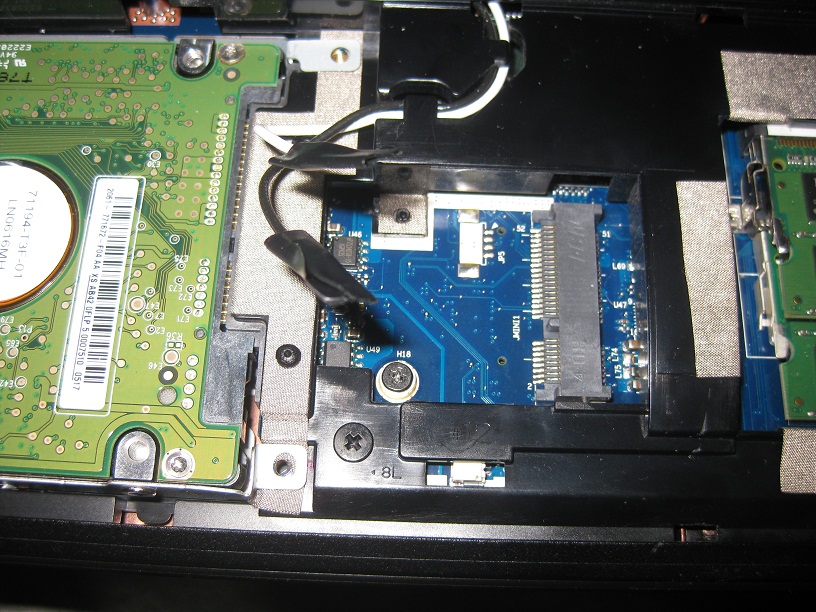
One: Here is a picture of the mpci-e slot I will be using. Looks like its going to be a tight fit and will definitely need to trim the PM3N. Hope the HDMI boot doesn't get in the way.
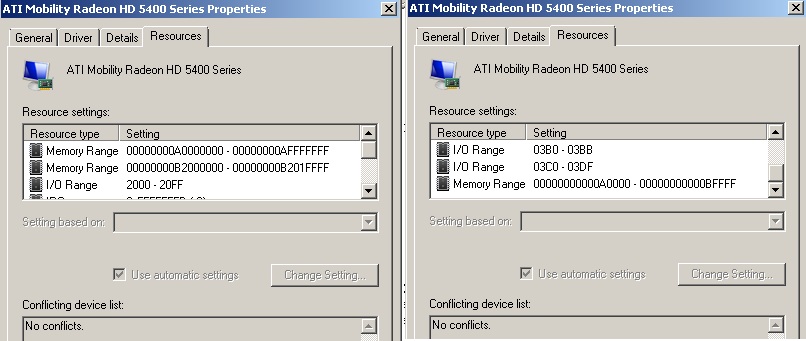
Two: Trying to understand what PCI allocation my bios is using for the internal 5470 mobility. From device manager I see it has 3 memory allocations:
AFFFFFFF - A0000000 = FFFFFFF = 28 bit(?)
B201FFFF - B2000000 = 1FFFF = 16 bit(?)
BFFFF - A0000 = 1FFFF = 16 bit(?)
From this information what does this say about my BIOS pci allocation? Problems ahead when I try the 5770? Could we lower the risk of eGPU by analyzing thing's such as the above before actually buying the hardware and investing the $$.
This is for a 64bit Win7 Home Prem. Acer Aspire 5742G with most up-to-date bios (1.21v)
Thanks for any help
BTRAttached Files:
-
-
if you upgraded from a previous version there should be a version of the devcon.txt in your C drive.
If not then make sure you follow the spoiler in step 2 of How do I create the Setup 1.x bootloader menuitem (XP/Vista/W7) or USB bootdisk? in this post.
Edit: Following the steps u might not find the folders i386 etc within \devcon\ but i just ran devcon command in this folder anyway. @Nando is this something which only happened for me or was this changed in the new Setup beta? -
Got the Devcon File working, now im just having the issue of my computer freezing when trying to disable the igpu in the diy menu setup
-
So how is the thunderbolt vidock working? is it out yet? sony is doing something pretty similar in the Z line
-
oh my goodness!! i can't believe i made such a simple mistake! thanks nlooije! if it wasn't for you i wouldn't even have paid attention to the connections! guess i was tired when i originally hooked everything up.
ok, so now the vidock is detected, but it comes up with the error 43. i saw that there are only troubleshooting solutions for win 7. does anyone know if they would also work for vista? i also can't load 258.96 or 266.35 drivers. it says i don't have the necessary components? -
Alright, I finally got my vidock working. I am running it on 258.96 drivers, the 270.61 didnt work for me as it asked me to install the intel drivers first.
My current setup
Lenovo T400
C2D P8600 2.4Ghz
4GB ram
with switchable graphics ATI 3470 / Intel 4500MHD
Windows 7 64 bit
PE4L ver 1.5a
Corsair CX430 430W power supply
Asus GTX 460 768MB
No issues with the error 12.
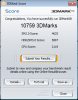
Please see attached for my 3dmark 06 score.Attached Files:
-
-
Given the HD5470M starts at A0000000 I can tell your TOLUD=2.5GB which is very accomodating. There's b/w768MB-1GB of 32-bit PCI space available - enough to attach 3-4 eGPUs if you had that many expresscard/mPCIe slots. I'd only be concerned if your TOLUD=3.5GB (Dell Latitude series, MSI CR-x20).
A tentative schedule for a Thunderbolt-specific PE4H 3.0 is later this year. hwtools haven't replied as yet my request to move that forward to coincide with the Sony Z2's release (June or thereabouts).
PSU and enclosure FAQ?
Anybody want to sign up to maintain a PSU and enclosure FAQ section for the DIY ViDock->eGPU rename plan? (ithildin, Agent 9?) Some standouts to date being being custom#1, Agent9, the endless (xbox360), max_headroom, Oddious (1U) and portable 12V/120W / 12V/80W.
Would be great if a MACesque person maintained a MacBook FAQ section as well. No idea there. -
I'll contribute to the enclosure in a week or two.
Won't have time to maintain it, but I'll for sure put up pics and guide when its completed. -
no problem

follow the solution to q13 from the Troubleshooting FAQ to find out how to run a system with an Nvidia eGPU and dGPU.
If this does not fix code 43, the you will need to use the Setup. feel free to send me a pm if this is the case. -
I wasn't able to find much info about TOLUD through google as most searches point to this thread.
Not sure what TOLUD stands for assuming it's an acronym
Not sure if this calculation was correct from my post above:
AFFFFFFF - A0000000 = FFFFFFF = 28 bit(?) Therefore the 5470M is using 28-bit allocation space?
I'll just ask some maybe stupid/useless TOLUD questions now so maybe someone won't have to later on..
Does the TOLUD just say "System PCI part's I giveth thee 2.5GB of RAM to use if ye like but if ye don't needeth that much the remainder won't be used"?
Just wondering how you can deduce that there's b/w768MB-1GB of 32-bit PCI space available from the above? The other 1.5GB - 1.75GB is assumed to be used by the stock hardware of the laptop (5470M, NIC, ect)?
Cheers,
BTR
Edit:
" I'd only be concerned if your TOLUD=3.5GB "
I would have thought the more space TOLUD allocated the more accommodating it'd be to extra eGPUs for example -
Here's the 3DMark06 score from my Inspiron 1545 + GT430
Seems a little low to me, but then again, I don't know much about 3DMark06
![[IMG]](images/storyImages/ae4d6d8691afda594a21c8165fc408b3.png)
Running the advanced version of 3DMark06 got the card to crack 6000.
![[IMG]](images/storyImages/e3160b17c18fecb26cebb34ef9814bb1.png)
-
Regarding switchable graphics with AMD/ Intel ~~~ and newer Nvidia drivers:
Installing Nvidia drivers with AMD/Intel switchable graphics may give you an error asking you to install Intel drivers first.
Solution is to uninstall the switchable driver from your manufacturer (Lenovo in this case); system should revert to pure Intel driver via WinUpdate (if not, you will need to reboot and disable AMD discrete GPU with Setup 1.x and let WinUpdate install or download newest Intel driver from their website). The Nvidia installer should be content with the pure Intel driver and install correctly. After Nvidia installation, reinstall your switchable graphics driver.
![[IMG]](images/storyImages/amdintel.jpg)
-> Intel driver provided by ATI (AMD) causes Nvidia installer to exit with error: You must install an Intel® driver first -
Did anyone see this?
Sonnet - New Product Announcement at NAB 2011
It's the Echo Express, I found it on the Sony Vaio Z thread.
Perhaps a thunderbolt Vidock solution is already on our hands? -
Would this work on my M17x R3 using HDMI-In on the laptop itself? Basically running the card's HDMI output to HDMI input on the laptop?
-
I have no working experience with this but theoretically this should work.
It would be great if you could share your experiences with this. -
Good news!! Thunderbolt natively in ivy bridge serie 7 chipset :
AnandTech - Intel Integrates USB 3.0 and Thunderbolt into Ivy Bridge Platform -
Hi nlooije,
Did you get a chance to test eGPU w/ your 2630qm in your sig?
Current: Clevo W170HR, i7 [email protected], Nvidia GT555M + GTX460 2.0 x1.Opt VD, 1x4GB DDR3 RAM, 500 GB 7200RPM HDD, W7-x64
Please let us know the results soon. I am still waiting/trying to make progress.
Much thanks. -
Not yet, i got the laptop this week and havent been home to be able to test it. I guess my sig for now is wishfull thinking. hope to have some results by next week.
-
I have some dificulties to get the eGPU working...
My setup:
HP Elitebook 2530p
PE4H v2.4
Zotac GTX560 Ti
So, from a fresh install of Windows 7 home premium 64bits, here what I did:
1) I boot up
2) I go in sleep mode and plug my eGPU. The GTX560's fan spins.
3) I wake up and I install the lastest optimus driver with modified INF from Nando.
4) I shut down the computer and unplug the eGPU. I restart the Laptop.
5) I go in sleep mode and plug the eGPU and wake up.
6) I have this:
![[IMG]](images/storyImages/psgtx560.png)
7) I try RE5 and it works only on the Intel intagrated.
8) When I select the external display only, it doesn't display anything and the laptop screen display only my wallpaper..I have to shut down with power button...
9)There is where I am stuck... I need help.
Thanks!! -
I'll highlight that there have been a number of reports of the GTX5xx series not allowing the internal LCD to function. So the first point could be that NVidia may have not coded it to work on GF114 chips? Pure speculation of course.
To have the best change of internal LCD mode working I'd advise:
1. Updated your Windows to have the latest Intel 4500MHD driver.
2. Remove existing NVidia Verde drivers.
3. Search your registry for "simulated" and remove all simulated monitor connections that Optimus does.
4. Reboot and reinstall the Verde 270.61 + nando4 modded inf from here.
Use image below to help you along. This is my 2530P with latest 4500MHD driver + GTX460 270.61 driver, working with internal and external x1.Opt.
![[IMG]](images/storyImages/2530pgtx460.th.jpg)
Your external LCD should do a x1.Opt link as it has been confirmed to work using a GTX560Ti by MikjoA and ittius on the first page. Important questions here are:
Q: Are you using any DVI-VGA adapters? That has been reported as being problematic. If so, can you try a native HDMI connection instead?
Q: Do you have another HDMI cable if using HDMI? An intermittently faulty HDMI cables will register a LCD but not allow data to be written to it. -
there used to be a seller on eBay selling pe4h and pe4l, and he was selling them much cheaper than hwtools. Does anybody know what happened to this seller? I want to buy a pe4h, what is the cheapest place to get one?
-
Hi all,
I'm running a Sager np8662 with GTX 260m (built in) + DIY ViDock GTX560Ti. (the ViDock is meant for my x220 when it arrives..just testing it now)
i managed to install and run the 560Ti, however, i'm getting quite a poor 3dmark06 score of ~5000. from what i see it seems to be pretty common for ppl running x1 config (which is what im running).
i closed the jumper on my PE4H and im using a silverstone 500w PSU. Should have plenty of power for the card.
Problems i get while playing Dragon Age 2..
1) constant lag and delay when activating menu or entering into new areas. Is this expected for ViDock setup?
2) i get random blue screen while playing DA2 with the error pointed to nvlddmkm.sys.
Anyone can help me with the above issues?
Thanks,
xc -
This 420W ATX powerful enough for HD 5770?
I've seen the 5770 power consumption stated at ~ 250w for FurMark max stress.. Is all this power from the 12V rail only? The 12v power of this ATX is 12V * 23A = 276W .. to tight a squeeze?
Thanks anyone -
250W? I don't think so. My preferred GPU tech site tested some 5770 cards (e.g. the passive cooled Gigabyte Silent Cell) and they don't draw much more than 100W in furmark. Read here (german site): Gigabyte HD 5770 Silent Cell - weltweit erste passive Radeon HD 5770 im Test - Übertakten (Seite 11)
-
Hey pyr0,
I got that number from here 254W under full load.
I'd like to know how they managed to get that number. It's possible they just hooked the entire test computer up through a wattage meter and the wattage they are showing include the consumption of CPU, Chipset, MOBO, all together ect.
Edit: oh right it says 'System Power Consumption' I see
Come to think of it if the 5770 just uses a 75W 6-pin pci-e connector and the PCI-e port can only supply ____? ...couldn't find the number I want to say 30W? so 75W+30 - 105W like you said - correct? -
NVidia Verde 275.33 WHQL
Has been released today, with modded nvam.inf for 64-bit here. I'm seeing quite a large improvement in smoothness on MafiaII benchmark and Internal LCD mode 3dmark06 has improved by ~250pts. Recommended. Wonder if this means they've optimized DX9 on x1 links? Will hook up a LCD later and see if I can crack 3dmark06 of 13k.
Yup. My internal LCD RE5.var went from 48.1 to 50.3FPS. -
PCI-e supports 75W, and this is a strict maximum. 6 pin connector is rated 75W, but in reality the wires are rated for more than that, which is why you see cards over 150W that have only one 6 pin connector. That said, with the PE4L/H I don't think you want to run a card that doesn't use a PCI-e power connector. The PE4H is rated for 3A @12V if you plug in a DC power supply, and the floppy port is supposedly capable of 6A. The problem is a floppy port has only 1 12V pin connected to ~20some gauge wire, which is definitely not good for 6A. It might work if you solder an extra wire in parallel.
Oh that might be a good warning to put in the FAQ. -
Nvidia cards are only worth it with optimus b/c they need a lot of pci-e bandwidth
-
Getting started on my enclosure for the eGPU I'm building, here's a teaser:
Cutting (some of) the materials:
![[IMG]](images/storyImages/part1egpu.th.jpg)
Waiting:
![[IMG]](images/storyImages/part1egpu1.th.jpg)
(oh, and I hate, HATE working with 1/4" acrylic, the rear panel and top panel will be 1/8" acrylic since they won't be load bearing much) -
I tried the driver, but my 460 can't output to my monitor with it. Whenever i plugged the monitor in the driver would either hang causing a BSOD, or the driver would think it was outputting a signal, but really wasn't so I'd just have a black screen. I managed to get the internal LCD working, and saw that in some places the driver now thought my monitor was a TV. When plugging the monitor in to the laptop itself to make the internal card drive it, it worked fine. To get it working again I had to clean install an older driver, for some reason I can't get the 275.27 beta working again either and have to resort to the 270.61 WHQL now.
-
so the input lag and lockups are due to a lack of PCI bandwidth?
i'm more worried the same will happen with my thinkpad x220 when it arrives -
x220 has an intel HD so it should be fine w/ optimus
-
So, I have my eGPU working on my x200 tablet (Galaxy GTX460 768mb, no benchmarks yet, just lots of BF:BC2 and Borderlands gaming) and am working on an enclosure for some portable gaming. I sifted through the thread trying to find a definitive answer as to why the internal LCD framerate is always less than 60fps. I understand that the expresscard slot is bandwidth limited so are we always going to be stuck at less than 60fps until we get 1xOpt. working on Sandybridge?
I am planning my next tablet purchase around a >60fps internal LCD framerate and I'm hoping that I won't have to wait till Ivybridge for that.
Thanks all, especially nando4 for everything! This eGPU is the bee's knees!
DIY eGPU experiences
Discussion in 'e-GPU (External Graphics) Discussion' started by master blaster, Sep 18, 2009.





![[IMG]](http://imageshack.us/photo/my-images/811/amdintel.jpg/)


![[IMG]](http://imageshack.us/photo/my-images/706/2530pgtx460.jpg/)


![[IMG]](http://imageshack.us/photo/my-images/705/part1egpu.jpg/)
![[IMG]](http://imageshack.us/photo/my-images/135/part1egpu1.jpg/)
