Problems? See this thread at archive.org.
Have almost the same with DVI -> D-SUB display. While card see it and Windows create second desktop, the screen stays black.
-
I got an SSD today. 275.33 driver installed without a hitch on a fresh win7 install. Oh and if you haven't heard yet, SSDs are amazing.
-
Work is progressing on the enclosure, this should give you an idea of where I'm at:
![[IMG]](images/storyImages/img1884c.th.jpg)
![[IMG]](images/storyImages/img1885v.th.jpg)
The fan I'm using to push air into the case is this, Thermaltake Mobile II. It is powered by a USB port, which the hwtools boards conveniently have built into them, and it is adjustable by a little knob, so it can be as quiet or as loud as I want.
The knob will be accessible underneath the enclosure so I can adjust it anytime. -
Same Here I tried both the Beta and WHQL of the latest 275 drivers, had issues with FF-XIV being a little rough, and when hooking up my projector using VGA caused black screen when trying to switch back and Nvidia tools to fail, at that point if I logged off to try and see if closing every thing would fix it, system would freeze, needed to be manually shut off, this happened more than once. Found best performance and stability with 270.61 with my Optimus setup i3 2.6 450GTS OC using PM3 x1.0op, score 9712 on 3DMarks06 using internal LCD. Even switched back to 270.61 then back to 275.33 to make some tests with FF-XIV to verify. I use FF-XIV because it is very noticeable when its not running smoothly, RE5 always works pretty smooth for me probably due to the fact that even the IGP can render about 20fps with RE5, shoot Intel HD can run dx10, but FF-XIV can barely load at all on the IGP, it's a total computer killer if you don't have the correct hardware to run it.
From my experience in the past the beta driver gets pushed up to the WHQL driver with little or no changes if Nvidia doesn't see anything wrong with it after testing period. Of course there not tailoring to us.
I'm gonna stick with 270.61 until the next driver release comes out. -
Well the PE4L came today
Took 1 week from Taiwan -> Melbourne, pretty fast
Nice packaging, nice looking build quality, good communication from the company.
Just need to get the ATX and G-Card today.
The instructions from the website for PE4L aren't really clear about the jumper settings..
I have SW1 set to 2-3 (x16)
SW2 set to 1-2 (Disable perst#) since I want to use the sleep - wake method
Now JP3 and JP4?
I want to use all power from ATX so 3.3 from ATX floppy connector
and 6pin pci-e for 12v..
It says on the PCB of PE4L that default position of JP3 and JP4 is CLOSE.. kind of confused.. can someone tell me what jumper setting I need for 3.3v from ATX?
Thanks,
BTR -
JP3 is for 3.3V from floppy jack (DC/DC converter does 5V->3.3V stepdown).
JP4 is for 3.3V from PCIe bus from your laptop.
JP4 is not really required, you can just pull the jumper for protection of your laptop. That's what I did and its working fine for me. -
Hi,
I'm getting stuck trying to load W7 64bit.
I've got a Dell D630, Zotac 560 Ti, 4 GB ram.
The sleep/hiberate trick doesn't work for me.
I have to boot with the miniHDMI plugged in for the system to recognize that the card is there.
When I boot with the boot disk, I go to chainboot, it hangs, and beeps once in awhile.
When I boot with it plugged it, the system reads it but on loading W7, I get a BSOD about AHCI.
When I boot without it plugged in, it doesn't recognize it later on.
I've got a PE4L + mPCIE combo from harmonic inversion.
Can anyone help?
Update, so I boot with boot disk, and compact under 36bit, and I get 256 MB in the left pane, chainload, get the vista loading screen, sleep, plug in the miniHDMI and scan for new hardware.
I get the 560ti to show up in the device manager but it says, "This device cannot find enough free resources that it can use. (Code 12)" -
Hardware being used:
Thinkpad T420 w/ 6gb RAM
PE4L w/ EC2C
eVGA GTS 250
Getting the Error 12 message.
Tried running compaction with the latest Setup 1.x. It seems like it can't detect/work with the Sandy Bridge chipset.
Any suggestions? -
I got my x220T finally, so going to start looking around for deals on a good gpu match for it. Going to test some stuff with a 4890 and a SAS card, found a very short "high speed" mini hdmi maybe I can coax 2.0 out of it.
The hardest part about all this is the case. Custom building is neat but a big hassle, I've been looking at the dimensions and configurations of a lot of small uATX/ITX/NAS/etc cases. I'm betting sooner or later one of them ends up just the right size and layout for a 2 slot gpu and fullsize psu with minimal or no dremel work required.
Might want to trademark or register eGPU as a generic term somehow before some random faceless company tries to take it for themselves
eGPU©®℠ -
Hi sprtnbsblplya,
Have you tried w/ 2GB ram first? I was only able to get ATI 5870 working w/ my Sandy 8GB RAM. Very limited success w/ GTX460: crashed during 3dmark06. So it seems possible w/ better software / drivers / bios. You might need to try (if using 3+ GB RAM) different compaction options.
I will try more when I have time.
Best wishes to you. -
I tried with 32-bit, 32-bitA, and 36-bit.
Honestly, I have no idea what all the options w/in the latest (June, 03) Setup 1.x are.
Is there a specific setup I'm missing?
Would it be best to go to an ATI card and use those drivers instead?
Edit: nvm -
Got mine working w/ ati 5870 by
2. Disable the GT525M in Device Manager
- PCI Compaction to "IGNORE" your GT540M and perform 32-bitA PCI compaction only on the IGP and the GTX460.
===
Here are some of Nando's advices to get Nvidia eGPU working:
1. Load recent drivers to eliminate need to do a PCI dump altogether as described.
2. Disable the GT525M in Device Manager in case it's adding some weirdness.
3. Reboot, ensure you have some pause before Win7 starts, eg: hit F8. Now poweron the DIY ViDock and manually (disconnect)/reconnect the mini HDMI cable.
4. Try to boot Win7 and see what happens. If no go
then:
(i) Poweroff DIY ViDock. Boot Setup 1.x, poweron DIY ViDock. You may need to disconnect/reconnect the mini HDMI cable to get it detected.
Do a 36-bit vid_0+1+2 PCI compaction setting vid_0 and vid_2 to 32-bit.
(iv) Chainload Win7.
That's really all that should be required.
======
I'd advise running with 2GB for the time being until get it worked out. 2GB will have enough PCI Config space for all 3 video cards so can do a 32-bit PCI compaction on vid_0, vid_1 and vid_2, but still disable the GT525M in Device Manager as I'm not sure what the Optimus driver does when it detects two video cards.
It may actually be a safer bet to run the standard desktop drivers to confirm operation (no x1.Opt though). They can deal with 2 NVidia cards running simultaneously. -
Hi, is "nvm" means that it's working now? What drivers are you using? desktop or notebook, which nvram.inf?
Hoping for a breakthrough soon.
Much thanks. -
No, I have no idea what is going on.
Wish I had an ATI to test out. -
Even w/ ATI 5870 working, I still have been trying for months to get Nvidia eGPU to work because of Optimus and much better performance.
Did you try disabling your dedicated internal GPU, not the Intel GPU? What is your dedicated iGPU?
What is the error or problem now?
Thanks. -
I don't have a dedicated iGPU, its a Thinkpad T420 with the 6 series chipset and integrated HD 3000 graphics.
-
What drivers are you using? desktop or notebook, which nvram.inf?
-
Desktop for the GTS 250.
The custom ones on this thread specify you need GT 4xx and up to use them (Fermi), which I don't have. -
So... I've tried running at 2.5 GB RAM, and still didn't work.
so when I compact, I've tried the 560ti only. I've also tried the IGP and 560ti. both didn't work either.
I'm kinda stuck...
edit: the BSOD i'm getting is something related to ACPI not being fully compatible, something along those lines. -
just wanted to give a big thanks to everyone who helped me out, esp nlooije and nando! i am now up and running!
sager np5793
dGPU GTX 8800m
eGPU GTX 460se
Vista
Intel Core 2 Extreme
thanks everyone! -
I have a D630, and I just got a second PM3N. I've hooked up the second one, but in the eGPU setup, the video card appears on the second port, so I can't set to x2, because it disables the second port, which has the card on it.
Basically, how can I get the card to show up in the first port? -
apparently i spoke WAAAAY too soon! lol!
question, if i get error 43 when powering on my vidock (after starting windows), do i have to do run it through eGPU setup everytime? (if i run it through eGPU setup, then i get error 12, and that is fixed using nando's suggestion).
Once i get the eGPU up without errors, the computer does not acknowledge it as another display, other than in the device manager (i cn't see or select it in Nvidia control panel or in display settings within the control panel). How can i use the eGPU once it is installed without errors? am i missing something?
thanks -
If you use the boot disk, you can open up your ports. I dont know how to get it to recognize the two lanes though.
Do you have it running with just one lane? Whats your setup like and what procedure to you do to make it work? -
Small help needed..
Setup trying: 5770 eGPU (5470M iGPU) Win 7 64BIT Acer 5742G PE4L 1.5 with PM3N 1.10 x1. 460W ATX JP3 closed. -- Hmm I'll put that in my signature so I don't need to say it ever time..
So with everything hooked up I've found I can only get the Acer to see the 5770 by tricking it.. by starting up with the wifi card in the mpcie then sleeping and swapping in the PM3N - powering on eGPU then starting again..
First time I did that windows told me to install drivers from AMD.. I did.. now in control panel it says 5770 .. good but error 12 ..
So I downloaded eGPU-Setup-10f-pre15 and tried to follow the steps to make a USB boot disk:
But when using HPUSBFW_223.zip I'm not sure where to find this V: drive
Could someone please let me know how to use HPUSBFW_223.zip? Once I get eGPU-Setup-10f-pre1 working I want disable the whitelisting of the wifi adapter so I don't have to trick the computer everytime and also I guess I'll need to to a 32-bit compaction for error 12, I think (?)
Thanks anyoneAttached Files:
-
-
Does anyone know where the cheapest place I could find just a PM3N is? I already have a PE4H and an EC2C, but the Lenovo Y470 I ordered only has mini-PCIE and no expresscard.
Also, with the Y470, will I have to take out the wifi card to get the eGPU to work? -
I'm interested to try this, so, I already ordered PE4H-EC2C ver2.4 Package today (HWtools).
-
Follow steps 1 and 2 of that spoiler, you will mount the image of the Setup to V: then you can copy the contents.
yes, but you can automate the process by choosing option 1 instead of 2 (menu-based) after chosing the eGPU bootitem.
are you hooking up to an external display? is the connection done correctly? are you using a dvi->vga adapter, there are reports of these not working properly. try an hdmi connection to the external monitor.Last edited by a moderator: May 8, 2015 -
Boot up with eGPU connected to your computer and into the bootmenu. goto pcie port and save it.
When you boot back into the bootmenu, you can load it from the pcie port menu under 'restore'.
I think I figured out my issue.
It may have something to do with "Prohibited PCI range" I'm getting when i'm compacting.
I've tried running this with 2gb RAM, 4 gb ram.. I've saved a devcon file with the PCI bus section and without it... -
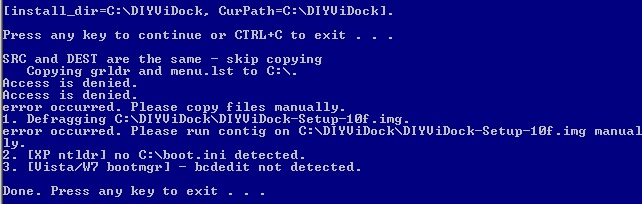
I installed imdiskinst.exe but when I run setup-disk-image.bat I get the follow errors. Seems like it can't access C: even though I am an admin
Attached Files:
-
-
did you turn off UAC as stated in one of the steps?
did you try right-clicking -> run as administrator? -
Thanks for that nlooije, Yep I realized I skimped the instructions too fast, getting too tired fighting this thing for now. Got into the boot menu now. Next problem looks like getting eGPU10f-pre15 to detect the eGPU. Tried everything on the detect screen nothing worked. But I'm pretty sure my BIOS are white listing the mpcie, need to figure out how to unwhite list it first before being able to get it detected maybe?
Anyone who has just plugged in a eGPU and it worked off the bat must have a deal with the Devil! -
Are you trying this on Acer notebook? Acer doesn't implement whitelist in their BIOS.
-
Boot into Setup with wifi card (which is whitelisted to work with your bios) on the mPCIe port and with eGPU off, go to PCI ports, choose save port, choose port with wifi located on it, reboot with eGPU on mPCIe port and wifi off into Setup, goto PCI ports, choose load port, return and check to see if eGPU is detected. If not detected then the eGPU may not have been connected properly either by mHDMI or to the PSU.
Edit: What i used to do was set the jumper to either 7 or 15s delay and boot notebook with eGPU on, a red light would show on my PE4H which would turn off after the respective delay had passed. This way the bios would not see it and i wouldnt need to hotplug.
Hahah, I know how you feel!
I beg to differ, my old Acer Aspire 7720 has a bios which had whitelisting on my mPCIe port. -
ok, thanks.
no, i'm not hooking up to an external display. thought it would work using internal? should i hook up to external?Last edited by a moderator: May 8, 2015 -
I have a lenovo y560 with a ATI 5730. How beneficial would this be to do? I mean the 5730 is pretty decent as is. Playing bfbc2 on all max settings. Smooth I don't see any problems. Worried bout bf3 though.
-
I would reference the posted benchmarks. If you think the laptop is fine, then I would worry about upgrading to a eGPU when BC3 comes out.
Videocards will be cheaper and more powerful. eGPU will have matured in the software setup. -
yeah going through page 1, seemed like there were A LOT of problems; kinks here and there to work out.
is there any ATI support? Seems like everyone who's doing this and is mainly geared towards - are nvidia uses. Or did I miss-read something?
If I was to do this, I would completely max out the video; but would there be a drawback to do this? Like using a gtx 580. Seems the popular choice that everyone is using is a 400 series. -
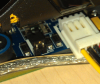
Here are my jumper positions and the prohibited pci ranges i'm getting.
Attached Files:
-
-
Maxing out your video card depends on what type of link you've got with your laptop.
like x1, or x2, or your version of expresscard.
Off the top of my head, an x1 link will max out at a gtx 460. In other words, on a x1 connection, any videocard with more performance than a gtx460 will have no benefits. -
dang that's what I thought. Not sure if my y560 has a mpcie or not... hmm.. since USB doesn't work, what about esata?
-
Your Y560 have two empty mini-PCIe port & one expresscard slot. You don't need to removed the wifi card if you decided to try. EDIT: If I have Y560, I will probably try HD5870.
-
The setup runs fine with one card in port one at x1 speed. I've never been able to get it to run at x1e, despite it being possible.
I have gone into the bootmenu, saved port 1 when the video card appeared. I then shut down, connect the second PM3N, boot into bootmenu, restore port 1, but the video card never loads onto it.
I just need to find some way to force the video card to load onto the first port. -
1.0e8 works with that method.
the beta (1.0f) bootmenu doesn't seem to load the card.
edit: here is my large memory resources.Attached Files:
-
-
man perfect timing, I was looking on the bottom of my laptop and noticed it then saw your update. Thank you very much
Was going over again how to figure out if it is 1x or 2x I can handle. Not sure. Another user from the Lenovo section said it was 1x right now. Not saying he's wrong, just want to double check though
not sure if you can tell from this
![[IMG]](images/storyImages/Details.jpg)
-
Looks like the two empty mini-PCIe slot are port 3 & 4.
Quoting post #455:-
So, if I'm not mistaken, your notebook can handle full x1 1.0 speed on port 3 (x1E). -
@GTS
You might, since you have port 3+4 empty. You can't set it up on 1+2 because you have the HDD on the first, which means you might not be able to access it. It is a 5 series chipset, and I'm not so sure about those, but usually 3+4 can get you x2. -
kizwan and radar, thanks for letting me know. That's what I figured as well with those two - what it seemed like - unused ports. All of this is new information for me so with Radar, I as well am not sure. But logically it makes sense if port 3+4 can be used to make a +2 set up.
hmm..
I mean even with the x1e set up, is it even worth it? I was looking at some video cards comparing them and the benchmarks.. lets say a 5870 or a 5850. Will it be significantly better than the 5730m that's in the laptop? -
To make sure, I would find a program call Everest, and use it to get confirmation about which ports are open to be sure. The other question is, how can you access these ports.
I bought a HD5670, mainly since it can run off of a powered board, so it's a lower end one ($60 I think). Before, I couldn't run many games at all, even older or low end spec games. Now I can at least run them at a low resolution. And that's with x1. I'm trying to get it to x2 or possibly x2e. -
So I dumped the PCI bus info from the utility and read it in PCI Scope, and took a look at the nVidia card PCI info, and it looks to my very untrained eye that it is getting 256mb:
![[IMG]](images/storyImages/PCIscopenvidia.png)
(I'll just mention now that I'm getting in over my head with this computer science stuff...) -
yeah I was thinking about that, looking at the FAQ if I can run x1 or x2; noticed that everest program from the screen shots.
wow, so at least now you can get it running. I bet it'll be a lot better if you can get the x2 going.
DIY eGPU experiences
Discussion in 'e-GPU (External Graphics) Discussion' started by master blaster, Sep 18, 2009.


![[IMG]](http://imageshack.us/photo/my-images/714/img1884c.jpg/)
![[IMG]](http://imageshack.us/photo/my-images/228/img1885v.jpg/)