Problems? See this thread at archive.org.
If I can get it working, I should see my 3DMark scores increase 1000-2000 points. I just can't get the video card to show up in port 1 when I have a second PM3N installed. It always shows up in port 2.
-
Ensure you can get your video card working on port1 as x1 if have any whitelisting issues. Then boot, set link to x2 width, power on eGPU with *only* lane 2 attached, then physically hotplug in the port1's PM3N into the mPCIe slot. That's because that method will start the CLKRUN signal. I modded my PM3N so that setting the jumper started CLKRUN instead.
Only Series-4 or older Intel chipsets see the x1E tweak give a performance boost with ATiAMD cards or older, non-Ferm NVidia cards.
a HD5730 is a pretty decent dGPU. Only a x1.Opt or x2 link could see any performance improvements.
You could get a x1.Opt link if you replace your Clarksfield CPU with an Arrandale CPU so the Intel HD iGPU activates. The Y560 does have switchable graphics to can do that. Otherwise for x2, I can see that wifi is port2. Port3 and Port4 we don't know what they are. If port3+4 are expresscard+mPCIe then could do a x2 link. Though your wifi could not run concurrently as port1 runs in x1 mode as well (Intel's limitation). -
yeah that's a possibility. My y560 only has the 5730, not switchable graphics. I have no use for that

I stumbled upon this, if you click on the picture it'll show the mpcie
I also don't have TV tuner in that card slot. So it's empty
![[IMG]](images/storyImages/Details.jpg)
-
there are methods for getting it working on the internal lcd as discussed on the first post, but i have no experience with this.
To make sure that your setup is working i would as a first step hook it up to an external display. Preferably by HDMI as this has the most chance of working without additional steps (unlike a VGA->DVI adapter). An additional benefit of using an external display is that you're are not as bandwith limited. -
I have a v1.1 and a v1.2 PM3N. If I connect the jumper on the 1.1, do I need to hotplug? What about the 1.2? There's no jumper and it says it does it automatically.
I can run at x1 fine with no whitelisting needed, so I have to have the eGPU powered off, set port 1 to x2, have a PM3N in port 2 and connect eGPU power. Then connect the PM3N to the 1st mPCIe port. -
PM3N 1.2 uses CLKRUN, but gives you a 7/15s delay time to set your link to x2. If you can get your link to x2 in 15s upon switching the power on your system, then it will work. Probably can't do that so I consider it a dud solution. So if lane1 is a mPCIe slot in a x2 setup then consider modding the PM3N v1.1 as follows:
modded PM3N 1.1 to start CLKRUN when setting the jumper
Here my modded PM3N 1.1 so that setting the jumper starts CLKRUN.
1. Open TP6 by desoldering the solder blob.
2. Run a patch wire connecting right TP6 pad (CLKRUN) to right jumper post.
3. Short C1 to give a direct connection to GND.
4. Remove U1 ic to not interfere with this arrangement.
Boot with jumper open, close the jumper after x2 link is setup. You may/may not need to unplug/replug the mini HDMI cable to get the video card to be registered. Use setup 1.x to do the x2 link and hit F5 to rescan it until you see the video card as a x2 link.
This was the least obtrusive way I got it to work on my DV4-2000 without needing to do scary hotplugging of the PM3N. I'm hoping hwtools' future PM3N will wire CLKRUN to the mini HDMI cable's ground so that plugging in lane1 mini HDMI cable will start CLKRUN. -
After booting in with WIFI and saving the port (p2) I hard powered off, plugged in PE4L with delay set 7s (sw2 @ 2-3) and JP on PM3N closed. The eGPUHelper program detected the 5770 and showed it's info correctly such as device ID ect. Then I hit 'restore port' (p2) ok. After that I tried a 32-bit compaction then, to get into win7 I first ran startup.bat (applies the settings right?) then chainloaded into win7. In windows 7 the 5770 was in device manager with proper drivers but ERROR 43, yay.
In troubleshooting it say's this might be due to the hdmi cord. I've tried a USB stick in the PE4L which worked fine and also since the 5770 is identified leads me to believe my hdmi cable is OK. Looking at GPU-z the 5770 had nonsence information (DDR3, 0 mhz clock, 0 mhz mem, sensor information was maxed out (100% load, fan ect 32862C temperature)
Now I can't get eGPU DOS to detect at all again. Even with the anti-white list method you gave.
So basically I'm at: Boot into windows with wifi, sleep, switch eGPU, resume - ERROR 12.
Use the Helper program by Nando: antiwhite list port2 chain to windows - ERROR 43.
I saved some screen shots in eGPUDOS which it said are saved in A: can you tell me where I can find them?
Do you think it's worth trying to flash the earliest version of my bios - reverting back since I have the latest? Maybe it isn't white listed then.
I've probably switched the wifi card and eGPU 50+ times now, maybe it just wasn't meant to be! -
have you tried letting win 7 overcome your error 12? i'm not sure if it will also work for you since you are not using an express card, but it might be worth trying. nando has a link here. Prior to putting your computer to sleep, you need to disable the HDMI audio. i don't really know that much, but this method worked for me, as far as getting the eGPU to laod without errors.
-
Confirmed. Individual port anti-whitelisting was broken in Setup 1.0f-pre16 or older. I've reverted back to the method used in 1.0e8 for individual port saves. Setup 1.0f-prex has a second method to save/restore "0:0.0 - root (1MB)" , which was required on both a M1530 and 2530P to anti-whitelist. Both those systems have the the bios *disable+anti-whitelist* the wifi port when no wifi card is detected on boot. More info in the help doco on both anti-whitelisting methods.
Setup 1.0f-pre17 also fixes a showstopper status window freezing bug introduced in Setup 1.0f-pre15/16.
Please update from Setup 1.0f-pre16 or older to Setup 1.0f-pre17
Setup 1.0f-pre17 is available here. -
Thanks for pointing me to that method mental2. I just tried it and still get error 12 on the 5770.
Picture below
Looks like the Restrictions are beating me can't believe this white listing nonsense, you pay money for a laptop which has a mpcie port you expect to be able to put what ever you feel like in it.. but sadly what ever may lower profit for these manufactures is blocked. Are there any laptop manufactures who never white list like this? If nothing works I guess I'll have to crack the bios to remove the white listing.
Is it worth it to try get an eGPU on a laptop at the risk of permanent system damage? - In my opinion - HELL YES!
Will try Nando's pre17 with the whitelist fix. Nice to have this much help without this dos program and forum eGPU would be an impossibilityAttached Files:
-
-
on your pic it shows several HDMI audio drivers of which only one is disabled. try and disable all of them. Afterwards you may want to do PCI compaction to reallocated freed up resources.
-
17 actually caused a status window freezing bug for me, not fixed one. Whenever I disable a port the program will hang when trying to load the status window again.
-
Should finally be fixed in pre19. Please PM a confirmation.
-
ok. i saw a post the other day with the same problem i am having, but i can't find it anymore, so forgive me for re-asking. so, i finally got my eGPU to load without errors, but when i go to display settings to make it my main display, it won't let me. in fact, it doesn't even show my eGPU on the display pull down menu (even though it is on the device manager). how can i get the nvidia control panel and the display settings to detect the eGPU and make it my main display?
-
Looking to build a ViDock for my Lenovo X220T, could I go with the PE4H or do I have to stick to the PE4L. I would be using it with the E2C2 addition to have it working in the ExpressCard slot. I am looking at driving probably the Radeon 6850. I heard that someone had it configured on the X220 but still can't seem to find their results on it or indeed if the X220 was even ExpressCard 2.0 (because that would allow x2 2.0 or x4 1.0 right?).
-
The download doesn't work. Mediafile says they don't have the file anymore.
@liamdye:
If a PE4L works, there is no reason why a PE4H wouldn't work, you just might not be able to do x2 to take advantage of the pe4H. -
We've discovered the T420 has TOLUD=3.5GB, meaning there's no room to accomodate an eGPU when have 4GB or more installed. Would need to run 3GB or less for those to work.
Can you check the PCI BUS range in Device Manager on your X220T and check if you have a Large Memory entry. The latter would then allow 36-bit PCI compaction to be performed.
I'm hopeful Lenovo have been miserly with TOLUD only on systems with an NVidia option (T420/T520).
Fixed. Please try again. -
I had the same problem after going down to 2gb in my T420 and getting a successful compaction and chainload into Win7. It showed up as still being error 12 in Device Manager, nando and I are working through it right now.
Its crazy, I would think with the latest computers they would be able to accommodate something like an extra graphics card. -
i have a x220 and i only managed to get my 560Ti working by using its stock bios 1.12 / (1.11 works as well) and boot up with the eGPU already plugged in and powered on.
after i upgraded the bios firmware to 1.15...it stopped booting with the eGPU plugged in and i could not get setup 1.x to work either..
about the expresscard 2.0.. i suspect its available as there's an option for it in the bios. but i could only get my eGPU to work in windows IF i force it to "generation 1" which i think means 1.0? leaving the option on 'automatic', it crashes when i right click on the desktop. -
Hmm, the one time I was successful with booting with only 2gb of RAM and chainloading into Win7, was when I was forcing 'Generation 1' on the Power -> PCI Express options.
I rebooted after I had switched it back to 'Automatic' setting under the Power -> PCI Express options.
Looks like that plays a role in this...
I'm running the latest T420 BIOS, wished I wouldn't have upgraded the BIOS now.
Edit:
Hey Xav, when you boot and get successful detection of your Geforce 560, how much RAM is in the system?
Also, are you using PE4L or PE4H? And is the jumper switch set to X1 or 'X2/X4/X16' mode? -
This is my full setup of x220 + Palit GTX 560Ti Sonic eGPU + PE4H + EC2C on x1.1Opt with 8 gb (2 x 4gb) ram onboard.
External LCD Setup
![[IMG]](images/storyImages/ViDockSetup.jpg)
Internal LCD Setup
![[IMG]](images/storyImages/internallcdmark06score.jpg)
x1.Opt Working
![[IMG]](images/storyImages/Optimus.jpg)
DMC4 dx10 Results
![[IMG]](images/storyImages/ExternalDMC4dx10score.jpg)
RE5 dx9 Var Results
![[IMG]](images/storyImages/ExternalRE5dx9varscore.jpg)
3DMark 06 Results
![[IMG]](images/storyImages/3dmark06.jpg)
3DMark Vantage Results
![[IMG]](images/storyImages/ExternalVantagescore8gbram.jpg)
PCI 2.0 working
![[IMG]](images/storyImages/eGPUPCI20-1.png)
No benchmark yet but so far it removes most of the microstutters.
Results -
External LCD : 3DMark06 Score : 18216
External LCD : 3DMark Vantage GPU Score : 14675
External LCD : DMC4 dx10 Scene 4 Score : 120.17 fps
External LCD : RE5 dx9 Var Score : 131.4 fps
External LCD : RE5 dx9 Fixed Score : 67.6 fps
*NOTE : Internal LCD mode works only with verde drivers + nvam.inf combi. Desktop drivers only allow optimus for External LCD.
Internal LCD : 3DMark06 Score : 11274
Internal LCD : 3DMark Vantage GPU Score : 13211 (updated for verde 290.36)
Internal LCD : DMC4 dx10 Scene 4 Score : 41.91 fps
Internal LCD : RE5 dx9 Var Score : 47.4 fps
Internal LCD : RE5 dx9 Fixed Score : 39.8 fps
How to make it work :
Pre installation :
1) Download display drivers.
a) For nvidia, - if you need internal LCD mode - VERDE (mobile) drivers + modified nvam.inf
- if you do NOT need internal LCD mode - download latest desktop drivers
b) For ATI, i have no idea. (ATI users pls drop me a PM on instructions so i can update this portion)
2) Download x220 BIOS here. Version 1.11, 1.12, 1.24, 1.26, 1.28, 1.29, 1.31 tested to be working with eGPU setup.
Installation :
1) Update BIOS. *Optional depending on your BIOS version*
2) For PE4H 2.4 users, Ensure that your BIOS > Config > Power > Express Card Speed is set to "Generation 1". Leaving it on 'Automatic' causes windows to freeze when its trying to negotiate 2.0 link speed.
For PE4L 2.1a users, Ensure that your BIOS > Config > Power > Express Card Speed is set to "Automatic" for PCI 2.0 link. Also, on the PE4L board, check that SW1 is on '1' and SW2 is on '2-3'.
3) Power on eGPU and hotplug in windows 7 and let it auto detect (to standard VGA + code 12)
4) Run the nvidia Verde driver setup, let the files extract and quit setup. Replace nvam.inf (in Display.Driver directory) with the modified one. Alternatively, you can install nvidia Desktop drivers if you do NOT need internal LCD setup (no replacement of nvam.inf required).
5) Leave the eGPU powered on and connected to your x220 and shutdown/startup the x220.
6) Once you can get past the BIOS, things should be working. No requirement for PCI compaction and chainloading. -
You're one of the few people to get a 6 series based chipset working. I find that I can get a bit higher PCI-E speeds by wrapping electrostatic protective plastic and aluminum foil around my mini HDMI cables. Maybe you can try the same to try to get the 5.0GT/s rate working? It sounds like it almost works since you can boot with it active. Make sure power cables are as far away as possible from the hdmi cables, and make sure you get some shielding on the connector area, since that area is completely unshielded.
Oh and don't short anything on the PE4H with the aluminum foil if you try this. That would be bad. -
SUCCESS
T420 w/ 6gb RAM and PE4L + GTS250 is working. The T420 MUST be running BIOS 1.15 or earlier (1.14, which is OEM from the original T420's that first shipped).
For you guys with a T420 w/ NVS4200, I have no idea what your results might be.
I did exactly the steps you outlined above.
PCI Express in Thinkpad BIOS must be set to generation 1.
Thanks to ThinkRob in the Lenovo subforum, I was able to find the old Thinkpad T420 1.15 BIOS and downgraded.
Unfortunately, I'm running a GTS 250, which is not compatible with the 275.33 Verde + Optimus tweak drivers (Optimus variant anyways, it is compatible with that setup otherwise). So I'm not able to get the 50-333% increase in 3dMark06 score like some members, my results hover around 4400 range.
With that being said, I played a short game in Starcraft 2, with settings 1280x720, textures medium, and graphics details on High, and it was very smooth. Something the HD3000 would have never been able to accomplish.
Edit: Just played a few minutes of BF:BC2 at 1280x960, overall quality Medium, felt like it was hovering in the low 20 FPS range, slightly jerky, but overall not bad. Huge improvement over integrated gfx.
![[IMG]](images/storyImages/img1899rl.th.jpg)
Here is current status of my external enclosure, not close to being done, but probably won't get any more work done on it until August when summer semester is over.
It will look a lot better when done, going to fill in gaps with a bondo type material and sand the whole exterior smooth and paint it a gloss black color.
The design was inspired by previous Shuttle XPCs that I owned a long time ago.
![[IMG]](images/storyImages/img1897p.th.jpg)
-
Wow! I am pretty happy to see that it has expressport 2.0!!
I was waiting for a first test and you did it. So, now, I have to take out my credit card to buy this beauty.
Have you played some games yet? Can you do the Resident Evil 5 test for some comparaison?
Thanks a lot! -
@Xav and @sprtnbsblplya : many thanks for the pioneering effort in getting a X220 and T420 x1.1 eGPU implementation going. Xav - you are the first to confirm that x1.Opt works on the Sandy Bridge platform. Now have to wait for hwtools to make x1 2.0 compliant cables/hardware which would see your setup kick it up another notch or three.
CASE Study: Lenovo T420 - why bios 1.15 allows 4GB+ setups and 1.23 doesn't. It's all about TOLUD aka TOLM
T420 BIOS 1.15 has TOLUD=3.0GB as seen in 'devcon resources ACPI*' PCI BUS item (devcon.txt)
T420 BIOS 1.23 has TOLUD=3.5GB as seen in 'devcon resources ACPI*' PCI BUS item (devcon.txt)Code:ACPI\PNP0A08\2&DABA3FF&3 Name: PCI bus Device is currently using the following resources: MEM : 000a0000-000bffff [B][COLOR="Red"]MEM : bfa00000-febfffff[/COLOR][/B] MEM : fed40000-fed4bfff IO : 0000-0cf7 IO : 0d00-ffff
So some Lenovo bios programmer has optimized the newer 1.23 bios to make available an extra 512MB of RAM when using a 32-bit OS by increasing TOLUD from 3.0GB to 3.5GB. Problem is that optimization prevents a 4GB or more eGPU setup being possible. With bios 1.23 only a 3GB implementation is possible.Code:ACPI\PNP0A08\2&DABA3FF&3 Name: PCI bus Device is currently using the following resources: MEM : 000a0000-000bffff [B][COLOR="Red"] MEM : dfa00000-febfffff[/COLOR][/B] MEM : fed40000-fed4bfff IO : 0000-0cf7 IO : 0d00-ffff
If Lenovo did want the higher TOLUD to cater for 32-bit OS and still allow an eGPU w/4GB or more setup, then they need to extend the root bridge (0:0.0) into 36-bit space as described here. I figure it would be easier for them to just revert the bios back to TOLUD=3.0GB since most users will be running 64-bit OS which will get access to all the RAM anyway.
If Lenovo aren't going to correct the newer bios then T420 owners with 4GB or more will require bios 1.15, available here to run their eGPU. If they want to use the newer bios then they'll need to remove RAM so they have only 3GB or less physically installed.
NOTE: Optimus-equipped T420/T420s would NOT be affected as explained due to the ability of the eGPU being able to hijaak the disabled dGPU's PCI space. -
^^^
Many thanks to nando (and ThinkRob for supplying the oldest published T420 BIOS), as well as Xav for his step by step successful setup.
nando and I spent like 4 days troubleshooting this hellish platform, finally got it working.
Now the rest of the X220 and T420 users can follow suit!
If hwtools comes out with a reasonably priced 2.0 setup this fall, I might consider it. I am designing my external enclosure to be compatible with future upgrades. -
Hey Xav and sprtnbsblplya great to see that x1.opt works on Sandybridge. Typing from my new X220, thanks for the brave efforts to get it working. As much as I'd like to go ahead and buy a PE4L right now I don't think I'm ready to buy a video card seeing how we've been stuck on 40nm process for 2 years, but I'm looking forward to getting this to work towards the end of the year.
@nando4
The HDMI 1.3 spec is supposedly capable of 10Gbit/s is it not? Why do you say we are waiting on hwtools to develop a cable to handle the PCI-e 2.0 signals when we can get mini hdmi 1.3 cables elsewhere? -
The 3 GB RAM limit or unable to use newer BIOS revisions for T420/X220 are both rather severe I think. I don't think Lenovo BIOS programmers will fix this unless they become aware of the eGPU problems (who's gonna tell them, and how?). Question then still remains if they care or not.
-
Thunderbolt, USB 3.0 and PCIe 2.0 eGPU update (Series-6+ chipsets)
Updates from BPlus
7-19-2012: Masaharu on PE4L-L060A, mPCIe double-adapter and Thunderbolt notebook availability7-07-2012: Masaharu on TH05 TB progress (x2 2.0!!, no DP-to-internal LCD), KZ-B21/KZ-B26 mPCIe products6-07-2012 BPlus Computex 2012 Thunderbolt/eGPU products> The best person to get a sample would be the Sony Z2 owner Mikjoa that
> has just used a PE4L-PM060A to do the first mPCIe 2.0 DIY eGPU
> implementation here.
> I can ask if he'd like to do testing and writeups with this KZ-B26 but
> I'd only ask if it was pci-e 2,0 compliant.
Unfortunately, PCIe 2.0 is not successful in our lab, probably because
using PCIe-mPCIe adapter on desktop PC.
So, when KZ-B26 is directly attached to laptop mPCIe slot, it may
be still chance to work properly.
> KZ-B26 questions
> 1. Is it pci-e 2.0 compliant end-to-end?
So far, it is not successful.
However, similar product KZ-B21 using equivalent cable works
fine with PCIe 2.0, so we suppose KZ-B26 should work fine with PCIe2.0.
KZ-B21 (Flexible x1 PCI Express Extender)
Also, shorter cables (10cm or 20cm) have much more chance
for PCIe2.0 than present (30cm/12inch) cable.
> 2. I can see the ZIF cable is flexible. Would the cable be durable enough
> to be threaded out of the chassis, be wrapped under the chassis and
> taped down when not in use? Then when required just undo tape
> and connect to the ZIF-expresscard connector?
We suppose KZ-B26 can work the kind of use.
However, it's a kind of "drip injection", it can not work well hard mobile work.
> 3. Would it be possible to go one step further and create some form of
> double-adapter allowing a wifi card and the ZIF-PM3A adapter to occupy
> the same mPCIe slot, similar to your MM3U? So when the ZIF cable was
> attached to the expresscard-ZIF adapter, it would detect it and disengage
> the wifi card from working?
It's interesting idea!
We will think about it in the next version.
> Thunderbolt details with TH05 questions
> 1. It is mentioned on your facebook page that it is 2 channel pci-e 2.0 link.
> That is x2 2.0.
Yes, TH05 support PCIe2.0 x2.
> The concern me since Sandy/Ivy Bridge expresscard is x1 2.0 which
> approximates to x2 2.0 with Optimus' pci-e compression (requires iGPU +
> NVidia Fermi/Keplar card and a x1 link). So x2 2.0 Thunderbolt isn't
> offering us any more performance.
We can understand the situation, PCIe2.0 x2 is not large leap
from PCIe 2.0 x1.
> What I'm wondering is whether x4 2.0 and/or x4 3.0 Thunderbolt will
> be available with the TH05? We have very little detail on the Thunderbolt
> controllers other than the Series-6 chipset has a x4 2.0 link for the
> Thunderbolt controller and the Series-7 chipset is x4 3.0 capable.
Unfortunately, x4 can not be supported by TH05, because we
use IC with Thunderbolt x1 channel and PCIe 2.0 x2.
In 2012, and early 2013, we will keep using the IC, though
there are TBTx2+PCIe2.0x2 ICs.
First we will develop all product with TBT IC with TBTx1+PCIe2.0x2.
After we get experience of TBT, we will use TBTx2+PCIe2.0x4 for
higher performance.
Step by step and tick-tock.
> So that link needs the right matched components (Thunderbolt
> mux/demux controllers and cabling) to get full performance out of it.
> Finding the right candidate machine may require figuring out if they
> have x2 2.0 or x4 2.0 or x2 3.0 or x4 3.0 TB links.
> THe manufacturers of course are not telling us any of that detail.
We suppose PCIe2.0x4 (5Gbps x4) is reasonable, because
TBT I/F is 10Gbps x2.
So, TBT I/F itself will be bottle neck for PCIe3.0x4.
PCIe3.0x2 may possible, however, we do not see PCIe3.0 on
intel road-map so far.
> 2. Are you going to re-route the eGPU's Displayport output back via
> Thunderbolt to the system? That would mean that if the system had
> a muxed internal LCD it could display output to the internal LCD
> without incurring any bandwidth penalties as we are seeing with
> NVidia Optimus. It would require a mDP connector on the TH05
> to attach to the video card's HDMI/DP connector.
So far, we do not have plan to add DisplayPort to our products,
because TBT IC we use does not have the option.
After we use another IC with PCIe2.0 x4, we will add DP port.
> 3. Obviously people want to get their hands on these TH05
> Thunderbolt-to-pcie adapters. How far are we realistically away
> from seeing a publically available product? Is there any NDA
> preventing beta/engineering samples being released?
Yes, intel's NDA is very strict.
We suppose intel wants to control TBT market strictly
because it's very high speed and the market should not
be messy with low quality products.
So only intel certified products can be released, and
hopefully TH05 should be certified in the end of August.
After that we can release samples for limited quantity.
6-05-2012 NEW! US$92-shipped PE4L-PM060A (mPCIe 2.0)
5-29-2012: Masaharu on PE4L 2.1b product listing and mPCIe PE4L-PM060A 2.1 availability5-22-2012: Masaharu Thunderbolt, mPCIe products and pci-e 3.0 compliant cables> Can you clearly label you are selling PE4L 2.1b now as have confused forum members . . .
We are very sorry about this, and thank you for your proposals. We know PE4L v2.1a issue because we got RMA from customer and confirmed CLKREQ# pin needs rework for some of released v2.1a.
There are some ways to tell v2.1a or v2.1b;
- Shipped after March 23rd.
- Version Silk on PCB
We will update our web site of PE4L v2.1b to see this information.
Also, MiniCard version of PE4L 2.1 (pci-e 2.0). We got samples of PE4L-PM060A. Please refer attached jpg file for the product image.
![[IMG]](images/storyImages/pe4lpm060a.th.jpg) 5-18-2012: Masaharu - mPCIe pci-e 2.0 product with detachable cable available> 1. details of the gerbered Thunderbolt products?
5-18-2012: Masaharu - mPCIe pci-e 2.0 product with detachable cable available> 1. details of the gerbered Thunderbolt products?
One is TH03, ExpressCard 54 Thunderbolt Adapter. TH03 ( ExpressCard 54 Thunderbolt Adapter)
The other one is TH05L/M. PCIe X1/X2 - Thunderbolt adapter. It looks like PE4L. Sorry no photo at present.
> 2. Any pics/photos of the pci-e 2.0 mPCIe product with the detachable cable extender. This would help the users visualize the solution.
Unfortunately, sample is not arrived yet. When we got them, we will send the photo to you.
> Series-7 chipset (Ivy Bridge) is a x4 3.0 capable Thunderbolt interface. Meaning I'd recommend ensuring pci-e 3.0 compliance of your cabling solution as soon as possible.
So far, PE4L v2.1b achieved PCIe3.0. As mPCIe-PCIe solution will be same configuration as PE4L v2.1b, we hope it can also support PCIe3.0.
Thank you for your information. We will develop other product lines, such as enhanced PE4H or mPCIe solutions as you suggested.5-02-2012: Masaharu - mPCIe pci-e 2.0 product sample availableRegarding mPCIe product, Gerry developed mPCIe to mPCIe extender with FFC type flat cable. It is like PCIe-PCIe type KZ-B21;
KZ-B21 (Flexible x1 PCI Express Extender)
and front-end changed to mPCIe. So, we should make PCIe-mPCIe type product, and we think it probably satisfy your request.
As KZ-B21-30 (30cm) achieved PCIe 2.0, we hope PCIe-mPCIe one also will be PCIe2.0.3-11-2012: Masaharu responds to PCI-E 3.0 compliance request> Apart from the 13" Sony Z2, a 11.6" Alienware M11xR3 (with a HUGE userbase)
> could also benefit from a PE4L-PM3N 2.1.
Regarding that kind of product, we already developed samples, after we asked my boss.
The product name is "PE4L-PM060A V2.1b". PE4L portion is same as PE4L-EC2C v2.1b、and PM060A stands for Pcie Minicard (Half size) and 60cm cable.
We hope we can test in the middle of May.3-7-2012: Masaharu on PE4L 2.1 manufacturing improvements> Appears Intel's upcoming Ivy Bridge CPU will have PCIe 3.0 compliance.
> Means the dGPU link into the CPU (x16 port), that's used by Thunderbolt
> by at x4 only, will be able to transmit at 8GT/s.
I am also curious for PCIe 3.0. We would like to buy PCIe3.0 M/B and video card to try them.
> Can you make the cabling/connectors on the PE4L/PE4H to be PCIe 3.0 compliant?
We will test first with PE4L v2.1a can be capable for PCIe3.0. Also, not only 60cm cable but also longer and shorter cable how the PE4L can do with PCIe3.03-2-2012: Masaharu RE EC2C end reinforcement of PE4L 2.1/PE4H 3.0Dear Mr. Nando,
> One confirms he too ran his PE4L and video card in a perpendicular
> arrangement, so there was 'slight' twisting around the EC2C point.
> He, like me, did believe the device was resilient enough to handle
> that minor force.
First 50 units run with enhancement of current design. Double of heat shrink tube and glue inside of EC2C point. Please attachment.
> Regarding bottom plate for PE4L v2.1, we will have similar one as PE4L v1.5.
Regarding bottom plate for PE4L v2.1, please refer attachment.
![[IMG]](images/storyImages/pe4l21en1.jpg)
![[IMG]](images/storyImages/pe4l21en2.jpg) 3-1-2012: Masaharu RE socketted mPCIe pci-e 2.0 product desiredDear Mr. Nando,
3-1-2012: Masaharu RE socketted mPCIe pci-e 2.0 product desiredDear Mr. Nando,
> Hmm.. a bit distress this news. I had hoped some interim workaround could be
> put in place to secure the EC2C point in place.
We found enclosure below, it's for ethernet ExpressCard and generic to obtain easily. mHDMI cable can go through the ethernet connector, so we can use it somehow and production will have running change if it is available.
![[IMG]](images/storyImages/gigaether.jpg)
> I'll give another warning about RMA/return units.
> There is also at least two other users who are having problems
> with their first-release PE4L 2.1a units detecting their video card.
> One confirms he too ran his PE4L and video card in a perpendicular
> arrangement, so there was 'slight' twisting around the EC2C point.
> He, like me, did believe the device was resilient enough to handle
> that minor force.
Thank you for your advice. At first, we enhanced power line in mHDMI cable soldered at ExpressCard to apply heat shrinkable tube so there is little possibility to have short circuit to contact to ExpressCard enclosure.
> All usual troubleshooting has been exhausted to diagnose the problem.
> Which leads me to believe those users too may have faulty PE4L 2.1 units.
> Should they be advised to seek a RMA for their 'faulty' units?
It is the way the engineering sample is. At present, they may have same issue with the present product version, because it is a little bit improved from your version.
So, if they need RMA, we recommend after this issue is comprehensively solved and become mature.2-19-2012: Masaharu RE mPCIe products and PE4H 3.0+enclosureDear Mr. Nando,
> You can see an excellent Lenovo Z570 Series-6 mPCIe DIY eGPU implementation at
> http://forum.notebookreview.com/8342495-post8663.html
> The flat cable allowing easy insertion/removal from the PM3N when has a nice cutout like shown.
This rework is great.
> Now the upcoming PE4L-PM3N 2.1 won't be able to be inserted in that same way since it's a
> PE4L+mHDMI cable + PM3N all soldered together.
We suppose cutout still work for soldered PE4L-mHDMI-PM3N, and also cutout area will be smaller because fat connector portion will be removed.
> Is there no way you can investigate other connectors to try to achieve pci-e 2.0 signalling
> so that at least the EC2C/PM3N end can be socketted? Inserting the whole PM3N is not
> such a practical solution and causes wear on the mPCIe socket.
We also wondering if there were connector to realize it.
We suppose any connectors do not have so much difference such as
about contact impedance. At this time, we have to think about
cable characteristics, such as impedance 100ohm and maximum frequency.
After that, we have a few options, such as HDMI, miniDisplayPort or Thunderbolt cables.
At present, mHDMI is the most reasonable finally, so we are not able to
switch to other cables.2-10-2012: Masaharu RE Pictures of sample PE4H 3.0> Can you comment on plans/ETA for a pci-e 2.0 mPCIe-based PE4L/PE4H per my last message?
Yes, we have a plan to have mPCIe-PE4Lv2.1, maybe in April. Probably we can release mPCIe-PE4H v3.0 after releasing ExperssCard version.
> Would be useful to know ETA of the PE4H 3.0 and enclosure products as well.
We will release PCB version of PE4H v3.0 first. Enclosure version will be after a few month later of the release, so we hope we can release it in May or June.2-2-2012: Masaharu RE PE4H 3.0 features, REQUEST higher power PE4L jack (no go)> Now did you have any sample photos of the PE4H 3.0 and perhaps the enclosure to go along with it?
We just got the PE4H v3.0 sample. Please refer attached JPG pictures. We hope you like it.
![[IMG]](images/storyImages/pe4h301.th.jpg)
![[IMG]](images/storyImages/pe4h302.th.jpg) 01-21-2012: PE4L 2.1 (pci-e 2.0) will be available on Feb-20-2012 as a US$70+shipping engineering sample. Detailed photos of one are here.> Excellent news on he PE4H 3.0 is on the way.
01-21-2012: PE4L 2.1 (pci-e 2.0) will be available on Feb-20-2012 as a US$70+shipping engineering sample. Detailed photos of one are here.> Excellent news on he PE4H 3.0 is on the way.
> Does that mean you can provide some photos of it?
When we got samples from Shanghai, we can provide them.
> As to the features list.
> - Direct ATX power connection: 300W available
> Do you mean there is a 24-pin ATX connector on the PE4H 3.0
> so can plug directly into it?
Yes, 24pin female connector is on PE4H v3.0.
> While that might be handy consider that the a pci-e 1.x slot
> only needs 75W. A pci-e 2.0 slot is rated up to 150W
> but I've never seen one uses that much power..
> I believe they still adhere to 75W.
Power supply from PCIe slot is 75W. 300W is available 6pin and 8pin PCIe power connectors are connected from ATX power to VGA board.
> The other benefits of the ATX connector on the PE4H 3.0 would be:
> 1) you can add circuitry to power on/off the ATX PSU via the PS_ON pin.
> 2) many ATX PSUs are dual rail, though there are single rail ones.
> Having the ATX connector allows access to the one 12V rail.
> The molex/pci-e power connectors tend to be one another 12V rail.
PE4H v3.0 power is controlled by the hardware power switch and ExpressCard 3.3V power. Power from ATX power and 19V AC adapter are controlled by ExpressCard 3.3V power, external PS_ON is not necessary.
> - PCIe2.0 x1 capable
> - Enclosure available
> Pictures/pricing of the enclosure please.
> We have a new eGPU logo you can create as a sticker: See here.
Unfortunately, we are not able to see the picture even though we registered. We will check it again later.
> - Power & Reset timing switches
> If I am correct about the ATX connector then can have
> an ON/OFF/AUTO power switch where AUTO detects
> the pci-e signal lines and sends an active low to the
> ATX connector's PS_ON when a signal is detected to power on the PSU?
Unfortunately, PE4H v3.0 is not so intelligent. PE4H v3.0 just check 3.3V from Expresscard, it means, ExpressCard slot portion of PE4H v3.0 is inserted to ExpressCard slot or not. If ExpressCard 3.3V is provided, main power will be on.
> Comments RE: PE4L strengthened tracks to support say 200W via DC jack
> Also, can you comment in my last emai?. There I requested the PE4L 2.1's
> 12V/GND PE4L tracks and DC jack to be strengthened to allow say 200W
> to pass via the DC jack and so can then be split to pass out via the floppy
> molex connector as inputs into the pci-e power connector. Some users like
> the small profile of the PE4L and would like to power a card such as a
> GTX560/560Ti using an AC adapter in a portable fashion. Splitting power
> in that way makes it possible.
Regarding PE4L v2.1, 12V/5V could be maximum. We checked PE4L layout. For DC jack connector to floppy power cable, 12V/3A (5A at most) should be capable. So, additional jumper is required as you suggested.
Even though we tried to have additional power plane for 12V, we were not able to find it on present PCB surface budget. So, we also suggest to add external jumper to enhance 12V and GND between DC jack connector and floppy power connector to use 150W AC adapter for PCIe 6/8pin power
1-20-2012: Masaharu from BPlus response to 12V bypass for PE4H DC jack + PE4H 3.0 arrival1-19-2012: Masaharu from BPlus response on cable length and some other requests> One other thing I know folks wanted in the PE4H was a 12V DC-jack passthru to supply the 75W (max) to drive the slot.
> The idea being they could set a jumper or switch that bypassed the 15-19V->12V regulator and just use the DC jack with a
> 12V AC adapter.
It's good idea, we would like to add it next revision.
Regarding PE4H v3.0, first sample was arrived at Shanghai. Some of brief tests are finished, and PCIe2.0 is good at 100cm cable. We hope we can have additional evaluation after Chinese New Year.
A happy Chinese New Year!1-17-2012: Masaharu from BPlus finalizes the pci-e 2.0 compliant PE4L 2.1 pricing>Upon asking the DIY eGPU community for cable length we get all sorts of replies b/w 45cm to 200cm.
At present we consider 60cm for product release which is same length as cable length with v1.5 package. At this time at least 100cm must be achieved for the 60cm product release. For internal testing, the target is 200cm, we may have 100cm if the 200cm is ok.
> 1. You can see that the original idea of a socketed cable was a good one. Perhaps continue to test different sockets
> and even keep the ReDriver idea in mind with the goal of being able to have a variable length socketted cable
> (NOT soldered).
Regarding this kind of configuration, we already tested and failed many times. So, we came to conclusion that mHDMI cable must be soldered at the both ends of the cable.
> 2. Can add a new PS_ON output connector on the PE4L/PE4L? This was requested some time ago.
As v2.1 was derived from v1.5 so the PS_ON is not applied for v2.1. We will have the PS_ON and other small fixes on next version, because it can not be on time for v2.1 release.
> 3. Ensure you have 12V->3.3V voltage regulation @ 3A (10W) so the user doesn't need an auxilery 5V/3.3V input.
> That is the pci-e spec for maximum 3.3V input power.
12v-3.3v regulator can not be applied for PE4L because the regulator exceeds thermal envelope of PE4L. Instead, we will apply another way that put 5V from USB port for 5v-3.3v regulator to achieve 3A/10W for 3.3v power plane;
3.3V from ExpressCard: 1.3A
5V-3.3V on PE4L: 2A
Total 3.3V current: 3.3A
> 4. For the PE4H 3.0, please add some more perspex height to the base. If I installed my video card on previous
> versions then the slot cover plate was slightly higher resulting in the card lifting itself out of the x16 socket
> so I had to put it on another base to give it some more height.
This time, we have different type of PCIe x16 slot connector so that your current issue will not occur. Please refer picture below. There is 4mm space on the rear side of PCIe boards so the most of VGA can be used.
![[IMG]](images/storyImages/x16connector.th.png)
* This picture is different product's prototype. PCIe x16 slot arrangement is same.1-17-2012: nando4 response requesting lower PE4L 2.1 price for next 6 monthsMy boss Gerry Chen quite respects you and he said we have to hear voice of you and market especially in this sector.
So finally we decided to put $70 tag for PE4L v2.1.
Thank you for your suggestion to give us a chance to reconsider the price before making mistake in the market.1-17-2012: Masaharu from BPlus clarified PE4L 2.1 pricing and requests optimized cable lengthI am yet again not sure why BPlus wish to charge $105+shipping for the PE4L 2.1, regardless of it being a engineering sample or final product. You advised me on 11-11-2011 about pricing:Based on those comments, I know DIY eGPU users have avoided purchase of competitor hardware and put their faith in BPlus delivering a cost effective solution. A $105+shipping price is a nasty surprise after a 1 year wait. The comment above was also made when the PE4L cost $55. So I consider x2/1.5x of then/now pricing as being unreasonable. A $105 pricepoint is 3 times more than the original project guideline of $35.
Please advise if you can guarantee a price of US$71 for an engineering sample or final PE4L 2.1 product for the next 6 months. That is 1.3x the previous $55 price of a PE4L which is reasonable. It would be a terrible loss for everyone if BPlus was no longer the preferred source of the DIY eGPU hardware because of unreasonable pricing.1-16-2012: Reply from nando4 to Masaharu at BPlus last message below about pricingThank you for your suggestion, and I am very sorry that my explanation in previous mail was not sufficient.
PE4L v2.1 at $105 is ES sample price. There is some duration period before MP, and we have some pilot run ES samples at that time for evaluation.
If somebody need to obtain earlier even the ES samples, we can provide them at the ES price with limited quantity.
MP price is not fixed yet, however, we can provide more reasonable price for it as you suggested.
Now, I need a help. Regarding cable length, we would like to know the optimized length, because the cable cannot be changed. The length of PE4L v2.1 sample we sent you is 25cm.
We suppose it might not be long enough, but should not be too long for handling. So, we would like to know how you feel the length and the optimized length.1-16-2012: Update from Masaharu at BPlus]I have serious reservations recommending the PE4L 2.1 if the price will be $105 + shipping (1.5x of PE4L 1.5 price). This is because:
(1) the original PE4L was set at $35 so I consider it to be gross profiteering and no longer aligned with the community spirit of the project
(2) The Thunderbolt-based MSI GUS II with enclosure is rumored to cost US$150 so a basic PE4L 2.1 for $105 is not at all competitive for older technology. It's not far off the cost of an enclosure-based pci-e 2.0 compliant ViDock 2/3/4/4+.
(3) The original request for a pci-e 2.0 compliant product was exactly 1 year ago. The ETA has been excruciating slow with no real reason for users who held out to purchase an overpriced product if it's going to be $105. It's a terrible surprise after a long wait.
(4) Technical users who think the pricing is excessive may consider making a true DIY version like this or a $55-delivered PE3A-based unit.
If this is to be the price then I'll be requesting the DIY eGPU community organize an alternative manufacturer to deliver a pci-e 2.0 compliant PE4L/PE4H clone at the US$71 pricepoint.
Your comments are much desired on this important aspect.1-10-2012: Update from Masaharu at BPlus> Has the product been tested sufficiently such that you can now sell it?
We well tested PE4L v2.1 on PC as attached BPLUS-PC.txt and AMD 4670 VGA. In our lab, the results were pretty good, and achieved PCIe 2.0 speed. At "Resident Evil 5" benchmark test, v2.1 had twice performance of v1.5's.
PE4L v1.5: 23FPS
PE4L v2.1: 46FPS
So, we are confident that v2.1 achieved PCIe 2.0.
However, it's still engineering sample, because we still need to test longer cable (yours is 25cm, another 35cm one was also ok, we would like to test 55cm) and tested only one PC system.
Also, we have some small modification (which not related to PCIe portion). So, next version will come out after Chinese new year holiday season. We hope we can release it by the end of Feb.
> If so, perhaps you can give another update I can add to the Thunderbolt, USB 3.0,
> PCIe 2.0 eGPU update so that Series-6 chipset users can now buy it?
Regarding Thunderbolt, we requested intel to provide permission to use the chip, and they will reply the results in beginning of Feb. Regarding PCIe 2.0, PE4H v3.0 will arrive in this week. We consider to sell the module (= without enclosure) first.
> Is there a product link to the new PE4L 2.1?
> What will be it's price? Have you soldered the PE4L+cable+EC2C all together now?
We are very sorry but product site is still under construction. We consider the price is approx x1.5 of PE4L v1.5, but not fixed yet. PE4L v2.1 is PE4L+cable+EC2C all together as you recommended;
![[IMG]](images/storyImages/pe4l21.png)
I forgot to say one thing. Joints portion of the both ends of cable is not strong enough now. Please take care of them carefully.
12-22-2011: Update from Masaharu at BPlus> It's now January 9th so wondering if you'll be releasing the PE4L v2.0
> in the next couple of days?
Good timing.
Today, we got PCBs in Shanghai and started SMT.
We hope they will arrive at Taipei in weekend and be tested.
If it is go, we will ship a piece to you.
> If not, can you give a revised ETA for products to be added to the
> Thunderolt, USB 3.0, PCIe 2.0 eGPU update.
Regarding Thunderbolt, it is not so easy to develop
so we ask Intel to provide chip and spec.
We hope we can receive them soon and resume developing.12-19-2011: Update from Masaharu at BPlus> Yes, I would advise getting the PCB out as soon as conveniently possible
> as that is all the most people will require. The enclosure is a nice option
> for those that want a tidy solution similar to what Villagetronic/Magma offers.
Only PE4H v3.0 will have enclosure. PE4L v2.0 will have same style as before.
> Is the PE4L 2.0 scheduled to be released at the same time as the PE4H 3.0?
> Some might prefer it's smaller footprint and price.
We would have PE4L 2.0 earlier, hopefully Jan/2011. The footprint will be almost same as before.
Regarding PE4H 3.0, it will be larger for enclosure, and quite different from before. It will be released after enclosure is finished so probably Feb or March/2012.
> Consider that CES 2011 will likely see mainstream Thunderbolt products being
> released. Those will compete with expresscard products but deliver more bandwidth.
> Ie: x1 2.0 Optimus is approx x2 2.0 in bandwidth due to pci-e compression, or half
> of Thunderbolt when used on an external LCD.
We already ordered a Thunderbolt product, however, the arrival will be delayed due to large back order.
We will also develop Thunderbolt products after PE4x to shift to Thunderbolt.12-07-2011: Update from Masaharu at BPlus> Can you give an further ETA on when the PE4H 3.0 will be available for purchase?
> Maybe those unwilling to wait will buy and modify a PE3A instead if it's going
> to still be a few months away.
Regarding PE3A, we decided not to have updated product any more.
Regarding PE4H v3.0, it is easy just for PCB, and now we are under discussion for enclosure so that it takes some more time to fix the spec. We hope we can fix the spec within this year and release it on January at least for PCB portion.11-18-2011: Update from Masaharu at BPlus> Thunderbolt cable Products:
> PE5H v1.0: ThunderboltX2-PCIe2.0x4, for PCIe2.0x16 video card w/ enclosure, Nov/E
> HP4C v1.0: PCIe2.0x4-ThunderboltX2, Install to Desktop PCIe slot, Nov/E
We got the samples in the beginning of this week. However, they do not work well at present, so they are now pending for a while including other TB products such as EC3C.
> mHDMI cable Products (Revise):
> EC2C v2.0: ExpressCard(PCIe2.0x1)-mHDMI with ReDriver, Install to ExC slot, Dec/B
> PE4L v2.0: mHDMI-PCIe2.0x1, for PCIe2.0x16 video card, Dec/M
> PE4H v3.0: mHDMIx4-PCIe2.0x4, for PCIe2.0x16 video card, Dec/M
Regarding mHDMI products, PCIe2.0 was achieved with combination of mHDMI-cable-direct-connected-ADP and PE4L v1.5 (without ReDriver). ADP: ADP (Mini PCI-E / PCI-E adapter ver1.0). So, we decided to develop PCIe2.0 products without ReDriver.
Now, we plan to develop PE4H ver3.0 which has direct connected to EC2C with mHDMI cable for both sides so that there is no mHDMI connector between PE4H and EC2C.
By the way, we also developed mHDMI-cable-direct-connected-EC2C (sample).11-11-2011: Masaharu about products inc USB 3.0 no goNow, we focus PE5H (TB-PCIEx4) and HP4C (PCIEx4-TB).
First one will be quite dirty with jumpers to reserved pads to confirm Thunderbolt specification (Actually Thunderbolt cable pin-out).
EC3C will be developed after the pin-out become clear, or apply same way as HP4C.
PE4Lv2.0+EC2Cv2.0 can be developed parallel with PE5H.
PE4Hv3.0(ReDriver) will be after PE4Lv2.0 issue become clear.
When Gerry come back from Shanghai next Monday, I will discuss detail with him.10-12-2011: Aaron Yang ( source)I am Masaharu Adachi R&D engineer, just started to work in Bplus. Now, we have these products to develop;
Thunderbolt cable Products:
PE5H v1.0: Thunderbolt-PCIe2.0x4, for PCIe2.0x16 video card w/ enclosure, Nov/E
HP1C v1.0: PCIe2.0x4-Thunderbolt, Install to Desktop PCIe slot, Nov/E
HP4C v1.0: PCIeX4 edge-ThunderboltX2 adapter
EC3C v1.0: ExpressCard(PCIe2.0x1)-Thunderbolt, Install to ExC slot, Dec/B
mHDMI cable Products (Revise):
EC2C v2.0: ExpressCard(PCIe2.0x1)-mHDMI with ReDriver, Install to ExC slot, Dec/B
PE4L v2.0: mHDMI-PCIe2.0x1, for PCIe2.0x16 video card, Dec/M
PE4H v3.0: mHDMIx4-PCIe2.0x4, for PCIe2.0x16 video card, Dec/M
At present, we concentrate to overcome PCIe2.0, because ReDriver IC or Thunderbolt cables are compliant with PCIe2.0. After that, if pin-compatible ReDriver IC for PCIe3.0 or PCIe3.0 Thunderbolt cable is developed, the products above can be used for PCIe3.0. If not, we will develop PCIe3.0 in the future somehow, of course.
Regarding Thunderbolt and enclosure product, PE4H v3.0 is it.
Our target ETA is Nov/E, and we hope evaluation can be finished until Dec/B. As development is not finished nor components are not fixed yet, the price is not unknown yet either. However, we would like to apply reasonable price compared with current PE4H products.
Regarding USB3.0 enclosure
We have already developed it and the product number is "USB3380". However, it is not suitable for PC consumers but for embedded system, because installed video card can not be used directly and lots of device driver modification is required, due to bus architecture difference between PCIe and USB3.0.
The USB3380 is available at PLX or PLX's distributors, however we still recommended except for embedded systems.9-21-2011: GerryChenThe PE4H(support PCIe 2.0) with housing is developing now and will be available in middle of November. In addition, the EC2C(support PCIe 2.0) is also developing and will be available in begin of November. I think you can buy PE4H-EC2C(support PCIe 2.0) in middle of November if the production is smooth.9-3-2011: GerryChen summary: using a active transmitter/receiver pair for reliable pci-e 2.0 transmission over copper.Subject: RE: Request: modified PE3A for pci-e 2.0 testing
New version of PE4L-EC2C add ReDriver IC design now. An engineering sample will be available next month.
8-4-2011: new flat cables are now available. BPlus allude to the mini HDMI cable as being the culprit preventing pci-e 2.0 signalling.Unfortunately, USB3.0 cable test fail for PCIe interface. The next stage. I will try ReDriver IC. Please check attached file for datasheet.
PI3EQX5701.pdfWho has pci-e 2.0 compliant cabling?Thu, Aug 4, 2011 at 5:50 PM
subject RE: pci-e 2.0 compliance of hwtools' PE4L/PE4H kit
[ highlights that the email node has changed ]
Please check attached file for new cable spec. The new cable available in my warehouse. It will launch web-shop this week.
New cable quality is better than old cable. But new cable still cant work for PCIe2.0 speed. Let me know your test result. Thank you.
PCIEMM comparison_2011Aug04.pdf
PCIEMM_A.pdf
- BPlus: PE4L 2.1 (avail 20th Feb) and PE4H 3.0 are pci-e 2.0 compliant.
- BPlus: a PE3A+riser is pci-e compliant, as is a modded PE3A. The latter is a cableless solution with the eGPU butted right up against the expresscard slot.
- bplus are now developing an active transmitter/receiver pair for reliable pci-e 2.0 transmission over copper. Their previous attempt at a new flat cable only allowed pci-e 1.0 over a longer length as shown. It uses a mini HDMI connector. <strike>Interested parties could try a $15 NXG active HDMI cable via two HDMI<->mHDMI adapters, noting that pin18 provides power with HDMI transmitting 5V and the EC2C/PM3N transmitting 3.3V which might be an issue.</strike> <-- doesn't work. <strike>Khenglish is in the process of obtaining a short mini HDMI to mini HDMI adapter to try instead of the cable.</strike> <- doesn't work.
- Netstor's TurboBox-mini has pci-e 2.0 compliant cabling.
- Apple's $50 Thunderbolt cable is the only one certified to do pci-e 2.0 signalling on copper due to being active in nature. It uses a mini Displayport connector
- Villagetronic claim pci-e 2.0 compatibility & <strike> but a X220 + ViDock4+ + GTX570 failed to negotiate a x1 2.0 linK as explained here. This was again found on a T420 + GTX460 here. This cable is not detachable so uses no connectors. Affected users may wish to see a refund for misleading advertising OR get Villagetronic to give them a new enclosure that is pci-e 2.0 compliant. </strike>. A Lenovo T420+GTX550Ti in a ViDock4+ here confirms pci-e 2.0 functionality (x1 2.0).
Thunderbolt Products Updated 4-22-2012
MSI GUS II: availability/pricing is unknown but rumored to be $199 with 150W PSU.
US$400 MLogic MLink Thunderbolt pci-e expansion: Available in July 2012 . Red Rocket version starting at $800. NAB 2012 - M Logic on Vimeo
OWC Thunderbolt PCIe x4 Expander Box ~ single slot chassis at 4x. OWC will be Nabbing Some Attention at NAB. | Other World Computing Blog
Sonnet Thunderbolt Echo Express: Available in June 2012. $800 for 150W chassis, $600 for 100W chassis
US$979 Magma Thunderbolt product - ExpressBox 3T: Pre-order on the product pre-order page.
Netstor's Thunderbolt product - TurboBox : Available soon according to the discussion page.
Villagetronic Thunderbolt product: Is being developed. External Thunderbolt PCI Expansion Chassis and Hub in Development - Mac Rumors. Do NOTE, their CEO indicates on their facebook page that Intel would not provide Villagetronic a development kit.
Which systems have or will have Thunderbolt ports?
* Apple MBA/MBP 2011
* Sony Z2 -> it's a proprietory Lightpeak port
* Lenovo S430 : the first PC notebook announced to be released with a Thunderbolt port
* Asus and Acer will have TB port systems in Q1-Q2 2012
* Intel Working on Standardized Thunderbolt Docking System for PCs - Mac Rumors
USB 3.0 Products - PLXtech's USB3.0 to pci-e adapter has been demonstrated working with a desktop video card attached to a USB 3.0 port here.
11-11-2011: Masaharu- USB 3.0 is no go10-14-2011: GerryChenRegarding USB3.0 enclosure
We have already developed it and the product number is "USB3380". However, it is not suitable for PC consumers but for embedded system, because installed video card can not be used directly and lots of device driver modification is required, due to bus architecture difference between PCIe and USB3.0.
The USB3380 is available at PLX or PLX's distributors, however we still recommended except for embedded systems.Last edited by a moderator: May 7, 2015 -
Or a third option would be a BIOS mod if knowing what to look for? If it's just a single TOLUD value that needs to be changed, it might not be impossible.
-
nando, didn't you say the BIOS change is beneficial to 32-bit OS users?
If so, I'm sure Lenovo did it for that reason. They cater solely to business users, many of whom are using a 32-bit OS for compatibility with industry or business programs that require it.
Or simply because that is what their IT department supports. -
with setup pre22 I can now reload the startup menu, but now chainloading crashes with the message, "opening gate A20".
Also at 15cm cables sometimes working is interesting. In the 20% pci-e x2 overclocking post I made, I also had how to cut and put back together mHDMI cables to make them shorter. Try it for the 5.0GT's rate! -
hello nando4
I have an Vidock 4 plus and I have used eGPU-Setup-10f-pre22 on my asus- u6v. The vedio card is ati 4870. I am still having problem with error 12. I try the pci compaction and chainload in evey combinations but still not working. My system is pm45-ICH9M, 4gb ram, corsair SSD 120 GB, and windows 7/64bit. I really want to get my vidock working. Please help me thank you very much. -
Houston we have lift off, HD5770 eGPU is working flawlessly.
Here is my experience to help eGPU beginners. (as I was one a week ago)
From getting every component too success took 2 days (of quite alot of cursing, of course)
External Hardware:
HD5770 Asus eGPU $125aud
PE4L 1.5 $70 aud
PM3N
460Watt ATX PSU w/ 6pin PCIe $40 aud
VGA 17" monitor (free)
total: $ 235.00 aud
Laptop:
Acer 5742G HM55 BIOS: 1.21v
15.6" monitor, i3-370m, 4GB DDR3 1066 RAM
Dedicated Internal GPU: HD5470M
Windows 7 64-bit home premium.
Problems I encountered:
Problem 1:
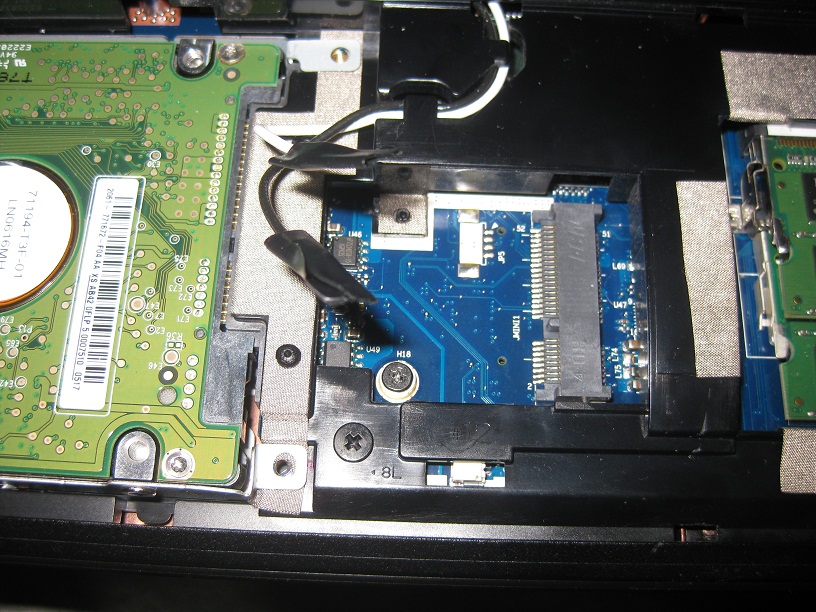
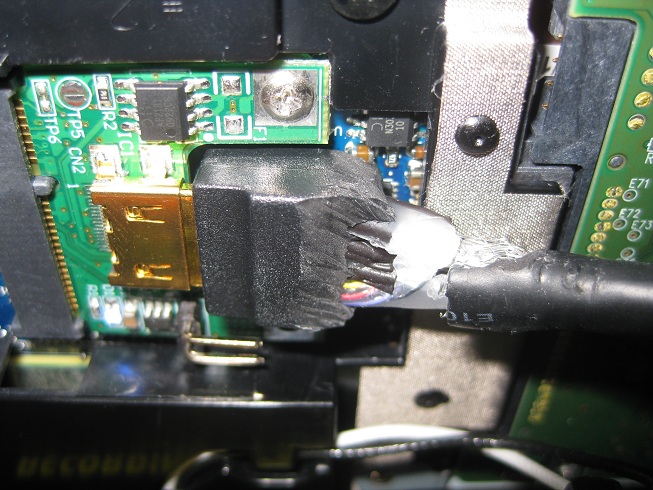
mHDMI cable boot too large for my laptops mPCIe slot. See pictures 1 and 2. The Cable may look destroyed but it works flawlessly. Firstly, since my mPCIe slot is half size I had to cut down the PM3N to half size - this was simply done with wire cutter's. The mHDMI cable on the other hand was a bit more difficult but really just took patience and care not to damage the internal wires. Use a sharp kitchen knife. (possibly add this to trouble-shooting page?)
Problem 2:
Whitelisting and compaction. Since Acer whitelists the WIFI card I first tried booting into windows with WIFI card in, sleep, plug in PM3N, power on ATX/eGPU, resume.
Error 12 in windows.
Downloaded Nandos Setup 1.X program. Boot with WIFI in, once in Setup 1.X menu, remove WIFI, plug in PM3N, power on ATX/eGPU, press F5 to rescan mPCIe slot, 5770 is found.
32-bit compaction on eGPU: Error 43 cannot start device.
32-bit A compaction on eGPU - > chainload into windows -> the external monitor shows login screen, first signs that all hardware is working including the butchered HDMI cable *jaw drops* followed by a big grin.
Testing:
Device Manager: no conflicts.
AMD Catalyst: Competely incorporated the double GPU setup. Very usable. Overclock (overdrive) tab added for 5770.
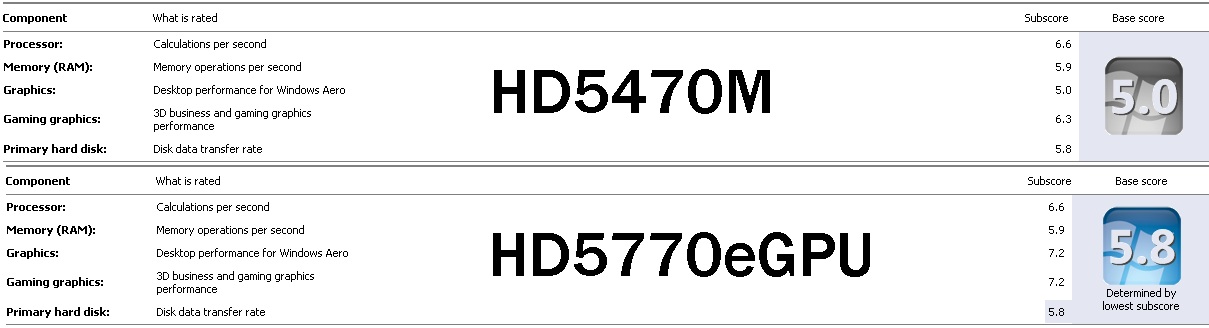
Windows Index Score: See picture 3. Index went up 5.0 to 5.8 (limited by harddrive speed) Graphics went from 5.0 -> 7.2!, Gaming Graphics from 6.3 -> 7.2.
Furmark: max settings, temperature: 75c
GPU-z: Monitoring works fine (e.g fan speed, gpu load, ect).
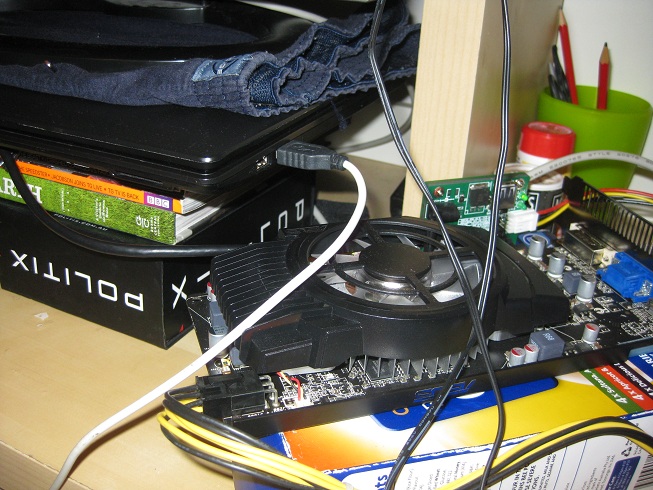
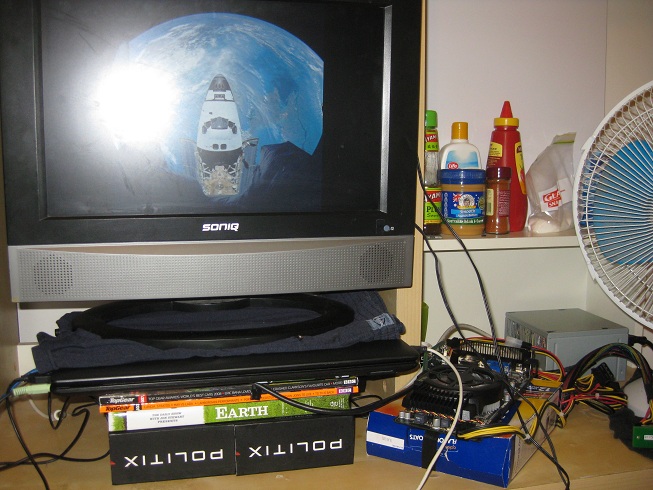
See picture 5 for the complete setup. Notice the laptop is now used as the monitor stand. Yes those are boxers under the monitor and in case you were thinking that's just sugar in that ziplock baggie
Benchmarks:
Resident Evil 5:
DX9 Variable:
5470 stock 23.3
5470 860core 960mem 27.1 (O.Ced)
5770 stock 57.4fps
Devil May Cry Scene 4:
5770 stock : 51fps
(no 5470 benchmark made)
3DMark06:
5470 5770
Detailed scores
3DMark Score 4752 11376
SM2.0 Score 1619 5304
HDR/SM3.0 Score 2020 5272
CPU Score 2548 2542
GT1 - Return To Proxycon 12 FPS 43 FPS
GT2 - Firefly Forest 14 FPS 45 FPS
HDR1 - Canyon Flight 18 FPS 53 FPS
HDR2 - Deep Freeze 21 FPS 52 FPS
3DMarkVantage:
5470 STOCK 5770 STOCK
3DMark Score 1391 6733
Graphics Score 1102 6753
CPU Score 6564 6675
3DMark11:
5470 stock 5770 stock
3DMark Score
P496 P2009
Graphics Score
431 2024
As it stands I still need to overcome the whitelisting of the WIFI by swapping it in and out each reboot. I've been too busy playing BFBC2, to try the methods Nando has sent me (but am very grateful for that!). BFBC2 by the way runs great @ DX9, full resolution 1440x900 (monitor limited), and full settings @ FPS of 50-60. If I use DX11 the x1 bottle neck makes the game a little too choppy for my liking.. because of tessellation perhaps?
Well those are my results. Please share yours with us. And if you're thinking about trying this - just do it! And have patience.
Thanks again to Nando, nlooije, mental2 and anyone else that helped me get this working.
Cheers! -
Riight the pictures...
Attached Files:
-
-
My new Lenovo Y470 has just arrived.
i7 2630qm
8GB RAM
500GB 7200rpm HDD
Onboard Optimus with GT 550m
Will be trying an eGPU setup sometime with my existing 5870, but I need a PM3N first. -
This topics is quite interesting actually.. But I am curious, can we put more powerful GPU into the PE4L/PE4H DIY Vidock? For example Nvidia 560?
-
Congrats, awesome that you got it working.
I have encountered this issue also; when inserting my PM3N into the mPCIe port there is less then the length of the mHDMI connector left to the RAM modules meaning i cant normally insert the mHDMI cable. I used an exacto knife to cut along the ridge of the connector and took it all apart. About half of the connector is covered in solid glue to keep the wires in place giving me the other half which is flexible to maneuver it into place. i have entered this issue into the Troubleshooting section and will also post a picture of my solution.
EDIT: what might be a better solution then taking apart a mHDMI cable is a Free Angle mHDMI cable. Unfortunately, i havent been able to find one which uses mHDMI connectors.
Hi welcome to the thread. I would like to point you to the Implementation: examples section of the first post. There you can find a number of powerful GPU setups including x60-x80 where x is generation 4 or 5.
Although this community is willing to help you with any issues you have, please check the Getting Started section of the first post and/or the Troubleshooting section if your question has already been discussed there. Chances are it has. -
Could this be clarified? Is there a "Generation 1" option, and an "Automatic" option in there, but also a "Generation 2" option? If there is no "Generation 2" option, then what does "Automatic" do? I want to know why it crashes.
-
ACPI tables need to be relocated so it's not as simple as changing a byte. Though having an older bios with TOLUD=3.0 could be used as a comparison to make the job easier.
x2 link on a Lenovo X220/T420 = homebrew Thunderbolt port (advanced bios hack required)
If any bios modder wants to make such changes then consider also adding x2 connectivity by modifying the flash descriptor *if* it has "x2 capability": either port1+2, port3+4, port5+6 or port7+8 are mPCIe and/or expresscard slots. The older X201/X200 did have this arrangement, but these new systems have a mSATA port instead of an additional mPCIe port so would need someone to confirm.
sprtnbsblplya's T420 has p2=wifi, p4=expresscard as shown below. Would need another p1 or p3 mPCIe slot to be physically capable of doing a x2 link.
The advanced bios modder would need the PCH_SPI_Programming_Guide.pdf as a reference to know what to mod.Code:[email protected] [email protected] 8086:[email protected] (Intel) [email protected] 10de:[email protected] (NVidia) [email protected] 1180:[email protected] (Ricoh)
This bios is just flipping one of the bits below to limit the link to 2.5GT/s or allow 2.5GT + 5.0GT/s link negotiation. I use the first method below in Setup 1.0f-prexx to force G1/G2 link speed.
![[IMG]](images/storyImages/hm65pcie20.png)
Source: HM65 chipset datasheet
The crashing when running G2 link speed is probably due to the link either having a partially working or is continues retrying to establish a working 5GT/s link. Forcing 2.5GT/s link speed stops the unsuccessful renegotiations and associated crashes in Windows.
A better quality, shorter or heavily shielded mini HDMI cable is the only real hardware variable at our disposal to try to tweak a 5GT/s link into action. -
I have 8GB of RAM, but from the sounds of it, running with a BIOS before 1.15 works fine with above 3GB of RAM. I am curious, does it have to be an Nvidia Graphics card, is there a specific reason, or would an ATI card do the trick. The only reason I ask is because I don't think there are any Nvidia cards that support more than 3 monitors. Furthermore, are you using the PE4H or the PE4L on your X220?
-
Hi nando, my X220 unfortunately sustained a bit of damage yesterday, and when I opened it up I realized an x2 link is probably impossible. The mPCI-e port cannot be accessed at all from the outside without cutting into the chassis. The Expresscard slot is 54mm so with the 34mm adapter it is theoretically possible to have a cable running through the extra 20mm space, except the touchpad and keyboard basically seal off the expansion card area. Looks like the only way to get x2 is to cut a hole into the chassis, or take out the touchpad. Even then some cuts might need to be made into the palmrest to accomodate a cable.
I can't speak for the T420, but having seen other Thinkpads before I think the situation is probably similar. I think we Thinkpad users are better off sticking with x1.Opt. -
Anyway, I got this ACER 5745G with Windows 7 64 and it has no Express card on it.. I found an interesting way using the Wireless adapter like beatTheRestrictions did.. But i am curious, I got this Express Card to USB Converter.. Can I use it to use the DIY Vidock instead of "tearing apart" my laptop?
And Also, I got 12Gb RAM in My laptop, does it will cause any problems? because as far as i can see, having more than 2 gigs RAM might cause a problem..
-
From the Pre-Purchase section on the first page:
3. I don't have an expresscard slot. Can I still do a eGPU?As stated a couple of post earlier; the community is willing to help but if you have a question please check the Pre-Purchase, Examples, Troubleshooting sections of the first post. Over time alot of info has accumulated there and chances are you question has been asked and answered. -
I got this setup to work with my laptop. =D
Laptop : dell studio 1555
Cpu : p8600 2.4ghz
Internal Graphics : ati mobility hd 4500/5100
External Graphics : nvidia gtx 470
Psu : corsair cx 430W
ExpressCard External Graphics x1 from HIT : http://www.harmonicinversion.com/pr...flypage-ask.tpl&product_id=193&category_id=25
I just hope someone figures out how to get Optimus to work on other primary video cards, namely the ATI mobility HD 4500/5100. I'm jealous of the crazy performance everyone is getting. D=
Edit: 5277 3DMarks with 3DMark06 http://3dmark.com/3dm06/15788638 -
Hello can somebody tell me how to make heavily shielded mini HDMI cable and post their cable images...
-
All you do is wrap a bunch of aluminum foil around the cable, especially the connector area since that doesn't have any shielding at all. Not really much else you can do. I'd wrap a few inches around, then wrap electrical tape around that, then do the next few inches.
Also make sure you keep power cables away from your mini HDMI cables. -
I have a question.
Is it really worth all that trouble to buy the diy vidock kit? I was contemplating if I should get a Sony Vaio SA for roughly $1,500(tax included), or get a Lenovo x220 for about $1,100(tax included).
The thing is, if I get the x220, I would also need to buy a monitor(~$130), (DIY Vidock(~$55), graphics card(~$135), power supply (~$30)
Is this all really worth it? Not only will it clutter my dorm, but in the end I will be paying almost the same. I would buy the Sony Vaio SA in a heart beat if they offered some sweet discount or something but I don't see them lowering the price anytime soon.
So what do you guys say? Sony Vaio SA or Lenovo x220 + DIY Vidock.
Also it would also be helpful to know what kind of DIY Vidock I need, such as the standard express card type or... etc.
Thank you. -
The thing is notebook cards are usually not very strong performers, they are generally something like half as powerful as the desktop equivalent with the same number designation. An external GPU will give you the massive performance when you do need it at your desk, while reducing power and weight on the go if you have just integrated.
-
![[IMG]](images/storyImages/logoix.png) Ivy/Sandy Bridge notebooks for a DIY eGPU
Ivy/Sandy Bridge notebooks for a DIY eGPU
![[IMG]](images/storyImages/MacOS.png)
![[IMG]](images/storyImages/Videos.png)
![[IMG]](images/storyImages/Getting.png)
![[IMG]](images/storyImages/Performance.png)
![[IMG]](images/storyImages/Home.png)
![[IMG]](images/storyImages/Moddeddrivers.png)
![[IMG]](images/storyImages/1_xSetup.png)
![[IMG]](images/storyImages/Enclosures.png)
![[IMG]](images/storyImages/Troubleshoot.png)
Sandy/IVY Bridge systems offer faster 5GT/s-per-lane PCIe 2.0 mPCIe/ExpressCard slots over their previous 1st gen i-core and C2D systems. However many no longer have ExpressCard slots. Only option then is a mPCIe eGPU implementation if have an accessible wifi mPCIe slot which introduces additional issues: it may be a whitelisted slot requiring Setup 1.x or booting with wifi, then swapping it out to activate it. mPCIe also adds the hassle of cabling it via underside covers with no concurrent wifi unless get a USB stick wifi. A USB 3.0 DIY eGPU product isn't likely to happen due to USB-to-pcie driver issues. The best eGPU solution is one using a Thunderbolt port.
Units with an ExpressCard slot or Thunderbolt port are shown below. Thunderbolt is a x4 3.0 (~40Gbps) (Ivy Bridge + latest TB controller) or x4 2.0 link (20Gbps) (SB or older TB controller). SB/IVB's expresscard is a x1 2.0 link (5Gbps), the latter approximately doubles to 10Gbps with NVidia Optimus' pci-e compression that activates on a x1 link with Fermi/Keplar cards.
Expresscard systems are capable of attaching an eGPU like a $160 GTS450-1GB or $210 GTX460-1GB all inclusive. Before purchasing one of these with the intention of attaching an eGPU, confirm details in Pre-purchase FAQ -> 2. How can I check if my notebook is compatible with an eGPU?. Refer to Pre-purchase FAQ and Getting Started guides on the main page to identify what parts are required for an eGPU setup.
Ivy Bridge
Sandy BridgeSystem ($=no internal ODD) ExpressCard eGPU impl? Weight/dimensions/dGPU 11.6" Acer W700$ tablet YES - TB 2.00lbs? (0.90kgs?). 0.8" thick?. 1080P-IPS. 11.6" Macbook Air$ YES - TB 2.38lbs (1.08kgs). 0.64" thick. . 11/13" Ultrabooks YES - TB From Acer, Asus & Lenovo. ~2.9lbs (1.30kgs). ~0.7" thick. 13" Acer S5$ YES - TB 2.70lbs (1.20kgs). 0.6" thick. 13" Macbook Air$ YES - TB 2.96lbs (1.35kgs). 0.68" thick. 900P 16:10. 13" Macbook Pro retina$ YES - TB 2.96lbs?? (1.35kgs??) 0.68" thick?? 1600P. . 14" Gigabyte U2442N$ YES - TB 3.28lbs (1.49kgs). 0.8" thick. GT640M/900P. 14" Lenovo T430s YES - TB 3.89lbs (1.77kgs). 1.02" thick. NVS5200M. 900P. Thunderbolt on i7 models. 15" Macbook Pro Retina$ YES - TB 4.46lbs (2.02kgs). 0.7" thick. GT650M/1800P. PROB: iGPU not accessible in Win. 15" HP Spectre XT Touch YES - TB 4.77lbs (2.17kgs). 0.70" thick. 1080P-IPS. 14" Lenovo S430 YES - TB 5.39lbs (2.45kgs). 1.3" thick. 15" Asus G55VW YES - TB 8.50lbs (3.85kgs). 1.3" thick. GTX660M/1080P. 17" Asus G75VW YES - TB 9.50lbs (4.30kgs). 1.3" thick. GTX670M/1080P.
System ($=no internal ODD) ExpressCard eGPU impl? Weight/dimensions/dGPU 10" Panasonic J10$ YES 2.35lbs (1.07kgs). 1.38" thick. 11.6"/13" Ultrabooks$ Click link for weight/thickness details. 11.6" Macbook Air$ YES - TB 2.38lbs (1.08kgs). 0.64" thick. . 13" Samsung Series-9$ 2.49lbs (1.13kgs). 0.60" thick. 900P. 13" Sony_Z2$ YES - LP
OR mPCIe2.60lbs (1.18kgs). 0.66" thick. 900P/1080P. Raid-0, Lightpeak port HD6650M, mPCIe eGPU idea. 13" Asus UX31$ 2.86lbs (1.30kgs). 0.67" thick. 900P. 13" Macbook Air$ YES - TB 2.96lbs (1.35kgs). 0.68" thick. 900P 16:10. . 12.5" Samsung Series-3$ 3.09lbs (1.40kgs). 0.98" thick. 12.1" Fujitsu P771 YES 3.10lbs (1.41kgs). 1.18" thick. 1280x800 LCD. 13" Fujitsu SH76 YES 3.20lbs (1.45kgs). 0.91" thick. 12.5" Lenovo X220$ YES 3.20lbs (1.45kgs). 1.36" thick. IPS LCD option. mSATA. Req bios 1.23+. 12.5" Lenovo E220s$ 3.23lbs (1.47kgs). 0.85" thick. mSATA. 13" Toshiba R835 NO 3.26lbs (1.48kgs). 1.00" thick. NOTE: SATA-II capping. 13" Toshiba R830 YES 3.26lbs (1.48kgs). 1.00" thick. NOTE: SATA-II capping. 11.6" ASUS U24E$ 3.30lbs (1.50kgs). 1.09" thick. Quad-core upgradeable. 12.1" Fujitsu P701$ YES 3.30lbs (1.50kgs). 1.02" thick. 1280x800 LCD. 12.5" Asus B23E$ YES 3.40lbs (1.55kgs). 1.1" thick. Boston Power Sonata 48Whr 3cell. 13" Lenovo U300$ 3.48lbs (1.58kgs). 0.72" thick. 12.5" Dell E6220$ YES 3.50lbs (1.59kgs). 0.97" thick. IPS LCD mod. 13" LG P330$ 3.63lbs (1.65kgs). GT555M. 13" Asus U36SD$ 3.70lbs (1.68kgs). 0.75" thick. GT520M. Quad-core option. 13" Lenovo X1$ 3.70lbs (1.68kgs). 0.84" thick. 13" Sony SA NO-mPCIe 3.71lbs (1.69kgs). 0.95" thick. HD6630M/900P option. 12.5" Samsung Series-4$ YES 3.83lbs (1.74kgs). 1.3" thick. 13" Lenovo E320$ 3.83lbs (1.74kgs). 1.41" thick. 13" Fujitsu S761 YES 3.85lbs (1.75kgs). 1.26" thick. GT520M option. 13" ASUS U31SD$ 3.92lbs (1.78kgs). 1.12" thick. GT520M. 12.1" HP 2760P tablet$ YES 3.97lbs (1.80kgs). 1.27" thick. AFFS 1280x800 LCD option. 14" Lenovo T420s YES 4.03lbs (1.83kgs). 1.05" thick. NVS4200M/900P option. mSATA. Req bios 1.30+ 14" Samsung Series-5 4.05lbs (1.84kgs). 0.83" thick. HD7550M. 13" Acer 3830TG$ 4.11lbs (1.87kgs). 1.14" thick. GT540M. Poor cooling=throttling requires DIY FIX. 14" Lenovo E420s 4.14lbs (1.88kgs). 1.22" thick. HD6630M option. mSATA. 13" Fujitsu SH561 YES 4.18lbs (1.90kgs). 1.40" thick. GT520M 14" Fujitsu LH701 YES 4.18lbs (1.90kgs). 1.27" thick. GT520M 14" Toshiba R840 YES 4.20lbs (1.91kgs). 1.00" thick. HD6450M/900P opt. HD6450M opt is not switchable gfx.SATA-II capped. 12.5" HP 2560P YES 4.24lbs (1.92kgs). 1.29" thick. Quad-core capable. 14" LG P430 4.27lbs (1.94kgs). 1.09" thick. GT520M. Quad-core option. 13" Dell E6320 YES 4.29lbs (1.95kgs). 1.2" thick. 14" Samsung Series-7 4.30lbs (1.95kgs). 0.90" thick. HD6490M. 900P. 13" ASUS U30SD 4.36lbs (1.98kgs). 1.18" thick. GT520M. 14" Lenovo U400 4.36lbs (1.98kgs). 0.89" thick. HD6470M option. 14" Dell XPS 14z 4.36lbs (1.98kgs). 0.9" thick. GT520M option. 13" chassis. 13" Lenovo Z370 4.40lbs (2.00kgs). 1.30" thick. G410M option. 11.6" Alienware m11xR3$ 4.40lbs (2.00kgs). 1.29" thick. GT540M. 14" MSI X460DX 4.40lbs (2.00kgs). 1.14" thick. GT540M. Quad-core option. 14" Asus U41SV$ 4.40lbs (2.00kgs). 1.06" thick. GT540M. 15.5" Sony SE 4.40lbs (2.00kgs). 1.32" thick. HD6630M. 1080P. 13" Macbook Pro YES - TB 4.50lbs (2.04kgs). 0.95" thick. 1280x800 LCD. . 14" HP DM4T 4.50lbs (2.04kgs). 1.27" thick. HD7470M option. 900P. 14" Samsung QX412 4.51lbs (2.05kgs). 1.06" thick. GT520M. 14" Gateway ID47 4.60lbs (2.09kgs). 1.13" thick. GT540M (though only have HD3000 model in US atm). 13" HP 6360B YES 4.65lbs (2.11kgs). 1.33" thick. 13" HP 4330s YES 4.70lbs (2.13kgs). 1.10" thick. HD6490M option. i7-quad capable. 13" Dell Vostro 3350 4.70lbs (2.14kgs). 1.17" thick. HD6470M option. 14" ASUS U43SD 4.71lbs (2.14kgs). 1.25" thick. GT520M. 14" Acer 4830TG 4.77lbs (2.17kgs). 1.17" thick. GT540M. 14" Lenovo T420 YES 4.84lbs (2.20kgs). 1.20" thick. NVS4200M/900P option. mSATA. TOLUD issue. 14" Lenovo Y470P 4.85lbs (2.20kgs). 1.29" thick. HD7690M. mSATA, quad-core opt. 900P LCD swapout. 62Whr 6-cell. 14" Lenovo Y470 4.85lbs (2.20kgs). 1.29" thick. GT550M. mSATA, quad-core opt. 900P LCD swapout. 62Whr 6-cell. 14" Asus U46SV 4.85lbs (2.20kgs). 1.06" thick. GT540M. 8-cell bat. 14" Lenovo Z470 4.85lbs (2.20kgs). 1.34" thick. GT540M. 14" Lenovo Y460p YES 4.85lbs (2.20kgs). 1.33" thick. HD6550M. mSATA. Quad-core. Not switchable gfx 14" HP 4430s YES 4.88lbs (2.22kgs). 1.12" thick. HD6490M option. 14" HP DV4-3000 4.88lbs (2.22kgs). 1.43" thick. HD6750M. 14" Dell Inspiron 14R 4.89lbs (2.22kgs). 1.29" thick. HD6470M. 14" HP Elitebook 8460P YES 4.95lbs (2.25kgs). 1.25" thick. HD6470M/900P option. No switchable gfx! 14" Samsung QX411 4.98lbs (2.26kgs). 1.07" thick. GT525M. 15.6" Samsung Series-7 5.05lbs (2.30kgs). ?.??" thick. HD6750M. 900P. 14" Dell E5420 YES 5.06lbs (2.30kgs). 1.28" thick. 900P option. 14" Lenovo L420 YES 5.06lbs (2.30kgs). 1.26" thick. 14" HP 6460B YES 5.09lbs (2.31kgs). 1.34" thick. HD6470M/900P option. No switchable gfx! 14" Dell E6420 YES 5.10lbs (2.32kgs). 1.28" thick. NVS4200M/900P option. Quad-core option. 14" Lenovo E420 YES 5.25lbs (2.39kgs). 1.43" thick. HD6630M option. mSATA. 14" ASUS N45SF 5.28lbs (2.40kgs). 1.38" thick. GT555M. 15.6" MSI GE620DX 5.28lbs (2.40kgs). 1.50" thick. GT555M/1080P. 14" Dell Vostro 3450 YES 5.35lbs (2.43kgs). 1.28" thick. HD6630M option. 14" Sony CA 5.39lbs (2.45kgs). 1.43" thick. HD6630M/900P option. 14" Toshiba M645 YES 5.40lbs (2.45kgs). 1.39" thick. 14" Fujitsu S751 YES 5.40lbs (2.45kgs). 1.46" thick. 900P option. 14" Asus B43 YES 5.46lbs (2.48kgs) 1.38" thick. 15.6" Fujitsu E751 YES 5.50lbs (2.50kgs). 1.38" thick. 900P option. 15.6" Fujitsu AH531 YES 5.50lbs (2.50kgs). 1.43" thick. GT525M 15.6" Dell XPS 15Z 5.54lbs (2.51kgs). 0.97" thick. GT525M. 1080P option. 15.6" HP 4530s YES 5.55lbs (2.51kgs). 1.12" thick. HD6490M option. 900P/1080P LCD user upgrade. 15.4" Macbook Pro YES - TB 5.60lbs (2.54 kg). 0.95" thick. HD6750M. 900P (16:10). PROB: iGPU not accessible in Win. 15.6" Acer 8573G YES 5.61lbs (2.55 kg). 1.22" thick. GT540M. 14.5" HP Envy 14 5.69lbs (2.59kgs). 1.18" thick. HD6630M. 15.6" HP DV6T 5.78lbs (2.63kgs). 1.39" thick. HD6770M. 1080P option. 47Whr 6-cell. 15.6" HP Envy 15 5.80lbs (2.64kgs). 1.10" thick. HD7690M (~HD6770M). 1080P. 15.6" MISC YES Lenovo W520/T520, Dell E6520, HP 8560P(no dGPU). 900P/1080P. 15.6" Dell M4600 YES 6.15lbs (2.79kgs). 1.44" thick. M5950 (~HD6770M). 900P/1080P. 15.6" Dell XPS15 NO-mPCIe 6.33lbs (2.87kgs). 1.50" thick. GT540M. 1080P. 14" Alienware m14x - 6.50lbs (2.95kgs). 1.49" thick. GT555M. 900P. 17" Dell Vostro 3750 YES 6.62lbs (3.00kgs). 1.46" thick. GT525M. 900P. 17" Dell M6600 YES 7.77lbs (3.50kgs). 1.46" thick. 1080P. M8900 (~HD6970M)/2000M/3000M/4000M/5010M. 17" Fujitsu NH751 YES 8.16lbs (3.71kgs). 1.79" thick. 1080P. GT525M.
..........=recommended lightest or most powerful in that LCD size class
purple=ULV notebook or ultrabook. Ultrabooks come with a non-removable lower-capacity li-po battery and mSATA SSD.
$=Add $36-delivered slim USB DVD if need ODD.Last edited by a moderator: May 8, 2015
DIY eGPU experiences
Discussion in 'e-GPU (External Graphics) Discussion' started by master blaster, Sep 18, 2009.


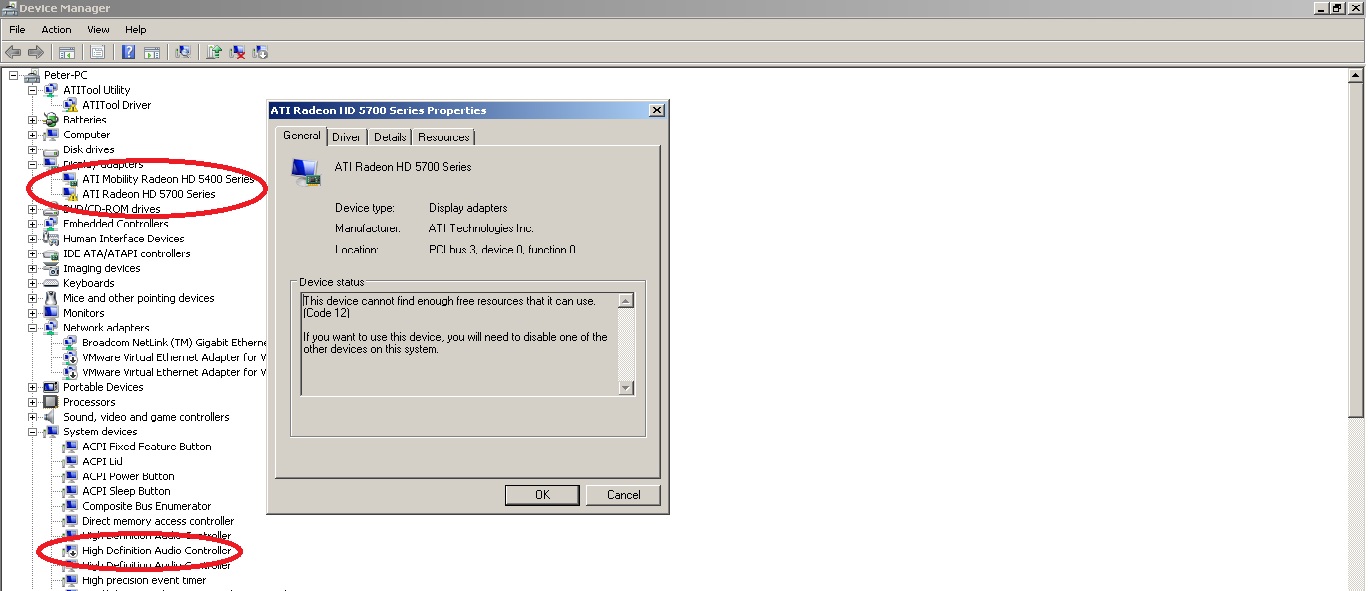


![[IMG]](http://imageshack.us/photo/my-images/28/img1899rl.jpg/)
![[IMG]](http://imageshack.us/photo/my-images/39/img1897p.jpg/)


![[IMG]](http://imageshack.us/photo/my-images/696/pe4lpm060a.jpg/)
![[IMG]](http://img43.imageshack.us/i/pe4h301.jpg/)
![[IMG]](http://img513.imageshack.us/i/pe4h302.jpg/)
![[IMG]](http://imageshack.us/photo/my-images/820/x16connector.png/)