Problems? See this thread at archive.org.
I also noticed a temperature difference when playing Witcher 2. On identical scenes/settings the 12.5 stock clevo drivers gave around 73degC, whereas the 12.7 got to 79Deg. I also had BSOD after half an hour of playing, whereas with the 12.5 drivers I played for hours....gee I need a llife...;-)
-
Those Dirt 3 scores still sounds wrong, compared to mine as stock. And im not even running an ivy bridge cpu, i got an old sandy.
something definitely isnt right. -
People were complaining, that Just cause 2 is runnig weird at around 20- 30 fps,so i tryed it. Here are the in game benchmarks.
The dark tower
![[IMG]](images/storyImages/YVfqx.jpg)
Desert sunrise
![[IMG]](images/storyImages/J862F.jpg)
Concrete jungle
![[IMG]](images/storyImages/tAtFn.jpg)
The 7970m again shows strange behavior as in the firs two benchmarks the utilization was almost all the time 99%, just somethimes went down to like 80-85, but that was only when the benchmarks were on the less demanding parts.. However in concrete jungle the fps is much lower and also utilization was around 50 % all the time.
But nevermind i tryed the game and it playes ggret, everything maxed out 8x AA around 50 fps and more.
This was on OC 950/1400 and stock drivers.Last edited by a moderator: May 6, 2015 -
Oh btw during vantage my peak power consumption was around 160W, where as my 16F2 setup was around 170W (both from the wall) so looking good there.
-
My reseller just told me that the first two batches of 7970m's have problems with enduro and that he is waiting for the new one ariving in july.
(Clevo reseller)
I live in Brazil so maybe you guys already have the fixed cards. I don't know but i think at least some people here have the first 2 batches.
Maybe you guys should check with your resellers ? -
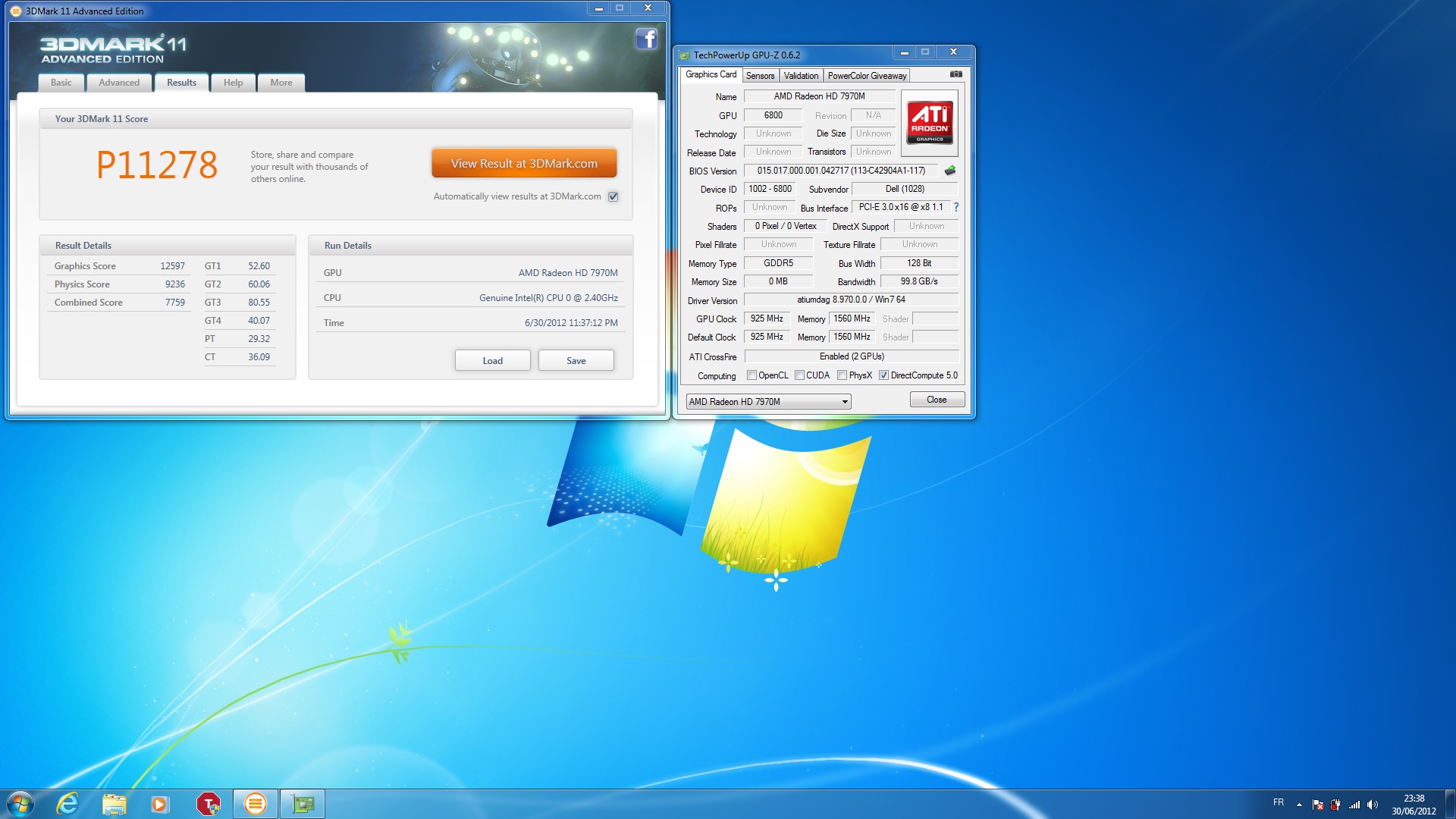
test single card 7970 @ 1070/1600 with 3dmark11 (1.075v)
Generic VGA video card benchmark result - Genuine Intel(R) CPU 0 @ 2.40GHz,Alienware M18xR2 score: P7216 3DMarks -
Hope thats not true coz I think I've got the one form the second batch..But everything points to a driver issue. There are a lot of games that run great.
-
I hope not... mine is part of the second batch....
-
Latest results with the new drivers - AMD Releases Catalyst 12.6 WHQL and 12.7 Beta | techPowerUp
AMD Radeon HD 7970M video card benchmark result - Intel Core i7-3720QM Processor,CLEVO P170EM score: P6881 3DMarks
Quite happy with this -
1070 core is very high. can play games stable?
-
Are these settings correct for P170em 7970m?? doesnt seem to make much difference, especially in BF3. utilisation drops to around 40% in mplayer games but i get P6400 in 3dmark11.. any suggestions?
Attached Files:
-
-
I believe I was the person to whom you were referring. I see the same results. Excellent (simply superb in fact) results for the Desert and Tower and disappointing results in the Concrete Jungle. I also see low CPU utilization in Concrete Jungle, as if the drivers are starving the hardware. The performance in-game is fantastic until I enter a city (just like the one in the benchmark) and the framerate dips. Fortunately, the drop is not as dramatic as it is in the benchmark and is only noticeable if I monitor the FPS.
-
yep lots of clevo 7970m owners can confirm bf3 multiplater is unstable at any settings or overclock. i even have gameplay on youtube search 7970m bf3 by 1detarrednu
-
These 12.7 drivers kill my oc potential. I think I got up to 990/1400 with the 12.5. Highest I can go with the 12.7 is 925/1350. Bummer.
-
I use the 'game' settting ( option 2)
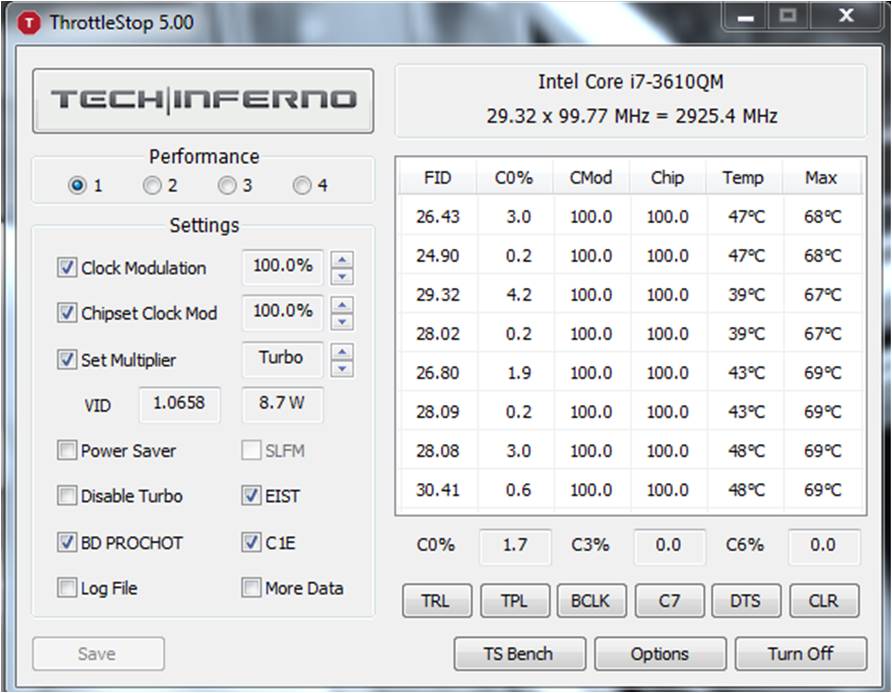
Then I click on the TRL button and change the ratio on each core to 38 (Ive tried higher than 38, but it seems to be capped at 38)
This gives me around 10% increase in fps for physics in 3Dmark 11. I havent played BF3, but other games I have played show an increase in fps after this change.. -
Hello
New test CFX M18X R2
http://3dmark.com/3dm11/3779532Attached Files:
-
-
If somedy is curious I just did a 3d mark 11 extreme run on 1060/1560 stock voltage , drivers form the disk
AMD Radeon HD 7970M video card benchmark result - Intel Core i7-3610QM Processor,CLEVO P15xEMx score: X2255 3DMarks
Thats just around the scores of a desktop 7950 or gtx 580
Charts, benchmarks 2012 VGA-GPGPU, 01 - 3DMark11 [C] Extreme -
I can't even get mine to load the stock drivers on a clean windows install. . Seeing all these awesome results makes me want to cry
-
Feel sorry for you bro, saw you complaining in alot of other threads. I know you installed all the drivers an d reinstalled your system many times, but still I can tell how I made it to work. Pretty symple.
Just instal windws. Put in the driver cd and pres autorun so the cd menu appears. choose install drivers, instal the chippset, restart. then just click on the second instal vga driver and let it install everything. First time I tryed it out I was browsing the cd instaled the intel gpu driver fist, and than the amd , but that didn't work.
You just nedd to instal the amd driver, The intel one is included inside.
I know you probably tryed it alredy but just in case
-
I would not waste any more time with that laptop if I were you. Just send it back to your reseller and they will let you know for real if something is actually wrong.
And from whom did you buy it anyways? -
I cannot get furmark to use the 7970m...keeps using the intel 4000. Any tips? I changed furmark.exe to high performance.
-
Guess what?Yesterday my girlfriend got back from the supermarket and bought me The close quarters DLC.
She sad it was for sale for a few bucks..Anyway, I played a few games and unlike the other big maps the dipping in fps isnt so noticeble and the gpu is utilized almost all the time more than 90%!! So I just recorded this short video with msi afterburner to let you guys see how it plays
Hopefully now drivers are around the corner and we'll be enjoing smooth 50+ fps with no dips also on the other maps.
Durring the video the card was overclocked 950/1400 and running on stock clevo drivers.
150EM 7970m Battlefield 3 gamplay - YouTube -
stock 8.951.6.0 driver right? I dont get it how come you say you get almost 60 FPS all the time when we have very identical laptop with same overclock. What do you average on bigger maps or other close quarter maps and does it bounce around from 30-60 FPS consistently?
Edit: we do get similar fps on ziba tower, your fps went down to 35-40 fps at some points then back to 50-60 so its still unstable. Do you really get mostly 60 fps mostly all the time when not recording on other maps? ziba tower usually gives me higher average but all the other maps are a lot more unstable. -
Hey all, I seem to be pretty low at 5,282 even with the same hardware. The only real difference I can think of is that I am using the included drivers from the CD included from Malibal who I bought this notebook from. Could my driver really be making that big of a difference? Even at stock this seems really low...
AMD Radeon HD 7970M video card benchmark result - Intel Core i7-3610QM Processor,CLEVO P15xEMx score: P5282 3DMarks
Any advice? I've tried downloading all the stupid auto-installers from AMD and none detect the 7970 and say I don't have valid hardware and refuse driver install. -
P6616 3DMarks
P150EM OC'd to 950/1500 on 12.7 beta drivers -
OK I updated to the 12.7 beta drivers... my score went from 5300 to 7800. Wat da eff?
AMD Radeon HD 7970M video card benchmark result - Intel Core i7-3610QM Processor,CLEVO P15xEMx score: P7808 3DMarks -
wat da hail? you were on stock clocks? dat sheet cray.
-
When I'm not recording It's just going a bit better, I mean not 60 all the time but the bounce isnt that bad like on th elarger maps, maybe somethimes it goes down 35-38 fps but that is still pretty good. The thing is that the gpu on close quarters maps is almost all the time more than 90%. But yeah when theres more players and the frames are lets say around 50 and I want to lower my settings to get better fps, I jost get lower utilization and same fps..
And its the same on larger maps except the fps is 30-50, mostly it dont dip under 30 on caspian, and also if I lower my settings I'll get the same fps with lower utilization..Some maps play even wors, like krkand maps dip somethimes down to 20 fps. and utilization is around 50-60%. Abd yeah the driver is 8.951.6.0
Hopefully the utlization isssue will be fixed soon. coz when the gpou is utilized 99% somethimes for few seconds it flyes areond 50 fps with 2xmsaa
-
It's a glitch.
Check your Graphics Test 4 - 73126.24 FPS. -
Yep, its a 'feature' of the 12.7 drivers. I had ridiculous scores, too. I'd reccommend the 12.6 official drivers, personally. Had no trouble for several days so far....
-
what is throttlestop?
-
Its not happening to everyone mate. No problem here, scores are reported correctly as they should.
AMD Radeon HD 7970M video card benchmark result - Intel Core i7-2820QM Processor,Micro-Star International Co., Ltd. MS-16F2 score: P6581 3DMarks
Official 12.7 beta with Cap 1 -
So my 3DMark score is still just ~5320 with (presumably) all settings correct.
Is overclocking the only way to go now for better performance? 5300 is still low for stock
-
Beefsticks, lets try something...disable everything that is non essential. No virus scanner, no firewall, kill all unnecessary processes. Then run 3dmark11. Look at your temps for both CPU and GPU while you are running the test.
Also make sure your power plan in windows7 is high performance, and set 3dmark11 to run at high performance GPU in CCC
Report back -
Mine was 5800 out of the box. First thing I installed after windows.
...tapatalk... -
Did you install the chipset drivers, restart, THEN install the graphics drivers?
I remember someone else had a similar problem, and they just installed all of the drivers at once. Doing the above fixed it. -
Anyone have 0/0 clocks on MSIA on CCC 12.6; therefore unable to OC?
How is one to remedy this? -
Slickdude, can you tell me if I run on 'Balanced' power plan but with everyting in advanced settings set to maximums performance that it will run as good as if its a performance power plan?
-
You need to run something to start the GPU. Start up a game or something similar.
-
Install the 12.7 7900 modded beta at benchmark3d.com
Check your MSIAfterburner.cfg file...make sure it saved correctly as a .cfg and not a .txt. Also make sure there are no duplicate files in the directory.
Then check the contents of the file to make sure they are correct.
when i get home tonight, i'll check my laptop for you. Balanced usually works fine. Its in those stubborn cases where you have to force high performance everything because in those cases, the computer is confused with balanced -
Slick, you are a BOSS! Thanks. Sorted the OC'ing problem. Legendary.
-
Now stop messing around and OC the darn card lol
-
Way ahead of you there dude.
I have OC'd the card to 900/1300 currently, CCC still shows as 850/1200 - that's okay though, right? On the old drivers CCC would update the figures instantaneously.
ALSO: Can't overclock nearly as high as before due to screen-tearing artefacts...what the fish? :/ -
hmmmm...you may need 1.075v, but enjoy your card first before even considering that option lol
-
!
I did do this, even though I knew that restarting after each driver makes for the least problems. I will nuke the drivers and install each with a reboot. -
so my laptop is back from warranty)replace screen and keyboard) and i loaded up with latest official amd driver
average fps in bf3(everything maxed) is 50 and temp around 73c
2 hours session with diablo 3 and fps around 90 but temp is 86c. is that normal? -
Multiplayer for BF3 or single-player? I'm guessing single.
-
yes single.
-
So when I tried to reinstall my drivers and disable stuff, Windows became a fallout zone. After an hour, I figured itd take less time to just install a fresh copy of Windows for a maximally pure test. (I have an image of my install pre-fallout so I can just redo that afterware)
This score is with the latest drivers all straight from Clevo. I will attempt a 12.7 update now and let you know how it goes.
AMD Radeon HD 7970M video card benchmark result - Intel Core i7-3610QM Processor,CLEVO P15xEMx score: P5767 3DMarks
The 12.7 is a no-go. 3D Mark constantly crashes when switching to the next scene. Its got something to do with the switchable graphics going in between the Intel and AMD cards and it constantly gives errors. My WIFI almost got bricked, too. It wouldn't turn on no matter what and Windows couldn't see it until I reset my CMOS and took the battery out for 5 minutes. It finally stuttered back on after a few more spams of FN+F11 while booting for the 6th time.
OK Im sorry to spam this forum but I suppose its not spam because I just found out why I was getting errors at startup even after I reverted from 12.7 back to Clevo's drivers.
Under the Intel graphics settings, if you have the Optimal Resolution balloon option enabled, it will force 3D Mark to close! Took forever for me to find out since most of the time it disappears before you can read it. One time it finally stayed long enough and I was able to catch 2 words: optimum resolution.
Whew. Now I need to reintall 12.7 and try again. Damn it!
EDIT: OK I updated to the 12.6 mobility package successfully and ran 3dmark and got 5774. So, from the OEM to 12.6 I got roughly a 40 point increase. -
there is a post regarding this
http://forum.notebookreview.com/sager-clevo/673993-np9170-7970m-cant-run-3d-mark-11-a.html
7970M benchmark results (ONLY)
Discussion in 'Gaming (Software and Graphics Cards)' started by Meaker@Sager, Jun 8, 2012.


![[IMG]](http://i.imgur.com/YVfqx.jpg)
![[IMG]](http://i.imgur.com/J862F.jpg)
![[IMG]](http://i.imgur.com/tAtFn.jpg)