Problems? See this thread at archive.org.
Yep, based on those clocks you're hitting during Firestrike, you're only about 2-3% below what you can expect on a desktop card that doesn't have any TDP limitation and with cooling that can keep it in the mid to low 60's. Yeah, so you're there.
-
-
Final touch
Please remember that I have made all this testings with awareness that I can kill my card and lap, but I worked very hard on cooling cpu, gpu and power sections so all my mods are higly experimental, but everything is working like a charm.
I also advice to not go over 105-110W on bga 1060 card and to not touch an extreem power limits for inexperienced user.
!!!!!!!!!! I have known that If I kill my lap I can aford to buy a new one, so I don't recomend any inexperienced user to follow me !!!!!!!!!
Personal record for my lap and not able to gain more because of crashesh and artifacts, resaults are for max stable OC in any bench and game:
Not able to gain more. But score is very good for mobile gtx1060
Worked hard on cooling my bgabook.
Flashed 150W TDP VBIOS, trying to kill it for over 3days of constant running and working without any issues.
Max wattage I was able to pull from the card is ~140W at 2076MHz at 1.062V which is max for my card, so now TDP is not a limitation for me.
In general graphics scores are around:
FS ~15350
Time ~ 4750
Night ~ 57000
Sky ~ 50100
Valley AA off ~ 5250
Superposition medium ~10200
I am using custom curve but in general +830 mem and around +180 on coreAttached Files:
Last edited: Dec 19, 2019hacktrix2006, kolias, Robbo99999 and 1 other person like this. -
-
Yeah, nice, that's desktop class OC'd territory. My GTX 1070 (desktop) stabalises at 2050Mhz and 1.05V for long gaming sessions, so we're about same there - you got desktop class performance in your laptop there by the looks of it.
-
@Krzyslaw Nice work there, even very very nice scores too. The fact that you have 926 points on GPU score alone for FireStrike and 156 points more on TimeSpy over my score is really making me itch badly on getting my Programmer out!
However on GPU Score's alone on a Mobile BGA GTX 1060 you have beat me out right, there for i concede / relinquish even trying to beat you.
Just one question @140w draw was your VRM's screaming at you?
Also a cheeky request could you share your Curve i am interested in how you set your's up. -
No problem, but I am currently not at Home, and I have only my second msi lap ( ps63 8rc) with me, so please wait .
As for vrm they were screaming for more
But seriously they working fine without a problem.
Changed mem from +830 to +850Last edited: Dec 22, 2019 -
Hi folks.
Few questions, how about adding support for GTX1660Ti? Or maybe app itself will work with those card anyway?
Does there exist any other vBIOS for 1660Ti that will increase TDP limit from stock 80W to higher value? Like 90W or more?
I saw some posts in this thread about SPI flashing that potentially not working with RTX cards is that still correct?
I've got 1660Ti laptop and if there is an option to potentially gain some performance than I'm ready for it.
If not I will think about getting an replacement with RTX2060 instead - because there is something that potentially could be gained here with some effort.seanwee likes this. -
Hi guys ,
I have a 1070 in my M17X R4 , i unlocked the tdp with the tool provided in this thread ( thanks for your hard work ! ) but it's having a weird behaviour : As soon as the gpu reaches 100% usage , my fps are slowing by half and my gpu back to 1443Mhz . It's happening rather quickly ( about 5 sec in the witcher 3 ) and i'm going from 100 fps to 45 ...
Also in hwinfo i never go up 115-120W whereas i unlocked the tdp ...
BTW i'm using 330W Adapter and temps never exceed 66°c
Any help or advice on this please ?
Thank you for your time -
Might be due to your mxm slot can not provide enough power. As far as i know it's official specs are defined with 100 watts.
Gesendet von meinem SM-G973F mit Tapatalk -
Thanks but others having same laptop don't have this problem . The mxm slot can power up to 200W if i'm right ...
-
No thats not true. It is defenitely just able to power 100 watts or little more. 200 watts defenitely not. Yes others use the same card as you but haven't gone beyond their limits if i remembered correctly.. correct me if i'm wrong.
Gesendet von meinem SM-G973F mit Tapatalk -
People like @Mr. Fox have been overclocking & overvolting MXM GPUs in Alienware laptops for years - Kepler & Maxwell GPUs were pulling in the region of 170W+ from the MXM slots if I remember rightly, it might have been even 200W I can't quite remember. I had an overvolted & overclocked 670MX in my M17xR3 and that would pull just over 100W from the MXM slot, and that was just a little GPU with a small number of cores - Mr. Fox and others were doing the same as me but with more voltage for 780M's which had 50% more cores so that would put them in the 170W+ area I would think. So I don't think it's an MXM slot limitation that Gounete is experiencing, it's some kind of a 'bug' related to using a non-standard GPU (I never heard of a 1070 in an M17xR4), so either some settings need to be changed or it's just an unavoidable bug of some description related to firmware/drivers.
-
Don't know that. Have just seen the official specs of the slot
Gesendet von meinem SM-G973F mit TapatalkRobbo99999 likes this. -
Yeah, people have been blowing those official specs out of the water for years. I think people in this thread have even managed close to 200W after doing the power mods (I think I remember a figure of 180W somewhere).hans12321 likes this.
-
-
There's many thread on M17X R4 drawing more than 150W ....
I found one strange thing using hwinfo : I got gpu performance limit utilization : yes ( i have no on every other things such as voltage or power limit so that's not my problem here ) . As soon as the gpu hits 100% usage while gaming ==> fps drop as power consumption ... Any idea anyone ?
Already tried to put off adapter warning in bios as i saw this on another thread but that was for the power limit and it seems that's not really my problem here ... -
To me that sounds like a very strange bug involving firmware/drivers, you're using a non-standard GPU for your laptop, so I'm thinking bugs can occur. You'd want to Google other users that have used GTX 1070 in M17xR4 to see what issues they have and how they overcame them, because I don't ever remember hearing about GTX 1070's in M17xR4...I think I remember hearing GTX 1060's in M17xR4 though, but I'm not sure, I've not really been following it.
-
digging further told me that it's a power limit problem , dunno why as vbios is unlocked , shouldn't throttle past 115W ...
-
Not the first time Dell cripple their products. It is more common than the opposite. Read the posts above as well http://forum.notebookreview.com/thr...r1-bios-unlocked.802440/page-23#post-10979310Robbo99999 likes this.
-
You didn't mess with the "Extreme Power Limits" did you?
-
Might want to talk to the member here who had been able to actually use 200w TDP in the m17x R4.
I still have no idea how he was able to do it. -
Hi there , what do you mean ? I tried many bios setup , there's also a preset button i tried ( this one change extreme power limits yes )
-
The preset button is fine. You're supposed to press that.
But manually entering in an extreme power limit is a big no-no !! These are **NOT** WATT (TDP) limits! These are PCIE rail limits, , which are completely undocumented.
I know first hand that changing one of them (not sure which one) affects the GPU throttle watts point while on *battery* power.
You can enter the GTX 1080 value for extreme power limit 1 (19200) vs 16200 and also I assume the other two, when modding a 1070, but going past the base 1080 values is asking for trouble if you don't know what you're doing.
One GT73VR user destroyed his VRM's by entering in the deskop GTX 1080 Ti "Extreme" limits in these fields when he set a 260 watt limit on his MXM 1080. Not only did it take his card's VRM's out, it damaged the motherboard also (only iGPU would work even on a repaired card, which would give no signal).Papusan likes this. -
Thanks , i finally found how to avoid this throttle . Anyone's looking to unlock his M17X R4 , you have to hibernate then resume OR shutdown ( not reboot ) and power on again . That way we can bypass the 100W limitation . Don't ask me why Dell did this ^^
Hope this will help others =)
Be safe !joluke likes this. -
Hello mates I just flash my(1080) vbios with coolanes app and I want to thank him personally for his effort sharing the app with us.
I flash the 258w vbios because the 280w it will be an overkill for my 330w power supply anyway
So I run a firestrike bench and I got this:
https://www.3dmark.com/3dm/42742859
I think that already hitting 315w while im playing or bench so im ok and happy
tps3443 likes this. -
-
Hi, would this work with a 2070 (not Max-q) and flashing the modded vbios through nvflash with board id mismatch disabled ? I don't mind the error 43 driver since I'm using using Linux and this error doesn't exist on the Linux driver.
Edit : I extracted my vbios with GPU-Z but Mobile Pascal TDP Tweaker opens it as "unsupported". I still can adjust settings tho. Is it safe ?
Edit 2 : When I click preset and then save, the program throws an exception. When I simply open the vbios and set the target to 150000 and limit to 170000 (manually, without clicking on preset), I can save it without any problems...
Here's the link to my extracted vbios if someone could check on it : deletedLast edited: Mar 9, 2020 -
What exactly is your board/system?
My 2070 is "supported" and fully recognised in utility, maybe your dump isn't correct then?
Not tried to mess with it yet, probably will wait until warrany expires and someone else succesfully does the mod. -
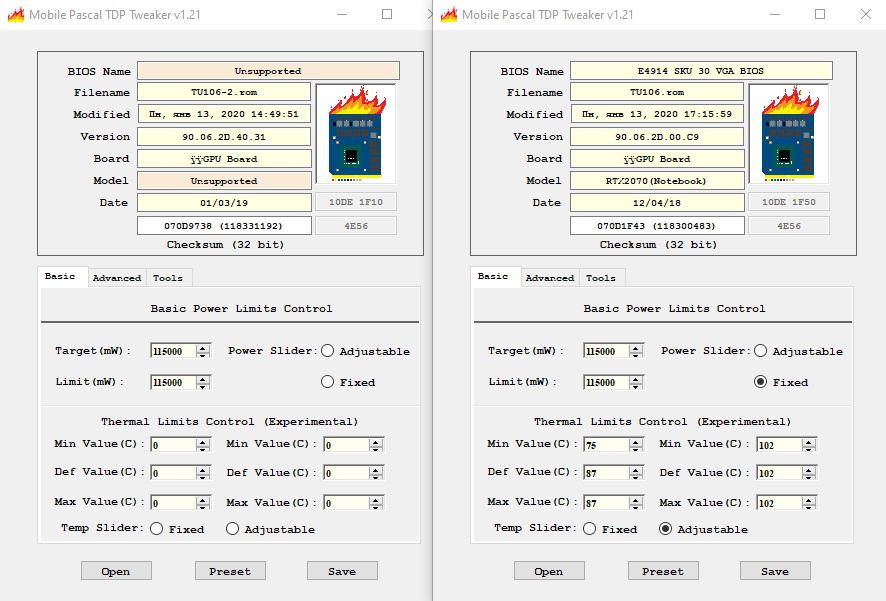
I have a PC Specialist Recoil III / Tongfang GK7CP7S (i7-8750h/2070 8gb). I tried with a dump from both GPU-Z and nvflash. The utility opens it, shows the correct vendor id and correct informations about target and limit power control (115000), but it puts 'unsupported' in BIOS name and Model fields. However the thermal limits fields are all set to 0, I don't know if it's normal or not.
You can try to open the vbios I linked to check it. May I have a dump of your vbios or a screenshot of your Mobile Pascal TDP Tweaker window ?
Edit : I figured the error in the utility is cause whenever I check Adjustable or Fixed Power Slider and then save. By default none is checked and there's no problem saving.Last edited: Jan 13, 2020 -
Checking yours was the first thing i've tried.
No, zeros in fields are not normal, and it seems your version of vBios indeed is not supported...
Here's screenshot, my Clevo vBios is on the right.
I don't recommend you trying to manually enter these values or to flash another manufacturer's vBios though, let's wait until someone more experienced responds.Attached Files:
-
-
Of course I won't flash it if I'm not 100% certain it would work. I'll wait for an update of the program. Thanks for your time
-
I am going to buy these to tdp flash my GTX1080N Clevo.
Is this good enough?
Skypro programmer, 1.8v adapter, and a Soic8 clip?
![[IMG]](images/storyImages/8619036-E-94-CC-49-B4-BD60-1-C71-AB8-A0-CA8.png)
-
Please avoid those cheap chinese clips.
Buy a Pomona 5250 and some male to female jumper cables for it
(these).
https://www.amazon.com/gp/product/B01EV70C78/ -
@Mr. Fox, what is the fastest single powermodded MXM GTX1080? Firestrike graphics score?
-
I think I saw somewhere here around 26400 gpu -firestrike but I’m wondering how much volt this card eats....
Mine with 258w power moded got 25000 graphics score, and I’m happy with that -
I am still confused about how I do this. Do I extract my current bios with the programmer from my GTX1080 bios chip? then I modify the bios with Pascal TDP Tweaker? Then I reload the modified bios to the programmer? then I load it from the programmer to my MXM GTX1080 GPU bios chip?
-
Here you go. Link showing the top two scores by @Johnksss and @Prema.
Use the 'old' search function on the Futuremark web site. The 'new' search really sucks. (The fact that so many things that are new suck is a really lousy trend. The opposite should be true, but it is not. Sad.)
https://www.3dmark.com/compare/fs/19655419/fs/17595622Last edited: Jan 23, 2020 -
Actually, I'm going to dig into this stuff as well, since my current Power Limit is low as well.
As far as I got it, you can extract the rom from your card directly through nvflash or gpu-z applications. You can also download other firmwares from techradar, if you want some predefined clocks and thermals for your card (if you find it) and flash them without the need for a programmer. If you want a custom bios, you modify it with mobile pascal tdp tweaker and save it. Then, it's up to programmer to move it to the chip through the clip (or by desoldering it). I'm going to try it on another board just to be safe with pin allocation and such. Afterwards, will try the main board.
I only got a question to people about the preset option in the app, since it sets the PL to 215W, which is kinda high in my opinion, is it not? -
215W is equal to the desktop 1080 FE set to 120% TDP limit, and that card has fewer power phases than the Clevo MXM card, so it’s fine.
-
Oh, ok, thought, that they usually handle around 150 or so, since it's a laptop card. But it seems it was designed for more than that.
-
its easy mate.
1)extract your vbios from gpuz and save it to desktop.
2)download the coolane app , open your file-vbios in the app(it will show you right way all the values from your 1080)
3)press only the preset button and save it.(NOTHING ESLE)
4)download the programmer app
5)connect you're programmer to your 1080 vbios chip with the clip.
6)read 3 times the bios and make sure that you see the same checksum numbers(4 digits)
7)load the modified vbios into the programer
8)and last press the auto button in the programmer app.
edit:dont forget to make a copy your're original vbios just in case.... -
I think it's also a good principle to take the board out from the laptop, so it doesn't get affected by external power or you might fry the chip with the programmer.
-
150W is the lower power version, e.g. MS-16L13. Generally the 1080N is 180W-220W depending on unit.
-
Oh, sorry, forgot to mention, that it is for 1070. On the website, the presets are like this:
- GTX 1050 (Ti): 35 - 75W (target - limit);
- GTX 1060 (2060): 160 - 190W (target - limit);
- GTX 1070 (2070): 185 - 215W (target - limit);
- GTX 1080 (2080): 225 - 280W (target - limit);
-
Tried this program however it seems that it does not save RTX 2080 vbios correctly.
No matter what basic things I edit on the main page, the VGA Will not output video with the modded vbios made with this program. A pitty. -
What a feedback for someone who's program is normally for PASCAL cards. RTX vbioses are still experimental and won't work normally (Error 43). Try to provide construktive feedback and provide your vbios for Coolane that he can look over the problem.
Gesendet von meinem SM-G973F mit Tapatalk -
I think people wrote something about RTX and their issues. There was info about disabling protection for the bios rom as well as a black screen fix. But i don't really know a thing, so maybe someone qualified will help you. I'm currently waiting for the programmer to come, so I can test it myself
-
Error 43 could be fixed easily, it's sometimes happening on eGPU platforms
Question is will this work properly with modified vBIOS. -
-
Hi Guys, I' m very new to this scene and am trying to figure my wat on all these vbios tweak thing.
Truth is, i have a MSI laptop with a GTX 1070 that reach 90°C mark doesn't matter what I'm playing, but mostly i use it with twinmotion and other archiviz programs. Even playing games like Rise of the tomb raider the GPU just keep rising itself till the max temp. Performance is great, but i think i might won´t be able to have any kids if i keep this thing in my lap for more than a few minutes.lol
I extracted the vbios rom with nvflash and with the gpu-z tool. All i want to do is to lower the target temp, i don´t care about loosing performance, with these temps i might lose the laptop itself.
I tried to tool provided in the thread, but nvflash don´t let me flash in two attempts, the first one it said that the bios wasn't certificated, so i downloaded the nvflash certificate bypass, now it is telling me that it needs a newer version of nvflash.
Can anyone walk me trough this flash/vbios tweaking? I really don't want to mess with the curve yet, just set a lower target temp. -
To reflash a modded vBIOS you MUST use an hardware programmer, like the cheapo CH431 and a 3.3v to 1.8V adapter, plus a SOIC-8 clip, all can be had for 6-8€ on eBay.
Also, did you ever repaste your laptop and clean the fans/heatsink fins?Leandro Lopes likes this.
Mobile Pascal TDP Tweaker Update and Feedback Thread
Discussion in 'Gaming (Software and Graphics Cards)' started by Coolane, Jun 20, 2017.