Problems? See this thread at archive.org.
power limit
completely normal pascal behaviour
increase the power limit with a modded vbios and your 100% load clocks will increase. Along with power draw and temperature, and all the related problems those can cause
Otherwise, editing the boost curve (MSI Afterburner) to undervolt can free up power that is otherwise wasted on excess voltage which pascal has lots of on its stock setup! The easiest way to do this is to add a clock offset "overclock"... the way it shifts the boost curve actually ends up undervolting the card, meaning it can use the power headroom freed from no longer burning it on wastefully high voltage, to run higher clocks under the power limit.
-
-
I also suspected it is power limit initially as well. But if gpu-z is accurate, it doesnt seem like i hit the power limit at all. And in regards of undervolting i am already undervolted to 0.9v down from 1.0625
EDIT: after further investigation using stock voltage/clocks, it does seem that I am hitting power limit. However, when I open up MSI afterburner curve, I can see that the GPU goes down to 0.850v as soon as the power limit is triggered. To my understanding, shouldn't the GPU be going to the maximum available voltage before it hits the power limit? for me it does seem like some artificial obstacle set in the vbios by the manufacturer to go down to stock clock as soon as the load reaches the magic number of 97%Last edited: Oct 30, 2017 -
To me it just sounds like it's hitting the power limit & downclocking. Bennyg's advice about simply overclocking the card with a simple offset (e.g. +100Mhz on the core in Afterburner for example) is a good way to get maximum performance at the current power limit. Editing the vBIOS is the most effective, but most complicated route to take, but then you have to make sure that your laptop has the cooling capacity as well as the power brick capacity to run the increased wattage. There's a thread on Pascal vBIOS editing here, it requires a hardware programmer: http://forum.notebookreview.com/threads/mobile-pascal-tdp-tweaker-update-and-feedback-thread.806161/bennyg likes this.
-
This is what is puzzling to me. I can tun 1835mhz @ .850v and it will be stable up until 97% then downclock as soon as it goes over to 98%+ . I can also run the same frequency at 1 volt and it will still behave the same
-
I'm not a fan of undervolting using the voltage curve editor in Afterburner along with the 'locking method' - if that's what you're talking about. It produces very strange results and for me never provided any benefits. It's better just to use Afterburner or any other overclocking program in the standard way & just choose a core offset value for an overclock, e.g. +100Mhz on the core as an offset. Running at a maximum overclock is like undervolting anyway - you're optimising the voltage for any given Mhz, so there's no wasted voltage, it's max efficiency & max performance.
-
After Effects Does Not Support NVIDIA GeForce GTX 10 Series Graphics Cards For CUDA / Ray Traced 3D Rendering
"This was a rather shocking experience for me – and I really hope NVIDIA/Adobe realizes that some of the plugins that use Ray Traced 3D are not legacy at the moment – they are very much actively used. Killing support for future CUDA support like this can only hurt future sales, especially when the fix is this easy and as simple as simply including an updated OPTIX dll file."Georgel likes this. -
NVIDIA GTX 1070Ti - Can it REALLY be overclocked?
ccmaster86 2 hours ago
Consumer: "Nvidia why did you launch another 10 series product just to beat Vega 56 instead of just dropping prices?" Nvidia: "Because "fargo" you that's why." Consumer: "Ok cool. Here's all our money." Nvidia: "That's right "female dogs"."
GTX 1070 Ti Review.. Oh and Also WTF NVIDIA??
Nvidia GTX 1070 Ti Founders Edition Review
Nvidia GTX 1070 Ti Founders Edition Review
https://overclock3d.net/reviews/gpu_displays/nvidia_gtx_1070_ti_founders_edition_reviewLast edited: Nov 2, 2017Robbo99999 and Georgel like this. -
I've been reading some reviews over on Guru3d (and elsewhere), I compared overclocked GTX 1070ti & overclocked GTX 1080 performance in Timespy - GTX 1080 only 8% faster when comparing overclocked vs overclocked. Non-overclocked GTX 1070ti trades blows with Vega56, but mainly beating it in the majority of games. Not a bad card, why not manufacture it - will create more demand for price dropped GTX 1070, and could lure people to spend that little extra for a GTX 1070ti rather than GTX 1070 that wouldn't fork out for a full fat GTX 1080.hmscott likes this.
-
The consensus is the 1080 is irrelevant and Nvidia killed their own GPU - it's a waste of $80-100 more to get the 1080.

The RX56 OC / 64 OC is still faster, and less cost for the RX 56 or just a little more for the RX 64, with the 1080ti still priced out of the competition.
The added suckiness of additional software for OC'ing the 1070ti - no model / sku differentiation without OC and binned models, the soon to be high price as it drifts upwards from MSRP, the killing of their own 1080 all make the 1070ti more of a problem than a product.
As soon as the miners OC and benchmark the 1070ti, and see the DDR5 memory is less of a penalty than the DDR5x, it will further kill the markets for the 1080, and 1070.
Either the 1070ti will sell out, or not sell at all as Nvidia realizes their mistake and drops the price of the 1080 and 1070, which may be the only card (along with the 1080ti) left on the shelves very soon
Georgel likes this. -
I wonder how much difference is between 1080ti and 1080 tho
between 1080 and 1070ti, 1070ti makes most sense, given the difference in pricehmscott likes this. -
Until some 1070ti's price rises up to and past some 1080's price
It should be fun to watch...Georgel likes this. -
Here in UK, on Amazon, it doesn't make sense to get the GTX 1070ti as it's currently priced (£490), which is the price of some of GTX 1080's. GTX 1070ti price needs to come down.hmscott likes this.
-
Now the question is, will people buy the 1070ti even though it costs more than some 1080's?
Mining seems to not like DDR5x, so for them the 1070ti might still be the better performer, even at a higher price than the 1080.Last edited: Nov 3, 2017Robbo99999 likes this. -
-
I need to install my nvidia 1070 but not sure what driver to download. What is the most stable driver before 388 came out?
-
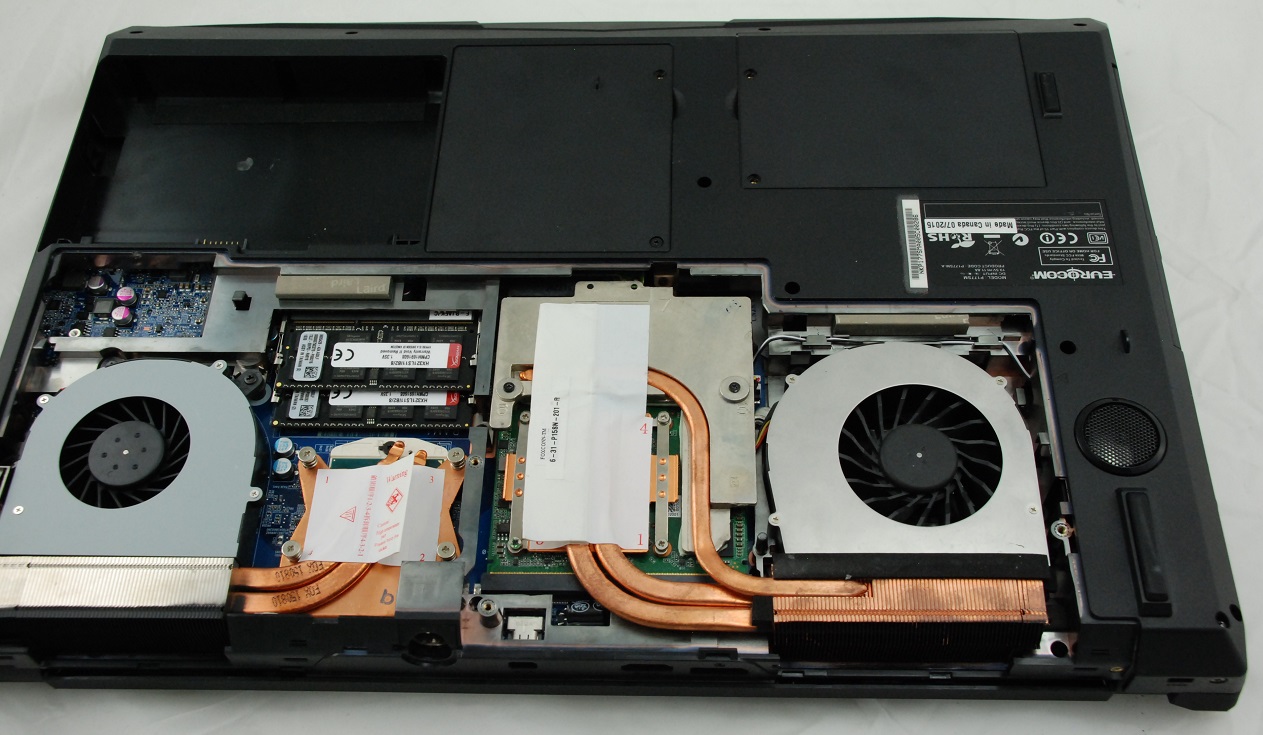
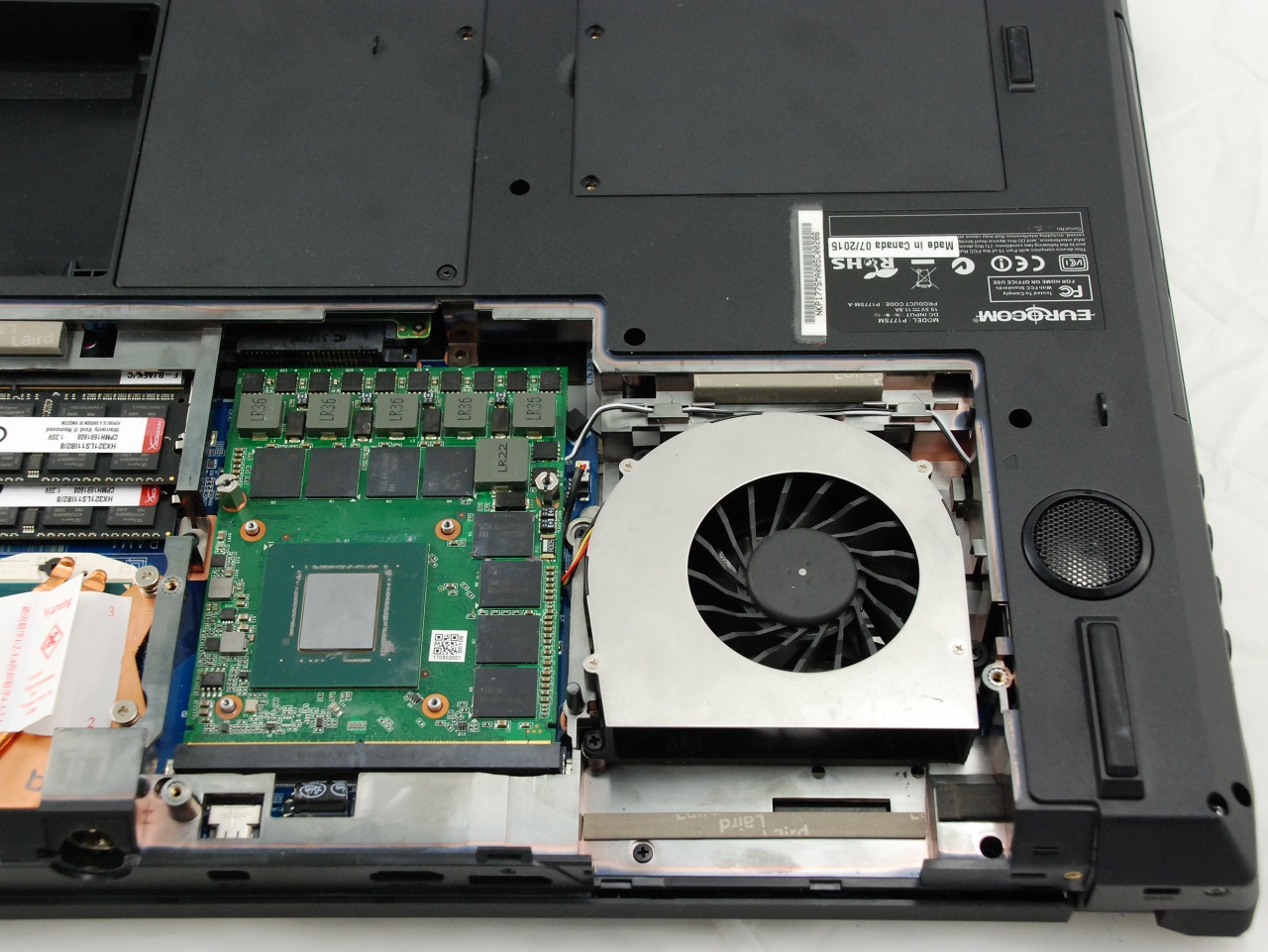
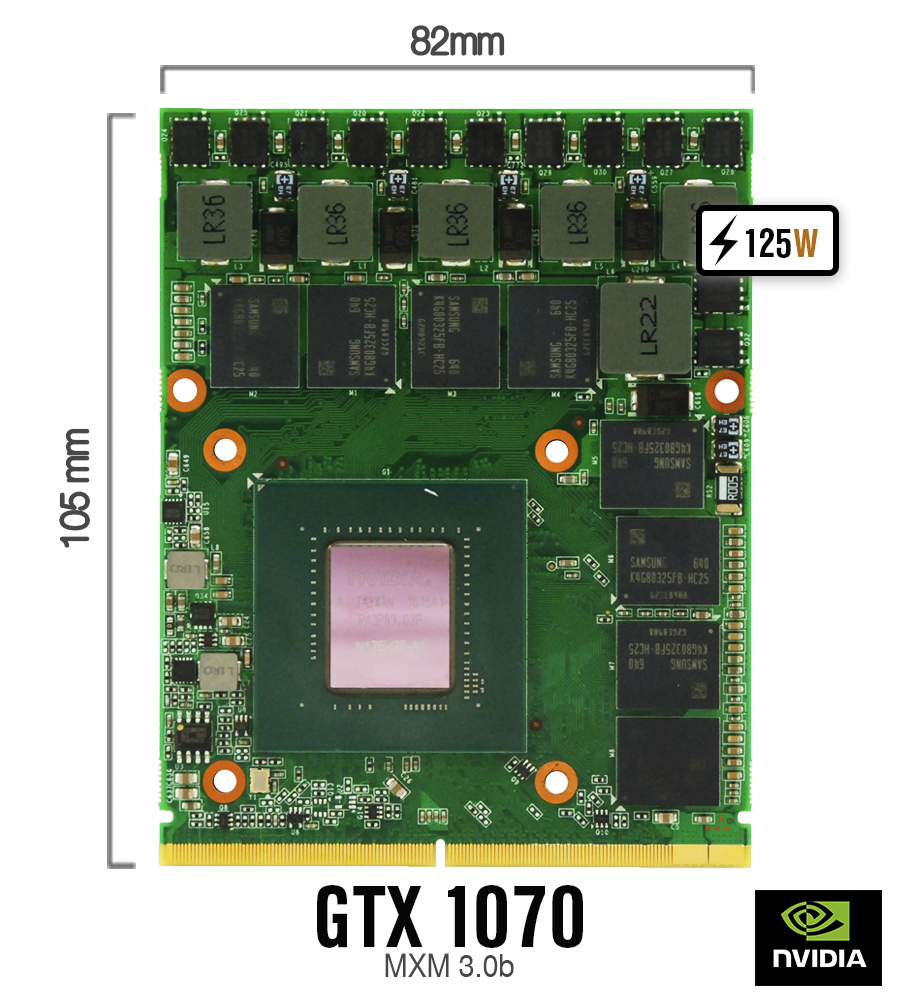
Here are some pics of our GTX 1070 installed in Clevo P177SMA. Our card is standard size 82x105mm MXM3 and fits in any of standard MXM 3.0b slot. VGA heatsink needs to me modded but not major mods are required. We provide proper BIOS, VBIOS and drivers so everything works.
Attached Files:
-
-
When we first talk about milking...
![[IMG]](images/storyImages/giphy.gif)
NVIDIA Teases TITAN X Collectors Edition Graphics Card – The Next Ultimate GPU In The Pascal Lineup?
"There is currently no word on the specifications, performance or pricing but we expect this to be the most expensive GeForce 10 series card to date. In terms of specifications, we aren’t sure if it’s using the same specifications as the GeForce GTX Titan Xp but it the Collectors Edition naming does make it seem like it’s just using a <fancy new design> and a few additions as bundle while being spec’d similar to the Titan Xp." The question is still... When will they push out Volta? After a refresh of same old inventory?
Amd is more like an accomplice in this dirty game. Why couldn't they push Nvidia out from the cliff?Arrrrbol, cj_miranda23 and Georgel like this. -
Would be really cool if it was a Titan xP x2 dual-gpu card, but is probably just titan xp with +100mhz oc and different shroud.
Papusan likes this. -
Sorry I haven't posted this one before... When Cpu power really counts.
MSI GS73VR 7RF (7700HQ - GTX 1060) Laptop Review by NBC.net
Processor
The Intel Core i7-7700HQ (2.8 GHz base, 3.8 GHz Turbo, 6 MB L3 cache) is an incremental upgrade and brings a slight boost in performance. Built on a similar 14 nm process as the i7-6700HQ, the Kaby Lake CPU outperforms its predecessor by about 16% and 8% in single- and multi-threaded workloads.
Using Cinebench R15 to measure CPU performance, the 7700HQ is easily able to hit its boost clock of 3.8 GHz, although it averages a bit lower at 3.6 GHz.
Running Cinebench several times in a row, we can get a good idea of CPU performance over a lengthy period of time. Interestingly, the CPU starts out strong, with some small dips here and there. However, after several runs, performance drops off significantly by about 30%. This result is alarming, but we see the same result in repeats of the test. This may be due to thermal throttling, which we will discuss in the Stress Test section below.
![[IMG]](images/storyImages/csm_CB15_hwinfo64_Plugged_4cfad0e72e.png)
Temps in Cinebench R15 tests. I can't say other than Amazing!!
This smells TRIPOD heatsink as in MSI GS73 STEALTH PRO-009 shown below.
![[IMG]](images/storyImages/teardown4.jpg)
![[IMG]](images/storyImages/teardown2.jpg)
If you love software bundled with the package. You get almost everything what you want. No need for much more
@Phoenix it's MSI
![[IMG]](images/storyImages/control_panel.jpg)
MSI includes their Dragon Center app package. Through Dragon Center, users can access several other included applications, including SteelSeries Engine 3 to control the keyboard and its backlight, Shift to tune system performance, Nahimic 2 for sound profiles, and an app to set fan profiles. Options are the name of the game here, but the number of included applications is staggering. Some of these tools are redundant with apps and settings that are already baked into the operating system. The SCM app, or System Control Manager, acts as a hub for controls available in the Windows system tray (such as volume and WiFi on/off). Even within Dragon Center itself, there are multiple apps for some of the same tasks. Case in point, SteelSeries Engine 3 and the LED Wizard can both be used to tune the RGB keyboard backlight.
While the included package offers an high amount of control over the system, the sheer amount of preloaded software is overwhelming. Some of these apps are also frustrating, such as an overlay used for screen snapping that appears anytime a window is moved. These preloaded applications also <might> bog down the system.Last edited: Nov 10, 2017 -
Using the fixed non-unlocked CPU's in the thin and light laptops is to be expected, even if they can cool the Pascal 1060 / 1070 GPU's the unlocked CPU's are far more than can be cooled.
There is some obvious GPU performance gain even if a appropriately matching OC'able CPU isn't included, so it's not a total loss, it's just not a total win.
Get a large frame laptop for that, with better power and cooling, and an unlocked CPU / BIOS - at least within the limits of it's limited cooling, like the GT73/GT75 going to 4.5ghz unlocked.
What I don't understand is the locked CPU models in the new Asus Chimera G703 line. That frame is larger and is designed for more cooling than the previous Asus 1080 models - which outperform all of the laptops at stock with an unlocked OC'd out of the box CPU.
I guess cost and demand drive down the price with the locked CPU, and there is still a performance benefit to the 1080 OC'd alone, but in this case it really is optimal to get the 7820HK model for a little more.
Or wait for prices to drop near EOL and then get the locked CPU model for a large discount - they will likely be the last models in stock.
There is a place for the locked CPU's, with lower thermal and power requirements, but they won't get the most performance from the 1060 / 1070 / 1080.
Papusan likes this. -
I can’ Understand what you mean by this sentence. You mean this flimsy MSIBOOK chassis should be used with 15w UV BGA’s instead of the fully locked down 45w mobile i7 ?
Maybe the coming Phone processors could be a option? As they now will be pushed in Windoze machines next year.Georgel likes this. -
How high above base can the unlocked G703VI go? 4.5ghz? The unlocked ROG Chimera can go to 4.3ghz factory OC'd. The cooling system seems fairly robust. What about liquid metal? I'll tag @iunlock since he is a pro.
I am very interested in the Chimera, seeing that it has a display that dreams are made of and space for a 2.5" drive. Waiting for reviews, though.
Sent from my SM-G935F using Tapatalkhmscott likes this. -
Yeah, it is pretty exciting, but I'd check reviews, notebookcheck has 1080 gaming FPS results for lots of games, make sure the games you want to play are playable @ 144 FPS at the settings you want.
The MSI GT73 I last tuned went to 4.5ghz before I had to send it on, it might have done more, IDK. I was pretty darned impressed at the 4.5ghz @ 3.6ghz CPU cache, but with more time a higher CPU cache setting + higher CPU multiplier might have been possible.
IDK about the Asus tuning, but it's using the same 7820HK with hopefully even better cooling, so I'll look forward to owner OC tuning results
-
The difference between a locked i7 7700HQ CPU that stays at a 45w power limit vs an unlocked 78020HK with power limits raised that will run at 45w+ continuously if the cooling can handle it isn't confusing.
The 7700HQ locked at 45w will limit FPS compared to an unlocked 7820HK 45w+ unlocked CPU. It may not be a lot, but the 7820HK OC'd unlocked will push that much faster.
With a 144hz / FPS capable screen you want the fastest FPS possible, up to that 144hz G-sync limit.
The G703 Chimera is the largest full sized chassis ROG laptop Asus makes, and it can certainly handle the thermal and power usage of the full OC 7820HK, so there is no other reason than cost differentiation for entry level models to use a 7700HQ instead.Last edited: Nov 10, 2017 -
Still confused. If the MSI chassis can’t handle the 7700hq, what other CPU options could be used?
-
Yeah, I guess you a really are confused, sorry I can't help you. Maybe re-read things, and stop thinking about ULV CPU's, they aren't part of the conversation,.Papusan likes this.
-
You still doesn’t answer my question. The chassis can’t cool down the 45w fully locked down 7700hq. See the Cinbench R15 scores... Drop down to stable +-510cb. Please tell me what other Cpu options can be used.Falkentyne and Georgel like this.
-
I was talking about the G703 Chimera 1080, which is the largest frame Asus laptop, it's not even an MSI laptop.
As far as the MSI GS73 review, did they undervolt the CPU or GPU? Usually they don't and all laptops out of the box need undervolting to run coolest. Especially the thin and light ones.
You can't go by those reviews that won't undervolt the CPU / GPU, you wait for owners that undervolt their laptop CPU / GPU and post results that are useful.
Until then, knowing that the 7700HQ needs to be undervolted, and it will run 10c lower at load, check to see if a 10c less temp would make the difference in the review benchmarks.
Usually undervolting is enough to bring the temps under CPU thermal throttling, for real life performance results.Last edited: Nov 10, 2017 -
I think MSI need to focus on improving the cooling of that laptop rather than turning to ULV CPUs. At the very worst, they should use cTDP down and use it at 35W, though I believe that with a revamped cooling system, the GS73VR can handle a full-power undervolted 7700HQ.
Sent from my SM-G935F using Tapatalkhmscott likes this. -
You quoted me with your reply in #4269.
As I can understand you... You say you need to undervolt for being able to run Cinebench R15 with normal scores. For what I know... NBC doesn’t do this for their other reviewed units. Why should they do it for exactly this unit? Please, don’t go around the topic. If this Junk can’t manage normal Cinebench scores without have to be undervolted, a 15w chips should be used!!
Edit. Notebookcheck use Apple vs. Apples comparison. The way it should be.Last edited: Nov 10, 2017Robbo99999 and Georgel like this. -
How To Undervolt your LAPTOP GPU for FPS GAIN! (NVIDIA/AMD GPU Laptops)
Undervolt your Laptop GPU? Let's try MSI Afterburner Voltage Curve Editor!
Last edited: Nov 10, 2017 -
Fine for me. But read the thread title...
nVidia GTX 10xx Series **notebook** discussion thread.
And you don’t need or have to quote me.Mr. Fox likes this. -
come one, don't argue;
What Papu is poiting is bothersome, and the reason I wasn't able to get anything even close to a midrange notebook. Lots of throttle...hmscott likes this. -
@Papusan chased you away from completely usable laptops, if you had undervolted and tuned the laptop for your use, it would have been fine.
Thousands have done this without problem. I have helped them personally, I have seen the results, they don't thermal throttle after tuning. If they do (very rare) they return it for another one, and that one works fine after undervolting and tuning.
Millions of people use BGA devices successfully for the entire time they own them, and the entire time the 2nd and 3rd owners own them.Last edited by a moderator: Nov 11, 2017hfm likes this. -
How To Undervolt Your Laptop CPU & Integrated Graphics
Last edited: Nov 10, 2017 -
There have been a few reviews, here's a newer run through by the project manager:
ASUS ROG Chimera G703 gaming notebook
Last edited: Nov 11, 2017 -
If this is a GPU thread, why does the title seem to imply that it is for all discussion of notebooks with 10XX GPUs?
Last edited: Nov 11, 2017Papusan likes this. -
Yeah, it’s finally confirmed... Incredible bad sales numbers for Razer’s Top Dog. Wonder what the numbers will be for 2017 with fully numbers for current models.
Razer sold fewer than 1000 Blade Pro systems in all of 2016
“Outside of the low Blade Pro sales, it's also worth noting that a good chunk of Razer's expenses has been funneling towards returns and warranties. According to the same report, the manufacturer spent 15 million USD in 2016 for warranty fulfillment to represent 4.8 percent of its revenue for that year.”
How many bad units is still on the desk home to users who either don’t bother with RMA or doesn’t know If their Razerbook’s performing as normal. Only God know.
@Mobius 1 you have experience with Razer’s notebooks. Info for you.
Last edited: Nov 11, 2017long2905 and Donald@Paladin44 like this. -
Doesn't make is good or right though. Just like millions of people do bad, immoral or stupid things every day, for years... habitually. Frequency never validates stupidity even when it is popular. But, as they say, ignorance is bliss.Prototime, Papusan, Donald@Paladin44 and 2 others like this.
-
I agree with you here @Mr.Fox, this path of going slim and BGA is not the good path at all they say "Millions of people use BGA devices successfully for the entire time they own them, and the entire time the 2nd and 3rd owners own them." Have they forgotten the days of HP and Macs with the BGA issues.
BGA One component dies its a complete main board (Logic Board if we start swearing the word Mac) replacement.
Socketed/ MXM if one or the other dies its just a simple swap, more often or not a GPU will fail more then a CPU, so why make more work and systems that are less up-gradable, in the long run its more work for the repair techs when it concerns BGA.
Sorry for the OT but Fox has a valid valid point.temp00876, Papusan, Mr. Fox and 1 other person like this. -
the only and the bigger one issue that I remeber was on Nvidia BGA and LGA gt/gs8400/8600 gpu series, almost all died within 2 years of use an every boards mounted, no manufacturer were safe, from Dell's XPS lines to Acer Gseries they were all affected.
Someone remember me other big failure rate (apart any mxm AMD gpus) on bga system? Or do you want your pos last forever (I mean, after 5/6 years is good to go)
-
I never discussed sales with razer, but thanks for the heads up.
If you don't consider the BGA nature, it's because Razer has a bad rep for really bad QC on top of the very high price. Other manufacturers with better warranty and discounts exist at a much lower price entry point.
The blade 14/stealth is probably their main sales figure atm. But god wonders why people still buy a razer branded device.
Giving credit where it's due on this incident, iirc Apple had the best extended warranty program on failures. -
As you can see... The heads up was more than sales numbers.
“Outside of the low Blade Pro sales, it's also worth noting that a good chunk of Razer's expenses has been funneling towards returns and warranties. According to the same report, the manufacturer spent 15 million USD in 2016 for warranty fulfillment to represent 4.8 percent of its revenue for that year.”
Razer has taken in account that they needed charging high prices due the massive return and warranty fulfillment. Because the sales numbers as you can see can’t make it a big business.
Btw. I wonder what the Alienware TRIPOD HS mess will cost Dell. Must be a huge numbers cash they must throw out. Both for 2016 and 2017. Damn pity we never will know the numbers due how Dell run it’s business.Donald@Paladin44 likes this. -
(My 8600M GT in my Dell M1530 was overclocked by 50%, and I used it for nearly 5 years everyday - a significant portion of the 8600M's did die though, but it was due to constant thermal cycling, maybe I was lucky and in addition the fan profile didn't result in constant thermal cycling in my particular laptop).Donald@Paladin44 likes this.
-
Yes, only luck on your side, I got 2 xps m1530 ( 8400m hd lcd and 8600m gt FHD lcd) because I worked for EDS and Dell RMA it about an year later, meantime Dell pushed out a bios update to up fans RPM and starting point.
At home I was playing on 5920g (acer) and it suffered the same thing but having a mxm slot helped him to live longer (today there are still 5920g with upgraded AMD mxm on it)
We're talkin about massive failure (admitted by OEM and Nvidia) and you reply with your only system?
Thanks for pointing me out in this way but I dont get you..Donald@Paladin44 likes this. -
Early 8600Ms weren't affected. The 8600M GT in our Vostro 1500 still works today.
/offtopicDonald@Paladin44 likes this. -
Just adding my personal experience into the mix, helps temper your claim that almost all died after 2 yrs, which seemed like an exaggeration. Bennyg's 8600M is still working too. EDIT: I know it was a significant problem & was aware that NVidia admitted that there was an issue, I'm not disputing that, and you can see in my original post that I said a "significant number" did die. Just adding some perspective.
Donald@Paladin44 and aaronne like this. -
As much as I dislike Razer, they just popped in their IPO at a valued $528M USD so they're doing something right.
I think this whole socketed vs BGA argument is moot. There is a market for both. And you can own both, they're not exclusive. It's like Xbox vs PlayStation.
What I don't understand is the complete lockdown of overclocking, undervolting, etc that they do with BGA systems. There's no reason for it.Donald@Paladin44 and hfm like this. -
Main target for BGA... Thinner notebooks. Intel talk nice about even thinner notebooks now with 8th gen mobile CPUs in their announcement. Today’s 1 inch thick laptops is all too thick (bigger, better cooling for increased power consumption due overclocking ain’t in the cards). Can’t have both.Donald@Paladin44 likes this.
-
If you're going to go thick, go socketed. If you want thinner and lighter, well, physics dictates BGA unfortunately. I don't want a 12 lbs laptop to lug around daily, but I'll take 5 lbs and 1 inch over 3 lbs and 0.5 inch if it means good thermals and user control. Problem is they don't make such beasts in the sub 15" market.Donald@Paladin44 likes this.
*Official* nVidia GTX 10xx Series notebook discussion thread
Discussion in 'Gaming (Software and Graphics Cards)' started by Orgrimm, Aug 15, 2016.