Problems? See this thread at archive.org.
On the alienware 18 you can use one of those headless hdmi Adapter's and just boot normally with the use of an external screen of course.
Was nicely done in the forums not too long ago
-
In M18x R2 it may be possible to route the HDMI out signal back to the HDMI in since there are two separate ports. Alienware 18 used a single combo port. Perhaps POST with DP and then switch to HDMI trickery? Who knows, not me
-
It should be possible in theory, with something like auto-signing into windows and the pressing the hotleys. I'll try a mDP to HDMI cable later today
-
Got the 1070 for my ranger, quite likely to be its final upgrade but I'll make it last.
VoodooChild, triturbo, dzpliu and 3 others like this. -
how much did you get it for?
-
380 USD from a member here
 Sold my 1060 for 300 and immediately upgraded.
Its going to be a while before its all assembled, workin 70ish hours a week now so finding time to get it done is troublesome. Ill get it there though, Im more concerned about modding the CPU heatsink at this point.long2905 likes this. -
I first like to apologise for not producing results earlier but its better late than never and yes, WX 7100 / Rx 480 do work on 120Hz display in the Alienware M17x R4 in PEG mode.
I especially like to apologise to TheReciever who wanted to install AMD in his ranger but I think 1070 is a better deal for you, it may be green but its a beefy card.
http://forum.notebookreview.com/thr...ning-on-120hz-edp-3d-display-it-works.828697/
By utilising Virtual Display Adapter DisplayPort variant, it is now possible without editing EDID on 120Hz eDP displays to run on any AMD card on most Alienware laptops with brightness control and 3D capability which works pretty badly on AMD (best to turn it off)
The display I have used is the wrong type that wont fit in the Alienware but its the one I had on my hand to test, however I plan on getting the 120Hz 3D Samsung panel that Alienware offered for the M17x R4 as it should work, the Optronics display I used is an 8 bit panel 120Hz with 3D support, absolutely lovely panel, shame it does not fit.
I hope it may help anyone who wishes to upgrade to lesser expensive alternatives, I have yet to overclock the WX 7100 but will do so when I receive my proper panel and you bet I will push that thing to the brink of destruction, with vanilla values the card scores a respectable 12 068 graphics score in 3DMark. Which is comparable to 1060 and all of this while only using 90W on the core, very respectable only 10 more than the 1060 in my experience. (What fool said the Rx 480 is power hungry?)
From my previous experiments I know the WX 7100 can be pushed to the absolute limit safely to 150W or even more with good temperatures, extremely beefy over the top VRM, during my experimental run on the WX 7100 in PEG it only reached 56 degrees in 3DMark, absolutely fantastic plenty of headroom here to go on, I believe I can easily outperform even stock desktop Rx 480 with an overclock however you can only do this with Rx 480 vBIOS as the WX 7100 is too locked down, flashing it is extremely easy however, can EASILY be done in Windows without fear of bricking the card.
I hope this proved some help for those few people who are interested in using the best AMD MXM cards out there which are pretty mediocre compared to a 1070 however the Rx 480 is far more fun to play with overclocking and whatnot, truly a blast for any enthusiasts and thanks to its ridicules overbuilt VRM it wont explode anytime soon, like the Vega 56 they really went over their own heads with the VRM. -
What do you think about compatibility with the MSI GT72VR(barebone)? The performance of my 1060 seems fine in fhd, but I'm really curious how this little AMD monster would work on my laptop.
-
You can simply upgrade to a GTX1070 if you need more power. Only the Two piece heatsink and MXM card will be needed, as the bios will have the support for it built in as a profile. After all the GTX 1070 version is the same even down to the power brick.
Sent from my LLD-L31 using Tapatalk -
The WX 7100 is not too bad on Taobao that it might be worth a try in fact they seem to sell like hotcakes on eBay lately, I seen ton of them come and go quickly so if it wont work you can sell it just as quickly off on eBay and recoup lost profit.
I am not familiar with MSI laptop BIOS so I am not sure if you are able to manually select it to boot via DisplayPort instead of internal display if you unlock it or not or whether it does this automatically, this is key to get this to work as the Virtual Display Adapter basically forces the internal display to run at 60Hz despite being 120 allowing compatibility with the Radeon card, never the less if your laptop supports eDP and uses the slim form factor you might as well just stick a 60Hz panel in there and have it work out the box without any modifications to it.
Arguably the main advantage of the WX 7100 is the fact it can be EASILY flashed to Rx 480 and EASILY overclocked way beyond the 1060 which requires surgical tools and a programmer duo to its locked down nature and the card is just as cool as a 1060 consumes only about 10W more topping off at 90W in my test before any overclock is done and can easily do 150W safely for an entire day (Yeah I really did test that)
I know that MSI laptops work in generally way better with AMD cards than Clevo does though duo to not relaying on a temperature reader to control the fan, worth a try you might be lucky to find the smaller brother of the WX 7100 the WX 4150 which is a MXM 3.0A card and costs half of what the WX 7100 does if you just want to test.
The 1070 is better but obviously way more expensive usually going three times the price of a WX 7100 on eBay, if you want cheaper and better performance than a 1060 the WX 7100 is a better choice as it can be overclocked through Radeon Settings quite easily.
It may not reach 1070 level in fact you may only get at best 15% better than 1060 performance but its 15% better and 30% cheaper price.dzpliu likes this. -
Hacktrix2006 my laptop originally had 1070, but i change it for 1060 to get lower temperatures. About WX 7100 it is like hmm... as a hidden fan amd I'm curious, very curious.
John, which memory brand does your card have?Last edited: May 3, 2019 -
The memory on my WX 7100 is Samsung, unsure what die type it is, all I know is Samsung and Micron are the best memory options on Radeon cards, if you got Hynix you screwed up.
As for temperatures the WX 7100 was about if not cooler than the 1060 simply because of the fact the WX 7100 is a standard 3.0 layout unlike the 1060 where the die actually sits lower most of the time you wont have a perfect die contact with older heatsinks. -
I saw also a "Elpida" variant.
-
-
The m5100 was significantly better with hynix memory as the Samsung were dogs on that card. Good to see that it isn't universal though
SMGJohn likes this. -
-
-
yummy! (as long as we are talking standard form factor mxm 3.0b here!) i knew that waiting on the gpu upgrade and going with other parts first would pay out any more info on that? pm if not ready for public yet hehe
btw received and installed my 970 pro 1 tb and built my very own little 512 gb usb thumb drive with a transcend m.2 2242 ssd and a trekstor ssd-prime enclosure (smallest package on the market atm), works very nicely! seeing about 440/410 MB/s R/W over USB-A
the 970 pro install was a bit finicky, getting that EKWB heatsink attached was a pain with those metal clips, but at least its a super tight fit now. another super tight fit was getting the drive into the m.2 slot below the gpu fan and put the back cover back over it, the heatsink is actually sitting flush with the cover *lol* but it fit, thats all that mattes!
initial testing went well, heatsink keeps the 970 pro at around 70C even under heavy loads, so no throttling, ever. (starts at 80C and above)
now to find some time to install W10 enterprise LTSB/C...
Sent from my Xiaomi Mi Max 2 (Oxygen) using Tapatalk -
Hi, I would like to know if it's possible to swap (upgrade) the gpu core of an mxm card, for exemple running a "full unlock" GK104 core on a GTX675MX mxm card (4Gb and 256bits) ? Could I need to replace the vbios ?
Is the same could work for GM204 and GP104 ?
I'm just waiting flux, solder ball and stencil from china to upgrade my K4000M (4Gb/256bits with dell vbios) to GK104 core (GTX 770), then my GTX970M (6Gb/192bits but two empty ram with msi vbios) to GTX980"m" (GTX980 desktiop) + 8Gb and if everything working as expected I will upgrade my laptop to pascal gpu.
Thanksjaybee83 likes this. -
@Khenglish has done this I believe. If you have the equipment to do so its entirely possible, but I think it only works for certain architectures.Ashtrix, jaybee83, Papusan and 1 other person like this.
-
-
I already modded my 970m with the 6 mosfet configuration, I need to replace some caps too in order to have the "ultimate" mxm 3.0 board for maxwell, there is also some missing smd for the two empty ram chip but I will not populate these before having a 256bits core and 8 ram chip.
I'm more concern about bios issues and for core swaping on pascal gpu (and their bios), the K4000M to full GK104 will be more like an experiment
-
Yes you can upgrade the core. A vBIOS change should not be necessary. With older Kepler cores though you can also remove the laser cuts which disable core elements if you are very good at sanding.
If you are trying to solder a replacement core yourself, expect to kill several cards and cores before you figure out how to sometimes do it correctly. -
You added the 3rd core power phase and verified that it is functioning?
-
I didn't verified if it work, I only checked the resistance between the pad of a non populated one and a populated one and all of them were 0ohm so I solder them and not tested If they but I think the work.
At first the card came with a two mosfet and one shorted, I replace the shorted one and it die in less than an hour after, so to be "safe" I replace the two original mofset then added four more (and by the time removed two for my K4000M), I also added one "R22" choke (the one I have at the moment was smaller than the other one, I need to replace it soon).
But after you ask me that I start to wonder how the regulator can keep 6 of them at once ? maybe only two mosfet work on mine, how can I test it ? voltage measurement ?
Also I want to know more about the removal of the laser cut, I saw your post on techinferno but you give no more information about that, I have some GK104 card laying around (mostly not working tho)t456 likes this. -
The VRM can't directly drive 3 phases. The 3rd phase has a phase driver chip and receives a PWM signal from the VRM. In addition to the phase driver chip for phase 3 there are multiple jumpers that need to be added. The VRM's phase 3 PWM line is likely grounded out with a jumper on the 970m PCB to make it operate in 2 phase mode, and this will need to be removed.
I can send pictures later of a 680m chip with the laser cuts revealed.t456 likes this. -
Okay so, in order to have 3 working phase on my pcb I will need to populate these ?
Do you have any good picture or schematics of this area ?
I saw this on ebay listing, if I'm right, the issue could be from mosfet (gpu and gddr5), or bios, or mosfet driver or the core itself or the ram chip ?
One of them seems "reflowed" by looking at the color of the pcb :/
https://www.ebay.com/itm/4-Units-Nv...008633?hash=item4b61f53b39:g:sYsAAOSwlddcfo0iAttached Files:
Vasudev likes this. -
-
Yes that whole area you circled needs to be populated. The 970m also likely has an extra resistor near the core VRM which needs to be removed to activate the phase.
I don't think any of those cards were reflowed. The stickers would be curling and discolored if they were.triturbo, Vasudev, jaybee83 and 1 other person like this. -
Is the G-sync capability is only related to the bios of the card ? or does "g-sync" card have a special hardware that allow it working ?
If I'm right there is no hardware related to G-sync in lcd panel ? but we still need to have a patched "g-sync lcd" whitelist ? -
There's no scaler in notebook panels, so there's no G-Sync module (which is a replacement scaler unit IIRC) as well.
-
Correct it's a whitelist for notebooks aka a G-Sync cookie. I can't say any more then that.
Sent from my LLD-L31 using Tapatalk -
im no expert, but i have seen people making GTX 980M non G into G-enabled by modding a small resistor thing near the bottom of the gpu chip and of course you need to flash Gsync 980M vbios. (provided your screen is in the whitelist of the BIOS)
-
Ok, so thanks to your reply I checked on the internet and found that my main issue will be the unability to mod the bios/cookie list of the card to work on my specific laptop (Dell M6700 and lcd), the only thing I can do is to modify the hardware id by replacing some resistor but that will not work.
Also does anybody try to custom frequency/voltage curve on quadro pascal card ? -
i think that would need to be unlocked via vbios mod. vram is adjustable at stock, but core clocks and voltage is not.Last edited: May 26, 2019
-
Then how to unlock the vbios ?
-
@Prema to the rescue
-
There is no software like tdp pascal tweaker (which don't work with my P4000 vbios) to do it by ourself?
I'm curious about how it work
-
Hello SMGJohn! I'm trying to run a WX7100 on a MSI GX70 notebook, getting error code 43. I would like to try this Eurocom vbios, but for some reason, the file is not included in the vbios collections posted in this thread. Could you upload it, please? Thanks!
-
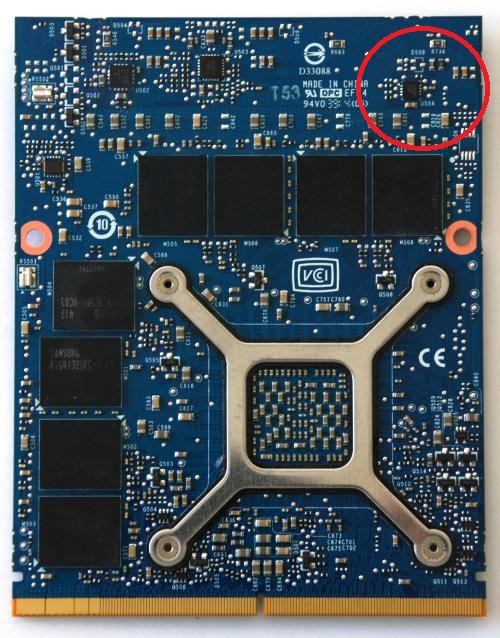
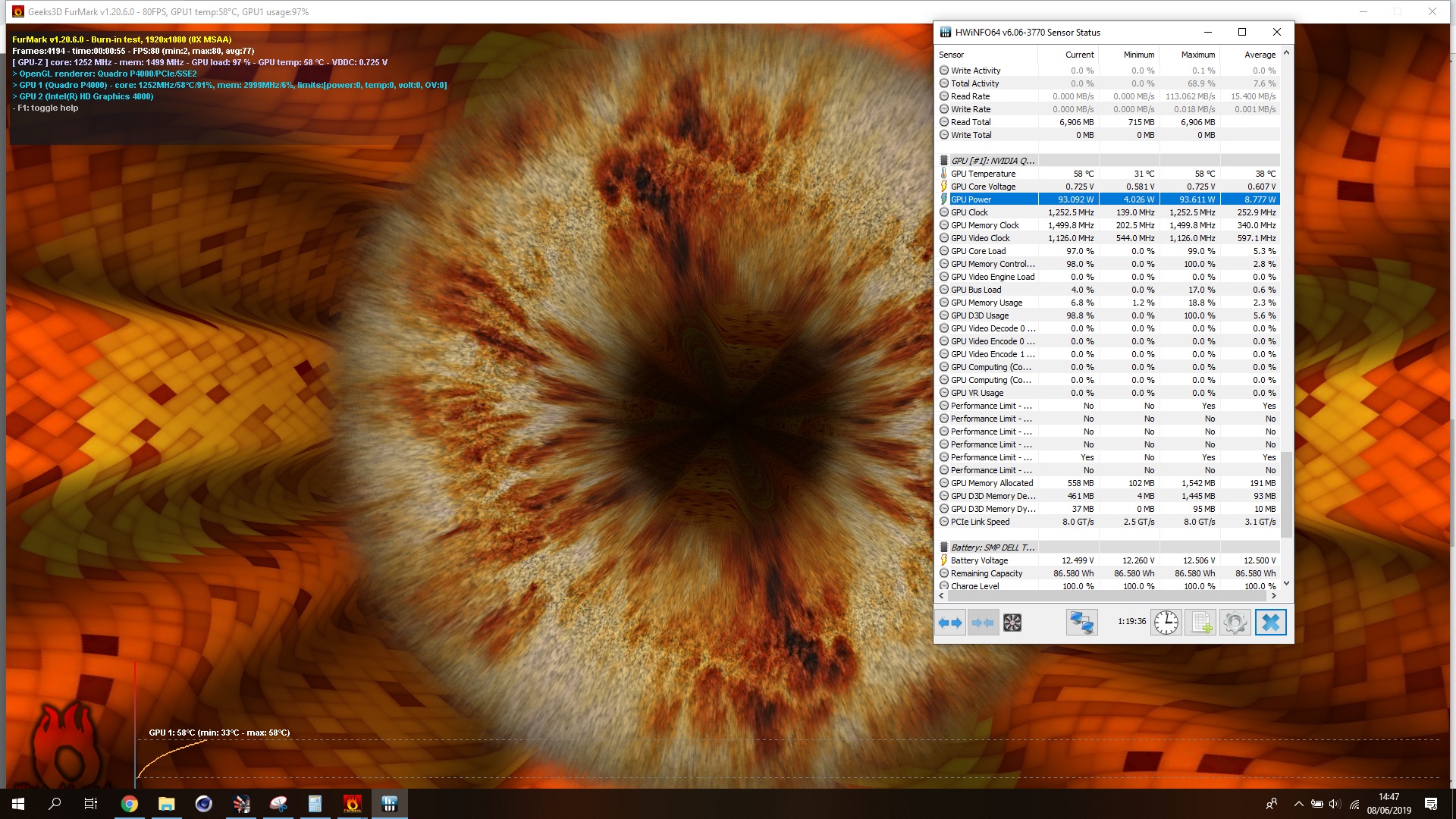
Hi @Prema (or everyone else), do you think we can unlock overcloking and TDP (like 130w or 150w) on my Quadro P4000 8Gb ? Actually everything is locked, I tried different software and all of them couldn't overclock the card, it does not throttle at all, thermal is below 65°c, even furmark work on full frequency (1250MHz).
I cannot use others vbios because my laptop (M6700) only work with this vbios.
I attached my vbios
Thanks a lotAttached Files:
-
-
Nope. Welcome to pascal.
You need to flash it with an external programmer and the only thing you can do is set a different tdp then tune around that. -
So there is no way of forcing higher frequency? how do some manage to overclock their pascal gpu ? their bios were "factory unlocked" ?
My card is stucked at 1250MHz and 0.725v, on afterburner (CTRL + F) I can see a curve that goes up to 1.25v and 1900+MHz, I don't think it's TDP related since even on high load such as furmark the card keep the same frequency.
edit : even memory is stucked @stock, no overclock possible -
You have a quadro card, frequency manipulation is not typically in the cards. While its obviously capable of 3D loads its intention is for CAD and other professional production applications, where stability is paramount.
I can alter my frequencies but I have a Geforce card with Geforce drivers, but even then Im quite limited as well, altering TDP values is the main method of achieving and maintaining higher clocks.
You could try installing Geforce drivers and see if that removes the frequency shackle, The rest however is going to end up being a TDP problem as well as power delivery. Not all MXM slots are created equal Im afraid. -
What do you mean by "the frequency manipulation is not in the card" ? it depends on the laptop bios ? or only on the drivers ?
I will try to get geforce drivers on it but for the inf mod, what geforce id should I replace with my P4000 ? no laptop gpu got 1792 cuda, also is desktop drivers is suitable for laptop (with optimus disabled and no need of a great battery life) ?
Talking about mxm slot, what is the value of the main input voltage for the card ? is it like on desktop at 12v or it depend on the power supply (like 19v) ?
I know that my board is limited at 130w by hardware, however a shunt mod should be possible. The thing is that even if the card is running something like unigine superposition (standard 3D load) or furmark (intense/should consume a lot more power) the frequency are the same so it made me think that my issue is not TDP related. -
it is very difficult to change clock speeds for pascal cards and there is no way possible to flash a Modded VBIOS without a programmer.
The only ones that are changeable right now are TDP and Temperature limits -
I already got a programmer, it's not a problem to flash modded vbios.
Are we sure that the overclocking is only limited by software/vbios ? maybe there is a resistor on the card that "activate" or "disable" overclocking/tuning capabilities (like back in the days with the "TME unlock" on C2D laptop). -
nope, definitely on vbios. you could see similar structure inside the vbios like in GTX 9XXM series, but no one(except people like prema of course) knows how to edit the boost 2.0 clock speeds.
-
okay thanks, is there some thread about vbios edit with an hex editor or that help to understand how vbios are made or work ?
edit : also there is a place (except on techpowerup) to share vbios ? I dumped the vbios from the P4000 mxm 8Gb GDDR5 (8chip) HP
edit2: for those who are interested in Quadro P4000 I attached two screenshotsAttached Files:
Last edited: Jun 8, 2019 -
-
http://tieba.baidu.com/p/6158113217
MXM3.0 slot to PCIE3.0X8 : successtriturbo, intruder16, jaybee83 and 4 others like this. -
In a Ranger of all laptops too lol
-
Can you pls help interpret - I can't tell through Google Translate garble whether they got a high end card working at Pcie 3.0 x8 or whether they were only working at crippled x1 or x2 speeds
The hopeful of keeping MXM 3.0b alive thread!
Discussion in 'Gaming (Software and Graphics Cards)' started by King of Interns, Aug 17, 2016.