Problems? See this thread at archive.org.
Well I do run the game in exclusive full screen mode, but at this point I think it's the engine of the game that is bugged:
![[IMG]](images/storyImages/ME34255_o.jpg)
In the above screenshot there is no bottleneck at all but the game can't do over 90 fps at that particular coordinate. CPU and GPU are barely being utilized. I think this game wasn't meant to go over 60fps. It's not all the game though. There are some specific spots that for no reason at all the game have lower frame rates. I'd say that the game runs at high frame rates on 90% of the time. Game running at epic settings by the way
-
The only other things I can think of that potentially may be causing a performance issue are either memory bandwidth limitations, or trying to use more VRAM than is available. Overloading the VRAM causes serious performance drops.
What resolution do you play at? If you're playing at 4K and using super duper ultra high resolution textures, that may be causing the performance issue. What happens if you drop from epic to high? -
I could never take that away. Hell the PS5 embracing 60fps makes having one for the exclusive games an even better proposition.
I'm mnot the PC vs console hater type, it's just been really hard this past generation to go back to my PS4, when gaming at 120 to 240Hz on my MSI laptops (GT72,l GT73, GT76). I'm unfortunately one of the people who gets headaches and eye strain at low framerates.
PC Gamer dropped it to Medium settings and still couldn't get a locked 144fps at all times. Like I said previously, it's a game engine issue, not one pertaining to user hardware.Clamibot likes this. -
If open up resource monitor while playing Jedi Fallen Order, are one of the CPU threads maxed out while the others aren't?
If so, it's a game engine issue like you said. Specifically, a software induced single core performance bottleneck. If not, still a game engine issue like you said. This means it's crappy software. -
me neither, just anything else its just a cost benefit analysis and then you move forward, with or without w/e it is your internally debating.
The high frame rate requirement is actually a requirement for a small percentage of people out there but even a small percentage is still a massive market anyways. Sadly Im now to the point where I start fighting screens if there is input lag and I have friends that get motion sickness from standard framerates.Clamibot likes this. -
Saints Raw 3 Remastered is on EPIC Store for Free:
https://www.epicgames.com/store/en-US/p/saints-row-the-third-remasteredClamibot likes this. -
Well I guess if you're sensitive to fps/hz most if not all gaming laptops around 1k+ are going to have at least 120hz for the most part. Other than outside cheapy screens that are mostly for non gaming anyways. I could definitely see a lot of competitive gamers having this problem due to use conditioning, whether it's for pay or not.
-
I'm playing at 1080p and it doesn't seems to be a VRAM issue either. Check this screenshot:
![[IMG]](images/storyImages/ME365KG_o.jpg)
The game is using just above 5GB of VRAM out of 12GB of VRAM available. Temperatures well under 60ºC, a lot of power available, GPU utilization 39%, None of the 20 threads is at 100% usage, like 5 GB of system RAM available. Frame rate should be a lot higher at this particular spot, also nothing is happening at this spot, the character is alone just standing.
UE4 is terrible. Any game that use it has issues of some kind. Here is the same particular spot from the above screenshot but running on my laptop (8700K + GTX 1080):
![[IMG]](images/storyImages/ME365KK_o.jpg)
The game isn't maxing out my laptop either. The GPU is at 74%, VRAM at 3.5GB out of 8GB, and none CPU thread is at 100% usage. So the 10-series also can't handle this game at perfection. Or saying it in other way, the game runs like crap also on 10-series. I wonder what makes the game to get more fps at my desktop though, at this particular scene. Maybe the extra 8 threads on the 10850K or the larger CPU cache. This particular game I think wasn't mean to be played over 60fps. Well maybe on the next gen of GPUs/CPUs or the one after, this game will be able to run at locked 144 fps.
Well as you can see on my first screenshot I'm using Afterburner to check almost any variable on real time while playing this game and none of the threads of my CPU go over 80%. This game doesn't even max out a single thread of the CPU on my laptop at this particular spot. So this has to be a glitch on the game's engine. I can't find another explanation.Clamibot likes this. -
Thanks for this very detailed post.
So basically the performance issues are caused by this being crappy software. The game is just refusing to utilize all resources available to it, even through there is no obvious limitation anywhere. This means the limitation is in the software itself. -
I guess the only answer is stop focusing on the performance and just try to enjoy the game itself.
 killkenny1 and Clamibot like this.
 -
Only 1080p wow I guess I missed that, seems too low for your system I was thinking 2k at at least. Did you try it at 2k or 2k DSR and get the same results? Maybe trying to push more onto your gpu would help. At any rate like I said just turn down a couple settings, like you did and it should be more stable but yeah that game was terrible on launch at higher settings. Guess they never fully fixed it. I played it on a 1650(or 980m can't remember) med with some low settings at 1080p or maybe even lower and had no problems. But I don't have too much problem with around 60 or lower w vsync or not etc
-
The problem is I can't enjoy a game if it's not running at 120 fps or higher. It'll look laggy to me. That 120 fps is a hard requirement for me.
This is the exact reason why I will never get a 240 Hz monitor and will stay way from them like the plague. They'll ruin gaming for me again. -
That seems extreme, especially for a single player exploration based game. I play most things at 60 vsync (some games don't play nice at 75) and enjoying it. Shrug.Clamibot likes this.
-
Yeah I know. I have pretty high requirements. I don't see how high framrates matter any less in slow paced singleplayer games versus fast paced multiplayer games though. All games look smoother at higher framerates regardless of genre, so I find that sentiment very strange.
To each their own. I'm glad you're good with 60 fps since that means you don't have to spend as much on hardware.
Have you tried this nifty ulitity called Timer Resolution to set the windows timer to 1 ms? That may force higher CPU usage in the game, therefore improving the framerate.
I would try it out myself, but I haven't gotten the game yet. I'm still waiting on my new Clevo X170SM-G to arrive, so I'm not going to get the game until I actually have the hardware to run it well.Spartan@HIDevolution and hfm like this. -
I didn't even know about that app Timer Resolution. I downloaded it, and ran it using the "maximum" setting it went to 0.5ms but made no difference on fps, or maybe I did something wrong?
When is your new laptop arriving? It would be great to see how this game goes for you. The game has two performance issues for me. The first one is the stutter when the map is loading new areas. This stutter can't be fixed no matter what. it happens from time to time. You'll get stutter is certain spots like, if you cross a certain line the game stutters, no matter if you just walked over that line, if you walk again the game will stutter again. The other issue is the one I'm showing on screenshots. On certain areas the game's fps just don't go any higher for no reason. To me this is an issue that doesn't let me enjoy the game at a 100% because I get VSYNC microstuttering. Even with G-Sync if you are sensitive to the microstuttering like me you'll notice the lack of smoothness. I'd say the planet with most performance issues is the Chewbacca's planet
Well my screen max resolution is 1080p and the game doesn't have a built in internal resolution setting to go over 1080p rendering as far as I know, so I can't test 2k.Last edited: Aug 29, 2021Spartan@HIDevolution and Clamibot like this. -
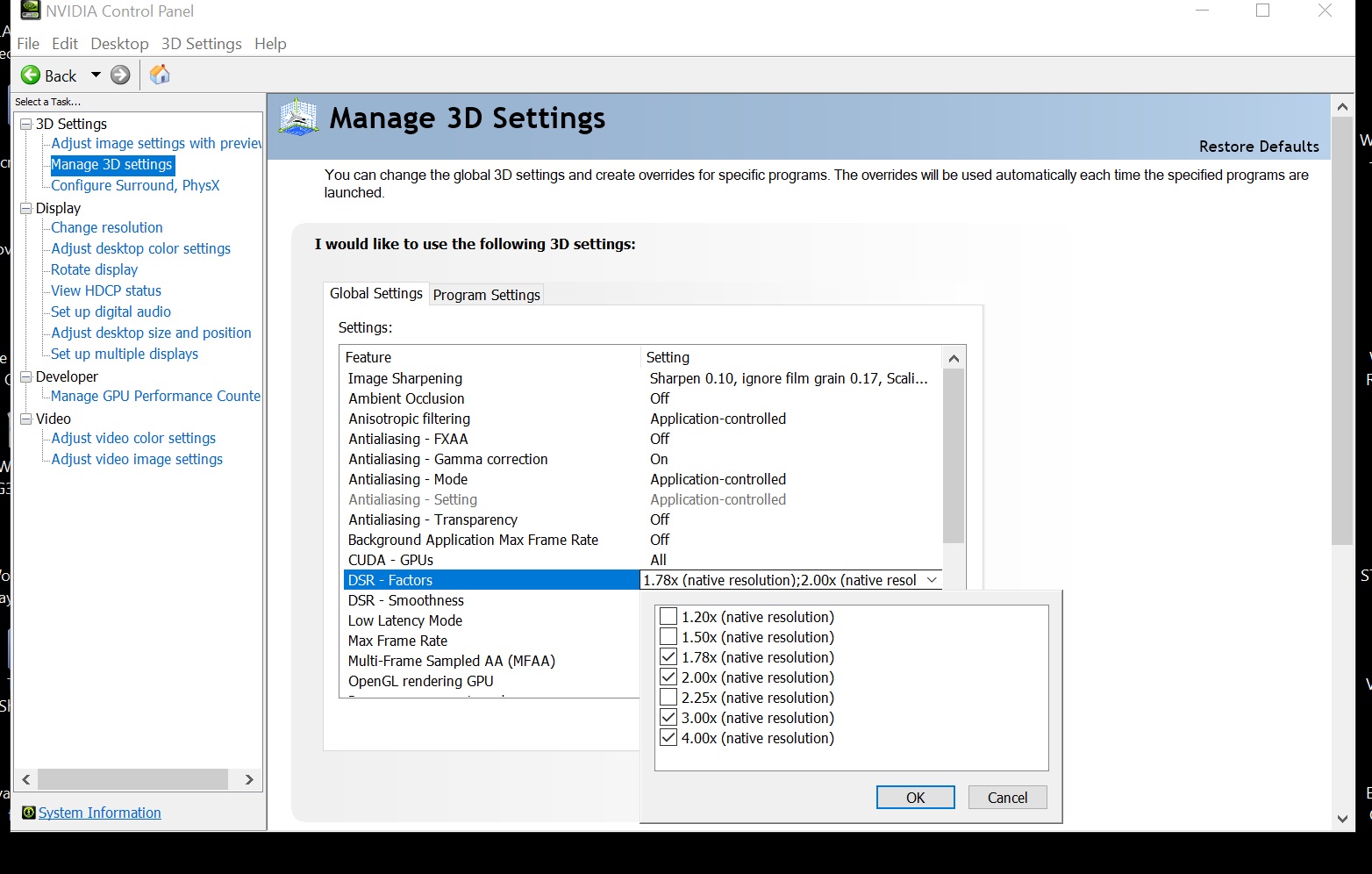
You can enable dsr in ncp to run at higher resolutions it just scales it down, it's kind of a form of AA. If you have an optimus system you'd have to have a mux switch or similar to enable it though. Run a few games at 2k dsr it pushes more onto the gpu for my relatively weak cpu works pretty good.Spartan@HIDevolution likes this.
-
My laptop should be arrive in a few weeks. Ztecpc had to order a new motherboard from Clevo since the one in the laptop was defective. We're waiting on that to arrive so they can test it and then ship the laptop to me.
Regarding Timer Resolution, no you didn't do anything wrong as far as I can tell. I think you do have to keep the application open after setting the windows timer resolution to keep the setting. I believe closing the application sets the timer back to its default value, so try keeping the application open if you didn't do that before.
If that doesn't help, then the software issue is due to something other than code execution pauses and is not something we can fix without the dev's help.
Or ya know, we can brute force the issue by overclocking the crap out of our CPUs.
There are a few games where Timer Resolution increases framerate by forcing increased CPU usage. The two that I know it helps with are Crysis 3 and Just Cause. There are definitely more, but I have yet to play any other games with an increased windows timer resolution. I know for sure it'll only help in CPU bound games.Spartan@HIDevolution likes this. -
What's the exact name of the setting in NCP you are talking about?? I can't find it
My CPU is already running at 5 GHz, I don't think 100 or 200 MHz more will give me those extra 40 fps on those areas where the fps sinks.
Spartan@HIDevolution and Clamibot like this. -
You might not have the option if you have mandatory optimus enabled or maybe SLI disables the option too, like I said I had to set the mux switch in the bios on mine to only use the dgpu in order to get the dsr option in ncp. With optimus enabled it's not even shown or an option in ncp on mine. You can choose factors up to 4x(4k) your screen resolution not sure if it goes higher. I have 2k or I think the 1.63x option and 4k, maybe some in between but those are the only two I use, mostly 2k for my dgpu. I only use it for games, it now has the option in them to change all the way up to 4k. The scaling under normal everyday non-gaming use is not worth the hassle, athough 2k gives more screen real estate.
Edit: if you have gsync no dsr is available from what I researched. Or the ones who do get it working it doesn't work so well. Maybe they fixed it by now in drivers not sure.
https://nvidia.custhelp.com/app/answers/detail/a_id/3597/~/dynamic-super-resolution-(dsr)-support-reference-chart
Attached Files:
Last edited: Aug 31, 2021Spartan@HIDevolution likes this. -
-
I started Ghost Recon Wildlands, but after playing Red dead Redemption 2 alot, now every open world game looks silly, GR looks like a farcry 3d person view and the world looks so simple, npcs and all. No game can recreate the detail of RDR2.
Its a masterpiece of openworld and it raised the bar so far
-
Thanks for the detailed explanation. I found the DSR setting on the global settings, I was looking at first on per program settings and it wasn't there. I tested DSR at 1x, 2x and 4x. There was almost no difference on frame rate or GPU usage at all, mostly the same within a small margin error. My desktop system has no optimus or SLI. Which makes me think that Jedi Fallen Order doesn't support such feature or something. The game is quite good though, it's a shame that has some performance issues
-
Wow no difference, that's pretty odd. I go on TW3 1k/100+, 2k/80, 4k/30 and the gpu usage goes up for sure. My DSR smoothness is alway at the 5%, seems like an art that. All of the games I can play at at least 2k/60 locked show a noticeable difference in fps vs 1k vs 4k. If you have an output screen at higher res and just have that screen enabled maybe it would show more difference in usage idk.
-
Just finished the Quake remaster, playing all the episodes front to back. The new one by Machine Games is pretty good. Brought back some memories. I don't think I had ever played that episode Machine Games made back in 2016 either, was definitely worth the time to run through it all start to finish.
Moved on to Halo: MCC, started Halo CE... the control methodology for driving that Warthog is just as intuitively garbage as I remember. I did play Halo back on the OG Xbox but I don't think I ever played another one (I think I might have played Halo 2 for an hour..) . Giving playing them all a shot, though just 30-45 minutes in I'm being reminded why I fell off this series and never played any of the sequels. Something about it just seems too .. sterile..
EDIT: stuck with it and got further, not badLast edited: Sep 5, 2021 -
Fired up WRC10 and man what a disappointment tbh. They seem to have a weird fixation on locking a lot of the regular season rallys behind the annoying career mode, they're not all available in the quick or single rally mode from what I saw. The whole forced team management in career mode is so obnoxious, if I wanted to do all that micromanaging I'd buy a game about that not a game that's supposed to be rally. No way around it either. I don't want to have to go from peon jr league to just play the regular wrc cars and rallys either, sheesh. It's very slow to load even the menus which are fancy but bloated/unnecessary. Loads you right into a training section too, come on just go into the menu so I can decide and adjust settings! It performs atrociously for what it is, lots of fps hits here and there for minimal upgrades from 9, but they seem to do that for all of them initially, then have to get a patch or two to get it smooth. But the new tracks and new cars are cool, has very long sections in each of them.
Spartan@HIDevolution likes this. -
Just finished The Ascent. Solid 8 out of 10 for me.
Story didn't matter, it honestly just felt like a new age Contra and I loved just running around shooting stuff.
The graphics are really impressive as well. The far future Blade Runner-esque slums really sold meSpartan@HIDevolution, cucubits, unlogic and 2 others like this. -
I have that installed but haven't started it yet, looking forward to it glad you are giving it some praise.Spartan@HIDevolution and cucubits like this.
-
I just find it really cool, especially with how you can build around the augments you find which are basically two active and two passive "powers" you can have installed at a time.
I 100% recommend you use this FOV tweak which lets you zoom out much further than the default. Getting shot by off screen enemies is annoying and this fixes that, while also making the game feel much more immersive as it really makes all of the verticality stand out.
Examples I just took.
Default view:
![[IMG]](images/storyImages/dGgoICn.jpg)
Zoom mod:
![[IMG]](images/storyImages/LKPE7JM.png)
You can control the amount of zoom, to not be as far out as I go, or to be even more extreme.
BIG EDIT: By the way I am playing the paid Steam version. If you are playing on Game Pass good luck because that version is a mess. It'll probably tarnish your view of the game.Last edited: Sep 7, 2021hfm likes this. -
i have still yet to play tw3
-
Wow really? Games 6 years old. I've finished the main quest with triss/radovid wins in this playthrough, supposedley the Ciri "happy" ending but I'm not sure it makes sense overall. Almost through blood and wine dlc firing up Hearts of stone dlc, it all goes by way too fast though.
Also doing a replay of Dead Space 1, fugly graphics but it's manageable, kind of a pain to get going on Win10 initially but fine now. Locks to 30fps w game vsync, have to go into ncp and frame limit/vsync there. -
That was the most annoying part of the dead space games. Vsync locks all of them to a crappy 30 fps. At least vsync from the nvidia control panel lets us run the games at our monitor's refresh rate.
Dead space 1-3 at 144 fps was awesome. The third one was my most favorite, and I find it strange that my opinion is unpopular. Dead space 3 was the most fun out of the series since it had the most action.JRE84 likes this. -
Thanks for this. Had my eye on it for a little while and this made me try it today. It really looks amazing and the dystopian future atmosphere is right up my alley. I'm getting the Blade Runner vibes, some Cyberpunk and a little DeusEx.
-
This was exactly why people didn’t like DS3 as it went against the design ethos of the first two games. It was just another third person action title.
Sent from my iPhone using Tapatalk -
Well I liked DS3 but was just too run and gun actiony instead of what made DS popular, the slower horror/tension focus. Kind of similar to the RE series with 5/6 compared to earlier titles. At the 60 my external monitor is at it's fine, the controller pan sensitivity seems too fast though but it's much better than 30 locked oof.JRE84, Clamibot and saturnotaku like this.
-
I think they may be remastering Dead Space 1, you might want to hold out for that. I still haven't played DS2 or 3. So many games...
-
Yes they are, but it's very early so no point in waiting. I'm enjoying it anyways it's not that bad and still decent graphics in some places, same tension/horror elements.
https://www.dsogaming.com/videotrai...ngine-footage-revealed-for-dead-space-remake/
Edit: Exploring a couple of the mods for ds1 on moddbLast edited: Sep 12, 2021hfm likes this. -
Dirt 5....worlds hardest racing game I have it set to easy and it's frustratingly difficult later on to get in first place (chapter 2 and up)
hertzian56 likes this. -
Haven't played it, lost interest in the Dirt series after the procedural tracks of dirt 4, very boring. Still play Dirt 3. Dirt Rally pretty good but dead or online only now, WRC series not as good but not tied to online for all season tracks and lots of licensed cars etc Definitely make sure you're using a controller if you're not.
-
Finished Dead Space 1 replay and it was pretty fun, the cliffhanger ending def got me to go right into DS2. DS2 the best one imo, right away the graphics overall are better, still hold up nicely today but I have an enb/sweetfx preset(moddb) that makes it even better. 4k dsr. Still have to disable game vsync or locked to 30, for some reason ncp fps limit doesn't work on this game like it did on DS1 so it's way over my screen hz wastefully. Interface/controls better. Wish they would have stuck with a mute isaac but that would have been kind of hard to keep going with with the story/interactions.
Edit: did get locked 60fps through ncp, had to add it to the list. Didn't work just selecting it from the previous list they have. Enb/sweetfx makes the game too dark in places though. Have had relatively a lot of bugs in it, lockdowns/locked doors not ending until wait 5 mins type of stuff, all standard reported bugs from online search. I still have the v1 version, maybe try to find the only patch it got v101 idkLast edited: Sep 14, 2021Clamibot likes this. -
Nioh Complete Edition free on Epic
https://www.epicgames.com/store/de/p/nioh-the-complete-editionAtma likes this. -
just bought a msi g32c4 165hz monitor for my laptop....lol monitor is worth as much as the laptop 300 cad
so my thoughts on 165hz...um it dont work with a hdmi 1,4 interface....144hz is nice but like 0 games run at 144hz....i did check out half life 2 and netted 144hz average....it was amazingly smooth a touch smoother than 60hz but i dont see what all the fuss is about.....60hz looks smooth..144hz looks nice perhaps i should test out counterstrike GO..or halo MCC..individuals are smart people are dumb i fear the opinion is from people not individuals..and that they say its oh so great because they are told its great vs testing it out themselves....
now someone gawd someone please give me recommendations so i can test out 144hz....a game where it matters i feel ripped off and the monitor was on sale
I'll keep it because of the wide color gamut and high contrast ratio.....image is amazing....but tbh I bought it for freesync and 165hz -
I think you will need a connection with a dp cable to get the full 165 Hz. G-Sync works aswell only on dp if im not mistaken
-
In regards to running the monitor at 165 Hz, yeah you'll need a displayport cable for that. I believe HDMI only allows for up to 144 Hz refresh rates, and only on compatible monitors. My 144 Hz monitor only does 144 Hz through DVI or displayport. It's limited to 60 Hz through HDMI.
144 Hz monitors really are amazing, and are not just a gimmick, but I suppose it does depend on how sensitive an individual is to perceiving motion. I do agree people should test it out themselves over listening to the opinions of others, regardless of their position on the matter (for or against high refresh rate monitors), because this is something that is very subjective. To me, there is a perceivable difference even between 120 Hz and 144 Hz refresh rates. I'm ok with either, but prefer 144 fps if possible since it's almost analog indistinguishable to me (about 90% as smooth as real life motion in my opinion). 60 fps does not look smooth to me at all. It's laggy.
As for games to try out, 144 fps really matters in all games, but since you seem to want to test out some shooters, try the following if you have them:
- Halo MCC
- Just Cause (any games in the series)
- Doom
- Doom Eternal
- Star Wars Battlefront II
- Titanfall 2
I'd still say run every game you have at 144 fps and see what you think. I guarantee you everything will look smoother.
-
Did you try it with a high motion game like a racing game? I can't get the latest racing games much over 80fps with my equipment at my settings so can't tell, maybe try an older racing game like dirt 3, wrc7 etc maybe ace combat/flying game.
I can't speak to higher than 120hz but I noticed it going from 30 to locked 60 on TW3 still remember it, and FO4 60 to 100/120, biggest difference was mostly panning speed. In game fire torches seemed smoother. Only game I've played on this native laptop 120hz monitor that was 120fps was terminator salvation and yeah I don't think it was too amazing a difference, but then again I didn't play it previously on a lower hz screen so can't tell from a previous lower fps/hz experience. I still remember when lcd's were relatively new and sitting at a bar that had both an old school tv and an lcd flatscreen next to it, wow one had vasoline smeared over it lol of course that was mostly the different resolutions though.Clamibot likes this. -
ok back...yeah i notice it in mass effect 3 while panning and motion in grid ap...pretty amazing....now i notice it big time...
hertzian56, Cylix101 and cucubits like this. -
yeah no....people are dumb.....60hz feels smooth as does 144hz....is it a big diff no i think your a freeking moron if you think it is....this after buying a 165hz monitor just for the huge diff...big letdown...im going to say this i have a slow brain i cant change that but perhaps my brain processes diff i dont see a dang diff.Spartan@HIDevolution likes this. -
Well it's not just hz to really notice it, kinda need to match up the gpu and the rest of your system to what the monitor is capable of. Resolution too, newer cards are really for 2k+ otherwise get underutilization at 1k a lot of the time unless it's just a very heavy game or badly optimized/scaling game. That being said it's not helping me enjoy a game more in a huge way.
A lot of this comes from the instant killathon gamers/competetive ones that do get a great benefit from it, probably playing at 1k or even less. Over time all screens will just come up to a new standard like 144 so the differences going above that won't matter much. -
btw flew through Dead Space 2 so addicting what a great game, the best one imo. Those machinery/floating levels were really cool. DS3 has such a cringe story imo, it came out only 2 years after DS2 so the graphics aren't any different. EA got too involved. Some cool minigames, still can't understand why doors don't just auto-open gets tedious, games aren't logical most of the time though just effects for the sake of drama/entertainment. All the drops by enemies all over in your screen ugh
The space is awesome to look at though and it's entertaining just a departure from 1/2. Weapons bench is really dumb, upgrades are obtuse/way too many, only have 2 weapons from 4 in the previous games etc etc This really kind of ended with the major love interest in the two previous games. Maybe should have focused on other people's stories during all this in kind of an episodes format idk. I'm not into coop so maybe that makes up for a lot of it.Clamibot likes this.
What game are you playing now?
Discussion in 'Gaming (Software and Graphics Cards)' started by HTWingNut, Jan 28, 2016.