Problems? See this thread at archive.org.
I'm only getting an overall score of P5100 in 3dmark 11? This is with stock clocks and stock PSU with the 780M running a 47000MQ... Shouldn't I be getting something around P8000?
Starting to worry, I don't understand what could be wrong... runs great in games tho... I'm on the 320.49 whql driver.
Any ideas? Thanks.1
-
Stock should be 7500.
My guess is that you don't have the GPU set to high performance in Nvidia control panel. Or either Windows Power management, make sure its set to high performance. -
Thanks for your help, just checked nvidia control panel and its all on high performance so is the windows power management. Am I missing something? I don't get it...
-
You are missing the compare link so we can check the raw figures.
-
Keep running those high memory over clocks and your nvidia card will not last long at all. Im pretty sure you saw screen tearing and green dots and shimmering when you did that run....
This is not a what you have to do, but I would keep this in mind. -
I did see lots of artifacts when running at high memory clocks on 326.41 beta driver but not on 320.49 (which was the default one that came preloaded onto the laptop). Not a single artifact. Screen tearing, yes, but that was due to VSYNC being disabled. PWN PCs overclocked my system for me and tested it thoroughly, as I selected the option to overclock in their configuration tool. They went with +97 core/+655 mem, which they deemed stable in their tests. However, I decided to try out a higher core clock and reduced the memory clock slightly. If they deem it to be stable at those high memory clocks I assume it's OK? I'd only use it if I needed the extra performance. Or would you still recommend lower?
-
No problem.
If they say so.

-
What is a good/stable OC for everyday gaming for the 780m?
-
OK so those memory clocks, while ok for 3DMark 13, are not stable for Crysis 3. So I guess I'll have to dial back the memory clock a notch or two...
This will take some experimenting!
-
To be quite frank. You can leave memory at stock and dial up the core. You will gain far more that way than trying to over clock the memory to the outer reaches of space.
-
I'm running day-to-day at 990mhz (+140)/2950mhz (+450) with voltage at +25mv in SLI. Although I can run stable all the way up to 170+, the heat gets to be a problem.
In single-GPU config, I'd guess you can push a bit higher. -
This is with or without the extra power adapter? Because if you can cool that at those clocks, while using a single PSU, I think I'm going to enjoy my new system much more than I originally thought I would.
-
Hi all,
I've been using the Nvidia inspector for a while but I'm noticing that the settings are resetting to default everytime i minimalize the window.. Could someone explain to me what settings I should change for a good set up ? Is in performance level 2 ? Sorry but i'm really a complete noob in this but would like to know more about it to enjoy my pc
-
Sorry for being off-topic but where can i see 680m fire strike benchmarks?
I just ran it and want to compare, what is normal Fire Strike score for a 680m? -
Single power adapter. Also worth mentionion I have my CPS OC'ed to 200+ in XTU. Have not had a single shutdown after hours and hours of gaming and benching.
-
I... I am going to die of <3 with my P370SM3 aren't I? Please note I am still on a D900F with a 280m.
-
Lol, like walking into daylight after a long night.
-
That describes my jump from 650M with 768p to 780M with 1080p quite nicely!
-
haha, im waiting on the same unit myself currently on hp 6135dx,
Haven't been this excited for a material object in a long time haha -
Which driver are you running? On the latest beta (I think it's 321.49 or something like that) I can't get that high anymore. I can do +130/+300/+25 - but she gets pretty warm and anything higher is crashing synthetic benchmarks (Heaven 4.0, Firestrike, 3dM11, and the Final Fantasy Character Creation Bench). The best way for me at least and what seems to get it the hottest is running Heaven (on high with extreme tessellation) for an hour or so. With the above settings and passive fans 90C is my peak. With Max fans - 78C (and that's just the main card the other is about 4-5C lower). And I would consider this fine since most games won't get your card as hot as a synthetic bench. What is crazy is, I was able to reach the same speeds as you and a little lower temps on the older (official/stock) driver. Anything higher than +130/+300/+25 yields in hard crashes where I have to hold the power button and reboot. (Black screens). I know drivers can affect overclocks - but has anyone else or yourself experienced the crashes on the latest drivers? I mean, honestly stock is fine so it isn't the end of the world. And the stable OC I have found on these drivers are fine. I am just curious.
And just to stay on topic for the thread (I didnt run all the benches others did but here are mine with stable settings on the latest beta drivers):
Fire Strike:
NVIDIA GeForce GTX 780M video card benchmark result - Intel Core i7-4800MQ,Notebook P375SM - 9361
Fire Strike Extreme:
NVIDIA GeForce GTX 780M video card benchmark result - Intel Core i7-4800MQ,Notebook P375SM -4974
3dM11 Performance:
NVIDIA GeForce GTX 780M video card benchmark result - Intel Core i7-4800MQ,Notebook P375SM -13449
3dM11 Extreme:
NVIDIA GeForce GTX 780M video card benchmark result - Intel Core i7-4800MQ,Notebook P375SM -5777
Also I have seen a couple, but what do others use as their daily speeds for gaming etc? Any suggestions on where I can improve my performance (obviously not needed but yea). The only other thing I have tried is XTU overclocking my CPU and that netted me lower scores! I thought it was throttling at first, but my temperatures were fine.
(Info on my system is in the signature, thanks for any advice!) -
92C on stock (no throttling). 93C when overclocked (throttled). This was on Unigine Valley benchmark. Are these temperatures too high? Should I be worried?
-
I would re apply thermal past or pads (I think the GPU comes with pads). More often than not, they slack off on thermal paste application.
-
HTWingNut had 87C as Max temperature running Unigine Valley. That was with his P157SM aka worse-cooling-than-yours-machine. He hit 89C max when overclocked.
You should 100% repaste -
B-b-but this laptop's not even a week old argh
-
I always repaste my new laptops when I get them. Ive seen some shabby pasting been done by OEMs.
Also, was it hot in your room when you were benchmarking? -
My P150SM with 780M hit out of box 91C in unigine valley, after repaste 71C... Bad done paste job by Clevo
-
It's midsummer here in UK, and my room is like a furnace, so yes. Moving house next week. To a bigger room, hopefully less of an oven!
I'll see if I can pick up some Arctic Silver or equivalent at the local shop tomorrow. It'd be my first ever repaste job! Nervous :S
My PC was built by PWN PCs. Good to know that temps can be brought down that much by simple repaste! Well, as long as I do it properly. -
Nothing to be nervous about. Its super easy.
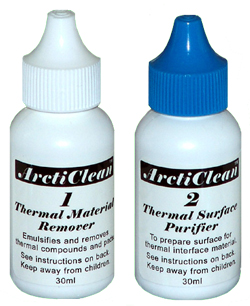
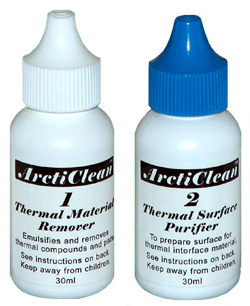
I highly recommend you buy ArctiClean along with the paste. You just put on a few drops on the old paste and it makes it really easy to wipe it away with a cloth after. Dissolve it or something. Plus you get some sort of purifier that makes the contact between the paste and the die better.
Also, ask about if the shop have a non conductive paste. Thats what I prefer to use.
Noctua NT-H1 or MX-4 is good stuff.
-
Thanks I'll keep that in mind
I know there's a repasting guide here on NBR so I'll check that out too. -
#1 Remove the backpanel
#2 Open the screws on the heatsink above CPU and GPU. The screws wont fall off the heatsink.
#3 Remove heatsink
#4 Remove old paste on both the CPU/GPU die and heatsinks. Make sure no residue is there. Use q-tip or something that doesnt leave any residues behind, like small cotton particles etc. ArctiClean helps a lot out with dissolving the old paste and it is easy to remove it. If you dont have that, use alcohol (99% like isopropyl)
#5 Apply the new paste on both CPU and GPU die. Make sure you dont put on too much. A small dot in the middle of the die is most used. It will spread out to the whole die when you press on the heatsink.
#6 Before pressing on the heatsink, make sure the thermal pads thats either stuck on the heatsink or VRAM on the GPU will hit the VRAM when you press the heatsink on.
#7 Fasten the heatsinks with the screws.
#8 Put on the backpanel.
Just use a monitor program the next few days to make sure your paste is working properly
You are done
-
Cheers!
A question; what are these stickers for and should they be removed for better cooling? Would removing them improve cooling?
![[IMG]](images/storyImages/e12ljt.jpg)
![[IMG]](images/storyImages/2mmbqeu.jpg)
Should really go in Clevo thread sorry, but I'm curious. -
Thats the first time im seeing big white stickers over the heatsinks. Maybe you can grab on to them to lift the heatsink off the die without burning your fingers (never happend to me anyway) after you have screwed the heatsinks loose?
Id leave them there, just in case for the warranty.
Notice the screws are numbered. First you unscrew #1, then #2 etc. Same when you fasten the heatsink. -
Heavily debating if I should repaste as well or does this sound accurate -
In Unigine Valley I got 81C after the first run and ran it again immediately after. It was 86C the second. That's with the fans running at passive speeds.
After turning the turbines on (joke lol) it hit 76 on the first pass and 78 on the second - still at stock speeds. Is this pretty normal? Going to see what overclocking nets me. I just have mainly seen single card results and very few SLI - so trying to feel this thing out! Thanks guys.
------
Overclocked at +130/+300/+25.0mV
Passive Fans netted me first run 88C/immediate second run 90C
High Speed fans first run 78C/immediate second run 81C
I would really like to know how this compares to others with SLI setups and if its what I should expect or what? Also about peoples "always on" daily driving overclocks? I saw one other post - but with the latest driver I cannot push higher - at least without temperatures going crazy or crashes. From what I can tell - these seem like fair temps - I just want to know how others fair!
But hey this gets me a little warmer than Unigine Heaven 4.0! I saw no artifacting or tears either. Running on Extreme HD -
Would also highly recommend the ArtiClean products. It's amazing how much easier it removes the gunk than just isopropyl. Haven't tried the Noctua, but I find the MX-3 runs a bit cooler than the MX-4 if you can find it (although both are good choices).
-
What do you mean by "passive speeds"? Let the computer apply the speed automatically or is the fan running on low speed?
Either way I think your temperatures is within the normal range. GTX 780M does run hot, no point beating around the bush there.
I think you should expect around 80-85C as GPU temperatures.
Doesnt hurt to repaste though, just to be on the safe side. Atleast then you know you get the best cooling
-
Your temp results are pretty much in line with mine, maybe 3-4c hotter. What are your ambient temps?
By running "passive" cooling, I'm assuming you mean you're using the regular fan profile (and not the F1 "turbine" mode). "Passive" cooling normally means running with no moving parts at all round our parts
Like I said, my daily speeds i.e. speeds I run for gaming and day-to-day stuff is 140+/400+ -- I find this is the highest I can go and maintain temps just under 90c at load. -
Alrighty got me some some isopropyl stuff and some Arctic MX-2 from local shop. Will repaste later tonight or tomorrow depending on time, just got some errands to run before...
-
I guess I should have said automatic rather than passive! But your assumption is correct. My ambient temperatures are around 22C (72F). I know no 2 chips are the same but if I go near +140+/400+ -- , I will freeze in any bench or game shortly after I launch it. I even tried lowering the memory and going 140/300 or 140/350. With the 130/300 I am running I had to bump my voltage up to remain stable. My machine was giving a black screen freeze forcing me to hold the power button and reset. What driver are you running? I have seen a few instances of people having trouble going there on the LATEST beta driver (I am at work and don't recall the version - but I believe it came out July 31st). On a previous driver I could get there but it was pretty hot. My concern is I am reaching your temps at a lower OC - do you run your fans full blast all the time? I mean that really isn't a big deal to me! Just curious. I think I will repaste. Mine had the factory IC7 application and from my previous experience on my 9370 - it was sloppy there! Of course that stuff is like spreading hardened clay anyhow.
Also, do you have any idea why overclocking with XTU would net me lower bench scores? I thought it might be throttling more often but that didn't seem to be the case - so I am not really sure what else would be doing it.
I am sure some of this is just a difference in chips or something like that - I just want to make sure I didn't get a dud or just have something out of place. -
MSI users, how stable are your vBIOs overclocks? I know the 180w adapter prevents a huge OC, but what are you guys capable of considering your psu limitations?
-
Hey there,
I have made a Unigine benchmark today to see how my P150SM is doing and here is the result.
Unigine Heaven Benchmark 4.0
FPS:
36.0
Score:
907
Min FPS:
15.1
Max FPS:
82.7
System
Platform:
Windows 7 (build 7601, Service Pack 1) 64bit
CPU model:
Intel(R) Core(TM) i7-4800MQ CPU @ 2.70GHz (2693MHz) x4
GPU model:
NVIDIA GeForce GTX 780M 9.18.13.1127 (4095MB) x1
Settings
Render:
Direct3D11
Mode:
1600x900 8xAA fullscreen
Preset
Custom
Quality
Ultra
Tessellation:
Extreme
I have also recorded my temp during the test with OpenHardwareMonitor.![[IMG]](images/storyImages/mjep.png) test start after 0:07
test start after 0:07
and I have ARCTIC MX-4 EXTREME THERMAL CONDUCTIVITY. GPU in red / CPU in pink
No overclock. -
Hiho
Make and Model: Asus G750JH
CPU: i7-4700HQ
Ram: 16gb 1600mhz
Driver Version 32
Benchmark link 1: NVIDIA GeForce GTX 780M video card benchmark result - Intel Core i7-4700HQ,ASUSTeK COMPUTER INC. G750JH
GPU Core/Memory Mhz: stock
Peak GPU Temp: 72c
Benchmark link 2: NVIDIA GeForce GTX 780M video card benchmark result - Intel Core i7-4700HQ,ASUSTeK COMPUTER INC. G750JH
GPU Core/MemoryMhz: stock
Peak GPU Temp: 75c
Really happy about the firestrike score, but really sad about the 3dmark 11(im about 200 points below the highest)
Is this because "HTWingNut" testing rig is using a i7-4800MQ while im using a i7-4700HQ?
Whats the performance differential between the 4800MQ and the 4700HQ in percentage? -
NVIDIA GeForce GTX 780M video card benchmark result - Intel Core i7-4700MQ,Micro-Star International Co., Ltd. MS-16F4 core/mem 1019/3000 max temp 84 personal fan profile used. I liked breaking 9.1K GPU score but sadly I need to bump voltage considerably to be stable at higher clocks. We are not really at a disadvantage immediately due to low power PSU, because we use the battery together with the PSU. That itself is also our current weakness because we can't use higher power PSUs due to BIOS/implementation from MSI.
I normally use stock or 980/2900mhz OC for gaming depending on which game needs it. but so far 1019/3000 is my current best clocks and score still able to use/game with stable. -
You have a good, inline with everyone score on your GPU. Try comparing GPU score to GPU because the P score is the total combined with CPU and any user with a high end CPU will always outscore you. 200 points is basically nothing, probably around 1 fps more in average.
-
are u using the vBIOS from techinferno?
-
I was, for that bench yes. Right now I am back on stock vbios as I have no use for unlocked vbios Maybe I will try higher clocks later when vbios become more developed and drivers mature. Right now I am happy with 980/2900
-
Make and Model: Clevo P170SM - from overclockers.co.uk - OcUK Hardcore Gamer P170SM 17.3" LED Full HD Intel Haswell Processor, 1600MHz DDR3, SSD + HDD, NVIDIA GeForce GTX 780M 4GB GDDR5 Graphics Card - Windows Laptop - Black [P170SM_GTX780_4GB]
CPU: i7-4700MQ
Ram: 8gb 1600mhz
Driver Version 320.49
Benchmark link 1: NVIDIA GeForce GTX 780M video card benchmark result - Intel Core i7-4700MQ,Notebook P17SM
GPU Core/Memory Mhz: 906/2800
Peak GPU Temp: 64c -
Can someone running SLI 780s please tell me what the temperature difference is between GPU0 and GPU1 in benchmarks for them?
Also does anyone know physically which GPU is the "Master"? I assumed the one on the end of the cable that says "Master" - closest to the back of the laptop and the "Slave" is closest to the battery. Is this true?
My concern is, in something like Unigine Heaven or Unigine Valley when the fans are on automatic - they are 10ish degrees apart. With fans on full blast, they are about 7 degress apart. This is consistent in multiple runs as well as in different benchmarks.
I just re-pasted them with Tuniq TX-4(they were pasted with ic7 from the factory). Likely due to bad factory pasting, my main GPU temp has seen a 3-4 degree drop but a more substantial 9 degree drop on GPU 2. Now the gap between 1 and 2 is larger than it was before - before it was around 5C. It is possible that GPU 2 was simply pasted worse than 1. But I want to know what others are getting for comparison and to see if anyone thinks I should be concerned? For an example at the end of a Unigine Valley run with fans on auto my Main GPU (the one at the bottom of the on screen display) is 80 and my slave/secondary (top of the screen) is 71. That gap just seems huge to me! I have even seen as far as a 12 degree gap. I know that GPU0/The Master runs hotter but should it be a gap like that? What else could I change?
I tried reapplying the paste twice for sanity sake. I use ArctiClean products every time to clean the bottom of the heatsink and the top of the GPU. I did the whole thin layer spread with a card trick the first and 3rd time. The 2nd time i put just a dab more paste than before - all still netted precisely the same results. I thought maybe I was doing the wrong GPU- and repasted the other as well. Same results. It is just really strange to me because from the factory they were 5 degress apart and now its in the double digits. I might be chasing a rabbit - but I don't have as much experience with laptops as I do with desktops. So can someone help me save my sanity!? Haha. OCD blows sometimes.
Thanks for your help.
Btw, Sager did a TERRIBLE job pasting. It was ALL over the heatsink. Glad I repasted! -
Good thing you repasted! As for your GPUs well not two GPUs are the same... my original barebone had a GTX680m that ran high into 90s degrees without OC and it died off. My replacement from MSI ran 10 degrees cooler, overclocked... so maybe one of them just runs hotter.
As for repasting I prefer the pea method myself in case the heatsink sits slightly differently but it just might be that one GPU runs hotter. I don't know how the cooling system is arranged, maybe one GPU has less ventilation? -
I have used the pea method in the past on desktops - but I never have used Tuniq paste before. So I followed the instructions =). I know some pastes work better if applied differently - and that stuff is buttery smooth.
Also, thanks for your response. I realize no two are the same, I just thought 10-12 degrees was kind of a large difference. It wasn't that wide (the gap) before I repasted. The main GPU still seems to be on par with everyone elses temps - I just want to know if others have a gap similar to the one I am experiencing? Also, the physical location - Is the Master the one closest to the vents/back and the Slave the one closer to the battery/ram slots?
Thanks!
Also the ventilation thing only makes sense if my understanding of physical location is wrong. The one that I believe is the master, is the one running hot, and its closer to vents and the heat doesn't have as far to travel to the fan as the other one. Just thought of that, thanks again. -
So, when I originally tested I was in a different location - I am testing today in my office. I think the huge difference I saw was due to ambient temperatures. Now that I am in the same ambient temp as my original testing , I am only 5-6 degrees apart. In the same environment - repasting got me 9C cooler on average after several tests. If that isn't evidence of sloppy pasting, I am not sure what is!
Thanks for the help guys, my OCD is silenced today.
nVidia GTX 780M Benchmarks and Overblocks (vBios, Afterburner, eVGA etc)
Discussion in 'Gaming (Software and Graphics Cards)' started by xjulzkx, Jun 11, 2013.