Problems? See this thread at archive.org.
yes, i would like to know also. please explain why it is not better and please explain how i can obtain the full working 9C.20 BIOS file. thank you.
-
-
I had to ship my P-7805u in for repairs, and when I got it back, they had replaced the motherboard. The new one has 9c.20. Basically this is the difference I noticed: With 9c.17, the GPU fan would rev up and down repeatedly when the temp was between 43 and 55C or something around there. This was super annoying to listen to and it was probably hard on the fan. Now with 9c.20, the GPU fan stays off completely until the temp hits 82C. This is way to high in my opinion, especially to have the GPU temp idle between 55 and 65C. The CPU fan is the only thing that cools it, and it stays on 24 hours a day even when the core temps are under 30C.
I bought the Notepal U2 cooler with fans that blow air into the computer and so the GPU now idles between 42-46 and I am going to place a filter in between the cooler and the laptop under the CPU so that not much dust collects inside. Even after these adjustments though, in games the GPU will generally hit 82, the fan will spin up to high, the GPU will go below 70, then the fan will turn off, then the GPU will warm up again... It is very nice though not to have the GPU fan turn on at all in older 3D games and not to have the horrible spin up/down cycles. -
Long-time reader, first-time poster here...
Just wanted to chime in and say that I just flashed my P-7811FX with the 9C.20.00 BIOS yesterday - upgraded from 9C.05.00 - using the files from PsychoUsagi's MegaUpload link. All went swimmingly, and my issues seem to have been cured.
My issue was that my screen would go suddenly go black while I was playing a game. I'm pretty sure the computer wasn't frozen, but as I had no screen I'm not sure. My initial thought was that it was an overheating problem (since this laptop exhausts some HOT air during a game, even a game like Civ IV), so - after a bit of digging around in these forums - I discovered two potential fix-alls:
1.) update the BIOS (which I did, and it went off without a hitch)
2.) install RivaTuner and use it to override the GPU's settings so that the laptop no longer cycled between "overclocked 3D" settings and "2D low-performance settings", the net result of which is that I basically under/'normal'-clocked the video card.
Now the laptop doesn't seem to be generating as much heat (and the fan isn't spinning up so much either) and my screen black/freezing problem hasn't reappeared. I'm not too worried about the lack of overclocked vid card, since this laptop isn't being used for games like Crysis, but moreso Civ IV and the like.
Thanks to all for the helpful advice and suggestions! -
ryano, could you tell me what the behavior of your fans are?
-
I also put 9C.20 on my P7805u.
GPU fan now only comes on rarely when playing a full screen video, or during intense gaming. Feeling near the gpu there is low heat when the fan is spinning. I'm loving this, no more whir-on-whir-off GPU fan behavior. -
What are your idle/load GPU temps?
-
They are probably similar to mine (see my first post on this page.)
-
Idle right now (it's been running for a while) with the laptop semi-propped up is roughly 30-31 Celsius. The hottest I've seen it (right after I get out of a game of Battlefield Bad Company 2, for instance) is about 70-75 Celsius. It varies, but usually sticks towards the lower end.
-
Damn only 30C, my GPU without the cooler idles at 55, and with it is about 43. And I do have the powermizer turned on.
-
Crap. This 1920x1200 resolution has me messed up, I was reading the _CPU_ temp, haha.
I'll keep an eye on it and re-report the GPU temps in a while. -
Just thought to let you know that the only file that the gateway bios update is missing is wflash.dat. I copied it over from the PsychoUsagi provided and it worked fine.
Please be warned: As soon as you run the program it will begin flashing. No confirmation is given!
P.S. - My video card is idleing 75-80C (after extended use).Attached Files:
-
-
I did not understand, is ok to install this version of bios, or not?
-
The new bios runs the fan less but we definitely have higher than usual temp readings. My norm is 55C before update but now I am getting 75C idle after a period of time.
EDIT: I've had time to evaluate the temperature range. It will range from 55C to 82C with light usage. I don't know how it will react with gaming so I will probably load Borderlands and check it out.
I've attached the update zip pack that I used but I only tested it on Windows 7 64-bit. I'm pretty sure that the dat file that I mentioned earlier is the only item missing so you can probably just add it to the 32-bit pack from the gateway site.
http://rapidshare.com/files/374379548/Update64.zip
EDIT (again): I played a littlebit of Borderlands. That game turns up the fans usually. I found that it worked just fine. Had to fix the resolution but I suspect it is because I played it on my 1080p display before so it reset when I loaded it up this time. For those of you that want to do it then I don't see a reason not to. It does seem to lower fan activity which is causing (what appears to be) higher than normal temperatures. -
Gateway released version 9C.23 and 9C.25. I've personally flashed both of these myself so they should be fine. I have yet to see any actual changes though. Fan management seems the same, maybe a little better than 9C.20? But still higher than 9C.17. I didn't see anything new in the setup table either. Maybe you guys will see something I didn't.
Gateway Support Drivers & Downloads -
i would to return to 9c.17 i would to flash a wph file with phflash16 but don't exit version dos of 9c.17?
-
my bios version is 9c.17 i would like to update to 9c.25.
Can i directly upgrade it or i need to go through 9c.23 first and then 9c.25 -
but anyways i directly upgraded from 9c.17 to 9c.25 and i started gaming having my powermizer turned off.
I had an increased performance with no lag and heat problems.
when gaming temp is at 87 degree celsius.
If you need to know about powermizer i can help and tell what is it.
Is upgrading 9c17 to 9c25 directly fine? -
With BIOSs it isn't an "upgrade" like how you upgrade to XP Service Pack 2, etc. In other words 9c.17 to 9c.25 is fine. Second, you really want powermizer on. Some people with some graphics cards might say that it will mess up game performance but that isn't the case with these cards. In fact, they tend to clock to full far too readily. If you want to be able to turn powermizer on/off without restart then you should get NVidia PowerMizer Manager. Note that for me there was a bug where setting the laptop to be locked at the lowest performance mode on battery caused it to be locked on AC when AC was set to "throttle." Other than that it works great.
-
thank you for the reply.
Oh ok and can you tell me more about the bug and did you solve it.
Because even i want to know whether my graphic card is at full throttle. -
Are these BIOSs save to use with the 7915u?
-
I would not use the P78 bios on the P79 series....................
-
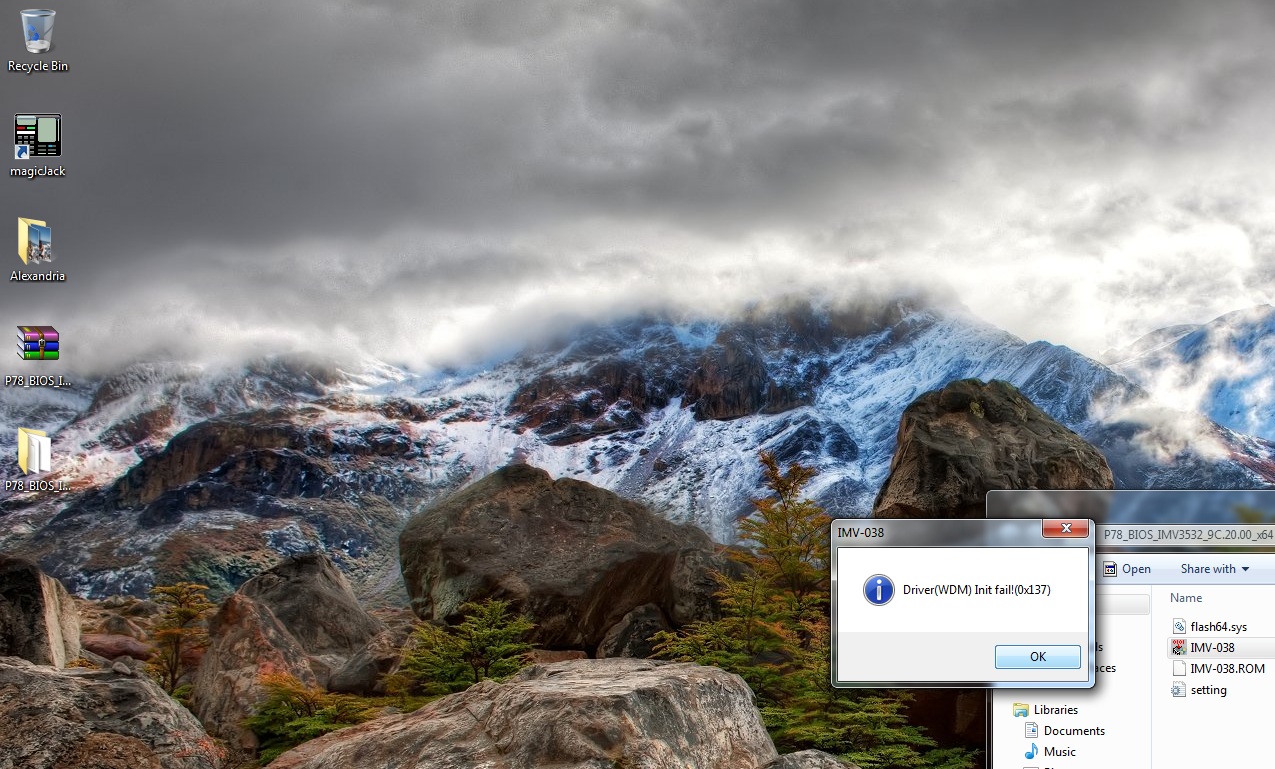
A few days ago I "upgraded" to the 9c.25.00 BIOS on my 7805u and am regretting my decision. I just double-clicked the application to get to this BIOS. When I try to go back to 9c.17.00, it gives me a "Driver(WDM) Init fail!(0x137)" using both iaTa's BIOS and Gateway's BIOS. Can anyone explain how to fix this error? I am okay with flashing my BIOS if someone can explain it. Thanks.

-
it looks like gateway took the 9c.25 bios off the website. does anyone have a working link to get the newest bios?
-
of course use at your own risk but this is the file I had obtained from Gateways site.
www.pcambrosia.com/files/P78_BIOS_IMV3532_9C.25.00.zip -
thanks TANWare, I appreciate it
-
Has anyone successfully flashed with win 7 64?
-
I had with the RC of Ultimate. I upgraded to Win7 HP and it did a fresh install, haven't been able to flash since..........
-
Flashing will work fine assuming the package is complete.
-
I have tried with the complete package, even packages I've used before I have archived to no avail. I am sure by bootable dos I could but I don't bother. 9c.17.00 works fine for me..........
Edit; if they make a bios that alows us to have Quads, Im there. Till then....... -
The BIOS for P-7808u allows for quads. I believe it is the motherboard that doesn't support quads.
-
I know, that is why I said "Alows Us to have Quads" as I also know it isn't going to happen..........
-
Hey guys.... looking to roll back to the .17 BIOS but every time I try I get an "init fail" error message and I can;t find a file that will work. I'm on .12 now and getting temps of 93C on my GPU when gaming, which worries me a lot.
If anyone has any advice on how to fix this, please let me know!
Thanks. -
If I followed the undervolting guide and flashed my BIOS to run the GPU during non-gaming at .8 volts will flashing one of the motherboard BIOS's listed here change my undervolt mod? I'm unsure if it's the same BIOS or if the video card and motherboard have two different BIOS located in two different locations.
-
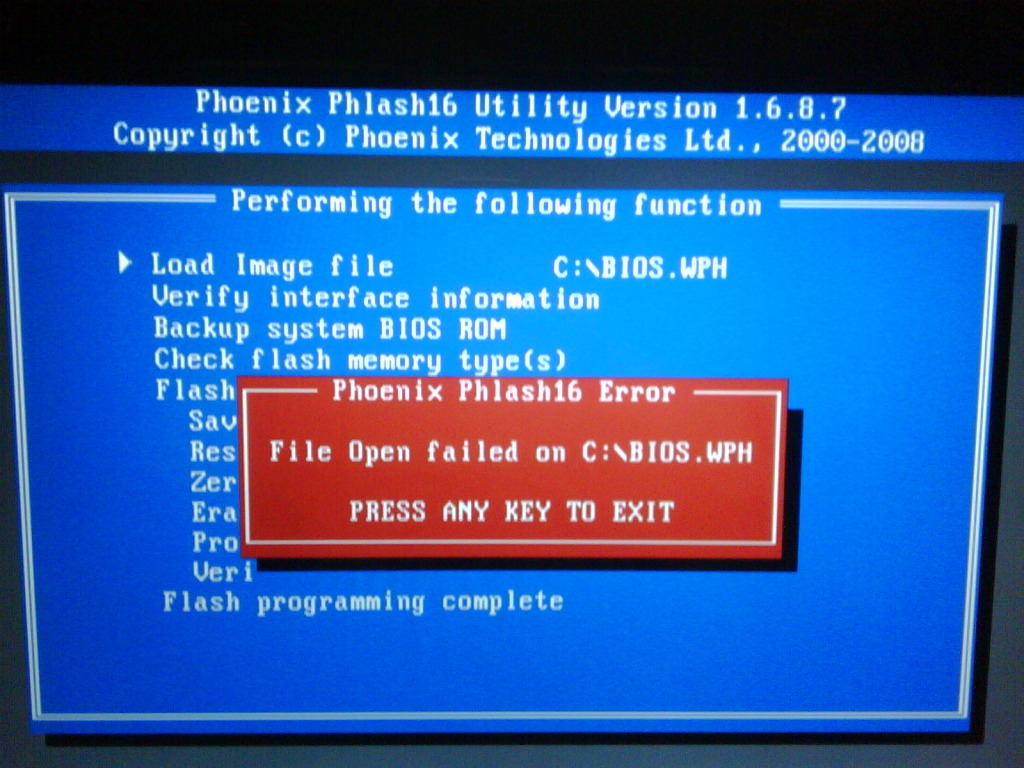
I keep getting the attached error when trying to flash from the bios as downloaded from Gateway. Is my best option to flash using a USB stick? I am currently on 9c.05.00 and want to update to 9c.20.00, but have read that some are experiencing higher temps with 9c.20.00 than 9c.17.00 I need to update, since I will be adding two 320GB 7200RPM HDD's to run in RAID 0 next week.
Attached Files:
-
-
Does 9C.17 let you turn off Enhanced Intel Speedstep Technology (EIST)? It is not an option in 9C.20.
-
The difference between the 2 BIOSs is that 9C.17 will throttle the GPU fan and keep it cool. At low temperatures it will pulse on and off which you may find very annoying. 9C.20 doesn't turn the GPU fan on until it hits 80C and it turns it off when it falls below 70C. ICD7 people will usually fall below 70C so this causes the fan to cycle on and off when gaming. I was given a 9C.20 BIOS and made the best of it by getting a laptop cooler. Although I just thought about the fact that if I switched back to 9C.17 there would be limited pulsing because my cooler keeps the GPU below 45C on idle.
-
Even without my cooler running the GPU overclocked with powermizer off runs about 52C idle and the fan does not pulse with 9c.17.00.
-
What changes does 9C.23 do for my laptop?
-
OK, thanks for the clarification. I thought it would be something like that. I am still not able to flash my bios and I have my new drives sitting here in their boxes waiting to go into raid....I am going to try flashing from a thumb drive using this guide: http://forum.notebookreview.com/sager-clevo/246530-how-flash-your-bios-dos-using-usb-stick.html
-
I keep getting this error with all versions of the bios when flashing from a usb thumb drive. Any solutions?
Attached Files:
-
-
Hello I have the Gateway P7811 FX.
Can someone please upload the latest version of the BIOS in DOS?
Also, is the latest version the best? If not which is?
I am unable to download it from the FTP.
Thank you. -
Read the recent posts in this thread. Your main options are 9C.23/9C.20 and 9C.17.
-
Can someone please upload them so that I can download them? The links on the first page are not working. I would prefer them to be in DOS.
-
Hello is this an EMERGENCY! Can someone please make a Bootable BIOS ISO file for my Gateway P7811 FX? Any of the folloring versons would be ok 9C.23/9C.20 and 9C.17.
-
What are the changes in 9C.23?
-
The only change I've heard of is that it alows the GPU to heat up further before kicking in the fan. This prevents what some people experience in a pulsing GPU fan.
I think someone disected the bios though and there was some change to the listing of the CPU overclock table that is non functional anyway. -
Thank you for the info!
-
I've just downloaded the .17 bios from the gateway website:
Gateway Support Drivers & Downloads
It'll work with the P7811FX right? Do I just extract the zip anywhere and run the executable in admin mode? Never flashed a bios before and I don't want to screw anything up, so help is appreciated.
I'm on the .05 stock bios right now. -
1.) Yes, it should be ok fir the P7811.
2.) I would create a simple folder off the root, old habit, and it shoudl run fine from the factory vista install. Some have had issues from Windows 7 upgrades including me. -
I just updated to the 9c.23 BIOS. GPU Temps hovering at 65c, CPU around 33c at idle web browsing. Fan spins on after GPU reaches 70-75c for certain periods of time, then completely off (at around 63c), but the fan doesn't blast at 100%. It is still audible though. Almost pointless if you ask me, fan spins to get GPU down to 63c, shuts off, then really 10 seconds later, GPU hits 70-75c and fan spins on again. Not as loud or as annoying as the spinup/spindown of previous versions, but still on/off/on/off.
Not sure how gaming is yet. Will let you know. What does everyone else think of the 23 bios?
Official Gateway 78xx Series FX BIOS - 9c.05.00 thru 9c.17.00
Discussion in 'Gateway and eMachines' started by E-wrecked, Sep 25, 2008.