Problems? See this thread at archive.org.
Just saw someone post that the 7801 price dropped to $1,199. It's the same as the P-7805u but with the high 1920 rez. go figure.
http://www.newegg.com/Product/Product.aspx?Item=N82E16834101166&Tpk=7801u
-
East or West store? And I thought only the H batch numbers were 1920x1200 res?
-
Nope. Here's what we've got so far:
http://forum.notebookreview.com/showpost.php?p=4466566&postcount=164 -
Does anyone know if i can put the LifeFrame software that comes bundled with the Asus on my 7805u. If not are there any better programs than the Camera Assistant software it comes with. All recorded videos save in avi. format and there to big to mail. I know i can convert but its a hassle. Oh and my batch# is I007775 and i have a 1920.
-
Agreed. I love my 1920x1200 and see font and everything else from a comfortable distance without problems

1920x1200 LG $1123 out the door
Hmm I'm using all the default settings for the dpi and everything. I like it because I can read everything perfectly fine and it gives great privacy (Meaning others can't read whats going on unless they're over your shoulder)
-
West best buy
-
GPGPU bandwidth benchmark test with Sisandra 2009 crashes on my P-7805u FX. Anybody faced that. Wonder if its got to do with the video driver i have, which is the official nvidia beta version driver.
-
I have this problem too but the error message appeared when just browsing, im using the safe mode since, somebody knows how to fix this? what its the nvlddmkm driver? anyone solved this?
-
I was told that there is a post someone in this thread listing the serial numbers or batch numbers that contain the higher grade screen.
Can someone tell me what post number so I can avoid scrolling through 221 pages of posts? Thanks -
If you used the "Search" function...
http://forum.notebookreview.com/showthread.php?t=338221&highlight=batch+numbers -
Few questions.
First of all I picked up my 7805u about a month ago from bb at the time when I bought it i wasnt aware of this site so i didnt have any background knowledge of this computer prior to purchase except for the bb site and gateway site. I guess i was lucky enough to get the 1920x1200 screen but after I found this site I found out that there were two screens the lg and auo. I found out I have an auo screen. still its a nice screen, but I have been noticing light leakage, and at the bottom of the screen after the computer is on for a bit i notice what appears to be separation of the screen. its hard to describe but it looks like bars running horizontal and a slowly fading upward screen. it is only noticeable on a black screen. I would send it in for repair but I'm afraid I would loose the 1920x1200 screen? I do alot of work with photoshop CS4 and the larger screen is nice to have.
Second question. I would like to find a second battery for the computer. I found that they sell them on the BTI factory store web site but does anyone know where else I could find one for a lower price. the two they have on there site are the GT-M150 Lilon, 11.1V, 5000mAh 6 cell for 149.99, and the GT-M150H LiIon, 11.1V, 7200mAh, 9 Cell for 167.00. would both of these batteries work in the 7805u. I know that the 6 cell would have a shorter running time compared to the 9 cell.
any suggestions would be great.
thank you -
Alot of people have talked about this and have this problem, it's nothing major.. My screen has white ghosting everywhere, only in a black screen though... nothing to worry about.
1920 X 1200 is worth keeping and dealing with the minor deffects. -
Guys, first off thanks for this wonderful thread. It made my choice easy when buying my laptop and saved me tons. I received my model for only $1049 even though it had went off sale, be surprised what you can get when you ask. My model is only the 1440 x 900 though I honestly cant think of a reason to complain about the resolution, since most games I play dont run well that high. Very rarely do I see myself using programs like most the CS 3/4 pack.
However, unfortunately even though I have my degree in IT the location where you can make a backup windows disc has eluded me. I know I saw it once while browsing through some applications and would be most appreciative if someone could point me to it.
Thanks for pointing me in the right direction. -
I was just reading up on the ghosting on another topic in this forum. they said that if they wiped there screen the ghosting would disappear. so i just got done trying it with a MF cloth and it worked. it didn't totally remove it but made it less noticeable. also i noticed that if i dim my screen a bit it is also less noticeable.
And your right the 1920 x 1200 is worth keeping.
now I just need to come up with a solution to all the fingerprints and smudges. lol -
if your talking about the recovery disks just type in recovery in the start menu. it should show recovery manager and also recovery disk creation. I suggest you use dvds. When I created mine for my desktop it took about 12 cds (I didnt have any dvds at the time). and when i did it for the 7805u it took 4 dvd's
-
I installed Nvida's beta driver and tried to play some games.... they all crashed immediately. So I reverted back to my old driver and everything is OK.
-
It's in the manual that came with the Notebook, Crestar, on page 88. -
Yeah, I've read that as well.
I tried it, but didn't help enough really, it's not a major defect at all, I forget about it most of the time tbh. -
Well after searching the Best buys in the Clearlake area of Houston I found a 7805U with the 1920x1200 display. I was simple to do just check the serial number on the outside of the box.
138****** 1920
139****** 1440
Problem now is I'm not sure I like the 1920, everything is two small. I'm not a young pup any more and it's kind of hard on the eye's.
I may return it for the 1440 screen Flame suit on
I'll play with it a little more but not sure I like it.
It should be noted that this is my 3rd 17in laptop. The other two have been HP's one with a 1650x1050 screen and one with a 1440x900 screen. Those were fine.
Rudy Ackerman
Seabrook TX -
What with the stupid function key in the lower left of the keyboard. The crtl key should be there and it's driving me nuts when I try to cut and paste
Can we remap key locations on the keyboard??? -
I feel your indecision...
Let me just say that my last lappy was 15.4" @ 1920x1200. That took some getting used to!
While others will suggest changing font/icon/browser settings, my question for you is; do you still have the 1680x1050 laptop? If so, check out its LCD panel. If the connection to the inverter is the same, why not swap the panels? I am using a 1680x1050 in my P-6860FX (two generations earlier than the 7805/01) and (in my opinion) it's the perfect compromise.
Just my $0.02 YMMV
No. It's hardwired. Been talked to death (sometimes multiple concurrent threads on this same topic). -
Why isn't anyone here just buying the P-7801u from Newegg?
-
I do not mail order laptops unless direct from dell, hp, ect.
I use my laptop for work, must have can't be with out one.
I travel 100% of the time.
I have yet to have a laptop last more then 30 months.
I take care of them but they are used 60+ hours a week, and go throught 3 or 4 airports a week, get x-rayed, and shoved in airplane over heads.
I always buy the extended warrenty from BB or CC(RIP). Managers can be VERY helpful when you have a dead laptop and their extended warrenty. -
The 1680X1050 laptop is long gone.
-
Thats the same reason as me.. I work at best buy and I will for SURE get the accidental.
-
Why don't you just set the resoultion to a bigger size?
-
Whoa!
Going by that, my monitor is a 7220 wide display!
In other words, that doesn't seem to work on the one I got at Best Buy in early January.
-
Does it come with super duper magnifier glasses?
-
The detail in Crysis is unbelievable, KawaFord,
but I only get 1fps!
-
I am Very Happy with Crysis too, After my cpu upgrade much smoother
-
Think he means
138****** = 1920
139****** = 1440 -
Did you adjust the font size (DPI) from the default "96 dpi" to the larger "120 dpi"?
That makes a noticeable difference. -
Oh, yeah - doh!
We somewhat agreed on that in the "batch number" thread, didn't we? -
Haha, who knows with these things nowadays All luck to me now haha.
-
i went off the the SN and luck out with a 1920 LG
-
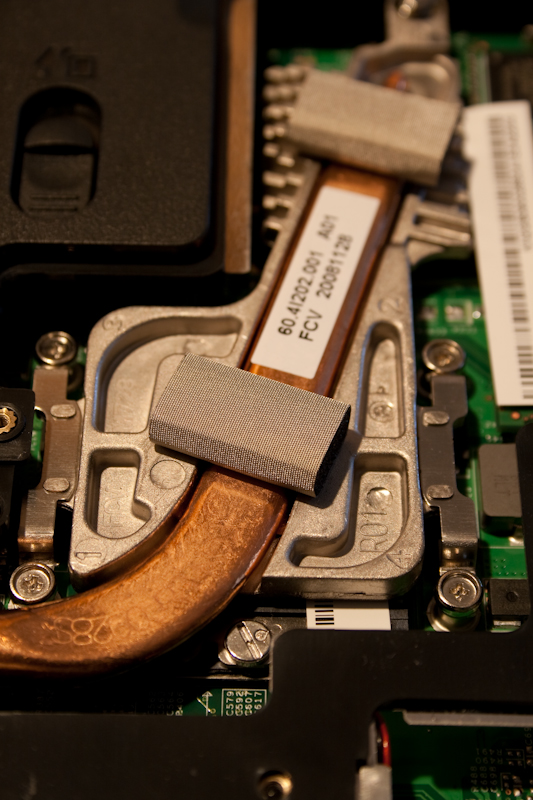
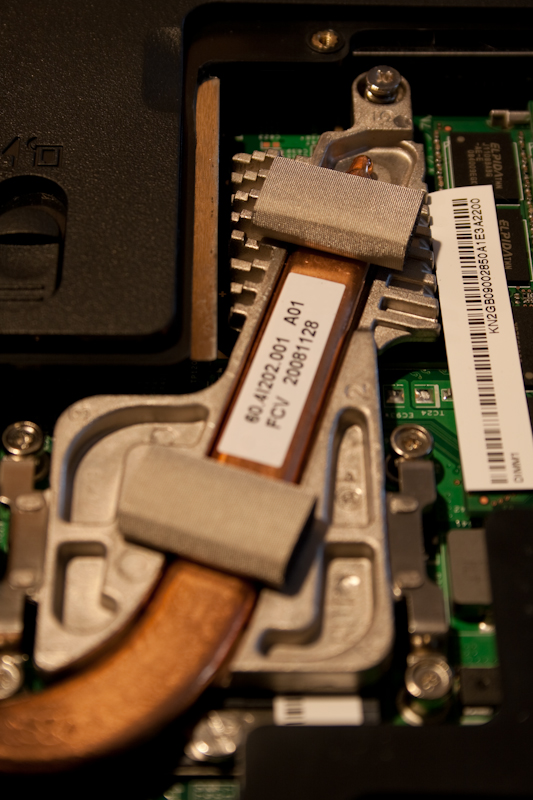
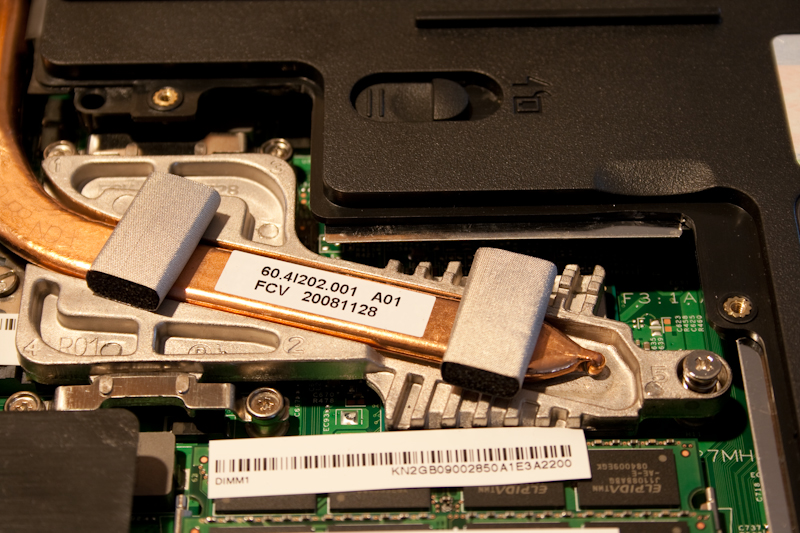
Just opened mine for the first time and my heatsink is of a different design than that. slightly bigger and bulkier, actually. I'll have pics tomorrow, but the CPU and NB heatsinks are noticeably different from the ones in your pic
-
Yep I did that and I did not notice a difference.
I have already returned it and got one with the 1440 display.
It works for me, and my eyes feel much better
-
I tried that but it was not as sharp. -
What resolution did you try? I'm using 1280x800 with a 1920x1200 screen and everything looks amazing.
-
You did restart your computer after changing the DPI, right?
-
Yeah, if you didn't notice a difference after you "changed" the dpi, then you did something wrong because the difference is quite noticeable.
-
These pics are of the HS from a brand new 7805u purchased Saturday. It's noticeably bigger than the one in the pics posted by lsutiger on page 12 here. I don't know if this means anything but I'm curious as to what the HS in the 7807 and 7808 looks like, but that'll have to wait til they come out
. Any ideas as to why the HS was changed, guys?
Attached Files:
-
-
Only the copper part touches the CPU, all the gray aluminum part draws ouf the heat from the Northbridge (which wasn't that problematic to begin with)
So this redesign might only mean two things
The northbridge will become hotter pretty soon (aka Overclocking for another model perhaps)
Or just a remanufacture of the HS itself. -
Prep for Quad core, we needed a larger HS...............
-
Possibly.
It's probably less expensive to have one HS that "fits all" and will work effectively on the hotter systems than it is to have a different HS for cooler systems and another for the hotter ones. -
They need to get those new 780x's out the door along with the new BIOS so we can find out on both counts.
-
Anyone having issues with their 7806u beeping on and off? I figure it may be the Seagate harddrive that I installed as it appears to beep when pulling from that drive. It's mainly just annoying when playing music, but does occur at other times when the drive is active... ie. - loading programs and games. Thoughts?
-
Beping as through the speakers and the standard windows beep in your sound properties? Only thing I can think of off hand is just be sure the drive isn't set to going to sleep in the power properties.............
-
Ok..so I've been digging everywhere, unfortunately I can't find my old pics. That is the same heatsink that came with the early releases of the 7811FX - back when they FIRST hit the market I had one with this heatsink. Actually, it kept TZS0 in check VERY well. Unfortunately, if you were to remove that heatsink and flip it over.. you'd find that the copper contact area is not going to square up to the edge like the other heatsink we've all seen pics of.
This pic for example is the other heatsink version:
![[IMG]](images/storyImages/coppershim.jpg) - pic compliments of Warlord's copper mod.. but notice how the heatsink is squared off to the surrounding silver area? The heatsink in your pic, if you were to turn it over, is going to be at an angle of approximately 30 degrees meaning the surface area would never conctact that of a Quad-core. BUT, this sink does provide much better cooling, IMHO.
- pic compliments of Warlord's copper mod.. but notice how the heatsink is squared off to the surrounding silver area? The heatsink in your pic, if you were to turn it over, is going to be at an angle of approximately 30 degrees meaning the surface area would never conctact that of a Quad-core. BUT, this sink does provide much better cooling, IMHO.
EDIT: that shiny copper to the right is a copper mod, I snagged this pic from the mod thread. the stock copper is on the left. -
I haven't flipped it over yet, was gonna apply some AS5 later on though, so I'll take a look then
P-7805u
Discussion in 'Gateway and eMachines' started by fbettis, Dec 22, 2008.