Problems? See this thread at archive.org.
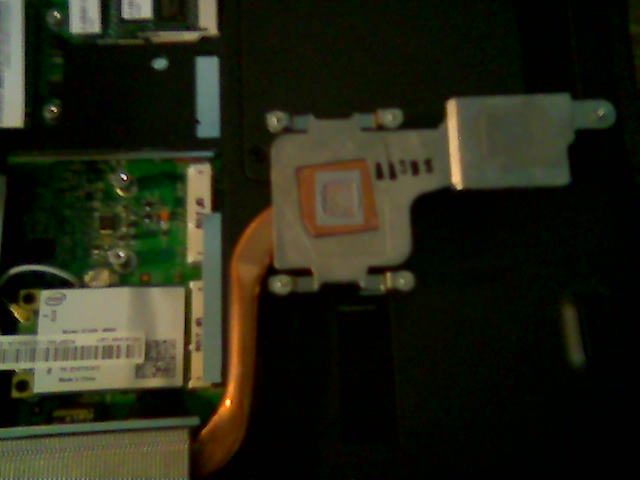
I've somehow lost the couple of pics I had of the heatsink.. eh, oh well. When ya flip it, snap a pic if ya don't mind? I thought it was an odd arrangement for how they setup the copper contact area. But I tell ya what, that heatsink works better than the less bulky ones they've been using.
-
here ya go. I see what you meant about the copper now.
Attached Files:
-
-
Hi husky55 i have a gateway 7805u have done tripple boot with xp first then vista64 then ubuntu 8.10 alternate disc works fine with just one hard drive. When using raid 0 with 2 320gb drives the alternate disc detects previous partitions and detects vista but not xp during install. After install xp and vista are not found in grub boot loader. Also no grub.conf file and ntfs volumes aren't mounted. This is where we need a up to date linux expert I used to be able to load drivers back when redhat 6.0 was around I'm sure I could bring myself back up to speed but just don't have the time. Anyone have Raid 0 working and able to boot vista and xp on this laptop?
-
Wow, that copper is smaller than the old HS, notice a step down for the chipset so that probably can be paste now. Wonder what the 7812 dual core HS will look like...............
-
That's what I was tryin' to tell ya!

But.. for some reason, that heatsink is twice as good as the other. The owner should be happy they got that one
-
lol, I'm not complaining. was just curious
-
Hey all, wanted to see if anyone else has this problem. I'm running vista premium 64 bit on the p-7805 with 1980x1200 native resolution.
at random times, on the desktop I will see white lines skittering across from top to bottom, and sometimes the video drivers will crash.
when playing back videos the nvidia driver will often crash, especially during 1080p.
sometimes I can play graphically heavy games like age of conan on high settings at 1980x1200 and it works great, really nice fps. Other times I can barely coax a medium setting at 1980x1200 out of it. seems random. Doom 3 sometimes crashes the nvidia driver.
It sometimes restarts itself after I shut it down through the windows shutdown menu.
I have run cpuid temperature gauge and find that the video card gets as high as 72 degrees celsius under load. Not sure if this is too hot or not.
So does this sound familiar? has anyone else had this problem? I'd really like to keep this computer, though I could exchange it easily... I just don't like my odds of getting another hi-def 1080p monitor. -
The temps sound fine.. I'd suggest one of 2 things. First, change video drivers. If that doesn't work.. then open it up and make sure your screens connection is secure.
Otherwise, you got a bad video card..or a video card going bad. But, that's not REAL likely.. check the first two, then see if it helps.. if not, you could always buy another, and swap screens if resolution is not right..then return the one that isn't working right
-
I replaced the driver with one gateway sent me, but it had no effect. I also tried updating the driver in windows hardware manager, nothing. Is there another driver I can try?
Also, I forgot to mention... When I'm watching some videos I get the message saying the driver has failed, I also get a message saying that my system is low on memory. Windows shows the full 4gb of memory so I'm not sure what that's all about. -
Something is chowing down on your memory.. you got anything in the background using it up? And the driver shouldn't be failing randomly unless you're overclocking the GPUs too much. It sounds like you may have a bad GPU/GPU RAM.. Like I said before, you can always buy a new one from BB - then take it home and swap screens, then return the original because it's defective anyhow.
-
I gave up on ubuntu on the P-7805U FX. Cannot bootup after install. I use ubuntu on my desktop. No problem there.
-
don't really have anything in the background except norton 2009. Guess I'll just exchange it and hope for the best. Don't really have the money or the expertise to buy a new one and swap screens >.>
-
You made the right choice. There is something wrong with your GPU if it keeps rebooting and run at high temps.
A new one will cure all your problems. -
It took looking at just two of my local Best Buys to find a P7805U with the 19x12 display. That was Friday
Have someone put the boxs down and check the serial number listed on the box.
138****** = 19x12 screen
139****** = 14x9 screen
Good luck -
i had a problem somewhat similar... i installed the new nvidia drivers for notebooks 179.26 and had no problem since. Also with this laptop i dont recomend using driver sweeper when upgrading the nvidia drivers (maybe for dox only) or pcdecrapifier, they messed up some things...
-
And get rid of NORTON...
-
New drivers from Nvidia out!!
-
@tanware (or anyone)...
can you tell me what utility this is that's monitoring core/RAM loads and temps and such? i like it...
![[IMG]](images/storyImages/3275419660_191c646644_o.jpg)
-
That is nVidia's system monitor, I placed them at the lower portion of the side bar.
Above the monitor are normal gadgets -
My present Desktop
-
I tried exchanging my 7805 but the two laptops they had there were 1440x900 so now I have it at the geek squad getting a diagnostic. It's only a week old so maybe they can just replace the gpu under the manufacturer's warranty. If I find a 1980x1200 at the other local best buy can I exchange it there?
-
Dox 185.20 this is my 3dMark06, is it good?
3DMark Score: 9119 3DMarks
SM 2.0 Score: 4310
SM 3.0 Score: 4270
CPU Score: 1973 -
What is Dox Optimised Video Drivers? I get a score of 8750 or something like that. Those drivers seem to give a good boost to the score.
-
go to http://www.laptopvideo2go.com/ and on the main page hit Ctrl + F and type "dox" itll scroll you down to like 185.20 optomised.. its okay.. just thought source would run at like 150 stable.. maxed.. still a bit choppy
-
Ok, I still haven't been able to diagnose the "Beep" sound from my 7805u. Upon further inspection, I believe that the beep is coming from my Western Digital 320GB Scorpio Black harddrive. The beep occurs even when the volume is turned completely off and/or muted. It is a clear, loud, single beep that is totally and utterly random in it's timing. It will beep whether or not I am running anything from the drive and sometimes won't beep at all, but always comes back a day or two later. It's been utterly frustrating trying to diagnose the cause. All drivers and diagnostics on the WD drive come back that everything is ok with it. Thoughts from anyone else experiencing this or from the true computer gurus out there that have a solution?
-
My 3Dmark06 score is only 6415. I have Dox optimised driver setup for Quality. Havent played with the GPU settings. What could be the reason for such a low score i wonder ?
-
Change your power settings from balanced or power saver to high performance. you should see a big increase
-
Have done that too. hardly a raise of 10-15. Any setting for GPU ? or shud i have installed dox driver for performance instead of quality ? would that make a big difference ? -
Thats possible.
I use Balanced, my score is in my sig. (9499 with my GPU overclocked though) -
I was wondering where can I buy a second hard drive for this notebook. Also I was wondering if the highest storage one that runs at 7200 RPM is the 320 GB hard drive or is there another one that runs at that speed with more storage.
-
I am having the same issue as you, I even posted a separate thread here on the Gateway forum. I haven't found the cause yet, sorry.
-
500gb 7200 rpm drives should be available any time now if they aren't already, i haven't checked lately but there are several with an eta of about now.
-
Ok but where do you turn them on
-
If you can find a 1980x1200 unit someplace then yes you can exchange it.
Just check out the Best buys in you area and check out the serial numbers.
138******** = 1980x1200 screen
139******** = 1440x900 screen
The serial number is printer on a label on the out side of the box -
Best Buy has 2.5 inch 320gb 7200RPM drives for about 118.00
I'm sure you can find lower prices with a google search -
Hey Rudinator, you have to download the System Monitor with the link "NVIDIA System Tools with ESA Support" located at the bottom of this page...
http://www.nvidia.com/Download/index.aspx?lang=en-us
Be careful though, the setup screen for it seems to annoy the nVidia drivers. I got failed drivers repeatedly and then even a blue screen. After I had it set up, it was fine, though. -
I checked the box of my 1440x900 p-7805u and couldnt seem to find the "serial number". Where exactly is it located? On the sticker with the batch number or on the side of the box with all the barcodes?
I didn't find any 139****** numbers on my box anywhere
-
look for this:
LXW430X0138xxxxxxxxxxx
LXW430X0139xxxxxxxxxxx -
http://www.newegg.com/Product/Produ...ebooks+/+Laptops-_-Western+Digital-_-22136280
^^^^
As Big Mike stated, 500GB 7200RPMS are out now I believe. -
Well, just so everyone knows... the 138/139 trick no longer works. I just exchanged my dysfunctional 1980x1200 for a 138 serial number and it was a 1440x900.
I really have to recommend against buying this computer to anyone who is considering it, the 1440x900 screen is terrible. It's faded and the colors are washed out. I tried messing with the gamma/brightness/color and it just looks horrible.
Shame on Gateway and Best Buy for whatever trick they've been trying to pull with this display business. Isn't the whole bait-and-switch scheme illegal? -
Well who knows what goes on behind closed doors, but this seems to have been a major manufacturing goof up. This model was SUPPOSE to be 1440x900 and a lot of folks got the higher resolution of 1920x1200. I've never seen anything like it personally. A big cluster you-know-what. But it turned out to be in favor of a lot of consumers. Sorry it didn't work out for you.
-
I think you are looking for THIS. I know I am getting one, or maybe two
A terabyte in a laptop, hell yes !!!!
-
It looks good, I guess I would like to have two of the same brand drives... another Western Digtal I have heard there are problems with Seagate (Where I don't remember) plus there are no reviews from that site yet although I do love Tiger Direct. Also while I'm writing I should ask what is a good CPU to upgrade too from Tiger Direct?
-
It's on the UPS Barcode white label on the side of the box.
The serial number is the middle one. There are 7 letters/numbers then the serial number -
You appear to be born under a bad star, and have no luck at all.
The serial number thing has worked for several people here, and you appear to keep getting bad computers.
Also BB and Gateway NEVER stated this model came with a 1980x1200 screen, all the labeling states it comes with a 1440x900 screen.
May be you should just buy a HP and move on. -
Yeah buy an HP and send yourself even deeper into notebook hell.
-
JP,
Is your "extra" 7805 with WUXGA still available? I was going to buy the 7801 from New Egg to get the WUXGA (no luck at BB in Nashua, NH with the 7805). Let me know and we can try to work something out. I live in Lowell, MA so I am about 45 minutes away from you. I can pick it up in person with cash in hand. My e-mail addy is redhotsox at hotmail dot com. -
Agreed....EX-HP Notebook owner here =_=" (I owned a 2008 model)
-
I don't know, I'm having problems with the multimedia hotkeys not working on this new one now. It's not a huge deal but the gateway techs on the live chat have no idea what they're doing. I've been given one driver and software for a fingerprint reader that this computer does not even have (?), one driver for the chipset(?), and I've been pointed to a FAQ on how to use the function key -page down key combo for volume >.> These guys seem clueless, they're not even familiar with the features included on any given model. Does anyone have the drivers for the multimedia touch panel hot keys?
-
Whats the highest you guys have overclocked your gpu's?
P-7805u
Discussion in 'Gateway and eMachines' started by fbettis, Dec 22, 2008.