 Problems? See this thread at archive.org.
If they have everything exactly the same except the option to get the bigger battery OR the 2.5" slot (which is what the material suggests) and they stick with the same great screen and approximate price - then maybe when they come out with a 970M model next year, then I'll upgrade and give this one to my little brother.
Yes, I think the GPU will use less power and be a fair bit faster, which is great, but as it is right now, I have it in my hand, I know it's awesome, it does everything I could ask for, the driver and other issues have been ironed out, the BIOS has been upgraded to be quieter - who knows how long it might take them to actually release this (maybe May or June at least?) and then fix any other bugs that come up. The comments about how much faster it will be are in part synthetic and inflated - I'm happy with what I have in my hands right now
Peter
-
No remorse, but after all the drivers issues were worked out with WiFi and Bluetooth my only remaining lament was, is the battery. Although we lose the 2.5" bay with the 63.64Wh battery on the v2, given Samsung 840 mSATAs are only a handful of more dollars than the SSDs, this would be the route I'll go dependent upon pricing and availability. As of yesterday Xotic is telling me 2-3 weeks on availability and Pemmz is showing $1,529 on the price for the base config.
-
I'm really not having any buyer's remorse at this point, considering the laptops look identical and its not that huge a spec bump. All the games I have now play at great framerates, and with all of the mobile-optimized stuff I see this laptop really lasting me a while.
On a side note, the battery was one of the biggest issues for me, but I would really rather have the big secondary drive than more battery. Recently I've been using my laptop in different classes and taking notes in one note with an external Bamboo Pad for using the pen. If I put the laptop in power saver mode, turn off bluetooth, and turn the brightness down, I can fairly easily pull down a good 7 to 8 hours of battery life taking notes with wifi on and some light web browsing. I was worried I'd never make it over 3 to 4 hours, but I am very happy with the 7 to 8 as it is more than I will ever need to be on battery. As an example, last night in a 3.5 hour (5:45 to 9:15pm) class of taking lots of notes and reading some news feeds and when I turned it off I still had 80% of my battery left. If I am gaming, programming, working, etc, I always have an outlet an just plug in and switch over everything to high speed.
So for me this laptop is really everything I was looking for at a fairly decent price (razer is way out of my price range!) -
7 to 8 hours, really? What brightness?
-
Of course, as soon as I buy what I thought was the ideal laptop for me, the new version comes out. If it releases for the same prices, I'll be really pissed.
-
You thought your laptop would never be succeeded? That seems a bit naive technology is always being supplanted usually at the same or cheaper price. What do you want them to pre-announce early and suffer the Osborne effect.
-
Per an e-mail exchange with Gigabyte support, response to my inquiry ticket was "v2 is scheduled to release middle of April after PAX show."
-
That reminds me. I always loved how IBM had a hotkey to turn off the screen. Maybe there's an app for that.
-
I totally agree with this. I think if i had bought this in 2013 I'd feel less bad; however, I've had a great time with this laptop. Only thing I desire is better battery but even when I did have a laptop with better battery life I still find places with outlets.
I like the give laptop to little brother idea. Although I probably spoil him too much as it is. -
Do you mean like FN + F6? Cuz that does turn off the screen.azrael201 likes this.
-
What?? I love this laptop thanks!!
-
Power Adapters
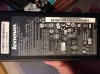
I was thinking of buying another ac adapter for my p34G but found that
A. My old Lenovo charger is rated for the same Wattage, Voltage & Amperage (120W, 19.5V x 6.15A) and has the same polarity, and charges my P34G successfully.
B. My universal charger which i used for the same lenovo also charges my P34G. (Its rated for 120W and changes the voltage according to whatever you connect it to).
If these elements are identical to my P34G adapter, can I use them without harming my P34G?
The only difference I found is that on my P34G the INPUT rating says 100-240 ~2.2A 50-60 Hz,
on my lenovo charger the INPUT says 100-240 ~ 1.8A 50-60Hz. What exactly is the significance of the amperage on INPUT, and how might it affect my P34G?
Below are images of the P34G Brick and Lenovo Brick
Thanks for your input!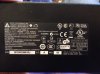
-
Ok I've had my Gigabyte P34G for a few days now, got the new BIOS fixing the fan noise (mostly), size and weight are just incredible for the gaming performance, battery life not too bad, lasts 3-4 hours for browsing web and basic stuff, which is fine for me.
There are just two deal-breaking things tempting me to return it for a refund:
1. The touchpad - wow this is an awful one. I know it was suggested in this thread to use Samsung ELAN drivers to get extra gestures. My big issue with it though is that two-finger scrolling is screwy. After scrolling a bit, if I just hold two fingers in place, completely still, the page jumps up and down. Using one finger and holding it in place is totally fine, no problems, it's just with two fingers that it goes nuts. I tried different drivers, changing sensitivity, nothing works. I had the same problem on my Samsung laptop with Synaptics touchpad - with holding ONE finger in place it would wiggle around - but Synaptics drivers fixed that. The P34G, holding two fingers in place after scrolling makes it jump up and down and it's maddening. Any ideas on how to fix this?
2. No FN key on the right side of the keyboard means you can't use some important keys with one hand (Home/PageUp/PageDn in the arrow keys, and the volume controls in F8/F9). There's the menu context key that I'd love to change to another FN key to solve this. I've searched a lot and can't find how it might be done on this model. Any ideas?
Thanks all, if I can't fix these unfortunately it's got to go back, way too much to spend to have such annoying unfixable problems. Yes I use a mouse too but there are times when I need to use the pad and keys only. -
1. I didn't touch my touchpad drivers and it works pretty well IMO. I have 3 finger swiping in all directions and I can scroll with 2 fingers. I'm also not getting the jumping issue that you are.
2. See if you can disable the functionality of that key and then try to use AutoHotKey to remap it to FN. -
Touchpad works fine. I don't know what a great touchpad feels like honestly. I still like the red nubbin cept that has no gestures.
-
Sometimes I play Witcher with the touchpad and it's fine.
-
why. The camera controls would kill me with a touchpad lol.
-
I've continued my existing ticket with Gigabyte Support asking that very question. Now I think I might ask what the chances are of retro-fitting v1 machines with the bigger battery (dumping 2.5" bay drive of course).
-
Sometimes I'm too lazy to break out my mouse. It actually is fine for this game cause all i have to do is click on the enemy. I go F1 view. Game runs well on battery and Max settings surprisingly.
-
From opening it up you think it's possible? Is the battery bay contiguous with the expandable bay? Ideally I would prefer hot swappable option.
What ever happened with the powergorilla? -
I believe so, yes, the space is contiguous across the underside of the front of the machine. Hot swappable I highly doubt.
Still have, use the PowerGorilla, but it's another 24 oz. and if I could lose it on the road whilst #upintheair, get my satchel back down under 10# it would be really, really nice. -
From what you had posted before you said it was not very convenient? You had to have it fully charged or something?
-
Have to have it fully charged for it to work when the notebook is on High Performance scheme. If the PowerGorilla is partially charged, have to attach while on Balanced or Power Saver, then it works.
Gigabyte Technical Support is Sargent Schultz, knowing nothing about pricing or whether the larger battery can be retrofitted to the old machine. I'm now going to ask if it's possible to just buy the battery and do it myself. Or I may just chuck it and go with the HP Elitebook Pro 840 G1. Know I'm giving up the quad core for a dual core ULV, but after almost six months of usage I've established the battery time is more important to me, along with the RAM and the disk I/O for my VM work. If I go the latter route and if anyone's interested, my P34G is still in pristine shape. I've popped the memory to 16GB and the mSATA LiteOn SSD to a 256GB one, but the 1TB Samsung 840 EVO SSD goes with me to the next machine. -
trying to use the smart usb but it just finishes in like 10 seconds and tells me it's complete. However there's nothing on the usb. when i try to boot with it nothing happens...
-
Yeah, the SmartUSB that comes with the laptop is crap. Install the 2.0 version from the P34G support site: GIGABYTE - Notebook & Netbook - Notebook & Netbook - P series - P34G
-
yea the 2.0 version is working...annoying had to use a swiss army knife to get the screws in and out
-
i was wondering what your cpu temps are when idle and under stress....mine stayed in the low 50s Celsius when idle and just shy of reaching 80C under load, and i was hoping it can go a bit cooler when idle....
-
Does anyone know a way to make the HDD silent?
I just installed an Evo in the mSata-Slot and put the OS there, but the HDD is still audible all the time (and it's the only part of my Laptop I can still hear every time). -
Where did you get your laptop from? Genetech was very helpful in pointing out some of the drives may be parking the head making the clicking noise. I am on my phone otherwise I would link the post for you. It's in this thread but he suggested using the Seagate drive tool to run a long check.
-
I bought it from a German online shop..
And it's not a clicking noise, it's that humming a hard drive makes if it is constantly spinning (and since this is the only noise I can hear from my laptop it drives me nuts sometimes) -
Unfortunately it's your hard drive and I heard at least in the US they are either Western Digital or Seagate(?). More people have problems with clicking.
-
If the V2 had a second mSATA-port to cope with the loss of the HDD (whith the bigger battery), and maybe slightly improved keyboard & trackpad, then I would certainly feel byers remorse. I really need the space of an HDD, though, and damn if I don't love this laptop..
edit: then again, msatas really are getting bigger and better... any reviews for the v2 yet? -
Usually on one of the lowest 2 settings. In my everyday work use I clock in the 4 hour range or less, but I usually just plug it in because I write very processor and GPU intensive programs. Once those heavy CPU programs get running the battery life goes down the drain pretty fast.
But my other main usage is sitting in a room with moderate to dimmed lights and using OneNote or something similar to take notes, and maybe have an internet browser running Google talk. In these cases I just leave the screen brightness on one of the lowest 2 settings and it is more than visible. If the room is very dark I go to the lowest setting, if it has an ok amount of light I go up to the 10 setting. I've never had trouble reading or seeing the screen on either brightness level. If I switch off the bluetooth, turn on power saving, and just take notes and chat the battery lasts an almost ridiculous amount of time for me. I can make it through an entire day using it in this manner. If I am gonna do this though I usually shut down most of the background programs and stuff. My old laptop had a terrible battery so I got used to using it in a very battery sipping mode when I was off the charger haha.
So yea, if I use it more normally and turn the brightness up and stuff I get about the same battery as everyone else here, but if I crank stuff down for the purpose of note-taking and things I can get plenty of life from the battery! I never planned to game or program much with the device on battery power so this is definitely an acceptable battery life/usage trade off for me. -
This forum should appreciate the following. Sold the unit on eBay. It was in pristine condition, shipped it in the original box with all the original packaging and materials. eBay dispute within a day because he couldn't, can't get the webcam to work (I Skyped and used GoTo Meeting on it constantly), doesn't know what "This PC" is when he opens up Windows Explorer and can't open his pictures with Windows Photo Viewer. Pics open by default with the new "Photo" modern UI app in Win 8. That default is easily enough changed from any of the right-context menu in Explorer or from Control Panel Default Programs. I was going to walk him through all of the proceeding via a GoTo then I just decided chuck it, send the thing back and I'll refund his money.
No time or patience today for the computer illiterate, particularly on, with a rig as nice as this one is. -
sad to hear you've moved on. sounds too fishy how much did it sell for?
-
yea i can get easily at least 4 hours just studying with brightness at 20% and wifi on reading websites and i had i think a good amount of battery left too.
-
$1,100. I'll re-list, then make some disclaimers in the auction listing that if you don't know what Metro is, don't know what charms are, don't know what "This PC" is, don't buy the machnine. Unfortunately the "not as listed" excuse on eBay gives buyers a lot of levity on getting away with things and I've been up there long enough to know better than to try to argue with their or PayPal's fine print. Sellers have no power up there. <shrug>
-
yea unfortunately it's always easier to place the burden on the seller. maybe you can list it as "as is" and pretend you don't know anything about this machine...
Btw guys, I'm at Panera and 2 hours and 30 minutes on 20% brightness reading online. I have estimated 3 hours or 68% battery left. Woohoo! -
On a side note, got so used to the keyboard on the P34G didn't realize how crappy it was, is. Keyboard on this new Elitebook 840 G1 - for an ultrabook with chiclet keyboard - is on par with a ThinkPad. That part on the P34G I do not miss at all.
-
wow after i installed the new intel management engine, chipset, graphics etc drivers i can't adjust my brightness! all the other function keys work. I can't change brightness through the control panel either. what is going on?
Nevermind, this is so retarded. I updated the Intel wifi and now it's working again. -
Guys, need some help here. I've fallen behind in reading this thread and don't have time at the moment as I'm traveling.
My problem is that my P34G recently started having a problem in that the display only turns on about 50% of the time upon reboot or awakening. I don't get the initial splash screen or the options to enter the bios, but it boots to login as I do get the jingle of the login screen. To fix it I have to hard shutdown (power key 5 seconds) and then re-powerup and after one or two tries the display comes on. Yikes.
Anyone seen this problem? I suppose it must be BIOS or hardware (switch to detect laptop closure perhaps?). Any ideas?
I've contacted the vendor (Xotic) and hope to hear from them soon. -
hi guys, I want to upgrate my wifi card p34 by Intel Dual-Band Wireless AC 7260 PCIe, anyone has pictures of how to change this card?
Amazon.it: Intel Dual Band Wireless-AC 7260 PCIe Half Mini Card, Dual Band 2.4GHz: Informatica
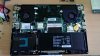
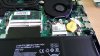
do it, is very easy . -
It's very easy, very quick. Just keep track of the screws for the keyboard (longer, keyboard icon on plastic) from the regular screws when removing the back. The wireless card is two screws and one connector. Screws first and it pops up at an angle like a memory card, decouple the connector and pull from the slot. Reverse for the new AC-7260. Takes less than five minutes once the back is removed.
-
Anyone got a link to a tear down for the P34G? I need to check my LCD connection cable as I don't have time to send it in for warranty service at the moment.
-
Popped the back off and found the display cable not completely seated...pushed down hard...click...all better.
-
** CAVEAT EMPTOR *** I am not an electrician.
You need to match the input and output voltage range (nearly all are rated for 110-240v which will work pretty much anywhere in the world), and meet or exceed the amperage. Here's a link that explains more.
The amperage on the INPUT side tells you how much current the adapter draws from the outlet. The OUTPUT tells you how much amperage the adapter can provide. If the voltages match, and the output amperage matches, and the connector size and polarity match, you should be good.
There's only a 0.4A difference between the two adapters. My guess is that the Lenovo's input amperage is lower because it's a more efficient adapter, but again, I'm not an electrician.
Incidentally, what old Lenovo do you have? My Lenovo has an enormous connector, and the P34G is tiny. -
First off, let me say that I love Gigabyte's dead pixel warranty. I had one pop up, and they replaced it pretty quickly.
Their fix for the keyboard and wifi was to reinstall the original OS, which didn't fix anything. Then again, maybe they didn't do anything. The laptop came back with a couple of issues I'm waiting to see if they'll fix, but Gigabyte won't return my emails or phone calls.
Anyone successfully fix the wifi-sleep issue? Mine still won't connect after waking from sleep or hibernation without a reboot or manually disabling/reenabling the wifi card. FN+WIFI key does nothing, SmartManager does nothing. I'd love some ideas. -
I'm sorry you bought this card but it is riddled with issues for some people. If all you need it for is transferring files it should be fine. Many people over on Intel forum as well as myself have latency issues, disconnects, Bluetooth dropout (I only hhave spikes that affect my gaming). We are waiting for thethe next driver 17.x.x but the beta seems worse right now. These problems have been around since N7260 and frustrating to see on AC model now.
-
What card do you have? (I am on tapatalk and can't see sigs). I use to have this issue but I uninstalled proset as my primary and only let windows manage. Also I give the wifi card a minute after bootup to autoconnect because i use tto think it wasn't working and switch it off prematurely when it was just loading.
-
Glad to hear you got it figured out. If any other questions come up feel free to PM me directly.
Gigabyte P34G
Discussion in 'Gigabyte and Aorus' started by spicypixel, Jun 3, 2013.


