Problems? See this thread at archive.org.
I got the impression that jedisurfer1 is mainly interested in if you think your Startech unit is a good value at the $35 price point.
e.g. would you set up your mother's laptop with this?
-
-
When it was new and the ports were really tight, it sometimes came off with the flash drives I was trying to unplug, that is no longer an issue and it's made in a way that won't damage the expresscard slot if it gets pulled out. Aside from that, you can just install the drivers (it's not PnP) and leave it there. Do the setup yourself, make sure it holds firmly in place and then you can forget about it and let mom use her laptop with it.
-
If I want to connect a USB external disk that normally does not require extra power (USB2.0 connection provides sufficient power), would I need the extra power with this flush USB 3.0 expresscard adapter, or not?
-
I would consider the power provided by my Renesas card to be less than the usual USB 2.0 port.
-
Maybe, maybe not, it depends on the drive. I have seen some WD externals that refuse to be powered by the USB 3.0 ports on my M6700 for example and we're talking Intel USB3.0, not expresscard ones while my own enclosures were fine. You won't know until you try, but you may need extra juice.
-
I want to buy expresscard 54 with 2 usb + AC plug in the middle.
Has anyone bought this one recently?
I want to find one with least amount of issues.
Expresscard 54 to USB 3.0 Adapter (Fully Inside Laptop) | eBay -
accurate assumption
-
Looks like the one I got. Default drivers Windows loads seem to give it a code 38 error after a while. Updated drivers make windows complain about power surge when/if resuming from sleep (easily fixed by unplugging and plugging the card back in). I haven't run across any other issues just yet.
-
I have this expresscard: Amazon.com: AKE 5Gbps BC618T 54mm 2 Port USB 3.0 Laptop Express Card support win7: Computers & Accessories.
I have an old laptop and am seeing the write transfer rate at about 100 MB/s and the read transfer rate at about 70 MB/s. I would expect them to be about the same. Does anyone know what the problem could be or how to correct this? -
I would not expect them to be the same even if you are reading AND writing to identical SSD's.
Don't think this is a problem...
What are your source and destination drives? What is the data type(s) you are transferring between drives? What is your CPU, O/S and RAM spec's?
Yeah - they all make a difference and none of them can be optimized to make reading and writing (even the same data) the 'same'.
Hope this helped. -
The don't really need to be "the same". I would expect them to be close to each other however.
The source and destination drives are the same type of drive, WD10JPVT 1TB HDD, I am using ATTO and CrystalDiskMark to test them. I am not sure how the data is transferred. My system is an HP DV5237cl laptop with an Intel Centrino Core Duo T2400 CPU @ 1.83 GHz, Windows XP Media Center Edition 2002 SP3 , and 2GB 667MHz DDR2 RAM (2 dimms, max for this laptop).
The external HDD is in a KingWin TL-202U3-BK 2.5" USB 3.0 enclosure. I am externally powering the expresscard 54 with a 2.0A wall adapter and the enclosure uses a Y cable to connect the PC to the enclosure USB 3.0 port with the additional USB 2.0 connection at the PC end for added current.
With one of these expresscard 54s I was seeing very similar read and write transfer rates, about 100 MB/s, under some power connection setups but the HDD was connecting and disconnecting quite a bit so I got another expresscard 54. Specifically with the 2.0A wall adapter only and a straight USB 3.0 connection from the enclosure to the expresscard 54. I didn't have the Y cable at the time.
With the expresscard 54 I can't get the read transfer rate over about 70 MB/s no matter what I do, thus the question. -
Too bad it doesn't work like that. I originally bought my first expresscard 34 and it shut down my laptop. Everything just locked in place, and no controls surfaces would respond. I had to do a hard reboot to get things back to normal.
After that, I ordered another expresscard 54 and it too worked sporadically with my HDDs and would constantly shut on and off with my USB 3.0 thumb drive. I moved this same card to my 6700 just to see what would happen and to my surprise it work instantly!
Although I have not tested it long term, so far, there have been no issues. Except that it doesn't quite fit flush. It extends about 1/16" from the laptop. -
From my experience with these USB 3.0 ExpressCards has been that the ones with Renesas-NEC or JMicron chipsets transfer faster than ones with ASMedia chipsets. So far all of my cards are still working fine but the quality could better. I would be willing to pay a little more for a better design (tighter more flush fit, USB ports that hold the connectors better, this sort of thing).
-
Hi,
I have just ordered this one: 2 Dual Port Hidden Inside USB 3.0 USB3.0 HUB to Express Card ExpressCard 54 54mm Adapter Converter Card NEC Chipset Renesas uPD720202 5.0Gbps: Amazon.co.uk: Computers & Accessories but after reading this thread I don’t know if I will use it as I don’t want to risk damaging my laptop or external devices. -
I had the same problem. So what card do you recommend? Can you give me a link to Amazon?
I am returning this BC681T card.
By the way, how can you tell the chip side the AKE card? How do you know it is "NEC/Renesas PD720202"? -
-
As would I. Too bad these thing are made so ridiculously cheap.
-
Yup, they are, my Startech adapter is quite good at keeping the connectors in the port, too good actually. When it was new, pulling on the connector was likely to pull the whole adapter outside of the expressacrd slot, seems like it isn't as much of an issue now though. It fits almost completely flush with my N50 too, but I would say that the expresscard ports on notebooks are built within different tolerances depending on the brand and same goes for the adapters which makes for a rather high potential of it not sitting completely flush. It's still better than a huge piece of plastic sticking out though.
-
Have you solved the problem? I am having the exact problem. Can you recommend a card without such problems?
Does this card have 'power surge' problem? I plan to use it on Thinkpad X220. -
The one I ordered arrived today, it does not look like the one I ordered but it seems to work ok.
The one I ordered is: 2 Dual Port Hidden Inside USB 3.0 USB3.0 HUB to Express Card ExpressCard 54 54mm Adapter Converter Card NEC Chipset Renesas uPD720202 5.0Gbps: Amazon.co.uk: Computers & Accessories
Pic of the one that arrived:
![[IMG]](images/storyImages/IMG_20130424_162549_zps66514843.jpg)
Pic of it in the port:
![[IMG]](images/storyImages/IMG_20130424_162707_zps68861366.jpg)
-
Well it certainly fits well enough. It appears recessed, but that's expected if this is the M18x in your sig?
On my Dell there is a slight protrusion. However, there's no way to tell if its a shorter card you have and not the bay itself that's to shallow?
Do keep us informed should you run any tests or notice anything out of the ordinary. -
Hi,
Yes it’s an M18x and it is recessed a couple of mm. I could not install the driver for it as it is on a mini cd and my laptop has a slot loading drive:-(
Windows loaded a Microsoft driver and it worked for a wireless mouse dongle but I just tried my external drive and it does not work. I will use my brother’s laptop tomorrow to copy the disk and try and install the driver that come with it. Hopefully it will fix the issue. -
I haven't received my Renesas NEC card yet, I'll let you know if it does have power issues. Do not forget why the power port is on there, it comes in handy for energy hogs like some 2.5" HDDs. I've never had problems with powering usb 2.0/3.0 flash drives or my 2.5" SSDs. Maybe you just got a bad card? These are pretty crappy in quality so it wouldn't surprise me if it did happen.
You can find most drivers and some firmwares for these AKE cards at Stadion Drivers. Check the device manager to see what the Hardware ID is, that should point you in the right direction. Otherwise, you can open the card, and tell us what controller its using from the ones below:
Renesas NEC
ASMedia
Fresco Logic -
Hi 83bj6
I know it's been years since your post regarding your AKE card on your HP 8730w laptop.
Here is your post: http://forum.notebookreview.com/har...b-3-0-expresscard-adapter-16.html#post7131287
I have been trying to replicate your results and was wondering if you could share the exact model of your AKE card?
If possible, it would also be great to learn your Firmware and Driver info.
Thanks very much in advance.
Cheers -
Hi Guys
I own obviously AKE Expresscard USB 3.0 slim one ..
When I connect external enclosure HDD USB 3.0 into AKE USB 3.0 the mouse (which is wireless connected to USB but 2.0 receiver the mouse cursor freezing .. It not working properly .. But when I connect enclosure into USB 2.0 in laptop all is good ..
Is there any problem with Flush USB 3.0 Expresscard Adapter ?
Thnx -
My first guess? The big, heavy HDD taking all the "juice for the port." Not enough power left for the USB receiver. If so, that's likely a port current limitation, not the AKE malfunctioning.
-
Yeah I think so .. Am using wireless keyboard too plugged in usb ,then usb camera
So is there way to upgrade firmware of these USB 3.0 AKE adaptors or it is not major diff. ?
If yes what changelog looks like..
Thnx -
I just bought this one: GMYLE(TM) ExpressCard 34/54 to USB3.0 Express Card Adapter Windows 7/XP/Vista: Amazon.ca: Electronics for a smaller notebook (Elitebook 2760p) that only takes expresscard 34. In my case, it doesn't even fit flush by at least 1/4 th of an inch. That said, I tried it in my M6700 and it sits almost flush, so most of it not sitting flush is probably due to a slightly shorter expresscard socket on the notebook. It has an ASMedia chip in it, not sure of the exact model though.
It is faster than USB2.0, but definitely not what I'd call fast for USB3.0 considering the Intel ports on my M6700 and Renesas ports on my desktop can do 200MB/s.
Here's the benchmark of the card, done on a SSD in a USB3.0 enclosure to avoid any bottlenecks from the drive.
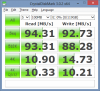
I'll have to bench the startech adapter in my M6700 again one of these days. -
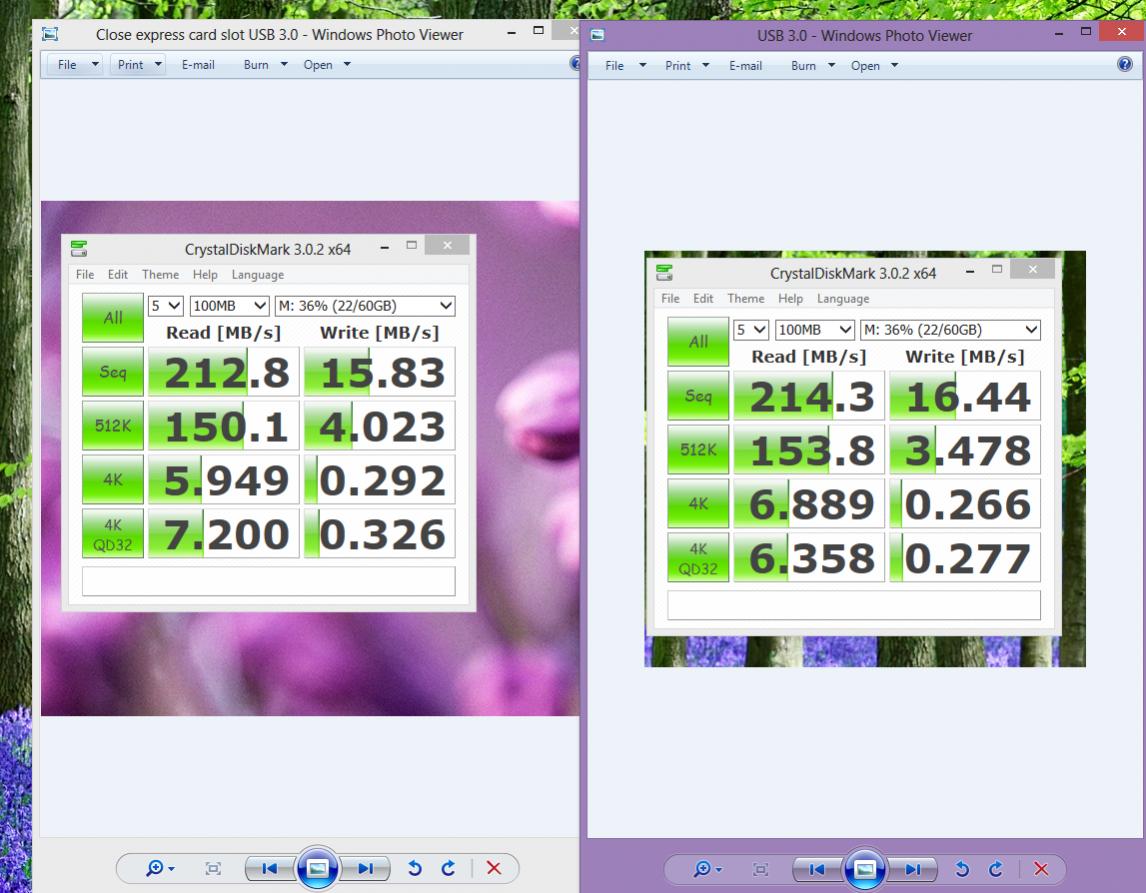
Impromptu comparo using Kingston Hyper X 64GB USB 3.0
Attached Files:
-
-
Which expresscard adapter are you using?
-
AKE USB 3.0
5Bbps BC618T 54mm -
Hi listeur, i saw you dissamble the Expresscard 54mm, would you teach me how to remove the bottom cover, as i have some issue and need to remove the cover.thanks, 410ovonel
-
Like i said in an earlier post, go for the ake cards with Renasas controllers. In my experience Renasas was faster than Asmedia. Fresco Logic being the slowest. IMO Renasas seems to do a better job with drivers and firmwares too.
None of these beat my onboard AMD usb 3 controller.
Sent from my XT557 using Tapatalk 2 -
And you know this how?
-
Two main reasons:
1. The onboard USB 3.0 ports result in faster reads and writes according to my many bench runs ( keeping the external USB 3.0 device the same)
2. The onboard USB 3.0 ports supply enough juice to power two external drives side-by-side, whereas mostly ALL ExpressCard solutions will require external power source via USB or an AC adapter which otherwise results in connection dropouts
This is why my AMD onboard USB 3.0 beats ExpressCards from AKE ( doesn't matter the controller).
Sent from my XT557 using Tapatalk 2 -
I guess it's better late than never but this totally escaped my radar... Now that I'm testing my "new" three year old 8740w and it's USB 3.0 ports I'll be comparing performance with the AKE card so as I started looking up my old threads I just noticed your post of three months ago ;-)
I'll check it out tomorrow, I presume you can wait another day?
Sent from my Note 2 - Text mostly by Google Voice, May Contain Weirdness ;-) -
I received this Express Card last Saturday and I'm extremely disappointed of it.
I purchased it as a controller for a USB 3.0 mass storage device. The mass storage device works fine on USB 2.0, but connecting it to this card, both the USB 3.0 controller and hub disappear from Device Manager. Also getting power surge warnings from O/S. (Vista SP2).
Additionally, I was reading reviews of it and other USB 3.0 controllers at a vendor site and noticed a few reviewers mention a 50% failure rate of these devices.
Is something dodgy of NEC/Renesas controllers or of this industry? -
The NEC controllers in my experience aren't dodgy, same for the Fresco or ASMedia controllers. The adapters themselves though are another story, some are flaky, others not.
-
Well mine (#433) seem to be so close that the difference isn't worth mentioning. How do you account for that?I haven't had that issue so far.
I would have thought so as well. But my results don't appear to support that. Why? -
Actually, I was mistaken of that controller. This is the one I received:
GMYLE® Express Card Expresscard 54 slot to USB 3.0 x 2 Port Adapter up to 5Gbps Compatible USB 1.1 / 2.0 Windows XP/Vista/7: Amazon.co.uk: Computers & Accessories
The one I originally quoted:
GMYLE(TM) ExpressCard 34/54 to USB3.0 Express Card Adapter Windows 7/XP/Vista - Amazon.ca
....is in the post and should arrive any day. BTW, is controller of this one FL1000 or ASM104x? -
The latter controller (34mm) arrived on Friday and installed straight away without problem. Works quite well with my 500 GB USB 3.0/eSATA mass storage device. Also, to answer my own question, it has the AS Media chipset..
Quite a different experience as compared to the former, GMYLE 54mm controller described above.
What I noticed immediately is the superior build quality of the 34mm controller compared to the 54mm GMYLE. Fits quite securely in it's Express Card slot and doesn't move around at all, unlike the 54mm controller.
My goal here though is to improve performance of routine complete system backups. These backups create an image of your system and thus would be the image that you would restore from should your system hard disk fail; it's crucial to do this well and do it quickly and often. Something I was lax in doing under USB 2.0 because of the time it took to do the backup; usually about 75 minutes.
Last night, I did two complete backups under the new system, as I was unsure of the first one. First backup took slightly less than 45 minutes and second was under 40 minutes for the 500 GB system disk. That's a significant performance improvement and one I'm well satisfied with.
I also have the following controllers in the post that were despatched from Hong Kong almost two weeks ago:
Hidden Inside USB 3.0 USB3.0 + eSATA II 2.0 Combo to Express Card ExpressCard 54 54mm Adapter Converter Card: Amazon.co.uk: Computers & Accessories
2 Dual Port Hidden Inside USB 3.0 USB3.0 HUB to Express Card ExpressCard 54 54mm Adapter Converter Card NEC Chipset Renesas uPD720202 5.0Gbps: Amazon.co.uk: Computers & Accessories
First one has an eSATA interface which I'm keen to explore, as I've heard performance of that interface is even better than USB 3.0. Secondly, I want to see what the build quality is like of the latter controller. I've heard it's much better than the GMYLE 54mm controller. -
I now have all four controllers and have spent some time with them and the results are:
- The two NEC based USB 3.0 controllers don't work at all as disk controllers. Work OK with USB flash media.
- The remaining controllers, which are ASMedia ASM-104x based, work great either way.
Not sure why that is as I've now read all 45 pages of this thread and can't discern any consistency of the failures, short of them being fake AKE models.
-
It doesnt say which chip is there inside so i cannot search, nor win7 is detecting after failing to instal driver.
-
Hello, i bought the same expresscard w/out drivers, been searching and trying renesas/NEC and Fresco to no avail, could u send me drivers?, i use win7 64bit.
Thank u very much -
You could try station-drivers, they usually have everything. http://www.station-drivers.com/index.php/10-drivers/42-renesas-nec
-
i tryed a few in that site, but i dont know chipset so cannot search for the right one
-
If you're referring to this item:
Hidden Inside USB 3.0 USB3.0 + eSATA II 2.0 Combo to Express Card ExpressCard 54 54mm Adapter Converter Card: Amazon.co.uk: Computers & Accessories
.....it uses ASMedia ASM-104x chipset. Latest driver for that is v1.16.10.0, which is what I'm using. -
Hey folks, I stumbled across this thread, and it just so happens we had a similar one going on at thinkpads.com (obviously, we were using these in IBM/Lenovo machines):
forum.thinkpads.com • X220 (and X201, X200) USB 3.0 Expresscard
Hopefully we might get some useful information across the two different forums. The AKE cards are quite nice when they work (but they don't always work, unfortunately). One key problem is that the Expresscard spec simply does not supply enough power to the slot, apparently there's barely enough to make a USB 3.0 card function in the first place. -
Its not. Several folks have done the test (including me) and USB 3.0 is the current king save Thunderbolt which I don't have.
-
USB 3.0 and eSATA on my M6700 using a SSD in the same enclosure (yeah, it does both) for testing purposes:
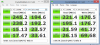
Unless you need the better random performance afforded by eSATA, go USB3.0 as it's backwards compatible USB2.0 and also ubiquitous. I'd have to pop the enclosure to see what controllers it uses as some controllers afford slightly better performance for both interfaces, but not by much.Krane and davidricardo86 like this.
Flush USB 3.0 Expresscard Adapter
Discussion in 'Hardware Components and Aftermarket Upgrades' started by damaph, Jul 26, 2010.