Problems? See this thread at archive.org.
BGA filth at it again. This proves that the hate for BGA is not displaced. I mean offering a "new" chip which actually has a broken design gives way at which state Intel is. I love tuning flawed laptop designs, but this is getting out of hand. They're purposely shipping broken chip designs because why the heck not. It's time for a new high end laptop boutiqe maker, one which uses open source software and open-source hardware or bring back the old DELL/HP workstation designs of those big and bulky machines we used to have.
-
If newer CPUs brings more money for a broken BGA Chip affected by Spectre NG etc.. they can market it as exploit proof w/ hardware fixes.Papusan, hmscott, jclausius and 1 other person like this.
-
The only products that are exploit-proof are buried in landfills. It's clever marketing to pitch them as such, but what they really mean is that nobody has taken time to discover the exploits. We saw crApple claiming that for years. We see AMD claiming it now. Makes sense if it helps them sell their stuff, but the reality is that it is only a matter of time. Crooks don't waste much time looking for exploits on products with low market share. The more popular products become, the more likely they are to be abused. It doesn't help that the media create so much silly hype around everything, but they do that in all areas of life because they are what they are and nobody has a surprised look on their face.Last edited: May 26, 2019Ashtrix, sweepersc2, raz8020 and 5 others like this.
-
Crooks invest in ideology of less time spent gives more more more money!!!
Even people are tired of hearing Intel 14nm are superior when Intel themselves are forced to move to 10nm and lower very quickly.
Even you lost interest in LGA laptop and went with superior full desktop with liquid cooling and max OC bypassing most FW limits which is much better than Intel test labs.Papusan, hmscott, Rei Fukai and 1 other person like this. -
I was just googling stuff after another thread where someone asked why there were two different 'Stepping' listings for 9750H (family 6 model 158 steppings 10 and 13) which Intel were stating had different hardware mitigation spec for the various vulnerabilities, and was wondering why.
Since stepping 10 was the CPUID for the original Coffee Lake... I wonder if the stepping 10 are 8th gen Coffee Lake 6-core dies rebadged as 9750H? -
-
-
The notion of computer security is like leprechauns and unicorns. As long as scary, mean and evil people live we will all be subject to cyber security issues, shootings, stabbings, robbery, sexual assaults, financial crimes and all other manner of wrong-doing. Replacing vulnerable CPUs with new ones that carry undiscovered vulnerabilities, releasing software patches to patch patches, outlawing guns, mandating behavioral changes that cannot be controlled and creating new laws intended to protect the innocent will do nothing to stop any of the things that the lawless do to make the world a dangerous place for the rest of us. The problem is the people that do those things, not the products and services that the rest of us enjoy using. The old cliché " where there is a will, there is a way" applies to both the good and bad members of society. And, we can always count on the media to be ready to write a juicy story about it in an effort to illicit an emotional response from those that are willing listen to them.Last edited: May 21, 2019
-
Will all chips with Security patches (new stepping) deliver worse performance? Or some and some not?
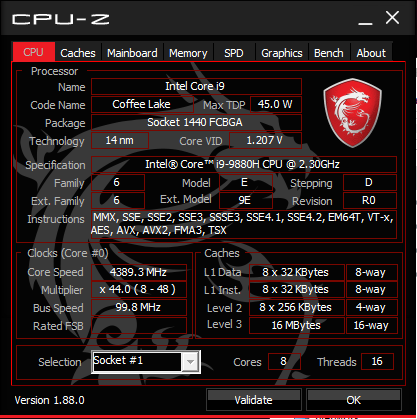
Look at this Prema. Cpu-Z can't recognize 9th gen Mobile 9750H. But it can with Mobile i9-9880H
https://www.notebookcheck.org/Revie...-GX502GW-Core-i7-9750H-RTX-2070.421034.0.html
![[IMG]](images/storyImages/cpu1.jpg)
![[IMG]](images/storyImages/hwinfo.jpg)
Ashtrix, raz8020, Vasudev and 1 other person like this. -
-
Isn't 8th gen i7-8850H partially unlocked? I expect Intel have locked it down now as 9750H is their cheap Low entry H Mobile
-
I'm failing to see the point of 9750/9980H when 8th gen performs much better. Why does BGA Skylake+ use same BGA1440 socket and lock out older users? Can BGA CPUs be surgically removed and replaced?
The CPU voltage looks more than your 5.1GHz on all cores.Rei Fukai likes this. -
It can, i tried failed and gave up. You need some special hardware, but can be done without (if you have some serious skills) it's called BGA reballing. Won't do it on these overpriced cpu's though, when you motherboard fails, ya done for. I think i'll live with my 6 core cpu for a 2 or 3 years before upgrading again to an 8 core. Next machine will be AMD based, so if AMD won't make laptop cpu's my R5 will be my last "DTR". I'm sick and tired of trying to fix problems that shouldn't have existed in the first place. Especially when you pay more than 3k for a brand new overheating system.
-
I'm done with Moe-Moe-Jokebooks. I'm perfectly fine with TB3 based eGPU on AMD Ryzen Thinkpad.
I don't have balls to reball the CPU and GPU. Maybe @Khenglish is the perfect man for reballing, custom mods, custom circuitry etc... -
Hi, do someone attempted to upgrade their 6 and 7th gen I7 to 8 or 9th gen ? They all are BGA1440 and it is possible on desktop to run 8/9th gen on 6/7th gen motherboard
-
With BGA Tragedy you’re screwed with what you bought. Regarding 6/7th gen motherboard (LGA socket) and newer processors, read this thread http://forum.notebookreview.com/thr...gtx-1080-upgrade.814711/page-96#post-10921289Vasudev likes this.
-
You obviously haven't heard that the Chinese have no limits of the imagination, look at 4th gen BGA to LGA.
hmscott likes this. -
Does this means you can solder on 9th gen i9-9980Hk chips on let’s say old 6th gen BGA MB and make it work perfectly? Or better say solder on whatever chips from last generations on whatever BGA machine and model? Yeah, I can imagine that is possible. In a dream (Nightmare).Last edited: Jul 20, 2019
-
Here you go, get one of these BGA workstations and go into business replacing all of those "millions" of failed BGA CPU's you think must be out there.
https://www.alibaba.com/countrysearch/CN/laptop-repair-service.html
With a nice side business upgrading the CPU's as well.
Zhuomao ZM R6200 Semi-Automatic BGA 3 zone Rework Station Optical Alignment System for laptop motherboard repair service
https://www.alibaba.com/product-det...pm=a2700.7724857.normalList.96.606029cawa9xBALast edited: Jul 20, 2019 -
You can solder one on fine, definitely, as to whether it'll work, unlikely due to intel ME.
-
Good luck make the 9th gen nice and shiny silicon work with 2015 models Jokes
 Or 7th and 8th gen for that matter.
Yeah, you will have a nice shiny not working thin plastic/metal book on your table. Maybe you is lucky and get some flashing lights but that’s all
hmscott likes this. -
Isnt that what you do? Make overheating crap work on notebooks that are the size of a house?
Junk work on junk? -
BGA is not an issue for me, also you don't need a lot of stuff to do bga rework properly.
The main issue is if it's possible to modify the bios to add the support of the 8/9th gen like you probably did on your P870DM, I was looking for a Dell precision 7710 or 7720 and upgrading for an I9 8950HK, I'm already running a M6700 and I wanted to upgrade to a 6 core laptop while keeping an mxm 3.0 slot and keep the very "clean" looking of these precision -
If the socketed laptops work with modded BIOS, so should a BGA motherboard work, but its there is no guarantees that it will work, and you need to find someone able to edit your BIOS to make it all work, and there might be bugs or things that stop working due to incompatibilities.
The BGA is bad song gets tiring when all those marvellous upgradable laptops are even half usable is due to bios mods..
Look, my Clevo is oh so good, just pray you bought it from some Prema sanctioned re-seller or use Dsanke BIOS, and hope that it all works out(not shamming his work).Mastermind5200 and Vasudev like this. -
You can't bypass the BIOS at all without bricking the mobo, so your money is wasted on BGA CPU just because its blocked and then again MEIFW will disallow the upgrade since its hard coded to brick unless the BIOS has explicit support for newer MEI 11.11.x or higher. Maybe Prema can give more insight.!
-
But there are the mods, and they do work, and you can run 8th and 9th gen CPUs on all the P series LGAs back to 2015 models, and plenty have done that because an end user can do it with nothing more than fresh TIM and screwdriver and a $10 rom programmer as backup, so... thanks for highlighting the exact opposite of what you were trying to rant about...?
I'm not going to dispute that we got really really lucky with Intel reusing the same socket for years on end, making no meaningful change, and Clevo making minimal changes over those years and with power delivery capable of handling literally double the power draw of the quads they were originally sold with.
But undoubtedly having a whole lot of desktop enthusiasts and modders working to do the same thing with multiple Z170 and Z270 boards helped, and Clevo have the experience and the enthusiast following as the only brand to consistently stick with socket CPUs in laptops in the face of their Haswell era death warrant 5 years ago.
Until there's examples of it being done with BGA, we're talking specious hypothetical vs established reality.Papusan, yrekabakery and hmscott like this. -
I have the HP Omen 17T 2019. Core i9-9880H and RTX 2080.
I took out the 16GB (8x2) 2667MHz RAM that came with the computer and replaced with the 32GB (16x2) 2800MHz XMP RAM sticks that came with my old 2018 Omen with GTX 1080.
I didn't try to undervolt before replacing the RAM sticks but i doubt that's why it's throttling. Lol.
I wanted to undervolt my CPU but during stress test, i found out my CPU was Power throttling. Before Stress test, It was already 'Current/EDP throttling'.
What should I do now? Should I still undervolt? Or what?
Mr. Fox likes this. -
Get ThrottleStop and use the settings you see in this screen shot. If SpeedShift is active, set the EPP value to zero in the main window. The BIOS default of 128 will make your CPU run like crap. That should take care of it. These turdbooks are all screwed up, especially with respect to their rubbish firmware. Just an FYI... when you add the check mark in the box to "Disable and Lock Turbo Power Limits" this will download a file for the ThrottleStop folder. That is normal and expected, so no need to be concerned. You must have that file for it to function. We'd all be screwed if it were not for @unclewebb magic to fix everything the laptop OEMs are so handy and consistent at botching up.
![[IMG]](images/storyImages/HmJ9myx.png)
Attached Files:
Last edited: Dec 20, 2019 -
-
Thanks for your response.
The values you are asking me to input are TOO HIGH compared to what i have there currently. Feels unsafe. Please take a look.
Thank you.
Mr. Fox likes this. -
Power Limits are "limits" (not static values) and you can set them to the max. The CPU cannot and will not ever use more power than what Intel has made it capable of using. Those values are fused. Just maxing out those settings keeps things simple and all it means is you don't have to care about it not having the capability to use as much power as it needs to not run into power limit throttling because you have removed any obstacle that could interfere with that. Same is true of the ICC max. It's the voltage that you have to be careful about setting too high. The voltage being too high can cause damage and cause overheating. Maxing out the Power Limits and ICC max won't cause any harm. One of the techniques the turdbook OEMs use to castrate their junk is to set those values lower than what the CPU needs to function at its full performance capacity.
Edit: You still need to check the box for "Disable and Lock Turbo Power Limits" (and download the file that goes along with checking the box) before anything else. If you don't do that, none of the other settings will be applied and you'll still be cursed with the same performance crippling symptoms that you posted about.Last edited: Oct 19, 2019raz8020, Donald@Paladin44 and Papusan like this. -
As well remove BD PROCHOT check mark, and click Speed shift - EPP box and add 0
Then run Cinebench R20
raz8020, Donald@Paladin44 and Mr. Fox like this. -
Yes, that's a good example, LOL. Just because your wallet has $1,000 doesn't mean you are going to spend it all on lunch. I like that analogy.
Yes, you can probably get by with -.125mV with no problem and maybe even more. Be sure to set the same undervolt for the cache as the core. ThrottleStop will allow you to set them independently and if you do not lower the cache voltage the core voltage will still run higher than you set it.Last edited: Oct 20, 2019raz8020, Donald@Paladin44 and Papusan like this. -
Thank you so much for your reply.
Firstly, can you explain to me what both of them do?
I bought this new computer because something went wrong with the CPU of my old computer (i7-7820HK) and it was running ONLY at 800MHz all the time and the only way i can get it up to 2900MHz is by disabling this BDPROCHOT. I hear it's a safety mechanism of some sort. Right now, that CPU NEVER goes higher than 2.9GHz even tho its turbo can go up to 3.9GHz. But always 2.9 now.Mr. Fox likes this. -
Indeed. I forgot to highlight that BD PROCHOT is unchecked. Thanks for mentioning it. I always disable it in the BIOS when the setting is accessible.raz8020, Donald@Paladin44 and Papusan like this.
-
If you read the info in the first post of The ThrottleStop Guide, it will provide a lot of useful info.
-
The notebook manufacturers add in more throttling mechanism than needed. Skin sensors etc who will trigger throttling although Intel have added 100 C in the chips.
Edit... Read my nice thread
How Dell cripple performance explained by....
![[IMG]](images/storyImages/4S853DK.gif)
-
Lol yes. Unless you having a party for lunch. After my last CPU 'broke', I'm baby-ing this one lol. I guess it's only right. Also, i'm thinking since it's a laptop. It would break easier than a desktop.
Thermals are great tho. I just want max performance always.
I also noticed that when I set Omen Command Center to Performance, it adjusted 'Turbo Boost Long Power Max' to 90 lol. It was 45 before.
Mr. Fox likes this. -
I expect HP use XTU services in their Omen Command Center Bloatware. Disable the XTU task in Autoruns.exe or Services (I recommend reboot after doing this) if you try out Throttlestop. Because they don't like each other
Last edited: Oct 19, 2019
-
Or just disable Omen software while testing out ThrottleStop.
-
Thanks for this. Now I understand it completely. I dont think speed shift was explained. Trying to understand that too
Lol. Crazy. I guess i'm just trying to be too careful to not break the laptop. But if you guys say it's cool. Then I'm doing it. Lol.
I just wanted to do a UV till I saw the throttlingMr. Fox likes this. -
Is this a new Intel CPU feature?
-
I'm not even sure how to do that. I can if you point me the right direction tho. However, i don't think it matters too much. If Throttle stop starts on reboot... It should override anything OCC does anyways.
-
LOOOL! I meant speed shift. Stop Playingraz8020, Papusan and tilleroftheearth like this.
-
Some inf about Speed-shift. A crippled feature intended for lowering performance http://forum.notebookreview.com/thr...trol-of-the-i7-8750h-advanced-version.823065/Mr. Fox likes this.
-
SpeedShift interferes with overclocking and I normally disable that. However, with a locked CPU or running stock clocks with an unlocked CPU it is useful. It allows the CPU microcode/firmware to control turbo clocks behavior rather than allowing Windows 10 to screw things up. (That is an over-simplified explanation, but it is all anyone really needs to understand. There is less latency than letting Windows 10 mess things up.) If you are overclocking it impairs performance more than any benefit that might hypothetically be imagined.
-
Lol. I get the general idea but i'm not trying to mod my bios. Too much or me. Lol. So speed shift and set to 0 good then?
-
WOW! Throttlestop really does change the game doesn't it?! So do you guys have Throttle stop running all the time minimized or what?
Intel Core i7-8750H/ i7-8850H/ i9-8950H Coffee Lake
Discussion in 'Hardware Components and Aftermarket Upgrades' started by sicily428, Nov 18, 2017.