 Problems? See this thread at archive.org.
2013 and people still talk about partitioning n stuff.. i guess that's a quick hello, and byebye
-
-
Just the knowledgeable ones.
lol..
bye! -
Hehe.. Haven't done partitions for, like, 10 years now. There's really zero need outside dualboot setups (which, thanks to vm stuff doesnt matter much as well).
anyways, new stuff about ssds? Bigger, faster, cheaper are the obvious things. Not much else, right? -
Cheaper, not so much.
Bigger, yes: but more capacity is needed as the nand die shrinks and each nand chip is now 2x the capacity. Why needed? To ensure that all channels are fully populated and that each channel is optimally interleaved (and for space for OP'ing for max performance and lowest WA too, of course).
Faster, not yet. SSD manufacturer's have stopped trying to improve the drives for too long now (they could have pushed for better consistency from 3 years ago - only now are we seeing some SSD's offer this benefit.. and only then; these are at the high end of the scale too).
We'll see faster when NGFF becomes more available in the Haswell and newer platforms (and hopefully from the same manufacturer's that are pushing high performance along with consistency too).
Lot's of new stuff to wrap our minds around - but in the end; what is available is pretty much same old same old.
Compared to the barren landscape back in 2009 though - we're in SSD paradise right now.
-
I am in that paradise. Not bothering about it ever again. Good enough all the way. Posting this from my surface pro, my sole pc now. Don't know and don't care about brand nor specs this ssd has. It just works. (with one partition ofc)
-
Yeah, I too like the Surface Pro - hope the v2 is everything I imagine...
'Just works' is a far cry from 'working optimally' though... but glad the available 'good enough' is good enough for you.
(I haven't drank that kool-aid yet).
-
@tilleroftheearth I have 830 256 GB. Partition 1 OS: 70 GB (Used= 33; Free=37); Partition 2 Data: 144 (Used=30; Free=114) and left 28 for OP. It's fine ? In case I utilize around 210 GB and left only 28 GB, so it affect my lifespan of SSD ?
-
The only thing that affects the lifespan of an SSD is the constant writes to each cell of the NAND flash. Leaving space free on the drive is to help maintain performance of the drive through garbage collection by TRIM. The empty space helps maintain the drive performance behaving like over-provisioned space but to a lesser extent. If I have messed up in the explanation, the article should clear it up for you.
AnandTech | Exploring the Relationship Between Spare Area and Performance Consistency in Modern SSDs -
What affects the lifespan of an SSD (nand chips) is the type of workload (writes) it is presented, the WA factor (this is where OP'ing helps immensely - especially if the controller has great GC routines; not too aggressive, but not too passive either) and the amount of time it is left 'off' without power.
If you're writing 100% large sequential data files; then you will most likely get much more than the nominal maximum stated specs of your SSD...
If you're writing 100% 4K random files, the lifespan of most consumer SSD's will be measured in weeks...
If you're expecting to fill your SSD with data today and put it away in the closet and hope to see that data in late 2015 - I would bet you'd better kiss your data goodbye from now. (The SSD spec's state that data retention is 1 year without power applied... - but a lot of newer/cheaper SSD's are closer to 3 months - can't find that article now...).
Most workloads are somewhere in between the above extremes (some mixture of power off, sequential and random writes). What is important is that the controller is able to minimize the WA factor as much as possible - especially as what is written to a system drive is not always user initiated - the O/S does a lot of internal/background file housekeeping too and keeps the drive busy without our input at all. So a controller with low WA is the first defense against physically wearing out the nand with inefficient Erase/Write cycles.
The best example of these controllers were the original Intel X25-M and the more modern SandForce based controllers (I'm only including Intel's 520 Series here as that is what I have the most positive experiences with). The SF controller is actually better than the X25-M which had about a 1 WA factor - the SF controller could actually write much less to the nand cells than what the host O/S sent it - thanks to the real time compression the SF controller could do.
See:
Write amplification - Wikipedia, the free encyclopedia
WA factors before these drives were in the 3 - 10x or greater range (so for every gigabyte of data we saved - up to 10GB or more of data was written to the nand chips, eating away at their lifespan...).
What about other controllers/SSD's without the groundbreaking work Intel offered on it's X25-M line and the totally different approach the SF controller took to get WA down to 0.14 in certain workloads?
They rely on different approaches of GC to keep WA in check. Some are better than others. Some don't work at all (in real world usage).
TRIM also helps immensely with WA - but TRIM only informs the SSD that some data is old/stale and can be cleared - it is still up to the GC routines of the controller/firmware to actually erase those nand cells and have them ready to be written to.
What helps almost all SSD's with regards to WA is OP'ing. This is because with 'unallocated' space/capacity available - there are almost always enough 'erased/cleared' nand cells to write to - without having to read/write/erase cells as the new data is being written - which is what causes WA to skyrocket in the first place as the 'priority' of the controller then is to write the new data as fast as possible and essentially kill whatever nand write cycles it takes to make it happen, now.
I've stated this before; OP'ing, partitioning and leaving free space on our SSD's is not about making them faster. It is about making them more consistent in the performance they give; while also allowing for the highest possible sustained, 'steady-state' performance possible.
The above performance benefits are a byproduct though of giving the GC and TRIM routines a chance to properly (at their pace) clean up the drive so that when we need to write to it - it responds immediately and as fast as possible.
We see the results as a snappier system - but what we're doing is simply using the SSD within it's design parameters, by allowing the GC and TRIM routines to run at their own pace, we're rewarded with a huge decrease in WA, a noticeable increase in responsiveness and a system that allows us to run almost any workstation class workload indefinitely with a 'steady state' performance level that doesn't tank after a few minutes, hours or days.
NIGHTMARE, in your specific example:
256,000,000,000/1024/1024/1024= ~238GB
238 x 0.7 = 166GB would be the maximum I would want to use, or;
238 x 0.3 = 72GB is what I would leave 'unallocated'...
to be able to use the drive in any way I want (almost indefinitely...).
While leaving 28GB unallocated is better than nothing - in my workflows I find that that is not enough to make a difference in how the SSD responds (which to me indicates that the GC routines are still getting in the way of using the SSD when and how I want to). It may be enough for your workflows though.
In addition to the above though; I find that I need at least 25GB free on the formatted C: drive to keep Windows 8 happy. And, an additional 25GB-50GB minimum free for any programs that use drive capacity as a 'Scratch disk' space too. But these are the same for a HDD based system anyways.
Yeah; 30% of the 'real' drive capacity is a lot to leave 'unallocated'. But that is the cost of doing business with an SSD at this time. That is if you want the maximum benefits and the maximum reliability that SSD's can offer now.
Without the availability of large capacity SSD's and the huge benefits that OP'ing provides to the responsiveness of the system, sustained-over-time performance and the higher endurance of the nand chips - SSD's would still be in their infancy for my workflows and HDD's (1TB WD Raptors, today) would be reigning still.
Fortunately, I took an Intel 510 Series 250GB drive and experimented with using only 100GB of it in early 2011 - and I haven't looked back since. Sure, ~$600 for 100GB usable capacity was a lot - but I've paid much more for the 'right' type of storage device...
So, without knowing your workflow - I can't say if leaving 'only' 28GB 'unallocated' is enough to shorten your SSD's lifespan (for the duration/expected length of your ownership of this SSD).
But I can tell you in my experience (across many different platforms) - even in 'light' workloads - I can feel the detrimental effect on performance of an SSD that is filled to much more than 50% of the (total) available capacity.
Which to me indicates that WA is higher than it needs to be - which means, yes: it will affect the lifespan of the SSD.
But,
it may not matter if you replace/upgrade/give away/sell the SSD before that happens.
Everything wears out - enjoy it the best/fullest way you can. Hope the info here helps you make that decision a little clearer...
It's complicated; everything affects everything else - the best we can do is use systems within their design parameters and hope that we understood those design parameter accurately (at least as it applies to us)...
Take care. -
I'm configuring a new R 6:8-780Powerpro / MSI GT70 barebones laptop over at Powernotebooks and I see they have the new Samsung Evo SSD in 1 TB. The performance looks really good, and the price isn't bad, but as I understand it, but it is TLC which I am not so crazy about.
For my first drive I am planning to get the 512 Samsung Pro 840, because it has the endurance and the speed that I want.
For my second drive I need lots of space, but would prefer not to have a spinning hard drive on my laptop. So I am torn between the Crucial M500 960 GB and the Samsung Evo 1TB. The Crucial M500 is slower but it is MLC which I prefer and it has already been run through the paces. The Samsung Evo 1 TB has awesome performance but it is TLC and relatively untested tech. What do you guys think, and are there any other factors I should consider?
Also, has anyone heard if there will be a 1 TB version of the Samsung Pro coming out? Although I would prefer to get an upgraded laptop sooner rather than later, I could delay my laptop purchase until I could save up enough money to get it, if it would be worth it. -
Just got a Samsung EVO 750, but while testing I didn't reach the advertised speeds, please check it out:
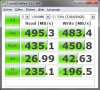

What do you guys think ?
Particularly about IOPS results ? Could it be because my CPU is limiting (i5 2410M) ? -
So what's the new hotness for reliability and performance these days in the 256GB range? The M500 or the 840 EVO or 840 Pro?
-
Definitely not the M500 240GB for performance. You would have to go to the 480-960GB M500 for performance.
Sandisk Extreme II 240GB The last graph 70/30 Read/Write Mix
HARDOCP - Iometer & Steady State Testing - SanDisk 240 GB Extreme II SSD Review
Hopefully, EVO will perform better in the "Steady State" metric than the 840 Pro. Samsung has emphasized low queue depth performance with the EVO. -
What are your thoughts on the new 840 EVO? I thinking of getting either them or the Sandisk Extreme
-
With performance as the deciding factor, based on what I know right now, the "Steady State" performance of the Sandisk Extreme II, I would choose it over the 840 EVO. If price were the deciding factor, the EVO is cheaper, outside of sales.
-
Sandisk Extreme II just went on sale on Amazon for $200 which i think is a steal.
-
Does anyone have any feedback to give about the Alienware 256GB LiteOn SSD's? There's some on eBay for $160 each, and they're new. I'm thinking about buying two of them and RAID'ing them with the mSATA that comes with my AW17.
-
It's basically an OEM Plextor. The listings are M5M or M3M? A Plextor is "Plextor PX-M5M mSATA 256GB." Plextor did not put out their named version of the M3M for retail like the M5M this generation.
EDIT: "Plextor is used by Lite-On IT Corporation under agreement with Shinano Kenshi Co.,Ltd." http://www.plextoramericas.com/ very bottom of page. -
Ah, I see. Well, that's good enough for me, especially at $0.62 / GB.
-
hi all
I am planning on buying an ssd for my alienware m17x r4. After some research i decided on buying an Ocz vector 128gb(OCZ VTR1-25SAT3-128G Vector 128GB Sata III 2.5" SSD 550MB/400MB 90K IOPS) but i wanted to ask for your opinion which one should i chose? forgot to mention that i am trying to make a decision between Samsung 840 Pro and Ocz Vector(both 128gb). One of the resellers in our country has a 25 dolar discount on ocz vector. -
With 2014 right around the corner, I would not consider a 128GB SSD for almost any usage scenario.
Between the two choices; the Vector has the higher performance - but draws much more power and has the weakest reliability record (being tied to OCZ).
No matter how I look at this: this is simply not a decision that needs to be made (and especially not one for saving $25 for).
Save up for at least a 240/250/256GB SSD (or if the newer models like the Crucial M500's then 480/512GB or larger) and do this properly and do it once.
Sorry I'm not giving you the answer you're seeking... but 128GB SSD's today are like buying netbooks in 2008 with 1GB RAM: the performance is a bottleneck from day 1... and it only goes downhill from there.
Good luck. -
Is it true that the Samsung SM841 is an OEM version of the 840 pro. any ideas? what samsung ssd is being shipped as oem ssd in alienwares?
-
More like the 840 (non-Pro), but it's still nice.
-
Please don't cross post!
See:
http://forum.notebookreview.com/sol...ng-sm841-oem-version-840-pro.html#post9386944 -
Here's what I'm seeing with 3 LiteOn SSD's in RAID:
![[IMG]](images/storyImages/2rprw53.png)
I don't think that's very good, especially on the second and third tests. -
Those last two benchmarks don't change (too much) with RAID0...
-
Just a quick update on the latest Intel RST 12.8 driver: you want it.
See:
https://downloadcenter.intel.com/Detail_Desc.aspx?DwnldID=23060
(I recommend the 'floppy' version for the O/S you're using).
Noticeably smoother O/S navigation - web browsing - program launching and switching. A definite 'must do' upgrade.
Take care. -
Cool, thanks.
-
Im looking for a large msata drive for my laptop, it looks like my option are the 480gb mushkin atlas or crucial m500. The m500 is significantly cheaper, around $350, the atlas is around $480, is there any reason to take the atlas over the m500? The drive will be used for storing media and my overflowing steam and origin library.
-
For storing media? Save the $130 and get the M500.
Take care. -
Now I hear issues about the Crucial running hot and having high power consumption. How do these compare to the muskin? Samsung also makes a 512gb model for $450, I just can't seem to find a lot of info about it
-
I've RMA'd two Mushkins over the past year, and not a single Crucial and I've deployed a few dozens of them. YMMV.
Never again shall I buy a Mushkin SSD, although I'll continue using their RAM.
You'll be fine with Crucial IMO.
Good luck. -
Is Plextor/Lite-On a reliable brand? I've discarded Crucial M500 msata 240 due to high idle power consumption.
-
I'm looking for a ~240/256gb SSD, and I saw that there's a deal for an Intel 530 + installation kit for $170. I was originally planning to wait until Black Friday/Cyber Monday and see if I could snatch a good deal on one then, but would this Intel be a good investment? I know its reading speeds are slower than Samsung's models by quite a bit.
-
What's the "installation kit" ?
I've deployed numerous Intel SSDs with only one RMA over the past 2-3 years. If reliability is your top concern - as is mine - then Intel is definitely worth a look.
-
Sorry, reseller kit would be the correct term--it comes with the bracket, SATA cables, screws, and software. Thanks for the feedback! I think I'll go for it then.
-
They seem reliable. On Newegg, 36 5-Egg reviews out of 40 total, that's 90% for the Plextor M5M 256GB mSATA. One 2-Egg and three 1-Egg reviews. One of the 1-Egg reviews was a lemon and it was followed up by a 5-Egg review by the original buyer. 39 of the 40 reviews are by verified owners.
Newegg.com - Plextor M5M PX-256M5M mSATA 256GB SATA III MLC Internal Solid State Drive (SSD)
I wouldn't hesitate to buy Plextor if the price was right. Lite-On is a Plextor re-brand for SSD/mSATA. -
I seek low-energy reliable alternatives to the new Intel 530 Series mSATA 240GB to go into the new Haswell NUC.
NUC reviews noted the previous IVB NUC suffered from overheating from the mPCIe cards (SSD & Wireless) causing lockup, which has been solved by Intel supplying the review models fitted with lo-energy 530 Series mSATA and Wireless-AC 7260
Reviews of the 530 Series say good low power SSD but uncompetitively priced - tomsHW says ridiculous price.
TomsHW says 'Idle power' is the key to efficiency. I will probably use Windows 7 which I read cannot benefit from DEVSLP power saving, so 'Idle' is the key spec. The 530 Series Idle is 55mW (prev. 525 was a wopping 250mW). I guess this rules out NAND older than 20nm.
As Bullrun noted in this thread, much mSATA ssd is OEM (no retail warranty) with little choice of retail makes. Also read to avoid M500 256GB due to high temperatures, and Mushkin & OCZ as unreliable. Many recommend Plextor M5M as energy efficient. The tomsHW review on 29 August lists the M500 240GB Idle as 600mW and on same page M5M 'Idle' as 1 mW !!, but when I visit the Plextor site to corroborate that, it says 1mW in DEVSLP, gives no figure for usual Idle. As the M500 also has a lower DEVSLP consumption, (the Intel 530 DEVSLP consumption spec states 0.2mW) it would appear TomsHW is not comparing like with like despite their article on 1 August "Watt-ergate...consumption exposed ". So much for that. Continuing my search, I read the Sandisk X110 mSATA launched last June using Marvell 88SS9175 4 channel controller, promises low power. Cannot find reviews of it.
X110 mSATA Mfr#: SD6SF1M-256G-1022 Intel 530 Series 240GB
Slumber Power Mode (Typical) with DIPM enabled 80mW Idle 55 mW
DevSlp Power Mode (Typical) 4.8mW DevSlp 0.2mW
Average Active Power under Mobilemark2007 DIPM, HIPM 85mW Active 140mW with LPM
Seq Rd 515MB/s Wr 465MB/s; 4k IOPS Rd 81k, Wr 51.5k Seq Rd/Wr 540/490 MB/s 4k IOPS Rd/Wr: 41/80 k
I dont know if Sandisk 'Slumber' is equivalent to Intel 'Idle'. If yes, would appear its energy efficiency is similar to the Intel, so perhaps a good choice for the Haswell NUC ? The X110 mSATA datasheet states 5yr Warranty, yet many retail sites show no warranty. Also, the Anand Shimpi 7 January review of Sandisk Ultra Plus (read of X110 family, but 2.5") finishes with an ominous " Most of my experiences with SanDisk drives have been in OEM systems, and there I haven't been pleased. " Retail descriptions for this P/N call it ' Enterprise'. Sandisk.com state 'Enterprise' does have 5yr Warranty, but I cannot find this drive on the site (I found the datasheet only at resellers), even after using Sandisk Search on the P/N. So does anyone know if the X110 mSATA is OEM or has 5yr retail warranty ?
Can anyone knowledgeable of the current mSATA market recommend if the X110 and which other makes of mSATA 240/256GB are a good choice for likes of the Haswell NUC ?
If DEVSLP can be made to work in W7, then the usual 'Idle' or Sandisk's 'Slumber' cease to matter, so a further question is does anyone know of any articles on DEVSLP working in W7 ?
Lastly, I had not found the 530 Series mSATA for sale at any price, while the X110 mSATA 256GB instock at good prices. I want to buy as soon as NUC & suitable mSATA instock. -
Guys I'm curious. Is there a direct comparison 4k random read for the 840 pro 128, 840 pro 256 and 840 evo 256? I have only one 128GB 840 pro and want to know if upgrading (I'm considering raid-o too) will give me noticeable performance gains. Thank you.
-
Read speeds should be comparable with all of them. Write speeds will be slightly lower with the 128GB drives but should be comparable for the 256GB drives.
-
Guys, is TRIM still active when using 2x samsung 840 pro in RAID-0, on a Haswell platform?
-
Hi guys, are all msata ssds have same sizes? For example regular sata3 ssd can be 7mm and 9.4mm which makes some of them incompatible with some of the laptops but what about msata?
Also what models of msata 240-256gb ssd should I look for and which ones are reliable? -
Dimensions should be standardized so that all of them are the same size.
As for brands, I'd suggest Crucial/Plextor/Samsun/Intel only for reliability.CallmeDuty likes this. -
Thanks for reply! I guess mushkin atlas is not reliable then? http://products.ncix.com/detail/mus...olid-state-disk-flash-drive-53-79756-1051.htm
-
I like Mushkin and their aftersales support (had to deal with them with RAM, they were great). However, that uses a Sandforce controller and while the second generation has gotten a little better, it still isn't as reliable as the controllers the previously-mentioned companies use for their SSDs. Not to mention that Sandforce only performs well with compressible data and not uncompressible data.
If you go with Sandforce, I'd keep a backup of data on a different drive, just in case. Though, then again, you should be keeping good backups regardless of drive, period.CallmeDuty likes this. -
Oh yeah I've heard some bad stuff about sandforce. I'll probably take an extra precautions and wait for better deals on crucial/plextor/samsung and intel then. Thanks for a detailed answer
-
Does anyone have some suggestions on a mSATA purely for a cache drive until i get a full sized SSD (need at least 500gb so i am going to have to save up)
there are a lot of different kinds on ebay relatively cheap, i don't need that much space since i am just using it for caching
also was curious how well does it perform with a 7200 RPM hdd, right now my hibernation boot is 20 seconds, shut down is around 15 seconds, but also after start up the hdd is active for quite a while even if programs are not on startup. -
I wouldn't recommend any 'small' SSD as a cache drive. First, your platform has to support it. Second, the overall speedup is ~30%. Third, you will be ~$50 away from a 'real' SSD and have to reconfigure your system once again (if you didn't bork it by trying to enable the caching in the first place).
While $$-wise it may seem like it is a good idea; all it is, is gimmicky.
Make the jump to SSD's properly: get an SSD that will hold your O/S, programs and data comfortably, along with at least 25GB free space and 30% of the total capacity left as 'unallocated' too.
While it may be fun to play with a small SSD; that is all it is; 'playing'. And even playing costs you in terms of real $$$, time and possibly frustration too (depending on many factors that you may not be considering at this time).
Sorry, not the answer you want, I'm sure - but certainly offered with the hope that it gets you into 'real' SSD's sooner...
Take care. -
I'd agree with tiller here on the cache drive idea. I've used them a few times before and while it has a slight boost in booting time, there's not much of a real affect on computing. Personally, I think a better idea would be to just buy a small "real" SSD (32-64GB), install the OS and whatever programs will fit, and save up for a bigger drive.
Though actually, you'd just be better off not doing anything right now and just save up for that 500GB SSD. -
Hmm alright, i think i will get 120gb or 250+ gb ssd for the 1st bay and just slap the 1tb hdd in the 2nd bay for storage, it is mostly videos i record/edit and photos
SSD Thread (Benchmarks, Brands, News, and Advice)
Discussion in 'Hardware Components and Aftermarket Upgrades' started by Greg, Oct 29, 2009.


