 Problems? See this thread at archive.org.
I have been using Intel 520 SSD for quite some time now and haven't had a single issue till date. Kingston are also good, but I am a big fan of Intel. Moreover, what I can say from my experience that SF based SSDs are smarter than the rest in terms of performance & reliabity and affordable. @Jarhead Agreed Let It Be any kind of HDD or SSD, I would recommend people back up their data :thumbsup:
-
Just a quick note about Intel RST drivers 12.9 version.
See:
https://downloadcenter.intel.com/Detail_Desc.aspx?ProductID=2101&DwnldID=23496&lang=eng&iid=dc_rss
Been using them for a while and they are a slight improvement from the 12.8 drivers I was previously using (which were excellent). The systems are both Win8 and Win8.1 (Pro x64) and only did the floppy install method (not the exe).
Improvements include smoother/faster opening 30 tabs or more in IE11. Smoother O/S navigation. Faster 'Querying Shrink Space' results in Disk Management.
Just generally a snappier system.
Thanks Intel!
Now, where's lucky version 13?
-
I'm out of the SSD thingy for a while and my question is: What is the recommended 250-256GB SSD for OS and main programs? Is Samsung 840 okay?
Sorry if this is the wrong thread for this kind of questions. Any help is well appreciated. -
I bought my sister an 840 (250GB) and so far it's working just fine. TLC NAND's probably going to wear out in about 7-10 years, but by then she'll likely get a new computer and new drive anyway.
There's also the Crucial M4 and M500 (MLC, which will last *much* longer*), 840 Pro or EVO (EVO basically being the original 840 with minor tweaks), and Intel's drives. -
Oh 7-10 year is more than enough for me. I'm thinking in like 2-3 year term.
Try to find a good priced then. -
Compatible for ivy bridge as well?
-
Yes, the IRST 12.9 WHQL drivers are for IB as well.
paradigm likes this. -
Thanks mate, it made a noticeable decrease in daily win7 operations
-
paradigm, it is noticeable on every system I've been able to install it on. Even HDD based ones.
Btw, I am using the beta v13 IRST on a test system (stable for over a week now). -
When are we expecting new SSDs from the big players?
I'm interested in what happens with interfaces, and this might be the year where I start going into the TBs with SSD drives as prices drop again. -
Guys, can I ask for advice?
I can't decide where to put my cloud storage drives. I have an Alienware laptop with 256gb SSD (Win8 + apps) and 750gb HDD (files + games). Which of the two would be better to put my Dropbox/Skydrive folders in?
Space/writes on SSD wouldn't be an issue, but should I go with HDD anyway? On the other hand, maybe it makes sense to have them on the OS drive for better integration.
Let me know, thanks! -
If you've OP'ed your SSD enough (30% is not too much), I would suggest to use the SSD.
When Dropbox/OneDrive indexes the folder contents; you want what the SSD can do for you.
Not what the HDD will struggle with (when time and/or battery power is critical).
In my Asus T100TA (2GB RAM, 64GB eMMC SSD model) Dropbox/OneDrive takes forever to sync (~25MB/s disk usage @ 100% disk utilization and ~45% cpu) vs. a 'real' computer with ~125MB/s disk usage @ 100% disk utilization and ~7% cpu (i7 QC, 16GB RAM, 480GB SSD).
The 'real' computer takes about a minute to sync a changed 4GB file - the T100TA takes almost 14 minutes.
(Yeah, I know Atom vs. i7 cpu's and all - still; it's the storage subsystem that is getting the workout here).
While the eMMC SSD is better than last gen embedded storage subsystem offerings - it is still nowhere close to a SATAIII setup. I am still positive it is faster than a HDD though; at least in this metric (indexing/database type workload).
I wouldn't even want to know how long it would take on a HDD based system (shudder).
unityole likes this. -
just a heads up, as per Jon from Tweak Town, the fastest raid driver is apparently 11.2, at least thats the driver gave him best benching results. As it for real world performance I'm unsure if you're really able to feel it lol.
OROM make very tiny differences it almost not matter anymore. -
I don't use RAID anymore but I do use the IRST drivers.
I have consistently found the latest drivers (12.9 currently) to be the fastest overall in actual workloads.
Benchmarks do not mean anything to me when I have found them to be so unreliable in predicting real world performance on my systems/workload.unityole likes this. -
just a quick question, is there a reason their is a drop in the price of SSD's, such as the kingston 120gb, is 66 dollars now on amazon, is newer technology coming out?
-
Kingston drives were never current (even when 'just released') or recommended. Nor is a 120GB SSD worth buying then and especially now.
Consider it $66 dollars wasted if you want to give it a try (I did the same thing in 2010 - but the cost to learn that lesson back then for the way too small SSD was $400 for me - still, I did use it as a USB 'key' in an external enclosure for a while. But that is not what an SSD is made to do, right?).
Just a quick answer (that was answered years ago) that even today, just considering the nominal capacity of an SSD without considering also the OP'ing that is needed is like spending all your money to buy a Ferrari and then finding out about the insurance, tune-ups, tires and gas it needs to run it properly and at full performance for the life of ownership. -
i see, thanks for your input, although i wasn't primarily looking at kingston, i have also seen some price drops in other ssds occasionally, such as samsung and crucial, but not as significant, as far as capacity, i will put my normal HDD in a ultrabay for storage since i have a lot of photographs and music files, doesn't really make sense to buy 500+ SSD for those types of files, only thing that is going on the SSD is win7 and microsoft office suite, i probably could get by with a 64gb but the price difference is negligible for the 120s, another question is, do i have to erase my OS from the hdd in my ultrabay or can i use it as a backup in case my SSD fails so i don't have to deal with any down time, i don't plan to boot from the ultrabay, but just swap it back in the main bay in case something happens
-
I guess you can run two drives (an SSD and a HDD) both with an O/S installed - but the one that is ignored will be effectively useless as you will not have updated anything on there in the way of the O/S or Programs. Even a stagnant drive of 3 months or less (depending on the programs you're running) can take a long time to get back up to a usable state.
If you do go that route, make sure to remove the HDD when you're installing the O/S on the SSD (otherwise; you may find that you won't be able to boot one without the other).
As for the size of the SSD - I think you're still missing the point. Size matters.
See:
http://forum.notebookreview.com/sol...marks-brands-news-advice-213.html#post9268437
See:
http://forum.notebookreview.com/sol...marks-brands-news-advice-214.html#post9317068
Spending the time and money to install a too small SSD in a computer you want to depend on for as long as possible is simply wasted effort imo.
Windows requires its free space (I find that ~25GB to ~35GB is enough for it to be 'comfortable' with).
Programs (i.e. PS) need their Scratch disk space (temp space) as do many other programs (~25GB to ~50GB additional free space for an average user would be required).
Some data is also needed on the O/S SSD drive (think database based files) at least another 25GB if not double.
In addition, the hardware (SSD) needs to be OP'd (I recommend 30% of the nominal capacity; Anand recommends 25% still) to provide low WA during GC and TRIM functions and also (almost secondarily) provide a more consistent user experience.
Add those together and you'll see why a 64GB or 128GB SSD is not recommended. At least, not by me.
To put it another way: SSD's only became useable for me when I had the ability to purchase (locally) a 250GB SSD (Intel 510 Series) and 'discovered' the magic of OP'ing.
Before that; HDD's were my only recommendation (along with the eBoostr program and a fast USB 'key').
The links above should highlight the need for capacity with any of the SSD's available today.
That is; if you want to enjoy your SSD for as long as possible, in (almost) any way you decide to use it. -
okay, thanks for the information, i completely forgot about the details mentioned in the first link.. i guess it would be wise to consider a larger capacity for long term use which for me is 2016 till the next laptop upgrade..i will stick minimally with 256gb+, i am primarily frustrated with the amount of time it takes my computer to to boot up/down plus when coming out of hibernation my hdd is active for a couple minutes even if nothing is up and the computer is sluggish even with a 3rd gen i5 dual core and 8gbs of ram.. i believe the SSD is the remedy for this.
-
With an SSD you can forget about hibernation - cold boot, reboot whatever is just seconds away (with Win8.1...).
Even with SSD, 16GB+ RAM is recommended (then you can also disable the pagefile too for almost all modern programs) which will make your system responsiveness even higher. -
@tilleroftheearth , wondering about intel RST, does your display like SCSI device instead of a SATA?
-
Sorry, just saw this was directed to me. I don't understand your question fully? I want to answer SATA, but can you be more clear with your question?
-
Interesting data on How Long Your Hard Drive Is Likely to Last
![[IMG]](images/storyImages/1964rwxe67vwujpg.jpg)
-
There is so much holes in statistical analaylzys of dead drive data by tha hosting/cloud service company. First of all - worklad. They are using consumer hard drives for enterprise storage. Using something outside its designed parametars will result in general failure. Even that hosting company said that their 1st "batch" of hard drive casings were not made properly and drives were overheating. So hot consumer drives under workload not designed to sustain - short lifespan. In the end they got good numbers.
Sent from my C1905 using Tapatalk -
Using intel RST, i get my drive as SCSI device, just wondering how yours appear?
![[IMG]](images/storyImages/84k2.png)
-
SCSI as well
-
On a completely unrelated note, I am SO looking forward to the day Ramdisks become mainstream:
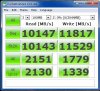
-
Are the Sata II laptops also benefit from the most recent fastest SSDs? I'm thinking between the cheaper Crucial M500 and the more expensive Samsung 840 EVO. Is the EVO going to be faster for a Dell Latitude E4310?
-
SATA II laptops can still benefit from modern SATA III SSDs. The only thing you lose out on would be the maximum seq. Read and write speeds, but those aren't as important as random access and the like (which stay the same).
-
That is what I thought, wanted to here for someone else too. I'll take the EVO, unless someone can recommend a faster random access drive...
-
I just ordered a thinkpad t440p and I was wondering what's a good M2 SSD to use for the slot? I plan on using the main bay for my 512 GB SSD and ultra bay for my 1 TB SSD.
-
What program are you using?
-
The top performance drive, for now, is the Sandisk Extreme II 480GB. On sale, it can be had for about $290
-
Any other opinions on which is the best SSD to buy? I need 240/256GB one...
-
If you want opinions; go to newegg - I have answered your question more fully in your other post.
TomJGX likes this. -
SoftPerfect Ramdisk. Also, ram was overclocked to 2400 MHz.
-
How is the reliability of Crucial drives? They seem pretty damn cheap, compared to evo. Of course the benchmarks are lower, but the difference shouldn't be too noticeable. I'm more worried about the durability and whether the company is trustworthy. I'm afraid of wasting my money on a drive which will fail and not be replaced by the manufacturer. What do you guys think, is the samsung evo worth the extra 30 euro?
-
Crucial? The M4's were (and still are in some of my many systems) bulletproof.
The newer M500 and M550 series run too hot for me - in a desktop I might use one, but in a notebook I have simply used other options (especially if the notebook is smaller and/or has a discrete gpu inside... which will only make everything get hotter and hotter, which in turn will have the effect of the SSD throttling to stay below ~70C). -
I hadn't even thought about the heat yet. My notebook already has some cooling issues, so this wouldn't be very good. They all SSD's run hotter than HDD's? What about the samsung?
-
Second the M4 - mine's been nice and reliable - I bought it for my old machine, and brought it to the new one when that system died.
-
+ 1 and then some.
I still have a bunch of M4s running in various units and love them dearly. With that said, reliability tops performance benchmarks in my book any day of the week and any hour of the day.
While I have yet to test out the M550, I've installed a M500 in one of custom builds that I've recently delivered - the SSD in question was the customer's choice, not mine - and wasn't really impressed.
My $0.02 only...alexhawker likes this. -
What was it about the M500 that left you unimpressed? Are they worse than the M4?
-
It lacks zest for a 2013/14 SSD.
In my opinion, yes. -
It may be unpopular, but I also agree with this. Reliability of the M4 has been phenomenal in my experience, and the gains in (practical) performance don't make up for the losses in heat compared to the m500 and m550 msata drives I have been using. While I would prefer an m4 to an m500 in most cases, part of the reason is also price. the 256gb m4 have typically been less expensive than the 240gb m500 (Again, msata) where I've been able to find them.
When finding an m4 is no longer possible, I'm not sure If I'll prefer the EVO / 840 to the m500/m550 given the differences in price. Samsung also makes a very reliable drive, and I'll echo what was said earlier--given the current performance of 2013/2014 drives, reliability is key. There's a reason I kept buying slower Intel drives while everyone else was buying Agility / Vertex drives. My x25m 80gb is still chugging along just fine after 110TBs of writes and over 30k hours powered on time...It currently lives in a PS3. I'll bet the same can't be said for many of the first - third generation OCZ drives. -
I ordered the M500, but I'm starting to have some early buyer's remorse. Mainly about the performance difference between the Evo and M500. Pretty much all the specs seem to be lower. Do you guys think it would be noticeable?
-
Which one is better? Crucial M550 512gb or samsung 840 evo 500gb?
Sent from my SHV-E210S using Tapatalk -
It might not be noticeable in day to day usage. What will you be using it for? Are you upgrading from a regular hard drive or another SSD?
Sent from my iPhone using Tapatalk -
It will be used mainly for booting and some games. I'm upgrading from the standard HDD in the laptop.
-
I don't think you'll notice it coming from the HDD - it will be so much faster that you likely won't even notice/care that you (maybe, possibly, just making stuff up) could have shaved 0.4-1.2 seconds off your boot times.
-
What usage scenario?
SSD Thread (Benchmarks, Brands, News, and Advice)
Discussion in 'Hardware Components and Aftermarket Upgrades' started by Greg, Oct 29, 2009.


