 Problems? See this thread at archive.org.
Thank you for the info, I agree with your advice. Idk if they make PM961 in other formats, but my drive in question hitting 88C is in fact a 512GB m.2 PM961 SSD.
Dell at least incorporated a bit of a passive heat sink/cover for this particular m.2 in the Dell 7577 chassis. HWiNFO seems to be reporting my drive temps appropriately at least.
If I really want I have a thermocouple wire probe from my multimeter I can use to check temps a little more accurately.
-
That's an NVME M.2... the M.2 form factor hosts both SATA and PCIE x4 NVME products.
If you look at M.2 SATA drives they are much cheaper, depending on the sale and size the M.2 PCIE x4 NVME drive is about 2x more expensive.
Sorry for using the NVME shortcut name instead of M.2 PCIE x4 NVME full name, or SATA instead of M.2 SATA. I wasn't talking about 2.5" SATA drives at all in my previous posts, M.2 SATA was what I was referring to. Last edited: Apr 12, 2018Maleko48 likes this.
 -
Really no need. You know it's too hot once the ssd's start throttle down speed. Just follow the Drives remaining life in Hwinfo or similar tools. If it's start to decrease below 100% too early find a solution for cooling. Lower temp from the rest of hardware in the chassis will help to lower the max ssd temp. Lower the better.Ashtrix likes this.
-
I just saw the video on their page it doesnt show how to enable it via software. Is this hardware level for sure or do i need to keep the software up and running? Will it encrypt it live while the OS is running
-
I really didn't test it at all. Their website says to use their SW to use SED or self encrypting drive feature.
-
Add 2-3 layers of 0.5mm or 1mm thermal pads(Chinese or arctic) on SSD chips to get temps down.Maleko48 likes this.
-
My - 0.165V undervolt drastically cut my temps by around 10C possibly a touch more or less. Antyhing more than - 0.100V undervolt stops thermal runaway on Prime95 pretty much. No complaints under normal use, I was just examining max temps during benchmarking to get an idea of how well the SSD is being cooled. I have some pads I plan on testing with it.Vasudev, alexhawker and hmscott like this.
-
Bro @Phoenix You want an Phoenix controller?
Samsung Releases 970 PRO and EVO m.2. SSDs -
FYI => Samsung 970 Evo SSD
http://forum.notebookreview.com/threads/samsung-970-evo-ssd.816020/alexhawker and Vasudev like this. -
I don't give a darn when they release all these shiny new SSDs. they keep releasing one after the other. Tag me again when you have a 4TB m.2 or higher. SSDs have reached a point where they are way too fast for the human eye to see any difference between one and the other. only synthetic benchmarks show a difference. What matters to me is space and only space now. We've been stuck with these sad capacities for years now.Maleko48, Vasudev, Papusan and 1 other person like this.
-
I think Samsung dedicated the name to you in testing 960 pro everyday installing/de-installing Win 10.
They have hit a wall related to speeds. Max is 3500MB/s reads and under 3GB/s writes.hmscott likes this. -
1TB capacity as max for 970 Pro. Very yesterday!! 960 Pro is a better option with its 2TB.
Reviews of Samsung 970 Evo
Edit. Maybe some of the explanation regarding small size Samsung 970 Pro https://wccftech.com/samsung-announ...70-evo-up-to-3500-mb-s-read-2700-mb-s-writes/Last edited: Apr 24, 2018Starlight5, Vasudev and Spartan@HIDevolution like this. -
Class Action Suit Alleges Samsung, Micron And Hynix Colluded On DRAM Supply Causing Price Inflation-Forbes.com
A lawsuit seeking class action status was filed today in the US District Court for the Northern District of California by attorneys at the law firm of Hagens Berman, versus world's top three DRAM manufacturers, Samsung, Hynix and Micron. The class actions suit is being filed on behalf of US consumers of smartphones and personal computing products during the years of 2016 and 2017.
Ashtrix, Vasudev, Robbo99999 and 3 others like this. -
It's about time they got smacked hard for this, LOL. For some reason that link did not work. Here is another one...
https://www.forbes.com/sites/daveal...-supply-causing-price-inflation/#765d3a6417cealexhawker, Vasudev, Maleko48 and 2 others like this. -
-
Yees, about time. And I hope it will be damn expencive for them. Btw... The link works, at least for me.Mr. Fox, Vasudev, Maleko48 and 1 other person like this.
-
This happened once before like a decade ago, I remember seeing it in the news at the time, DRAM collusion lawsuit that is, thanks to complaints by Dell and some other OEMs, 2004-2006 I think. DRAM manufacturers will pay whatever fine and slowly go back to their old ways within no time, that fine last time was nowhere near the profits reaped from the collusion/price gouging. Still good though to at least give them a slap on the wrist though a larger consequence would be nice this time around.
Last edited: Apr 30, 2018 -
Hey guys I'm finally getting around to testing and gathering some hard data for my results but I added thermal pads to my NVMe m.2 SSD and managed to reduce its max temps from 89C down to 70-72C. Much better now.
tilleroftheearth likes this.
-
What are the thermal pads conducting the heat through? Chassis? Glued on heat sinks? Did you add a channel for air to pass through to remove some of the heat?Maleko48 likes this.
-
Ok, so my initial results did not hold as tightly as I had hoped, but I still have a 10C reduction in maximum temps under the harshest conditions, which I am still very happy with. I remembered reading somewhere that ATTO disk benchmark hammers the disk much harder than CrystalDiskMark does, so I switched to that to finalize my results and it definitely drove my temps up a bit more. My ambient room temp is between 27.2C and 28.0C for the record.
The pads are cheap blue silicone type, approximately 1.05mm to 1.09mm thick so I will call them 1mm pads. The label on the package states: "COOLOOdirect30Pcs2...forCPU GPU Heatsinks Made in China" with a barcode that reads: "X001J1AV9Z" and measure: "20mm by 20mm square"
Upon examining the heat spreader plate in its stock configuration from Dell, you can see blue edges peeking out from one side under the heat spreader plate that are sandwiched between the actual memory chips mounted on the PCB and the heat spreading plate itself. There is approximately a 2mm air gap between the surface of the heat spreading plate and the bottom cover of the laptop.
Initially I only added 2 layers of pads and they made minimal contact on the center thermal pads with the foil flashing that is bonded to the inner side of the plastic bottom cover. I placed these very carefully and tried not to handle them too much because I did not want my oils from my skin getting on them or degrading my test results. After running CDM a time or two my temps maxed out at 70C (laptop had been off all day prior to these runs, so the chassis had minimal additional heat soak). The problem was that I hadn't taken a baseline reading or specs with no pads at all so I didn't have anything besides my previous post here to go off of. And I also forgot I had posted stats and screens here previously anyways, lol. So I decided to pull the pad job off and run the test again with no pads. On CDM I saw my temps quickly max out at 89C before CDM even got through its first half of tests. Success was confirmed at this point, but I wanted more hard data and proof to offer you fine folks.
Next I reapplied the same set of pads I had removed and re-ran the tests with CDM. This time with the same set of pads I noticed my temps kind of shooting up unusually compared to the original test that maxed at 70C (of which I had no screenshots for), but still not as bad as when tested with no pads at all. This round of testing with the reapplied pads maxed out at 76C. I assumed that peeling the pads off then reapplying them made them ever so slightly thinner and thus contact with the foil flashing was reduced or inadequate (in addition to possible finger oil contaminations). Upon removing my laptop's bottom cover, all of the pads were actually stuck to the foil flashing pretty much confirming my theory.
So naturally, I went back and peeled them all off once more then reapplied all of the same 2 layers of pads back onto the black metal heat spreading plate then added an additional 3rd layer for a total of ~3mm of thermal pads stacked on the heat spreader. By this point I didn't care so much about the finger oils as the pads had been stretched and handled enough that the results would be what they were- and contact pressure/consistency seemed most important anyhow. I should note that the 2 layers of pads equaling 2mm seemed to sit flush with everything and the 3rd layer that made their collective thickness 3mm had a more satisfying protrusion I was happy would maintain solid contact with the (admittedly flexy) plastic bottom panel with the foil flashing bonded to it. Upon running my CDM tests with 3mm of (reused / reapplied) pads it scored maximum temps of 71C and 75C on the first and second passes respectively. It was at this point I remembered I should have been using ATTO all along- doh!
Next with ATTO fired up, I ran 3 passes with no changes to the padding and saw max temps of 77C / 78C / 79C respectively. It was at this point I decided I was satisfied and did not bother running additional passes.
So my final conclusion was an approximately ~10C reduction in peak temps when running harsh hard disk tests was good enough for me. Compared to no pads at all where the temps spiked nearly instantly during the harshest portions of the CDM test, with the 3 layers (3mm) of pads on the even harsher harshest portions of the ATTO tests the temperatures creeped up much much slower. Overall I call it an easy success.
Now the annoying part is whenever I take the bottom cover off it peels off the pads with it and I don't like assuming they will end up placing correctly on the actual surface of the heat spreading plate when re-attaching the plastic bottom cover to the laptop, so I feel the need to peel them off the cover and reapply them back onto the heat spreader covering the SSD prior to re-attaching the plastic bottom cover back onto the laptop- but that is probably just me being too OCD. Additionally I have considered using thermal compound to smear the area of the foil flashing where the pads like to stick to in order to keep them on the heat spreader plate when removing the plastic bottom cover for other service / modification reasons- mostly just as a hassle and time saver. (I don't expect that to change the results any.) Sorry for the wordy response but I feel the need to be precise and clear with my procedure and results here for obvious reasons.
NOTES:
Crystal Disk Mark was v6 (64bit) and averaged approximately 67% CPU load when performing its tests. (Since CPU is primary heating source in most laptops this may matter more in other machines or configurations- worth keeping in mind in the back of your head imo when performing trials such as these.)
ATTO was v3.05 and averaged between 5% and 15% CPU usage despite being much hotter and harsher on the SSD temps themselves.
My machine's fan was approximately 3k / 3000 RPM during these tests as that is where it idles when I keep my external monitor plugged in and it keeps my dGPU active and prevents sleep states deeper than C3 on my machine.
All tests were performed with my machine set to absolute maximum performance profiles (SST: 0) using ThrottleStop and (Windows power scheme) Bitsum Highest Performance profile. This essentially maintains an all-core minimum of 3.4GHz on my CPU and a maximum boost clock of 3.8GHz. Additionally I was running a stable -0.150V undervolt during all tests as well.
And finally I selected 8GB test lengths with Queue Depths of 9 which I have been under the impression are slightly harsher test conditions than the defaults that CDM and ATTO open up with.
SCREENSHOTS:




 Last edited: May 1, 2018Robbo99999 likes this.
 -
That's a great outcome, stacking the thermal pads often has a reductive result as each surface loses some transfer capacity, but in this case giving a path to metal and even the edges of thermal pads gave surface area to transfer the heat.
It's too bad that fitment is sensitive to removing the back panel as described, but as long as you don't need to do that often it shouldn't matter.
It's almost like the laptop makers should figure out a way like your's of conducting heat off the M.2 controllers through to the bottom case with a large heat spreader to further help with heat dissipation.
Thank you for taking the time to describe your efforts.
-
I wouldn't bother adding thermal paste on top of your pads, I think that will just make the heat transfer worse. Good that you reduced your drive temperatures, a sucessful mod.hmscott likes this.
-
As I mentioned in my OP it wouldn't be intended for heat transfer necessarily, but just to act as a lubricant essentially to keep the pads from wanting to stick to the bottom cover whenever I pull it off for service. But given that thermal pastes like to dry into crusty bits, it may stick just as bad in the long term as it dries out. On that note, I could probably get away with a thin layer of vaseline or similar.
SCREENSHOTS OF 3mm Pads CDM Passes #1 & #2:


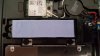
CAMERA IMAGES OF PAD JOB:

 Last edited: May 1, 2018hmscott likes this.
 -
Yep, I understood that was the reason for you considering it - I'm just saying if I were in your shoes I would not do that - I think it will make the heat transfer worse, and definitely don't use Vaseline, if you're gonna use anything then use the thermal paste, but I think best to leave it how you have it currently.
-
Just updated my last few posts with pics btw. Thanks for the input and encouragement everyone. (^_^)
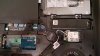
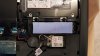
The filenames of the screenshots are self explanatory since I don't feel like captioning each image right now. The pics from my cell cam are not unfortunately. I think it's easy enough to see the differences though.
A FEW MORE PICS:


 hmscott and Robbo99999 like this.
 -
Yeah, that looks good, that looks pretty 'stable and secure' to me - doesn't look like the pads will fall apart if you have to occasionally reattach them on the rare occasions you remove the bottom panel.Maleko48 likes this.
-
I try put arctic 1mm pad on 850 EVO and checked after that the temperature was increased so I removed the pad. Well its was normal SSD may be in case NVMe will be different.
Sent from my iPhone using Tapatalk Pro -
NVMe drives have faster speeds than SATA drives which is certainly a contributing factor to heat spiking, but the more important detail is the form factor of the SSD. M.2 drives have virtually no mass to soak up and help dissipate heat and minimal surface area for air to pass over for cooling.
By physically connecting my m.2 NVMe SSD to the foil flashing that's bonded to my bottom panel it is able to take advantage of all the flashing's surface area which happens to have plenty of air moving across it already.
Every user's machine will be different though since laptop layouts and component configurations vary from one model to another.
If your machine does not have any foil heat flashing to sink to you can actually buy thin copper tape or sheets and essentially create your own. But again, every application will be unique based on the specifics of your machine's configuration.Robbo99999 and NIGHTMARE like this. -
So, are SSD prices finally going down? E.g. m.2 WD Blue 3D 2TB I've been eyeing for a while retails for slightly above $400 on Amazon. Is that it, or should I wait some more, in hope for better price, or some adequately priced 4TB m.2 drive?
-
It uses a lot more power at idle vs the 850 EVO which would be its equivalent and performs a bit worse with writes, though still pretty decent.
https://www.anandtech.com/show/10741/the-western-digital-blue-1tb-ssd-review/9
Get it for a desktop, but with a laptop I’d still go for a Samsung or Crucial which have better power draw characteristics.
Overall prices are supposed to go down this year but that hasn’t happened yet. WD, Crucial and MyDigitalSSD usually have lower prices than Samsung to begin with and SATA prices have gone down relatively to nVME for while. With nVME, MyDigitalSSD’s BPX for example uses the same hardware as the Patriot Hellfire and is similar to Toshiba’s OCZ RD400, but the controller’s power draw makes it better suited to desktops. nVME prices are still roughly the same as before. -
@Aivxtla thank you. I need m.2 2280 of 2TB capacity at the very least, AFAIK there are only few models available in this capacity and, except this one, prices are simply ridiculous.
Last edited: May 1, 2018 -
It’s still a great SSD I reckon it would only be like 30-40 Min difference in battery life overall worst case scenario (guess) so go for it. It’s not like it will cut it in half.
Last edited: May 1, 2018Starlight5 likes this. -
I know you wanted an m.2 drive but the 2TB Micron 1100 is $267 if you are interested, Micron is the parent of Crucial and the drive is essentially an MX500 in all but name, looking at the controller and flash.
https://slickdeals.net/f/11585371-2tb-micron-1100-2-5-sata-iii-solid-state-drive-269-free-shippingStarlight5 and Papusan like this. -
@Aivxtla thank you, fantastic deal! My main machine doesn't have 2.5" slot, but hopefully that's a sign that SSD prices will finally take a long awaited and well deserved dive into abyss.
-
M.2 version of the 2TB Micron 1100 is $302 on Amazon.Starlight5 and Papusan like this.
-
how much OP are you guys having on your SSD? Personally, I've been using 37% for more than 2 years but thinking I could cut it down to 20% or something since I don't write a lot.
Also in the market for new SSD but there are so many brands these days so looking for advice also. I have the Mushkin reactor 1 TB. -
NAND Manufacturers
Only a few companies actually make the NAND Flash and the rest just buy from these companies. I would buy these brands in bold as they actually make their own flash and have better support/firmware and experience with these things than the likes of Mushkin, Adata etc which buy from the companies listed below.
Actual flash producing companies in order of market share.
The first 3 groups make over 90% of NAND FLASH production.
Samsung
Toshiba (OCZ is their brand as well) in collaboration with SanDisk (SanDisk is now owned by Western Digital)
Micron aka Crucial in collaboration with Intel (Joint venture separating soon)
SK Hynix
Now some Chinese manufacturers are entering the business but quality of NAND is unknown.
Micron/Crucial usually has the best bang for the buck like the Micron 1100 2TB SATA for ~$260 and M.2 version for ~$280-300, with Samsung being the most expensive.
Over Provisioning and Write Amplification
As for OP, factory OP on a SSD is usually ~6.8% and any unused space is also used as OP. I usually set my 512GB drive at 400GB for use and rest as OP not that its needed but because I'm OCD. A standard user will be fine with factory OP. It will still last you years, by which time it will be outdated and new larger drives will be cheaper.
A 512GB SSD has a full 512GB but you only see 476GB because the rest is OP.
A 480GB SSD is also 512GB but with more factory set OP.
For usable space like hard drives, SSD vendors use Gigabytes (1000 Megabytes) rather than Gibibytes (1024 Mebibytes) so take those differences down to Kibibytes/Kilobytes and you have have like a 6.8%-7% difference. So even though your SSD has 512 Gibibytes of space the vendor uses the conversion difference to Gigabytes as overprovisioning ~36 Gibibytes in Reserve for wear leveling and helping maintaining performance even when the drive is nearly full. Some drives have more overprovisioning like 480 GB drives which are also 512 Gibibyte drives with more factory OP so the drives can stay at peak performance under continual load even when full also to help prevent high write amplification (WA). WA basically means when you write say like 1 byte the drive writes like 3 bytes in reality as it’s shifts data around and clears partially used cells. Basically WA also increases wear out the NAND faster as well as you are writing a lot more. Also note your SSDs inbuilt controller will use any unused space or unpartitioned space as OP automatically.
Inherent 7.3% Factory OP from Conversion Difference on most drives.
Write Amplification
![[IMG]](images/storyImages/1280px-Write_Amplification_on_SSD.svg.png)
![[IMG]](images/storyImages/writeamplification2.png)
Information on OP (Over Provisioning) and WA (Write Amplification):
https://www.anandtech.com/show/6489/playing-with-op
Information on common OPs:
https://www.kingston.com/en/ssd/overprovisioning
Also note NAND can be configured in the following 3 types:
NAND Configuration
SLC (Single Layer Cell) Best performing and longest endurance (1 bit per cell) Barely used anymore due to cost but in TLC drives some of the free NAND can dynamically be used as SLC to increase endurance and performance.
MLC (Multiple Layer Cell) Provides 2x space than SLC so lower cost (2 bits per cell)
Widely used as it gives 2x capacity of SLC with decent performance. Endurance is like a 1/10 to 1/20 of SLC.
Examples: Samsung 960 Pro, 950 Pro, 840 Pro, 860 Pro, 850 Pro, OCZ RD400, Crucial MX100, MX200, M500, M600 and many others
TLC (Triple Layer Cell) Provides 33% more space than MLC and has the lowest endurance (about a 1/3rd of MLC or maybe lower) and performance but much cheaper (3 bits per cell)
Examples: Crucial MX500/Micron 1100, Toshiba SGX4, SGX5, Samsung 960 Evo, 950 Evo, 860 Evo, 850 Evo, 840 Evo and many others. These all use part of their free TLC NAND space as SLC cache so if you do large transfers llike over 10-20GB on 256GB drives and 30-40GB on 512GB drives once you run out of SLC buffer and write directly to TLC portion dropping speed significantly till buffer is cleared, not common occurrence in normal use cases.
Why does more bits per cell cause lower endurance?
Reason is in SLC only 1 bit is stored (1 or 0) so you only have 2 voltage states, in MLC you have 2 bits (00, 01, 10, 11) so you need 4 voltage states and 8 voltage states with TLC. Basically as the NAND wears it gets harder to see difference between the voltage states and the more states you have the lower the threshold for failure or less margin for error.
SLC/MLC/TLC Voltage States/Bits.
![[IMG]](images/storyImages/_bg=ffffff&fltr[0]=usm_40_4&q=93&w=210&src=http%3A%2F%2Fosmnewsphotos.s3.amazonaws.com%2F503545d0edb37%2Fslc..mlc..tlc.photo.gif)
NAND Endurance
![[IMG]](images/storyImages/Screen%20Shot%202011-12-21%20at%2012.30.30%20AM.png)
More detailed info here on SLC/MLC/TLC hopefully better explained than what I typed:
https://www.mydigitaldiscount.com/everything-you-need-to-know-about-slc-mlc-and-tlc-nand-flash.html (Rough endurance chart at end of article)
http://embedded-computing.com/news/nand-slc-mlc-tlc/
3D V-NAND and Die Size
3D V-NAND (Vertically stacked layers) allows for higher density and endurance, most new drives from all manufacturers are 3D V-NAND for example the Samsung 960 Pro/Evo is 48 Layers and the new 970 Pro/Evo is 64 Layers while the 850 Pro/Evo were 32 Layers but the 840 series was 2D Planar. A 3D V-NAND TLC drive can achieve endurance close to an old 2D Planar MLC drive.
One more thing to note is die shrinks lower endurance, so 20nm NAND will have lower life than 40nm NAND for example. This was usually compensated with better NAND controllers/firmware on newer 10/20nm drives vs older 30/40nm drives.
Would be nice if Mods could either sticky this info regarding SSDs or put similar stuff as a sticky for potential buyers.Last edited: May 27, 2018 -
So if I was doing a lot of photo/4K video editing and I plan on having a 500/512gb m.2 nvme drive for OS/Apps and a secondary 1tb m.2 nvme drive for active files being edited, what is the best type of memory to get for this setup both for performance and endurance as I don’t upgrade my laptops often (having on built now but buying the drives myself).
Was thinking of going 970 evo plus for OS and a 970 Pro for the other. But I’ve been suggested the sabrent drives recently as well maybe. I do transfer footage up to 100gb.hmscott likes this. -
I don't think endurance matters nowadays. How many GB's are you gonna be writing to it per day? I think most drives will last for years whilst writing 100's of GB's per day. For performance, 970 Evo is pretty much at the top of the performance tree isn't it, although I think the write performance tails off after writing a massive sustained chunk to the drive (before it has a rest period to recover). How large are your sustained writes gonna be? You'd want to compare the size of the sustained writes to reviews of the drive to ensure that your sustained writes are smaller than the performance drop off point. I can't quote you GB size of sustained writes for different drives, but the info is out there, I remember Guru3d doing such testing on the drives they get.
EDIT: here's the Guru3d review of the 970 Evo 1TB:
https://www.guru3d.com/articles_pages/samsung_970_evo_plus_nvme_m_2_(1tb)_ssd_review,8.html
Write performance drops down to the lower level after about an 85GB sustained write to the drive (during file copy).
EDIT #2: you're using it in a laptop, so you might want to research the thermal performance of different drives, because during a sustained write the drive might heat up & thermal throttle in a laptop due to less airflow. You might want to consider the specifics of your laptop model and if there is adequate air flow around the drive, and if other users of that laptop model might have needed to apply heat sinks to the drive. And heat sinks won't really help that much if there is no air flow around the drive, but it would take a little longer before the throttle point though due to the extra heat capacity of the heatsink.Last edited: Apr 2, 2019 -
Remember that the source for the transfer, as well as the destination, both have to allow for full transfer rate - and that the slowest speed of source, destination, or transfer medium (PCIe NVMe, USB 3.0, TB3, etc) sets the maximum throughput overall.
So, pretty much both source and destination need to be NVMe bus SSD's, as if either of them are slower - say SATA SSD's, or USB 3.0 bus connected, the maximum transfer rate will be the slowest link in the transfer chain.
If you are copying from RAM to SSD then yes, that can help, but get an NVMe SSD that doesn't thermal throttle during long transfers. Many of the ratings are made doing short transfers - and when you get larger files or multiple transfers queued up, after the first xxGB transfered the SSD controller can heat up and the transfer rate will be cut drastically due to thermal throttling.
Also, how much of your production time is actually spent transfering that final work? Saving 5 minutes per transfer is nice - if it's even that much, but is that worth $100's more in initial costs?
Lots of things to check before deciding whether to spend 2x as much for an NVMe drive vs a SATA SSD. You could end up not getting any faster transfer - as measured against the wall clock - and have 1/2 the storage size for the same money.Last edited: Apr 2, 2019 -
I'd recommend looking at 2.5/M.2 SATA versions since they'll thermal throttle almost quickly on a laptop.
-
Is this for paid work? If so, you want the Samsung Pro all around. The Evo is responsive, initially, but can't keep up in a sustained workflow. You also want to ensure you can keep these drives cool. If not, throw in a 5400RPM spinner instead. Yeah; thermal throttling on NVMe drives is real. And a real pain in the ...
See:
https://www.tomshardware.com/reviews/samsung-970-pro-ssd-review,5572-2.html
The 70% Mixed Random Workload and also the Sequential Steady-State graphs are what most closely mimic my workloads (similar to yours, but much less/to none video editing).
That's up to 43% or more difference. Or, as I like to see it: closer to the promised NVMe advertised speeds than being just barely above SATAIII levels for the EVO (before throttling).
Another thing you want is to have both drives the same size/specs' - otherwise, one will be dragging the other down when used consecutively. Samsung 970 Pro 1TB is my recommendation. The price increase over the EVO is in line with the real world performance and much higher durability of the Pro in actual use.
Don't forget that if this is for paid work or not, OP'ing by 33% or more is highly recommended. This prolongs the life of the nand, gives the most sustained performance over time and gives you the best setup to minimize the background nand caretaking and optimizations needed on every SSD (except Optane) from getting in the way of your work.
A 1TB SSD, properly OP'd will give an effective/actual capacity of ~620GB to the user. In return, and with proper cooling of the drive(s) a given, it will deliver superior, sustained, performance with almost any workload you can throw at it.
So, how heavily is this platform going to be used? An hour or less a day? Or 8+ hours a day? How much data do you create 'RAW' and finished in a week? Will 2x ~600GB drives be enough to hold that data (and O/S+Programs) until you back it up to a NAS? Or, deliver it to a client? Do you have a backup plan?
If you are using it at a more leisurely pace, maybe for personal enjoyment, and especially if the notebook in question already has throttling/cooling design issues, a better option would be to go for capacity, rather than maximum sustained performance.
In that case, 2x 2TB Intel 660p might make better sense. In real-world use, they might even outperform the 970 Pro's and EVO's in a chassis that throttles the latter easily.
Give us some more details of your setup, including the notebook model and the other items asked above.
I hope that the platform already has a current i7 based CPU and the RAM is maxed out, period, right? If not, no storage option is going to give you the productivity performance that your platform is otherwise capable of.
jclausius, AdamSupra, Robbo99999 and 2 others like this. -
A worthy contender if 970 pro becomes expensive is, BPX Pro 1TB with Phison controller with 800-1000TBW.
-
Sorry, can't comment on that specific drive directly. But, if the 970 Pro is what is required for the intended workflow and it is deemed too expensive, then the OP isn't charging enough.
Edit: Had a quick look at the Toms review of the BPX Pro and was really disappointed. The review is little more than 'scores'. Compare this review with the link above for the 970 Pro, which has real benchmarks that actually mean something.
Was this style of review chosen to highlight the BPX in the most favorable light? If so, it does the opposite for me. It tells me, reading between the lines, that it is not even close to the class leaders.
Papusan likes this. -
All drives come with a minimum of 6.8-7% base OP that you can’t touch or see. They use the Gibibytes to Gigbaytes conversion difference as the actual base OP. Add another 7% like some enterprise grade drives usually do and you should be just fine. Infact the endurance is usually much higher than ratings imply, especially with MLC. Also realize any unused space is automatically used as OP by the controller anyway so you don’t technically need to reserve anything. Even with your high usage the drive will last you years. The 970 EVO and some other TLC based drives can dynamically increase the pseudo SLC cache upwards of 100 GB or above based on free space so TLC drives may still be good enough for you.
Take a look at the HP900 ($129.99 for 1 TB on Amazon) /920EX ($159.99 for 1 TB) (both are TLC based, but low warrantied endurance is the pitfall (1/2 of the 970 EVO) as an alternative to the 970 EVO as well it’s a pretty decent drive and well priced too. Look for a price/performance balance. Service recovery times on the 600 (TLC) series Intel drives were kinda bad though. Also just because something is the “best” may not mean it’s worth the price difference of something that’s decent.
The 970 PRO and other MLC based drives are the best though for consistent performance as they need no pseudo SLC cache to maintain advertised performance.Last edited: Apr 2, 2019 -
OP'ing is not a matter of greater endurance. It is a matter of getting the most sustained performance over time.
Free space is also no substitute for OP'ing. On a fully utilized drive, every single nand cell is used by the O/S and thrashed thoroughly. On an OP'd set up, the 'spare' nand cells are ready to be used as needed. No, read/erase/write dance needed, unlike with the 'free' space set up...
Do a search on this in these forums. I've already explained it a million times.
Papusan likes this. -
I understood that but at least with the modern Samsung drives the controllers are good enough to sustain pretty high rates even around 80-85% full. 30+% is just overkill and a waste of space, better to let the controller use available free space (as in there may usually be enough unwritten cells with no partial data filled if you have like 1/2 the drive in use) as OP dynamically rather than fixing the amount for such drives like the 960/970 Pro which ends up being 37% when taking into account the inherent OP of 7%. Main reason for OP is also to prevent Write Amplification which can cause major NAND wear. At least from what I’ve seen at a data center they’ve usually considered that much OP even in high write cases pretty excessive for minimal gain. Maybe long back or with terrible drives it may make more sense.
Last edited: Apr 2, 2019 -
Those reasons may be true, but I haven't cared about write amplification since we hit larger than 480GB SSD's.
Sustained high rates in a synthetic benchmark aren't what I buy drives for. Actual sustained rates in mixed read/write real-world scenarios is.
Data center usage isn't about maximum performance for the ones that actually write the cheques. It is about maximum ROI.
My ROI is my time. Maximizing anything else is an exercise in futility and saves little if any $$ in the end game. Productivity period. Not productivity for minimum $$$$ spent.
The %age actual/calculated used for OP'ing is also not my concern in and of itself. The 33% is what I do and recommend as 'default', in certain use cases for my workloads, that can go to 65% (when used as a scratch/temp disk). That is just the cost of doing business with SSD's. Without OP'ing, the performance plummets to HDD levels, and to tell the truth, HDD's aren't that bad today (modern drives, of course).
With OP'ing, SSD's start to approach their advertised levels, but still struggle to achieve even 50% in any real-world usage, mine or anyone else's.
Vasudev likes this. -
Just a quick question tiller, regarding what you said in your last sentence about struggling to achieve performance in real-world usage. I don't know if it's related to my SSD, but when using Malwarebytes to do a virus scan of the whole drive, for some reason when it's checking Google Chrome "js cache" (some folder along those lines) the rate of scanning decreases greatly with the SSD at 100% active but only reading at a few KB/s, CPU usage is also really low on all threads when that is happening. It's just for that directory & it's only happened in the last month or so, but now drive scans take over 3hrs rather than more like an hour (or less) that they used to take. What's going on there do you think? (I checked the contents of that folder & they're exceedingly small files, and many of them). (Avira Free Antivirus still scans the disk at the normal speed though).
It's my desktop in my signature, and it's the Sandisk Ultra II 480GB drive and it's OP'd by 30%. I actually OP'd that much ages ago after reading some of your advice on here.
EDIT: running the scan now to capture some more details. Yes, 100% Active time, just a few hundred KB/s read speed, Disk Response Time fluctuating from 30 - 200ms, folder is \CODE CACHE\JS in Google Chrome User Local App Data. Weird! (Data captured using Windows Task Manager).Last edited: Apr 2, 2019Vasudev likes this. -
A great example of SSD's not living up to their claims.
I don't run a third party A/V because of exactly these types of 'results'. I feel the whole system is swimming underwater in molasses or something like that. Sorry, I don't have a good/better answer for you.
The only A/V I trust on a Windows system is Windows Defender itself. Check out the future/soon to be implemented 'sandboxed' feature of this A/V. Especially with the sandboxing, running anything else than Windows Defender is insane, IMO.
Of course, I'm also seeing a 3+ hour run on some scans with WD, but I suspect I have a few more files than you on my systems (~3M).
What I can recommend and use myself is to do a full SmartPlacement defrag at least monthly using PerfectDisk. Forget about the extra writes (not important in the overall scheme of things) and bask in the increased responsiveness.
Again; PerfectDisk isn't (just) about defragging your files on an SSD. The more important part is the defragging of free space. Which forces a read/erase/write dance when you want it to happen, and gives you the SSD's full attention for the rest of the time.
Please do a quick search for why I defrag with PerfectDisk. There was some very recent discussion about it too.
Vasudev and Robbo99999 like this.
SSD Thread (Benchmarks, Brands, News, and Advice)
Discussion in 'Hardware Components and Aftermarket Upgrades' started by Greg, Oct 29, 2009.


