Problems? See this thread at archive.org.
I am also wondering what does do to the ssd. Planning on disabling system restore and running the toolbox again. It took me about 20 mins to run the toolbox with system restore enable.
-
I couldn't believe the difference.....and I mean to get to the bottom of it. Maybe we stumbled on something.
If I was a G1 owner, this would be very good to know as the tool box is not available to G1 models... -
Just ran the toolbox and it took a Second to complete..... Compare to 20 mins....what the hell is going on
-
hi guys
I have a Kingston v series 128gb ssd, im getting another computer of ebay with a ocz 64 gb (apparently it cost 600 aud a year ago) ill post the exact model when i get it
but which would probably be better?
thanks -
OCZ without question...
-
Hello, this question is for HP EliteBook owners or for anyone who knows well HP products:
Well, I'm probably going to buy an EliteBook laptop, specifically the 8740w when will be released (this month according to a reliable source), and I'd like to add it a 160G SSD Drive shipped by HP (I think they are Samsung ones).
My main concern is if new drives shipped by HP with this new line are 2nd gen. and if they have TRIM support (the most important part). It's sad I cannot buy my SSD from a 3rd party retailer and install it in the notebook without voiding the warranty (yes, I've checked out this on the official HP Envy Forum, see 4th post).
Thanks in advance. -
The only 160gb ssd's on the market are the Intel G1 and G2's. I think HP is using the G1's without TRIM but they are still pretty good degraded although winsat disk gives em a penalty stroke for responsiveness.
-
@sgilmore62:
Thanks for your reply. In fact, I also checked out the Bussiness Suport Forum and there are some complaints for lacking TRIM support in their SSD's ( LINK, the last post is mine).
Wow, then I have no choice? I don't mind if the drive is made by Samsung or Intel, nor if the drive has not the best performance in the market for sequential/random read/writes. It's enough the drive has an acceptable performance, but for me TRIM is necessary since I plan to use heavily the drive for storing the OS (Win7/Linux) and applications, that involves a lot of writes (and deletions too) and I don't want to format the drive every 3 months in order to avoid the degradation... It's a shame.
According to the official service manual of the 8540w (since there is no manual for the 8740w yet), the spare part number for the 160G SSD is 595757-001. Is there any way to find out the exact model of this Intel drive? You can find the service manual here.
Thanks again -
And HP is going to know you swapped hard drives.... how exactly?
-
They could put a seal on it...
Not all laptops have a convenient HDD drive slot - although if you don't scratch screws etc. they wouldn't notice.
And isn't the EliteBook supposed to be a business machine?
If companies buy them they want to be able to swap out a HDD - be that for repairing cloning etc. -
@Jlbrightbill:
Well, the problem is not HP is going to know I've swapped the drives, but install a SSD not approved by them. This is the issue. They claim don't guarantee full compatibility and reliability if the user installs a 3rd party drive in their product and, of course, they will refuse a repair under warranty if this occurs. -
"SSD Not approved by them" - pretty much nonsense.
Generally any HDD or SSD is compatible with any laptop provided its the same size (2,5") and same Connector i.e. SATA or PATA.
If they did actually limit you to a certain type of SSD (say in the BIOS) then that would be a good reason to never ever buy their products - because there is nothing like an "approved HDD/SSD" in computer.
Edit:
And reliability - provided that most companies will use the cheapest drive they can get reliability will generally be better with a drive swapped in by the user. -
As long as you put the original HDD or SSD and OS back in that your HP notebook shipped with when/if you send it for repair, your warranty will not be voided.
-
sgilmore62's advice is pretty much the norm for the computer world. Most companies gave up on considering RAM and hard discs warranty-voiding offenses years ago. Even Apple doesn't really care about SSD upgrades, except when Intel drives don't play nice with their chipsets.
HP does engage in whitelisting their BIOSes; however, I believe they only do that for the WiFi cards, GPUs, and whether the computer accepts a quad core processor. -
Thanks guys for your advices.
It's really a shame (if not they're pissing off us) the user cannot have the freedom for configuring his computer as desired with certain brands (I think Dell is more open-minded in this regard). -
Just do it.
Worst case publish online complaints in several places when you run into trouble - that can hurt HP quite badly. -
Does anyone have known benches bookmarked for x18-m vs x25-m? Just curious how vast the performance difference is. I have to assume the mini-SATA draws less power than the SATA and would make the x18 slightly slower?
-
as far as I am aware they should be the same in terms of performance.
-
I cannot quote the article but I have been informed of same...no performance difference.
-
Actually , i doubt dell is more open-minded... Clevo , Sager and Asus usually are more open minded... also if u want , u can take pictures and just send your laptop in without your hard drive... they can't sat anything if u got the pcitures as proof... just make sure they're pictures of your old drive.
-
There is another argument - say you work for a company that handles sensitive data - you do not want your HDD wandering around the warranty department.
-
ssshh... how do you think I make my money? jk.
-
Hello All,
I just bought a Kingston V - SNV425 128GB (G2) and it is supposed to have Trim and NCQ and and and ... how do I check that it is working properly with Windows 7?
I cloned the previous system using the given Acronis and all went fine and then it asked to restart to update the drivers, but when I used HD Tune it is saying that it does not have NCQ.
Speed is what I expected with my Acer AS1410 (200 MB Avg. Sequential Read - Slower on other tests)
If you feel this is not the right thread please advice and move.
Thanks -
NCQ = Native Command Queueing? You possibly need AHCI enabled for this and might be in IDE mode.
-
NCQ is not supported apparently from this drive but TRIM is working. I followed a thread on OCW and got it confirmed.
So all is ok except for the fact that loading time is still quite slow. From 82 secs to a firefox windows open to 68s. I was hoping for a bigger boost.
Hopefully I will feel it more with the virtual machines on the laptop. -
Well, I suppose you get slow 4k read and random writes.
And FF - have you got a lot of add-ons? Its a tad slow? Maybe remove completely and reinstall?
I'm on a 160GB Intel G2 - FF opens in less than 2s - but not many add-ons (some)...
But then the Intel is quite fast...
The controller in the drive is important too... and for queuing you need AHCI (if the drive supports it) -
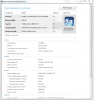
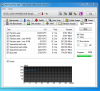
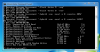
I borked my new X-18m running AS freespace cleaner on it. Running CCleaner wipe free space didn't work either, had to use HDDErase on an old desktop from a PATA port with a SATA to PATA adapter. HDDErase couldn't see the drive on a SATA port. The only benchmarks that showed the drive borked were the random access ones on HDTune Pro and the responsiveness ones on winsat disk. The IOPS on HDTune Pro were about half of usual. Now they are back to normal after resetting the drive with HDDErase.
Attached Files:
-
-
Everybody on XtremeSystems says don't use AS cleaner on it. Writing all F's to the drive seriously messes up the performance and like you discovered, requires an HDDErase to correct it. So called "Tony Trim" has strong negative performance on the Intel drives.
-
What are the guys @ XtremeSystems recommending for maintenance on the G1 Intel drives?
-
There is no maintenance other than HDDErase. Even a slightly degraded G1 drive is better than a Vertex/Agility/Samsung drive, so just use it and don't worry about the performance. That's what I'll be doing.
-
JBright,
Thats why I wonder what effect System restore will have on the G1 over time. It was only 2 weeks since I last used the Toolbox on my G2 and I noticed a performance drop (through tests) and then elected to use the Toolbox again. It was slow as heck and took 2 hours to optimize the drive with the Intel Toolbox. I did it again just to double check and it still took 10 minutes.
I was alot concerned as the toolbox is supposed to be able to do the entire drive in a second or two tops..
Someone mentioned to me that System Restore seems to do this so I shut it off and ran the Toolbox again...took a second. This seemed to make sense because it had been 2 weeks since I did a clean install and I hadn't turned off restore this time around.
So over time, I wonder if restore and the way it stores its files will cause a huge decrease in G1 drives???
Not a word of lie, my write scores had dropped almost 20mb/s. -
I'm not sure how or what exactly System Restore is writing, I've turned it off in every system I've owned since 2004 and use a scheduled Acronis disk image as backup. It certainly doesn't sound positive that it would cause the Toolbox to take 2 hours, that's for sure.
-
Do all 2.5" SATA drives work and fit with laptops?
-
So Acronis works fine with the Intel? Do you have a once a week backup? And is it incremental?
-
System Restore is definitely the culprit. Intel mentions this is some of there documentation. My system (160 gig g2) was taking just under 4hrs to run. I deleted all my restore points and it ran in under a second. I then created a restore point and noticed a slight slowdown. The more restore points and the type will definitely affect the time it takes to run the Intel SSD Optimizer.
-
Ergo...I am going to bet its responsible for performance suffering as well.
-
C300 Endurance: Total bytes written (TBW) - 72TB
72/0.256= 281 write cycle per cell?
http://benchmarkreviews.com/index.p...sk=view&id=454&Itemid=60&limit=1&limitstart=1 -
Wow 4 hrs..... I thought mines (20mins) was long. Same here I disable restore and Toolbox took just a second.
-
I turned off System Restore and saw Toolbox Trim time go down. I didn't notice the amount of restore points increasing times over the time when I had it turned on. Yeah Trim went from a couple minutes to a second or 2.
I think System Restore still has some value, but there are much better/less SSD interfering solutions out there. -
20mb/s drop after using the toolbox?
I'm wondering if there's anybody else experienced some write speed drop?
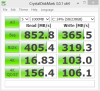
I'm still puzzled why the write speed on my Samsung 256gb (TRIM) has dropped from 150-160mb/s to 89-130mb/s (CrystalDiskMark)
-
Answer:
Its a Samsung drive...
Possibly faster new and then degraded to some extent even with Trim.
I'm not really sure about Trim though - I mentioned it before - as my drive "degrades" random read writes go up, sequential goes down and trim reverses that??? -
Thanks for the quick response.
Ouch! Hope I took the Intel SSD instead
I'm thinking of getting a G2 Intel 160GB SSD and would like to know if I will be able to use the Intel Toolbox on my XPS 1340 since its a nVIdia chipset? -
Chipset shouldn't matter. It should work just fine.
-
Not sure on your NVidia...
I know people couldn't update the firmware on the NVidia chipset...
On the G2 Intel - you can have at least 300GB of writes with no performance degradation - I'm currently not trimming - I'll see when it becomes slow like this, but it will possibly take a few months. -
Hmm. Guess I'm wrong then. I'd have thought that chipst wouldn't matter since the drive is marketed to all systems. Oh well.
-
Look in device manager and see if Nforce Serial ATA Controller is in there, if it is get rid of it. Right click on it and select uninstall, make sure to check the box, delete drivers for this device. After three reboots the default M$ SATA driver will install, it's the only one that works with TRIM.
I have a Samsung and Intel SSD and the Nvidia storage drivers don't play nice with the Samsung SSD. The Intel performs slightly worse with them in benchmarks but never gets penalty strokes when running winsat disk. -
I have the Intel 160Gb G2 and noticed the performance drop when I did a test before running the toolbox. I ran toolbox as a result and it took 2 hours. It took in excess of 10 min even after I ran it a second time.
I read from another how Restore may be the culprit, turned it off and retried...took a second. -
Thanks for the heads up mates!
Yep. I'm using the MS drive controller driver.
Is it possible the TRIM on my system is not doing its job?
Because my read speed is still above 200mb/s (same when new) only the write speed has dropped from 150-160mb/s to 89-130mb/s. -
I have Nvidia chipset and was able to update firmware on my Summit to 19C. Had to switch SATA ports without a reboot(hot plug), took me about an hour to finally get the updater to see the drive and about 2 seconds for it to flash.
AS freespace cleaner works on the Samsung drives. The problem I have with the Samsung TRIM firmware with GC versus the older firmware with just GC is that GC doesn't work well with TRIM enabled. What I do with my Samsung drive is disable TRIM with command prompt fsutil behavior set disabledeletenotify 1 , run free space consolidation with command prompt defrag c: /x, then run As freespace cleaner with FF checked. Shut down the computer then start and leave at the logon screen for at least 20 minutes. Once you have determined that GC has kicked in and restored performance you can re-enable TRIM with fsutil behavior set disabledeletenotify 0 command prompt. I usually look at hdtune graph to determine if the controller is seeing the freespace as freespace. When GC has cleaned the free space the HDTune graph will jump where the free space starts rather than being a straight line without delineation between data and free space. -
I thought something was wrong with my intel 160GB SSD - downloaded adn installed the toolbox - first time I ran it it was quick - next few times averaged 1-2 hours. Read your comments on system restore - turned it off. Tried the toolbox - was done seconds after I clicked the run command.
System restore stays off based on this. Thanks for the updates.
SSD Thread (Benchmarks, Brands, News, and Advice)
Discussion in 'Hardware Components and Aftermarket Upgrades' started by Greg, Oct 29, 2009.