 Problems? See this thread at archive.org.
I am running it as long as possible, currently it's at 1 hour 40mins.
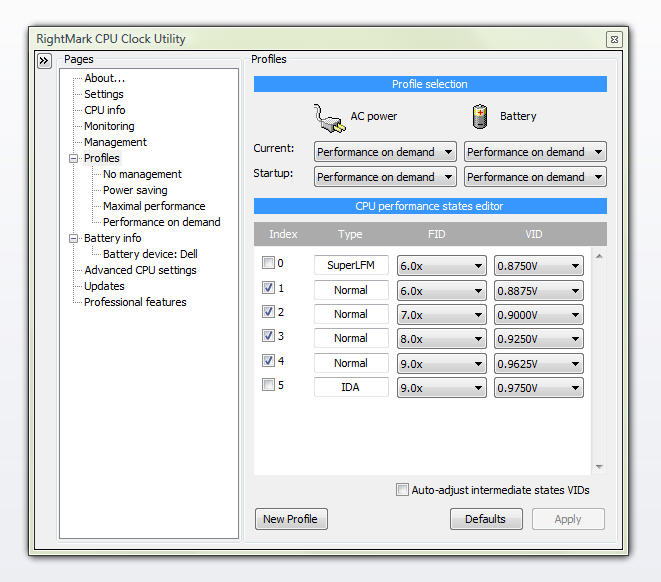
Highest multiplier is 9x at 1.0750 V
-
Thanks , and please excuse the fact i misread your post completely. When you said to increase the voltage, i actually thought you were telling me to increase from the default factory voltage and was confused.
-
Your current voltage shouldn't be 1.000v. Are you sure you have DFFS enabled?
-
dude, i got the same sxps13 with p8600. How come our volt/cpu info is different? O-o My min volt possible is 0.925v and max is 1.125v. Did I set up the program wrong? I followed the guide word for word.
-
I ran Orthos test for 16 hours with no BSOD
-
Thought I missed something. No it was not enabled. I will re-run the tests again later tonight

-
I was using your steps to lock throttle at maximal. Not a big deal but I noticed there were two options for my highest index # for the multi. There were two 11x with different voltages. I just chose the lower of the two..what might I ask is the higher one for if they are both x11? IDA?
-
Somebody has input on this ? -
![[IMG]](images/storyImages/fixedz.png)
![[IMG]](images/storyImages/w362.png)
![[IMG]](images/storyImages/fixed2.png)
![[IMG]](images/storyImages/w461.png)
Revised
P8600 in sXPS 13
Original temps: 76/74 -
Just a quick question here (sorry if it's been covered or if it's really newb...):
Does RMClock need to be open for it to apply the undervolting settings? I thought it did until I started looking at CPU-Z while RMClock wasn't open, and it appeared as though my undervolting settings were still being applied. So I'm confused... Does RMClock need to be open? -
When you press the cross on the top right corner it doesn't close.
It just minimizes to tray.
It needs to be in the tray (running) to keep the system undervolted.
If you right click on the rmclock icon the the task tray and choose "exit rightmark cpu clock utility" it will exit. The volts will go back to stock.
So to answer your question, yes it needs to be running
-
CPU abuse is a misdemeanor. 5 minutes will tell you if a BSOD is going to happen. Then, bump up the voltage a notch and get back to work on something useful. If it ever happens again, bump it one more time and you're good to go.
-
That looks more like it.
-
Hi,I've got T9900.
My voltages are (thoroughly tested):
6x 0.9v
7x 0.9v
8x 0.9v
9x 0.925v
10x 0.975v
11.5x 1.05v
I've already read that you can't go below minimum available voltage,has anyone succeeded? -
I just changed from the X7800 to a T9500. Was able to get a 0.2125v drop on the 13x FID. Temps while running stock voltage of 1.1375 was 52C-53C after 15 min. of Ortho. Temps while running an undervolt of 0.9250v where 42C-43C, a full 10 degrees cooler, after an hour of Ortho. I only bothered to do the 13x FID (all the rest are unchecked, except the lowest) because my laptop is either idling, or working hard. Monitoring showed the CPU never used the other FIDs for doing work, just to transition through on the way up to 13x, or down to 6x.
I also must comment on the difference on the two procs. Same speed, same FSB with 2MB L2 cache difference. I was not expecting a significant change, but I was wrong. Photo editing software loads in 3-4 sec compared to 14-15 sec previously. Acrobat open instantly, not the 4-5 sec it took before.
All in all, a very successful swap.
EDIT: I was going by some quick notes I had made. Now that I am at my T61p, let me correct some figures.
The voltage drop for the 13x FID is 0.1250v, from 1.1375v to 1.0125v. The temps are the same, but the undervoltage is 1.0125v, not 0.9250, which is the 6x FID voltage. The rest of the post is correct. -
That Voltage is impressive, I'am thinking of putting the T9500 in my Vostro 1510, the max cpu it can handle.
-
Sorry cjrciadt. I had my numbers mixed up.
I edited the post. -
GET A BETTER UNDERVOLT:
I have found that when I dissable spread spectrum modulation, I am able to undervolt further. My CPU is more stable.
Here is a quick result:
10x mutli, orthos error @ 0.9500V
Now with spread spectrum modulation dissabled:
10 multi, no error @ 0.9500V. But BSOD @ 0.9375V.
My CPU is a T7300.
If you want to know more about spread spectrum modulation and how to dissable it see my post here:
http://forum.notebookreview.com/showpost.php?p=5231994&postcount=10
Basically dissbleing the spread spectrum is very good for CPU stability.
Most desktops have the option to dissable it in the BIOS, but with notebooks you have to use setfsb.
If setfsb does not support your PLL or chipset then I dont know how to dissble the spread spectrum.
With setfsb it's very easy, you just need to change one bit from 1 to 0.
Open setfsb and select your PLL (clock generator).
Then click on the diagnosis tab.
download your datasheet and look for the correct bit to dissable the spread spectrum modulation. change the bit to 0.
If anyone needs help with this just ask.
I can tell you which bit to change (if I can find the datasheet for your PLL).
OK good luck
Edit: A few results:
Max temps:
Orthos was run for 10mins for each of the following tests.
with spread spectrum enabled (default)
10x
0.9625V = 62C
10x
0.9500V = orthos error, voltage too low.
Now I dissable spread spectrum modulation, no error @ 0.9500V.
10x
0.9500V = 61C
10x
0.9375V = BSOD
As you can see it's not a big difference.
My downspread was 0.5%.
if your downspread is anything higher (1%, 1.5%, 2% or 2.5%) then you will get better results than me.
Also remember when you disable the spread spectrum modulation the CPU frequency will be a little higher, so use setfsb to clock it back down to stock. -
Quick question, If I set my CPU from mobile to desktop does it allow me to run higher vids?
I noticed that the vids increase but are they actually higher or is it just some sort of bug?
I overclock my cpu so if it's possible to increase the voltage that way I'll be happy.
So is the voltage higher in the desktop setting?
Edit: I just checked, it shows a higher voltage but the actual voltage is the same.
So it does not allow you to set a higher voltage.
Is there any registry hack to allow a higher voltage? -
never
Lots of people waste hours and days testing intermediate steps that are never used. Maybe they don't believe what they see on the monitoring graphs. Too bad, but at least it's not my time being toasted. -
Hi,
I ran ORTHOS for 2 hours and have no issues with my RMC configuration. I am very happy, my temps decreased a lot and my SXPS16 is working great. But last night I wanted to play counter strike with a friend and got 5 BSOD. No counter strike games as I was not able to start it. Here are my RMC voltages. Please, help! What can I do? Do I rise all the voltages so I can play friday nights CS (once a week), or do I disable RMC during games? THANKS ! -
Sorry, I forgot to attach the RMC votages.
Here they are.
Attached Files:
-
-
Yeah, I was one of them, when I did the X7800. This time, I just disabled everything but the highest and lowest FIDs, 13x and 6x. I did not disable the lowest, as I need the laptop to run at 'idle', and not just go into standby. The way it is, the unit works better than ever.
-
your voltages must be too low.
raise them a little, then run other software like 3dmark or any games to make sure it's fully stable.
I noticed that ORTHOS can sometimes not give an error but when I run 3dmark05 I BSOD.
I think there was also a good stressing tool from intel that was more sensitive than ORTHOS, worth giving it a go. I just can't remeber the name of it right now, hopefully another user knows what I'm talking about and can give a link
-
Orthos gives an OK workout to your CPU but fails to "pile it on" by stressing your graphics processor (GPU) at the same time. Your game is actually the better stability test tool here. The solution is real simple: Raise the voltage of your top FID one notch at a time until your game doesn't BSOD anymore. That's it.
-
Just finished undervolting the T7200 in one of my XPS M1710. Once again, I just did the highest (12x) FID, and disabled the rest, other than the lowest (6x) FID . Stock voltage was 1.2125v, which gave a temp of 74C with Ortho. I got it down to 1.0000v with a temp of 58C. I'm lovin' this.
-
OK, my Canuck buddy, take this challenge, eh?
Run your rig at 6X, idle load, screen on, HDD on, network card on, until you're out of battery. No standby. Record the hrs. and min.
Now, do the same thing at 13X. Disable the 6X, no cheating. Record the endurance time.
My claim is, and has been, that at idle the CPU is only using a very minor portion of the total power usage of your laptop, irregardless of the frequency it's running at because it's a switch. -
Well my honorary Newfie buddy, I will accept your challenge.
For the 13xFID test, do you want it done at stock voltage, or my undervolted setting, eh?
So what you are indicating is that if I only have the highest FID enabled, I will get about the same battery life as when it is running at the lowest FID, eh?
I will have to wait until tonight to do the test, eh. Right now, the unit is in an office, in a docking station, eh.
I will post the results later tonight or tomorrow, eh.
Have a good day, eh.
-
Sounds like the wager will be settled at the Fraser Arms in Vancouver. You're on, Sir Oil Patch. Bring plexiglass cleaner and Brasso for the poles
1. Use your UV settings. You worked for them.
2. I'm not "indicating" anything. I want real life data.
Cheers, -
I'm using a P8600 and after turning off OS integration and setting the min and max of my current power plan to 100% I'm still getting voltage spikes. They look like this
![[IMG]](images/storyImages/67567778.jpg)
I think I've tried just about everything I can think of and those spikes are really annoying me. Any suggestions? -
hmmm i'm having trouble even getting started
Like i'm "ok" until i get to the voltages dropdown point in RM Clock- it seems like there are large steps in the drop down window to choose from. I picked the next one down from the default voltage on my highest multiplier and got the overheat warning so i stopped the stress test about 10 min. in
I have a sneaking suspicion that it didn't pick up my CPU correctly as it didn't show my CPU model (core 2 duo T7100) and never checked off the "moblie" check box, etc.
I'll have to try installing it using an administrator account (I usually use a standard account for 99 percent of my computing, and install apps via UAC, but i have an admin account i can try) -
Actually, you quit before you even got started. First, never mind that RMC didn't ID your CPU. The program is about 2 years old now and doesn't "know" about newer models of processors. It will still work. The fact that you're overheating at slightly below stock voltage suggests that you really need to undervolt. I would start dropping the volts in bigger steps and just test for a minute or two. You'll know when you hit the "basement" when it BSOD's immediately every time. Then, work upwards to a stable voltage. Skip all the intermediate FIDs because they're never used in On Demand.
-
Indeed, you quit before you even got started.
It works with a T7100 for sure. I have one and my undervolt went perfectly by following the guide. -
haha ok then i'll have to give it a go again!
-
Good luck
Let us know how it goes, I'm interested in what the typical voltage tolerances of a T7100 are.
For reference, here's mine:
http://img132.imageshack.us/img132/6049/rmclocksettings.png -
Oh I will
-
Ok, I have an Intel Core Duo T2050. All the VID's are the same (FID 6x-12x) Do I have to manually adjust each one or does this chip always use the same voltage regardless of multiplier?
-
manually adjust them
-
I'm too busy to make it out to the Fraser Arms, how about we change the venue to The French Maid in Cowtown? Plexiglass cleaner and Brasso still required.
So, I did not have the time until last night to do the test. The settings for both tests: LCD brightness on high, web browser open and streaming radio station through wireless card, internal NIC disabled, screen saver on after 2 min, low battery warning @ 6% left, no Standby or shutdown.
To eliminate any battery variances, I used a brand new battery which now has only three full cycles on it.
Both test ran within seconds of each other; two hours and ten minutes.
I can see your cheetos eating grin from here, Scott. Nothing like independent testing to verify facts you have been advocating.
I have to say that I did expect the 6x FID to get a couple of minutes longer run time than the 12x FID, but that was not the case.
All in all, an interesting test. Thanks.imoskvin likes this. -
Hey all. I'm trying to undervolt my xps studio 1640 p8700 processor.
Few questions:
1) Is there any reason I wouldn't want SuperLFM running? I notice when I have it on that my temps drop another 2C at idle.
1.5) Is there any way to dip below .8750V on idle? RMClock wont let me select anything lower.
2) The lowest voltage I can go on multiplier 9x (underclocked, I know) is .9875V anything below that it crashes. I see others going as low as .9500V, what gives?
3) What's up with IDA? RMClock only sees it as 10x (overclocked, right? I think factory is 9.5x. Either way, not much of an overclock) With IDA enabled, it crashes below 1.1250V. Why?
Thanks all! This really helped bring my temps down. I might try applying arctic cooling MX-2 next -
any news about half multipliers lately?
-
figures it would be the long way.
-
Are these good temperatures for my laptop?
![[IMG]](images/storyImages/31509863.th.jpg)
My laptop specifications are:
AMD Turion x2 TL-56 1.8 GHZ
4GB DDR2 533 RAM
160 GB HD
ATI xPress 1150
The temperatures would spike up around 60~80 depending on usages...
Gaming: 70~80
General: 60~70
When I try to underclock, the system would be unstable, so I need to leave it at stock (1.1250V).
Artic Silver 5 is applied to the CPU and GPU and the laptop is on a Zalman NC-2000 cooler.
Now, I'm just wondering can I lower the temperature from 60~80 to around 50? Cause the touchpad portion is getting a bit warm. By the way, I had this laptop for 2 years and I blow out the dust with compressed air every month. I blew it out yesterday. -
I love the smell of Cheetos in the morning. Smells like victory
I go to the Roundup once in a while. I'll see if I can find my 8" silver belt buckle
BTW, getting rid of your screensaver saves juice. Offing your display when idle is better.
Thanks buddy
-
Have a look.
http://forum.rightmark.org/?id=6 -
I ran the tests with the laptop setup the same as when it is on AC. That is how mine 'idles' when plugged in, so I thought I would test it like that. I might run the tests again and see how long I can run. I am sure there will be no difference between the two FIDs (6 & 12x), just interested to see how long I can get. I am actually impressed by the time I got, considering the setting I used.
I will look for you at the Roundup. Should be easy to spot, as you will be the only guy sportin' a 8" silver buckle of a DeLorean.
-
The ice road truckers will tell you that you can idle a 500hp diesel all night long on a few gallons of fuel. Same for your CPU when it's "resting". It's all the other devices that consume significant wattage even when you're not computing.
Darn, now where did I put those cowboy boots
-
Is it "ok" a max voltage setting of 1.1250V (10X) for a Merom T7250 (Santa Rosa platform) ?
Running Orthos (+ other applications) for 20 minutes I get a maximum temperature of 69 C (On both cores). -
seems ok.
My T7300 has a max voltage of 0.9750V. Are you sure you cant go lower? -
I don't know... I haven't tried again.
Following the guide I was wondering that value of 1.1250V was even too low.
The "Undervolting" Guide
Discussion in 'Hardware Components and Aftermarket Upgrades' started by flipfire, Apr 1, 2008.


![[IMG]](http://img183.imageshack.us/i/fixedz.png/)
![[IMG]](http://g.imageshack.us/img183/fixedz.png/1/)
![[IMG]](http://img329.imageshack.us/i/fixed2.png/)
![[IMG]](http://g.imageshack.us/img329/fixed2.png/1/)




![[IMG]](http://img43.imageshack.us/i/31509863.jpg/)
