Problems? See this thread at archive.org.
I dont think there is such a thing as being too low (as long as it's stable).
lower it more, you will notice a huge decrease in temps.
your max temp could be around 60C or less.
-
-
hi guys,
I just want to share my results.I got a t7700 on pavilion dv9000
max voltage in the 12x multiplier is 1.2000
lowest voltage in 6x multiplier 1.0375
i am using a zalman nc2000 cooler also so the higher temperture of cpu is 75-80c.
idle 40-47.
pretty nice.
tempertures could drop if i clean the dust from laptop but i need to unscrew bunches of screws so i wont clean it.has a little dust on it.
will artic silver effect the cpu and gpu temps? -
those volts seem high, can you go any lower?
yes, could be as much as 10C.
But dont use AS on the GPU, it's better to use a ceramic paste for that. -
seems like t7700 is crazy in voltages.
update: voltage in 12x multiplier:1.1875 for now.
lowest voltage in 6x multiplier:1.0250v
why is is that high man? i mean the voltages.
t7700 is 2.40 ghz clocked maybe it runs to fast according to others.but it should not take that much voltage?
is there any difference between termal paste and artic silver? -
How come? The silver amalgam pastes have >double the thermal conductivity
-
I hear that silver is bad for the GPU.
Maybe you should use some diamond stuff.
diamond>silver. -
Fair dinkum, mate. I'll take a tube since you're buying, eh
Actually, there's enough silicone grease in the formulas so that the silver pastes are electrically non-conductive, but they still conduct heat better than the grease alone. Most of the job is just getting rid of those nasty insulating air pockets. -
aaaaa phooey! I've gotten distracted getting ready to move in to school. Now that i'm moved in, i'll make undervolting my next weekend project!
I havent forgotten i swear!
-
Hey all, RMClock recognizes my CPU, but in the main profile, after I unticked "Auto-adjust intermediate states VID", the guide says that the voltages should automatically change, but they don't. From 6x to 10x (my highest) , the VID are all 1.1000 to 1.2375. I just tested and lowered my max multiplier to 1.1000 (from the factory default of 1.35something) and it seemed pretty stable in Orthos for ten minutes, which is nice, but the problem is i can't set my 6x to any lower than 1.1000! my CPU is a T9600. Any ideas?
-
Might be locked. See here.
http://ark.intel.com/Product.aspx?id=35563&code=t9600 -
Funny, I was just looking at that site right now. I wrote it wrong btw it's actually a P9600 - http://ark.intel.com/Product.aspx?id=37266 Which is more or less the same I think.
The odd thing is that the minimum VID shown in RMClock, is actually higher than my default numbers. My CPU default voltage is 1.05v at x6. The x10 is a whopping 1.35 for some reason, and Orthos temps maxes out at a little over 90C which is definitely unacceptable. So according to the Intel site itself, the max range is 1.212 so it's odd that my factory default is so high. I just ran Orthos for a half hour at 1.1250 and it's stable. Now I only need to figure out hwo to unlock the min VID to get my x6 under 1.000 for lower idle temps, and i'll be set. -
http://www.overclock.net/laptops-notebook-computers/424756-laptop-undervolting-thread.html
Look at this author, he uses a T7500 that has a VID Voltage Range: 1.03 - 1.30v , yet in RMClock he can go as low as 0.8500v. How do I "unlock" the voltages for my CPU? Is there a way to force them to appear in the list? I'm guessing there shouldn't be any risks for going/testing too low, other than BSOD and locking up...
p.s.- Is CrystalCPUID the same as RMClock in the way that the settings are cancelled when you shut the program off? or does it 'integrate' into your Windows Power settings profiles? -
Try the RMC registry tweaks.
-
Hey guys i have a t6400 and it runs stable at 1.0v but for some reason thats the lowest i can go. I see most of you can go under 1 volt. how come?
-
i was able to undervolt my cpu a little in high voltages.
every cpu has different tolerances.
it is not a factor that every cpu can be undervolted.
when a undervolt a little bit more my notebook restarts but even i have done a little undervolting it decreased the cpu temps. -
Finally, I managed to undervolt my T8300 successfully. Before that, the VID doesn't go lower than 1V. After enabling DFFS, I can go under 1V.
Is it possible to go lower than 0.95V? The lowest VID I can select is only 0.95V. I believe the processor has the ability to go even lower since the 10x multiplier already uses 0.95V only. Thanks.
-
what is DFFS?
-
Dynamic FSB Frequency Switching. Look for it under 'Advanced CPU settings'.
-
Ok I see, Thanks.
I just didn't know thats what it was called. I'v already had that dissabled. -
dont worry about lowering voltages.
lower your voltage as much as you can when notebooks shuts off or restarts this means you lowered it much.
you can go lower until it restarts
-
Hmm i can't enable dffs for some reason.
-
First off thank you so much, it has helped tremendously.
Test Machine:
Lenovo T500
4GB DDR3
ATI Radeon HD3650 (kept it on while running heat tests, instead of disabling it)
T9400 6MB Cache 2.53 GHz
7200 RPM 120GB HDD
Defaults:
Default Voltage (9x Multiplier): 1.175 V
Default Temp (Idle): 35 C
Default Temp (Load): 70 C
After:
Undervoltage (9x Multiplier): 0.9500 Runs stable!!!
Temp (Load): 51 C
I almost didn't believe them but I saved 19 degrees celsius and 0.225 V! This was using Orthos for over 30 minutes. I also at times ran Boinc (SETI @ Home) since it does fourier transforms as well as ran a game that uses GPU load to increase heat and CPU load and no problems at 0.950.
0.9375 became unstable after a few minutes. I will run further tests at 0.950 tonight to be sure it runs stable. -
Nice number. Congratulations. I'm jealous.
-
the lowest i can go with my P8700 on 9x is .9875V
-
Hi flipfire,
This is an excellent guide. It is too useful to me. I have ASUS motherboard with AMD 2600+ processor.
My CPU always throws many heat when it's working. I always use thermal paste to make it cool.
Undervolting is the best way to reduce the heat coming from CPU. How much have i to pay for it?
-
Has anyone undervolted own notebook on a Linux system by linux phc module ?
I'm about to do it... I've applied the linux phc patch and I'm wondering to lower the voltages at the different available frequencies for my lappy (2000, 1600, 1200, 800 mhz). -
RMClock is free. From Russia, with Love
-
I'm trying to get all my multipliers on optimum voltages. Do I really have to wait 45 minutes after each voltage change to see if it holds? Can I run like a 5 or 10 minute test after each change and if it doesn't crash, continue?
-
yes you can run 5-10min.
Personally I just leave ORTHOS running and every 10 seconds I lower the voltage. Then when you find the point where it's unstable (remember what the voltage was) and increase it a bit from there.
Then when you have your final volts you can test for 45min
-
Okay. Another question. What does it mean if both ORTHOS and Prime95 crash at a certain voltage setting? The computer doesn't BSOD, everything else runs fine, but the programs don't issue warnings, they just crash. I'm guessing it means its an unstable voltage, but I just wanted to check.
-
It might mean you shouldn't run them at the same time?
Also can you test your ram, because that might be causing the problem.
EDIT: check by dropping the voltage one step lower than when that happens -
Oh, I didn't mean I was running them at the same time. I ran ORTHOS, and since that crashed, I tried Prime95, which also crashed.
As for dropping it one step further:
Dropping it one step further than when it crashes makes it crash quicker. Another step further than that and I get a BSOD. So I'm assuming that step before it makes ORTHOS crash is my stable setting. -
yes, you must be right.
But it's strange that ORTHOS doesn't give an error.
Edit: Try running 3dmark and some games to be sure of stability. -
I used this guide to undervolt my laptop & now my new Studio XPS 1640. Have even undervolted an overclocked cpu. Good work flipfire.
However I am having a slight problem in that every time I restart my laptop it defaults back to the poxy Dell recommended power settings. Seems to be something in the registry overriding RM clock. Anyone have any idea's how to solve this little niggle? -
Do You let the rmclock set the intermediate voltages (Setting only the voltage at the max freq) or You go manually on each step ?
-
Hello people!
I have a brand new Turion-based Acer 5536G that is running hot, so I thought I'd give undervolting a shot. I get above 90 degrees Celcius after some gaming or after a short time of Prime95.
I tried to follow the steps described in the first post, but was unsuccessful. RMclock didn't recognize my CPU and I see no "Advanced CPU Settings" tab (needed to make the necessary changes).
I hope my CPU (Turion X2 RM-74) is simply to new and not supported yet. Is there perhaps a way top force RMclock into thinking I have a similar CPU that is supported? I tried reading the RM-FAQ and browsing the RM-forum but didnt find anything on this.
Please forgive me if the answear is somewhere in this gigantic thread. I backpeadled a few pages from the end but then realized it would be so much easier to just ask.
Thanks in advance! -
BSOD is only one of many possible outcomes of a system malfunction, but not the only one. If altering the voltage was the last and only change, then Voilà, try a higher VID.
-
Im digging through the thread and found this post on page 281. Is it true or is there a workaround for new Turions? Will another program do the job?
Thanks!
Edit: I think I found the answear on page 301:Will try in a few hours. -
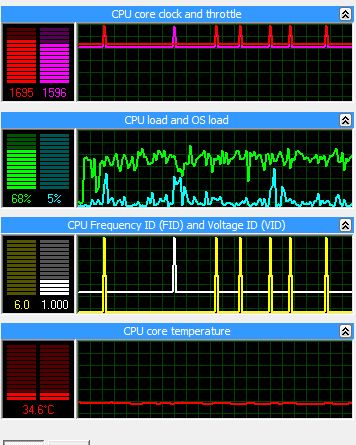
I dont understand something. The settings in RMcolck I choose for the P8400 the lowest one. When monitoring it still says 1000V
Can someone help me?Attached Files:
-
-
I do it manually.
-
I've been using RMClock to undervolt my laptop for a couple of years now, but I was wondering if there are any alternative apps? The problem is that RMClock requires UAC to be turned off, or else you get a prompt to load it at startup. I've been waiting for a newer version that addresses this for a long time...
-
Here you go:
-
There is some undervolt loving for us Turion users (ZM,RM,QL and SI series) to be had here: http://aspiregemstone.blogspot.com/2009/06/k10stat-amd-griffin-processor.html
-
Another approach is to use the task scheduler to start RMClock as described in this post:
http://forum.notebookreview.com/showthread.php?p=4849227#post4849227
This method doesn't require you to install any 3rd party software. -
Hi,
I have read the first 20 pages or so of this thread and then I got really tired. But what a goldmine!!!
To introduce, I had an Asus F3Sv-B1 with the C2D T7500 Merom. I managed to undervolt(age?) it to 1.0625V at the 11.0X multiplier and it significantly reduced the temperatures. It was a good 10 Celsius, and I was very happy.
Anyway, that Asus is now history and I am looking at some new laptops. I have an MSI in sight right now, everything else seems good, except that it has the C2D P7350 Penryn 45 nm. The troubling thing is that I can't find much UV info on this processor, and I hear that there are some disadvantages:
1) The max T is apparently 90, not 105 Celsius?
2) Multipliers are in half-steps, so my favourite RMClock won't work?? Is this really true? I am already going from a 2.2 GHz processor to a 2.0 GHz, I'd hate to lose more processor speed unnecessarily.
3) There really doesn't seem to be much info on UV this processor, as compared to the T7500 and its siblings.
4) Does anyone have running temps for this processor? I have heard that it runs cooler due to its 45 nm architecture and 25W power consumption, but I'd like some more info on this.
Any more info on this Penryn would be appreciated.
Thanks.
SNB -
If you Search this Thread for "P7350", you'll get 23 posts which should answer your questions.
-
Hey Guys,
Just finished undervolting my laptop, and I wanted to see if anyone could double check my work?
I have a Dell Studio XPS 1340 (Penryn P9600 Processor + NVIDIA 9500m)
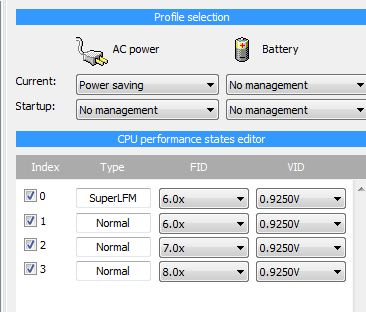
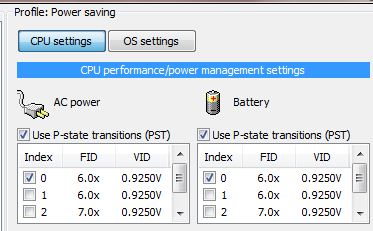
![[IMG]](images/storyImages/RM2.jpg)
My original voltage for all five multipliers was 1.1375:
![[IMG]](images/storyImages/RM1.jpg)
![[IMG]](images/storyImages/RM3.jpg)
![[IMG]](images/storyImages/RM4.jpg)
Also, a question: I don't have to untick the multipliers to control voltage while on the battery of my laptop, do I? For example, if I'm just browsing the internet or listening to music, I don't have to untick all the multipliers except for the first one to conserve battery life?
Let me know if something doesn't look right... I'm not sure why my idle voltage (6.0x) has to be set at its default. -
no you dont.
why don't you enable superLFM?
it doesn't. lower it. -
Thanks so much for responding, moral hazard!
Oh, I will do that. I can undervolt superLFM, as well, right?
Oh good, I'll do that right now, as well! -
yes, it's perfectly fine to do that
The "Undervolting" Guide
Discussion in 'Hardware Components and Aftermarket Upgrades' started by flipfire, Apr 1, 2008.