Problems? See this thread at archive.org.
did u also lower the voltage for the smaller multipliers?
-
The Hazard Man is correct, W7 is even more OCD about controlling power than ever. Other people here have found ways to tell W7 to butt out but I don't have a link handy. Do a Search This Thread.
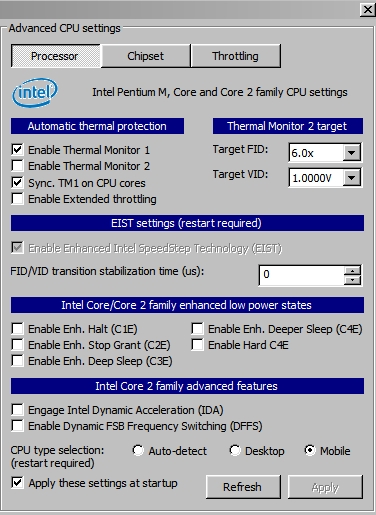
BTW, "spikes up" are from IDA and "spikes down" are from SLFM. Turn them both off in Adv. CPU and uncheck them in Profiles. -
But what if we want to turn on SLFM ('Enable Dynamic FSB Frequency Setting')? Is it safe to do so?
My T9500 is capable of SLFM, but the option is left unchecked by default... -
At low CPU power levels, your stock fan setpoints, on, off, and rpm are up to job and they run the show.
-
It's safe alright, but the more important question is "Why?".
-
I just tested for 10x, the rest are put there proportionally and haven't tested to see if i can get any lower. I figured there wasn't much sense in doing the extra work since I planned on running 10x all the time.
Thanks for the input, anyway!
Anyone else have an opinion on what's fighting for control with RMC? -
maybe OS? i see the settings in RM in management has Allow OS management. WHich if i'm correct, doesn't give RMclock complete control.
I too get spikes even though i only have 1 FID on. Not too much bother to me and haven't tested why but wouldn't be bad idea to know -
Probably not, but you have to test it out.
yes.
yes.
It means you only have to run a stability test for the maximum multiplier.
The rest of the multipliers will be automatically adjusted. -
A small word of caution. RMC's interpolation routine doesn't always fit the power curve of the chip exactly. It's a mathematical "best guess". I'm the last person in the world to recommend exhaustive (mindless) testing, so just test a little bit. And, only on the FIDs that you're actually going to use

-
Nice guide. Even a non-techie like me could understand it
I have a T7100 (1.8ghz C2D). I started at 1.175v, ended at .925v. I didnt test all the multipliers (yet). Max temp went from 82 down to 62. Definitely notice the difference in heat (or lack of). -
JC - Thank you for reading the directions and following instructions first
-
I need some help with undervolting. My Amilo Xi 1546 has been suffering issues with hotness for nearly a year now and e.g it just freezes when playing games like Medieval Total War II or even PKR. So I started with Orthos blend- stress CPU and RAM and the max. temperatures were ~89 C and in Idle ~70 C( pretty high I think). So I changed my x11 multiplier from 1.2125 to 1.200 V and started running the "Small FFTs - stress cpu" test with Orthos and I checked the temperatures with Hwmonitor - they were nearly 100 C. I left the test running but after a few minutes the laptop shut down itself. Did that mean that the voltage was too low or did it shut down because of the heat?
-
And now when I started the computer again temperatures stay ~85-89 C even Idle. Should I shut down my computer for a moment and let it cool down and after that do the test again?
-
tell me what CPU, most have a tjmax of 100C. So the notebook shuts down to protect itself @ 100C.
That makes me think your notebook shutdown because of the heat.
Undervolting will help, but you really need to clean out the dust, change the thermal paste and check if the fan is working. -
I cleaned all the dust yesterday and the fan is definitely working although it keeps a heck of a noise. I haven't changed thermal pastes so I think I have to just lower the voltage even more.
-
you dont have to run orthos too much every time you change the voltage.
Just keep orthos running in the background, then change the voltage every 10 secs untill you get the blue screen.
Then when you reboot, select the voltage just above what it BSOD at.
Then test that one for 15-20 mins and you're done. -
Ok thanks for advice. I'm gonna try that immediately
-
Orthos warned about hardware error when I had set the value to 0,9500 V from the original 1,2125 V. 0,9500 is also the last voltage number on the multiplier X11 list. Now it's running in 0,9625 V. And the temperatures stay between 87-90 C
-
Now it ran 3 minutes with the voltage set to 0,9625 and Orthos warned again about a fatal error. I Reset the value to 0,9750V
-
Orthos is still running ( for over 8 minutes now) with X11 multiplier set to 0,9750 V so I decided to post the other values also. Temperatures have now risen to 90-96 C.
0 6,0x 0,9500 V
1 7,0x 1,0000 V
2 8,0x 1,0500 V
3 9,0x 1,1125 V
4 10,0x 1,1625 V
5 11,0x 0,9750 V -
Now Orthos run for 20 minutes and as it went further the temperatures dropped down from 90-96 C to 83-86 C! Is this now ok? Do I just do this ( Go to the Main Profile page > On the drop down box for startup choose "Performance on Demand" > Hit Apply
Settings page > Tick "Start Minimized in Windows Tray" and "Run at windows startup" > Hit Apply) and begin to use the computer or do I have to set those other values also? -
Sorry, double posting
-
Now I ran the first stress test with Othros and the temperatures had dropped a whopping 16 C! Do you think that I'd able to get more decrease of temperature if I adjust the other volt values?
-
yeah adjust the other values, but I still think it's a bad temp.
I would really consider thermal paste, but that's just me.
At least now you wont have it shut down. -
Could you give me a link or advice how to change thermal paste? Is it very expensive?
-
Thermal paste should cost under $10US.
Just search google for a guide, there are plenty out there.
It's not too hard, you just take your heatsink of the CPU, GPU and NB (any chip with a heatsink on it).
Then clean off the old paste, or thermal pad.
Apply the new paste. Make sure you don't use too much, but also make sure that there is no gap between the chip and the heatsink.
When I changed my thermal paste, I took 10C off.
So it may be worth the time spent.
Be carefull though, take your time. You dont want to make a mess of it.
Thermal paste is not fun to clean up. -
You should talk to your friend flipfire about entering the above practical method into the guide.
I get the impression that some new people here think 8 hours of Orthos is wonderful
-
Youre right (+ rep), but I think flipfire wants to be safe and not have people complain to him about losing unsaved work because of a BSOD.
-
Ok ive undervolted for a while now on my new laptop windows 7 and has P8700 in it.
Ive set rmclock to run at highest multiplier all the time at 1.05V, when i go into the monitoring tab, both voltages multipler and frequency stays at the values i set them too. Straight white and yellow lines, just what i like to see.
However when i go into CPUZ its displays my multiplier and frequency jumping back and forth from 6x, 1600mhz to 10.5x 2530mhz.
Which one should i trust? -
I would trust cpuz, just because it's newer.
-
I had the exact same disagreement with the exact same two programs. For some reason, CPUZ prefers to work alone without RMC installed and running. I've checked my RMC "flatliner" results with half a dozen other utilities. RMC is correct except for temps.
Welcome to the flatliners club, cyannon. This is where we run cool and fast. Speedswitching is for slackers
Attached Files:
-
-
Anyone on this?
Thanks!
PS: I have successfully undervolted my other laptop with RMClock but its doesn't support atom. And i haven't tried any other program yet! -
I don't know if anyone has an i7 processor, but was wondering if RMC supports i7s... I know it's a pretty old program, so I'm not expecting much.
-
Cool good to know, after all that tweaking i was about to cry when i saw my PC running at that speed. benchmark seems to indicate that its runnign at full speed.
-
I cannot install RMClock for Vista 64 bit. I get a message telling me that "cannot install or load RTCore 64 driver....."
.
I do not know what I am missing but I sure miss this program
Help, please -
There's a link to the special signed "64" driver inside the UV guide way, way back in this thread.
-
Thanks.
This is precisely what I am talking about: I am following the guide including the downloading of the driver for Vista-64 bit
-
I don't have "Advanced CPU settings" on RMclock, how's this possible?
-
Ok , i've got a T9400 with half multipliers.. i'm currently using CPUgenie but its a trial so its going to end soon. Is there any software like RM clock that acutally works.. CrystalCPUID causes Massive CPU voltage changes... and that with a little undervolting. SO how can i use RMclock with my T9400?
-
Did you run rmclock as an administrator? Right click on the exe and select 'run as administrator'. That is all I did on my vista 64 unit, and have had no problems. If that is not it, I have no idea what the problem is.
-
Thanks.
I have also done that. As a matter of fact I have followed all the procedures.
No viruses, malware etc... according to my favorite program
Other than throwing the Z in the swimming pool I am at a loss .
But I still need the light of an expert
-
Great guide well done.
-
After unzipping, whre did you put the RTCore64.sys driver?
-
In the rmclock_235_bin file
-
Ahhh help.. how can i use RM clock to undervolt a T9400?
-
Ok i installed RM clock and started doing what the undervolting guide said but problem is that my CPU isn't properly detected even when in advanced CPU settings i tick mobile CPU. Also IDA appears to be disabled. What to do? Is it because i'm using windows 7 64 bit? I'm running RMclock in compatibility mode with windows vista SP2 yet this happens. Help!
-
For Windows 7, I was able to get rid of the high idle load (30%) and chattering with RMC by disabling Popup and Popdown modes in Adv. CPU.
-
Under Advanced CPU Settings I only have "Enable Enh. Stop Grant (C2E) checked, should I have Enh. Halt, Deep Sleep, Deeper Sleep, and Hard enabled? What do they do?
-
Are you saying that you dwnloaded the special signed driver from NBR and replaced the original Russian one and then zipped it up back into the rmclock_235_bin package? That's what it sounds like.
-
Sorry for the lack of clarity but, yes, this is what I did.
The "Undervolting" Guide
Discussion in 'Hardware Components and Aftermarket Upgrades' started by flipfire, Apr 1, 2008.