 Problems? See this thread at archive.org.
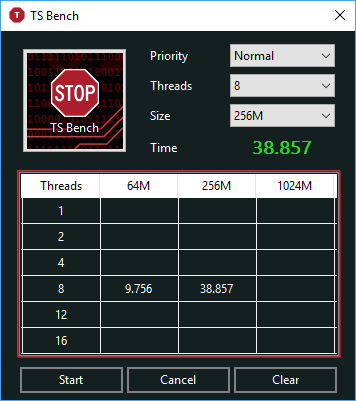
I maintain my argument - My friend has the 7700HQ, which does the 64M TS Bench at about a 28W power draw, yet finishes at 8 seconds. That being said, I understand your argument and that's why I'm going to say: The 8250U is less efficient during high load (upper turbo ratios) but absolutely thrashes the 7700HQ in normal every day workloads.v
![[IMG]](images/storyImages/image339)
(From my http://forum.notebookreview.com/threads/why-does-the-8250u-require-such-a-high-voltage.815154/ thread)
You should be able to beat a 753 CB score as well
![[IMG]](images/storyImages/image340)
=
My scores are on par with yours... yet your 8550U us running at 3.7GHz and at 38W? Do you have any background processes that might be sipping resources?
In my opinion, a core voltage of 1V was so pre-haswell. I don't consider 1v to be ultra low voltage. U CPUs are supposed to be ultra low voltage and I'm certain my 8250U runs at higher voltages at idle and at full load than the 6200U, 6500U, and the 4210U, all of which I have owned in the past. I still think my 8250U is just a lower binned 7
-
Oh wow, that is an amazing score for a 8250U. You are bringing some good numbers here. You're racking my brain as to why this can be.. In your signature it says you only have 8GB of ram. Does the latency decrease in single channel mode effect CB scores?
I think I'll read over that thread some more and maybe post my thoughts over there as to not clog up the throttlestop thread Vasudev likes this.
 -
If I throttle to 3.4ghz my voltages dip to 0.98
What were your voltages at this speed? -
and have a look on the Impact of XTU - slowing down your computer
-
I don't know how TS Bench really works. You'll have to ask unclewebb. I don't know if dual channel ram makes a difference. I can't test either because my RAM is soldered lol.
If I'm only getting a gain of 12.5% with the 8550U over the 8250U according to passmark, I'm not willing to pay the extra $113. as indicated by Intel ARK. All I'll be getting that oh so special 4.0GHz clock (which it can't sustain under full load on all cores)
Your 8550U:
My 8250U:
;
I guess it's pretty much to be expected.duttyend likes this. -
The only purpose of the TS Bench is so users can quickly and easily load the cores so they can watch for any signs of throttling. I got tired of always having to hunt around my hard drive to find something to load my CPU with. The TS Bench performs the same calculation a zillion times so it is not likely to be the definitive benchmark of anything useful. It is just warming the cores.
-
How can I manually downclock my CPU?
and also this:
Holy crap.With TS Bench and CB15(not at once),under 1V all times FULL LOAD. -
Please don't. There is zero use. If you want to force your CPU to a lower clock, raise the Speedshift EPP value.
If C8 is working, but your system is not using it at over 60% of idle time, that means you have some background task. Close all background tasks, disconnect all USB devices, stop all monitoring software (except TS) and disable all modifications (NBFC, XTU, etc) Try running a clean installation of Windows (As in, Windows + Drivers + TS only)
As I have observed, full load voltages are slightly lower than idle voltages. That's not really impressive. What's more impressive is how many people get tricked into thinking a 8250U or 8550U is a 7700HQ but at 15W instead of 45W. Well, to get the 7700HQ performance, you need to draw about 35-40+ Watts on the 8250U -
What do you mean by this? I'm confused.
Man, i still can't figure out how the 8250U is scoring above mine in cinebench by such a high amount. it's almost unbelievable. lol I'm running at ABOVE 3.4ghz at all times during a cinebench run lolLast edited: Aug 17, 2018 -
Need some help with ThrottleStop. First off, if I am able to run through a 3dmark 11 benchmark, would it be presumed that the CPU is stable? I know it only has one test that fully tests the CPU, is there a better benchmark that is better to test the stability of the CPU? I've used games that are around 80-90% CPU utilization, and they were just fine... but I'm curious if there's a test out there to really make sure.
Last edited: Aug 17, 2018 -
Running 3DMark 11 is just enough for GPU stability testing. Also, you should use the latest 3DMark to test especially DX12 test(Time Spy test). I like to use 3DMark v2.5.5029(I do not know it is the latest version or not) to test GPU undervoltage stability(if failed, the screen will be blanked and you need to go back to the desktop to manually stop the 3DMark program or directly restart your laptop to try again, try to set higher voltage until it can run the test completely) and use GPU-Z 2.10 -- Render Test, LinX, and the Prime95(choose small FFTs torture test) at the same time to test the whole system stability.
However, you should know the heat dissipation of your laptop is good enough before you run the last 3 programs test together. I am using i7-7500 TDP 15W, running these 3 programs can easily go to 35W and it is very easy to let your CPU going to 100 degree. Be careful to do so and you need to keep watching to stop the test if it is 100 degree over 5 seconds. My laptop will be shut down by the thermal protection if it is over around 5-10 seconds.
Apart from the above, you can also need to use some relative light-loading program, such as OCCT, to test the CPU to see the lowest voltage point in the fast "bouncing" voltage vs CPU clock ratio, that the voltage is high enough for the normal CPU operation. If it is failed, it will easily go to BSOD. You need to set higher voltage to try again.Last edited: Aug 17, 2018 -
I found an interesting discussion on the Reddit Dell forum. When it comes to using Intel XTU or ThrottleStop to under volt your CPU, a rep at Dell Customer Care does not recommend doing this.
https://www.reddit.com/r/Dell/comments/97yvdb/will_dell_void_warranty_for_intel_xtu_or/
And most importantly,
Before buying your next laptop, remember to get in writing what you can and cannot do with your laptop. -
No worry. Dell try as hard as possible to close the door for tools like yours outside their own control. And they continue develope own OC tools aka UWP apps who can be downloaded on Windows Store.
-
A recipe for disaster.
This is what I meant by BGAs being wasteful. No two bits of silicon are the same.duttyend, raz8020, Vasudev and 1 other person like this. -
unclewebbcares: it's perfectly safe and I'd pay dell 100k if they can find out I used Throttlestop on my laptop
ah thanks for clearing that up. lol Dell is hilarious.
-
So, let me get this straight: With these changes,
(a). Does Alienware have the basic decency to provide an unlocked BIOS? I've seen some models ship with the HK-series processors (and I have never owned an Alienware laptop, totally clueless here). I ask this because providing an unlocked processor without BIOS controls is about as useful as bull nipples.
(b). How does Alienware (Dell, basically) handle RMAs, warranty coverage and repairs in general? What's the general failure rate for modern (post-Haswell) Alienware builds?raz8020, Vasudev and ha1o2surfer like this. -
-
If you're AMI developer you can self sign the modded BIOS with secure flash compliance to get it up and running.
Post haswell especially for out of warranty PCs, AW support makes us doubt or harsh statements that we don't know how to use a PC and yadda yadda ... They think, they forced us to buy AW BGA and blame people, threby closing support request w/o any solution.
Still, normal users get the current issues on AW after warranty runs out so they buy new ones since BGA are expensive to replace.
@unclewebb If you are interested, yesterday I made a bat file to create a scheduled task to run TS at startup. Only issue is, you have to copy and paste the path where TS is located. For now I tested with TS located in my D drive, so you/anyone can add/modify the script accordingly. I don't like searching/looking for TS directory by scanning whole drive, it seems I'm invading the user's privacy if the scripts output their personal *ahem* stuffs, if someone scrolls up/down in cmd prompt or powershell.
Note: Run the script as admin. tsscript.bat adds TS to run at logon whereas tsstop.bat removes TS from logon if anyone don't trust the bat file or AV blocks the scripts from running.Attached Files:
-
-
why would you admit that you're using throttlestop or xtu
when a machine comes into service, ALWAYS say that it broke on its own and provide minimal user interaction information with the computer
play dumb, play safe, play the victim
the customer is always rightduttyend, Falkentyne, raz8020 and 1 other person like this. -
Its needed these days for basic survival. I'm thinking of going/unchecking TS in notification area for TS to run stealthily and also hide it from view in Task manager if hide option is checked off in Task scheduler.duttyend likes this.
-
Its a workaround when PC companies void your warranty seeing TS icon in tray.
-
This is just a plain stupid thing for a company to do.
They experiment on their PC,they broke it,your job is to fix it and make them pay for it,done.
More money from stupid customers is something companies always try to achieve.
Why not Dell? -
Hey @unclewebb I just thought I'd give you some info to add somewhere about the missing WinRing0.dll.
I saw you said you couldn't replicate it to find a fix so I replicated it for myself (on accident lol).
I see on another post deleting the registry winring0_1_2_3 or whatever it was, fixed the issue.
The problem is when someone installed evga precision tuner for their gpu it overrides this registry and installs a redirect that causes winring0.dll to not be located.
So if you wanna replicate the issue just install evga precision tuner.
In any case the fix was deleting that registry and alls good. -
Maybe BGAs will do that leading to inevitable death of Intel BGAs. I'd never buy a intel laptop w/o TS support.
-
Me too. In fact, I really do not consider to buy laptop which cannot use TS to maximize it.
-
I was originally worried that some antivirus program or gaming website was going to frown on ThrottleStop so I added a feature where you can change the .exe file to whatever name you like. How about SpongeBob.exe
After you do this, it will create a corresponding SpongeBob.INI file for all the config settings and it will happily read these settings next time you start it up.
![[IMG]](images/storyImages/iKPUq6a.png)
The icon and description kind of gives things away so I might need to work some more on a covert feature like this someday. It might be enough to throw the Dell Secret Police off of the trail. "It must just be some dumb game my kid installed."
-
Why not let us have the ability to change the icon?
-
Well how about they stop selling model after model of Dell and Alienware that needs an undervolt in order to stop overheating at stock voltages ??!??
How many RMAs in the past few years have they had from overheating throttlebooks vs damage from an undervolt? -
Atleast in Asia, Dell CS blasts us refusing repairs/blaming us for dying parts which you can see in Dell/AW forums.
People in US/Europe returned AW/Dell and settled for Aero 15 or MSI laptops or even went with Clevos.hmscott likes this. -
Guys, I'm new here. Just retired from master race and now own an Inspiron 7000 14" with a 8250U. Pretty happy about the notebook overall...
I'm struggling however to make RWEverything settings to stick. It seems this BIOS has 20W PL1 hard coded somewhere, because even when I set the values in RWEverything, the PL1 and PL2 changes (I can see the values I set on HWINFO) but then it just throttles back to 20W and the value is overwritten on RWEverything.
Any guess? Does that means the BIOS is locked? Is any other driver/program conflicting and overwriting this values?
I'm using throttlestop to undervolt it, -100 core / -125 cache seems stable so far.
Thanks in advance!hmscott likes this. -
What values are overwritten and what are they written to? Post a couple of screenshots.
Did you disable and remove the Intel DPTF driver and did you fix up Windows 10 so it cannot install it again? This is the biggest problem for most users. DPTF = Throttling Cancer
You usually need to under volt the CPU Core and CPU Cache equally. If these are not equal, the -125 will be ignored and the CPU will use the -100 mV value for both.
A wonderful person contacted me recently and I told him about this problem with the MMIO memory location being abused by Intel / Microsoft. He is working on a solution. Things have never looked better. Time to go do some testing.
-
The results are in and it could be a game changer.
To simulate a modern throttling laptop I wrote the value 8100 to the long and short term turbo power limits in the MMIO memory location.
8 means the limit is enabled and 0x100 = 256 and divide that by 8 and you get the 32 Watt power limit. I started up Prime95 for some serious load and here is the throttling I got.
![[IMG]](images/storyImages/pwAcfki.png)
I had the Clamp bit set too so the CPU throttled down below the default 24 multiplier to stay within its sad and sorry 32 Watt limit.
Next up, I ran a new magical program. Using the RWEverything driver, it has access to this MMIO memory location. My recommendation was to write a bunch of zeros to this register and then also lock it so no other driver or anything else could access it further. Any writes to this memory location by the DPTF driver or any other software will be ignored.
![[IMG]](images/storyImages/2Gywnf7.png)
Exact same Prime95 load but now my laptop is pulling 56 Watts instead of 32 Watts. The MMIO memory location has been fully neutered.
Not sure if this new code will be added directly to ThrottleStop or perhaps it will remain as a separate program. It should be very useful on many 8th Gen and beyond devices. -
Here we go...
I got core/cache down to -110mV and disabled DPTF for good (restarted, it didn't reinstall)
That, helped (a bit), the value I set on RWEverything is now permanent, is not being overwritten like it used to before, but the CPU is still getting PL1 Power Limite Throttling after the PL2 time limit. It throttles back to stay under 20W.
On the screenshot below we can see that both line in RWE and HWINFO readings show both values set at 32W, even though the CPU is PL1 throttling back to 20W.
![[IMG]](images/storyImages/2.png)
Any thoughts? Thanks again -
So how does this new magical software write to this memory location versus the user writing to it?
-
The turbo power limits can be set in MSR (TS handles that one), MMIO (RW Everything handles that one) or PECI and I do not know of any tool that can handle that last one. Intel might have a tool but they are not sharing. Your device might be forever limited to 20 Watts. That is not ideal but at least it is better than 15W which Intel rates it at.
It does the exact same thing. I just thought a simple program that could handle this or perhaps building this code into TS would save users from getting their hands dirty with RWEverything. -
This is a great idea and great news! Intel.. stay awayVasudev likes this.
-
Say it this way. Unclewebb please include it w/o intel's/XTU's knowledge.
-
Good day/Evening Unclewebb. I have a strange intermittent issue when my laptop PL2 on idle and load. I stress tested with Aida64 but I cant get more than 2.8 GHz for my i7 7700HQ CPU. I have increased power limit to 92 on TPL but still constant PL2 in red under limits and on idle it flashes red/yellow. It happens intermittently though, if I shutdown the laptop it and switch it back on it will go away and I dont get the PL2 limit. Please help.
-
Change 92s to 200. I had this also. It is safe.
-
You didn't have PL2 flagging red/yellow in idle after this change?
-
No. Not with these settings.
Post # 1940 shows my TS settings.
http://forum.notebookreview.com/thr...5-owners-lounge.815492/page-194#post-10784162 -
Well, that's what I was afraid of...
It's not THAT bad, like you said. I`m still getting 2.7-2.9 after it throttles to stay under the 20W PL1 limit. That's good enough for a notebook that won't do anything heavy.
Also, cooling is terrible in this Inspiron 7000 (as expected), 20W is being more realistic to that, especially when we have the 25W GPU on the same ridiculously small heatsink.
I'll try to create a gaming profile that stays under 20W, maybe get a solid 2.8ghz, and lower temps. And let the 3.4ghz turbo for quick "juice-ups" when using the system for everyday tasks...
Thanks for all the effort and help, uncleweb. Guys like you give meaning to the word "community" -
Oh ok I see. Weird thing is that my CPU pl2 throttles intermittently every 3 or 4 days. If I get a pl2 throttle flag I just shutdown and then turn on the laptop and it's gone but restarting doesnt remove the pl2 flag.c69k likes this.
-
Is there any recommendations against starting ThrottleStop automatically via TaskScheduler and set "Ac ON - Battery OFF" at the same time to apply the settings automatically?
I ask because with settings I can pass some light stress tests I get freezes on startup if I set it that way I mentioned above. But if I turn it ON manually AFTER the system is up and running there's no problem. -
Hi man im a linux user, i can undervolt 5200u cpu in linux with a python program, only problem is when my cpu reaches 85 degrees its turbo gets disabled by bios possibly by dptf. How did you pass that crap in windows while writing throttlestop? i tried to disable bd prochot with no avail, it didnt prevent dptf from disabling my turbo can you help me please?
-
Sounds like a bug or just bad design somewhere. If you feel adventurous, next time you have this PL2 throttling problem, download RWEverything, click on the memory tab, navigate to FED15900 and post a screenshot. I would like to see what those 2 power limits show.
The previous page has some examples of what a RWEverything screenshot looks like with the memory tab open and set to the appropriate location.
http://forum.notebookreview.com/threads/the-throttlestop-guide.531329/page-850#post-10784106
The On Off feature does not really do much these days so I would not use that feature. One of those mostly obsolete features that I have not got around to removing yet. Any freezes are a sign that your CPU is not getting enough voltage. Do not be cheap and give it some more voltage. A truly stable CPU can run at any load and at any speed without locking up. This means doing some full load testing as well as running things like the TS Bench with only 1 or 2 threads selected. My advice is do not add TS to your Windows start up sequence until your tests show that your CPU is fully stable.
I thought the DPTF driver was only for Windows. I have zero Linux experience. I think there is a bit in MSR 0x1A0 that can be used to disable turbo boost or it might be the value in MSR 0x199 that is causing this. The bios can also set a 15° offset to force a CPU to start throttling at 85°C instead of the Intel recommended 100°C value. Without seeing a register dump while your CPU is throttling, it is impossible for me to figure out the cause.
I am thinking about sending the developer of RWEverything a big bag of PayPal money so I can use his RWE driver to help ThrottleStop get over the hump. What do you think? Does that sound like a good plan?
Last edited: Aug 22, 2018 -
Thanks unclewebb, will monitor and if PL2 again constantly even on idle will post a screenshot of memory tab. Thanks alot for your assistance.c69k likes this.
The ThrottleStop Guide
Discussion in 'Hardware Components and Aftermarket Upgrades' started by unclewebb, Nov 7, 2010.


