Problems? See this thread at archive.org.
I'm trying to apply a sweet sweet undervolt on my surface book, but I'm not really getting what I'm seeing here:
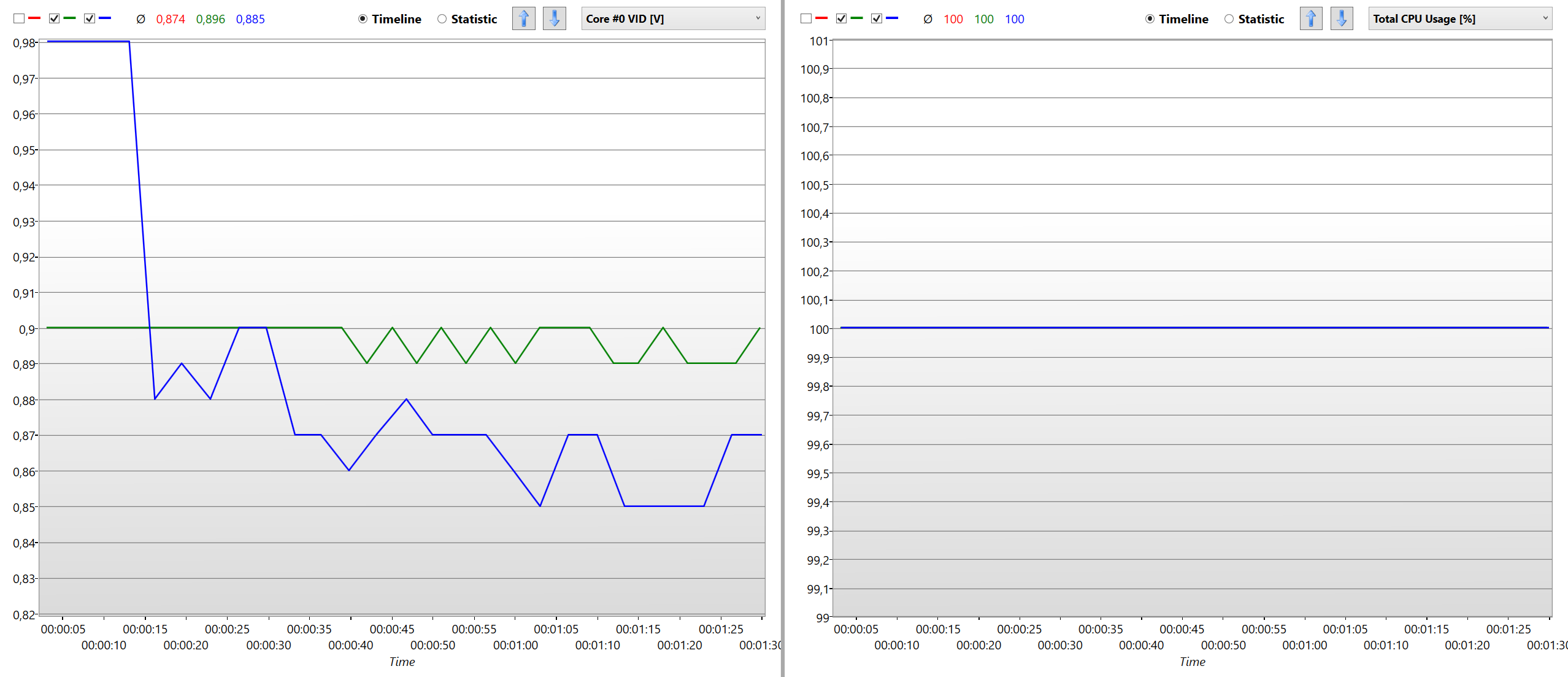
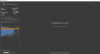
The blue line is stock, no offsets set in FIVR. The green line is with a -89.8mV undervolt on the core and cache, and a -35.2mV on the GPU. I hid the red line, which is pretty much the same as the green one. (That's also a question I have: Turn On/Turn Off doesn't seem to do anything? I get the same results wether I have the undervolt turned on or off.) Logs are pulled from HWiNFO with genericlogviewer, and the entire graph is on 100% CPU load with TS Bench.
It's interesting that the voltages are lower initially (exactly as expected), but then the not-undervolted voltage drops below. I thought it would be some kind of turbo thing, but I ran the test multiple times and let the PC cool down to its idle temps every time; the results stay the same. Does anyone have an explanation for this behavior? Am I doing something wrong? What's happening? What is the meaning of life?
-
-
I have a reasonable explanation. When you are not under volting your CPU, it is probably throttling more. A slower CPU automatically gets less voltage than a faster CPU does.
What that graph tells me is that you are looking at misleading information. You need to be looking at your CPU speed when fully loaded. Do not look at a graph of CPU speed reported by HWiNFO. That program does not accurately track CPU throttling. ThrottleStop does.
Run ThrottleStop with the Log File option checked. A TS log shows extremely accurate multiplier information. If you want, you can graph that information however you like. I prefer just looking at the numbers. When it comes to throttling, it tells me what I need to know. You can use www.pastebin.com if you have a log you would like to share or maybe attach it to your next post.
The Turn On / Turn Off button only applies to Clock Modulation, Chipset Clock Modulation, Set Multiplier and nothing else. Most modern devices are not using any of these throttling methods so this button is obsolete. Offset voltages and most everything else works regardless of the state of this button.
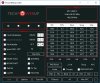
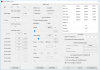
How about post some pictures of ThrottleStop so I can see how you have the program setup? So far I don't even know what CPU model you have let alone what features you are using or not using. -
I've been chatting with Falkentyne over PM for only a little bit trying to figure out how to flip the Flash Protection Registers for my BIOS so I can flash it. Man he's got some great info. Upon learning more about this new process involving stupid bios locks (gone are the easy days huh..) I have managed to modify some interesting things to "unlock" my power limits without flashing a modded bios... I'm sure some people have a guess as to what this is.. The key thing is no flashing needed (at least for this newer HP model..) hehe more to come as I gather my data and post it neatly
 Last edited: Aug 13, 2018
 -
-
Thankfully this is an HP laptop. The Spectre 13 x360 to be exact. Their BIOS recovery tools are top notch. I have messed up trying to write a BIOS to it (flashing a pre meltdown/spectre bios) as well as messed up the booting of the laptop with changing EC values (for some reason those stick and survive the battery being pulled out..lol oops). I do have a flasher on order though All you need is a flash drive and it'll do a blind flash and reset everything 100% of the time. Now I agree, I had a AW laptop and man those things are pains in the a****. You sneeze the wrong way and your BIOS is bricked (had it happen twice to me just using their own tools)
EDIT: Just noticed you have the same laptop I did.. yup brick hell on that model for me lol I had to sell it
I don't want to turn this thread into a BIOS themed thread. My goal was to use a unlocked bios so that TS could control power limits. While it's slightly off topic what im about to post, I will be using throttle stop to keep my power consumption in check during battery mode as my "mod" lets my 8550u draw well above 15 watts on battery which I assume it was never designed to doVasudev, raz8020 and Falkentyne like this. -
I’ll preface this with a warning. This method of editing your BIOS blindly COULD end up damaging your machine. Some settings are reversible but some like voltage settings may render your machine useless if the hardware’s been damaged or if you can’t flash back to a fresh BIOS. You’ve been warned! On a lighter note, you’ve always been warned that this may not work for your laptop. This didn’t take me very long to complete as I had great help from <insert forum member name here> but maybe I was lucky and this method works for my machine. Who knows unless you try it out, SAFELY
Play and follow these at your OWN risk please.
Now onto the meat. My laptop, the HP Spectre x360 2018 with the 8550U is a great performer. Turbos up to 30 watts for 9-11 Seconds (PL2) then dips to 14.7 watts for the duration (Pl1). Sometimes dipping into the 9 watt range for some reason. My goal is to unlock PL1 or at the very least let it turbo higher than 2.7ghz at PL1. I dumped my BIOS using FPTW and poked around in AMIBCP for what settings it had to offer. HP gives you desktop grade settings in this BIOS which was refreshing to see. I went to work trying to figure out how to flash this an easy way. I unlocked the menus and set them to “USER” and just slapped the saved BIOS over my HP’s recovery tools BIOS and let it restore it lol yeah yeah sounds funny but it sort of worked. I saw my custom BIOS revision I added so I could tell it was working but it never showed any menus. Bummer.
That’s when I posted to the forums here to see if any great minds had an idea and also just to keep my findings documented since nobody seems to have attempted my creative ways to modifying the BIOS. Modding is a stretch, it’s more like unlocked hidden menus lol
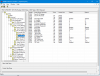
Lots of cool stuff so I was “foaming at the mouth” not really, but this seemed promising. I’ve seen the inside of some other BIOSes and ¼ of the menus I see here were only present. So <insert member name here> PMed me showing me some details about the flashing process. He has a great help keeping me sane as I figured I was doing this all wrong. We tried a lot setting the right BIOS Lock bits as well as trying to troubleshoot a Flash Range Protection Region error that I couldn’t seem to get past (he found some more info on that so that might be saved for another post)
During the process of modifying UEFI Setup Vars in RU I figured.. since these settings are surviving reboots and are clearly affecting my system (I disabled the battery in RU and test to be sure my settings were actually doing something) I set off on a search to change IMON variables!
RU is an EFI shell that allows you to edit variables in firmware. I found the IMON variables using these softwares
1) 1) UEFITool (used to extract the user interface setup variables. Such as changing CPU settings and memory timings and such)
2) 2) IRFExtractor. This extracts just the menu section of the BIOS as a readable text file so you can search for variables that are tied to BIOS menu options. Basically a giant list of all bios menu options
I chose not to show pictures of these softwares as these are almost always going to be different then your machine unless you have my same exact BIOS revision and model number
This is where I found the IMON variables naturally. As shown below are my systems default values. Pretty standard and 100% of the system use default values since these are usually used for overclocking I’m guessing
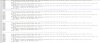
Hopefully that's not too small. I also have the text file attached to this post.
I booted up RU and changed these values for all the above found entries. Now, I’m not sure which set actually control the IMON so I changed them all lol
IMON Slope: C8 (this was stated as max in my bios so that's what I set it to)
IMON Offset: 32 (50%)
IMON Prefix: 0x1 (enable – offset)
And here’s what that looks like in RU
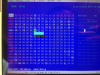
You can match up the IMON variables with my screenshot
Now that we have those set we force a reboot a couple times without going into windows and then check that my settings in RU stuck and low and behold they have! Woot! The only time these values get changed are if you do a bios load setup defaults or upgrade your BIOS. Pretty nifty. Because of the nature using RU to modify these variables, this means no flashing of a modded bios so your warranty should stay 100% intact. Please correct me if I’m wrong J
Now onto Throttle Stop Numbers. My computer rarely went above 15 watts for any length of time because it’s so throttle happy. I was very intune with my wattage numbers and what temps I get at what wattage draw. After setting these settings in RU it was quite obvious my changes had taken place.. While I don’t have any pictures beforehand these are enough to prove the effect of IMON. Once I get home tonight I’ll throw my computer on top of the AC vent and get it nice and cold and run more tests but for now this will work

As you can see I am drawing a full TS Bench load at 3.3ghz at just over 18watts. Normally this would be out of reach at my laptops current PL2 limit which is 30watts at 3.1ghz. During a cold boot I can see as high as 3.7ghz for 15 seconds until thermal throttling takes over. PL1 and PL2 limits never even show up in Throttle Stop as they never activate. Pretty Cool.. or hot in my laptops case.
Since my CPU is now drawing way more than it should I was worried about how this effects battery mode. So my laptops locks PL1 when on battery so it can’t draw more than 15 watts. This is where ThrottleStop has been a huge help. I set the 4 core turbo limit to 2.7ghz which is roughly 15-16 watts. So I feel good on that front. Now I need a repaste as my temps are off the charts and quickly hit 97c and basically negates all this work I have been doing anyways *rolls eyes*
I will report back on the hit on battery life but looking at my discharge rate at the moment. It’s sitting at around 4watts and my battery meter says 13 hours while writing this up. So I’m going to guess it doesn’t effect battery life that much. I see the C8 sleep state is still being used and the reported wattage is around .8 rather than .5w that it usually idles at.
That’s all for now, If I missed any data I’ll post some edits. Hope I didn't leave any thing out. I was so excited to find this so I hope it all made sense! Let me know if you have any questions! I usually answer quickly.Attached Files:
csin_86, duttyend, Ionising_Radiation and 3 others like this. -
-
Glad you got at least what you wanted in the end.
Did that link to win-raid.com about those strange sub variables under flash range registers help at all?duttyend, Vasudev and ha1o2surfer like this. -
I'm carefully looking into how I can test and try this. I did see your message. They do exist just as that forum post says.. Since his laptop uses the same chipset and apparently similar ish bios as well.Vasudev likes this.
-
TS Showing 3.7Ghz at 14w!
I will never update this laptops bios again. Knowing stupid HP, they will somehow prevent this from happening lolAttached Files:
Last edited: Aug 13, 2018 -
-
How much speedshift value is good for letting the processor hit the highest frequencies and yet be able to idle when not under load?
-
Keep the middle of the road value of 128
-
All CPUs are unique so best to do your own testing. The built in TS Bench test should give you an idea. One CPU I tested could not hit max speed with the typical Speed Shift EPP value of 128 so now I recommend using 80.
When individual cores have nothing to do, they should be entering the low power C7 state. Reported MHz is meaningless because 99% of the time, if the core is in C7, it is running at 0 MHz. It is disconnected from the internal clock in this state. Disable useless background tasks and max out your C State residency time so cores spend as much time as possible in C7. Learn to ignore MHz when a CPU is idle. Reported MHz being high or low makes virtually no difference if the CPU core is running at 0 MHz 99% of the time.
Too bad laptop manufacturers do not have the smarts to build low power laptops with U CPUs that run like that. I guess they would get in trouble from Intel if they showed what the U is really capable of.duttyend, Ionising_Radiation, pressing and 4 others like this. -
In reality it's probably using like 40 watts lol so is it really special still at this point?
-
I actually found BIOS recovery on my model, after I googled Falk's sentences until SEO worked and I found a solution at dell. Done it and always have the usb in hand before updating BIOS.
I suppose HP used Aptio 4/5? Insyde BIOS tools are hard to find and crack.
Uncheck Speedstep and C1E. Enjoy full power of CPU with HWP-EPP.duttyend, pressing, ha1o2surfer and 1 other person like this. -
Well I guess I'm famous.duttyend, Ionising_Radiation, Vasudev and 1 other person like this.
-
Dear fellow TS users,
After following the battery life increasing guide by Che(a great guide btw),I have a issue:On idle the CPU will not comepletely set at C8 over 80% but instead a little here and there at other C-states;especially C2.Not too good and from the same guide,he mentions about a driver issue.What should I do?
And also my laptop when not using the Battery Saver bulit into Windows and the "power saver" Power profile DRAINS the hell outta the battery,like 10-11 W monitored through TS's Battery tab.
Please help!duttyend likes this. -
-
Hey guys!
I'm kinda new with undervolting CPU and GPU stuff. Does anyone has similar laptop with me?
My laptop setup is MSI GT72VR i7 7700HQ GTX 1070...
I did the undervolting my CPU with throttlestop and then did the stress test with AIDA64, but I couldn't find any sweetspots and everything went wrong after I hit "stop" stress test cuz blue screen came up. Any advice? TIA. -
Try using this tutorial. It has everything you need to set up Throttlestop. I have a 770HQ. You will need to find the sweet spot for your undervolting. Mine turned out to be about -124mv. Your mileage may be different due to variations in chip quality. Change this on both the CPU core and cache.
You will need to be patient and make your undervolting changes incrementally until your system is stable (no BSOD).
duttyend likes this. -
Sorry for such a basic question... but is there any reason to use ThrottleStop over XTU for undervolting? I have -140 on my 7700hq at the moment, 145 crashes every now and then. 150 crashes on the first test. Would it be worthwhile to use throttlestop to see if I can get to 147 or something? XTU only allows in intervals of 5.
Going through a stress test of 30 minutes with XTU implies the system is operating efficiently correct? Or is there a better stress test to make sure everything is operating smoothly?
Edit:
It's not really related to Throttlestop... but I figured someone would know in here. -
Throttlestop is more useful and far more lightweight.
The only thing XTU Is good for is the stress test and for changing the worthless "CPU Cache ICCMAX", which is nothing more than "GPU unsliced ICCMAX" on Skylake+.duttyend and InOrderToSignIn like this. -
Interesting, isn't undervolting just changing the operating voltage for the CPU? If you change it -140 on throttlestop, wouldn't it be the same as changing it -140 on XTU?
If it's more lightweight, I'll check it out though. Using less resources is always good... but once you change the voltage, the application is no longer running correct? It's a permanent change. -
Look at the file sizes.
TS doesn't install a ring 0 driver that can reset your system bios if you enter the wrong values.
TS doesn't take 50 seconds to uninstall.
TS allows you to select multiple saved profiles with different voltages (Note: this requires using a SET voltage on any profile that uses the default voltage in your bios as what is "Default" can change when you're in windows if you made a voltage adjustment already (that then becomes the "new" default).
TS allows you to instantly switch to a battery power profile if you unplug the AC adapter.
TS allows you to take control of your cpu multipliers and even downclock manually to 800 mhz if you want to get 6 hours out of that 2 hour battery.
TS allows you to set and control your own speed shift settings.
XTU allows you to feel happy about having that good old blue, white and black Intel theme all over your desktop. -
Awesome! I may actually check that out. I currently only get about 3 hours battery tops while browsing/videos... hopefully using TS I can bump that up a bit.
Curious, if you change the voltages and uninstall the application (XTU)... I imagine the settings revert to stock settings? -
wow thanks for the video. I think I found my sweetspot for now (I guess lol) -150mv
and btw do you know what is Speed Shift - EPP is? And do you know how to undervolt GTX 1070 using MSI afterburner? I searched whole youtube, but I found lots of OC GTX 1070 desktop
-
All that you seek is in this guide from the first post of this thread:
https://www.notebookcheck.net/How-t...ife-The-ThrottleStop-Guide-2017.213140.0.html
To quote from the guide:
“ Speed Shift - EEP - Speed Shift is a great new function of Intel’s Skylake and Kaby Lake CPUs which supersedes Intel’s old “SpeedStep” technology. Where SpeedStep exercised software-level control over the CPU clocks, Speed Shift removes this inefficiency and lets the CPU dynamically change clocks without making calls to the OS. This means much faster upclocking and downclocking of the CPU. If you have a Skylake or Kaby Lake CPU, you want this enabled. Note: You will need to click on the “TPL” button and enable Speed Shift in that dialogue box as well. Though it should be enabled by default on new PCs, some companies, such as Dell, have decided not to enable to this feature on their XPS 9550 and 9560 notebooks. If you own either of those laptops, this is a feature that you definitely want to enable yourself.
Next to Speed Shift is a box with a number value in it. The accepted values are 0-255, where 0 means absolute maximum performance, and 255 means minimum performance with minimum power drain. You can play around with this setting yourself and watch how the clocks change while performing a strenuous task. You should see that a value of 0 will keep clocks pinned at their maximum under most levels of load, 128 will allow some downclocking during load, and 255 will likely pin your clocks at their minimum frequency despite load. If you find your CPU is downclocking while playing games or other situations where you want maximum, consistent performance, try a lower value. This is where profiles come in handy (as we will discuss later), as you can use a value of 0 when plugged in and a more balanced 128 when on battery, for example.”duttyend, ha1o2surfer and InOrderToSignIn like this. -
It's official, an 8550U is more powerful than a 7700HQ when an 8550u has unlimited access to power
-
Sorry @unclewebb I don't mean to throw the thread off topic. Just wanted to post how an UNthrottled u CPU actually performs. One last screenshot.
duttyend, pressing and Falkentyne like this. -
Yeah, I've been positively caught offguard by this.
I totally bought this U processor to be a basic machine, but when unlocked, it can tackle heavy tasks with ease.
I don't get why Intel doesn't let it run like that.duttyend, pressing and ha1o2surfer like this. -
Hi, can TPL per profile be added please? I am running an 8950hk and want to save cooler and faster profile for different cases. For most power saving example if I set the Turbo power limit to 15w, my temps stay in 60s even when I block the fan intake by keeping the laptop on bed and running OCCT small data set test with 100% cpu usage. I can still browse the internet without any performance issues. Unfortunately it changes the power limit for all profile and there is no option for individual profiles.
Since power is directly related to heat, we can have much finer and consistent control over the heat generated by just setting the power limit for different profiles.
Edit: Speed Shift: EPP and disabling Turbo achieves roughly the same effect. I didn't notice power change on the first test, possibly due to some wrong setting by me. After thorough testing, I can confirm power usage changes with Speed Shift settings. Great software indeed. Thanks for it.Last edited: Aug 15, 2018 -
Sorry for throwing out non related question over here!!
I just wanna know what is the usual settings for undervolting GPU using MSI Afterburner especially one who with GTX 1070 laptop...
Screenshots will be much much much appreciated. And, Thanks and sorry in advance. -
What's even more amazing is, I get easily 9-10 hours of battery life. Plus I can pop in my GTX 1080 for a pretty beast gaming setup. Almost a win win. Now can I hack 32GB of DDR3 onto this motherboard hmm
pressing likes this.
-
CPU/GPU undervolting/overclocking are not skills learned quickly. There is a lot of information, sometimes embedded deep in threads, that will turn on your magic lightbulbs. Here is another useful guide from our own @Mr. Fox . I found this guide very helpful in understanding how to undervolt and overclock the GPU:
raz8020, Papusan, Mr. Fox and 1 other person like this. -
Thanks!
I really need such guide right now for my toasty GTX 1060 laptop!Mr. Fox likes this. -
I agree that would be useful but I haven't got around to adding that feature yet.
What I did add recently is the ability to change IccMax on a per profile basis for both the CPU and iGPU. It works great but I still need to fix a few minor unrelated things before releasing the next version. I think this new feature will give control very similar to being able to change the TPL power limits.
Per profile IccMax adjustment also works independently on the iGPU. Minimizing iGPU IccMax to 1.0 Amp has the iGPU in my desktop running at a lowly 100 MHz. This might be useful for someone trying to max out their run time on battery power. Slow and sluggish for the win!
Edit - A couple of examples. 1000 MHz iGPU vs 100 MHz iGPU
Nice little drop in power consumption.
![[IMG]](images/storyImages/MpSPx9r.png)
![[IMG]](images/storyImages/NCOWfod.png) Last edited: Aug 14, 2018
Last edited: Aug 14, 2018 -
Hmm why would an idling iGPU use 3 watts?
Im sitting at 300 mhz at .2 watts on an Intel 620.
Edit: sorry I mixed up 630 and 620. and more numbers. blah lol but the 620 and 630 are basically the same chip just slighter high rated clock speed. -
-
That's weird.
The i7-7700HQ can't be that low.
Would you mind sharing the TS setup and maybe run CB15?
I have the same i7 so,yeah I will post a CB15 screenshot and TS setup too just to compare.
Update-Here you go:Attached Files:
Last edited: Aug 15, 2018 -
-
-
AH my mistake. Makes sense now!
-
Ok fine ill give you this round.. my micro laptop cant keep up with the heat..
My laptop is about this thick... Lol minus the pink color
PS only a couple fps off a GTX 460.. that's no feat I guess lol -
Thanks Bollas for another useful video... Hopefully I can do more and better at this after I watch the video... Cheers!!
-
Actually none of us win this round because I run it using maxmium fan speed of 6000rpm and my laptop-the Acer Predator Helios 300 is THICC.
By the way yours is very close to beating me,and you did in single core.
I have just bought it before the 8th gen rage of the 8750H for the price near a Helios 300 with a 8750H.
Oh well,mistakes were made.Friends?Attached Files:
ha1o2surfer likes this. -
-
"THICC" LOL hey it ain't that thick... that's a nice looking laptop IMO If you want to be even more fair my fans were at full blast too but thankfully they were quiet as I was running all these in bed with my wife sleeping and I'm still alive!
-
A bed isn't going to provide the best vetilation so yeah you may need to get it on a solid ground.
Still pretty sad about the 8th gen thing though.
By the way,where is UncleWebb though?
I have some questions that needed to be answered. -
You should be able to do better. My 8250U gets a score of 9200 I think. THe link is in my signature.
Poor you guys with terrible BIOSes. All I have to do is increase the value in FED15950 lol.
EDIT: The 8550U has a turbo of 4.0GHz, and the 8250U 3.4GHz
9200 divided by 34 equals about 270.5 points per 0.1GHz. for the 8250U.
The 8550U is the exact same but overclocked and with 2MB more cache.
Xiaomi decided to go with the disgusting MacBook air output design. The airflow is pushed towards the bottom bar of the display and is forced up onto the screen. Ugh. The airflow is probably restricted by 50%. I've run those fans at the full 5v with no PWM, and they are shockingly powerful despite being only about 5mm thick. Whilst running cities skylines, raising the bottom of the laptop reduces temps by 5-7C.Last edited: Aug 15, 2018duttyend likes this. -
Well the 8550u at 4 Core turbo is only 3.7ghz with no turbo bins. Even with unlimited power budget it can't go higher. At least I'm not aware of a way. It can hit 4ghz on only 2 cores where as yours can hit 3.4 on 2 cores.
i If my laptop didn't thermal throttle it might perform better but I'll never know because no matter what i do, even in front of a huge AC, it throttles.
10400 in passmark for a U cpu is good enough for me. If it didn't throttle I might get a couple hundred more but as of right now, this chassis is a limitation.pressing and Falkentyne like this. -
You are forgetting that, to get a 10400 score, you need a ridiculously high voltage, resulting in the power consumption equal to, or greater than the 7700HQ. It is really no use. All you are getting is a 7700HQ locked down (on most laptops) to a 15W TDP.
-
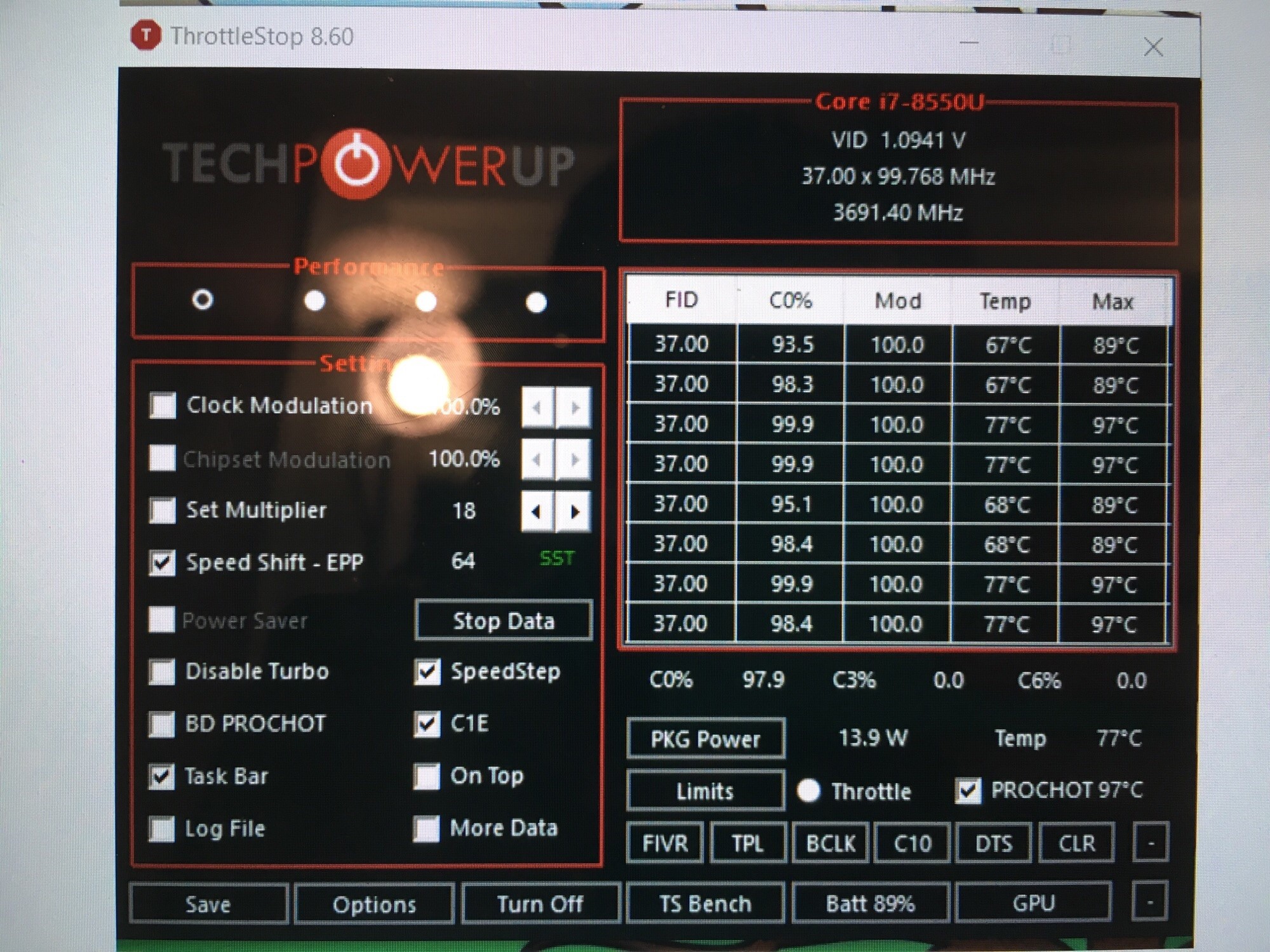
Ehh, my voltage is 1.07 (since I undervolt) at 3.7ghz under a TS Bench Load. I have the IMON offset and slope set so it shows -50% power draw so that means when TS is reporting 19 watts load it's really 38 watts at 3.7ghz so much lower than a 7700HQ. I would argue your 8250u is closer to a 7700HQ. And my 8550U shares the same specs at the 7820HQ
Look at those temps lol usually it's around 3.7 but throttling set in so it's sitting at 3.6 ish ghz
My wall meter says I'm drawing 26 more watts under load then when throttled to 15watts. So my calculation is mostly correct.
HP shipped my laptop with a 65 watt USB c adapter. Maybe they wanted this to happen hehe
EDIT: TS Benches Below
256:
64:
Last edited: Aug 16, 2018 -
My i7 7700HQ.
The ThrottleStop Guide
Discussion in 'Hardware Components and Aftermarket Upgrades' started by unclewebb, Nov 7, 2010.






![[IMG]](images/storyImages/iRHxrLu.png)