Problems? See this thread at archive.org.
@unclewebb
Things about Windows and SST:
Hmm. 5 pic attachment limit.
-
Attached Files:
6.|THE|1|BOSS|.9 and Vasudev like this. -
-
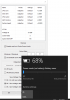
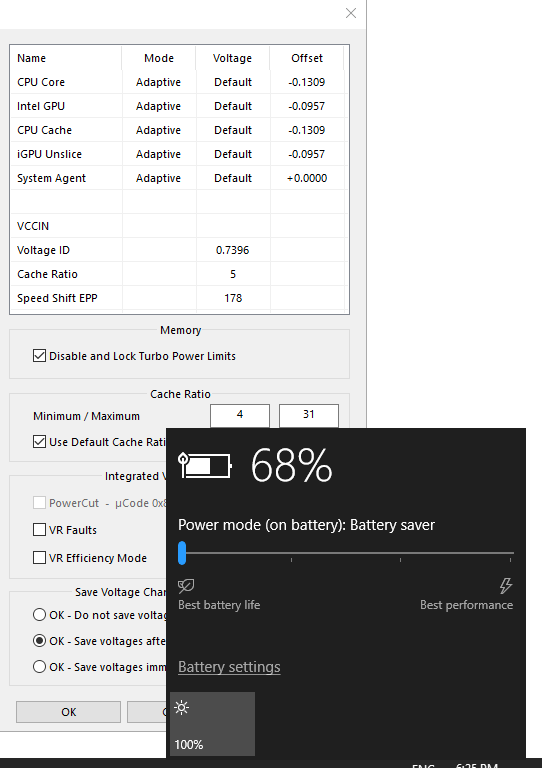
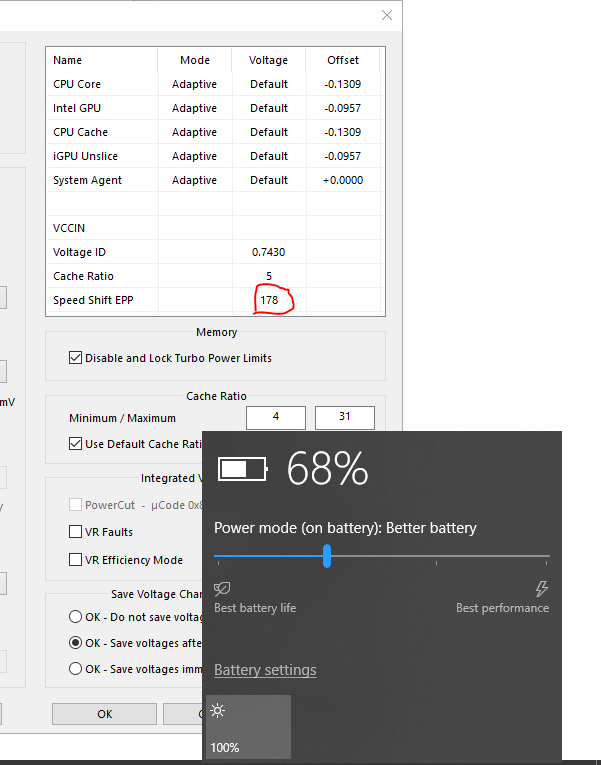
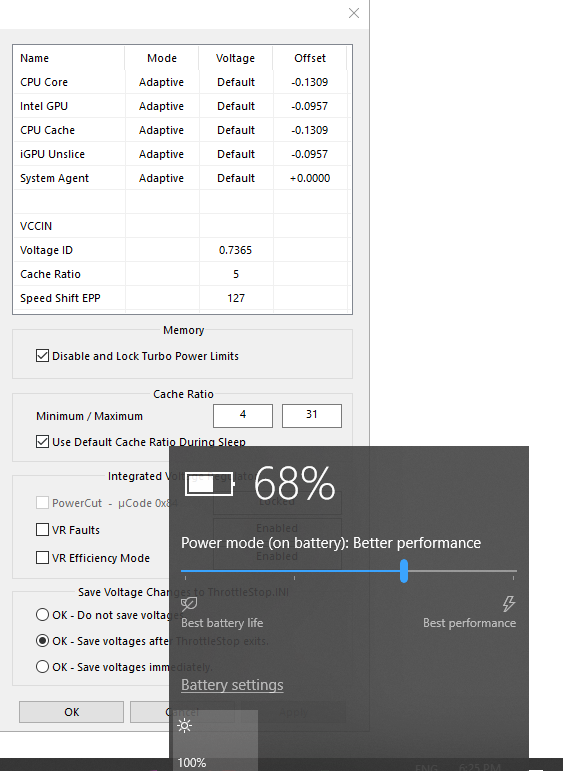
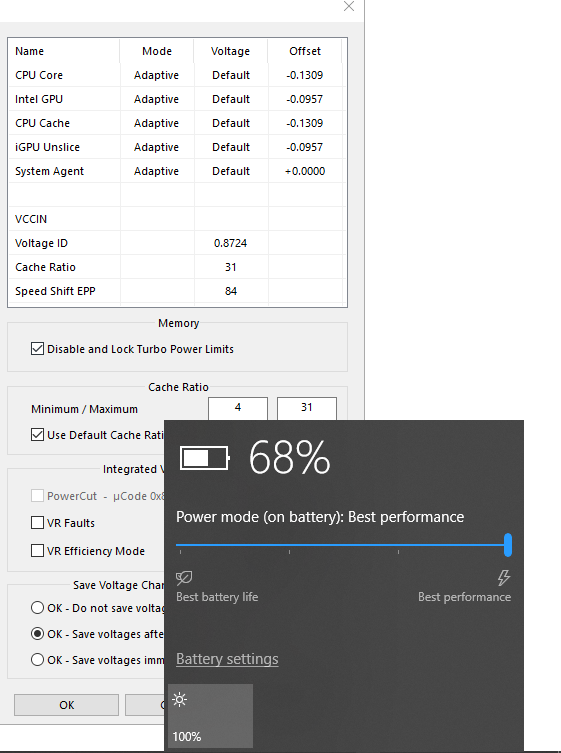
Without TS, on battery power, Windows limits the lowest EPP value to 84. Plugging in the AC adapter changes the same setting to 0
And here is the master setting that controls "Better Performance"
These are the default values. This means that, on battery power, when the slider is set to "Better Performance", the SST EPP would be 50% of 255 = 127. The same setting on AC would give 33% of 255 = 84.
It is interesting to note that the aforementioned setting does not change any of the other battery slider options (It only changes the "Better Performance" slider option). Lazy coding on behalf of Microsoft. How difficult would it to have a slider that has 255 values? FFS what we have instead is SST EPP values of 178, 127, and 84 on battery power and 127, 84, and 0 on AC power.
What a useless slider. TS saves the day once again.unclewebb and 6.|THE|1|BOSS|.9 like this. -
Have you tried other BGA Chips? I'll try it on skylake. Acc. to me speedshift values differ from each gen. On skylake 80/127-Balanced 0-Max performance and anything higher than 180 causes cpu to hang up or perform like Pentium 4.
On Kaby I found (2 Samples only) 0/80 roughly ramps up clocks to highest speed 95% of the time, 160-190 just works as extreme power savings. Maybe I'm wrong because the BIOS didn't have HWP-EPP option at all! So everything was controlled though TS.6.|THE|1|BOSS|.9, Che0063 and Maleko48 like this. -
Ok I have made more testing after adding reg values from your 1 post about dptf and after applying additional reg fixes.
As I said cpu performance in benchmarks like firestrike went up by around 120points in physics and around 20-40points in rest tests.
But what is crucial is that after applying additional reg tweaks my temp was better by arround 1-2C during gameplay. So all in all I am now about 5-6 C cooler than before and now my avarage temp was mostly fluctuating between 67 - 70 C on GPU and 69 - 72 on CPU, so I think that for my laptop with quite high decent spec is excelent. And what is more after this additional reg fixes my fans were running quieter than before. It s amazing now! Lower temps with better fan culture and a bit higher overal performance.
I am only wondering why this DPTF were disabled by default in bios. And what is more why we need to unlock bioses to get all this extra features like for example DPTF, ram OC etc. enabled, especialy in gaming laptops?6.|THE|1|BOSS|.9 and Maleko48 like this. -
@Che0063 @Vasudev
I already mentioned it a while ago here...
http://forum.notebookreview.com/threads/the-throttlestop-guide.531329/page-812#post-10759299
here...
http://forum.notebookreview.com/threads/the-throttlestop-guide.531329/page-812#post-10759299
@unclewebb Knows about it
Vasudev likes this. -
In my case, increasing undervolt on cpu cache more than a certain value causes my laptop to either freeze or have random glitches on screen. I can undervolt cpu core to a higher value than cpu cache. I noticed that this dropped power consumption by a little margin compared to having same value for core and cache. This is on intel gpu balanced profile. If i select maximum performance, i get edp others flashing in red randomly. This is my current setup:
Core: -155.3
Cache: -144.5
iGPU and System Agent: -59.6
I do experience some stutters whenever i open a webpage like youtube for the first time. Do you think this is because of having undervolt on iGPU? Also, should i undervolt unslice too? I'm pretty happy with these values. I get pl1 pl2 and edp others when running a prime test which i think is unavoidable because even after changing power limit values, it still doesn't go past 56w short and 45w long. -
I'm happy & satisfied that it is working wonderfully for you those are great results!
.
OEM's will always abuse this feature to charge you extra $$$.. + other things too like Dolby Sound , Fan Control, etc.. those are only enabled for expensive laptops but disabled on cheaper ones! Notice.. I said disabled NOT removed
So you must know what laptops you are choosing here .. you must really deeply know what you are buying rather than most people do.. buying laptops blindly! and when I say know deeply I mean more than just looking at the specifications
To me.. my own laptop enjoying all kind & every kind of features that only found on expensive laptops have do you know my own ASUS laptop model considered as a budget laptop? so that means it is not top model.. and I knew about that before buying it.. so knowing what you gonna buy will really really save alot of money while still enjoying all kind of features that are
only available to top models laptop or by other means the expensive ones
Lol... I don't even buy the top RAM models but rather I buy those cheap RAMs like [Kingston ValueRAM] and I simply OC it & tweak timing & then enjoy all kind of speeds & timing that Kingston offers on there Top RAM models! even those with XMP ones
Oh man.. if you or people know what I know.. people will save alot of $$$ and then it will force OEM's to offer you a proper product to the consumer. You will be shocked how much those OEM's ba$tards stealing peoples money & cheating on them
Be a C.F.P= Be a Control Freak Person like me
I will stop here... because If I keep explaining.. I will never finish
A advice from me.... Always buy cheap & Max the benefits thats what OEMs do to us so.. I am doing the same concept to them
Don't get me wrong.. I am not a cheap person but I do what is common sense to me
Last edited: Sep 25, 2018Vasudev likes this. -
More likely too high undervolt. Try -140 on cpu,cache and system agent. Put iGPU to default 0.0 values.6.|THE|1|BOSS|.9 likes this.
-
That's called Smart buying feature enabled on some people's BIOS flashed by gods. That feature must be present on most people living on this planet.
ValueRAM use same chips as HyperX. Its good to have unlocked BIOS.
Then again, in real world RAM performance will not matter when you need high capacity. Because 16GB runs out quicker these days and that beefy performance returns will be NIL when OS use Page file.6.|THE|1|BOSS|.9 likes this. -
-
I also made some testing, and I got 2-3º less highest temperatures while gaming. But I also tried -125mV undervolt instead of -123mV I used. I plan to keep on seeing how much more I can undervolt now.6.|THE|1|BOSS|.9 likes this.
-
Thank you very much for updating Throttlestop
I am currently trying to manipulate the Power Limits on a Dell Latitude 5290 2in1 (i5 8250u) and am failing.
The Power Limits can be set via XTU (and they will stick across reboots), but when forcefully stopping and disabling the XTU service, Throttlestop can't set new Power Limits.
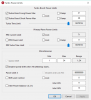
Via XTU I have set PL1 to 18W and PL2 to 44W, whereas in Throttlestop I then tried to set the values as can be seen below:
The new values don't get used - when running the TS Bench on 8 cores and 256M, it will throttle down to PL1=18W after some seconds (as is intended, but the 21W I set up in Throttlestop get ignored).
Is there any way I can help you replicate this or is this simply XTU's access to some hidden registers that Throttlestop can't write to (at the moment)?
My Throttlestop version is 8.70.6 and after realizing PL1 is not being changed I have added the RwDrv.sys - but still no success.
Cheers and keep up the great work
Attached Files:
-
-
I had no idea that activating 'ultimate performance' in power options through a simple (Google) registry tweak changes automatically a lot of values (mostly in the hidden menus) compared to 'balanced' power plan, even though set by clicking on battery icon to 'best performance'.
An example:Code:powercfg -duplicatescheme e9a42b02-d5df-448d-aa00-03f14749eb61
-
Thanks for your testing. Too many settings and adjustments is too confusing to the average Joe. Looks like Microsoft decided to keep things simple.
When the Overclock box is not checked, the maximum multiplier is 43. If you want to use any multipliers higher than 43, you have to check the Overclock box to do this. ThrottleStop might let you adjust your Turbo Ratio Limits to 47 but if the CPU is not overclocked, these limits will be ignored by the CPU.
Do you remember what your default Turbo Ratio Limits were? If you are not sure, you would have to completely shutdown your computer, start it up and before running ThrottleStop, delete the ThrottleStop.INI configuration file. That will allow ThrottleStop to read the default specs from your CPU. I am guessing that the default Limits were 43, 43, 41, 41, 39, 39. If that is the case; those are your maximums. If you want to increase any of those default values higher, you will need to enable the Overclock option. If you want to set all of these to 43, you need to enable the Overclock option.
You can set these values to whatever you like. I have no idea what you are trying to accomplish or what software you will be running. When plugged in I would run my CPU as fast as possible as long as it was not overheating. If you use your laptop on your lap and it constantly feels like someone took a hot pan out of the oven for you to hold on to, then maybe going as fast as possible is not such a good idea.
As long as your laptop is not overheating, setting the turbo power limits sky high is not a problem.
I want maximum performance when plugged in so I always use an EPP setting of 0. If you want your CPU to slow down when lightly loaded, increase the EPP value to whatever you like. I would not go higher than 80 but most people seem to like 128.
Is BD PROCHOT causing you any problems? I never check this box but if it is not causing a problem, then it does not matter whether this is checked or not.
Personally, I would avoid using the Alarm profile feature of ThrottleStop. It reacts way too slowly. Intel hardware control of the CPU speed is incredibly fast and responsive compared to any software solution. If your CPU temps are getting too high, lower your turbo power limits so the CPU throttles based on power consumption.
If ThrottleStop is showing negative MHz, here is how you can fix that.
You are welcome.
Why is your turbo time limit set to the max? When testing, I would use a default setting like 28 seconds. If a sky high time limit is not supported by the CPU, it will be ignored. Same for the PP0 time limit.
When you use Intel XTU and you set a power limit of 21 Watts, will the CPU run continuously at 21 Watts? Run the 1024M TS Bench test and open Limit Reasons. With XTU in charge of your turbo power limits, what does Limit Reasons show and what power consumption is being reported by ThrottleStop? Is there any CPU throttling? Does it change 30 seconds or a minute into this test? Can Prime95 Small FFTs run continuously at 21 Watts?
I will assume that after you installed this driver that you checked the FIVR - Disable and Lock box.
Without an 8th Gen laptop or two to play with, there are some problems that I might not be able to solve. Depending on what your testing shows, we can check a few registers if you want to try and help.Last edited: Sep 25, 2018FrozenLord, Maleko48, f3n1c3 and 1 other person like this. -
hello been using throttlestop past few days on dell precision 5510 with i7 6820hq processor (stock 2.7 overclockable to 3.6). when i first istalled and ran the program the program automatically bumped up the cores to 1:36,2:34,3:33,4:32 and i undervolted cpu core and cache both by -100.6 and the intel gpu to -40. the INI i left as do not save voltages (just in case it wasnt stable and i had problems with restarting the computer). so each time i restarted the computer i would have to rerun throttlestop and would run normally until i restarted the laptop. and the cpu was now happily running away in the 3s
yesterday in the bios i turned off intel sppedstep and c-states as i read that it is better for ssd performance. after i had done that in the bios throttlestop would open up when i manually opened it but would not have any effect on the cpu , it would just run at stock speeds. so i turned those 2 options back on in the bios and now whenever i restart my computer the cpu immediately goes into overclock mode even without me starting the throttlestop program. is there an explanation for this, am i doing something wrong? if i want to stop the overclock how do i get back to stock cpu speeds? -
^ sorry my pictures and text are a bit disorganised
-
Thanks for your help unclewebb. I was able to get the TPL working by using that second set of options in FIVR. Sorry I promise I did try googling for what seemed like forever but to no avail. So now I can confirm TS works just like XTU does on this little beast.
I have uninstalled XTU now, and I have tried your above suggestion to try to get past the 4.5W limit when on battery power. But it still throttles at 4.5W in spite of what I set TS to. So I guess Toshiba must be using that 3rd set of registers when in battery mode. On AC it all works fine now.
Its a real shame because this laptop has tons of headroom and battery life (and uses 2x identical batteries in parallel when running on battery with the keyboard dock attached). So if it can run off 1 battery at 4.5W (when in standalone tablet mode), then theoretically it should be able to run at 9W on 2 the batteries together. 4.5W is pathetically low, I'd be happy with even 6W like it has stock on AC, but no. CPU mark goes from 3700 on AC to below 2500 on battery. Luckily its got around 12hrs battery life because stuff is going to take forever at that rate lol.
Anyway thanks again for developing and supporting TS. It has helped me eek out so much more use from my laptops over the past decade or so. Keep up the great work! -
Thank you once again unclewebb,
If I'm not mistaken the default limits were something like 43, 42, 42, 41, 41, 40. I think I remember seeing the same thing when I was first using Intel XTU. I'm not much of a gamer (now and then) and I would mostly be using my laptop (Aorus X7 DT V8) for high resolution photo and video editing, photogrammetry, 3D modeling, etc. For photogrammetry I use Agisoft Photoscan and sometimes building dense clouds and meshes can take hours for very large architectural or environmental models. I suppose that translates into high intensity CPU and GPU tasks for extended periods of time. The last thing I want is my computer to crash after a model has been rendering for like 6 hours, so if you have any ideas on what kinds of settings might be best for that kind of software or use I'd appreciate your input.
I'm not sure what you mean by "If ThrottleStop is showing negative MHz"? For example in this image the top right window shows -8.35Mhz? Is that what you are referring to? What does that mean? And how would I fix it, by lowering my turbo power limits from how I have them set? Any suggestions? Thanks a million!
![[IMG]](images/storyImages/8V5IlNE.png)
https://imgur.com/a/ZwDme8W -
ThrottleStop did not do that. When you first run ThrottleStop, it reads the Turbo Ratio Limits (multipliers) directly from the CPU. The bios set your CPU to those multipliers. ThrottleStop read that data from the CPU and used those as its initial values. CPU World lists the default values as 36, 34, 32, 32. That is not overclocking. Those are just the default settings for a 6820HQ.
http://www.cpu-world.com/CPUs/Core_i7/Intel-Core i7-6820HQ Mobile processor.html
The explanation is that what you consider to be overclocking is not overclocking. It is how Intel designed a 6820HQ to run at its default settings.
Glad you turned those back on. Your mobile CPU requires that the C states be enabled so it can run cool and reach its maximum speed. Turning off SpeedStep and the C states will make your CPU run slower. The internet is full of bad advice. Don't follow it.
If you are going to be using ThrottleStop and you do not want to overclock then make sure that the FIVR - Turbo Ratio Limits - Overclock box is NOT checked. Your CPU is capable of running single core activities at 4000 MHz. Why pay extra money for a CPU with this capability and then disable it. I do not understand.
Your CPU supports Speed Shift Technology. For maximum performance, I would enable Speed Shift in the TPL window and I would set the Speed Shift - EPP value on the main ThrottleStop screen to 0. You should get some decent SSD benchmark scores with this setting.
Manufacturers do stuff like this to protect their batteries. The lawyers hate laptop battery fires almost as much as consumers do.
That is my plan. Thanks for the encouragement.
That is a perfect example of negative MHz. Scroll back through the last 892 pages. How common are negative MHz? Luckily, not very common. Read my last post again. It tells you exactly what is causing this problem. If you want to fix it, change the setting that I previously talked about. It is in big black bold letters and thank @Vasudev for telling everyone in this forum how to fix this problem.
That statement says that stability is the most important thing to you. If your time is worth money and you do not want to risk wasting 6 hours of your time, I would not be overclocking. I would also be very conservative when under volting. A hot CPU is better than a CPU that randomly crashes. -
Just for a slight correction, brother @unclewebb ,
Allowing a CPU to reach C3 state can cause slower benchmark *graphic* scores. Limiting a CPU To C1E state only, will give higher 3dmark scores and possibly some other benchmarks, as long as the CPU running full speed all the time doesn't cause overheating (note: speedshift will still work fine, but the processor will not drop the voltage at idle). There was some debate on eVGA forums as to why this happens and someone explained it has something to do with the cache timings being slowed or flushed, or even SSD read speeds dropping off (this needs proof; may be a Corsair/RST bug).
https://forums.evga.com/The-effect-of-C-states-on-3dmark-11-graphics-score-m928984.aspx
https://community.amd.com/thread/214623
But for these mobile processors with weak heatsinks that have insufficient cooling to keep them running without throttling, (because you know, light and thin with 6 core processors is a recipe for success @Papusan ), they need all the help they can get.
Anyway we're talking about CPU raw speeds, not c-states deeper than C1E affecting graphic scores. I'm not getting into that.Vasudev likes this. -
It depends on the benchmark. On a locked CPU where ThrottleStop shows Turbo Overclocking +0 or even on a CPU like my 4700MQ that supports limited overclocking (+2), if you disable C3 and C6, you lose out on the maximum multiplier when a single core is active. When C3 is enabled, the 4700MQ can hit 3.6 GHz when a single core is active but it will only hit 3.4 GHz if C3 and C6 are disabled. Any benchmark that only uses 1 or 2 cores should show better results when the C states are enabled.
Edit - The 6820HQ mentioned above will lose 400 MHz when C states are disabled.
The EVGA link you posted is over 7 years old and they are talking about a 1st Gen Core i and a GTX 580. Is that relevant in 2018? Modern Core i CPUs can come out of the low power C states and go directly to the highest multiplier. C state exit time is way down compared to 1st Gen Core i.
Is the thread about AMD Ryzen relevant? Not sure. It is newer but I am not sure how its C state exit time compares to Intel Core i.
A lot of testing that I have seen over the years involves people using the Windows Balanced power profile with the CPU locked to the 8 multiplier. I prefer using a high multiplier when the C states are enabled.
With GPU prices dropping like a rock, in the name of science, I might have to go pick up that 1070 Ti that I have been looking at way too much. I need some new hardware to do some relevant testing.Maleko48, Vasudev and Falkentyne like this. -
Thanks for your work,
How to donate? -
Hi @unclewebb
Yes it is.
On my 7820HK MSI GT73VR, if I keep C-states enabled (up to C3), I lose 500 graphics score on 3dmark Firestrike
e.g. 21800 to 21300 or 21200.
if I disable cstates in bios, I get +400 to +500 graphics score.
I posted about this sometime last year in the GT73VR thread. I was wondering at the time why my graphics score was so low and was varying.
I figured out one of my profiles had c-states disabled (high scores) and another had them enabled (lower gfx score). Then i was able to reproduce this 100%. -
thankyou for your help unclewebb
before i installed throttlestop my cpu wasnt showing over 2.7 and since i ran throttlestop it is consistently in the 3's. so if i am not actually overclocking is throttlestop allowing the cpu to run at its available numbers
? or what explains the jump in cpu figures?
i presume these settings are correct now ? any other settings need to be tweaked or boxes checked/unchecked for better performance?
thanks again -
@unclewebb Some more info about core isolation feature in Win 10 v1803. Looks to me they are simply employing shift to right(SHR) most value to let malwares see garbage values.
So actual freq will be 3308.13MHz at 99.78MHz.
After Core isolation is disabled:
-
Thanks for the info
On my MSI GE72VR 7rf laptop disabling c states in bios gave me around 350-400 more points gfx score in firestrike. Benchmarked 3 times in a row.
And I have checked C1E in throttlestop so my laptop could clock frequency and watage down and keep lower temps in idle.
Idle temp fluctuating 40-42 during for example browsing.
I have enabled speed shift in bios and unchecked speed step in throttlestop and I have also speed shift - epp set to 0.
I have also disabled in bios CPU energy efficient turbo.Last edited: Sep 27, 2018 -
Yes this is exactly what I'm saying.
If the laptop is allowed to go into C3 state, -400 points graphic score in Firestrike 3dmark.
If Cstates are disabled, or limited to C1E deepest, +400 points.
Now @unclewebb I'm not saying everyone should just disable c-states and make their laptops run hotter. But if you have an unlocked processor and bios that isn't totally locked down, and good cooling, while on AC power, then that should boost some of your graphics scores or framerates slightly.
This seems to be purely something on the PCIE/PEG bus communication or something. CPU Physics scores are not affected at all. Basically the exact opposite you think would happen. -
It will be different from laptop to laptop OEM's or Intel (I guess) Implement something called
Acoustic Noise Mitigation and it is there on BIOS nearly all kind of laptops & PCs too after Dell incidents about almost all there laptops was suffering from [Coil Whine] noises ...anyway while being Enabled it will prevent the [Coil Whine] issues.. so this Acoustic Noise Mitigation it will let your laptop go to C-states but.. it won't go deep but rather it will be lightly go on those C-states which will prevent the [Coil Whine] issues and
as a side effect it will go out from the c-states faster which will lead to increased responsiveness which is = increased performance
While Disabled.. will it will happen the opposite & it will go deeply on C-states which will get out from C-states slower which will lead to decreased responsiveness which is = decreased performance
C-states either enabled or disabled will act differently depending on how OEMs implemented Acoustic Noise Mitigation as it doesn't affect the CPU alone but the whole package for example (SSD,HHD,GPU,USB, etc...)
Correct me if I'm wrong... after all I'm human Vasudev likes this.
 -
I seem to have a small bug when it comes to Battery monitoring.
I have Throttlestop new installed with no changes made and also not Turned On and a scheduler task to autostart it.
If I enable Battery Monitoring then TS will silently quit entirely (it no longer shows in taskmanager) if I pull the powercord from my laptop, ie when it switches to battery profile. This also only happens if TS is minimized. If I have it maximized and pull the powerplug it will continue running and switch between profiles properly. This is on Windows 10 v1803
Wonder if anyone had any advice how to fix this? -
I suppose this is relevant, but I posted what will follow below in this thread and I think it's relevant, as there are likely more people here who could help.
I'll keep it simple: I'm experiencing extremely high power draw from the battery, on the order of 18-22 W, such that a 97-Whr battery lasts less than 4.5 hours. This is frankly unacceptable. My notebook supports Optimus, and I have it enabled.
Attached is the powercfg sleepstudy report, and a screenshot of the unknown power drawer, Unknown [NONE]:
![[IMG]](images/storyImages/1ebWlDH.png)
I have undervolted in ThrottleStop, killed all background and foreground processes, and this still crops up. Display brightness is at 30%. I need help, please.
Thanks very much.Attached Files:
-
-
@unclewebb is C7 or C7s more preferable in terms of power saving? Ivy Bridge 3920XM.
I can enable C7s, in the bios it says "Enable processor idle power savingC7s sate. If enabled, BIOS will report C7s instead of C7 to OS." -
If you disable C states in bios and you enable C1E in Throttlestop you won't run hotter. idle temps and high load temps are preety much the same as with c states enabled.
But it you dont enable C1E than temps will be much higher especialy in idle.
But in both cases there will be significent boost in graphic score in fire strike ( 1 to 5 fps depend on situation, and The same in games) Cpu physics score is the same.Falkentyne likes this. -
@unclewebb I am wondering if it could be possible to make independent undervolting depend on usage cores. For example one core active -125mV two cores -130mV etc?
Maleko48 likes this. -
Can someone tell me whether increasing iccmax for cpu cache is useful or not? It's value is 11A while the cpu core iccmax is 128A.
Maleko48 and 6.|THE|1|BOSS|.9 like this. -
Yes. it is useful increase it to whatever you like.. it is harmless
try a 70A or 80A.. I'm sure that is sufficient enough
Maleko48 and magnetoeric like this.
-
Got a new HP Omen 15 (2018 ed.) with an i7 8850h and a 1060 6Gbs this monday and decided to try and squeeze as much performance out of it as I could. I'm new to undervolting and throttlestop, still with some guides I got myself a very nice setup. I got from around 3000Mhz throttled, to around 3600Mhz when throttled, with lower temps too. I was undervolting for -134.8mV on both core and cache. Also turned on Speed + Shift EPP to 63 (set matching numbers in Windows Power Options) and the TS benchmark went from 146 seconds to 114 seconds. Saw improvements in the benchmark for Rise of the Tomb Raider as well and gamed heavily last night with Gears of War 4. It has been running very stable, even idle (left it many hours idling to insure no blue screens). Now the problem that I'm having is that I turned on my laptop this morning (unplugged) and when I plugged it in it displayed (plugged in, not charging). This is the second time this problem has happened since I've been using throttlestop. Both times I have simply deleted the .ini file, turned off my laptop and on again to return it to default settings. Why could this be happening? The charger supplies up to 200 W. I should also add that initially I went for a -146mV underovolt and I got a blue screen after quitting a game I was testing, hence why I increased to -134.8mV. Also I have different profiles for running on battery and a failsafe for when temps get way too high. I really want this to work. Sucks to be throttled to 3000Mhz, when I can do 3600Mhz under heavy load.
-
Well, it seems that I have been wrong about the device maintaining 21W.
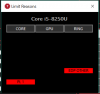
I have set the short power limit to 25W and the long power limit to 21W in XTU, but the device will still throttle down to 18W and show CPU's PL1 along with RING's EDP Other (PL4 / ICCMax in HWInfo64) after some time:
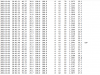
I have attached a detailed (and slightly scrubbed, I removed the serial information of my device) log file by HWInfo while doing the 1024M using 4 cores (I disabled Hyperthreading).
The file is actually a comma-separated CSV.
No, I have simply added the file in the hope of benefitting from some hidden feature :-D
I did not change anything else and the mentioned setting is not checked.
I'll gladly do some tests if those are of any help.
Thanks
Attached Files:
-
-
Take out most Dell SW and disable most dell services as well as a test measure. Looks like Cortana,Photos app, Outmail mail app and ms edge eats up cpu cycles causing higher drain. There's a known bug in BS. You need to turn on BS mode and turn off after 2 mins and you should see less drains.(BS-> Battery Saver)
-
I increased it to 100A. There wasn't any change in package power consumption, but somehow i got higher score in cinebench test
Maleko48 and 6.|THE|1|BOSS|.9 like this.
-
Thanks for the detailed reply.
So I went a step further, and even performed a clean install. There was no difference in the power draw. The power draw is high even in Arch Linux. Leads me to believe that this is a hardware issue, through and through. -
If you're using linux, install intel's powertop and run calibrate option on both AC and battery mode to best results. It will lower your power drain. Install tlp as well for best experience.Che0063 and Ionising_Radiation like this.
-
I think I've finally gotten rid of power limit throttling on my XPS 13 9360 (8550U) thanks to TS 8.7. Performance is way up. I checked disable and lock power limits in FIVR, which didn't help on it's own, and changed the TDP levels in the TPL window and checked the clamp, which didn't work, until I also locked the turbo boost power limits. So now, I appear to have a system which will run at 25 watts, which is what I had typed in for long power limit, continuously.
I also can't change any of the values anymore because of the lock. How do we disable the lock temporarily?Maleko48 likes this. -
It sounds like you did not follow the ThrottleStop Task Scheduler guide. Read the guide. Follow it exactly and your problem will be solved.
http://forum.notebookreview.com/threads/the-throttlestop-guide.531329/#post-6865107
In theory, C7s can save more power than C7. Will you notice a huge or measurable difference? Probably not.
You and @Falkentyne have got me curious now. Maybe in a week or two I will have more time to do some testing.
Maybe but it sounds too complicated. An undervolt does not have to be exact. A couple of extra mV will ensure stability while only creating a tiny amount of extra heat. Best to error on the side of too much voltage rather than not enough.
Moving the TS IccMax Cache slider high or low did not make any difference on my laptop.
Words to live by. Full speed ahead is always best!
Installing the RwDrv.sys file does unlock a hidden feature, as long as you put a check mark in the Disable and Lock box.
Are you using ThrottleStop to undervolt your CPU? If enabling Speed Shift causes a CPU to lock up, it is almost always because of lack of voltage.
I have been going crazy waiting to hear about a success story like that. Can you post some pics to show other users what needs to be done to take care of this throttling problem?
The ThrottleStop Lock feature is a feature of the CPU. When you check and apply the Lock option, this lock is applied to the entire register within the CPU. Once a CPU register is locked, there is no way to unlock it unless you reboot or do a sleep or hibernate / resume cycle. When you resume, before running ThrottleStop, you might have to remove the ThrottleStop.INI configuration file to prevent ThrottleStop from locking this register again. I wish there was an easier way to unlock a locked register but as far as I know, there isn't. -
Thanks for replying unclewebb. I'm not entirely sure whether this is the reason, but increasing cache iccmax reduced stutters while playing games with absolutely no change in cpu temperature. So it's a good thing for me
Maleko48 likes this.
-
And I've been going crazy trying to solve the problem! I've gotten information from you along the way in this thread, so thank you very much.
It's always been confusing trying to figure out why my 8550U sometimes throttles to 15W right after turbo boost time ends, and sometimes throttles to 18W (which I assumed was because of the VRs overheating, as XTU identified that as the cause of the throttle). With TS 8.6, I think 15W throttling was engaging somehow, so I switched to XTU, which kept it at 18W, but now I'm running right at the thermal limit with TS 8.7, which for my laptop is about 22-24W. I can actually play the witcher 3 on my laptop now, it was just throttling to 15W which made it totally unplayable.
I'm really not 100% sure what the important factors in achieving this are, but I don't run XTU anymore, so my TS settings should be sufficient. Though in the past I did go through the registry and edit power settings to make sure any limits imposed by (Dell modified) Intel drivers are removed (things like using cTDP UP in all cases, etc.) so that may be necessary too.
Here are my TS settings.
![[IMG]](images/storyImages/BX1qRCh.png)
![[IMG]](images/storyImages/lGli66K.png)
Thanks, this isn't that bad. I think the only thing you could do to make it easier would be to add another button which removes the lock from the throttlestop INI (like priming it to remove the lock) which you could check before rebooting so that throttlestop wouldn't automatically reapply the lock, and we wouldn't have to delete the entire INI. -
Ok, how about C7r "enable processor idle power saving C7r state."?Vasudev likes this. -
That sounds good. TS 8.70 can be used to lock both power limits. Putting a check mark in the FIVR - Disable and Lock box is probably helping you to get beyond the previous turbo power limits that you were hitting.
I noticed on your screenshot that Speed Shift - EPP is checked. This option will not do anything until Speed Shift is enabled within the CPU. Check the Speed Shift option in the TPL window to enable Speed Shift and you should see SST light up in green on the main TS screen.
I am going to have a look at the Lock feature and try to make it more user friendly when you need to unlock this setting. You will still need to reboot but hopefully I can change things so you will not be forced to delete the TS.INI config file. Thanks for the feedback.
I think C7r is better than C7 for power savings. Big savings? Once again, probably not. -
I have had a EDP limit pop up while gaming, but nothing stands out in the data around it. ts benching isnt throwing any errors or limits.
Attached Files:
-
-
Ok.
I have this weird problem with adjusting TDP, lets say that I set the power limit at 50w but under load the whole package throttles at around 38-40w. And whenever I set a new power limit it will TDP throttle way lower than what I set it at. It doesn't matter if I put a high TDP or low TDP it always happens.
3920XM with unlocked bios.
Any idea to why this might be happening? -
It does not seem to be causing any real throttling issue. Those throttling reasons can be hyper sensitive. One of your settings might need to be increased a little. I would bump IccMax up from 128 to 192 and if that does not work, max the slider out to 255. For PP0 Current Limit, go from 100 to 256. In the old days, 256 was a magic number. For Turbo Time Limits, why not set both of your time limits to a default number like 28 seconds. Just because ThrottleStop lets you set these time limits to 163840 does not mean you should. The CPU might ignore a setting if it is way outside of its normal range. The PP0 Power Limit is set to 0 so it should not be checked. The Clamp options are also not necessary and should be cleared.
Are you also using Intel XTU? I would exit that program and I would think about uninstalling XTU while testing.
Can you show me a few screenshots while running the TS Bench? How about the main screen and the TPL window while throttling is in progress?
The new Disable and Lock Turbo Power Limits is a hidden feature when using a 2nd or 3rd Gen CPU but it is still available. This secret setting might also be useful when overclocking an unlocked 3rd Gen XM CPU. ThrottleStop should be able to increase the multiplier of a 2nd or 3rd Gen unlocked CPU which, depending on the bios, it could not always do before.
Open up the ThrottleStop.INI config file and add this line.
LockPowerLimits=1
Before you start ThrottleStop, you will also need to install the RwDrv.sys file into your ThrottleStop folder. You can download and unzip this file from here.
https://mega.nz/#!CNNA0SoC!Z2Xi2icwX4d4jzW016dKnKGhVglWmSSPpgiRU7VCG6g
It is hard for me to solve these problems without the hardware sitting in front of me. Hopefully some of the above might help.Vasudev likes this.
The ThrottleStop Guide
Discussion in 'Hardware Components and Aftermarket Upgrades' started by unclewebb, Nov 7, 2010.