 Problems? See this thread at archive.org.
@THEBOSS619 What does these settings mean? Only HDC and Low Power mode worked which weren't there for me.
-
-
I can help you with testing, if you want you can send me reg file by private
Regarding C states. With disabled c states and enabled C1E in throttlestop I am able to push my undervolting to -210 on core -180 on cache and -100 mV on igpu. All stable. This gave me another 1C lower, Now I am on 70-73 during gaming6.|THE|1|BOSS|.9 likes this. -
About [Presence Aware power] it is under investigation
 I'm researching about it before messing with it
I hope so! Intel really know how to hide those secret info. but as long as I am alive.. I will keep exposing those unknown info.
Intel DPTF is like some kind of bossing behavior as it literally deals with mostly everything on your motherboard.. a simple image from there own Intel website..
![[IMG]](images/storyImages/technologies-dptf-architecture.png)
It is time to abuse those things for good...
Can I see a screenshot of your registry that contains DPTF power options? you will always find it on [HKEY_LOCAL_MACHINE\SYSTEM\CurrentControlSet\Control\Power\PowerSettings] maybe your DPTF using different keys
I may find a solution for you
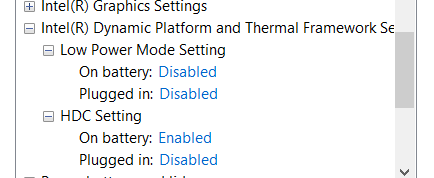
HDC means Hardware Duty Cycling.. it is used for power saving at general load & at different kind of system load as HDC goal is to lower energy or power consumption without switching to lower frequencies or lower speed That is why for those people who tried my DPTF fix.. they immediately noticed Lower Power Consumptions & Lower Temp. with same high performance
while Low Power Mode or by other means [LPM] on BIOS terminology it will only work if your BIOS have an advanced DPTF options which will use the LPM feature
(which required to unlock BIOS for further advanced DPTF settings or features ).. benefits from it is mostly for those who wants to squeeze longer battery life with moderate performance penalty or without sacrificing alot of performance
No problem.. Check your inbox and btw... you got good undervolt there
 Last edited: Oct 5, 2018
 -
Not helping newbies and flooding with bios settings. What is the connection with throttlestop ? Any admin to clean that mess ?
We know you have to show your superior knowledge with superior humans go exchange it somewhere else. -
Connection? Throttlestop is helping you with power management and reducing temps and throtling. DPTF is also helping with that on supported platforms.
You can also ask why we were talking about C states disabling in bios and C1E in throttlestop. All this things combined together gives you lower temps, higher performance, better fan culture, lower power usage and helping with throtling.
I think this topic is for newbies who want only "how to knowlage" and for pro users who want to share their experience in topicpressing and 6.|THE|1|BOSS|.9 like this. -
Hmm... should I care?... maybe I should used this
O&O ShutUp10
program against you
 ... it may work!

Thank you for pointing that out
Last edited: Oct 6, 2018pressing, Vasudev and ha1o2surfer like this. -
So here goes:
After DPTF fix with EPP-HWP set to 0, my CPU pkg pwr is 1.4W at 34x-35x all the time, earlier it was 3W. So it means HDC is working?
Here is the screenie:
pressing, c69k and 6.|THE|1|BOSS|.9 like this. -
Yes this is the effect of HDC but it doesn't effect during idle only.. but also during full load
test during load & see if you see difference on power consumption
Vasudev likes this.
-
Is your dptf fix the reg key one for power options? and should i enabled hdc on a laptop with an i9?6.|THE|1|BOSS|.9 likes this.
-
where do i find those? im getting both mfc120u and msvcr120 not found, on a fresh install from Xotic PC6.|THE|1|BOSS|.9 likes this.
-
Use the one from this post here...
✪Low CPU Temp. & High Performance through Intel DPTF Fix✪
and yes enable HDC.. it is good & harmless & always offer positive results which is lower power consumption,lower temperature, and same or even higher performance
-
Get it from the AIO package
https://www.majorgeeks.com/files/details/visual_c_redistributable_runtimes_aio_repack.html
And thank me later...
-
If i have speed shift enabled (set to 80), is it good to uncheck c1e and speedstep?
-
While I see that DPTF might bring power consumption benefits, my tablet will throttle when using DPTF.
I am running a Dell Latitude 5290 (2-in-1) which is a Microsoft Surface-style device.
And it will get quite warm at the back, when I run a power-hungry application.
This results in DPTF throttling the device via PL1 - it will actively and aggressively reduce PL1 to counter the device's heat output.
Have you found a way to prevent this?
The only solution that I found was completely removing DPTF. -
I tested this but DPTF doesn't seem to do anything on my Dell G7 but instead of deleting the drivers and or blocking them from installing; woudln't it be easier to just disable the service? (for people who want to disable it)
Maleko48 likes this. -
Is it possible to have per-profile power limit settings? Just like how each of the 4 profiles can their own voltage settings?
-
This is where im at with the Aorus X7/i7-8850H. I have the undervolt back alot to stop bench errors.
Attached Files:
-
-
Some laptops lock out turbo bin adjustments in the bios and the 3rd Gen Intel CPUs do not support undervolting.
I thought writing ThrottleStop would help expose and put an end to the throttling madness but it has not. The average laptop is way more powerful than what most consumers need to run Facebook, etc. Mediocre performance is acceptable to the majority of consumers so manufacturers are not financially motivated to change.
Some random PL2 throttling while idle or on startup is not that important.
Now that is important. Nice score.
@SvanX - Your settings look fine. Most people do not undervolt the System Agent by -0.250V. If that setting works for you without causing any stability problems then great. I avoid checking the BD PROCHOT option. I also prefer using a Speed Shift EPP setting of 0 when plugged in and 80 when on battery power. Many people use the default 128 setting. If I had a 7820HK, I would check the FIVR - Overclock option to see what speed it can run at.
@THEBOSS619 - The HDC registers are well documented in chapter 14.5 of the Intel public documentation. I have a desktop 7th Gen but so far I have not been able to get HDC to work. If HDC is working for you and you know how to use RWEverything, could you post a screenshot of these registers?
![[IMG]](images/storyImages/uJ5S3m8.png)
HDC control might be something useful to add to ThrottleStop for those that do not want to install the DPTF stuff.
When Speed Shift is enabled, SpeedStep is ignored so whether SpeedStep is checked or not does not matter. C1E and Speed Shift are two different things. Intel says C1E should be enabled. On battery power, perhaps having C1E enabled is a good thing. Modern CPUs have so many other lower power C states to choose from that having C1E enabled or not might not make any significant difference.
Not yet but maybe someday. An alternative to this is to use different IccMax settings for each profile. This is an indirect way that you can reduce power consumption for each profile.
Nice to see a laptop that has decent cooling. 80+ Watts at only 75°C with a steady 42.00 multiplier are the kind of numbers I like to see. Maybe government needs to regulate this industry better and force manufacturers to include a sticker like that on the top of every new laptop. Instead of an ENERGY STAR sticker, how about a PERFORMANCE STAR sticker? This laptop is hereby rated to run at its rated specification without overheating or throttling itself to death. Consumers deserve more from this industry.Last edited: Oct 8, 2018bennyg, 6.|THE|1|BOSS|.9, Vasudev and 2 others like this. -
Asus ROG GL703GS - 8750H, 32GB @ 2666, 1070 GTX -140.3mV Courtesy of ThrottleStop
More interestingly with Turbo limits disabled and a longer benchmark. Possibly has a little more to come, looking to break 3000K Rays/Sec, although already at a sustained 3.9GHz...
Can go as deep as -160mV, however the GL703GS has a TDP down feature (silent mode) and when on battery -160mV is too deep with the notebook being a little unstable. At -140mV the notebook is bulletproof regardless of the TDP setting (35W, 40W, 45W).
Default PL1 45W, PL2 90W, Turbo limits are unlocked and ThrottleStop 8.7 can successfully adjust them. although for the most part the notebook is already very fast, so I leave it at the 45W/90W default setting.
Big thx to uncleweb, a scholar and a gent
Q-6unclewebb, Mastermind5200, Vasudev and 1 other person like this. -
Thanks and quick question; do i need to have clamp checked? does it affect idle temps?
Attached Files:
-
-
With W10 RS1 (before implementing HWP) speedshift feature needed C1E and EIST to work correctly. With RS2 and above we can get away with disabling C1E and EIST through TS provided, we have enabled all options in BIOS such as HWP,C1E and EIST as well. Disabling C1E and EIST will BIOS might have side-effect like CPU clocks stuck at 800MHz or at stock base multipliers (Usually on dell PC; mine is included as well, don't ask for me for screenshot).
There's another scenario where Speedshift is the only thing enabled whilst C1E and EIST are disabled give worse performance than default TS settings where all are enabled. (Some HP,Lenovo or in general Insyde BIOS exhibit it)
Maybe @Falkentyne know it.Maleko48 likes this. -
Here.. well I'm not familiar with RWEverything but I managed to do it
At first time when I added all those Register Names all at once.. I got BSOD related to RWeverything drivers so... anyway after restart I did it one by one and I got it all without problems but.. it seems like I have the same things like on your image..even though I still have all the effect of DPTF
Here... Sorry it was not clear before so... I edited the color of the picture to get clear letters & numbers. RWEverything didn't like my custom theme
-
You are most welcome. Always nice to hear about a laptop that can run the 8750H at its full Intel rated speed.
I can understand that if EIST is disabled in the bios, that might cause problems. After you boot up and Speed Shift is enabled, the state of SpeedStep (EIST) should not make any difference.
If I do not see a screenshot then I start thinking that maybe it never happened.
Thanks for going beyond the call of duty. When I boot up, my PKG_HDC_CTL is set to 0. Setting that to 1 should enable HDC. I thought that if HDC was enabled then one of the three Residency counters would start counting upward but both our screenshots show all 0. I might have to find a 7th or 8th Gen U CPU so I can do some HDC testing.6.|THE|1|BOSS|.9, Vasudev and hmscott like this. -
@Krzyslaw @THEBOSS619
Apologize guys I didn't understand well about DPTF earlier
First thanx for the precious time you took to answer.
System Agent is at default stock +0.250V (not negativ). I decided to set all cores to x36 (overclock unchecked) with only
Speed Shift at 0 and
C1E checked (Unchecked clamp in TPL). Everything looks fine (max FID). Undervolt was to high earlier I got higher temps now I am at -89.8mv. Need more testing since I switched all cores to the same multiplier. Much more simple now to check FID with one multiplier. I took the
CPU IccMax value from default stock XTU was not well detected like
Non Turbo Ratio. Would like also to say that if you have one default stock value read by
TS for
FIVR control superior at 125mv (in my case System Agent), you should select range of one of your undervolt (CPU core or CPU cache) to 250mv. If I wasn't doing this I saw many times
System Agent dropping to 125mv (Notice that System Agent wasn't unlocked for all my tests).
Last edited: Oct 8, 20186.|THE|1|BOSS|.9 likes this. -
My eyes are not that great. I missed the + sign and just assumed that you were undervolting. The default offset for this setting should be 0. Any Intel CPU should be able to run just fine without needing a positive or negative voltage offset. Your laptop manufacturer might have changed this setting in the bios. Not sure why. Either that or when you first ran ThrottleStop, it picked up this setting because the CPU was set to this by Intel XTU. Does the System Agent need to be set higher than default for stability? I would do some testing with the System Agent set to zero for a baseline.
CPU World shows that the highest multiplier when not overclockiing a 7820HK is 35 when 3 or 4 cores are active.
http://www.cpu-world.com/CPUs/Core_i7/Intel-Core i7 i7-7820HK.html
When the TS Bench test is running, does ThrottleStop show the 35 or the 36 multiplier? You might have to enable the Overclock option to get the 36 multiplier when 4 cores are active. It is also possible that CPU World is wrong.
For IccMax, I would just crank it to the maximum so the CPU doesn't throttle.
I think if you need to set any of the FIVR offsets greater than 125 mV then you will need to click on the 250 mV Range button for all of them. I never need to go beyond 125 mV so this feature might need to be improved. Thanks for the bug report.
Thanks for the info. It might be a while before I update to that version so it is nice to know that ThrottleStop continues to work just fine.Last edited: Oct 8, 2018 -
Can I help in any way?
I am running an i5 8250u and would like to assist
-
Because I hate seeing that dreaded 800MHz bug that plagued AW echo models. Let me swallow my pride and try to get that bug out.
Another tip for TS users in VM, enabling Virtualize counters and VT-x in VMware gives negative clock readings and increased CPU usage.Maleko48 and 6.|THE|1|BOSS|.9 like this. -
Thanx for the info I thought overclock check was only to overclock the higher stock multiplier. Even unchecked TS report a FID of 36.00 (Stock multipliers 39-37-36-35 TS reporting 38.xx.)
I switched all cores to 35.
This is the stock bios dump after having been optimized by default :
![[IMG]](images/storyImages/uncore.png)
The CPU core and CPU cache stock offset are at +20mv. If I take a standard base of undervolt -100mv will be better to start with a cache offset at -80mv.
TS is very important for me because I can not access all settings in bios. Asus hide all dangerous ones (May be to much troubles under guarantee with customers)
I will bench with System Agent at 0mv to see if I get instability.
For IccMax I am gonna crank them up. Can I do it too for Intel GPU too ? TS detecting 20 A (XTU not showing this info)
(For XTU it's a separate install on another disk and if I test some settings with it or just get some infos, after I always go to bios to do optimized by default before going back to Windows with TS)Last edited: Oct 8, 2018 -
Yea it seems weird although I got different case from yours.. is that no matter if I shutdown & started or Rebooted... my PKG_HDC_CTL is always set to 1 which is expected because in the BIOS I have got HDC enabled
[it was disabled by default] and I immediately noticed decrease on power consumption on TS... I couldn't believe it! so.. I tried another monitor [HWInfo] and it shows the same results during load & idle
Maybe because mine is Intel HQ model not a Intel U model? so it doesn't have the capability to count or see how many HDC happened? I'm sure of it because it can't be a placebo while having different results it is proven that it worked to others also even if they don't have a Intel U model
And I confirm also that it works wonderfully on Windows 10 RS5 1809 17763.1
Last edited: Oct 8, 2018 -
But the fail safe is 0 so don't worry about it... try putting it 0
From my experience on messing with BIOS stuff on nearly every single thing.. I sometimes stuck on some settings that I don't know about (even after extensive research) and no results..so... I go to my last option to know the answer.... which is looking at the Fail safe it will tell you if you want to mess with it or not
because I am tired of disassembling my laptop to reflash my BIOS though SPI programmer over & over
Last edited: Oct 8, 2018SvanX likes this. -
When fully loaded, the Clamp option can reduce the multiplier below the default multiplier. I would never check this option. It will have zero effect on idle temps.
I do not like seeing a CPU locked at 800 MHz either. This can happen if you disable EIST / SpeedStep in the bios, especially on many Dells. The moment you run ThrottleStop with Speed Shift enabled, the CPU should clock up to its full rated speed and EIST / SpeedStep will not matter after that.
If those are your stock multipliers, TS will not be reporting 38.xx when you are running the TS Bench with all 4 cores loaded. With 4 active cores, the maximum multiplier when using those settings is going to be 35.
Those voltages are not really stock. It is just the voltage that your bios has set the CPU to. The Intel default voltage offset is always going to be zero for core, cache, iGPU, system agent, etc. Any CPU should be able to run 100% reliably at default turbo multipliers while using this default voltage. I would start at zero and then crank up the multiplier and adjust the voltage accordingly after that. Give the CPU whatever voltage it needs to be stable. It does not make any sense to start with a positive voltage offset if you have not done any testing or if your testing does not indicate that your CPU needs this extra voltage.
That is what I like to hear. The IccMax settings can cause throttling if set too low so better to set both of them too high than too low.
With a 7th Gen desktop CPU, I do not see any difference in reported power consumption when HDC is enabled, same as your screenshot. That's why I am wondering if HDC is causing the drop or maybe something else like the Cache is running slower. Maybe keep an eye on the FIVR monitoring data to make sure the Cache multiplier is consistent.
It will be simple to add an HDC enable / disable check box to ThrottleStop so users can do some testing. While waiting for that new feature, you could use RWEverything to toggle PKG_HDC_CTL (0xDB0) from 1 to 0 and back to 1 again to see if power consumption changes.
Maybe. If you are comfortable using RWEverything, go back to the previous page and see if you can use RWEverything to view the registers shown on the previous page. We are sort of in the deep end of the pool. It is OK if you have no idea what I am talking about.
-
Even on a laptop clamp should be disabled?
-
My bad I was doing bench with 1 thread
I got PL1 Core limit so I increaded undervolt to 99.6 and now PKG power is max 44.1 W on 45W and problem fixed. Thanx a lot for everything I will improve settings in 2 weeks with Conductonaut
.
c69k likes this. -
Hello unclewebb
Search the last Version for Windows XP. Can i have a Download link ?
Thank You for Help me again.
xenocracy_2001
Have found
ThrottleStop 8.60 and 8.70 no for Windows XP
I have Installed Visual C++ Redistributable Packages für Visual Studio 2013.Last edited: Oct 9, 2018 -
Disabling EIST in BIOS does get the cpu locked 800MHz like you said. Let me try once again.
-
I already mentioned that a while ago it fluctuates the cache speed less than 1 seconds and comes back
I realized it by coincidence when I was adjusting the ICCMAX
sometimes TS doesn't catch it due to very fast cache speed switching so.. I confirmed it using HWInfo
Edited:-
Here with HDC enabled by just simply switching it to [Enable] Through Power Plan
With HDC Disabled
Last edited: Oct 9, 2018FrozenLord, c69k and Vasudev like this. -
Not sure what i am doing wrong but current on my Mi Air 13.3 laptop with the i5 8250U, i tried using Throttlestop to offset voltage for the cpu core via FIVR. But every offset i do does not show up on the chart on the top right portion.
[/URL]
edit, ok.. found the problem.. the device has been locked in the bios to prevent undervolting.. oh well.. looks like i am out of options
edit2, after following the guide at https://forum.xda-developers.com/showpost.php?p=77626628&postcount=11 i've managed to unlock my device for undervolting... yayLast edited: Oct 9, 2018Maleko48 likes this. -
Does anyone know if the i9 8950hk can reach deeper c states than c3? at least on the alienware 17
6.|THE|1|BOSS|.9 likes this. -
Yes it can go as deep as C10 but the problem is not here... the problem is... it depends on OEM & BIOS if they allowed you to reach to those deep states or not
-
Knowing dell with alienware probably not thenVasudev and 6.|THE|1|BOSS|.9 like this.
-
Alright guys... Here is it to have the option to change the scheme for Intel DPTF Power Modes
after testing all three modes [
Low,
Medium,
High Performance] I didn't see a significant difference on battery life or heat differences
so... anyway.. it is here for anyone who want to try it out
and let us know if you see any kind of differences
If the first one didn't work.. try the second one.. but
always be sure that you have
DPTF enabled on your BIOS
as without it.. it won't work even if it appears on the power plan it will still won't work
Example to what I see from the Power Plan...
Enjoy if it works out for you
Attached Files:
-
-
It will be a sad day when all manufacturers disable undervolting in their laptops.
If you have the time, can you try toggling HDC on and off by using RWEverything? I would like to add a check box like this to TS so users can toggle HDC. Installing the DPTF driver is not for everyone.Maleko48, FrozenLord, Vasudev and 1 other person like this. -
HDC Disabled
Stuff open
https://i.postimg.cc/vm5wQ6tZ/screenshot.png 5.1W
Desktop only
https://i.postimg.cc/pdf3NMP9/screenshot.png 3.7W
HDC Enabled via PKG_HDC_CTL MSR
Stuff open
https://i.postimg.cc/90nnPWYk/screenshot.png 5.1W
Desktop only
no screenshot - but package power is still 3.7W
HDC makes no difference for me
---------------------------------------------------------
For those wondering what the hell is going on
Per the intel documentation (page 17):
Hardware duty cycling (HDC) enables the processor to autonomously force a logical processor, processor core, or physical package to enter an idle state (to C3 or deeper). HDC forced idle operation can be thought of as operating at a lower effective frequency. The effective average frequency computed by software will include the impact of HDC forced idle. The primary use of HDC is to enable system software to manage low active workloads to increase the package level C6 residency. HDC is disabled by default on processors that support it.
Here is what these registers do:
I think CPUID.06H:EAX[bit 13] is set to 1 for me. So not sure why HDC isn't doing anything for me.Code:HDC "BASELINE AVAILABILITY RESOURCE" CPUID.06H:EAX.[13]=1 means that If you execute CPUID instruction with register EAX = 06H (6 in hexadecimal) as input, you will get the result in EAX. If the bit number 13 of the result is 1, the bit is enabled. In this case, when bit number 13 is enabled the CPU HDC performance counters will be enabled: THREAD_STALL, CORE_HDC_RESIDENCY, HDC_SHALLOW_RESIDENCY, HDC_DEEP_RESIDENCY. The Package and logical-processor level HDC control MSRs (IA32_PKG_HDC_CTL_MSR, IA32_PM_CTL1) are also only writable if bit number 13 is 1. ----------------------------------------------- HDC PROGRAMMING MSRs PKG_HDC_CTL (bits 1:0) enables HDC operation by allowing the processor to force-idle all "HDC Allowed" logical processors. This bit defaults to 0 (HDC disabled) for all logical processors. This bit is only writable if CPUID.06H:EAX[bit 13] = 1 PM_CTL1 (bits 1:0) allows each logical processor to honor the PKG_HDC_CTL setting. This bit defaults to 1 (HDC allowed) for all logical processors. This bit is only writable if CPUID.06H:EAX[bit 13] = 1 ----------------------------------------------- HDC RESIDENCY COUNTERS (IA32_THREAD_STALL_MSR, MSR_CORE_HDC_RESIDENCY, MSR_PKG_HDC_SHALLOW_RESIDENCY, MSR_PKG_HDC_DEEP_RESIDENCY) (Accessing all except THREAD_STALL_MSR will cause #GP fault unless CPUID.06H:EAX[bit 13] = 1 ) THREAD_STALL (bits 63:0) will report HDC forced idle count (stalled cycles) since last RESET. This counter increments at same rate as TSC counter, and only updates after the logical processor exits its forced-idle-C state. It also indicates the forced-idle cycles due to HDC that could appear as C0 time to traditional OS accounting mechanisms. This counter is available only if CPUID.06H:EAX[bit 13] = 1. CORE_HDC_RESIDENCY (bits 63:0) tracks per-core HDC residency when the core is in C3 or deeper (when all logical processors of this core are idle due to HDC or other mechanisms) and at least one of the logical processors of the core is in a HDC forced idle state. This counter increments at same rate as TSC counter, and only updates after the logical processor exits its forced-idle-C state. If CPUID.06H:EAX[bit 13] = 0, attempt to access this MSR will cause a #GP fault. HDC_SHALLOW_RESIDENCY (bits 63:0) tracks HDC residency time when the package is in C2 state, all cores in the package are not active and at least one logical processor was forced by HDC into idle state. This counter increments at same rate as TSC counter, and only updates after the logical processor exits its forced-idle-C state. This counter may be implementation specific. If CPUID.06H:EAX[bit 13] = 0, attempt to access this MSR will cause a #GP fault. HDC_DEEP_RESIDENCY (bits 63:0) tracks HDC residency time when the package is in a software-specified package Cx state. The Cx state monitored is stored in last bits 2:0 of MSR_PKG_HDC_CONFIG (0: no-counting [default]; 1: count package C2 only, 2: count package C3 and deeper; 3: count package C6 and deeper; 4: count package C7 and deeper. [CPUID.06H:EAX[bit 13] must be 1]) This counter increments at same rate as TSC counter, and only updates after the logical processor exits its forced-idle-C state. If CPUID.06H:EAX[bit 13] = 0, attempt to access this MSR will cause a #GP fault.
(CPUID 0x00000006 [ 0x000027F7 0x00000002 0x00000009 0x00000000 ])Maleko48 and 6.|THE|1|BOSS|.9 like this. -
Roger that..

Here with editing the MSR to disable HDC & showing TS the power consumption became higher immediately
And this with editing the MSR to enable HDC and showing TS the power consumption went lower immediately
I edited the MSR using CrystalCPUID from here https://crystalmark.info/software/CrystalCPUID/index-e.html
I hope it helps
Have you checked your BIOS have DPTF enabled? because I think(not sure) HDC is one of the features of DPTF so... DPTF is the main function in order to enjoy other kind of features like LPM ,HDC ,Power Limit ,Acoustics Limit , etc...
Last edited: Oct 9, 2018Maleko48 likes this. -
No difference for me either.
Keep in mind that power consumption is not measured power consumption. It is some sort of approximation and when a CPU is idle, it is far from 100% accurate. A much more accurate number is the package temperature. In your original screenshots, there was no change. In your second set of screenshots, the package temperature actually went up a couple of degrees even though the power consumption number went down. That does not make sense so I am still skeptical if enabling HDC is accomplishing anything or not.Maleko48, FrozenLord, Vasudev and 3 others like this. -
My bios is really limited, there are no DPTF settings. oh well.
I tried this same thing on my dell venue 11 7140 with core m -5y71.
CPUID 00000006h EAX is 00000077h so the 'HDC availability resource' is disabled. sad. Trying to even load the PKG_HDC_CTL MSR in Rweverything causes blue screens.
Using crystal cpuID (doesn't crash) I can see that PKG_HDC_CTL is 0 and PM_CTL1 is even set to 0. Thanks dell.Vasudev and 6.|THE|1|BOSS|.9 like this. -
Oh wow.. Alright it was little higher because I was multitasking when taking those screenshots
but I'm sure it was much much lower than that!
believe me!
I am so so so sure [I swear] it was much lower than that as I was taking screenshot depending on task bar CPU temperature Icon from TS
Oh alright.. I guess I can't change your mind except proving it to you...
With HDC disabled through MSR
With HDC Enabled through MSR
Getting HDC feature on TS will help alot of people really I'm sure about it
Honestly.. I totally forgot about telling you or reporting you this problem on TS and you reminded me just now! the temperature that is showing on TS is not the same that is showing on icon on the taskbar.. I don't know were this number gets from...?
For example just right now....
------------------------------------------------------------------------------------------------------------------------------------------------------------------------------------------------------
Oh sorry to hear that... have you tried googling about unlocking your BIOS? maybe there is some people managed to do it? who knows...
Last edited: Oct 9, 2018c69k likes this. -
How can you tell if hdc is on? I just followed your dtfp registry fix since that enables it rite? I tried RWEverything and it blue screens when I try to add it, thx for your work btw
The ThrottleStop Guide
Discussion in 'Hardware Components and Aftermarket Upgrades' started by unclewebb, Nov 7, 2010.






![[IMG]](http://smg.photobucket.com/user/polygon21/media/ThrottleStop_1.jpg.html)
