 Problems? See this thread at archive.org.
I had no problems on AC power, on idle or full. Playing games, scientific applications, web navigation, etc.
I chose that amount based on a review with the same processor. What amount do you suggest for this processor?
My problem is just on battery, so is it possible to turn off Throttlestop automatically when on battery? The option AC - On, Battery - Off had no effect.
-
I never set my CPU voltage based on reviews of similar processors or recommendations. All CPUs are unique. Hands on testing is always best.
I would start by reducing your undervolt. Try -50 mV and see if you can switch to battery power without your laptop freezing. If that is OK, try -100 mV, etc.
-125 mV might be fine for everything you do on your laptop but it could be too much when switching to battery power. That happens. Are you using Speed Shift?
You might have to try setting up a second profile with a much smaller undervolt when running on battery power. Any crash while undervolting usually means the CPU needs more voltage. Undervolting is a compromise. I know my 4th Gen is quite happy with a huge undervolt while fully loaded but as soon as I go back to idle, instant crash. I had to reduce my undervolt accordingly until I was stable idle, full load, AC, DC, etc. -
Ok, after all the testing these are my results:
- If I should set the same undervolt for both, I found it to be stable at -50.8 mV for core and cache
- Using different undervolt values instead, it seems the last totally stable ones are -125 mV for core and -47.9 mV for cache, just a little less than before.
For "stable" I mean that I got no errors in all 64m/256m/1024m - 12 threads TS bench tests, and also in RealBench, repeated more than once. Also, no bsods and crashes during normal use and games.
I'll do some more testing tomorrow but, from what I've seen until now, temperatures seems to be better when using different undervolt values... I guess because I can then put core to -125 mV. So, if both the above results seems to be stable, what would you suggest me? Using different values with a bit better temps, or the same with a bit worse temps? -
Run 5 rounds Cinebench R15 in a row (click start once one round is finished)with both settings and compare the average results afterwards.
-
It stopped freezing on -85mV when switching to battery. Thanks!
-
Hello, when I try to launch this I get the following error:
"The code execution cannot proceed because mfc120u.dll was not found. Reinstalling the program may fix this problem." Am I missing something obvious? Cheers.
**EDIT** - Found the issue, just needed to install VCRedist.Last edited: Oct 31, 2018 -
Sorry for the noob question, but how to spot errors while running ts bench test in throttlestop? I only ran few tests and it reported time taken to complete those tests

-
I was going to say, @unclewebb was dead on. It's hard to believe, I know - it seems so stable. Yet when idle, that's when the crashing happens. Also, on battery power, I am pretty sure there is extra limiting going on, because even with TS active, my Alienware clocks go way down on battery, even though I still have the same performance plan selected. (probably something is going on, I SHOULD be able to get max performance on battery, shouldn't I... or not... lol)
Anyway, just to add one thing - if you really want to play around some more, and if the greater undervolt is truly stable under all conditions on AC power, you could also use the option of setting a different TS profile when it sees that you're on battery power. This is under the Options popup at the top right, you can activate it and tell it which profile to switch to for battery power (and whether right away, or only once battery goes down to a certain percentage). You'd choose to do it right away. Then you'd set that profile (#4 is the default for battery) with much less aggressive undervolt settings, perhaps higher EPP value, etc. Depending on how quickly it crashes when you switch to battery, that might let you do the higher UV on AC power. -
I did what you suggested, here are the results:
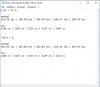
I don't get why mostly opengl performance continued to drop after each test, despite undervolt settings... but maybe it's normal. No throttle at all by the way, power limits are disabled by default on TS, in fact this system almost never throttles.
Anyway, I don't see much difference from one another. I think I'll have to compare also max temp values from TS sensors.
Just a note, as i haven't said it before: I've let Windows to manage speedshift values, because on this machine it is already activated and I didn't want Win10 and TS to fight for cpu control. So, I'm always using Windows balanced profile with speedshift setting automatically set to 84 (it switches to 0 in rare cases only).Last edited: Oct 31, 2018 -
If ThrottleStop detects any errors, they will be reported instead of the time being reported. If it shows the time value after a TS Bench test, no errors were detected.
The TS Bench is not the ultimate stress test by any means. I think of it as more of a basic stress test. You should definitely be 100% TS Bench stable with 0 errors being reported in any of the TS Bench tests you try. I recommend doing both single thread and multi-thread tests. On a laptop when undervolting, being error free in both of these tests is important. Too many users concentrate only on full load or uber load testing. Partial load is where most laptops spend most of their time.
Always a wise decision.Wintermute and magnetoeric like this. -
Not the big performance differences. Don't put so much trust in the Maxon OpenGL benchmarks. Have always beeen flawed. Use the settings who give you best temp. Switch to the other settings or decrease your undervolt if you later can see stability issues.
Btw... Have you tested with other voltage settings? As for example -90 / -100mV for both core and Cashe.Last edited: Nov 1, 2018 -
I did run every test possible with ts bench and prime95. Along with testing few games, i found the stable undervolt for my laptop. I'm currently running -160mv on core and -140 on cache. In my case, having more uv on core reduced power consumption and temperatures by a little margin than having matching uv with cache. Sadly the disable and lock power limits setting didn't have any effect, maybe coz they're locked by acer? It's not that necessary to me though, since i use lower multipliers while gaming. Once again, thank you so much for this amazing piece of software
-
@unclewebb I've noticed that when the clock modulation box is checked the CPU usage of TS goes from 0.02% to 0.13% and the results on Cinebench are ~10 points lower (from 683 to 673).
I suppose that's caused due to TS being constantly writing to the clock modulation MSR to make sure it is at the set value, is there any chance of making this feature less impactful (or aggresive) on the CPU performance in the future? Thank you
-
I could be wrong, but I do not think you need to have the Clock Modulation button checked if you are using Speedshift.
Joe -
Nah, clock modulation is not related to Speed Shift.
According to Intel documentation clock modulation throttling should only be used as a last resort method to cool the CPU. In my case when DPTF is enabled clock modulation won't go below 100 as DPTF throttles the power when the temps are high.
But when I disable DPTF, clock modulation throttling appears whenever the system is a bit hot and it won't go away long time after it has cooled down. -
Dell has long been a fan of using clock modulation throttling. If you are interested in the early days of Dell and clock modulation throttling, here is a 24 MB pdf download that tells all. This document is what originally motivated me to write TS.
https://drive.google.com/open?id=1tDRwD215OkMyx9BzTQRq1esBOXJrC4Dw
Anyway, there is already a hidden option within TS so you can adjust the frequency that TS checks the clock modulation and set multiplier registers. In the ThrottleStop.INI config file you can add this line.
TimerInterval=1000
That line tells TS to check these registers every 1000 ms which is every second. The available range is 4 ms to 1000 ms. Default value is a secret. Play around with that value and hopefully you can come up with a better compromise that is right for your laptop. -
I set the TDP Level Control to 2 from the 0 and I "Lock" it. My question is, how can I unlock it? I already reboot my laptop but the "Lock" and the "TDP Level Control" is grayed out.
-
Hi there, I'm quite new to this site. I'm trying to get Dual IDA mode to work via Throttlestop on my XPS M1730 with C2D T9500. I have tried disabling SpeedStep In BIOS, but no matter what I do, the multiplier is locked to 6x in Throttlestop. My goal is to get both cores running at 2.8Ghz.
Any advice would be greatly appreciated.
Thanks. -
Welcome to NBR!
Are you using the Windows High Performance power profile? Is Set Multiplier checked and set to the maximum value? Enable SpeedStep in ThrottleStop and then right click on ThrottleStop and there should be an enable Dual IDA menu option. Select that. Make sure your laptop is fairly idle and if you get lucky, it will enter Dual IDA mode. SpeedStep will then be disabled and the CPU should be locked to the highest IDA multiplier.
It has been years since I have used Dual IDA so hopefully it still works. Post some screenshots so I can have a look. -
Trying to update from 8.50 to 8.70.6. When I replace the exe and try to run it I get two errors: mfc120.dll was not found and MSVCR120.dll was not found. Running on LTSC 2019. Should I even bother to update or is 8.50 just as good from a stability/performance perspective?
-
If you are happy with TS 8.50, there is no need to upgrade. If you want to run the newer versions, you might need to install the Visual C++ 2013 Redistributable packages which can be downloaded from Microsoft.
https://support.microsoft.com/en-us/help/4032938/update-for-visual-c-2013-redistributable-package -
Hi all. Just a question, could a whea error from HWINFO app stating "CPU L2 cache errors" be related to undervolting to much on Throttlestop and incurs errors on HWINFO In return. Should i increase voltage or is my CPU faulty and in return my whole Motherboard faulty? Would appreciate any insight on this matter and what tests can run to determine if my hardware is at fault or it's just my undervolt? Thanks all. I apologize in advance If this is a silly noob question
-
I think I've read you saying somewhere you included those in the TS exe file. Maybe I misunderstood. I'll try the ms packages, thank you for the link and explanation.
Regarding staying on 8.50, does it cause any bugs with the Task Manager on 1809? -
WHEA errors are errors that Windows keeps track of. HWiNFO is just reporting that information from Windows. WHEA errors are a sign that your computer is not stable. If I was undervolting, this is definitely a sign that you have probably gone too far. At this stage you cannot blame your CPU or your motherboard. Give your CPU the Intel recommended voltage and see if these errors go away.
This might be a sign that your cache needs more voltage than your CPU. Undervolting is always a compromise. Use as much voltage as you need to be stable.
What sort of bugs? I have not heard of any issues.
I thought I did but I might have done something wrong. Last time I installed Windows 10 Pro, I do not remember installing any of the Redistributable files and ThrottleStop worked just fine. You are on a different version of Windows 10 so it must not include some files that ThrottleStop needs. Too many versions of everything these days. All I know is that if a user is having any mfc120 related problems, installing the Redistributables directly from the Microsoft site will fix this problem. Start with the x86 Redistributables and if TS still doesn't work, add the x64 ones too. Some users have said you need both of them. -
I've just started using TS (and loving it over XTU) and I've got a question, many thanks in advance for your help.
In the "TPL" menu, there's "Intel Power Balance" with Intel CPU at 9, and Intel GPU at 13. What does this setting do?
Also, what does "clamp" mean for turbo boost power max?
Thanks.Maleko48 likes this. -
In theory, this setting would let a user decide how much power went to the Intel CPU and how much power went to the Intel GPU before throttling begins. If you had a low power U CPU with a 15 Watt long term TDP rating, maybe some tasks would work best with 10 Watts going to the CPU and only 5 Watts going to the GPU. For gaming on the Intel GPU, maybe more watts being allocated for the Intel GPU would allow better frame rates. To be honest, it is kind of a hokey setting and the majority of users are probably not going to have any use for this. If you do your gaming on the Nvidia GPU then I do not think there is anything to gain by adjusting this setting. It never hurts to try different settings though.
When a CPU has to throttle, the Clamp option determines whether the CPU will go down to the default non-turbo speed or whether the CPU will go lower than the default non-turbo speed. Clamp forces the CPU to run as slow as it needs to run so it does not exceed the requested power limit. Most laptop bios versions seem to default the Clamp option to checked or enabled. I hate throttling so I always turn Clamp off.Vasudev, FrozenLord and CedricFP like this. -
Thanks for the explanation,
@unclewebb it is very much appreciated.
Regarding intel power balance, I do actually have a handheld unit (GPD Win 2) which has a Core M3 7Y30 which is Kaby Lake generation. Do you know if it would work here?
Since for the majority of games it is GPU limited, being able to divert more power to the GPU and less to the CPU while staying within the same package power (7w default) would be really good.
If so, what do the numbers represent? On my laptop, it has 9 and 13. Are these a ratio?
Thank you in advance for your reply! -
I have never played with a Core m3-7Y30 or similar but I think it supports the Intel Power Balance feature. The last laptop I remember using Intel Power Balance on was a 3rd Gen U CPU so this feature has been around for a while. My laptop also uses the default settings of 9 and 13.
You can adjust each setting from 0 to 31. If you want your Intel GPU to get the majority of the power budget you would set the Intel GPU to 31 and the Intel CPU to 0. When set like this, when you reach the 7W power limit, the CPU cores should throttle first to stay within the power budget. This should be better for gaming. Give it a try. -
I was asking me... is there a way (or will there ever be one) in TS to selectively disable cpu cores on the go?
Both the Windows-related methods I know are not direct, they require a system reboot or the creation of a batch file with command lines for each application. I think it might be good to have such a feature in TS, if there isn't one already. -
I don't think there is really any reason or benefit from this considering the excellent sleep states we have available on the newest generations of Intel i CPUs. It would be a moot option imo as the power savings would be negligible at best and non-existent at worst.
What generation CPU did you have in mind that you are wanting to use this feature on?Wintermute and unclewebb like this. -
@Jena_Plissken - I am pretty sure that when disabling cores a system reboot is always going to be required. No plans to add this to ThrottleStop. On your 6 core 8750H, if additional cores are not needed, they will automatically enter the C7 state where they are disconnected from the voltage rail so they are getting 0 volts. They are also disconnected from the internal clock so unused cores are running at 0 MHz. Hard to improve upon that. Any gains from disabling cores would be so small that they would be difficult to measure. Intel CPUs do a great job when it comes to power efficiency.
Spartan@HIDevolution, FrozenLord and Wintermute like this. -
Thanks for the explanation, @unclewebb
How can I tell if this setting is working or not? I've been playing with it, going from 0 cpu 31 gpu to the reverse, and have not noticed any difference in the clocks my CPU boosts to, or performance in game.
I know for a fact that the iGPU won't run at full clocks until about 10~12w tdp, but that's too hot for the handheld so I keep it at 7. Is this indicating that either the setting in TS is not applying, or that even with 0 CPU and 31 GPU, the 7w power limit is still not enough to allow for full iGPU clock speeds?
I understand that this is kind of a niche question, but just a guess on your part would be helpful.
Many thanks in advance. -
I'm swapping out my Mi Notebook Pro with a Teclast F6 Pro, which has the m3-7Y30. I'll report back on this when I get it in a few weeks.
(It has a 100% unlocked BIOS - That means lots of fun to be had) -
Hello, new member here, and also a newly-established happy user of TS. I have some quick questions regarding BD PROCHOT:
From what I've understood so far from stalking the guide here, as well as from other sources, BD PROCHOT is suppose to throttle the CPU because of outside sources getting too hot (i.e. GPU). But it's said that most of the time BD PROCHOT is triggered is just because of bad sensors in the motherboard. I've already disabled BD PROCHOT and found great results in CPU-Intensive games where BD PROCHOT is triggered usually.
I want to ask if disabling it is safe? Like, is there no repercussions at all? This is considering how BD PROCHOT is supposed to stop other components from overheating by throttling the CPU to drop the overall temperature. Wouldn't disabling it open the way for those components that I do not know of to overheat?
edit: I'm using a laptop (Acer Aspire E5-576G). My CPU temps are around 85C on long loads after undervolting both CPU, iGPU, and dGPU, while the dGpu averages around 72C. And could I ask what C1E means? And whether should I uncheck it or not on TS?
Another thing I'm curious in TS is IccMax. I've read somewhere in this guide that it could indirectly influence the Package Power, and I've discovered on my laptop that although the Turbo Boost Long Power Max is working fine --like how it would take it longer for the CPU to throttle due to TDP-- my Package Power always caps at 19W regardless that I've set TPL beyond 19W. If I do set the TPL to 15, the Package Power properly caps at 15W. What I want to know is, is raising the IccMax also safe? And will raising it help in increasing my Package Power limit? If not, what do you recommend?
By the way, I also noticed one peculiar thing during any intense loads like Cinebench while looking at the Limit Reasons. Assuming my TPL was set to 30, and even though the Clamp was not checked, whenever PL1 is triggered Red, my Package Power would throttle down to 15W which is the default TDP of my laptop. It would then stay at 15W until the load lessens signficantly, or finishes. I've read before from one of your old posts unclewebb that the Clamp when unchecked should stay close as much as possible to the max turbo boost. But in my case, the throttling acts as if the Clamp was checked. I would like some help with this as well.
ThanksLast edited: Nov 15, 2018 -
a i8750h with only 4 cores enabled, would get 4GHz and lesser power drain, which could be better for some games.
I read there was a program to park cores, but dunno if it would work that way. -
Hello,
First of all, THIS PROGRAM ROCKSSS!!!
Secondly, I am new in throttlestop and I cannot seem to find an option to disable individual cores in a specific profile. Is there one and I am just a noob or there is not? I searched the forum and could not seem to find an answer.
Thanks in advance! -
Yes, that was my thought, but from the answers I got it seems there shouldn't be so much difference. I will make a test maybe and see if it's really true or not.
-
What does GPU EDP OTHER means under limits section? It is always yellow.
-
Hello there,
I have a question: In throttlestop, I see a Turn On/Off in the taskbar's icon. Its' red when on, green when off.
Following the Throttlestop guide in this thread, setting the program to run as soon as I log in is trivial.
However, the switch state (on or off) defaults to OFF on start-up.
Can this be adjusted such that it defaults to ON on startup? Is there such a launch option? Thanks. -
When the button says "Turn off", it means that TS is on - clicking will turn it off. When it says "Turn on", it means that TS is off, and clicking will turn it on. So it defaults to having TS turned on at startup, which is what you want.
Best,
Joe -
That I understand.
This isn't the case on my end. It defaults to "OFF" on startup, and I have to manually toggle it to ON.
Perhaps there's a preference I have to set to enable that by default?Vasudev likes this. -
Ah, fixed it.
Just leave it on when you shut down and on restarting, it will still be on.
That's it. All's good now.Vasudev likes this. -
Try deleting ini file and check options to make sure TS setting stick on AC and battery even after exiting TS.
Hibernation must be disabled and TS folder must be whitelisted if you use 3rd party AV.Dennismungai likes this. -
Quick question: Is it safe to increase the ICC Max?
@ Che0063 -- I've seen from your posts that you had used an i5-8250u as well. Considering it's the same CPU as mine, could I ask what do you set your ICC Max as? Thanks.Last edited: Nov 20, 2018 -
On all 4 laptops I've ever owned which all had 15W U Series processors, I have never had to touch the ICCMax. That setting sets the maximum current your componend will draw. It is basically current limiting. E.g. if I set ICCMax of my cores to 15A, my CPU cores will never draw more than 15A.
Completely unnecessary to change on U series CPUs imo- My 8250U has its Core ICCmax set to 64, iGPU to 31A and Cache to 6A. HK/HQ/H CPU users may need to change this; these CPUs easily guzzle up to 100 amps.
Safe to increase? Yes. Recommended? No. Should you? No. If your CPU is throttling (In fact I'm absolutely certain its TDP limiting) send screenshots so that people here can help you. I have my 8250U running at the performance of the 7700HQ (albeit also at 40W power consumption).Vasudev likes this. -
Thanks. Greatly appreciate the help. I'll post the screenshots later, but in the mean time, let me give you some basic information on my current laptop.
I'm using an Acer Aspire E15 (E5-576G) with an i5-8250u and an MX150. I discussed in a previous post that I was hard cap for some reason at 19W regardless of what I set the TPL as. If I do change the TPL to something lower, like 15W, the changes do take effect. That suggest that the TPL is working just fine. Long story short, I've discovered that a program (HWMonitor) is oddly the reason for this hard cap.
As of now, the TPL is working as intended: Long: 25W, and Short: 44W. Duration is set to 32. Undervolt for both Core and Cache is -0.85mV.
The current issue I'm facing right now is that I want to change the TDP Level of my Aspire E15 which is nominally set to 15W. As of now, using Throttlestop's TDP Level Control doesn't seem to work even though RWEverything showed the change had taken place. I read from a much earlier post that there might be a 3rd set of values that you cannot possibly change. In that case, it would be helpful for some suggestions to stop it at least from throttling to 15W after Turbo finishes. Like, will raising the Duration help in acting as a pseudo-TDP Level Control?
P.S. Btw, the reason why I asked the ICC Max question in the first place is because my Aspire E15 had EDP Other as one of its Limit Reasons in Throttlestop. I discovered that by raising the ICC Max, it helped in solving the EDP Other Limit. Should I assume that the EDP Other here does indeed correspond to the ICC Max being lacking, or it's solely because of other throttling issues? -
Screenshots screenshots screenshots pl0x. FIVR window, TPL window, HWInfo, TS Main, RW-Everything Memory, CPU throttling under stress test etc + Limit Reasons
I'm in the middle of my exam revision and as a result cannot dedicate much time to this forum for the next two weeks. I've had plenty of experience working with U CPUs so I should be able to give you a definite answer as to whether you can solve your problem or not but do excuse me for being brief -
Okay, here are the images. I apologize for the rushed work.
https://imgur.com/a/1mijzHK
I would like to note that for intense sessions, like the start of Cinebench, TDP is capped at around 19W. After awhile, it would go back to the regular Long TPL, with Package Power going above 25W. Beyond that, though, it eventually throttles and settles at the nominal TDP which is 15W.
Also, during the Cinebench run, HWInfo showed Yes for all of the cores' Power Limit Exceeded. This is also the case for any demanding games like The Witcher 3. On that note, my Package Power is actually usually between 15W - 19W when playing load-intensive games with the max frequency being 2.9Ghz. A far cry from the actual max 3.4GHz, or in my case, 3.2GHz.Last edited: Nov 20, 2018 -
Can someone make me a step-by-step guide undervolting my laptop?
My laptop is Acer Aspire E 15 (E5-576G)
i5-8250U
GeForce Mx150 -
@unclewebb I'm using a Gigabyte Aorus Master Z390 with x50 multplier, x47 uncore and voltage set manually to 1.270v in the Bios. However Throttlestop says it's using adaptive voltage with no offsets.
Is this intended or Z390 is too new?
The ThrottleStop Guide
Discussion in 'Hardware Components and Aftermarket Upgrades' started by unclewebb, Nov 7, 2010.


