Problems? See this thread at archive.org.
Folks, sorry if this is a dumb question, but I googled it and couldn't find a satisfactory answer.
In "Turbo Boost Power Limits" there are "Lock" and "Clamp", what they do exactly? What's the difference between the two?
-
-
The Lock option is easy to explain. When the Lock bit is set, the CPU will lock the turbo power limits register so no software can change it. Not even the operating system can change it after it has been locked. If you use ThrottleStop to lock this register and change your mind, you will need to exit ThrottleStop, delete the ThrottleStop.INI configuration file, completely shutdown your computer (no hybrid shutdown). If you do not delete the configuration file, after you reboot and run ThrottleStop, it will lock this register again. If the bios has locked it, there is nothing that ThrottleStop can do to unlock it. You will usually need a modified bios to unlock this register.
As for the Clamp option, I am pretty sure that this has been talked about once or twice before in this thread, usually by me. Try using the Search option in the top right corner. In a 1000 page thread, it is an incredible resource. Even I use it.
![[IMG]](images/storyImages/1R4KaNm.png)
It depends what power profile that you are using and it might depend on the laptop you are using. If I drag the Windows 10 slider all the way to the right, ThrottleStop is in control of the Speed Shift EPP value.
@CraftyClown - Razer is nowhere on my things I need to buy list. That is too hot for me. With ThrottleStop about all you can do is undervolt and run your CPU at a reduced speed if necessary. For the iGPU undervolt, you usually have to combine that with the iGPU Unslice and undervolt them equally. The undervolt will probably not work if you do not do this.
Intel rates the vast majority of their CPUs to be able to run reliably up to 100°C. That is why they set the thermal throttling temperature to this value. Your temps are safe but when a manufacturer cheaps out on the heatsink, you lose performance.Last edited: Mar 28, 2019CraftyClown, Vasudev, joluke and 1 other person like this. -
Can someone please explain what the 'short duration time' of 2.44 ms means in HWinfo? Will it only draw 78 watts for 2ms?
Attached Files:
-
-
Without undervolt 90C should be the target for most slim laptops otherwise BD PROCHOT will put the CPU to 800MHz or stock clocks once it reaches 82-85C. Without TS, you will have ThrottleBook and it is worse than your 5 yr old PC you replaced.
85C-88C should be the max target thermal limit for any benchmarks because they are running in short burst for a very specified period of time.CraftyClown and joluke like this. -
Thanks @unclewebb
When you check the "Lock" option you also lock the clamps in their actual state (enabled or disabled)?
I mean, if I disable both clamps for PL1 and PL2 and check the "Lock" option, will Throttlestop prevent the system to enable the clamps? -
Low to mid 80s are the kind of temps I get when I do any benchmarks, however RealBench stress test is about as punishing a test to put the system as you can get, if I'm not mistaken.
Would mid 80s still be the max you'd want to get in those conditions, in an ultra thin gaming laptop? I can certainly get the Blade down to those temps, but at the cost of clock speeds.
If I change my EPP to 128 The same 15 minute test will give a max CPU temp of 89 degrees (average 81) and max GPU temp of 84 (average 73) however my average clocks are about 2,300 -
Cheers unclewebb, I was unfamiliar with the iGPU unslice setting. So essentially it needs to pair up with intel GPU undervolt in the same way CPU cache does with CPU core, right?
Yeah the Razer is a hot beast, but sadly for my purposes a necessity. Working in video production means I need a combination of max power and max portability. It's a balancing act getting thermals right at the cost of performance and vice versa
-
90C is real bad for your PC because it slows kills hardware due to heat.pressing likes this.
-
Its better to undervolt everything to same UV values for temp reduction. A cooling pad or stand helps as well.
-
So you think I should do another repaste then?
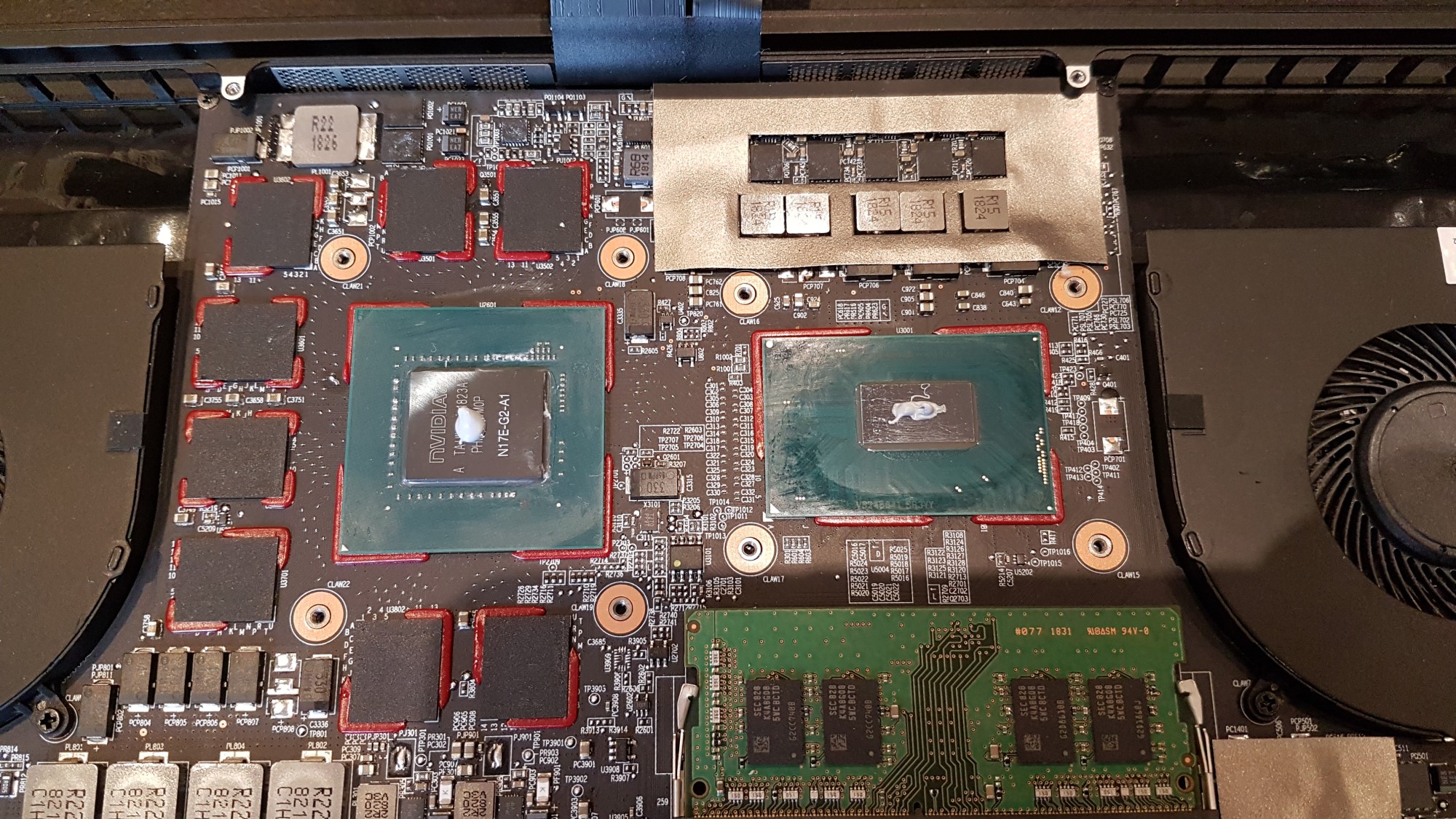
I've attached an image of my last repaste. Not enough do you think?Attached Files:
-
-
I think its too little paste for both CPU and GPU. Add some 0.5mm/1mm thermal pads on GPU VRAM to get some reduction in temps say 1-3C at max load. Which paste did you use? Kryonaut?CraftyClown likes this.
-
Not enough for cpu and gpu. A tiny more and should be goodCraftyClown and Vasudev like this.
-
Thanks, yes it's Kryonaut. I believe there are VRAM pads but they are attached to the underside of the heatpipe.
Thanks, I'm going to do another repaste this evening then.joluke likes this. -
I believe you need something like ICD 7/24 or even CoolerMaster maker gel. You can refer this thread http://forum.notebookreview.com/thr...nd-apply-traditional-and-liquid-metal.806840/CraftyClown likes this.
-
Maybe I misunderstood but does your thread not rate Kryonaut as one of the best options for non conductive paste?
-
Its best if you have clean contact with heatsink and CPU/GPU bare die. Some have good reviews for Kryonaut and some don't. You might need to cover 3/4 of the cpu with line method or even surface spread on CPU/GPU will do.joluke likes this.
-
I don't know. Thermal paste is a poor conductor of heat so you want the absolute minimum possible. The paste is a better conductor of heat than air is, so paste is principally to fill microscopic defects in the mating surfaces.
For the CPU, run an intense benchmark like Prime95 for a while and all cores should be very close in temps, say within 2*C max (You can see that on ThrottleStop or HWiNFO64). Idle temps don't tell you much. Else, you can try to repaste or have a warped heatsink.
You can search for benchmarks ran by other people with same computer and compare CPU & GPU temps for ballpark figures. There is a ton of data for the XPS laptops here but I don't know about for other laptops.Vasudev likes this. -
I've tried this out, unfortunately it does nothing for me...
I've tried this out and noticed that if I set EPP to 80, Windows controls it completely, regardless of where the slider is (complete left gives 84 and complete right 63).
If I set it to 128, and click on far left or far right of the slider Windows might allow TS to use 128. Clicking again will put the Windows version back...pressing likes this. -
Sorry, should have directed this to @unclewebb
-
Any tips on what i should modify to get my temperatures lower and the limits off?
Can't figure why i'm getting EDP OTHER flashing from yellow to red and PL1 in yellow?
Never had such problems with my previous cpu, 6700k but can't figure the 8700k now!?
Did a repaste but still hit those 80 something ºC
https://imgur.com/a/pwPHePX
The Iccmax isn't a bit low? on Cpu core and CPU cache?
I did delete the throttlestop.ini and shutdown my computer and went to the BIOS and loaded the defaults.
I feel like the 8700k is throttling like crazy!
any ideas? Repasted with Grizzly Kryonaut btw -
I have seen this SpeedShift EPP "issue" on several laptops.
powercfg /query 8c5e7fda-e8bf-4a96-9a85-a6e23a8c635c 54533251-82be-4824-96c1-47b60b740d00 36687f
There are several ways you can try to "confirm" EPP settings, including:
1) Look at Windows Power Options, Edit Plan Settings, Change Advanced Power Setting, "Processor Power Management", "Control Panel\All Control Panel Items\Power Options\Edit Plan Settings", look at EPP shown for "plugged in"
2) Windows Powershell: This is the text for my Dell XPoS 9550 (if using "High Performance" Power Plan)
9e-e3a5-4dbf-b1dc-15eb381c6863
--- If I am in "Balanced" Power Plan then I replace first group of digits with (Power Scheme GUID) 381b4222-f694-41f0-9685-ff5bb260df2eIn summary, Only options 3 & 4 show EPP values reliably in my experience (I just use the ThrottleStop EPP figure in FIVR, which I suppose just reads the MSR).
GUID numbers and naming scheme on your system may differ.
3) You can use RWEverything or similar to read EPP (Hexdecimal) realtime via address 0x774 (CPU MSR Registers User). Caution with this program as you can brick your system easily.
4) You can just look at ThrottleStop FIVR screen "SpeedShift EPP".
Options 1 & 2 are not reliable in my experience. That might depend on how your computer maker configured the BIOS on your system. Windows may request SpeedShift settings but those are controlled by the CPU (Speed Step worked differently). Changing EPP settings here does not change CPU performance on my computers (I have enabled several other Windows power options settings that, alas, also have zero impact).
TEST EPP VALUE You can easily see EPP values are sticking by typing in extreme EPP values in ThrottleStop's main window (EPP ranges are typically 0-255 but may be 0-64 or 0-100). Make sure you have SpeedShift enabled (ThrottleStop main window "SST" will be green fontcolor). Also make sure you have not locked/limited CPU multipliers lol. For example:
-- Typing EPP "0", I see CPU multipliers pegged near max turbo speeds 3.2GHz & EPP value "0" confirmed in the FIVR screen.
-- Typing EPP "255", I see CPU multipliers below 1GHz & EPP value "255" confirmed in the FIVR screen.Last edited: Mar 30, 2019Vasudev likes this. -
Hi unclewebb, so I repasted the cpu and gpu and now I get a constant 3.192 GHz without overclock on TS bench 256M. Limits :EDP current
With overclock and same settings, I get 3.36 Ghz , 57 Watts until PL1 kicks in and I get around 3.0 GHz and 47 W. Limits for this one: EDP current, PL2, then PL1. Max temps are around 87 Celsius now, around 10 degrees lower than before.
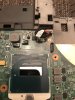
When I removed the heatsink though, all the thermal paste I previously applied was around my CPU like this photo: https://i.imgur.com/reJP18M.jpg. There was nothing in the middle and there was even a small liquid on top... The paste was not even dry. Is that normal? It hasn't even been that long that I re-pasted (like 1 year ago)...
Thanks -
That paste doesn't look normal. What brand are you using? Hope you used a different one this time.
-
I forgot to mention that I didn't take this photo. It's just for reference. The paste I use is arctic MX4.
Here is a look at my CPU. There's some tiny scratches as you can see in the pic (forget the dot, that's the reflection of my phone). I cleaned it up really well but they did not go away.
CheersAttached Files:
Vasudev and tilleroftheearth like this. -
-
Yeah, I'm using the option 4, FIVR screen to see which EPP value is being used.
Like I said Windows is in full control of this.
I changed the Widnows EPP % and noticed that that affects the value when the performance slider is all the way to the left, moving it to the right increases performance (as it should be).
So changing the EPP% in Windows changes the baseline value which is the slider all the way to the left. -
I was able to get my undervolt down to -.137 and all benchmarking tools and games were stable, but in a week I got 2 blue screens that haven’t happened again since putting it back down to -.125. The blue screen error was pretty generic. Is there a reason why the blue screen would not manifest at max loads and only at other times? Is there a way to lower the voltage only when the cpu is working hard, similar to the afterburner curve?
-
Been lurking around the throttlestop thread for what seems like ages I am now a proud owner of an Alienware 17 R2 with the 4710hq CPU and 980M 4GB GPU .
I would like to say thank you to unclewebb for this great application with out it I would of chucked this laptop out of a window.
Yes the Alienware 17 r2 is now getting on in age but I bought this nearly 1 year ago and found out really quick WHY lol , last night I was playing around with PUBG and just kept getting throttling and the CPU going into default clock speed 2.4ghz , when I thought surely this laptop cant be that bad ,
whilst going through the numerous amounts of pages I came across one that was about VCCIN set it to 1.914 no throttling
these are my settings for reference if theres anything which looks bad please let me know
![[IMG]](images/storyImages/FSSIlrgl.jpg)
![[IMG]](images/storyImages/PQQbkwql.png)
![[IMG]](images/storyImages/pCy6EDrl.jpg)
![[IMG]](images/storyImages/RuABfh0l.jpg)
-
Is there any fix or workaround for the "Could not open WinRing0.dll" error? I tried a few methods that people recommended but I'm using Windows 10 Preview 18356 and I can't get Throttlestop to work at all for me anymore. I love this program and I'm hoping I can get someone to help me get it working again
-
ok not sure what happened but my vccin setting is now not staying it will now not change and is just sitting at default and the power cut feature now doesn't work ???
-
I think the way to interpret this is that the CPU can operate beyond PL1 for approximately 28 seconds and it is allowed to operate beyond the short term limit (PL2) for only 2.44 ms. In other words, operating between 45 and 78 Watts for a short amount of time (28 seconds) is OK but if the CPU ever tries to go beyond 78 Watts, that is a big no no and the CPU will almost immediately (2.44 ms) slow down to prevent the CPU from operating beyond its 78 Watt PL2 limit.
When overclocking on a desktop motherboard, these turbo power limits are usually both set equally to their max which I think is 4095 Watts. This ensures that neither power limit will interfere or limit maximum CPU performance.
@bazza2000 - Your first screenshot shows that you have Clock Modulation checked. Is this necessary? To find out, clear the Clock Modulation box, turn on the ThrottleStop Log File option, go play a game or run a stress test and when finished, exit ThrottleStop and look in the log file. If the CMOD column in the log file shows 100.0 for every entry, there is no need to check that option in ThrottleStop because your laptop is not using Clock Modulation throttling.
Why did you set your turbo time limits to 3670016 seconds? Most CPUs will ignore that setting. The default value is usually 28 seconds. Just because ThrottleStop lets you make a change does not mean that you should make that change. After making any adjustment in ThrottleStop, do some thorough testing to prove that the change you made was a worthwhile change that increased performance or decreased temperatures. Changes that you read about on a forum should be avoided unless you can prove that they actually work on your computer.
The default Turbo Ratio Limits for the 4710HQ are 35, 34, 33, 33. You have Overclock checked so you can raise those values by +2 to a maximum of 37, 36, 35, 35. You can set these less than that. Some users might go with setting these all to 35. Reducing the maximum turbo multiplier might help reduce the CPU core voltage requirements.
The PowerCut feature takes advantage of a bug within the early 4th Gen CPUs. This works great on my 4700MQ but it might not be useful on your 4710HQ. PowerCut locks the VCCIN voltage value. After you enable PowerCut, you will not be able to make any further changes to VCCIN until after you reboot. The VCCIN voltage is locked within the CPU. Look in the FIVR monitoring table. If you see the word Lock to the right of VCCIN, you cannot change the VCCIN value.
I do not know of any feature in the latest Preview versions of Windows 10 that are more important to me than being able to run ThrottleStop. Choose your updates wisely! If ThrottleStop is important to you, get off of the Preview ring ASAP.
ThrottleStop is working great in Windows 10 Version 1809 Build 17763.379Last edited: Apr 1, 2019bazza2000, Papusan, tilleroftheearth and 2 others like this. -
TS is working fine on 18362.1 Fast insider build on my PC clean installed. I think WD/other AV blocked it.FrozenLord, Papusan, pressing and 2 others like this.
-
Thanks @Vasudev for the update. If ThrottleStop does not start up and Windows shows a WinRing0 error, I would disable Windows Defender to see if that helps. I know that most of the time, Windows Defender does not have any problems with ThrottleStop but sometimes, almost randomly, it will quietly put ThrottleStop on its list of evil programs and will prevent ThrottleStop from starting.
Papusan, joluke and tilleroftheearth like this. -
I posted this a few pages back and since i didnt get any reply i decided to go and test stuff for myself:
Update on this post:
Aparently iccmax was pretty low and it was causing throttling in my 8700k!
Raised it and voila, no more throttle!
The cpu was being throttled at 2.7Ghz in cinebench and wouldn't go near its default speed of 3.8Ghz, or even 4.7Ghz when turbo kicked in!
Anyway, decreasing the voltages offset in CPU Core, Cpu cache and System Agent to -0.1299 made the system WAY cooler! So i was able to run this beast of a CPU at 80ºC maximum at 4.7Ghz with a pretty low undervoltage and running stable when running several games like: Battlefield 5, Battlefield 4 and Rainbow Six: Siege!
I'm able to run these games all maxed out and all above 125fps stable!
Thanks @unclewebb for this little program that is a miracle maker!
Really appreciate all the hard work you have put on it along with other NBR members!
Love this community from the heart! Thank you allPapusan likes this. -
How high did you raise IccMax? I do not have any hands on experience with an 8th Gen - 6 core CPU. Not many people with desktop CPUs post their results here. I do know that an 8th Gen low power U CPU needs an IccMax setting up around 80 Amps to achieve maximum performance so an overclocked 8700K probably needs 150 Amps or more.
I like keeping things simple so I just drag the IccMax slider all the way to the right. Full speed ahead with no EDP throttling.joluke likes this. -
Pushed it all the way to the right and no more throttling. Yeah I've done a search before to see if i could find the culprit on the throttling and i don't see many posts about the 8th gen. Found one post on reddit that a user said to raise it to the max (to another person with a 8700k). I did try it and voilà, no more throttling. Still have PL1 in yellow. Any idea why?
-
-
Will try it when I get home and ill reply here with results. Thanks a bunch my friend

-
Just wanted to say congratulations @unclewebb for 1000 pages achievement
I have been looking into it for a while
-
unchecked modulation . I have also changed my turbo limits to 28secs . For some reason the Vccin has also now "set" I really don't know why lol .
I have unchecked the overclock now and gone with the default 35,34,33,33 as if I set at 37,36,35,35 I get a GPU power limit and the clock goes to the 2.4ghz which really impacts the performance .
Just going to test the powercut feature at these new setting
thank you again -
Made the adjustments CPU maxs at 72c and the GPU is hitting 64c under load , after 5 minutes the GPU power limit comes on and the CPU limits down to 2.4ghz and there it sits , ive also enabled powercut ,
Could this be a GPU issue ? but no limits are showing up in Invidia inspector . the only thing that I haven't done is a modified Vbios ? did this actually solve problems when a Vbios was available ?
Sorry for the multiple posts -
Thank you. When I first started this project, I had no idea I could turn it into a 1000 page epic adventure. I remember the early days when the NBR mods were not happy with me. There were ThrottleStop posts scattered through all sorts of different discussions. They finally told me to make one thread dedicated to ThrottleStop and 8+ years later, here we are. TS continues to be a very useful tool for a wide variety of problems.
Any GPU related throttling that shows up in Limit Reasons is referring to the Intel GPU. To try to get rid of the 2.4 GHz blues, first try setting the FIVR - Non Turbo Ratio to 1 and see if that helps. After testing that, set the Non Turbo Ratio to 0 and then put a check mark in the Set Multiplier box and set that to the maximum. Hopefully one of those tricks works. The first trick takes less CPU cycles so I recommend trying that one first.
Is anything showing up in Limit Reasons when the CPU is running at 2.4 GHz? Why not run a log file and post some info from when you are using your computer and experiencing this throttling problem. You can copy and paste log file data to www.pastebin.com
Does PowerCut work on your CPU? When it works correctly, you can run 8 threads of the TS Bench and reported power consumption will only show a number in the low single digits.
![[IMG]](images/storyImages/sMMwmeN.png)
The CPU is confused. It is fully loaded but power consumption is only reporting 2.9W. This means that there is zero reason to throttle. Power consumption is well below the PL1 or PL2 power limits. Make sure that VCCIN shows Lock, and that beside PowerCut it shows Enabled.
![[IMG]](images/storyImages/GlYtWjj.png) Last edited: Apr 2, 2019Ashtrix, FrozenLord, t456 and 6 others like this.
Last edited: Apr 2, 2019Ashtrix, FrozenLord, t456 and 6 others like this. -
So the GPU is the integrated hd4600 thing BLOODY hell . This is the only limit reason I get coming up .
Power cut looks like it works as it enables At the VCCIN I put in but I cant remember seeing LOCK .
When I check the max power it shows something like 8.9w
I'm getting no other limits reason apart from the red gpu power one . Temperatures on the 980m max at 65c and the highest on the cpu is 80c when on full load
What are the options.
I will do a log file tonight as this is the only thing holding this laptop back now -
https://pastebin.com/wf9dCFNf
VCCIN IS LOCKED getting core and gpu red limits my log file is linked im really at lose now -
@bazza2000 - Did you try changing the Non Turbo Ratio value to 1 or did you try using the Set Multiplier option like I mentioned above? One of your power limits might be getting set to a really low number like 0 which will disable turbo boost so your CPU will be left using a maximum multiplier of 25. That is the default multiplier for a 4710HQ.
Over on the superuser forum, I was trying to help a guy with his computer limping along at 400 MHz. I asked him if he had tried disabling BD PROCHOT. I went back to see how my advice turned out but discovered that my post was deleted. Tough crowd over there.
https://i.imgur.com/TRuR1O8.png
Thank you NBR for not having stupid mods. Over on superuser they are all still scratching their heads, trying to solve this dilemma. -
I think I may have identified a bug :
If I manually put profile 4, battery mode, when plug, Throttlestop exit if I unplug AC. Throttlestop is supposed to switch to profile 4, but I guess that when it sees that it's already on the mode, bug...
Thanks for the wonderful work unclewebb
Last edited: Apr 4, 2019 -
Post n°10.000 , nice thread.
I have to read alot of coments here.
Enviado do meu Redmi Note 4 através do Tapatalk -
Is there a way to run TS ignoring 'ExitTime=n' paramter in the .ini?
I wanted to create a shortcut to run TS without having to modify the ini every time.
Maybe also a parameter to launch TS forcing GUI ON (not iconified ) even if you saved to iconify it in the tray as default?
Small request
Can you add CPU Type info on FIVR and other customizing panels? I've seen many sshots on the internet of your program, and thought it would be easier to immediately understand what's the CPU users are talking about from their screenshots Maybe (f.e.) " (i7-8750H)" added to the window tile would be enough.
joluke and tilleroftheearth like this. -
@unclewebb when you get a few moments, please check out my post here:
http://forum.notebookreview.com/thr...71-owners-lounge.826856/page-11#post-10891267
Discovered something interesting and I'm not sure if it's ThrottleStop related or not but it may be worth taking a look. It's not just one isolated case, it was replicated on another 703GX too.
In short, the ROG G703GX would appear to be locked (couldn't change voltages and TRL in FIVR) but a simple action of putting windows to sleep and waking it up magically unlocks these settings. After a windows shut down, this needs to be repeated to unlock again.
I'm digging around wondering how windows messes this up. Anyone seen this behavior ever anywhere?pressing and tilleroftheearth like this. -
Are you using the Task Scheduler to start ThrottleStop and if you are, did you follow the guide in the second post of this thread? Before I do some testing, I want to see if your problem is Windows related.
I agree that adding the CPU name to each window is a good idea. I too get frustrated when searching the web for ThrottleStop screenshots and not being sure what CPU TS is running on.
Why would anyone want to exit ThrottleStop, ever?
Not a bad idea but no plans to continue working on TS at the moment.
@cucubits - I was reading on the TPU forum about the same thing where doing a suspend / resume cycle unlocked the offset voltages. My question over there was, is Intel XTU installed? If it is I would delete it. Do some testing and try to isolate this problem. Is it the bios that initially sets the lock bit and then forgets to set it after a suspend / resume cycle or is Intel XTU or any software that uses XTU involved in this problem. I know TS does not lock the offset voltages. That would be a dumb thing to do deliberately. Who is guilty of this?Papusan and tilleroftheearth like this. -
Interesting.
No, I don't have Intel XTU installed. I will dig around some more and post back if I figure it out.
I wonder if it's the same on a completely clean windows install (without all the asus crapware).
The ThrottleStop Guide
Discussion in 'Hardware Components and Aftermarket Upgrades' started by unclewebb, Nov 7, 2010.