Problems? See this thread at archive.org.
The fans are likely responding to thermal load. See UncleWebb's post. Simply turning the fans down is likely to cause temps to rise. I would do all you can to improve thermal efficiency (repasting, undervolting as possible,...) to see if you can bring temps down. Simple things like making sure the underside of your laptop has plenty of clearance for air flow (my daughter's laptop was overheating like mad until I discovered she was using it on the bed!). There are laptop boards with fans that can be quieter than the built in ones,... Once you've done all you can, then try reducing fan speeds in the dragon center. Good luck. Joe
-
Hello again!
I reduced my undervolts for Clock and Cache and am now getting no errors on TSBench when stress testing with Unigine Heaven. I also ran Prime95 torture test on blend for about an hour with no errors or warnings. I may reduce further so I have a bit of a buffer when I have finished interfering with my computers voltages.
I also increased the undervolt to Intel GPU quite a bit but stopped as it seemed to be getting a bit extreme (-150mv) even though it produced no issues.
The ThrottleStop Primer says I should ignore the other elements under FIVR control, however, I have read a couple of posts (I think in this 1000 page thread but maybe elsewhere) that say Intel GPU, iGPU Unslice and System Agent should be undervolted by the same/similar amounts. (The primer is a little dated as iGPU Unslice is not an option in the ThrottleStop examples).
Which is it? Should I also undervolt iGPU Unslice and System Agent?
I have also read that the dedicated GPU can be undervolted by overclocking with other programs. Is that something you would recommend? (Dell G5 15, i58300h, 1050 4gb, 1tb hybrid, 8gb ram). Any/all opinions appreciated.
Thanks again. -
Asus ROG G703
Unleash the Beast
https://www.asus.com/Laptops/ROG-G703/
That is funny. It is going to be pretty hard to unleash the beast when Asus has decided to block CPU voltage control. ThrottleStop does not work and neither does Intel XTU. Be careful before emptying your wallet. You might find that this beast has been tied tightly to a post. Without voltage control, it will be a struggle to achieve maximize performance from any Intel 8th Gen CPU.
@Joe_233 - It is quite possible that the iGPU voltage and iGPU Unslice voltage are tied together which means you will have to adjust both of these voltages equally. If you only adjust the iGPU voltage and not the Unslice, the CPU / GPU will likely ignore your request. If you mostly use a dedicated GPU, there might be very little to be gained by adjusting the iGPU.
I believe that ThrottleStop runs OK on Windows 10 - 1809. If there was a problem, I think more people would have been posting about it during the last 6 months. There have only been a couple of random complaints. Hopefully a few happy TS users can confirm if TS is OK when running Windows 10 Version 1809.6.|THE|1|BOSS|.9, pressing, Papusan and 1 other person like this. -
TS confirmed running on multiple platforms all Win10x64Pro based v1809. Desktops and notebooks.
 Papusan, viktor5001 and unclewebb like this.
 -
I have a brand new laptop with an 8750H. I undervolted to -125mv, and enabled speedShift with a value of 84 (this seems to equate to the 33% that is the windows default).
I ran the Normal, 12 thread, 1024 benchmark. It finished in 111 seconds and the maximum temps of the cpu cores ranged from 72-76. Is this good? -
Maybe. When I see temps that good I start to wonder if your CPU was throttling during that benchmark. When the TS Bench is running, open up Limit Reasons and have a look. Is any box red? Is the multiplier at a solid 39.00 during this benchmark? Can you run the original Cinebench test and maintain the 39.00 multiplier for the entire test? No throttling in Cinebench is usually a good real world test for an 8750H.
@tilleroftheearth - I have not got around to updating any of my computers to 1809 yet. Thanks for confirming that everything is OK in Windows 10 - 1809.Papusan and tilleroftheearth like this. -
really appreciate your response. If I was reading everything right, I saw the 'EDP Other' and 'PL 1' go red. The multiplier appeared to be around 35. I'll definitely try Cinebench as well.
Edit: even when not running anything, EDP Other, PL 1, and PL 2 are yellow. And the first two go red around 20 seconds into the test. -
When Limit Reasons shows a yellow box, that shows you that throttling has occurred at some point since you booted up. You can click on the headings in Limit Reasons to clear this information from the CPU. It is normal for some laptops to quickly go back to yellow when lightly loaded or idle. What it shows when testing with a load is more important.
Red boxes are bad news. That means CPU throttling is in progress. EDP Other usually refers to one of the current limits. You can try adjusting the TPL - PP0 Current Limit higher and you can try increasing the FIVR - IccMax higher. PL1 refers to Turbo Boost Long Power and PL2 refers to Turbo Boost Short Power. Both of these can be adjusted higher in the TPL window if they are not locked.
Post some screenshots while throttling is in progress. Other users can learn from your adventure. -
No issues, a few were using TS before and now after the upgrade.
I don't need to tell you to go slow and do one system at a time. All systems/configs are different.
-
mmmmmmm…….Cooler Boost puts your fans at max and they will stay at max even when the laptop is at idle until you turn Cooler Boost off. Hence the name; COOLER BOOST
-
Is it expected that short power max should be at 78? Should I just set that back to 45?
FWIW, I'd personally rather err on the side of cooling/fan noise as opposed to small performance gains.
Edit: setting short power max to 45w caused nonstop throttling lol. I can keep that up at 78. What do people with an 8750H generally keep their long power max to?
Edit 2: I got a 1213 in cinebench, the multiplier stayed at 39 until the last few seconds and then it throttled PL1Attached Files:
Last edited: Mar 21, 2019 -
-
@unclewebb I was wrong! I was wrong!
This is the strangest thing, all of a sudden the voltage changes seem to be active now. Also the turbo ratio limits are not greyed out anymore. I don't understand how, I haven't touched other settings in ThrottleStop.
The only one thing I did was install XTU, saw the voltage controls greyed out there and uninstalled it. Didn't touch any setting there either. How it this possible?
-
Pity I have the ROG GL703GS and the limits are not hard locked, so can unlock Turbo Limits with TS.
Turbo Limits unlocked with TS, PL-1 set to 65W as this is limit of this chassis before thermal throttling will occur - Prime95 Small FFT stress test. Windows 1809 -140mV undervolt applied with TS
Note checking Disable and Lock Turbo Power Limits in FIVR will break the TDP down feature on this model, although unchecking and performing a full restart TDP down will function as normal
TDP down - Silent CPU PL-1 35W, Balanced CPU PL-1 40W & Overboost CPU PL-1 45W, PL-2 remains at 90W also limits and boosts GPU.
Q-6Last edited: Mar 22, 2019pressing likes this. -
Hi guys, i have just see in the Winaero, there's an option "disable power throttling". does someone knows this feature and does it works on cpu throttling ?
https://winaero.com/blog/wp-content/uploads/2018/10/Power-Throttling-Tweaker-0.12.png -
No. Read the description of what it does in the image you've included.
If it was that easy, there should also be an option to download more RAM when your system gets low.
CPU throttling is usually when the platform has reached its maximum temperatures and the CPU is throttled to bring them down to within safe specs. It may also apply to a platform that can't supply enough power to the CPU, that is then power throttling.
The throttling that that option will toggle is whether Windows will give full resources to background tasks. Or not.
Not the same kind of throttling TS deals with.
Avé César likes this. -
THANK YOU
i thought it will be to easy too hahahaha
english is not my native language so i didn't understand all what is in the "text in the picture"
I use throttlestop since some month, and was hard to reach my sweet spot, so i was sick when i saw the picture hahahhaha and roll my head over the keybord lol xDtilleroftheearth likes this. -
I’m just trying to understand something - if you have an 8750 with a 39 multiplier and a 45w long power limit, you’re basically guaranteed to see power throttling, correct?
-
Hello, why does my PC not allocate all of it's processing power? It's supposed to go up to 2.8 GHZ turbo boosted but it stays at 2.6. Why is this? Also the multiplier is at 99.768 instead of being 100 mhz and i don't know how to change it. I have clock modulation and set multiplier on max.
-
How can anyone answer your question if you do not provide a screenshot or even your CPU model? I checked your 2 previous posts and they did not contain any information either. The multiplier is not 99.768. That is the BCLK and somewhere close to 99.768 MHz seems to be a typical value for many laptops. A perfect 100.0000 MHz would be nice. I can do that on my desktop but not on my laptop. Not sure why. The difference is not significant and can generally not be adjusted on a laptop so it is what it is.
Clock modulation is rarely used on any recent Intel CPUs so I am not sure why you have that checked. Set Multiplier is also not used on recent laptops if Speed Shift is enabled so you might not need to check that one either.
Post a screenshot or two of ThrottleStop if you need some help.
Here is what a perfect 100 MHz BCLK looks like in the wild.
![[IMG]](images/storyImages/rFcfH5J.png)
@scarletfever - Different applications use a different variety of CPU instructions so they will load the CPU differently. An application that uses the AVX instructions will require significantly more power compared to the same application that does not use AVX.
Perhaps a low stress app can run at the full 39.00 multiplier on your 8750H while staying within the default 45 Watt power budget. On the other hand, I know for a fact that there are high stress applications like the Prime95 Small FFT test that will shoot a giant elephant gun sized hole in your power budget. No way will your 8750H be able to run 12 threads of Prime95 while only using 45 Watts.
My simple advice is run your CPU as fast as possible as long as it is not overheating and the fans are not driving you crazy. A CPU is an inanimate object. No need to baby it or keep it at some sort of perfect temperature.
This sounds like a conspiracy of some sort. I have no idea why your turbo multipliers and voltages were locked. I hate to bash the competition too much so thanks for providing users with a reason not to install XTU. Last edited: Mar 22, 2019Papusan and 6.|THE|1|BOSS|.9 like this.
 -
@unclewebb
On a different message board I see you posted this:
"Open up the Turbo Power Limits window and set the Package Power Long to 52 Watts, Package Power Short to 70 Watts and set the Turbo Time Limit to 28 seconds. In this section, make sure to clear the Clamp option. That is a throttling method that can kill performance. You can also adjust the PP0 Turbo Time Limit to 28 seconds. While you are in this window, check the Speed Shift option, hit Apply and then set the Min to 8 and the Max to 41."
Should the clamp option be disabled for both short and long? My long clamp is checked on. -
I can run anthem at -.137 but I can’t get past the initial loading screen of BFV without a BSOD. ton of coil whine too, but only during initial loading screen.
-
My laptop has 8750h and from what I've observed by running CPU tests like cinebench and TS, the multipliers will drop down to 34 or 35 after 28 seconds (which is the duration of the CPU power limit PL1) to maintain the 45w limit. Unfortunately increasing the limits doesn't work on my laptop
-
I haven’t bothered increasing wattage but I’ve been experiencing the same. I can’t wrap my head around why intel would do this lol.
When do the 28 seconds start again? Ie how often can the cpu be in PL1? -
I might be wrong, but I think the timer starts once the power consumption crosses 45w and will reset as soon as it gets below the limit. I would like to hear more about this from other people around here.
-
Does undervolting cause the CPU speed to go lower when under max load? I'm noticing it's not going to full speed when it's undervolted with throttlestop. I get around 2.7 GHz when it normally goes to up to 3.3 GHz.
i7-4700MQ, -100 mv CPU/Core -
What other changes did you do? Post some screenshots of how you've set up TS to allow unclewebb and others to be able to diagnose this for you.
-
No. Undervolting will not reduce clock speeds. Undervolting reduces the excess heat generated as a result of having an excess of voltage applied. Keep in mind, if you undervolt too much, your system will be unstable. The key to undervolting is finding that sweet spot where voltage and demand can be balanced. Use benchmarking tools that stress both your CPU and GPU to test for stability.
-
Anything is possible if ThrottleStop is not setup correctly. You did not post any pictures of the problem you are having or include any information about what laptop you have so it is tough to say what is going on.
Here is a screenshot of my 4700MQ while running the TS Bench. All 8 threads are reporting the maximum 34 multiplier without a hint of throttling.
![[IMG]](images/storyImages/1xdQ7vp.png)
@scarletfever - Intel once compared the turbo boost function to water in a bath tub. If there is a huge hole in the bottom of the tub, the water will drain out very quickly and when the tub is empty, there will be no more turbo boost. The 28 second timer is not a written in stone kind of number. If an app has the CPU just over the long term turbo power limit, the boost will last longer compared to an app like Prime95 Small FFTs that is trying to push the CPU way beyond the turbo power limit. If you are using more of a real world app and the load is variable, the water going into the bath tub will be replenished so turbo boost can be enabled again and again.
Did you enable the FIVR - Disable and Lock Turbo Power Limits option? This works well on some laptops so ThrottleStop will have full control of your power limits. I know the guys with the WalMart Overpowered brand of laptops are able to run the 8750H well beyond the 45W TDP limit indefinitely. Some manufacturers like Dell are much more restrictive. That is why I have not bought a Dell laptop since I started working on ThrottleStop.
It is your computer. You can set it up however you like. I hate the Clamp option so I always leave it disabled (not checked).magnetoeric, pressing, Papusan and 1 other person like this. -
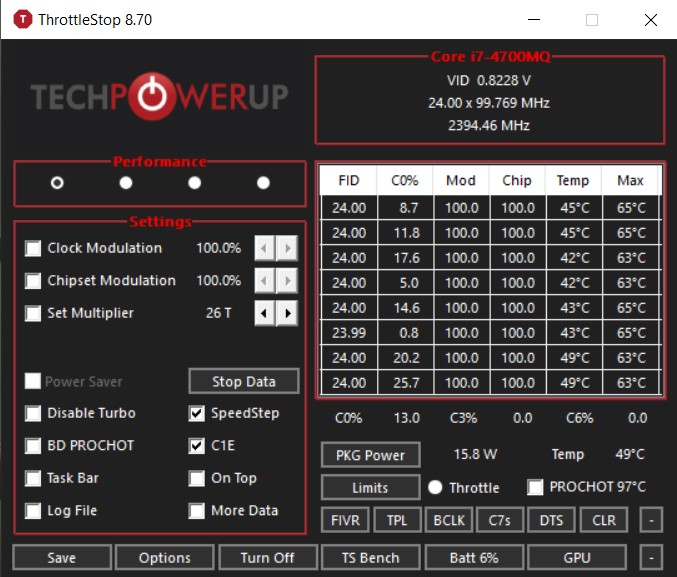
Hi, sorry I have been busy with some things. My specs: Lenovo W540 i7-4700MQ 2.4Ghz to 3.4 Ghz, Quadro K1100M 2GB, 16 GB Ram, 500 GB SSD. Here is the screenshots:
Attached Files:
-
-
Any news on TS from those running preview builds of Win10 19H1 update? There was talk about a WinRing error a few months ago, has this gone away or is it still a thing? TS is too good to lose.
-
You could start with increasing “Set Multiplier” to max on main TS page and save.Arrrrbol likes this. -
It seems Dell have no love for your amazing tool, Unclewebb. When will they reach the bottom?
Undervolting your Dell laptop can void the warranty
http://forum.notebookreview.com/thr...otebookcheck-net.808983/page-15#post-10886302 -
I agree. There are a lot of laptops in the wild that would be truly sad without the help of ThrottleStop.
Is that official Dell policy or maybe it is just one Dell rep trying to make a complaining customer go away. Some companies pay their front line call center employees based on how many complaints they can make disappear without it costing head office any money. A shameful practice.
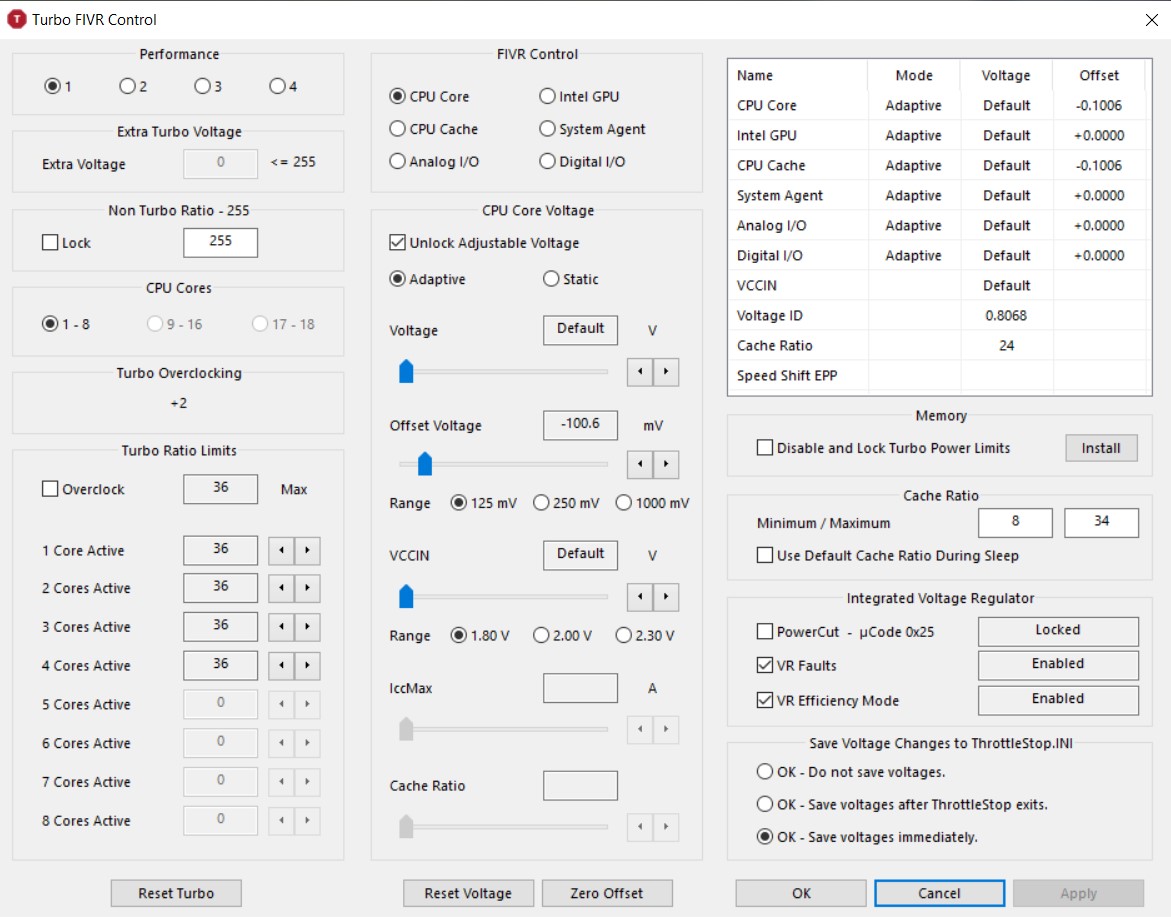
Open up the FIVR window so we can make a few adjustments to try and obtain maximum performance when plugged in. For some reason, the Non Turbo Ratio is set to 255. On a 4700MQ, the maximum Non Turbo Ratio is 24. I cannot use ThrottleStop to set this higher than 24 so perhaps your bios set this value sky high. Your screenshot shows your Battery at 6% so maybe Lenovo adjusts the Non Turbo Ratio high when it senses a low battery.
Try setting the Non Turbo Ratio to 1. Using this trick allows my CPU to run at full speed without having to check or adjust the Set Multiplier value. If your computer has a bad habit of changing the Non Turbo Ratio, you might have to use the ThrottleStop Non Turbo Ratio Lock feature to prevent this from happening. Avoid using the Lock option until you do some testing. It is a bit of a pain to unlock this feature after it has been locked.
The default maximum multiplier for a 4700MQ is 34 but this CPU also supports limited overclocking. Your ThrottleStop screenshot shows Turbo Overclocking +2. To access the 36 multiplier, go into the Turbo Ratio Limits section and check the Overclock box. I like to use CPU World to find out what the default Turbo Ratio Limits are.
http://www.cpu-world.com/CPUs/Core_i7/Intel-Core i7-4700MQ Mobile processor.html
When not overclocking, the Turbo Ratio Limits, from top to bottom, should be set to 34, 33, 32, 32. Any higher than this when not overclocking will be ignored by the CPU. When overclocking, you can add +2 to each one of those numbers so for a 4700MQ, the turbo ratios should be set to 36, 35, 34, 34. ThrottleStop should look like this.
![[IMG]](images/storyImages/Xwmikpv.png)
If you are still seeing throttling, open up the Limit Reasons window to see if it shows anything.
As for your undervolt, I found that -100 mV was way too much for my 4700MQ. Anything beyond -50 mV and my computer will randomly crash when lightly loaded. An undervolt that works great when fully loaded might be too much when lightly loaded so you need to test both situations. On the 4th Gen CPUs, the core and cache offsets do not have to be adjusted equally but it is fine if you do.
When idle, C0% should be around 0.5%. If it is way higher, use the Task Manager to find out why and fix the problem. Maximum performance or maximum battery run time are impossible to obtain if the CPU is spending time spinning its wheels processing useless background tasks.
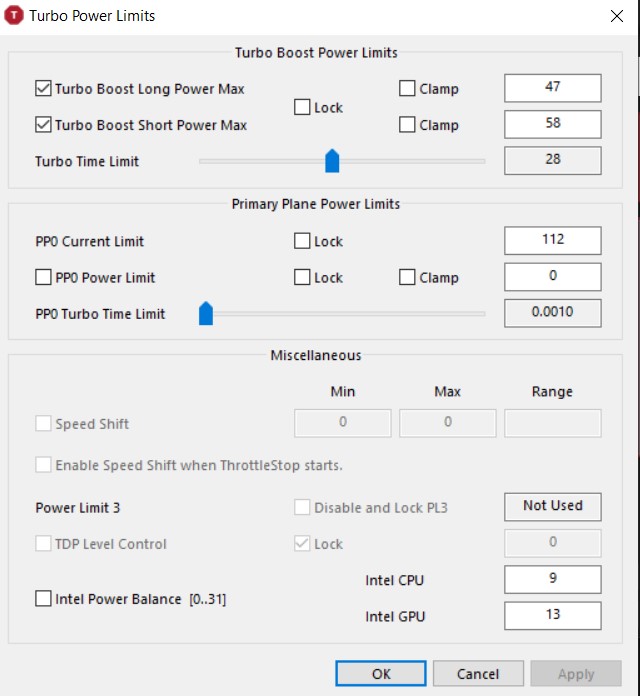
Not sure why some users are so reluctant to post a screenshot or two. Your two screenshots provided me with useful information. That allows me to do my job so I can provide you with some tips to get your CPU up to full speed, where it belongs. The Turbo Power Limits window might also contain some interesting information.tilleroftheearth likes this. -
Yes, I enabled it but didn't work I think a modded BIOS is required to unlock those power limits manually (from what I've heard), but I'm not sure whether to take that risk. I'm fine with my current UV and since I don't play games that often, it doesn't bother me much. But I'll keep on tinkering with whatever available options I have and will have in ThrottleStop
-
Hi unclewebb, I tried your suggestions but it still does not reach and stay at 3.4 GHz when using TS Bench 8 threads 256M. I get a steady 2.8 GHz with a -50.8 mV on CPU/Cache with a Non Turbo Ratio of 1 and overclocked with the same settings as above, on balanced power profile set to best performance. When trying a 8K youtube video, it topped at 3.1 GHz. I tried changing the value for the Non Turbo Ratio but I still don't get max CPU.
Concerning overclocking, I want to avoid it because I don't want the CPU to always run at full speed. My computer fans are very loud and activate with the least amount of CPU activity. They are so invasive that I set a custom balanced power profile where the CPU reaches 99% max to avoid turbo boost. So when set to balanced, the CPU runs at max 2.4GHz with a tolerable and steady fan noise. If I need more power, I set the profile to Best performance and I get a max speed of around 3.3 GHz (when everything was functioning).
All I want is to be able to use my custom profile, still reach at least 3.3 GHz when needed and enjoy the battery life improvements of throttlestop. I attached more screenshots if you want to have a look.
Thanks for the help!
EmilAttached Files:
joluke likes this. -
-
You can overclock a CPU and still have it slow down when lightly loaded. Overclocking and the CPU always running at full speed are two different things.
If you look at what I posted above, if you are not going to be overclocking then when 3 or 4 cores are active, the maximum CPU speed is 3.2 GHz. If you want at least 3.3 GHz when 3 or 4 cores are active, you have to overclock.
You can also do this in ThrottleStop. Set up a profile and select Disable Turbo and your 4700MQ will run at 2.4 GHz. Some of the problems you might be having are because you are making adjustments in Windows and ThrottleStop that are both trying to control the CPU speed. Best to let one or the other control your CPU so the two are not fighting against each other. If you want ThrottleStop to be in control, always use Windows Best Performance. To slow your CPU down, set up a second profile in ThrottleStop with Disable Turbo selected.
Open up Limit Reasons and have a look for a reason why your CPU is not running at full speed. Look for a box in red. Intel CPUs will slow down and throttle so they do not exceed the turbo power limits. The long term limit for the 4700MQ is 47 Watts. There are also current limits as well as other limits built into the CPU that can hold you back. Post a screenshot of ThrottleStop and Limit Reasons while your CPU is loaded and while it is not running at the speed you expect it to run at.
3.4 GHz is only possible if you check the Overclock box. The TS Bench cannot run at full speed for the entire benchmark. My 4700MQ will start out at full speed but long term, it is limited by the 47 Watt TDP limit. I will go run the same test. I will probably end up running at a similar 2.8 GHz.
If you can reliably undervolt your 4700MQ more than -50 mV, that will reduce power consumption. This will reduce the amount of power limit throttling so the CPU can run faster when fully loaded.
Edit - During the 256M test, I was able to maintain full speed, 3392 MHz, for the entire test. This test is short enough that my 4700MQ was able to run beyond the 47 Watt TDP limit. When I switched to the longer 1024M test, now I saw some throttling.
![[IMG]](images/storyImages/gcVip2j.png)
Limit Reasons shows PL1 in red. This indicates that the CPU is throttling because it has reached the long term 47 Watt limit. The CPU multiplier has been reduced from 34.00 to 31.94. This CPU slow down reduces power consumption which keeps the CPU from exceeding its long term 47 Watt TDP rating. ThrottleStop is showing 46.9 Watts which makes sense. Your laptop might have a thermal or current limit interfering with it reaching full speed. Limit Reasons should show something.
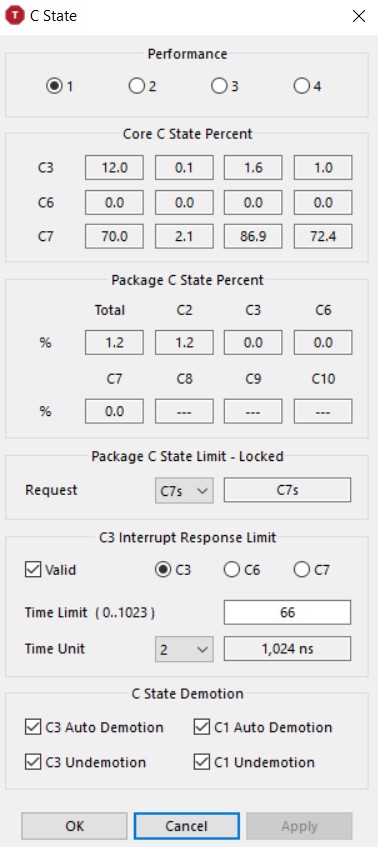
Almost forgot. The C State picture you posted is abysmal. I hope that is not when your CPU is idle. Some software is keeping that second core way too busy. That will kill battery run time and could cause excessive fan noise. Open up the Task Manager and find out what is going on.
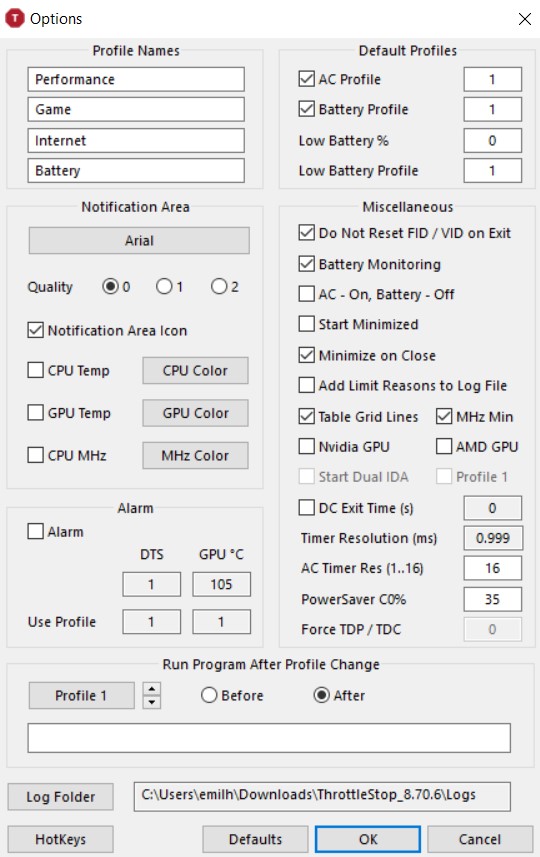
And finally, software that sets the Windows Timer Resolution to a low value like 1 ms when running on battery power should be avoided. 15.625 ms is the default value for Windows. Google Chrome can be guilty of changing this and then forgetting to change it back. This results in reduced battery run time. Open and close the Options window to refresh the current Timer Resolution that Windows is using.
![[IMG]](images/storyImages/nM6nixF.png) Last edited: Mar 26, 2019FrozenLord, SoftDev and Papusan like this.
Last edited: Mar 26, 2019FrozenLord, SoftDev and Papusan like this. -
What is this?
![[IMG]](images/storyImages/FDqJP9A.jpg)
-
@3g6 - Many operating systems include this file but some releases of Windows 10 do not.
If you get the mfc120u.dll is missing message, head to Microsoft and download and install both the x86 and x64 Visual C++ 2013 Redistributable packages from here.
https://support.microsoft.com/en-ca...l-c-2013-and-visual-c-redistributable-package
ThrottleStop is a 32 bit program and I assume you are running it on a 64 bit operating system. That is why you need both downloads.Last edited: Mar 26, 20193g6 likes this. -
I had my hands on a Lenovo Yoga C930 convertible laptop so I decided to give it a thorough test. When I told my daughter that I was doing some benchmarking with it sitting in the freezer, she thought that maybe I was being a little too thorough with my testing.
Not a lot of bloatware from Lenovo so I was able to get the idle C0% down to 0.2.
https://i.imgur.com/vJELCMp.png
Individual cores averaging 99% in C7 and the CPU package spending over 85% in Package C8 is another good sign of a laptop free from useless crud.
https://i.imgur.com/tazlvt9.png
Lenovo gets a gold star for leaving the power limits unlocked so ThrottleStop can perform some magic. At default settings, I initially saw a variety of throttling issues but they were easy to overcome. I set the long and short power limits to 45W, clicked on the Disable and Lock Turbo Power Limits feature, increased the PP0 Current Limit and the IccMax current limits to 80 to get rid of the EDP throttling and I did some undervolting. It locked up at -120 mV but it seemed stable at -110 mV. I went for a conservative -100 mV across the board for the CPU Core, Cache, iGPU and iGPU Unslice. Basic undervolting 101.
How does it perform? Pretty good for a thin laptop that only weighs 3.0 lbs. The fan speed and air flow is non-existent so when pressed hard, it will thermal throttle. A cooling system that is designed for a CPU with a 15 Watt TDP becomes inadequate when running it at or beyond 30 Watts. Should I complain? I don't think so. If a person needs a laptop with a 45 Watt TDP rating, they should not be looking at thin and light or a U series CPU. This laptop is a good compromise.
755 points in Cinebench is more than respectable for an 8550U. Tossing it in the freezer only got me an extra 5 points. There is just no significant fan speed to keep it cool so it thermal throttles half way through Cinebench testing.
https://i.imgur.com/DhI7ErY.png
In the CPU-Z bench, it is performing on par with a 4790K.
https://i.imgur.com/gybEEUk.png
Here is a custom Lenovo logo for ThrottleStop.
https://i.imgur.com/6SRGMOu.png
Just rename it to logo.png, add it to your ThrottleStop folder, restart ThrottleStop and you too can have a customized version of ThrottleStop. I am surprised that more users have not used this trick to create their own ThrottleStop versions.
Edit - The included Samsung PM981 is first class for sequential read speed. It is only a 256GB drive so many of the other scores are on the low side compared to the 512GB or 1TB NVMe drives in this series.
https://i.imgur.com/olThGbA.pngLast edited: Mar 26, 2019pressing, FrozenLord and tilleroftheearth like this. -
Hi unclewebb, thanks for great insights.
Still not able to get around 3.3 GHz when under load even with overclocking on... I attached a screenshot the TS Bench test with the settings and results in it. The utilization flashes red-yellow when the test ends if that helps.
For the control of my fan noise, I created a second profile in TS without Turbo like you said. The issue now is that the CPU always stays at the max base clock of 2.4 GHz, even at idle. That is if my Windows balanced profile is set to Best Performance as you stated I should do. I feel this is a waste of resources. I prefer it goes back to like 800 MHz when not under load. If I want to achieve this, I would have to set my Windows profile to balanced (in the middle). It makes a little bit of too much steps in my opinion. Without the TS profile, I just have to switch between Balanced and Best performance in Windows to toggle Turbo Boost. If there's an easier way of controlling Turbo or reducing fan noise with TS, let me know!
I don't remember if my CPU was under load for the C-state window screenshot. I attached new ones while it's at idle, plus what's going on in Task manager (Memory and CPU).
Looking at the background tasks, I don't see anything using a lot of CPU or ram to my limited knowledge, other than my Adobe CC subscription software, which I need. Hopefully the Task Manager screenshots can give you a better idea of what's going on.
For the time resolutions, it returns to 15.624 after closing chrome. Also, what does the Non Turbo Ratio mean/do?
Emil -
Note that, when TS is showing FID in ~24 range, but CO is low (only a few percent), then processor is mostly idle - it is running at 24 when it is running. For example, when my 6700HQ is idling, (Speedshift=0), FID is in 32-33 range, but CO% is only a few percent. Fans are silent, because processor is mostly idling. When I run a benchmark, like TSBench, FID drops to 31 (max for all cores active for my processor), and CO% is at 100%. Temperature begins to rise, and, if it continues, fans speed up.
I hope this helps.
Best,
Joe -
Have a look at the first screenshot you posted above. In Limit Reasons, THERMAL is glowing in red. ThrottleStop is reporting 97°C and PROCHOT (aka. processor hot) has a check mark beside it. All of these are telling you that your CPU is too hot. It is thermal throttling and slowing down to protect itself from damage. ThrottleStop does not include any features to go beyond this limitation. That is a good thing.
The core on one side of your CPU is reporting 97°C and the core on the opposite side is reporting 85°C. That is usually a sign that the heatsink is not square to the CPU or the thermal paste or thermal pad need to be replaced. ThrottleStop is reporting 43.6 Watts and your CPU is overheating. For a CPU with a 47 Watt TDP rating, the cooling system in its present state is not adequate.
Your C States look a lot better. I guess your laptop was not idle when you took the previous screenshot.
People see a fast CPU and they automatically think that this is a bad thing but is it? When a CPU core goes into the low power C7 state, it is stopped so it is running at 0 MHz and it is disconnected from the voltage rail so it is at 0 volts. Your CPU cores are spending 97% of their idle time in C7 at 0 MHz. Do you think the CPU cores spending the other 3% of their idle time at 800 MHz, 2400 MHz or 3400 MHz is going to make any significant difference to overall power consumption or heat? I found that the idle CPU speed makes virtually no difference. Watching C state activity when idle is far more important than CPU speed.
If you want to do some testing, you can use ThrottleStop to slow your CPU down to a crawl. Let your computer sit idle and watch the CPU core temperature. Increase the CPU speed and watch the CPU temperature again. When the C States are working correctly, the difference in temperature might be difficult to measure. The advantage of a fast CPU is that it can get tasks done quickly so the CPU cores can spend a bigger percentage of time in C7 where power consumption and heat are minimized.
The Non Turbo Ratio lets the CPU decide whether it should use the lower multipliers. The default setting for this is 0. Setting this to 1 is a trick so the CPU does not slow down when idle. You were originally concerned that your CPU was not getting up to full speed so I thought this would be a good place to start testing. I always leave this setting on my 4700MQ set to 1 and run the CPU at full speed. My laptop fans are virtually silent when idle and my laptop does not turn into an oven and burn through my lap.
If the Non Turbo Ratio is set to 0, you should be able to click on the Set Multiplier function and change the CPU speed from fast to slow. When finished testing, try leaving this at 0, clear the Set Multiplier box and try letting Windows manage the CPU speed. This might give you the lower MHz when idle that you are looking for. A slow CPU is not for me but maybe for your situation, it might be appropriate.
My daughter just installed the Adobe Creative Suite on my desktop computer. I was so impressed that I got her a new laptop. I know people need this stuff for work but wow, it sucks up way too many system resources when it is not even running. The whole whack of Adobe tasks constantly running in the background is ridiculous. I cannot wait for her to install this on her new laptop so I can remove it from my desktop. C state residency time in C8 is going to drop like a rock after this is installed which is not good for battery run time.joluke, FrozenLord and tilleroftheearth like this. -
Thanks for the recommendations. I will try to your suggestions and see how things go. You're really lucky to be able to run a 4700 MQ with minimal fan noise! My W540 sounds like a rocket launching as soon as I do something! What is your laptop?
Thanks for confirming that Abobe CC was the culprit. It's really unacceptable what Adobe is doing. That app is useless most of the time. I only use it when I get some new updates. They should really do something about it.
Best, Emil -
It is a Lenovo Y510P. Same company as your W540 so I would have thought that noise levels would be similar. I am a light duty computer user so most of the time, I can barely hear it running. If you have not cleaned your laptop out for a long time or ever, I highly recommend it. If the heatsink is full of dust, the fan will have to work harder to try and keep it cool.
I will post a pic of C state activity on my daughter's laptop after she gets the Adobe CC installed. Too many programmers do not pay attention to how their programs work on a laptop. There should be zero CPU load from any program that is not being used. Adobe programmers do not understand this concept.Emil8x, pressing, Papusan and 1 other person like this. -
@unclewebb and the rest of the guys, I'm one of those people that usually just reads though forums, but I've made an account to show my appreciation and to share some info that I have.
Btw I used ThrottleStop years ago with my sager NP5797, it had T9900 inside - it was fun playing with undervolting back then...
I've tried HP SPectre X350 15" version with i7-8750H and 1050Ti MaxQ.
The undervolting was pretty smooth and straightforward.
I first started at 100mv for both CPU Core and Cache and got to 160 when it froze, went back to 140 and that gave me an error while running TS Bench, so I settled at 130.
Tested it out with various stress software and left it at idle as well and we're all good, so that's sorted out.
Being a noob at undervolting the iGpu I started at 40mv...
The trick with this laptop is that it's not enough to undervolt Intel IGPU and System Agent, you have to undervolt the IGPU Unslice as well.
I kept pushing it and at some point I tried 130mb (like the Core and Cache) just for fun and that froze the laptop.
After I restarted I set 100mv and tested it out, all sorts of scenarios and it's stable.
Running the i7-8750H with the 1050Ti MaxQ at the same time you can bet your processor is going to throttle rather quickly (unless you disable BD Prochot). but then you'll get the GPU to throttle quicker.
This laptop has nice cooling but it can't really handle these components, at full power they are more then it can chew.
I've noticed that Windows 10 is dictating SpeedShift EPP value, even if you set some number in TS, Windows overrides it and it sets another number which can be seen in FIVR screen.Last edited: Mar 29, 2019pressing likes this. -
Check the Chapter 4 here : ( Chapter 4: Make the way the Speed Shift to work as it should be )
http://forum.notebookreview.com/thr...trol-of-the-i7-8750h-advanced-version.823065/
Have a nice day.
Again, I thank you so much @unclewebb for your hard work, and throttlestop. You still help people, answering them, following this forum, i can't believe there's still some nice guy in this world helping, and sharing these days... (Sending you loves from France)
Why customers can't buy a notebook, plug and play, without having some thermal issue or throttling...
pressing, tilleroftheearth and unclewebb like this. -
Afternoon folks, I'm looking for a little thermal advice if that's ok?
I'm running a Razer Blade 2018 advanced with 4K screen, a 1070maxQ card and an I7-8750h which I use predominantly for video production work, 2D and 3D editing and rendering which tends to thrash both CPU and GPU under load. Despite needing to use it for work I'm keen not to melt it within 12 months, therefore I'm trying to find a configuration that gives me a good productivity to life ratio.
Obviously the first serious weapon in my cooling arsenal is Throttlestop (Cheers @unclewebb )
I currently have it configured as follows:
CPU core and cache offset to -140mv
iGPU offset to -60mv
Speedshift set to an EPP of 128
BD PROCHOT switched off
*all other settings are currently left at default*
I have been using RealBench for my stress testing as it is incredibly close to the real world stress I will be regularly putting my machine under, but I'm unsure as to whether the results are something I need to be concerned by.
On a 15 minute stress test the CPU clocks never go above about 2.7GHz and spend most of their time around 2.2GHz mark, occasionally dropping to about 1.8GHz with only 80% utilisation.
The CPU temps reach 91 degrees and the GPU temps reach 84 degrees
a 60 minute test saw the CPU temps reach 97 degrees and the GPU reach 89 degrees
a 15 minute stress test with Speedshift set to an EPP of 96, allowed the clocks to sit around the 3GHz mark, however the CPU temps peaked at around 100 degrees, averaging around 90 degrees.
So I guess I'm asking firstly is there anything more I can be doing with Throttlestop to control either the clocks or temps and secondly is it safe to allow the CPU to be occasionally reaching 100 degrees under this kind of load?
Any feedback would be greatly appreciated, especially from @unclewebb
pressing likes this. -
I’m not an expert but if you are getting thermals like that with that undervolt, you probably need to consider reposting.
-
Yeah he definitely needs to repaste.
-
Really? Even though those temps were caused by RealBench? I thought my numbers were fairly in line for this model of Blade.
What kind of temps should I expect on RealBench?
The ThrottleStop Guide
Discussion in 'Hardware Components and Aftermarket Upgrades' started by unclewebb, Nov 7, 2010.