Problems? See this thread at archive.org.
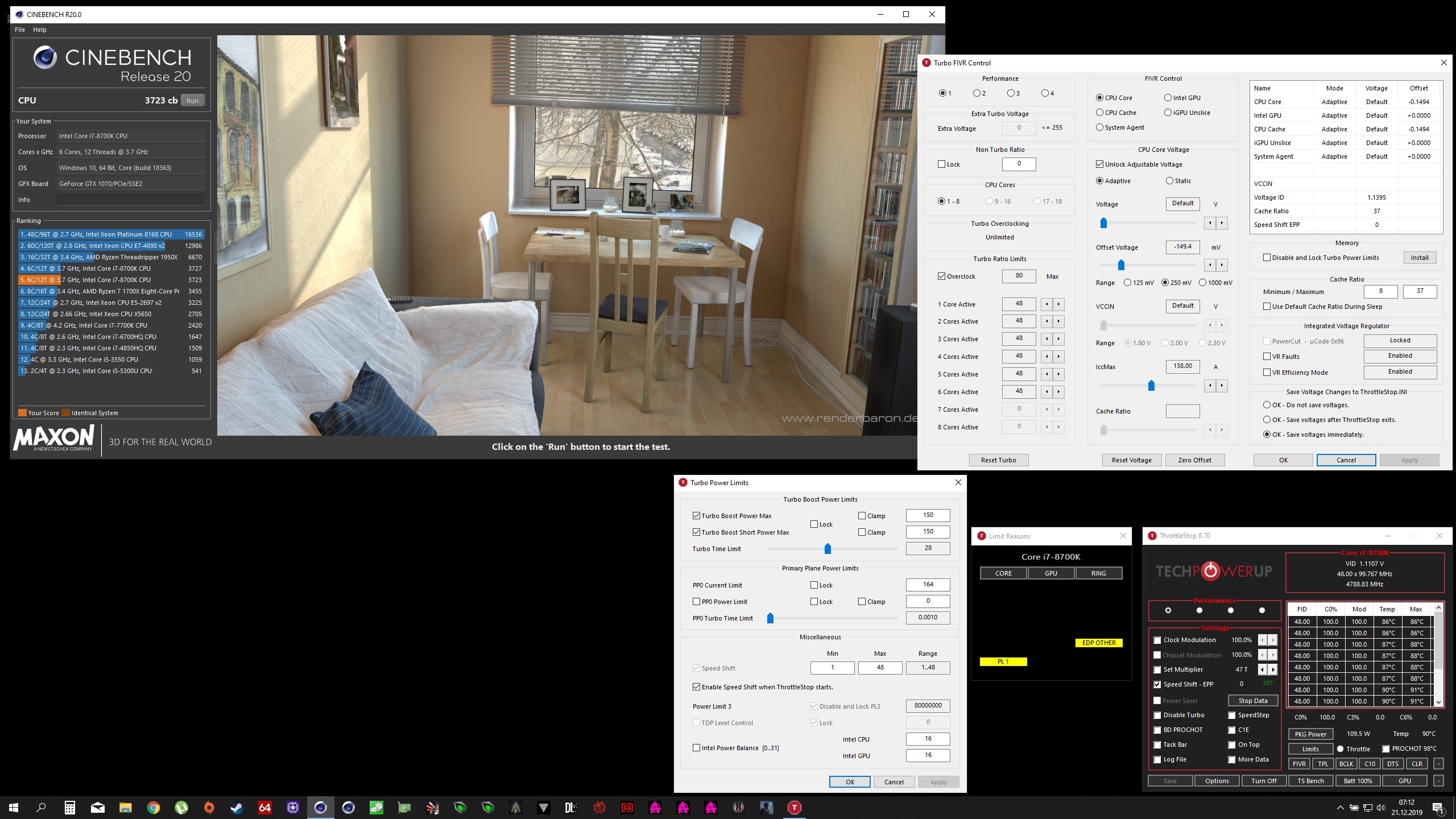
I have set the power limits to 150. I don't know how does the voltage regulator go away actually. I've tried Cinebench R200.
-
It is really difficult to downgrade Intel ME firmware cancer. It's unfortunate that Intel ME even exists in the first place. Life would be better without that stupid pile of crap.
Your best bet is to download InSpectre. Launch it as admin, click both "Disable" buttons to disable the Meltdown and Spectre mitigation cancer. Reboot and launch it again to confirm both of the first prompts say "NO!" (may have to click one of the buttons a second time and reboot).
Papusan, joluke, tilleroftheearth and 1 other person like this. -
Your power limits are too low. You also need to choose the box to "Disable and lock Turbo Power Limits" (and download the required file to support it). Check the box and it will ask you to download the file.
Power limits are not necessary. Just max them out all the way. The CPU can't and won't use more power than it is capable of using. Make it look like what I have highlighted in yellow. It won't make the CPU run too hot. Using too much voltage will. Power limits are only limits. There is no real reason for power limits to even exist. They are not necessary.
![[IMG]](images/storyImages/HmJ9myx.png)
Also, try manually launching ThrottleStop from a desktop or taskbar shortcut immediately (like within 1 or 2 seconds) as soon as you reach the desktop. Don't wait for other things to load. Do it as fast as you can. This might block the firmware from forcing your power limits to stupid low stock levels. More likely than not, the settings you put in place for the power limits are being ignored by the firmware. Giving ThrottleStop the jump on things might (hopefully) block that before it happens.
![[IMG]](images/storyImages/5qg2dcg.png) Last edited: Dec 21, 2019test0s, c69k, Papusan and 1 other person like this.
Last edited: Dec 21, 2019test0s, c69k, Papusan and 1 other person like this. -
Yeah, I have disabled everything using inspectre long long time ago. I have tweaked everything I could in my bga book. Look at my sig. But to make it ultimate I wish I could downgrade me fw. Unfortunatly it must be operational to aply bclk OC, so I only wish I could downgrade it to 11.7.
If you know how to guide me. If you know how to recreate 11.7 me fw in my FULL bios dump Tell me.Mr. Fox likes this. -
Well I never thought of InSpectre. Thanks for the tip. Glad to recover a bit of performance back


-
i own 3 hp zbook. recently just got a 17 G6 zbook. but for some reasons. TS kept saying able to start correctly 0x000007b. only for this freshly installed windows. and first ever i saw, it needed me to hunt for mfc120u.dll
-
Download and install that 2013 rredistributable packages for x64 and x86.
https://support.microsoft.com/en-us/help/4032938/update-for-visual-c-2013-redistributable-package -
unclewebb, the new package you set up for the 10th gen works very nicely. I'm not sure how much progress I'm making though. In Cinebench R20, my results don't seem to change very much no matter what I'm doing within TS. When I'm doing testing with Passmark, I'm seeing some improved numbers depending on changes I make. With all that being said, EDP other, is popping for Core, GPU, and Ring, even when I'm not running anything. The only thing I can do to stop EDP other from showing, is to Disable Turbo. While benchmarking Limit Reasons is throwing EDP other, PL1, PL2, no matter what I do. I went ahead and made changes exactly as Mr. Fox's post above about maxing out the turbo limits.
Any advice?Mr. Fox likes this. -
EDP OTHER across all 3 is typically the PP0 Current Limit that needs to go higher. That or the IccMax values.
Post some pics so I can see how you have TS setup. Some companies lock their laptops down. I do not recommend buying those.Papusan likes this. -
If that is the case, this HP may have been locked down. The PP0 and IccMax are tapped out I think.
Not sure why I can't figure out how to embed the images here.
But here are the actual links.
https://imgur.com/Qz25eAB
https://imgur.com/sa8r5MN
-
@Victor Santos - The i5-1035G4 has a TDP rating of 15 Watts. If your laptop throttles at 15 Watts, that is unfortunate but it is also normal. Not many people in this 1000+ page epic thread have had much success with HP laptops. In other words, I would never recommend buying an HP laptop to a person that was interested in maximizing performance.
How does your laptop do when running Cinebench or the built in TS Bench? How about post a screenshot of ThrottleStop while a benchmark is running and while your CPU is throttling. Make sure the Limit Reasons window is open so I can see what throttling reason is lighting up in red.
The Turbo Boost Short Power Max box should be checked. Try using more normal values like 25 for the long and 44 for the short power limit and the default 28 seconds for the turbo time limit. For maximum performance, try checking the Speed Shift EPP box on the main ThrottleStop window and change the EPP value from 128 to 0. Try clearing the PP0 Power Limit check box and set that to 0 so it is not used.
Is - 50mV the maximum stable under volt for your CPU Cache? It is normal for the low power i5 CPUs to not have much under volting headroom before losing stability.
When posting images from Imgur, use the Direct Link that Imgur gives you. You can also use Paint to crop your pictures.
Here are the Direct Links for your two previous pictures.
https://i.imgur.com/Qz25eAB.jpg
https://i.imgur.com/sa8r5MN.jpgLast edited: Dec 22, 2019Mr. Fox likes this. -
I'm starting to accept that I can only tweak the laptop so much. It was a decent deal at $280US, so I can't really complain much. One day, I'll get myself a monster laptop that I can tune more.
I didn't click the Speed Shift box because I'm not sure how to change the 128. On the FIVR screen, it says Speed Shift EPP - 0. The -50mV is stable thus far. Anything much higher gives me a BSOD. I haven't tried smaller increments, and have been going my multiples of 5.
![[IMG]](images/storyImages/zpxmDYk.png)
![[IMG]](images/storyImages/81Mynd2.png)
![[IMG]](images/storyImages/foPUEuT.png)
My best on Cinebench was 1081.Last edited: Dec 22, 2019 -
It's almost 2020 and ThrottleStop is still the best lightweight CPU tweaking tool around I can't imagine my life without
 What I'd love to see however is Power Limits saved in a profile
As profiles are already implemented and working well it should be possible to extend them with TPL settings? I wonder if TS could go open source, I'd be glad to help with small changes like that
What I'd love to see however is Power Limits saved in a profile
As profiles are already implemented and working well it should be possible to extend them with TPL settings? I wonder if TS could go open source, I'd be glad to help with small changes like that
-
So I figured out that I can just change the Speed Shift value on the main screen. What I have found is that the FID is locked at 14, when I run the TS Bench, on any number other than 0, and I also do not get any Limit Reasons, but my benchmark numbers drop significantly.
edit: I'm making progress!!!!!
adjusting the PP0 power limit and the speed shift, is helping keep my multiplier up. Still getting the EDP other though.
![[IMG]](images/storyImages/xBCt92F.jpg)
Last edited: Dec 22, 2019 -
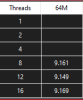
BTW, Could someone tell me why my 7700HQ is always faster in 12 & 16 threads
I have always thought that 8 should be the fastest. This differences are negligible but always..
BTW
Is there possibility to bypass powerlimits on Intel Atom x5-Z8350 via Throttlestop or RW Everything?
If yes could some guide me, as I have old PC HDMI STICK with this CPU and I want to give it second life. I will be setting it up soon.
For old celeron n3350 there was a register you could change via RW and it was working but I am looking something for atom x5 z8350Attached Files:
Last edited: Dec 23, 2019c69k likes this. -
-
My fears for the user community have come true. Head to TechPowerUp if you want to read about a user that suddenly lost adjustable voltage control. The turbo ratio limits are locked out too which is exactly what I thought was going to happen.
https://www.techpowerup.com/forums/...setting-in-fivr-filed-of-throttlestop.262308/
I am pretty sure that ThrottleStop works with your Atom CPU. No FIVR window so voltage adjustment will be on the main ThrottleStop screen. It is locked together with the Set Multiplier feature so you need to check that for voltage adjustment to work. The power limits should be adjustable in the TPL window.
The TS Bench breaks a calculation up into 8 or 12 or 16 equal parts depending on what option you check in the TS Bench test. That work is assigned to a thread. How Windows distributes the background tasks that need to be processed while the TS Bench is running will influence what TS Bench thread gets completed first. When a TS Bench thread is completed, that thread or core will be sitting idle waiting for the rest of the TS Bench threads to be completed. They do not all end at the exact same time. This is why during a longer TS Bench test, you might see the multiplier increase near the end of the test. On many laptop CPUs, as cores go inactive, the multiplier will increase so that makes sense.
Perhaps breaking the task into 12 or 16 threads allows the CPU to remain fully active for a slightly longer period of time so the TS Bench completes just a hair faster. 12 threads might be ideal and 16 threads might be too much. That's my wild guess but it will depend on how many background processes are running. In your example, the difference is slight so maybe that means that Windows 10 is doing a great job of moving the background tasks around from thread to thread and from core to core. If you were to break a TS Bench test up into too many little pieces, the overhead would be greater and I would expect the bench times to increase.
ThrottleStop is lots of fun for anyone with OCD. Lots of variables to adjust and lots of testing to do to confirm any improvements. Have fun playing.
That was on the things to do list but with Intel and Microsoft blocking voltage control, ThrottleStop is going to be dead in 2020. There is no use spending my free time on further development if the majority of users will not be able to use TS for voltage control. The latest microcode update will kill ThrottleStop and that is going to turn a lot of marginal laptops into unusable devices.
TS had a good run. No regrets!pressing, Dennismungai, Ashtrix and 6 others like this. -
I have heavily modded win10 20h1 19035.1, different reg tweaks, bcdedit configuration, no cpu ucode cancer, Inspectre, ooshutup, win10privacy etc, cpu affinity changes, irq to msi , etc etc worked HARD on tweaking services and scheduled tasks and I have 41 tasks working (including 1 task for throttlestop, 1 for steelseries engine, 2 for KIS antivirus, so bare Windows is taking only 37)
-
BLACK LIST. Adjustable voltage control/turbo ratio limits locked out due latest Win update/and or newest firmware update.
Please post your notebook/desktop model and what hardware, if this has already happened to your PC. Thanks.Last edited: Dec 24, 2019 -
Thanks for creating the thread. I just made a comment the other day that we needed a thread for a black list of companies that need to be boycotted for drinking the firmware cancer Kool-Aid.
ThrottleStop will still be needed for the folks that are not stupid enough to ruin their existing products with cancer firmware, or waste their money on new products that are broken trash.
Intel and Micro$lop are going to kill Intel. Nothing like committing hara kiri in the name of "security" LOL. Man, it seems like stupid is just coming out of the woodwork. I thought the drama revolving around Spectre and Meltdown was just about the dumbest thing I'd ever seen, but this throwing the baby out with the bath water knee-jerk reaction with Plundervolt takes the cake for the ultimate public demonstration of being a total retard.
AMD sucks, but it looks like it may end up being the lesser among evils. AMD CPUs (and GPUs) suck at overclocking, but so will Intel CPUs if they do this. A CPU with locked multipliers and voltage control is as worthless as the tits on a boar, so six of one, half dozen of the other, I suppose. We're all born with belly buttons and butt holes. No joy in that at all. I've never been interested in janky mainstream computing, so I'll probably just say to hell with computers. If I cannot have what I want, then I don't want anything. No point in spending my money on products that suck. They can kiss my butt. I can get cookie-cutter suckiness in a smartphone or console for a lot less.Last edited: Dec 24, 2019Ashtrix, tilleroftheearth and Papusan like this. -
The real threat here is the notebook manufacturers who is known for crippled products and crippled firmware. They will go the easiest way and continue on next level damaging their products. Aka put the middle finger right into your face and lock down every advanced options in updated firmware, and then call it a day for security. Or just let Microsoft push out new microcode updates without have to lift a finger to offer new firmware who can reverse some of the damage.tilleroftheearth and Mr. Fox like this.
-
You're absolutely correct. This is the only industry that I can think of where the vendors don't care that their products are garbage, and their customers are not smart enough to know better. Nobody holds them accountable for selling broken trash, and many don't even see it as that. They're so enamored by it being thin and light and cute that they are willing to overlook the leprous sores that are oozing blood and puss. They don't have "that many" or the sores are overlooked on account of overall cuteness. After all, who needs quality when they have RGB and 4K!?! Nothing else matters.
Last edited: Dec 24, 2019Papusan likes this. -
in regards to BIOS update locking voltages.
zbook 15 G4 and zbook studio G3 and zbook 17 G6, all of which had november updates, now their voltages dont affect and the multipliers are grayed out.
am attempting to revert to previous bios. will update here.
that said. MBP are known to undervolt to get more clock speed. with this microcode update. are they locked out from the undervolting also?
update: i managed to revert all to previous firmwares. clocks and voltage are now adjustable.Last edited: Dec 25, 2019 -
Thanks for the heads up unclewebb. Well, it pretty much sums up not to buy Intel based BGA jokebooks since we can't control it anymore and control is back with Intel after new uCode. I'll run a test using TS 8.72 and see I'm locked out of undervolting! Even if you're in the market to buy Intel BGA its better to opt for older gen hardware since newer products are getting inferior as time progresses!
Will this security issue make OEM think of putting more bigger heatsink to dissipate heat I guess no! -
This might be wrong thread to write to, but in connection to latest 'voltage limiting news' this is what is happening here.
After the latest Windows 10 LTSC update (2 days ago) I am unable to get processor under 4W, no matter what I do. It used to go to 1.9W when in desktop 'nothing on'. Both 'minimum 4W' are reported by TS and/or HWinfo64.
Task manager shows the same values for processes % usage as before the update, no changes there.
HWinfo64 shows minimum voltages of 0.540 instead of previously 0.524 before the update.
See, having 0% or 1% CPU usage at 4W is kind of weird.
I am using TS, re-installed to 8.72 AFTER I saw the above mess, no change.
Had anyone encountered this?
BTW. If I disable (uninstall TS with .ini deleted and complete shut down) and or/stop TS and check power usage in HWinfo64, the 4W minimum is still there.
So it is not TS (reporting) for sure.
Why suddenty my processor does not want to drop under 4W during 'no load'?Last edited: Dec 25, 2019 -
I modded my own motherboard BIOS with AE microcode for the 9900k. C6 and CA are garbage. And I blocked windowsupdate from updating the microcode file there too.Vasudev likes this.
-
@unclewebb I am using throttlestop on ice lake (1065 g7 lenovo c940). Undervolting works great, but it seems that the Turbo Power Limits don't work (even if i installed the "disable and lock turbo power limits" thing). It used to work well on the previous gen. Any idea if there is a way to make it work on ice lake?
Cheers and thank you for such an awesome app! -
@c69k - Check your C states when your CPU is idle. Some manufacturers are disabling some of the package C states, either accidentally through their own stupidity or perhaps on purpose. When this happens, your idle power consumption will go up. ThrottleStop can correctly report package C8 but few laptops seem to be using this power saving feature.
![[IMG]](images/storyImages/1qeib3x.png)
@Gusstavo - If you are having a problem, post some screenshots so I can see what you are seeing. I do not own a 10th Gen CPU so seeing some screenshots definitely helps.
There are 3 sets of turbo power limits. ThrottleStop gives you access to one set of these power limits in the TPL window and you can use the Disable and Lock feature to try to control the second set of power limits. Unfortunately, if a manufacturer enables the third set of power limits, there is no free software available that I know of to change these. The lowest set of power limits always wins. If this third set of turbo power limits is set to the 15 Watt TDP value for your CPU then long term, you will be limited to 15 Watts and there is nothing you can do about it.
ThrottleStop 8.72 will work correctly on the 10th Gen Ice Lake CPUs as long as a manufacturer has not locked the CPU down. If it is locked down, you are out of luck.
What method are you using?
@Papusan - Your Black List is a great idea. It might be a few more months before Microsoft starts force feeding the masses with Intel's latest microcode update which blocks voltage and turbo multiplier control.
Black List
http://forum.notebookreview.com/thr...ocked-out-due-latest-win-update-and-o.831450/Falkentyne, c69k and Papusan like this. -
@unclewebb thank you so much for the reply!
I am attaching the screenshots. I just put everything in the turbo boost to maximum. On my previous laptop with 8550u, 15W, i put all the turbo boost to maximum, and the cpu would stay at 30w all the time (basically permanent turbo).
But on this laptop with icelake 1065G7, i put everything to maximum and it does 35w for just a few seconds, and then it drops to 25w (which is the default setting of my lenovo). So basically changing this settings on TPL seems to not change anything, no matter what i change. I am pretty sure that thermal throttling is not the issue, but just that the TPL is not working. Undervolting does work for sure though.
Maybe i am missing something.
-
@Gusstavo - There is a third set of turbo power limits that ThrottleStop and Intel XTU do not have access to. The last Lenovo I bought did not use this third set of power limits so ThrottleStop could do its thing. Manufacturers that use this third set of limits will prevent you from achieving maximum performance.
On previous gen CPUs, you had to under volt the core and cache equally. Try setting the time limits to the default 28 seconds. Do not check the Clamp options. Try checking the PP0 Power Limit and set that to 60 too.
Will all this help? Probably not. Sad times to own a new laptop. Things are about to get much worse when the updates start to get forced onto user's computers.
Edit - I just noticed that the TDP Level Control is locked to Level 1. Did you do that or was it like that already? Try deleting the ThrottleStop.INI config file and completely shut down Windows. Boot up and start ThrottleStop so it can create a new INI file. If this is still locked to 1, that is probably the problem. I think my super Lenovo was set to 0 by default and it was not locked.Last edited: Dec 26, 2019 -
@unclewebb thank you! About cpu cache, i noticed that if i undervolt it, the system becomes much more unstable (even if it's the exact same as the cpu core). So i just leave the cache in 0 and do only the core.
TDP level control was set by me just for testing purposes, but it didn't change anything so i leave it in 0 now.
Will try the other things and let you know
-
You're 100% sure that your undervolt works without touching Cache settings?
-
As far as I know CPU core and CPU cache goes together as recommended.
Have a bit more reading here if it helps: https://www.ultrabookreview.com/31385-the-throttlestop-guide/ -
Well, if i undervolt too much the system becomes unstable (i mean if undervolt only cpu, without touching cache), so that means it's working, correct?
I can do some tests later with cache as well, but whenever i touch cache system becomes even more unstable so i would have to use smaller values.
But thanks for the idea, i will do some testing -
I have not had much feedback from users with 10th Gen processors. Intel might have changed something so the core and cache offset voltages are totally independent now. Intel CPUs used to be like that. My 4th Gen Haswell has independent voltages. No need to adjust Haswell core and cache voltages in sync.
That is the best way to prove it. If you can adjust only the core or only the cache voltage and the CPU becomes unstable, the core and cache voltages must be working independently.Papusan likes this. -
You could use less undervolt and instead put equal settings for Cpu and Cashe. Go stepwise up with undervolt. Thanks for testing.
-
I just tried downloading and running the program, then I got this error message:
"The code execution cannot proceed because mfc120u.dll was not found. Reinstalling the program may fix this problem."
I don't see that particular .dll file in the zip file. Am I missing something? -
@GooPuddles - Scroll to the top of this page, enter mfc120u.dll into the Search... box at the top right, check the option, Search this thread only and then click on the orange Search button.
It only took me a few seconds to find a relevant post by @Kers
http://forum.notebookreview.com/threads/the-throttlestop-guide.531329/page-969#post-10856200
Edit - I entered mfc120u.dll and ThrottleStop into Google. It was even quicker finding the info this way. Maybe this is a test to see if you should be using this program or not.
Last edited: Dec 27, 2019dmanti, tilleroftheearth and Papusan like this. -
I probably shouldn't! I just bought a laptop and read that this is a program to make sure the new laptop's thermals are okay. I'm certainly not going to overclock.
-
You still need to know how to use it... The ThrottleStop Undervolting Guide (2019)Ashtrix, Vasudev and tilleroftheearth like this.
-
@unclewebb I tested new uCode for Skylake D6 and TS 8.72 and performance seems to have improved for highly threaded tasks. I'm just seeing 0.3ms hit in TS bench as opposed to D4 uCode which had 0.8ms difference compared to CC uCode.
And good news is, undervolt is working w/o any issues. But, I think 125mV undervolt is the max now. -
With or without the intel patch for plundervolt or mcupdate_GenuineIntel.dll via windows update please ?
-
I am not an expert but I think that UV might works because ucode from mobo bios is loaded first and after that you are loading newer ucode via vmware software?
I think that when you insert nawet ucode directly into bios UV wont work if this ucode is a patch for plundervoltVasudev likes this. -
Hopefully someone with an HP laptop that no longer allows under volting will show us what microcode version his laptop is using.
![[IMG]](images/storyImages/aBZlQov.png)
Then we can try to check whether this was from a recent bios update or a Windows microcode update with a new mcupdate_GenuineIntel.dllVasudev, Papusan and tilleroftheearth like this. -
Xeon E2186
WinUpdate shows 0xB4, 0xBA comes from latest UEFI firmware thenunclewebb likes this. -
@SnakeSK - Did you manually update your UEFI Firmware or did your laptop come pre-installed with this version? It is also possible that your laptop comes with software that took care of the UEFI Firmware update for you. It might have happened in the background and you barely noticed. Thanks for sharing your microcode version.
-
I always update my UEFI firmware (company policy and also dogfooding, before any public release
).
And yes, capsule update is already on the Windows Update, so this particular firmware is already being deployed with no option of rollback (this is so called fixed version release) -
Hi there!
I have just undervolted the CPU (-0,1455), Cache (-0,1455) and integrated GPU (-0,557) of my Dell XPS 15 7590 (i7 9750H)using the latest version of ThrottleStop 8.70.6. When I start the application later again it seem like the voltages applied to my CPU are sometimes some steps lower than the values that I chose (for example CPU -0,1699). Therefore the system immediateley becomes instable and crashes. I'm not sure if this is a bug in ThrottleStop or maybe something is wrong in my configuration. For now I switched to the next older version 8.70. In this version my problem doesn't seem to occur until now.
Does anybody has an idea what might be going wrong in my situation?
BR,
JackShepardAttached Files:
-
-
@JackShepard - No one has ever reported a problem like this while using TS 8.70.6 or any other version of ThrottleStop.
Your screenshot does not show this problem. The voltages reported in the monitoring table at the top right are the same as the voltages that you are requesting in ThrottleStop.
Do you have any other software on your computer that might be interfering with your voltages? Do you have Intel XTU installed? ThrottleStop running by itself has always done a great job of maintaining your requested voltages.
Did you save different voltages for different profiles? In the FIVR window, click on the 4 different profile buttons at the top left, Performance, Game, etc. and make sure you did not accidentally save a larger offset voltage (-0.1699) to one of the other profiles.
Edit - I did notice that the last known microcode for your CPU that supports voltage adjustment is 0xB4. ThrottleStop shows you have microcode 0xC6 installed. Try rebooting. When you first boot up, have a look at the FIVR monitoring table and make sure your voltages are being applied correctly. Microcode 0xC6 might be perfectly fine. Everyone here is still trying to find out what microcode versions are OK and which ones are not.
Things also might change after doing a sleep resume cycle. Microcode 0xC6 was not good for an 8th Gen U CPU.
https://www.techpowerup.com/forums/...setting-in-fivr-filed-of-throttlestop.262308/Last edited: Dec 31, 2019Papusan likes this. -
Vmware fling driver is 99% close to real uCode patch in BIOS.
I have configured to start TS when I login and VMware driver is loaded before Windows desktop appears.
I used Vmware driver to patch CPU ucode and not windows because with Vmware fling driver I can simply delete those files using LiveCD when bad uCode bricks the OS whilst MSFT ones are hard to revert if Safe mode is corrupted. -
Hello!
I have a X1C6 with 8550u. I was wondering if there was a way to change or stop the power limit with TPL? With this machine, the initial turbo short PL is 29W (even though TS says it's 44W), which then goes down to 23W after 28s (set to 25W as turbo power max).
However, for some odd reason even though the temperature doesn't get extremely hot, the power limit starts dwindling down to 13.5W, which is terrible performance. Can't really do anything with that sort of clock speeds. At that power setting, it runs cool enough that the fans even start to slow down to a slower state! I would like to force it to maintain 23W as long as possible, until temps go too high or something. Is this something I can do with TPL?
Thank you and have a happy new year!
The ThrottleStop Guide
Discussion in 'Hardware Components and Aftermarket Upgrades' started by unclewebb, Nov 7, 2010.