Problems? See this thread at archive.org.
Hi there.
Found some issue with CPU Cache IccMax in Throttlestop?
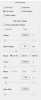
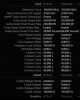
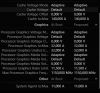
Throttlestop 8.70.6 reports the Cache IccMax = 11A.
But XTU and HWiNFO reports Cache IccMax = 140A, and SystemAgent IccMax = 11A.
So, I'm thinking, if I undervolt the CPU Cache with the Throttlestop, and apply settings - will it also set 11A for the Cache IccMax, instead of 140A..? How bad it can be?
Screenshots (XTU reports are for example, HWiNFO gives the same values):
-
Attached Files:
-
-
Hi @unclewebb.
Sorry to disturb you. Did you have time to check my message? -
I've fixed my problem after i removed the speedstep. Now it started like i desire. I also said that it was fixed by set multiplier option but it wasn't.
-
I had a quick look at the International Rectifier document you sent me and you know what? I do not have the slightest clue what that document is all about. I know it is written in English but that did not help me any. I know how to read and write a few registers in Intel CPUs but beyond that, my knowledge of electronics, etc., is extremely limited. I wish I could help you more but I don't have the necessary background.
When Speed Shift is enabled (SST), checking the ThrottleStop Set Multiplier function should not have any control over the CPU speed. Glad to hear that you finally got everything sorted out.
ThrottleStop was programmed without access to the full documentation from Intel. That means the IccMax adjusters in ThrottleStop may not be using the correct name. I am not sure if HWiNFO is based on proper documentation from Intel or if the programmer of HWiNFO simply copied what Intel XTU calls these IccMax values. I will have to assume that they are both correct and ThrottleStop is wrong.
On the 7th Gen desktop CPU I used for testing, the only one that seemed to matter was the Core IccMax value. Adjusting the other two as low as zero did not result in any throttling. Adjusting them high or low did not make any difference so there was no need to adjust them. I recommend setting all of the IccMax adjusters to 255.75. This should prevent any IccMax related throttling.
If you want to do some testing, use the TS Bench 1024M to put a load on your CPU, open up Limit Reasons and then open up the FIVR window and adjust these IccMax values from high to low to see if any of them cause any throttling when adjusted too low. If you learn anything new, post some pics of your results.Mr. Fox and Falkentyne like this. -
@ Papusan Erm... could this maybe be related? http://forum.notebookreview.com/threads/xps-15-9570-owners-thread.817008/page-290#post-10974516 Were there any new Microcode updates in this weeks Tuesdays Windows 10 updates? Which maybe broke proper c states? ...
-
Nope, I don’t think so. But check what microcode you have then search on release date for it. You can see the ucode version in TS Fivr window, Hwinfo or the Win register.
If you got a new bios version, not the first time this screw up.Mr. Fox and Falkentyne like this. -
![[IMG]](images/storyImages/OmQrjVl.png)
@Papusan Mh. Thats an older one I guess? But it is really weird, I have broken c states since a few days. Either it was latest Dell bios 1.14.0 or latest Windows 10 updates from this week.
Is there a way TS could "trigger" or activate c states with a command at start up? My c states are now off it seems from a cold boot or reboot, and just work again, after I trigger a standby for about 10 seconds, and then wake the laptop up again. It was always working in the past though until a few days ago...Last edited: Dec 12, 2019 -
Try roll back/uninstall latest patches from Micro$lope. The other options is roll back last bios version. Check also Reliability Monitor to see what is installed latest days.
Edit. I looked on released notes on last bios for your Dellbook. Disgusting reading!
Everything can go wrong with such massive changes to fix their broken machines.
https://www.dell.com/support/home/u...r&oscode=wt64a&productcode=xps-15-9570-laptopLast edited: Dec 12, 2019 -
"Modified battery algorithm to prolong lifespan and minimize risk of swelling"
Yay, MORE THROTTLING instead of designing a proper battery that won't explode! -
I don't think its only the battery. If they can't let you utilize full power from the power adapter, the battery has to work overtime to provide the lacking (needed) power. End results will be short lifespan and swollen battery. See....
http://forum.notebookreview.com/thr...-owners-lounge.826831/page-1717#post-10974306Last edited: Dec 12, 2019 -
There is one more thing left to fix for me which is "VR CURRENT". What does this exatly mean? It is blinking in LIMITS when i put load. I've tried to Enable VR Faults in FIVR menu, i click that after i close menu it was gone.
-
That is the amount of current flowing through the Voltage Regulator. Not sure how to control this. I think some desktop boards might give you some control of this in the bios. What are the IccMax variables set to as well as the PP0 Current Limit in the TPL window? Set those sky high and see if it helps. If there is no adjustment to control this in the bios, you might not be able to fix this throttling problem.
Just to be clear. Your package C states are no longer working but the individual core C states are still OK. I have no idea how to control or enable these. You will have to ask Dell to do some explaining. Good luck getting them to listen. If it makes you feel any better, lots of laptops seem to have problems with the package C states including my 4th Gen Lenovo. In my case, the package C states work OK if I use the power button on my laptop and only package C2 works if I resume by using either an external keyboard or mouse. If the Intel documentation was not so full of secrets, maybe someone like me could get this problem figured out. I have no idea at the moment.geust123455, maffle and jclausius like this. -
Is there a way to force a timer resolution of 0.5 using ThrottleStop? At the moment lowest it can go is 1.0.
-
This is not possible when using ThrottleStop. Do you know any situations where a timer resolution of 0.5 ms is better than 1.0 ms? I do not think going as low as possible is a good thing but I might be wrong. I have not done any timer resolution testing recently.Papusan likes this.
-
Some games like Crysis 3 benefit from a lower timer resolution. It results in higher CPU and GPU utilization and subsequent FPS increase.
-
Any reason? Lower doesn't mean better http://forum.notebookreview.com/threads/the-throttlestop-guide.531329/page-1055#post-10957258
You can try Timer tool.
https://www.virustotal.com/gui/file...cf738e56c247f44d69d636b6556dc7c3531/detectionAttached Files:
Ashtrix likes this. -
-
I've some option in my laptop bios, i'll check what are those setting and share with you.
I'll try this one after i play with bios.
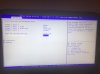
# uncleweb - Here is the picture from vr option in bios
Have a look please.Attached Files:
-
-
A PP0 Current Limit of 164 looks OK. It is the VR Current Limit that is lighting up in red in ThrottleStop. That is the problem. Usually a setting of 0 disables things but in your bios example, you have CPU VR Custom Setting set to Enabled and then the actual VR Current Limit is set to 0. My interpretation of that is you are telling the bios that you want your CPU to throttle if it uses more than 0 Amps of current. Do you want your CPU to constantly throttle? I hope not. Either change the 0 value or do not Enable this custom setting in the bios. Why not try 100 or 200 or 1000 or 10000 and see what happens
Papusan likes this. -
Actually the CPU VR Custom Setting in bios was disable. I've just made it enable to show you other values. I'll try to rise it as high as possible. By the way i've tried 4.8 Ghz and tried Cinebench R20 and multiplier was stable till %98 then VR CURRENT started blinking.
-
If you are on the TM board try 1023. If not try 8191 in bios as it shows 1/8 A increments. And increase PL1 and 2. Put them both 150. It’s just a limit, the machine won’t use more than what it needs.Last edited: Dec 16, 2019
-
I didn't touch bios setting earlier cause i was increasing PL1 and 2 118 i was thinking it was max. How would i know which TM board i am using?
-
TM board come with 6 cores processors.
Just increase PL1/2 values as well and start testing. -
I'll try "1023" then.
I'll increase them to 150. -
Can you point me to the address outside of the MSR? As I'm not able to find it.
It doesn't matter what limit I set now, but my N4100 keeps throttleing to 6 watts.
I wonder if its the same issue as you had. -
This is probably one of the most elementary questions at this point in the thread, but how do I bring up the Limit Reasons window? I have an i5-1035G4, and the laptop fan runs pretty loud. I've done some initial adjustments to voltage, but I'd like to monitor with the Limit Reasons window because I feel like it'll be easier to make logical adjustments. I've been using logs for now.
The Limits button is grayed out, and I tried clicking on that, but I get nothing. Appreciate any help. -
The 10th Gen processors did not exist when ThrottleStop 8.70 was released. That means some ThrottleStop features are either disabled or not working correctly.
Tomorrow I will unlock the Limits button and send you an updated version of ThrottleStop. Post some pics if it looks like it works.joluke, Papusan, 0lok and 1 other person like this. -
Thanks unclewebb! I know a few pages back, you said you had not done much programming in the past year or so, so I'm especially thankful for that.
-
Allright, I found the memory address that stores the second powerlimit and caps it at 6 watts. Writing this to 0 disables the second power limit, wich leaves the MSR power limit in charge.
Wichever limit is lowest, is the actual limit.
![[IMG]](images/storyImages/ig5Bobf.jpg)
But I'm not completely sure how rweverything batches work.
Can someone show me an example to write this address to all zeroes? So I can automate this process
EDIT: that was easier than I thought.
Rw.exe /Min /Nologo /Stdout /Command="W16 0xFED170A8 0000"Last edited: Dec 17, 2019 -
ThrottleStop 8.72
December 17, 2019
https://drive.google.com/open?id=1l_H9Ip2k9TIpEQ6ULEaM7MP0wMNX1ulv
New Features
- enabled Limit Reasons access for 10th Gen Core i processors.
- added FIVR Control locked status reporting.
- fixed maximum multiplier reporting in FIVR TRL window for 6 and 8 core CPUs.
If you do not need any of these features, there is no need to upgrade.
Best to stick with TS 8.70.6 which has been signed by TechPowerUp.
You are welcome! Let me know if the Limits button is unlocked. It should be. The Intel documentation says the various limits are all the same as the previous 8th and 9th Gen CPUs so this was an easy fix.
Some Asus laptops like the Asus ROG G703GX have a problem where the bios is locking the Turbo Ratio Limits as well as the FIVR voltage control register. Thanks Asus.
So far, entering sleep mode and then immediately resuming is enough to clear the lock bit on these registers. I decided to add a new feature so it will be easier to see if the voltage control lock bit is set or not. If Intel decides to block voltage control, they only need to set one bit to do it. After a microcode update, it will be easy to see if something bad just happened.
Life is Good
![[IMG]](images/storyImages/8MJEJiM.png)
Someone Just Poked Me In The Eye With A Stick
![[IMG]](images/storyImages/T3aMozK.png) Charles P. Jefferies, intruder16, t456 and 5 others like this.
Charles P. Jefferies, intruder16, t456 and 5 others like this. -
Once this information become available to the public it should be utilized to launch a massive smear campaign against the worthless and dishonest bastards that sell broken trash like that. May their undesirable filth rot on warehouse shelves until it becomes so obsolete that nobody with half a brain wants to buy it.
-
That is the first word that comes to my mind. Sadly, not enough consumers are educated enough to complain. Going to be fun times if Intel blocks voltage control with their next microcode update.
 relobe, joluke, Papusan and 1 other person like this.
 -
Can't imagine how that is going to turn out. That would be like driving a nail into their own coffin, seeing how everything (100%) they sell needs to be undervolted to not overheat running stock clocks.
TS 8.72 works fine here. The Tongfang turdbook is just as happy to use it as it has been the prior versions. Nice job, as usual Brother. I actually prefer to have unsigned software from trusted sources (unsigned drivers and firmware, too). That is my way of passively showing a nasty-finger salute to the control freak digi-Nazis that want to ram it down our throats. There is also a sense of satisfaction in the blatant act of defiance that comes with using an SPI programmer to have what I want. To hell with what they want. It's MY COMPUTER, not theirs. They should have no say whatsoever in the matter.
Using a baby -0.25mV voltage offset now, with lower voltage set in the BIOS. Not because it's better. Just because I can. Everyone should be able to.
Last edited: Dec 17, 2019joluke and tilleroftheearth like this. -
Your Turdbook is Intel’s baby. This model should be the lackmust test on what will come. If Intel lock everything out on their own baby with next firmware update then expect the other ODMs will follow after with similar “fixes”. Will the ODM differentiate locked bs. unlocked chips In same firmware? (Intel talked about making exceptions for unlocked chips - make it still possible with some sorts of voltage/OC control). We have to see
Last edited: Dec 17, 2019
-
The Intel baby is the MAG-15. I have the MECH-15G2Rx, which is the slightly older and better product. The MAG-15 has an inferior keyboard, no numeric keypad, only one mini-DP. I looked at both and chose the MECH-15 instead on purpose. I did not want anything to do with the MAG-15, and I still don't. It has more compromises, and I was already making too many compromises by downgrading to a BGA turdbook. Making more just seemed too retarded, especially since the price on both was essentially identical. The "Pay more, get less" approach just doesn't work for me.
In other words... newer is not better... as usual, and as expected now. -
I've tried both 1023 and 8191, unfortunately didn't work for me. I've still getting "VR CURRENT" error in Limit Reasons Menu. Any other suggestion?
-
My HP 600 G2 with i5 6500 had a BIOS update that has blocked access to voltage adjustment and probably other things. Lots of CVEs mentioned regarding security of various memory areas on the CPU.
HWInfo says the microcode is D4.
It's not a big deal really but I was kinda academically enjoying the thought of saving power when it's under load.
Last edited: Dec 18, 2019 -
The more important detriment here is lack of voltage control. The impact is harmful to virtually everyone, whether they realize it or not. Those with laptops will sustain the greatest harm from it, because laptops are famous for having thermal management problems.
The detriments are:
- Makes a system totally worthless and undesirable for those that enjoy the sport of overclocking and performance tuning
- Makes a system miserable for those that need to undervolt to control ludicrous overheating issues when running stock (not overclocking).
-
Yeah it sucks but security is more important than tweaking unfortunately. It looks like the functionality was disabled because of new CVEs affecting various CPUs. I wonder just how much software it breaks. The crazy security issues cropping up these days are just no fun.Last edited: Dec 18, 2019Mr. Fox likes this.
-
I have to disagree (for me). Performance always trumps security in my book. If anything adversely affects the performance or tweakableness of my computers, I will have no part of it. This risk is too insignificant compared to the loss of functionality and enjoyment to put up with the perceived "security" benefit. Nothing is secure. Crossing the street, driving cars and flying in airplanes has dangers and risks, but I still do all of those things.

A "fix" that breaks something else is not an acceptable fix. I will stick with the "unsafe" firmware.Last edited: Dec 19, 2019 -
If Intel took the easy way out blocking the voltage control feature, this will also disable turbo ratio limit adjustments. Lots of users with overheating laptops have been using both of these ThrottleStop features to control their overheating CPUs. Lowering voltage and slowing them down allowed many half baked products to be more or less usable. There are going to be a lot of unhappy laptop owners after this security fix gets shoved onto their computers.
I am with @Mr. Fox on this issue. Lots of ThrottleStop and Intel XTU users are not going to be happy. I have been using computers for many, many years without ever having a virus or any security issues. These potential security issues are blown way out of proportion. I bought my computers with money I earned. I want to be able to use my investments however I like.
Me too. No more bios updates for me if it means that I cannot control my CPUs however I like.
ThrottleStop displays the microcode version that your CPU is using. It would be a good idea to keep a close eye on that number. Be careful what you install. After a bios update, it can be difficult going back.
![[IMG]](images/storyImages/5jEsTsE.png)
Edit - Might be a good idea to go into File Explorer and do a search for mcupdate
Make a backup copy in case Windows Update pulls a fast one on you.
![[IMG]](images/storyImages/4etBACG.png) Last edited: Dec 18, 2019
Last edited: Dec 18, 2019 -
Unclewebb, just wanted to say thank you for the update to include the 10th gen chips. I'm learning and tuning now!
-
You are welcome. Remember to post some pics so users can see this TS update working on a 10th Gen chip. It also helps me see what features could use another tweak or two. Programming without hardware is like driving blind folded.
I think just the BCLK is still out to lunch. The multipliers should be accurate. If you assume that the BCLK is 100 MHz, you can estimate the CPU speed by multiplying the multiplier by 100. Just move the decimal point a couple of notches to the right. I might get around to fixing this some day. Intel probably changed the frequency of one of the timers that ThrottleStop uses.
The important stuff should work, at least until the next Intel microcode update nukes it! -
I agree, for regular and most power users performance is the selling point. But it's different for enterprise and server, as security is more valuable. It's really a shame that Intel's been hit so hard with all these exploits lately, they got screwed in both sectors.
-
It doesn't matter what area of life we are talking about, evil people (a tiny minority) ruin things for the rest of the world. Nothing is secure. Windows, Mac OS, Linux, Android, iOS... and the hardware/firmware that support those operating systems. All of the software and apps running on all platforms. All of it is insecure. Nothing can be done to make any of those things secure. If evil people have the will and the skill they will exploit anything they feel like exploiting and there is absolutely nothing anyone is going to do to stop them.Last edited by a moderator: Dec 19, 2019jc_denton likes this.
-
One thing for sure... Now it's up to the ODMs implementing the needed options to disable/enable SGX and voltage settings in coming bios. The ones who walk own ways and close the door, has to be put on a Black list. A sticky thread with #what brand/models to avoid#.
-
Yeah of course if you want to keep the tweaking working and think security is unimportant, stick with the older firmware.
Be careful with firmware reversions if you want to do that though. It can brick systems these days.Last edited: Dec 19, 2019Mr. Fox likes this. -
I don't think anyone views security as unimportant. It's hard to view security as being more important than a system that functions correctly. A securer system that has problems with throttling and overheating and cannot be tuned to run optimally is a pile of feces that nobody wants to own.
Yes, you're correct. The possibility of bricking a machine by flashing older firmware is real. Downgrading firmware versions carries some risk because of restrictions the stupid digi-Nazis that build laptops have anointed themselves with the liberty of implementing. That is really unnecessary and unfortunate. It's truly none of their business and implementing restrictions is pretty draconian.Last edited: Dec 21, 2019 -
If anyone know how to downgrade me fw version from 11.8 ( Security updates after all this spectre meltdown) to 11.7 which does not include Security fixes, please guide me.
Last edited by a moderator: Dec 20, 2019 -
Finally I was able to run Cinebench R15 without any Limit Reason error or crash
-
@onrblbl - Why not increase the turbo power limits some more so the Limit Reasons windows stays black? You do not have to set these to the bare minimum. How about setting both of them to 150 or 200?
How did you make the voltage regulator throttling complaints go away?
Now you can try Cinebench R20 and see how you do.
https://www.maxon.net/en-us/products/cinebench-r20-overview/
This bench lasts longer so it is more demanding compared to Cinebench R15.Charles P. Jefferies likes this.
The ThrottleStop Guide
Discussion in 'Hardware Components and Aftermarket Upgrades' started by unclewebb, Nov 7, 2010.