 Problems? See this thread at archive.org.
these logo's are awesome, especially the second one, thanks man!
-
-
I had a problem recently with Speed Shift after doing some Windows updates and a BIOS update all on the same day.
http://forum.notebookreview.com/threads/the-throttlestop-guide.531329/page-1284#post-11083379
Not sure what changed so I disabled Speed Shift in the BIOS for a few days. I enabled it last night when doing some testing and now it works correctly again.BayonetworK, Papusan, dmanti and 1 other person like this. -
Is it a bios issue or windows issue windows really likes to intervene in stuff but disable and enable on bios solving is weird
-
I was not able to solve that mystery. I installed the previous BIOS version and the problem was still there. I updated the BIOS again and the problem was still there. I ignored the problem for a few days, retested, and the problem magically went away. Gotta love computers.BayonetworK, Papusan and dmanti like this.
-
I saw the same thing. Version 303 of the BIOS put a hard set time limit on PP0 (203 lets PP0 run forever as long as temp is under 80C). I reverted to version 203 and the limit was still there. Power limits were back to normal after a few restarts over a few days.Papusan likes this.
-
When flashing bios there should be reset ec reset cmos nvram etc type of options maybe it is because of them?
I have no idea too it is so weird -
I've noticed that when I enable TDP Level Control (aka Configurable TDP) in TPL settings and set it to 1 (aka cTDP Down), my CPU honors the cTDP setting and lowers the max frequency and TDP as expected - but only when my laptop is running on battery power. Now, I'm not actually complaining about that behavior, I think it makes sense that cTDP Down would only be applied when trying to save battery, but I'm curious - is that how cTDP down is supposed to work (on DC only?), or is that behavior that ThrottleStop is enforcing?
-
The Configurable TDP setting is duplicated in 3 different spots. ThrottleStop only has access to one of these. Some laptops might not be using some of these other Configurable TDP registers so ThrottleStop will be in control. Other laptops might put up a fight and what they set Configurable TDP to internally will override anything that ThrottleStop wants. This might always happen or like you found, it might only happen when running on battery power.
I have not played around with any recent laptops to try to figure out what they do. I just set all of the power limits as high as possible and hope for the best.
Surprisingly, my desktop CPU includes a Configurable TDP feature. When testing cTDP, I usually put a light load on the CPU and check the Disable Turbo option to see if the CPU speed changes. Different TDP Levels all use a different base frequency so this is an easy way to test and confirm what TDP Level the CPU is using. In TDP Level 0, the base frequency for a 10850K is 3600 MHz. If I switch to TDP Level 1, the base frequency changes to 3300 MHz.
When I clear the Disable Turbo option, the CPU goes back up to full speed in either TDP Level. When I run a stress test, there is no TDP Level power limit throttling. The main turbo power limits at the top of the TPL window are still in control of the CPU.
What does this all mean? In a desktop CPU, cTDP seems to be a useless feature. Some engineer at Intel got paid too much money adding this feature to this desktop CPU.
I remember adding cTDP control to ThrottleStop when my daughter had a 3rd Gen laptop. That was a long time ago. There has been virtually zero feedback about this feature in this forum or any forum since then. If you do any testing or learn anything new, post some pics.
That I do not know. My best guess is that how cTDP works depends on how each individual manufacturer implements this feature. For some laptops, it may only be used when switching to battery power. It makes sense to lower the TDP limit to protect the battery and to restore the TDP limit when a laptop is plugged back in. I am sure this was the original intention of this feature.
Edit - HWiNFO can report cTDP Level but it does not seem to update correctly when making changes in ThrottleStop. You might need to restart HWiNFO so it updates.
![[IMG]](images/storyImages/MrMLG1J.png) Last edited: Mar 18, 2021Papusan likes this.
Last edited: Mar 18, 2021Papusan likes this. -
I'm actually really surprised to hear that, given how many people use ThrottleStop to try to underclock their laptop CPUs to maximize battery power. cTDP Down (Low) seems like it was designed precisely for the purpose of underclocking CPUs and maximizing battery, I was really happy to see it working.
I have a Lenovo P1 laptop with an Intel Core i5-8400H, factory rated at 45W, which has a base frequency of 2500 MHz (25x100) and a turbo frequency of 4200 MHz (or 4100 MHz when all cores are engaged). It doesn't expose a cTDP Up option, but it does expose a cTDP Down option which brings the max TDP down to 35W and the max frequency to 2000 MHz.
When cTDP is disabled (i.e. nominal level) and laptop is running on battery with turbo disabled, CPU idles at about 0.7W and when I run AVX2 stress tests the CPU goes up to 2500 MHz and PKG power goes up to about 17-18W.
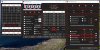

When cTDP is enabled and set to 1 (i.e. cTDP Down) and laptop is running on battery with turbo disabled, CPU idles at about 0.6-0.7W and when I run stress tests the CPU goes up to 2000 MHz this time and PKG power only goes up to about 13W. That's roughly a 25% decrease in power consumption when the CPU is maxed out, which seems like a pretty easy win when battery life is a priority.
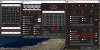
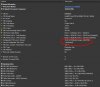
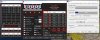
When I plug my laptop in, cTDP Down remains enabled, but the CPU is no longer constrained to 2000 MHz. When I run the same stress test again the CPU now goes up to 4100-4200 MHz, and PKG power goes all the way up to 66W before temperature throttling kicks in. (I should also note that I have "Turbo Disabled" unchecked in my AC profile in TS.)
So all in all... cTDP appears to be working exactly as I hoped it would. It throttles the CPU 500 MHz below its base frequency when on battery power, and it ignores the cTDP limit when running on AC power. Seems like a win-win situation.AndreaM likes this. -
Another day another throttling
Even though everything is set NOT to throttle to my knowledge the cpu still power throttles i noticed it after some gaming
And remember the days when people said 6 core is too much for gaming ... Utilization is near 100 percent on all 8 cores!
![[IMG]](images/storyImages/ihBZokW.png)
I have locked the power limits too and it didnt work
![[IMG]](images/storyImages/Dwluxes.jpg) Last edited: Mar 19, 2021
Last edited: Mar 19, 2021 -
Your 10875H has a 45W TDP rating. Some computers use the EC to enforce this power limit. That is what I see in your screenshots. The 45W limit will be enforced and the power limits set in ThrottleStop will be ignored. Sad times.
The only work around for this that I know of is to go into the MSI Advanced BIOS and find the IMON Slope and IMON Offset settings. Changing these values can be used to trick the CPU so it reports 45W of power consumption instead of 90W. No more reason for any power limit throttling when the CPU thinks power consumption is nice and low. As long as your temps are OK it will run full turbo boost indefinitely. I am no expert on these tricks so do a Google search for those two terms or search this forum thread. I know this topic has been talked about before.
The Windows 10 Utilization data and fancy graphs are absolute garbage, especially on a mobile CPU. Your CPU has a very low base speed of 2.3 GHz. When you run your CPU at 4.0 GHz, the Task Manager scales the CPU load data up almost 75% (40/23) to create its Utilization number. Nonsense. Maybe someone at Intel thinks this is a good idea. Anyone looking at those graphs will think their CPU is being overly utilized so it is time for an upgrade. Here is the truth about Utilization data.
![[IMG]](images/storyImages/9ibBiXb.png)
50% Load X (52 / 36) = 72% Utilization
Do you see the trickery? Run an 8 thread TS Bench test on your 16 thread CPU.
Turn the Log File option on while gaming. Monitor the C0%. That is a good indication of how utilized your CPU is. The Task Manager data is not.
@CitizenInsomniac - Thanks for the feedback. Glad to know someone found a good use for the TDP Level feature. I thought about ditching this feature during the recent overhaul. Glad I did not.Last edited: Mar 19, 2021 -
Hmm if I change imon slope settings I also will not see the correct power usage that is my only worry this kind of throttle is the first time i saw on msi laptops shame..
I will try the bios because I lose a big performance 45W is not enough.
On benchmarks you can not tell the 45W TDP throttle because they are short so this looks like a benchmark cheat. Shame
What you wrote sounds incredibly weird task manager not reporting correct values but on my screenshots task manager and TS is very close to each other of course there is difference but TS refreshes a lot more than task manager that was what I thought. And i just checked again in game not with a bench and they seem identical.
I have tested TS and Task manager but they seem very close to each other on 4 cores. On 8 core the difference is more is this what you are telling the effect seems less on my pc.
Last edited: Mar 19, 2021 -
@FrozenLord
Did you tried search for setup module?
There could be more than one instances of setup module.
Try dump all PE files (save as body) of all setup modules and lets do IFR on it. -
Here is an interesting number from the Resource Monitor.
How is it possible for a CPU to be running faster than its maximum speed? Windows uses the rated base frequency (3600 MHz) to calculate this big number. This CPU is using lots of turbo boost to reach full speed so Windows calculates that the CPU is running way beyond its maximum speed.
5300 MHz / 3600 MHz = 147%
@berkkocaturk - The 10875H has a low base frequency of 2300 MHz. When running your CPU at full speed, the reported Maximum Frequency might be over 200%. That's fast!
The ThrottleStop C0 data and the Task Manager Utilization data are measuring two different things. When the CPU is using lots of turbo boost and these two numbers are equal, they are probably both wrong.
I finally uncovered an interesting bug. The problem with monitoring Intel CPUs is that the internal monitoring timers are a shared resource. Individual applications can use the monitoring timers however they like. This can cause conflicts and monitoring data that is not accurate.
Both ThrottleStop and HWiNFO use these timers to record data for each individual thread. Both programs use the same timer in the same way. When lightly loaded, if you look at the HWiNFO Effective Clock data, you should see unique data for each thread. That shows that each thread is being monitored individually.
If another program decides that it wants to monitor each core instead of each thread, it can change this timer. Both ThrottleStop and HWiNFO will not know that this has happened. This is obvious when you look at the HWiNFO data. Instead of each thread reporting unique data, now both threads of each core will be reporting the same thing.
Changing the timer from thread monitoring to core monitoring also screws up the accuracy of the C0 data that ThrottleStop reports.
@berkkocaturk - If you look at your ThrottleStop C0 data, you will see the same sort of pattern that HWiNFO shows. Instead of each thread reporting unique data, ThrottleStop shows the C0 data to be the same for both threads of each core.
The ThrottleStop C0 data has always been extremely accurate. At least I thought it was. Turns out that if some other program changes the monitoring timers from thread mode to core mode, ThrottleStop C0 data will be just as bugged as the Task Manager Utilization data is.
It is easy to test for this bug. Does the HWiNFO Effective Clock data look suspicious? Try running a TS Bench - 8 Thread test on your 16 thread CPU. This test should have the CPU spending 50% of its time in the C0 state plus another 0.5% to 1.0% for the background tasks. If this test shows something totally crazy like close to 100%, the C0 data is not accurate. Run this test while your computer is idle, not while in the middle of a game.
This bug has only been around for 12+ years. No one ever noticed, including me. It seems just recently that some update or some new program has taken over control of the internal timers. ThrottleStop has been updated to monitor these timers and will try to keep them in thread mode. Hopefully the C0 data will be accurate again.
If anyone is interested in doing some testing, let me know and I will send you a download link.FrozenLord, dmanti, Papusan and 1 other person like this. -
Super interesting. Thanks for explanation.
I ran a 8 thread and checked if they matched and forgot that 8 thread should only utilize half the threads hence around 50 percent utilization.
Well TS and task manager are matching but as you said both threads on TS read the same thing. I do not have other application open on my pc no msi dragoncenter no Hwi etc. at the moment. I do not know what uses it.
I could test if you have anything to test.
Update
I figured the POWER throttling issue. Any idea to bypass it?
On only cpu load power limit is 200W for over a minute but after that it will throttle to 70W.
While doing that I ran furmark and suddenly it throttled to 20W like before I realized that the battery charging icon has gone!! AC charge has dropped! I had to unplug and plug the charger again. On battery cpu will throttle to 20W which is crazy low and less than 45W TDP.
My issue seems to be a big power issue the GPU is 115W and cpu can use well over 100W yet the charger is 230W
On my old laptop i had this too but not this severe. It would just lose battery charge on AC while gaming rather than throttle. After it got to 50 percent battery than it would throttle which makes sense to me.
I am getting 45W throttle on games probably because of 230W charger related throttling made by msi and there are no settings that I discovered on bios to solve that.Last edited: Mar 20, 2021unclewebb likes this. -
When the EC starts setting power limits, there is not much you can do. The IMON Slope trick is about all I can think of.
A bigger charger will probably not help. The computer is still likely going to be programmed to power limit throttle to values far lower than what ThrottleStop lets you set.
Thanks for testing out the new beta I sent you. Nice to finally come up with a fix for a 12+ year old bug.
Edit - ThrottleStop reports that the CPU is spending 51.0% in the C0 state when running an 8 thread load on a 16 thread CPU. That makes sense. The Task Manager rounds that up to 97% Utilization. On mobile CPUs where there is a big difference between the turbo boost speed and the base frequency, I would definitely not use the Utilization data for any purpose.
![[IMG]](images/storyImages/B0canGk.png) Last edited: Mar 21, 2021Papusan and tilleroftheearth like this.
Last edited: Mar 21, 2021Papusan and tilleroftheearth like this. -
Hi not sure where to post this but
I have an Core i5-4210H @ 2.90GHz that turbos up to 3.42GHz, but it only maintains this turbo when its utilizing single core, but when you utilize 100% multi core, like in Cinebench R23 for example, it goes down to 3.08GHz and never goes up, any idea how to fix this?
EDIT: Nvm about the single core vs multi core thing, it seems to happen on either now, but different CPU stress testers seem to make the CPU adjust the clock differently, like Geeks3D CPU Burner puts it down to 3.39GHz. On AIDA64 it goes down to 3.08GHz if I check "stress FPU" but otherwize, 3.39GHz. Prime95 does 3.08GHz like Cinebench.Last edited: Mar 21, 2021 -
All intel cpus including yours have single core and multi core boost ratios which are different. Single core is the max speed which are advertised but multicore is lower and not advertised.
Start the TS and TS bench and click limits and check the limits page whichever glowing red are the limits that are actively throttling yellow are past throttles and not important. Check whats throttling it will give you an idea and you can post it here -
Intel CPUs use power limit throttling. Have a look in the TPL window and post a screenshot of that. On most 4th Gen mobile CPUs, the power limits are locked by the BIOS. The PL1 power limit is likely locked to 47W. You can try to unlock this power limit in the ThrottleStop TPL window but if the BIOS is responsible for locking this power limit, there is nothing ThrottleStop can do to unlock it.
https://www.cpu-world.com/CPUs/Core_i5/Intel-Core i5-4210H Mobile processor.htmlLast edited: Mar 22, 2021tilleroftheearth and Papusan like this. -
O
![[IMG]](images/storyImages/GD3aDG1.png)
I have an unlocked BIOS with an "advanced" options tab which has a bunch of things like PCIe control, Overclocking, Power Limits, USB control etc, which I don't really understand because the settings are kind of cryptic.
Do you want a pic?Last edited: Mar 22, 2021 -
Ok
![[IMG]](images/storyImages/okbrQ0g.png)
It locked down to 3192.61 MHz but no red in the limit reasons.
Btw I *am* using a -85mV stable undervolt on the CPU core and cache but this does not make any difference at all to the clock throttling, it does help with the pkg power and temperatures but thats all
Prime95 on the other hand...
![[IMG]](images/storyImages/ApISgNV.png) Last edited: Mar 22, 2021
Last edited: Mar 22, 2021 -
Enable speedstep on main throttlestop page and disable clockmod and set multiplier they do not work on locked cpus. on FIVR increase the iccmax current slider to right to get higher current limit.
-
Ok, now on TS bench it locks down to 3392.15 MHz and on Prime95 3092.85 MHz, the target here is around 3469 MHz, the 3.5GHz Intel advertises.
I mentioned in my previous post about an unlocked BIOS, here's some pics:
https://imgur.com/a/aYwl5EV
Maybe there's something interesting here? -
3.5Ghz is only on single core. The maximum multiplier is 35 which makes around 3.5Ghz.
On multicore it will get to 34 multiplier that is the maximum which makes slightly less than 3.4 Ghz because your bus speed is 99.769
It is calculated 99.769x34=3392Mhz that is your multicore max speed on multicore TS bench you are already getting your max speed thats it.
On bios
You can disable bi directional prochot on bios maybe that could help but unlikely.
You can change boot performance mode to turbo speeds it might boot faster except that there is nothing to do.
On Ts bench everything works fine.
On prime95 test can you check the limits page if something is glowing red? -
Yes, here.
![[IMG]](images/storyImages/4snC5IO.png)
I've turned on "More Data" and observed that it goes red and clocks down to 3092.85 MHz IMMEDIATELY when the PKG Power hits 30W.
IccMax on FIVR is not adjustable on this CPU it seems.
Edit: FYI my CPU sits at around 34.78 x 99.769MHz = 3469.96 MHz on idle, when it's not doing anything.Last edited: Mar 22, 2021 -
Thats normal behavior. I am out of ideas prime95 is pushing more current on your cpu and that is the reason for your throttling maybe just do not use prime95 no other app would get a load like prime95
-
Me too! It's quite possible that people aren't using it because they're not aware of the feature or its benefits.
I do have one suggestion for how cTDP could be made more useful though: it'd be great if TPL settings could be assigned to a TS profile, rather than being global settings. I think you were maybe already considering that, based on the radio buttons you added to the TPL config screen recently?
For example, on the i5-8400H I originally reported about, the cTDP Down frequency limit is 2000 MHz (compared to 2500 MHz base freq), which is still sufficiently fast that I don't mind running my laptop in cTDP Down mode any time it's on battery power.
But on the i7-6600U CPU, for example, the cTDP Down mode is much more aggressive in throttling frequency and power: when cTDP Down is enabled the max frequency drops to 800 MHz, literally the lowest frequency supported by the CPU, which is a huge drop from the 2600 MHz base. On one hand, that is an amazing boost to battery life, but on the other hand 800 MHz is too sluggish to be used every time the laptop is unplugged. The ideal configuration for that CPU, in my opinion, would be to have cTDP Down enabled only when battery level is below the low battery threshold (e.g. below 25%). Right now that's not possible with TS, but if TS supported per-profile TPL settings that sort of configuration would be possible.
-
That is exactly what it is supposed to do. That is the maximum speed for the 4210H when both cores are active.
This is not an unlocked K series CPU so that is the maximum. When idle or lightly loaded, the CPU rapidly switching between the 35 multiplier and the 34 multiplier is also normal. With a TS Bench - 1 Thread test, you might get close to the 35 multiplier but there will always be Windows background processes waking up the second core so you will never likely see 35.00. Maybe 34.90 or 34.95 if you have a very lean computer without a lot of background crap.Code:Maximum turbo frequency 3500 MHz (1 core) 3400 MHz (2 cores)
When running Prime95 you are getting EDP OTHER throttling. For your CPU this is usually caused by the PP0 Current Limit. Try increasing that limit higher than 85. How about set that to 125 and see if this throttling goes away or if the multiplier increases any. If not, try 1023. That is the maximum value for this setting. If you still have throttling in Prime95, there is probably nothing you can do about it other than don't run Prime95.
IccMax adjustment did not exist on the 4th Gen. I think 6th Gen are the first CPUs that allowed adjustable IccMax. With 4th Gen, the only adjustment is the PP0 Current Limit. Your turbo power limits are not causing any throttling so no need to do anything special in your BIOS. You can either set the Current Limit higher in ThrottleStop and this will get rid of throttling or you cannot.
@CitizenInsomniac - I know the 3rd Gen CPU I tested also used an 800 MHz max for TDP Down mode. That was kind of harsh. It was best to avoid that altogether.
More than 100,000 downloads of TS 9.3 but only 2 or 3 people have mentioned the unfinished TPL window and adding adjustable limits for each profile. The things to do list does not progress very fast if no one nags me about new features. Getting bored with the forums. Almost time to get back to finishing the TPL window. If summer comes first, it might be a while.Last edited: Mar 23, 2021FrozenLord, Papusan and tilleroftheearth like this. -
I actually got 34.98 with all my applications closed actually, just trying to squeeze the most out of my CPU here.
Thanks!! That did the trick!
![[IMG]](images/storyImages/y7bpA1b.png)
49.8W... guess I should just put it back and deal with it
EDIT: Didn't have my undervolt active, With the undervolt its 45W now, just under the rated 47W max TDP.Last edited: Mar 23, 2021 -
I will gladly nag you about things. You are greatly improving it with updates already.
Turn on and off button is kind of misleading does it actually do anything? I know even if you close TS undervolts are written and will keep to apply.
I haven't even noticed the other TPL profiles are coming soon. It would really be useful for some people actually and you already promised it by adding it there
And on the TS notification bar it would be nice if we could also see the C0 times utilization .
I wish I knew programming so I could also do something like this.
I checked that your cpu is 15W and on your TDP down AC setting it uses more than 15w it could be a TDP up setting rather than down what is your base frequency on that setting does it change?Last edited: Mar 23, 2021dmanti likes this. -
@unclewebb I just wanted to let you know some findings on the new i7-11370H I had briefly in the new Asus TUF Dash 15.. I was able to completely unlock the BIOS which still had the Overclocking Features, Overclock Lock, CFG Lock, etc.. just like any other normal AMI bios .. FIVR visibility/control in Windows is still completely nixed. Even setting manual undervolting down to -1000mv on core, cache, iGPU, etc. had zero affects in Windows or Throttlestop.. everything remains completely default. Unfortunately sounds like the end of modifying non-K CPUs from 11th gen onwards
FrozenLord, Papusan and tilleroftheearth like this. -
Disappointed but not all that surprised. I guess we will know in a week or so if CPU voltage control is going to be available on the 11th Gen desktop K series CPUs. If the K desktops allow voltage control then the K mobile series will probably allow this too. Other than that, it looks like the end of an era. Sad times indeed.
Last edited: Mar 25, 2021FrozenLord, hfm and Diversion like this.
-
Could you undervolt directly from the BIOS itself? That would at least be something even if it's a total pain to iteratively tune. I would imagine this is Intel's Plundervolt protection in it's final form. I was keeping this laptop on my shortlist since it would make a great eGPU platform. Not being able to undervolt wouldn't be that big of a deal as it would be using the entire thermal management for the CPU alone in that scenario. But still.. disappointing.dmanti likes this.
-
what up all. two strange things have occurred recently, the first being I have constant yellow edp other under ring limits while on AC, but as soon as I go on battery it disappears. second, my battery wear went from 0.00 up to 5.6%, and I have not done anything other than used it on battery for a few minutes when the power went out here, and I try to take care of this battery by only letting it charge to 60% using dragon centers battery limiter, so how could my battery all of a sudden have wear? I am checking the battery stats using hwinfo. I am hoping that it is just an error in readings, but it is concerning to me as I have had this laptop for only 3 months (and I ran the msi batt calibration today but it is still at 5.6% wear, dropping my overall charge level by 5%) any insights would be greatly appreciated.
-
Normal. You can double-check that against BatteryBar too.
See:
Download BatteryBar for Free (batterybarpro.com)BayonetworK likes this. -
ok man I'll check out batterybar and thanks for the responsetilleroftheearth likes this.
-
Yellow means after the pc booted it had this type of throttle it is a history yellow doesn't mean that it is throttling now just clear and if it is red it is throttling and you need to check out yellow is just the history sometimes it will get reset maybe when you plug and unplug it gets reset.BayonetworK likes this.
-
yeah that's the thing, I can't clear it, by that I mean when I hit clear it just comes back half a second later, seems like it's continually happening, which idk what's causing it
-
Negative, manual undervolting in the BIOS does nothing.. I'm assuming the BIOS is just a copy-paste and those features do nothing anymore.. I don't think it has anything to do with Plundervolt.. It's because 11th gen is on an entirely new power setup all-together and not using FIVR any longer.
Now that being said, I did liquid metal the unit and temps never reached past 72c under the most demanding AVX loads even.. undervolting wasn't necessary on that unit.. Turbo stayed full tilt.. 4.3ghz all-core all day long no matter the load.. Same holds true for the Asus Q528 I currently have with it's i7-1165.. It needs a liquid job, but it doesn't throttle either.. all day long, max turbo boost at 88c.. Granted these are all 4-core machines, the wattage isn't insane.. they both do around 45 watts and the cooling system can keep it under 90c. The real problem will come with the new 6-core/8-core 11th gen laptops i'd imagine where the lack of undervolting will be an issue.
I don't want to sway you from still picking up a TUF Dash 15, it's a great machine.. even though the 4-core is probably going to create a bottleneck in certain games. -
That's good to hear, I am probably going to hold out till later this year and see what the i5-11400H holds, though I think even 4-core if it can hit 40-45W should be fine, i'm not looking for 400FPS in cs:go, I'll probably be GPU limited with the games and settings i use.Diversion likes this.
-
That is what I heard but I was not sure if it was true or not.
I thought someone at Intel was just trying to discourage me.
-
It is crazy you went to LM that cpu which runs at low power already. I do not like the 4 core approach on 11th gen intel the single core performance improvement is good but having less than 6 cores is not that ideal today. But also the 4 cores have improved so much and integrated graphics too. I think it is a thin and light portable laptop dream except that I am waiting for 6 or 8 cores to compare to the amd.
I think the 6 core and 8 core intel cpus will be defining since we are past 4 core era already. If they could really improve it will be a success. From 6th gen to 8th gen to 10th gen there were a lot of optimization and they added a lot of cores and tech into it but it just meant more aggressive throttling too.Diversion likes this. -
Yeah, that's why I'm interested in seeing devices with i5-11400H to get two extra cores. Downside is less frequency. Also depends on what devices actually come out, as I suspect most will have a dGPU that I'm not going to use. Upside on that is using the entire heat management for the CPU, though with the dGPU cost tax. The Intel NUC 15m design (Schenker Vision 15 and ADATA XPG Xenia Xe) both peg the i7-1165G at 40W which is pretty nice. Be interesting to see what comes out later this year containing H45.
-
Boredom gets the better of me.. I always like to push everything to it's limits
-
I have plans about my 10875H too. If i could get a 280W charger from msi hopefully i will change thermal paste and imon slope mode it but since with 230W charger laptop already loses battery on AC and power throttle keeps it cold I can not do anything. Hopefully these will happen and I can mod the laptop to get better performance I think cpu could achieve cinebench R20 4500 ish scores without restrictions.Diversion likes this.
-
As far as I can tell, when the laptop is running on AC power the cTDP setting gets completely ignored. In my screenshot you can see that PL1 and PL2 in TS are set to 45W and 50W, so when the laptop is plugged in those are the power limits that get enforced. It's only when the laptop switches to DC power that the cTDP setting takes precedence.
-
Unclewebb, could you do me a big favour and replace the old "primer" link from Notebookcheck to the more current one at my site UltrabookReview? Thank you!
-
Link has been updated.
After 10+ years, I do not spend much time in the first post. Looks like a few links and pictures could use an update.Eason, dmanti and tilleroftheearth like this. -
I was just checking the first post and the pictures are very old. I can send screenshots and benchmark because I already have a lot of them I can PM if you like.dmanti and tilleroftheearth like this.
-
Thanks for the offer. I updated a couple of pictures. My 10850K being fed lots of voltage and running fully loaded at 5300 MHz all core looks good. I also updated the picture of the Options window. As for the rest of the first post, it is overdue for a major rewrite. That is more work than I feel like doing today.
Does anyone have access to a new 11700K or 11900K? Can you post a few pics if you have one? Especially the FIVR window. It would be nice to see what the FIVR window looks like and what settings are still available on the new CPUs.
I kind of like my 10850K. No big hurry to upgrade to something that costs more and performs worse in multi-threaded tasks.
Papusan and tilleroftheearth like this.
The ThrottleStop Guide
Discussion in 'Hardware Components and Aftermarket Upgrades' started by unclewebb, Nov 7, 2010.


