Problems? See this thread at archive.org.
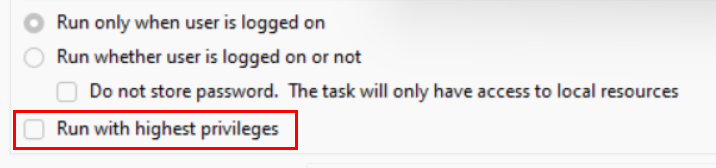
I saw that you did not check that box. That is why I am not sure how closely you followed the guide.
If you are still having problems, post screenshots of every tab in the Task Scheduler and maybe my keen eye will find something else. It is possible that this does not work in Windows 11. It has always worked correctly for me in Windows 10.
Some users like to use ThrottleStop to manage their CPU when running on battery power. I only use a desktop computer. Use ThrottleStop if you need it.
ThrottleStop does not report voltage. It reports VID which is not the same as the actual voltage going to the CPU. Most laptops do not have a sensor to report voltage going to the core. Not sure if 1.1648 VID at almost 4600 MHz is good or bad. It looks good but I would not bother wasting time comparing VID voltage values to other users. As long as your computer runs well and benches well compared to other 11800H users, that is all that is important.
-
-
Hi Sir
After updating 2021-10 Cumulative Update for Windows 11 for x64-based Systems (KB5006674), throttlestop display wrong value and does not work. -
Did you disable Core isolation - Memory integrity?
![[IMG]](images/storyImages/3bwy942.png)
Did you disable Virtual Machine Platform?
Most people are able to run ThrottleStop in Windows 11 as long as those settings are disabled. If those settings are enabled, ThrottleStop will not have full access to the CPU and ThrottleStop will not work correctly.
If you need help, show me a screenshot of your Windows features and show me a screenshot of the FIVR window.
Here is some more information about what needs to be disabled so ThrottleStop will work in Windows 11.
http://forum.notebookreview.com/threads/the-throttlestop-guide.531329/page-1333#post-11122016100won likes this. -
I wonder that why windows 10 can enable sandbox feature without problem?
-
@unclewebb It seems I was able to fix black screen of death upon sleep or due to display timeouts. I had DCH Intel driver and nvidia standard driver. Couple of months ago, WindowsApps was corrupted during junk files cleanup and Appx are inoperable. Couple of days ago I reverted to intel standard non-dch version for skylake 6700HQ 51xx version driver and that black screen of death has been fixed.
unclewebb likes this. -
my fivr Screen - because I just yesterday added (lol?):
virtual platform
Hyper-v
and Hypervisor platform.
Memory integrity DISABLED
So program could not working properly as just dont reduce voltage? -
I do not know the answer to that question. It looks like ThrottleStop is working correctly in your screenshot. It should be easy to test this. Set the offset voltage for the core and the cache to +0.0000 while a TS Bench test or a Cinebench test is running. If you change the voltage to -82.0 mV, you should see a change in temperatures.
Go back and forth from zero offset voltage to -82.0 mV while the CPU is fully loaded. If you are still not sure, go crazy with the undervolt settings. Set the core and cache to -200 mV and see if your computer crashes. That is an easy way to confirm if CPU voltage control is working or not.tilleroftheearth likes this. -
Finally me too - got not working TS after cumulative last update on W11 today - I mean there was in FIVR sections nothing in OFFSET
and can`t change Turbo Ratio limits etc.
Uncheck Virtual platform - not enough - Uncheck Hyper Platform - it all came back!
How is everyone on w11 last update - switch off both now?
Ps. Didn't check yet about working or not with -200mv etc - got this first!
PS2. One more question - about MEMORY DISABLE and LOCK TURBO POWER LIMITS - is it proper to leave unchecked? -
It is hard to keep track of what update has switched what Windows setting or feature on or off. What you have to do to get ThrottleStop working in Windows 11 is always the same. Switch off whatever virtualization features that need to be switched off.
That is up to you. If you do not need these features then you do not need to check them. There is no right or wrong if your computer is running good.tilleroftheearth likes this. -
Could it be the Windows Subsystem for Android (which is installed for the Amazon Appstore integration)?
-
Any software that uses a VM could prevent ThrottleStop from accessing the CPU voltage control register.
I have heard of the Windows Subsystem for Linux but I was not aware of the Windows Subsystem for Android. Thanks for posting that info.
https://docs.microsoft.com/en-us/windows/android/wsa/Vasudev, DrewN and tilleroftheearth like this. -
Installing WSA (Windows Subsytem for Android) on Windows 11 does break Throttlestop. Tested and confirmed it yesterday.
On my laptop, unplug charger tend to force close/ crash ThrottleStop.DrewN likes this. -
Are you using the Task Scheduler and did you follow the guide in the second post of this thread?
http://forum.notebookreview.com/threads/the-throttlestop-guide.531329/#post-6865107
This problem is almost always caused by a setting in the Task Scheduler. If this setting is checked, even if it is grayed out, this setting is still active. Everyone assumes that a grayed out setting is not active.
-
Do you plan update that will fix issue with undervolting on windows 11? Without disabling wsl2 of course.
-
Does Intel® XTU work with the Linux subsystem enabled?
-
No. It doesn't work. On Windows 10 with enabled wsl2, Intel XTU and ThrottleStop work fine
-
Only Microsoft can fix the problem that they created.
If you need to use WSL2 and if you need to undervolt your computer, do not upgrade to Windows 11.
Continue using Windows 10.joluke, chumley, FrozenLord and 1 other person like this. -
Hello!
I have successfully made a good undervolting on my i7-7500u of - 100mv (Asus UX330UA). Now I have only one problem... the VRM Thermal. (this one kick in at like 85° cpu temperature, with a critical point set to 99°)
So, can you recognize the VRMs on my motherboard ?? Can you edit the picture and mark them? I have find online one photo, but I can made better pictures of my notebook if you need it.
The idea is to place little thermal pads to connect the VRMs to the alluminium case, so I can make a better dissipation.
Thanks in advance guys! -
Ok but I don't think that Microsoft fix it in the future.
-
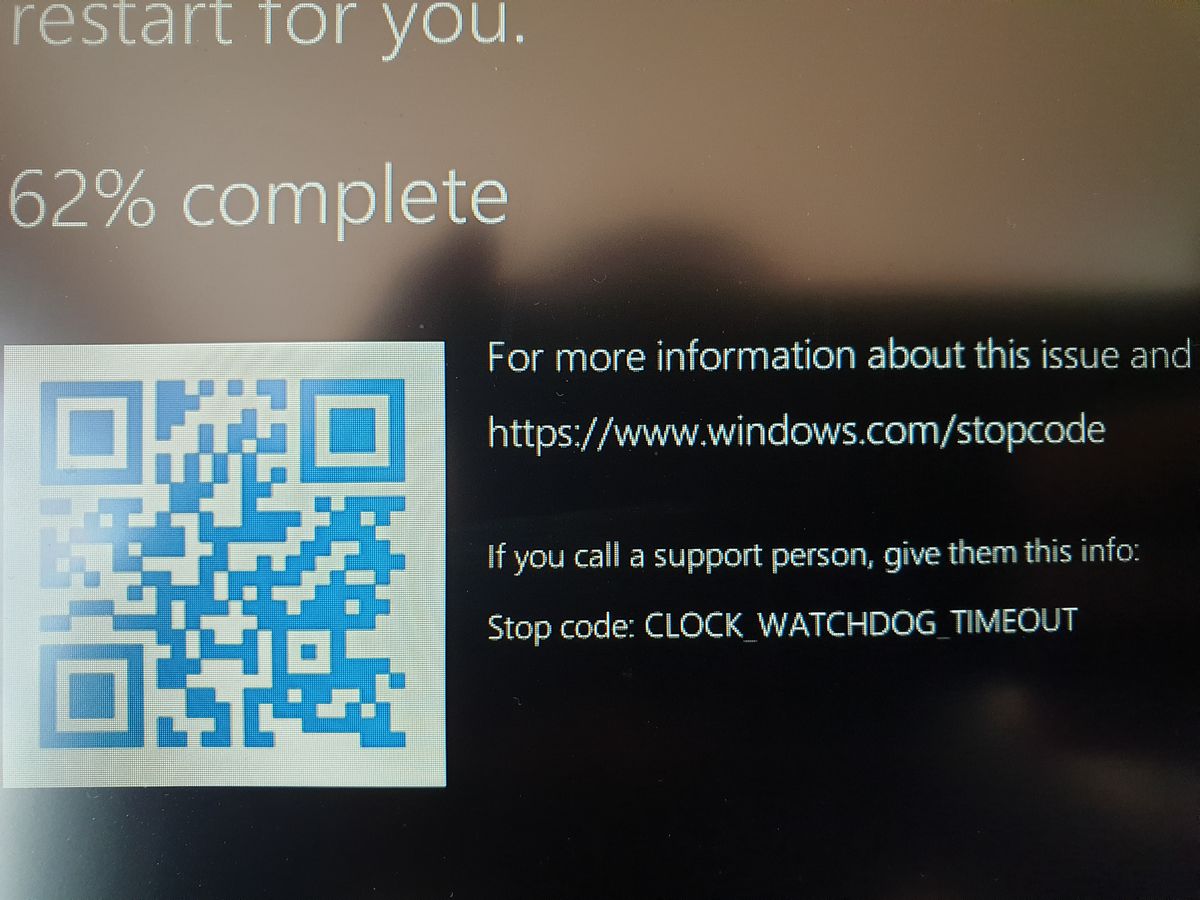
Got couple of time once in a 1-1,5 day attached reboot?! screen - could be connected to Throttlestop, especially when it was described for me - not enough power for 1-2 cores?
It was working under minimal CPU load, just some GPU under load and then pressing some keys and it was freeze then this death screen. 11800H, W11.
PS. it is somewhere may be LLC levels must be TUNE UP - higher like normal-high-turbo? MSI BIOS?
GOOGLE-Watchdog clock timeout
Clock Watchdog Timeout is a BSoD error that may occur when the CPU is not processing interrupts, and that is a sign that there is an issue with the processor. ... The Watchdog Timeout Stop Error can happen on a Windows system when the processor is not computing interrupts.Mar 5, 2021
going to check Windows Memory Diagnostic - to do.
from EVENT VIEWER-
some errors - from service control manager:
The RstMwService service terminated with the following error:
%%2684420176
WHEA Logger
A fatal hardware error has occurred. A record describing the condition is contained in the data section of this event.
from Event manager about KERNEL:
- System
- Provider
[ Name] Microsoft-Windows-Kernel-Power
[ Guid] {331c3b3a-2005-44c2-ac5e-77220c37d6b4}
EventID 41
Version 8
Level 1
Task 63
Opcode 0
Keywords 0x8000400000000002
- TimeCreated
[ SystemTime] 2021-10-26T17:21:02.5854019Z
EventRecordID 3579
Correlation
- Execution
[ ProcessID] 4
[ ThreadID] 8
Channel System
Computer MSIRAIDER
- Security
[ UserID] S-1-5-1
- EventData
BugcheckCode 257
BugcheckParameter1 0xc
BugcheckParameter2 0x0
BugcheckParameter3 0xffffc48085aa1180
BugcheckParameter4 0xa
SleepInProgress 0
PowerButtonTimestamp 0
BootAppStatus 0
Checkpoint 0
ConnectedStandbyInProgress false
SystemSleepTransitionsToOn 0
CsEntryScenarioInstanceId 25
BugcheckInfoFromEFI false
CheckpointStatus 0
CsEntryScenarioInstanceIdV2 25
LongPowerButtonPressDetected falseAttached Files:
Last edited: Oct 26, 2021 -
-
Hi, I observed same thing on two old PC's. I don't remeber if it get sorted out on first PC but my Thinkpad E540 was doing the same than I eventually got over.
The thing is that I don't know how.
At first I started to think the OS must be on the blame and further turned off secure boot and some OS optimal default setting at Bios plus turned off some of memory protection setting at Bios level as well.
Now it is ok so I can longer search memory tab in RWe
I have also modded bios on first SNB PC just to unlock power limits, you are currently struggling.
It is quite simple, but you are still on the verge of brick the machine although.
But there are still big possibility it is messed on MMIO level as unclewebb wrote you before.
(I am not English native)
EDIT: on first PC I got over by flashing SNB to IVB compatible bios instead of original SNB bios and had upgraded to IVB CPU as well.Last edited: Oct 26, 2021 -
No one here?
-
Hi
I moved to Windows 11 Home from Windows 10 Home 2 days ago.
When I was on W10 SpeedShift was enabled by default (it was green in ThrottleStop) but now on W11 its not enabled (not green) and I have to enable it via TS. Any idea why?
Secondly, are there any methods to find out the best UV for core and cache voltage? Which should be the bigger undervolt? Should I find the highest undervolt for core without cache UV and the same method for cache undervolt?
Thank you!
-
Are you undervolting your CPU or are you overclocking it? The 11800H is a fast CPU. It needs lots of voltage to run at full speed. There are probably some that are not 100% stable if you try to use the factory +400 MHz overclock. Overclocking and under volting are never guaranteed.
BSoD errors when using ThrottleStop are often times caused by not enough voltage.
Are you seeing a VR THERMAL warning in Limit Reasons? I have always owned motherboards with good VRM cooling so I have never had to add additional cooling. I am not 100% sure where the voltage regulators are on your motherboard. Maybe try posting your question in a forum that is specifically about your computer model. Maybe someone there will know how to keep the voltage regulators cool.
That sounds like a Windows 11 bug. You need to either complain to Microsoft or just continue using ThrottleStop to enable Speed Shift.
I generally start out by setting the core and cache offset voltages equally. It is all trial and error after that. The TS Bench is a good first test to see if you have general stability. After that you need to run a wide variety of programs. If you get a freeze or a BSoD, you have gone too far. Many Intel CPUs run better when the core offset voltage is set to a bigger number than the cache offset voltage.
You did not mention what CPU model you have so I have no magic numbers to share with you. 8th Gen mobile CPUs often times liked -125 mV cache and -200 mV for the core. Some 10th and 11th Gen CPUs are more like -50 mV to -75 mV for the cache.
Run Cinebench and then run some 3D Mark tests or some games so your GPU is active too.
https://www.techpowerup.com/download/maxon-cinebench/
A voltage that is stable in Cinebench might need to be increased so other tests are stable.
Every CPU is unique so the only way to find out what works best is to do lots of testing.Vasudev likes this. -
Yes, correct. Only VR THERMAL warning. (like Red and yellow blinking). And after some minutes of stress test it will shutdown istantly (at temperatures maximum near 90°, when Prochot is set to 99°).
So I think that one solution can be to optimize the VRM dissipation to the allumium case.
Sometimes I see also EDP Other in yellow.
I will try to post the same question in another forum... but don't have much hope! -
No overclock - all as standard? all is only in Throttlestop and nothing else.
4.6 all cores and that's all from FIVR section.
Now came lower from -81.1mV to 79.1mV - will look thoroughly at the laptop behavior.
-
See that blue box with the check mark in it? That is overclocking.
The default turbo ratios go from 46 when 1 core is active to 42 when all 8 cores are active. When you check that box and increase the turbo ratio limits, that is overclocking. An all core 46 multiplier is also overclocking.
The voltage you are trying to use has proven to be not enough for the 11800H when overclocking. Go back to -50 mV for the core and the cache and see if the BSoDs and errors go away. If that works out, maybe in a few days you can try -60 mV. You have to find a voltage where you are 100% stable. If you have a BSoD or errors are showing up in Windows, do not adjust the voltage in 2 mV steps. Your computer is telling you that your voltage is not nearly enough.
You do not have a fully unlocked K series CPU so setting most of the turbo ratios to 50 will be ignored by the CPU. You can only go +4 over the default values listed in the ThrottleStop Turbo Ratio Limits section. That means from top to bottom, the maximum turbo ratios are 50, 50, 49, 49, 49, 48, 47, 46. Setting any of the individual turbo ratios higher than the maximum default value will be ignored by the CPU.
I would set the Intel GPU back to +0.0000. Find a stable CPU undervolt before touching this. Even then, if you have a Nvidia GPU, there is virtually nothing to be gained by undervolting the Intel GPU. -
oops, sorry - yes - about 42->46. Thank you for advices, took off Intel. Make less -mV.
But interesting thing - when I tried this -80mv with test prime95 for 30-1hour - it was all ok under heaviest load & suddenly sometimes during a days everyday routine load it is becoming not enough... -
This is very common with Intel mobile CPUs. At default settings, the voltage is already low when the CPU is lightly loaded or idle. A negative offset voltage removes voltage from the entire voltage curve. Even if your full load voltage is 100% stable, you are more likely to run into problems when the CPU is lightly loaded or idle. Being Prime95 stable is great but it does not determine how stable your computer is going to be in normal use. I do not spend too much time running Prime95 anymore.
The TS Bench includes a Random MHz option for a reason. When Speed Shift is enabled, setting the MHz option to Random will randomly change the MHz so you can test for stability at a variety of speeds, all at the same time. I think the MHz will change approximately 10 times per second.
You can run a TS Bench Random 1 or 2 Thread test and while that test is running, you can run a couple of threads of Prime 95 and maybe a single thread Cinebench test too. I think having the MHz and voltage constantly vary while the CPU is partially loaded is a lot closer to real world use compared to a stress test that loads the CPU at a constant speed and constant voltage. Check the More Data option if you want a better look at how frequently the MHz are being varied.
Another thing to consider if you are not already doing so is to run your CPU at full speed all of the time. Use the Windows High Performance power plan and check the FIVR monitoring table to make sure Speed Shift EPP is set to 0. The High Performance power plan should take care of setting EPP to 0 automatically. With your CPU no longer randomly dropping down to 800 MHz, this might allow you to reliably run a larger undervolt. I prefer this full speed setting over the Balanced power plan, especially when plugged in. Intel CPUs do most of their power savings by entering low power C states like C7. Using the Balanced power plan to slow the CPU down when lightly loaded is not necessary.
Even at 5000 MHz, 10 cores can be very efficient. I added an extra digit to the C0 data to show this CPU going under 0.1% in the C0 state.
![[IMG]](images/storyImages/4cG1tdB.png) Last edited: Oct 28, 2021
Last edited: Oct 28, 2021 -
Thanks a lot unclewebb - got it. I am always in High Performance power plan: I have nothing to loose - right?
Do you recommend to checkbox ON "Speed Shift" in my case?
Where is better to do it - in TPL menu or in this Left side on screenshot.
And one more question - seems Speed Shift - EPP 0 and what is next to 0 - green SST there: is it ok?
Vasudev likes this. -
That is what I like to hear.
A steady 46.00 multiplier when lightly loaded is what I like to see.
Look in the FIVR window at the monitoring table. If the monitoring table shows that your CPU is using a Speed Shift EPP setting of 0, there is no need to check the Speed Shift - EPP box on the main screen of ThrottleStop. Your CPU is already using the correct value.
In the TPL window, the Speed Shift Min and Max options allow you to control your minimum and maximum CPU speed. I usually adjust the Speed Shift Max value when I need to quickly change the maximum CPU speed.
When you see SST in green on the main ThrottleStop screen, that confirms that Speed Shift Technology is enabled within the processor. Most recent laptops automatically enable Speed Shift in the bios.
If the bios does not enable Speed Shift, you can open the TPL window and check the Speed Shift option to enable Speed Shift.
Speed Shift was first available when the 6th Gen CPUs were released but not a lot of computers back then bothered to enable this feature. It literally took Dell years before they started using Speed Shift. This new CPU control method seemed to interfere with some of Dell's tried and true throttling methods. It took Dell a while to dream up some new power limit based throttling methods.
If you have an older computer, it is easy to use ThrottleStop to enable Speed Shift if that is what you want. -
Thank a lot - yes its 0.
But another question was born - about Cache Ratio: 38 its too low!? Your shows 47 for 10850.
I heard about "rule" to make Cache Ratio as: from my CPU as 46x and MINUS 2?!
So make it 44?
And use for it program Cache section: Min/Max? but what is more proper and faster?
8-44? 40-46? ;-)
-
The 10850 is an unlocked K series. That allows me to set the cache ratio to whatever I like. When running a 50 multiplier I could set the cache ratio to 50 but that requires an insane amount of voltage so it is not very practical to do this.
I have no idea where you heard about the rule of -2. That sounds like an internet myth to me.
When Ring Down Bin is checked, that forces the cache to run at least 300 MHz slower than the core. You can call that the rule of -3 if you want. Tell them you heard it on NBR from a fairly reputable source.
-300 MHz works well for the desktop K series like the 10850K and 10900K. When pushing 11th Gen desktop CPUs to their limit, most users seem to use even less cache frequency. If the core is good to 5000 MHz, the cache might only be stable up to 4500 MHz.
Open the FIVR window and enter a big number like 99 into the Max Cache Ratio box. Press Apply. ThrottleStop should change the Max Cache Ratio value to the maximum that your CPU supports. Use that value. Your default 8 core active multiplier is 42 and it looks like your maximum cache ratio might be 38. Maybe this is a sign that your 11th Gen mobile CPU uses a rule of -4.
As always, the higher the better. Do not kill yourself though trying to get another 100 MHz of cache speed. It makes virtually zero difference to the vast majority of real world apps. It is hard to find benchmarks where an extra few hundred MHz of cache speed makes much of a difference.4W4K3 and tilleroftheearth like this. -
Maybe I'm missing something, but on my NUC10 10710u CPU I only have a check box for undervolting on Throttlestop version 9.2.2b and lower.
From 9.2.9b and up the undervolt checkbox is greyed out.
Is there a new switch I missed?
Edit:
Changelog says "- more obvious FIVR window feedback when CPU voltage control is locked."
But I don't see why that would result in a greyed out CPU voltage control unlock box.Last edited: Oct 30, 2021 -
@tijgert - Post a screenshot of the ThrottleStop 9.4 FIVR window.
Locked means locked. If the BIOS locks the CPU voltage control register, ThrottleStop cannot be used to unlock it. -
Maybe I didn't explain myself correctly, my apologies.
In v9.4.2 (and lower, until 9.2.2) the unlock box is greyed out, I cannot change the voltage.
But with 9.2.2 (and lower) I can adjust the voltage without a problem as the unlock box is working.
Both these versions are vanilla, not a single setting changed, just screenshot taken.
Why is it greyed out in the later versions and working just fine in 9.2.2 and lower? -
Because it is not working just fine.
In 9.2.2, ThrottleStop lets you adjust the voltage request values but when you press the Apply button or the OK button in the FIVR window, the voltage values that you just entered are not being applied to the CPU. Why? Because the CPU voltage control register is locked. Try making a change to the Offset voltage, press Apply and then look at the FIVR monitoring table. The Offset value that the CPU is actually using is still +0.000. That confirms that the offset voltage you just requested is not being applied to the CPU.
Version 9.2.2 says FIVR Control - Locked but some users were not fully understanding the meaning of Locked. English is not everyone's primary language so I decided to simplify that message and changed that to one word, Locked. That still was not getting everyone's attention so I went one step further and grayed out all of the settings to make sure that no one could possibly attempt to make any changes. Trying to make changes to a locked register accomplishes nothing.
When the CPU voltage control register is locked, you cannot use ThrottleStop or any software to make any changes. Once locked, it can only be unlocked by the BIOS. Once you boot up into Windows, if the voltage control register is locked, all software will be prevented from making any changes to this locked register.
Here is a possibility for the next TS version or perhaps a giant sized padlock.
I am always open to suggestions.Last edited: Oct 31, 2021tilleroftheearth likes this. -
Completely understood, much appreciated this very clear explanation. A+
-
Hi unclewebb!
Any ideas about why on my 11800h i can raise the all core multiplier and see it applied when running a multicore workload, but if i raise the single or dual core ratio (even by just 1) i never see those higher ratios on a single threaded bench? -
I need to see some screenshots to answer your question. The main window, the FIVR window and the TPL window would help.
The 11800H supports limited overclocking. You should be able to increase each of the turbo ratio limits by +4 bins. ThrottleStop should show in the FIVR window what the default turbo ratios are.
Most people have a lot of stuff running in the background so only raising the 1 or 2 core turbo ratio does not make much of a difference. Make sure Speed Shift Max is set appropriately and the Overclock box is checked in the FIVR window. That might help.
Run a TS Bench - 1 Thread test and while that test is in progress, take a screenshot so I can see the C0% and multipliers being used. -
Thanks. Will do that later tonight.
The thing is, everything seems to be as it should. The overclock box is checked, I´m able to oc the 8 cores ratio, Speed Shift is working and at 0. Running TS bench 1 Thread test, Cinebench single core test, Cpu-z single, or just letting windows sit idle with no startup apps allowed, i´ve never seen HWiNFO report on the Maximum column more than 4590mhz or 46x ratio for any core. -
The non K CPUs need to have the core C states enabled so the CPU can reach the maximum 1 core active turbo ratio. Most enthusiasts that recommend disabling the C states do not realize this limitation. When the C states are disabled, the CPU is usually limited to the 8 active core multiplier.
There can be issues with the BIOS where the C states get disabled "accidentally". This makes for much improved SSD benchmark scores which can increase sales.
Open the C States window when your computer is idle and see what it reports. If you see a table full of 0.0, that is the problem.
Speed Shift EPP is at 0 but what about Speed Shift Max? If the Max value is set too low, that can interfere with maximum CPU speed.tilleroftheearth likes this. -
Multi thread
![[IMG]](images/storyImages/SdpJULi.jpg)
Single thread
![[IMG]](images/storyImages/WkRY7xV.jpg)
Multi thread with TPL window
![[IMG]](images/storyImages/xjO3RwI.jpg)
Single thread with TPL window
![[IMG]](images/storyImages/qtFzk7m.jpg)
Btw, don´t mind the "50" on the TPL window Max field of Speed Shift. With 46 or 50 it´s the same (i know, the check box is unchecked). -
Where is this "disable Idle" selection in Power Options for a 6300HQ laptop?
-
Your higher multipliers are working when running a single threaded task. The problem is that Intel has over promised and under delivered.
A Windows computer has to be extremely lean to use the 1 and 2 active core multipliers. Start by exiting HWiNFO and anything else running in the background. When testing, only have the main ThrottleStop window and the TS Bench window open.
What does ThrottleStop report for C0% when your computer is idle? Try running another TS Bench - 1 Thread test. Is the TS reported multiplier any higher compared to your 1 Thread test above?
If you want your CPU to use the 48 multiplier more often when it is lightly loaded, try setting the 1, 2 and 3 Active core multiplier to 48. That seems to be the only practical thing you can do to get around the Intel algorithm that decides how many cores are active.
It looks like the correct name is Processor Idle Disable or IDLEDISABLE. To find out if your computer has this setting available, open a command window.Code:Power Setting GUID: 5d76a2ca-e8c0-402f-a133-2158492d58ad (Processor idle disable) GUID Alias: IDLEDISABLE Possible Setting Index: 000 Possible Setting Friendly Name: Enable idle Possible Setting Index: 001 Possible Setting Friendly Name: Disable idle Current AC Power Setting Index: 0x00000000 Current DC Power Setting Index: 0x00000000
If this is available, enter these two commands.Code:powercfg /qh SCHEME_CURRENT SUB_PROCESSOR IDLEDISABLE
To go back to normal, set this to 0.Code:powercfg /setacvalueindex SCHEME_CURRENT SUB_PROCESSOR IDLEDISABLE 1 powercfg /s SCHEME_CURRENT
Power consumption goes through the roof when all of the C states are disabled. ThrottleStop correctly reports that the CPU cores are spending 100.0% of their time in the C0 state even though the CPU is idle and not actually doing anything. With all of the C states disabled, reported idle power consumption is up to 124W instead of the normal less than 2W. Idle core temps have increased almost 30°C.Code:powercfg /setacvalueindex SCHEME_CURRENT SUB_PROCESSOR IDLEDISABLE 0 powercfg /s SCHEME_CURRENT
Power consumption at the wall as measured with a Kill-a-Watt meter has increased by 140W.
Disabling all of the C states in a laptop while running on battery power would not be a good thing to do.
This might help you achieve your best SSD bench scores. Extreme benching is about the only practical reason to use tricks like this. The guys at the top of the HWBot leader board might not be happy with me sharing this info.
The ThrottleStop feature in the C States window that lets you disable C states is not as extreme. ThrottleStop still lets the CPU access C0, C1 and C1E. The IDLE DISABLE method only leaves C0 available. Keeping a CPU constantly in the C0 state is kind of like jacking the back end of a rear wheel drive car up with the tires spinning at full speed. Knock the jack out and away you go.Last edited: Nov 6, 2021dmanti, tilleroftheearth and pressing like this. -
That works on my Dell XPS 9550! Thank you for posting this detail.
Disabling all C states could be very useful for audio types trying to track down glitching, particularly with laptops. Testing purposes only.
Otherwise, for laptops this is a total waste of energy and a good way to shorten equipment lifespan, as you noted. -
No luck. The lowest C0% I can get is 0.3 but I still can't get single core higher than 46x even if I set all multipliers to 50x.
-
Did you check the Speed Shift box yet in the TPL window? The Speed Shift box has to be checked so the Speed Shift Min and Max values get sent to the CPU.pressing, Vasudev and tilleroftheearth like this.
-
Already tried that. Same result.
-
Got it working now. But the way i did it is odd. Unchecked "unlock adjustable voltage" on the FIVR window, and now 47x and 48x single core work correctly. Re-enabled "unlock adjustable voltage" and they still work. Mind you, speed shift check box on the TPL and main window are disabled, as i always set them. I let Windows manage that - high performance power plan selected and speed shift shows 0 on FIVR window.
The ThrottleStop Guide
Discussion in 'Hardware Components and Aftermarket Upgrades' started by unclewebb, Nov 7, 2010.