Problems? See this thread at archive.org.
Yeah, but first, screenshots.
Lots of them.
-
-
>I would not touch IccMax. Set the core and cache IccMax to 255.75 so it does not cause throttling. You are playing around with so many different variables, all at the same time, that it is >impossible to know what limit is in command of your CPU.
>Keep things simple. If you want less CPU heat, open the TPL window and reduce the turbo power limits. Less power equals less heat. Check both Clamp options so your power limit requests >are enforced. ThrottleStop gets another gold star for providing access to the Clamp feature. Intel XTU does not think being able to toggle Clamp is important.
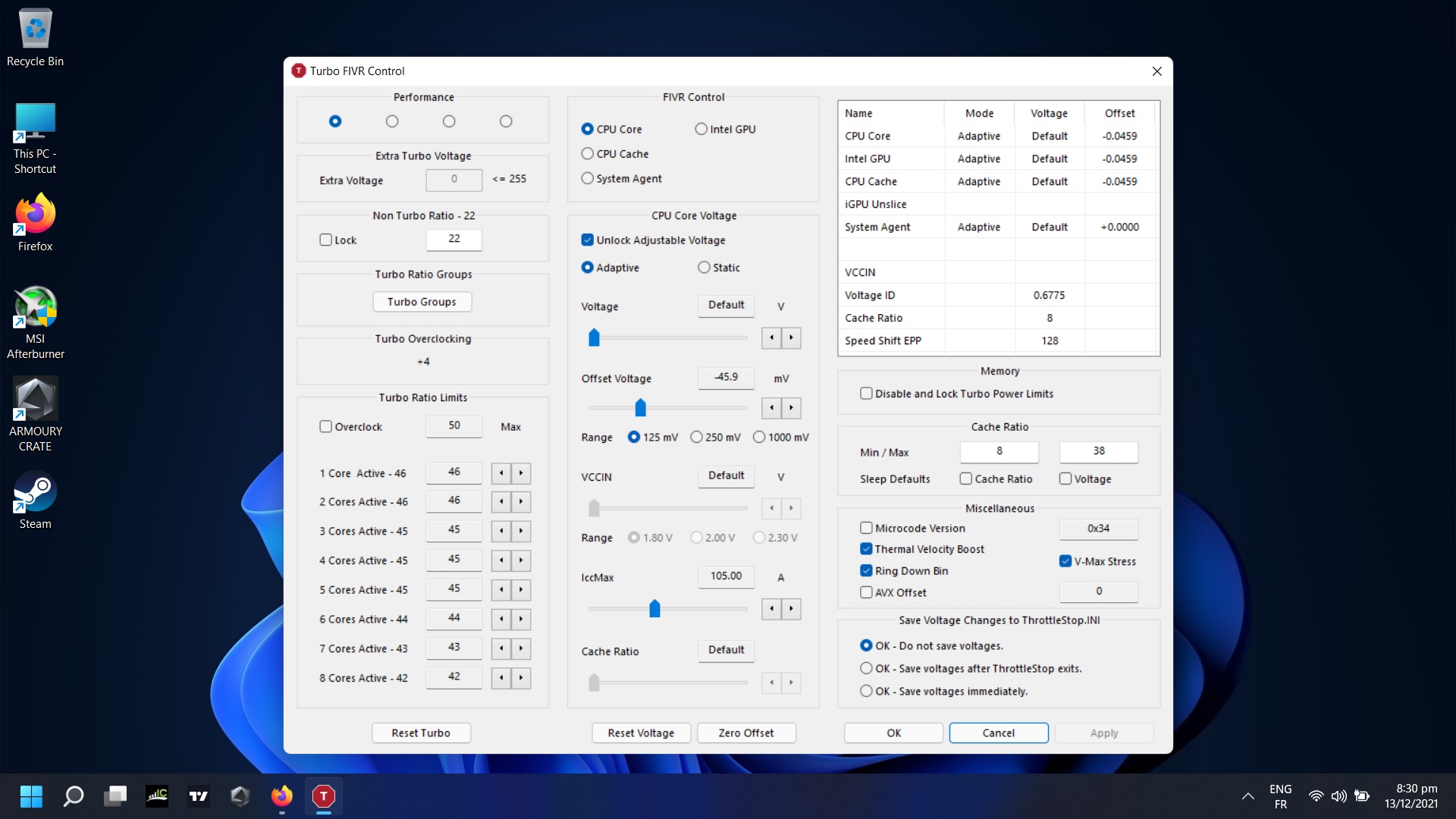
Need some help with choosing - (took screenshot from desktop) - where to lock-unlock-uncheck and turbo limits (for 11800H) around which numbers?
-
Hello guys I just got my asus tuf f15 with 11800h and rtx 3060 I undervolted the gpu already np now on to the cpu I added a pic of how low i can go on the cpu core and cpu cache before blue screen is there any setting you guys see that I could tweak to lower even more?
should i even undervolt intel gpu?Attached Files:
Last edited: Dec 13, 2021 -
-
I think your problem is two-fold here:
1. You're laptop doesn't really look like it's 'idling'. 16-17% C0% at 1.3GHz (TS Main window) means your CPU is spending 16-17% of its time actively doing something. During idle and at low clocks on an 8 thread CPU, you should be aiming for less than 0.5% C0%. We can see that you've got a few monitoring software in the background - do you need these? ThrottleStop should be the only monitoring sofgtware you need, the rest are pretty bloated
2. Your Package C states are not working (1st pic) I'm not sure if this is because your Core C0% is so high, but even at 16-17% C0% I'd expect some of the package to be in C2 or C3. Default drivers are the No. 1 cause of non functional Package C-states (and hence high idle power draw) although in your case the incredibly high idle CPU usage needs to be addresed first. There is a section in the guide linked in my signature for tips on enabling deeper package C-states.
As an aside, is there any reason that you've set your TPL Short and Long to 14W? Or was this by default? You're intentionally limiting your CPU to below what even the Intel Spec says it can do - default is 15W. Your screenshot doesn't give me faith about your laptop's thermals, but even if you set this TPL higher, e.g. 25W your laptop will thermal throttle to protect itself anyway.
IIRC H-series CPUs should be good for over -100mV on Core and Cache. These apparantly do not need to be set the same. Your mileage may vary. Each CPU is different and you may be lucky or not. I could do -140mV on my i5-8250U but only -80mV on my i5-10210U.
You should not bother with your integrated GPU, but if that -50mV undervolt is stable it doesn't hurt. In my experience with HD and UHD graphics it doesn't go below -50mV before stabilitiy issue but again YMMV Iris/Xe Graphicspressing likes this. -
thx for the reply Che0063 so if I understand correctly I can lower the voltage on just the core or cache even more ? and they dont have to be equal? because like I said on my post if I lower just -5 more then my current undervolt I get a blue screen.
-
11800h is Comet Lake-S, this design shares Voltage Regulator (VR) for both "Core" and "Ring/Cache" domains.
Typically, system firmware will program both at the same time and with the same voltage parameters - if user changes this later, CPU will apply the lowest absolute value (so smaller overvolt / undervolt) of these two voltages.
Examples:
Set Core to -125mV, Ring to -50 mV --> CPU will apply -50 mV to both
Set Core to -100mV, do not touch Ring --> Nothing will happen
The crappy part is that OC Mailbox interface (this is the I/O for changing these values by end-user) will just store what the user specified - it will not correct the values. So, our second example will end up in very misleading display info: user might think he is undervolting the system, while in reality, CPU is just ignoring the Core voltage offset set by the user. -
First, 11800H is Tiger Lake.
Second, with Tiger Lake this - "Set Core to -100mV, do not touch Ring --> Nothing will happen" - does not apply.
I would suggest @malik22 to start uv´ing just the core, that´s where there is more to be gained. I´m set to -80mv on mine (and -60mv igpu), but maybe i got lucky. Most of the time i see people hitting a wall at around -50/60mv. Haven´t seen anyone running -100mv or more on these 11th gen H cpus. Oh, and disable the 3 checkboxes on the miscellaneous field. -
thx man what do you have cpu cache at?
-
You're welcome.
Haven't bothered with it. Yet.
But I don't expect much from it. On my old laptop with a 4790k, a -150mv cache uv lowers the temps just by 1c. So I'm expecting the same temperature wise, or even less. -
in TPL windows tried to make profiles- it will come soon?
-
Hello, maybe I'm reading the interface wrong, but I seem to be unable to access deeper cstates on my system (Eluktronics MAX-15 i7-11800H) and as a result I'm seeing very high idle Core VID and power usage.
HWiNFO64 does show c7 residency, and the Core C States table in TS shows 90%+ in C7, but the package C States table is always 0 in every category except C2 (this is where I'm unsure of how to interpret the GUI readings).
I have read a bit about AHCI Drivers etc preventing core parking, but I'm not sure which drivers I should be looking at if I need that kind of a solution. Maybe it's a BIOS issue?
I did un-hide some processor power state management options in the windows power profile through the registry, but changing those values doesn't seem to have had any effect. I've included a screenshot of my TS window while my system is at idle (task manager shows system idle at 99%, there's not much going on in this system, very clean setup.)
Thanks for any help or tips on reducing idle voltage/power consumption.
![[IMG]](images/storyImages/ABiODjC.png)
-
Are you connected to an external display? If so, disconnect it. I have the same laptop (XMG branded) and i can reach Package C6 if the dGPU is inactive and on the power plan options i select PCI Express-Link State Power Management- Maximum Power Savings. As soon as i plug in to an external display Package C2 is all i´ve got.
You should be able to reach lower than 1% C0% and lower than 1W package power.
Btw, you don´t need to check the Speed Shift box (Windows manages it), unless you specifically desire to apply the value next to it. As per unclewebb, you could scheck the Speed Shift box on the TPL window.kylezo likes this. -
Thanks for the tip. Yea, I use an external display, but so did my old system. It shouldn't completely prevent C-state residency...right? It worked flawlessly on my last system.
I don't have that option in my power plan options. Do you happen to know the registry key to unhide it?
edit: I found it under
But it was already set to maximum power savingsCode:HKEY_LOCAL_MACHINE\SYSTEM\CurrentControlSet\Control\Power\PowerSettings\501a4d13-42af-4429-9fd1-a8218c268e20\ee12f906-d277-404b-b6da-e5fa1a576df5
I'll go ahead and test with no screen plugged in and see if that affects it.
BTW, how do you like the XMG? Isn't the Neo 15 the equivalent of the Mech-15 (not MAX), or is that a different chassis? I'm still not 100% sure which chassis the tiger lake MAX-15 variation is, it's still so new that I'm having a hard time finding info about it. I'd be interested to try an XMG bios if it's really the same since the Eluktronics one is super limited at the moment until they release a Tiger Lake update.Last edited: Dec 16, 2021 -
Yeah, you are right, the Neo is the same as the Mech. I'm enjoying the Neo so far, except for some connectivity issues to my external display through the TB4 port.
But did your old system use the igpu when connected to an external display? The Neo, and i suspect that your Max also, cannot output to an external display through the igpu, just through the dgpu.Last edited: Dec 16, 2021 -
No, it used the dGPU, and besides, my old system would park cores correctly even at 100% dGPU usage when mining crypto. My new system is the same temp idle as my older one under full GPU load which is bonkers & I'm pretty sure due to power control efficiency problems, but idk. Eluktronics is flashing my bios tomorrow so we'll see if that helps. It's still new so I might just do a full system reset and start from scratch if I can't make any progress.
-
I'm thinking about getting B660 when it releases for Alder Lake, but want to use TS to unlock all power limits. Any testing performed for unlocking power limits (including PL4) with Alder Lake and with BIOS power limits in place?
-
OMG, thanks Samot - I was sleep deprived and misread the model - it is, of course, Tiger Lake, not Comet Lake - and, yes, TGL has a separate VR for ring.
To be useful, here is a list of independent voltages per platform (for the purposes of undervolting):
Comet Lake-S/H: Core, GT and SA are separate (VCore = VRing)
Rocket Lake: Core, GT and SA are separate (VCore = VRing)
TIger Lake-H: Core, Ring, GT and SA are separate (so Core and Ring voltages can be adjusted separately)
Alder Lake-S: Core, GT and SA are separate (same as RKL: VCore=VRing) - note: E-Cores, Ring and P-Cores are on the same VR
It is actually possible to see this by discovering the VR topology - if two domains share the same SVID VR, they will share the voltage as well (in operation)
--
So, yes, as malik22 has TGL-H, your recommendation to start with core voltage (only) is spot on - I'd not even bother too much with the Ring voltage if it brings the stability down. -
I am contemplating switching from Windows to Linux and my main gripes are:
- lack of AntiCheat support
- lack of Throttlestop
@unclewebb: do you have any plans to support Linux with Throttlestop?
Especially when considering that Windows is further locking down access to those hardware registers. -
Wishing @unclewebb, @Mr. Fox, @Papusan, and everyone else a very Merry Christmas and a Happy and Prosperous New Year!
Hope everyone gets good health, good toys, and has good friends to share them with! -
Thank you. May all of your lives be filled with love, joy and peace during this Christmas holiday and throughout the coming year.dmanti, Vasudev, steberg and 1 other person like this.
-
Wish you all a Merry Christmas and a Happy New Year.
Spartan@HIDevolution, Papusan, tilleroftheearth and 1 other person like this. -
I have a question, does the BD PROCHOT setting also require access to the CPU and GPU registers in Windows 11 or is that only for undervolting?Spartan@HIDevolution likes this.
-
Some info for you in the post #6343 http://forum.notebookreview.com/threads/the-throttlestop-guide.531329/page-635#post-10564677
Thanks
Merry Christmas and have a Happy New Year to you all brothers and sisters. And continue as you do bro @unclewebb Gumwars, Vasudev, Spartan@HIDevolution and 3 others like this.
 -
Thanks for your reply but you misunderstood my question. I know what BD PROCHOT does which is not what I am asking. As in the thread, it has been known that with Windows 11, you cannot undervolt if virtualization is enabled because Windows blocks read/write access to the MSR registers. My question is for BD PROCHOT setting in Throttlestop, does that also require read/write access to the MSR registers that are blocked? Also, where is the MSR actually located? Is it in the Windows Registry?Spartan@HIDevolution likes this.
-
Hello guys.
Can undervolting by throttlestop brick the laptop somehow?
I've done undervolt in my notebook in the past and never had any issue. But recently, I've got a new one, with i7-10750h, and I've seen some people claiming they semi-bricked (need to reflash the bios) their laptop with this CPU because they undervolted too much and the laptop doesn't boot anymore. However, I think they used Intel XTU which they said the software writes the modification directly into bios. Is Throttlestop safer than XTU because it writes the modification directly in CPU only after Windows logon?
Also, if try to undervolt and after pick a value for offset to test, when I apply the new value but let option "OK - Do not save voltages" checked, is that safer for testing? What I means is with this options the new values are still applied to the CPU, however it doesn't write in throttlestop.ini which makes the values reset after a reboot?Vasudev and Spartan@HIDevolution like this. -
With happy new Year people!
I am confused, could not lock down turbo limits till 9x-10x turbo limits. Like Battery Profile with low speed-wattage-temperatures is the goal.
Before I played with parameters in TPL - it was not going over 10x - as I remember. (In TPL windows - on the top Profiles section say COMING SOON still)
and in Fivr section the lowest parameters is 23 for turbo limits and as I see now - PKG Power going till 17w,
sometimes. I wish it was locked under 10 like present is 8.3w...
how to lock it? - Speed shift 8-9 is checked but it going higher...
-
That is a bit tricky as the Power Limit settings are not yet profile-related, as you have noticed.
There is the workaround of very tightly limiting CPU Core's ICCmax in FIVR for the low power profile.
You could give a value of Core ICCmax = 25 a try.
Feel free to adapt this figure according to your wishes -
unclewebb wrote thos about ICCmax
so, seems not that parameter to try... did Clamp but still turborates going till 23....may be for shorter amount of time - now PL1, PL2 now are 10... -
Please consider that you want to artificially limit your device's performance, which is the opposite if what most Throttlestop users are trying to do.
As you want to reduce the maximum power consumption under load, you will need to reduce the maximum power the device is allowed to consume.
This is done via PL1 and PL2, which are not yet being saved as part of the profiles, I.e. you can't go that way to have a convenient battery saver profile.
Hence my recommendation to drastically reduce ICCmax.
However, you are of course free to find a different way. -
ok, I did - to try. I thought it for stability to depends - parameter?
Anyway even when I choose in TPL Clamp to 9 and UNdisable Control in Power Limits and now it "eats" no more then 9w.
Temp for CPU 50C - good boy now! ;-)
PS. would be nice in new version to have in TPL windows - Profiles 1Click 2choose -
I tried using throttlestop on my Zephyrus S GX701 with Win11 according to the guide below. It doesn't work however.
Is it possible that the bios negates the use of throttlestop? -
Most likely you automatically updated the bios when you installed updates. The updated bios on the GX701 locks away some of the undervolting features.
Zephyrus S GX701 Undervolting. - Page 2 (asus.com)randomA likes this. -
thanks. yup, i followed the same thread and you're right.
the issue now is that EzFlash says the bios is not a valid bios file and won't let me flash. does this with both the old 306 version and the even the latest 310 version. usb stick is fat 32 even. -
Thank you, that's what I needed to know. I will avoid Windows 11 for now.joluke likes this.
-
Hi at all,
With my notebook asus n551jm on the ver. 9.4 there isn't the button"speed shift-epp" ...
I tried also with the Version 9.2 but is the same.
can you help me??? -
i tried -81.0 on offset voltage on my asus n551jm but my notebook crash...the max temperature was 88 degrees.... who can tell me the best value??
-
No, nobody can.
You need to find that variable for your specific platform yourself. -
Unclewebb - are you ok in our present s-hit COVID time!?!
You are keeping silence!? -
Intel have removed/abandoned the cancer SGX (software guard extension) from their newer processors as 11th and 12th gen processors. But for some OEMs this ain't enough.
Why did Intel abandon SGX?
As a secure enclave technology, SGX was commonly targeted by security researchers who discovered numerous vulnerabilities and attack methods.
Examples of attacks targeting Intel SGX include:
- the Prime+Probe attack discovered in 2017,
- a Spectre-like attack disclosed in 2018,
- an Enclave attack discovered by researchers in 2019,
- a MicroScope replay attack,
- the so-called "Plundervolt" injection attack,
- a Load Value Injection (LVI), and
- the SGAxe attack on the CPU cache resulting in the leak of the enclave's content.
http://forum.notebookreview.com/thr...cted-11th-gen-notebooks.836451/#post-11137520 -
Seems our story coming to the end here? As all new bios will be without it and Finita la commedia. Sorry about possible rip such a great thing for present and future CPU.
-
Please note that @unclewebb's project is not affiliated with NBR and my hope is that he will keep it up and running.
-
Hi guys, I was wondering what are these two boxes in the TPL window? what's their purpose?
if I use the "disable and block turbo power limit" feature in the FIVR window and then go to the TPL window I see that the first box is checked
but the second box is not (the one in the "power limit control" square)
i'm a bit confused about that
] -
This forum has been invaluable for tweaking laptops. I especially hope the ThrottleStop Guide can be transferred intact.
Special thanks to @unclewebb but also the ThrottleStop users who posted here. This education and these tweaks have saved me from "investing" in new laptops, saved a lot of electricity, and boosted laptop performance significantly.Ionising_Radiation, Vasudev, FrozenLord and 1 other person like this. -
The Disable and Lock Turbo Power Limit feature started out as an experimental feature. Experimental features end up wherever I have room to put them which at the time was in the FIVR window. This feature is power limit related so when I recently redesigned the Turbo Power Limits window, I decided that it would be a good idea and a good time to move the Disable and Lock FIVR feature into the TPL window. It makes more sense being in there.
Intel decided to make things more complicated than they need to be. They created multiple sets of turbo power limits to give laptop manufacturers more options to throttle their CPUs. The primary power limits are the MSR power limits and the secondary set of turbo power limits are the MMIO power limits. What the Disable and Lock feature in the FIVR window actually does is it locks out the MMIO power limits. Intel CPUs run great without needing multiple sets of power limits, all overlapping each other. I thought it would be best to simply lock out the secondary set of MMIO power limits. This has worked out extremely well on many different laptop models. This prevents Windows or any manufacturer's software from changing the unnecessary secondary MMIO power limits.
As you discovered, the new MMIO Lock box in the TPL window does the exact same thing as the Disable and Lock box in the FIVR window. The long term plan is to remove the Disable and Lock box from the FIVR window since it is no longer needed. The problem with removing or changing anything in ThrottleStop is that when I do this, there will instantly be 101 or 1001 questions about what happened to this useful feature. English is not the primary language for many ThrottleStop users so even if this change was well documented, there would still be lots of users with questions.
At the top of the new and improved Turbo Power Limits window you will find real time monitoring data that is updated every second for both the MSR and MMIO power limits. This allows users to see if the MSR or MMIO power limits are being discretely changed without their knowledge. For most laptops, it is best to just select the MMIO Lock option. No more worries after you do that. Very few laptops are randomly changing the MSR power limits so for most users, there is no need to select the MSR Lock option. It will not hurt anything if you do select the MSR Lock option. You just will not be able to make any MSR power limit changes without first removing the Lock option. You will also need to reboot to unlock the CPU.
There you go. Everything you ever wanted to know about this feature.
Are you guys going to miss these overly lengthy and thorough explanations?
I agree. It will be a sad day next week when the long running NBR - TS thread goes silent. dmanti, FrozenLord, Papusan and 4 others like this.
 -
Nice to see you back @unclewebb!
I'm going to miss these thorough explanations immensely.
-
@unclewebb will you continue on another forum for example reddit?
-
@unclewebb
So many thanks for you for your hard work on NBR and working on TS. Thanks to you and your software all my Intel cpus could work at their best. Without your soft I would not be able to hold Golden cups on 7700hq, 8565u, 10875h on Hwbot beating even faster cpus, and help many others cpus that my friends have/had in their laptops and desktops.
Thank you also for few private conversation and implementing one or two options, dont remember exactly, that I requested into TS.
Dear Uncle
As NBR is going bye bye like Kansas in Matrix movie, where I can follow you, TPU? or somwhere else?
PS
Also @Papusan @Mr. Fox @Falkentyne and all you invaluable gurus/enthusiasts that I forgot to mention are moving?Last edited: Jan 24, 2022 at 2:29 PMVasudev, Mr. Fox, unclewebb and 1 other person like this. -
Everything is still open. But some of us have put in links to forums we can be found in here "Where do we go now?"
For Unclewebb. You know you'll find him at TPU.Vasudev, unclewebb and tilleroftheearth like this.
The ThrottleStop Guide
Discussion in 'Hardware Components and Aftermarket Upgrades' started by unclewebb, Nov 7, 2010.

![[IMG]](images/storyImages/Qh2uxkx.jpg)
![[IMG]](images/storyImages/w3zw4qX.jpg)
![[IMG]](images/storyImages/qyPZM0W.jpg)
![[IMG]](images/storyImages/Qre64tE.jpg)