Problems? See this thread at archive.org.
I would definitely be interested in reading it. Thanks in advance for your time and help!
-
-
I do drive on sammy slc, but my brother ( tomy b ) drives sammy mlc, and it is fine, no problems at all, maybe some slower writes, but all in all, it works and feels same

also, tomy b had first gen 16gb sammy slc
so, when I'm writing about sammys, I kind a know what I'm typing about
-
Just a few more newbie questions regarding running the Intel 160GB G2 SSD under OS X (snow leopard).
Someone mentioned in another thread that it is a good idea to turn off the "fall sensor", since it may be triggered and block read/write to the drive. Of course, this assumes that the sensor is not within the HDD that was removed and actually somewhere else. Is this true? If so, how can I disable it.
Under energy savings option, I unchecked the box that says "put HDs to sleep whenever possible". Does this still apply to SSDs?
Lastly, the Intel user's manual documents how to disable automated defragmentation for Windows, but there isn't anything for OS X. I've been told many times "you probably won't need to optimize at all if you use Mac OS X", which indicates that there is a background defrag/optimization process. Does this require any input from me, or just "leave it alone" to the OS?
Thanks again for any insights and sorry for the relatively naive questions. Needless to say, I've been enjoying the speed and the quietness of the drive for the last 12 hours. It's just great! -
darQ96,
Thanks for the additional info, Okay! Now I know where you're coming from!
(Wasn't picking on you... just trying to clarify). -
I too would be eager to see this article too.
Thanks!
-
no problem mate, we cool
also, I've never had intel or vertex based ssd, but would like to try one...and, selling my slc sammy and buying another drive..., well, it's not an option for me, couse, drive works perfectly, so, I'm kind afraid that I'll be sorry if I sell it, couse, simply, I can't find any of those slc available to buy anymore
-
I'm very new to ssd drives and perhaps someone could help me out. I am getting a new laptop running a 250GB 5400rpm drive with vista installed (windows 7 coupon included) in a few days. I also ordered a separate 120GB agility ssd and decided to use this for my laptop. Should I:
a. just image the vista install onto the new ssd drive when i get it
b. install vista from scratch on the new ssd
c. or wait a couple more weeks to use windows 7 coupon and install from scratch
or is there another option that is better. thanks! -
First of all, Congrats!
In my opinion, a clean install (from 'scratch') is always the best way.
Enjoy your new computer for a couple more weeks with the mech H/D and then I would vote for your 'c.' option; install Win 7 from scratch and never look back.
If/When you sell your computer simply trade H/D's again and re-use the Agility in a new system. Of course, in the meantime, your mech H/D will be your system's backup (don't delete any hidden partitions) while you're flying with the Agility.
Keep us updated on how Wow your upgrade will be both with Win 7 and with the Agility.
-
darQ96,
Ya, when I find something that works, I too am a little protective about keeping my working system - working!
When you eventually do get to try an Intel or Vertex, I would be most interested in your (and your brother's) opinions of them.
Thanks!
-
OS X doesn't have any built in defrag. The file system is less prone to fragmentation so it takes longer for it to get to a point where it affects performance. I know for myself, I've seen slowdowns after a while. It is probably due to my VM usage, with opening and suspending writing a lot. The solution I have used is to clone the hard drive with SuperDuper! to a backup and then writing over the original drive to "freshen" it.
For a SSD you shouldn't have to worry about lowered performance because of fragmentation and there is no built in defrag so you don't have to worry about extra writes to your drive. -
the above was in response to:
Originally Posted by wirleaon
"So... are the samsung SSD's that bad or what?"
wirleaon,
this is not a matter of trust - buying anything on trust is usually a bad idea (at least for a business minded individual).
Base your decision on facts. Period.
I have previously asked zephir to provide some facts to back up his claims, but so far he's ignored me.
To clarify my position for you (so you can make a solid decision) I am currently searching for a 160GB SSD or larger, that will support Win 7 Trim and also allow me (the end user) to flash to newer firmware if I so choose. I want this from a company that I can trust and am also looking for the best performance possible from this 'upgrade'. I am not looking for the second/third/forth/etc. best performance - I want #1 (overall).
Now, you know where I am coming from.
As you can probably guess from my '160GB SSD or larger' requirement, Intel X25-M's are the only drive to fit my criteria at this time. This does not mean that I am an 'XXXX' basher - it simply means that I know what I want, given my criteria above.
I may not have an SSD yet, but my research fully backs up my conclusions. As do many people on this very thread (which is one reason I joined - to learn not only the positives, but the negatives too, if any - of any SSD that I'll put real money towards).
I honestly do not know why zephir says I 'attack' others for using Samsung SSD's - maybe PMS?
My advice to you is that it doesn't matter if someone owns what they are talking about; all that matters is that the facts presented are indisputable.
I may not own any SSD's (except for a Lexar 16GB SSD ExpressCard), but I have 'played' with them. Both, funny enough, are Samsungs. One in the original Macbook Air and the latest in a client's new Dell workstation.
The 'Air' was rubbish (performance-wise) and the new Dell, with a 128GB Samsung is an enigma - in a split second you're there with your mouth open (at the speed - installing CS4 Suite) and in the next instant you're almost apologizing (for its lack of performance - opening/using 4 programs at once).
Am I judging? No. These systems were not mine and I didn't know how/why they were set up the way they were.
Do I know of faster? Yes. Through the reviews I've read and others who post here (Samsungs do not multitask well).
We are both here to learn, but if you have any other specific questions for me, I'll be glad to answer to the best of my ability. -
zephir! So many mistakes!
I didn't give a percentage threshold, I gave an actual size in GiB (125).
Intel Gen1 is nothing like Gen2... Even without TRIM the Gen2 is much better than the Gen1 - opposite of what you state.
You don't run the 'TRIM' utility in Windows - TRIM must be supported in hardware and in the O/S (eg. Win 7) and runs transparent to the user.
Even if you could 'run' it, how would this help on an Ext4 partition on OS/X? Simple - it wouldn't (help).
I don't know what I've done to you for you to be attacking me/my remarks, but please lay off, huh!
-
KITHPOM,
the problem is not the file fragmentation, but rather the free space fragmentation that causes the slowdown.
Have you tried iDefrag? I use it on a lightly used eMac (it needs all the help it can get!).
The downside is that you have to boot off of another drive (not the boot Mac drive you want to defrag) and also give it a few hours to finish (8+).
The advantage is that once completed it felt better than a new (fresh) install! I only need to do this five or six times a year on this machine. (Might do it more often if it didn't take so freaking long!).
-
Hi guys this is interesting ...
http://www.tomshardware.com/reviews/ssd-performance-power,2279.html
samsung ssd done very well .. ha haaa ..
it beaten intel in some tests
-
It looks like they only tested the drives when they were new? You don't notice performance problems until they start to fill up.
Here is a page from an article on anandtech that discusses new vs used performance.
From the article
-
Supertalent and Toshiba Team up to make a SSD called the Ultra Drive DX.
http://www.supertalent.com/press_vi...db3f7439&lid=c4ca4238a0b923820dcc509a6f75849b -
So they are making an ultradrive with enhanced security.
Wonder why Supertalent would have to team up with anyone to do that -
All of the new Samsung drives that have been shipping (suspiciously prior to Anands article) have the latest firmware VBM18C1Q that supports Samsungs version of background garbage collection.
Background garbage collection does exactly that, while the drive is inactive, the controller makes the previously written to, and subsequently deleted portions of the hard drive anew rendering the "need to erase before writing slowdown" criticism moot.
In other words, Anands criticism of Samsung SSD's was already stale before he posted it. -
My take on that article by Tom's is:
Why didn't they run the tests in a new/used state (without Trim/erase/etc)?
Anyway, as it stands;
SLC drive; buy it and forget it. You simply have the best (still $1,100 CDN drive in my part of the world - oh, for 64GB!). Don't have to worry what you throw at the drive either - it will deliver.
Intel Gen1 X25M w/orig firmware; update the firmware already! (I'm a firm believer of updating firmware)
Intel Gen1 w/updated firmware; a drive that configures itself to work how you want to work (the min. & avg. keep getting better). This is truly a 'versatile' SSD for just about anybody's workflow (video editing guy/gals exempted unless you RAID like half a dozen of these on a good RAID card).
Samsung 256GB; a drive that is suited for only a particular type of computing (the min. & avg. keep getting worse - when the drive is 'hammered'). 'Most' people may be at this level of computing, but I, for one, do not want to told by my hardware what I can and cannot do ('told', by the performance hit I'll take).
Samsung offers I/O performance half to 1/10th (or less) of the Intel MLC drive. Intel offers sustained Read performance consistently higher than the Samsung, however, (as we all know) it falls on its face (comparatively) for write performance.
But, do you know what programs you use that 'depend' on sequential write performance vs. I/O performance? I don't, but the 'experts' here and other articles agree that sustained sequential write performance is a non-issue for the Intel MLC drive (except if you're only/constantly copying large files on and off the drive).
I 'get' that the Samsung is faster for certain things, I just don't like how it slows down the more you are using (hammering) it.
To make a comparison to the car world;
A Porsche 944 Turbo S can be beat by a lot of cars (Not!), but when you're behind the wheel and the engine is fighting the laws of physics, your hands and the devil for those last 200 rpm (I love turbos), it doesn't feel like anything is faster and even if it is - it doesn't really matter - you've already got the biggest smile possible, now, what were we racing for?
(The engine seems to keep increasing it's power and acceleration even after it hits redline, you shift, or (if you hold down the pedal enough) till the engine blows...) Just like the Intel seems to be tuned (maybe not the 'ultimate' in every sense, but the most consistent - with a lot in reserve).
Simply stated in English; the Intel seems to deliver when you need it to. The more the Samsungs are used/abused the worse they'll perform. I don't care if they'll recover after some 'rest', when I'm needing them to perform 'now'.
That's my take... and I wonder how the G2 would fare in these tests?
So Evoss-X, who wins for you?
More important... why?
-
Hard drives should have Turbos too
-
ha hah hahahahaha
BiTurbo's: A smaller one and a larger one - no lag and no power loss over the RPM (er, I mean I/O per queue depth) range! -
I'm not really getting the race car analogy unless of course you are referring to prices then yes the Intels are definitely the Ferraris of SSD's.
-
I just disable the defrag on my setup, but i was just browsing about ssd and found the following
Do you guys do this, or recommend doing it? -
I would be interested in knowing if a similar list exist for Mac OS X (Snow Leopard).
-
Abula,
I think with Vista and for sure with Windows 7, the alignment part is taken care of automatically - If you start with a new disk (or clear all partitions on a used disk).
Definitely disable defrag (Again, I think Win 7 does this by default for an SSD, but I would double check).
The only other one I might consider is to disable 8.3 filenames - not because an SSD needs it (its just one of the tweaks I've done in the past since XP). To be truthful though, I haven't thought about (or applied) this 'tweak' in a long time.
Each other item you've listed is what 'makes' the O/S. I wouldn't want to go second guessing the O/S designers as to what is or isn't needed (I've tried, but each time a 'default' install proved to be the most stable/responsive system build, overall.
I see from your sig that you're running the 160GB Intel G2, could you give me an overview of how you're finding this drive in 'real-world' situations - compared to your previous drive? I would appreciate your observations very much as this is one of the drives that I am seriously considering. Thanks! -
You're joking, right?
Wasn't referring to price, but their performance.
quoting myself;
"Simply stated in English; the Intel seems to deliver when you need it to. The more the Samsungs are used/abused the worse they'll perform. I don't care if they'll recover after some 'rest', when I'm needing them to perform 'now'. " -
Yeah, race car analogy wasn't that great...
If all drives costed = /GB My rankings would go:
1 Intel
2 Indilinx
3 Samsung
but in all honesty you'll be impressed with any... -
tenderidol,
here is one such list (be sure you read all seven pages though);
http://www.ocztechnologyforum.com/forum/showthread.php?t=52845
Basically the same as with Win 7, any 'serious' tweaks will take away functionality from snowkitty, but then there do seem to be one or two that make sense.
If I had a Mac to try these on, I would only attempt the one on page 6 by kmess (post 88) and also disable SMS (the motion sensor for mechanical hard drives) myself.
On page 4, Azu does mention that no tweaks are necessary for an X25-M (but I would still apply/try the two above).
Note that OS/X does not give you a means of disabling its auto defrag routine (at least not while using the shipping official 'core')- this is something that is still not addressed in snowkitty, maybe a point update will enable it (at least for SSD's). -
Totally agree!
(On both points!)
When Intel prices (and availability) get in line to where they where first announced, we should see some good sales on all SSD's. -
No. My post on the subject from a different forum:
-
One of the reasons I spent the extra money for the Intel G2 was the mountain of configuration tweaks and info on the OCZ Forums. I appreciate Tony and the gang letting everyone know the latest over the past six months. But it is a choice of install and use vs. install, read, configure, update firmware, read more, tweak, repeat. I paid $250 for my G2 80GB and it was definitely worth the extra $60 over the Vertex 64GB to have the extra room and not have to deal with all the hassle.
-
Thanks very much for pointing out that thread. I'll go ahead and read all the posts and decide which one to apply.
-
Finally did it today. God I almost forgot the joys associated with using a 10 year old HP scanner and cleaning up the images with Paint.net. Hopefully you guys can read it. I made it a bit smaller than is comfortable for me since I use a 1920 x 1200 resolution.
![[IMG]](images/storyImages/pg1.jpg)
![[IMG]](images/storyImages/pg2.jpg)
![[IMG]](images/storyImages/pg3.jpg)
This is from October 2009 PCWorld magazine. I haven't even read the article yet. -
Thanks for taking the time to put the scans up. It's so brief. Haha I think I've been spoiled by these 15-page articles on the internet about SSDs.
-
I suppose I knew that. The file system is much better about spreading information about instead of filling every nook and cranny like ntfs.
I am sure I looked at iDefrag and possibly other options as well. If it works as you describe it isn't any better a choice than SuperDuper! as it still needs a second drive and looks to cost $30. Amount of time to run seems similar as well. I saw some reviews saying iDefrag results were not so assured, I was pretty happy with results from my SuperDuper! efforts the one time I've done it so far. Soon to do it again as my macbook is running like crap. -
Hey folks, I got my RunCore Pro IV this week and it hasn't been all fun and games.
I cloned my disk image to the drive and everything seemed to work fine until I tried to copy about 10GB of anime from an external HDD. At first I got some error about one of the files being corrupt, so I stopped the transfer, verified all my files, and tried again. Then I started getting BSoDs.
I thought I might have had a dud drive, but connecting the drive externally, all 10GB of files transferred successfully. Booted back into the drive, tried copying files in Windows, same BSoD. 0x000000F7.
Haven't had the time to look this up or do a clean install... was wondering if anyone had a quick fix for this... maybe something stupid I overlooked? -
tilleroftheearth,
Here's the flaw in your logic. Have you made sure what Samsung drives you used in the Air and the Dell laptop? The original Air uses Samsung drive with ZIF connector, and the read and write speed is horrid (Do an actual search on the spec of the drive). And the Samsung drive in the dell laptop may be a first generation drive. I provide information about the exact drives I use, not like you, who say that oh, I used that "samsung" drive before. Talk about presenting accurate facts.
And when I say that you attack others, I mean that you exploit the fact that they don't use the MLC counterpart of the drive, but the SLC. In fact, I'll let you know that the performance of the newest MLC is very close to the SLC drive.
Also, may I ask how you arrive at the storage threshold of 125 GB for the Intel drive without ever using the drive? Again, talk about presenting fact.
And you're wrong. Without TRIM, the gen2 Intel drive is almost identical to the gen1 drive. Look at all the benchmark and tell me if there's actually big difference in speed.
Also, Intel promises to release their own TRIM utility for Windows before 7. That's the utility I'm talking about. Please ask for clarification if you don't know enough next time.
And no, I'm not attacking you personally (Look closely, there's no personal insult). I'm attacking your false argument.
And you say that I don't present facts. But the truth of the matter is that the feel of the drive is not something you can present in numbers. You have to use the SSD to get the feeling. For me, the feeling of the Intel and Samsung drive is almost the same. That's why I don't generally trust someone who haven't used an SSD like you, who relies on numbers a little bit too much. -
I did both of those (i.e., disabled SMS and blocked access time recording) along with stopping Spotlight to index my drive - I dont use spotlight; I know where things are...
I'll just leave the rest to the Intel drive to take care of... At least I did my part
Thanks again! -
Zephir.....
Wow....tell us what you really mean why dont ya??? eheheh j/k. I will agree with one thing that you said which was that the true feeling cannot be determined by numbers alone. For one who has never experienced an ssd, even an old Sandisk U5000 will seem wonderful, even with its hesitancy issues. For the average user, the difference cannot be seen in any ssd quite frankly. All of my tests are at the beginning of this thread and i now have a Samsung 250gb mlc in one laptop with a Samsung 64Gb slc in the other and, quite frankly, without programs i could never tell the difference.
I know that the 250Gb Samsung is fast as heck AND has the storage we have been asking for for some time.
I will credit Samsung as truly fighting to be a pioneer in the industry... They have stood strong throughout the past two years whereas others have seemed to fade in and out.
Just my two cents....
EDIT>>>> I have to say this in the end though. Its a different world when I am at work on a work system that hasn't got the ssd, CPU, ram and so on.... -
Speaking from my experience, the PB22-JS3 is every bit as fast/snappy/whatever as the Intel G2 and Vertex.
In fact, the sammy in my new Adamo seems faster to me in real-world usage than the g2 in my desktop. Go figure! -
sleey0,
Can you let us know what the % filled and the size of the SSD is in the Adamo and also the % filled and the size of the G2 (along with O/S (64bit?) the cpu and the ram) in your desktop is? Also, are you running essentially the same install (re: programs/applications) on both?
This would go a long way towards comparing the 'feel' of these SSD's - through numbers. Thanks. -
Les, what do you mean I should tell you what I mean, you mean?
Joking aside, I have come to believe that at this point, as long as you buy an SSD with either Samsung, Indilinx, or Intel controller, you'll be able to experience the snappiness of SSD. From there, you should consider other things that are important to you, such as price, capacity, and so on.
I used to have a Sandisk SSD too (in fact, two of them, one with SATA interface and one with ZIF interface), and I can defintely feel a difference between the Samsung SLC gen2 compared to the Sandisk one. This is an instance where numbers do matter, but that's because the Sandisk drive doesn't have any edge over an HDD per say when you look at its numbers. SSDs these days are superior compared to HDD, so you don't really get that snappiness upgrade anymore. (But you do get that snappiness downgrade when you're forced to use a normal HDD )
Also, I will add that when I compare the feel of the SSDs, I always make sure to keep the filled level at around 70%. I adjust my usage depending on whether I have a Intel 80GB or a Samsung 128GB by simply deleting a few HD movies when using the Intel drive.
-
Well i don't have much experience with SSD, so even though i read that intel one of the best i cant compare it to anything related to ssd directly as this is my first expirence.
Overall im extremely happy, probably the only thing that i felt wasn't that great in the G51 was loading OS as well as some autodesk maps i run, the loading of vista has been lower, as well as its very responsive to any app loading n running, although i do have an issue when minimizing wow takes a lot more than my previous HD to return to the game, but nothing that would change my mind. I think was worth the money, i now enjoy being on my laptop and don't wish to be always on my desktop. One thing that didn't feel that fast was installing OS/programs i didn't see that much improvement probably attributed to low write speed, but this is something i don't do on the daily basis so its alright.
I'm so pleased with it, that my next upgrade will probably be a raid0 of ssd for my desktop, but money.... inst that abundant atm. -
Abula,
Thanks for this update! Now, is wow a game? (Sorry, non-gamer here).
Did you notice a difference in the heat given off and the battery life (if you use it on battery power)? The only other thing I can ask is how much is the drive filled?
Had to highlight how happy you are with it in your quote above!
Thanks in advance.
-
zephir,
thanks for continuing this conversation.
We agree on the Air (that ssd is, umm... sub-par).
Thank you for clarifying that you are challenging my logic and not me, but I do not see anything in your argument above that wants me to change my mind (where are your 'facts'?).
First, I did not state I 'used' those SSD's - I stated I 'played' with them. To me, I thought everyone would know by stating 'played' it means that I did not use them seriously, nor would I be the least bit interested in their specs/part/firmware numbers. So, even though I thought I presented my facts accurately, I'll apologize for the fact that I did not make it clear enough to you.
Second, I'm not exploiting the fact that someone used SLC's (when most people are looking at MLC's on this thread). As a class, the SLC drives are in a different league than most/all MLC drives. Even the last Tom's Hardware link that was provided by Evoss-X (post 8815) proves that. SLC's are just that much better than MLC's period. (If you are denying this, what is your proof)?
Now, at least one person replied back and informed me/us that although they do use SLC drives, they also have experience with MLC drives too (both Samsungs, of course). While I wasn't too worried that they would be misguiding me (I've done my research), I was more worried about the people with less experience/knowledge than even me reading this thread that they would not know/see that important distinction - and in my understanding it is a big one.
Continuing, you state that the newest MLC is very close to the SLC drive. I'm assuming you're talking about your Samsungs, right?
All I can think of when I read that statement is davepermen stating that the performance between a Samsung and an Intel is night and day difference - so much so that he replaced the Samsung with the Intel (which I've also read elsewhere on the web, most notably on Anandtech.com, but also other sites too) - so, through my eyes, what are you doing wrong with the Intel's?
Something else that I distinctly remember reading is that Samsung SSD's were never 'snappy', especially compared to an Intel (I know, where is the link when you need it). Again, this goes against your position but you offer no direct proof to support your seemingly lone argument.
As to how I calculate 125GB for my personal 'maximum' for the 160GB Intel:
160,000,000/1024=156,250 MB
156,250/1024=152.59 GB
152.59x80%=122 GB
So, I simply rounded up the 122GB to 125GB.
Is this factual enough?
As to your statement that the G1 and G2 Intel drives are almost identical (without TRIM) is easily proved wrong. All you have to do is read the third SSD article from Anandtech.com, thoroughly.
I have never read/heard about a manual TRIM tool from Intel, even searching for one right now (maybe searched too quickly), where is the link where this is talked about?
As to your last point about 'not trusting someone who hasn't used SSD's', what can I say? Okay, discount my lack of direct experience - I agree 100%.
What you can't discount is the fact that everything I've read and reiterated about SSD's is 180 degrees opposite to what you state regarding the sammy's.
I don't need to be right on these points (I haven't purchased anything yet), nor do I care if you prove all the 'others' wrong, but you still have not expressed nor offered your 'proof' in any tangible way that I can get my head around.
Like I asked sleey0, in the post above, tell me how you use the drive(s), how full, etc. etc. etc. (etc. = details!) and I'll see if I can reconcile your new information with what I've already assimilated.
Now, I'm sure there are more flaws in my logic, but I hope I've given you enough information to know where I'm coming from?
I'll now thank you in advance for fully answering my questions too.
Cheers! -
I stated above that the drives I use are always filled to 70%, no matter whether it's Samsung SLC, MLC, or Intel. I just adjust the actual amount according with a few HD movies more or less.
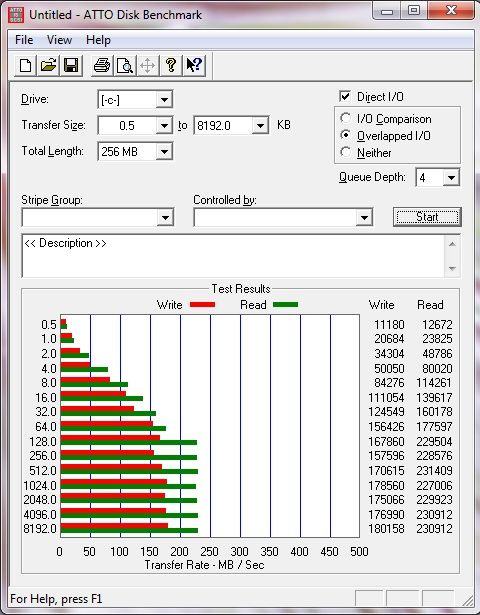
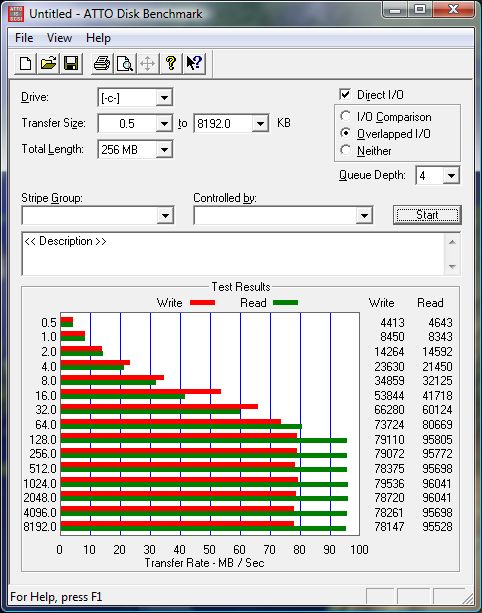
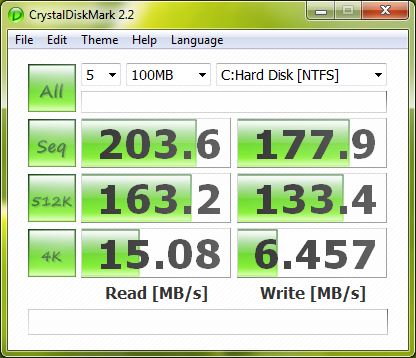
Also, as for the fact that the Samsung MLC gen 2 drive is as good, if not better than the SLC drive, see my attached benchmark.
Look at the benchmark for the Intel drive as well. All numbers are like they should be, so I'm pretty sure that I don't do anything wrong.
Looking at the benchmark of the Samsung MLC and Intel and believe in my word that they behave the same requires a leap of faith, and whether you want to take that leap of faith or not is up to you.
Additionally, perhaps I don't word the question right, but I don't mean what the 125GB figure corresponds to (which is 80%, I know that much), but rather where you got it from, article, self-estimation, etc...
Attached Files:
-
-
hankaaron57, thanks for this!
The text is a little too small for my eyes, but I think I figured it out - or, I just read what I wanted to read
So, the 'standings' don't change even with this beginner article - especially when we consider price (and the 96GB difference is not a show stopper, for me at least).
I'm actually disappointed that they didn't mention in the text part if/what any differences were 'felt' in using these drives.
Bryan505, I too was expecting a mini book to read - lol -
Ah, just read/skimmed your newer posts, so 70% filled, great, but what size Intel and G1 or G2? Also, what O/S are you running? And where do they rate the same? When you're copying files, installing programs, booting, or running a specific program or group of programs? (zephir, do I have to spell it out for you? Details man! )
Now, I'm more than willing to make a leap of faith in your subjective ratings of the drives, but the above information I am asking for will also allow me to see if my computing environment corresponds to yours so that I may 'believe' what I'll actually experience, given the same usage scenario.
As to benchmarks - sorry, I don't want to see them (I've seen enough of them), what I want to know is;
in your specific/particular usage - how do they 'feel', comparatively?
As to where I got the (125GB) 80% figure, I guess I would have to say from 'Steve Jobs' since I was replying to an Apple user (I got it from an Apple forum).
Now, I'm sure I mentioned it in one of my posts, but here is how I typically use my computers (solely for work purposes - no games - ever).
When I'm at full steam (having just finished a shoot the day before), I'm running at least a dozen (heavy duty) programs at once - the most intensive are the 4 or 5 photo editing programs which I can let run in the background when I'm batch converting raw (NEF) image files and use the foreground program to 'finish' the files so I can show them to clients as images, slideshow or a DVD format 'movie'. In addition, I have my 6+GB pst Outlook file open and also a few dozen browser windows/tabs open (in Safari, IE8, FF and Chrome) Word, Excel, Sonicfire, Roxio and my accounting/billing program is also running. This type of work 'spurt' may continue for up to 10 hours, straight, no breaks (at least not for my desktop computer).
In other words, my typical work scenario is highly multi-tasked - is your usage the same?
Oh! I'm running Windows 7 on my 8GB notebook and Vista on my 8GB 4 Raptor desktop (1 VRaptor & 3 Raptors) - both are 64bit, 'Ultimate' versions of the OS's.
Once again, Thanks!
Edit: Both notebook/desktop are set up exactly the same program-wise (OS and programs about 60GB) and both are running the free MSE (Microsoft Security Essentials) A/V software (replacing 3 or 4 individual protection software packages; Avast Pro, Spybot S&D, AdAware and Xsoftspy. -
Just FYI, without TRIM the intel G1 is actually slightly better than G2. the G2 realies on TRIM to boost its performance and TRIM compatability is what gives the G2 it's edge over the G1
Visit Anand's article for reference... -
For what it's worth, I've had the 160GB G2 for about 2 weeks now running under the same workload that caused degradation in my G1 in a short period of time... and the drive hasn't degraded one bit. Still running as good as new.
Relevant quote from the anandtech article: "Something definitely changed with the way the G2 handles fragmentation, it doesn't deal with it as elegantly as the G1 did. I don't believe this is a step backwards though, Intel is clearly counting on TRIM to keep the drive from ever getting to the point that the G1 could get to. The tradeoff is most definitely performance and probably responsible for the G2's ability to maintain very high random write speeds even while used. I should mention that even without TRIM it's unlikely that the G2 will get to this performance state where it's actually slower than the G1; the test just helps to highlight that there are significant differences between the drives.
Overall the G2 is the better drive but it's support for TRIM that will ultimately ensure that. The G1 will degrade in performance over time, the G2 will only lose performance as you fill it with real data. I wonder what else Intel has decided to add to the new firmware..."
The new SSD Thread (Benchmarks, Brands, News and Advice)
Discussion in 'Hardware Components and Aftermarket Upgrades' started by Les, Jan 14, 2008.