Problems? See this thread at archive.org.
Might want to wait till the ACHI enabled firmware update is released by OCZ.
Vertex 120GB is available at mwave for 399$ plus 50$ OCZ rebate, and if you buy from mwave's ebay store, you can also get 32$ MS cashback. so total 318$ for 120GB.
Now the game is on for who can tune firmware better for the Indilinx controller better, OCZ or Super Talent. I hope OCZ just because I bought that.
-
I got my Sammy's working in RAID 0 (intel ICH9)!
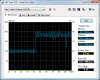
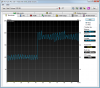
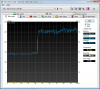
However, this seems strange. Why is the first 40% of my drive around 100MB but the last part of it is around 200MB/s? It seems to correlate with how much stuff I have on it since it is about 40% full.Attached Files:
-
-
Something is wrong, you should have at least 180MB/s minimum with 2 Samsungs in raid0 an not the around-100MB/s values. Try with the HDTune 3.5 Trial, CrystalMark and ATTO
-
Strange. HD Tune 3.50 didn't make a difference. I will have to do further research.
Attached Files:
-
-
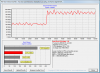
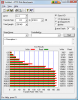
Here are my HD Tach and ATTO results.
ATTO looks OK to me. HD Tach reports similar issues like HD Tune.
Could it be my strip size? I'm using 128K, perhaps something smaller would be better? Hmmmm... must do more research!Attached Files:
-
-
Nice so how do they feel running everyday tasks?
Didn't you have a different ssd before this? How's it compare? -
Are you sure that the problem isn't with the OS?
There are lots of problems with windows and AHCI apparently:
http://en.wikipedia.org/wiki/Advanced_Host_Controller_Interface -
HD Tach and HD Tune gave me the same problematic issues when benching the Corsair 128, I would ignore the results and stick with ATTO. Also try CrystalDiskMark.
-
Well this seems related to stripe size. I changed from 128K to 8K and my results according to the benchmarks programs significantly improved. I may try 16K stripe and see what happens though this is a time consuming process!
Attached Files:
-
-
Have you formated this to NTFS ? If so, what cluster size did you choose ? I think 8K (=2x4k, number of disks x 4K) is the optimal for 2 SSDs in Raid0
-
TW1, benchmarking is good and all but how snappy does it feel in everyday tasks? Did you install Vista from scratch (recommended) or clone it?
-
I cloned my system... 4K cluster size I believe. Do you have solid data on how much performance would improve with an 8K cluster size?
I'm using 16K cluster size now... I tried several... 4K, 8K, and 16K all seem to be better than 128K. -
Haven't had a chance to use it that much, but definitely faster than my VelociRaptor (sometimes it seems by a lot and some times not so much faster)... worth the $380? I'm a geek and it's for my job (tax deductible) so I guess so, but the VelociRaptor was no slouch.
PhotoShop Elements 5 definitely opens much faster! But my development environment doesn't seem to open that much faster (faster yes, but not that much). -
For you folks looking for an image backup solution, ntfsclone on Linux is very good for the job. It does a sector copy but also skips unused sectors. Even if you don't have Linux installed, you can boot off a LiveCD and clone your HDD to your SSD.
The 64GB Samsung SLC is a decent price, but that's only barely enough room for my Windows XP image plus all the crap I use on there. I also need space for my Linux stuff, which is why 128GB was the minimum for me. The life of a software developer... -
Similar here, that's why I bought two and RAIDed them.

-
I'd been looking at the Vertex until I saw this being reported on the OCZ forums which killed it for me. I've also read that all the workarounds cause some amount of instability.
Chances are no one would even look at these no-name-brand-first-generation products from companies like Indilinx if the market was established. I learned my lesson from my Patriot Warp V2 and am sticking with Intel and Samsung for now. -
Tidal - excuse my ignorance but does the benchy test large file reads for the RAID configuration? It is my understanding RAID-0 performance is most noticeable in large file reads (games, photoshop editing, video, etc.).
-
The reason ATTO looks different from HD Tach and HD Tune is the way it benchmarks the drive. HD Tach and HD Tune probably has a set size its benchmarking at while ATTO is benchmarking ALL the data sizes.
-
yes, i am sure, coz intel X25-M was problem free on my laptop with ACHI.
-
hmm, Vertex is still good to use. I will try my 256G samsung when I get it tomorrow. to see if its problem free like my intel SSD
-
See a very interesting article on Tomshardware regarding the performance and the power saving features of OS & Bios
-
Ok so i installed the drive and did a fresh install of vista 64. now for some reason i can't get on the internet. The wireless connects to the router but for some reason not the internet
Any ideas? (i'm asking here b/c one it's my sammy i'm talking about and two most people here have installed an OS once or twice)
I haven't gotten to good of an impression of the drive yet b/c most of my night was backing up data then trying to do some troubleshooting. Pretty sure it's snappier though
-
it may be that your os default wireless driver doesn't really work, and you need to get the updated one _from_the_net_ to connect _to_the_net_ (god am i happy to have more than one machine in such a situation).
happened to note this with my home server: wanted to restore a backup, it connected over wireless but never found my server. till i realized i had to feed the bootdisk the actual manufacturer drivers instead of the windows default ones to connect...
-
Here's another PCIe SSD: the Fusion-io.
It sounds like you can't boot from it and it is almost certainly going to be absurdly expensive, but I haven't seen one that can reach these speeds yet. -
so dell noise management could gave me issues with my w7
-
Yeah i left my spinner in the other laptop bay jsut how it was so i should be able to boot to that and give grab the driver and give it a whirl. tx -
I really don't know how the benchmark is testing it.
Also, when I was trying to find out what was going on, I saw some strangely similar graphs where large sections would be significantly lower performance than other sections... so I'd like to figure this out but need to just go about my normal computer use until I run into something and end enjoy my new SSDs.
-
RAID-0's performance with smaller files should be affected far less than with traditional HDD's do to near instant seek times, rather than having to wait for both HDD's to locate data.
-
Well after some trials and tribulations, I'm now the proud papa of a bouncing baby Sony Vaio TZ with dual SSDs. I left the 64GB 1.8" PATA SSD as is, but went in and replaced the 250GB 2.5" SATA 5400RPM HDD with the 64GB Samsung SLC SSD that arrived from Geeks yesterday.
Tiny little netbook-sized notebook that is NOT user-friendly at all with respect to access and upgrades.
The goal of this exercise was to be able to make the faster SATA SSD the boot drive, and then use the PATA for data storage.
Well, I've gotten things to work, but it's been a long process and a bit wonky. There is no option in BIOS to choose preference of SATA over PATA for boot device, only "hard drive". The Vista and XP restore DVDs that come with the TZ do not allow you to choose where to restore to; they insist on restoring to the PATA drive.
I used Acronis to save the system state from the PATA drive, imaged it to the SATA SSD, and was able to boot into both systems. No problem. I then mistakenly thought that I could wipe the PATA SSD and be left with a machine that would boot via the SATA SSD. Not so much. By deleting the partitions on the PATA SSD, I was left with an unbootable system. Neither the drive recovery tools I have, nor the "repair" functionality of any OS discs or the restore discs would even see an OS on the SATA SSD.
Joy. Bliss. Rapture. Not.
So I used the Vista restore DVDs to put an OS back on the PATA SSD, and then did a clean install of XP Pro + SP3 on the SATA SSD. Interestingly enough, upon completion of that install, the machine now boots to the SATA SSD (XP) only and doesn't even recoginze the PATA SSD (Vista) as a boot option. The only weirdness is that when booting to XP, the OS labels my boot drive (SATA) as D: and the PATA drive as C: (as if the drive letters were inherited from the Vista install on the PATA SSD), and from what I've read I dare not attempt to swap drive letters on a system drive.
What I don't know now is to what extent I can actually recover space from the PATA drive. Can I delete the factory recovery partition (10GB)? Can I delete the Vista partition? I suppose I could simply delete the folders from the PATA drive without reformatting or disrupting the partitioning, but dang I wish I knew what was going on between the two drives and the BIOS/boot process...
It's as if, from both a hardware and software perspective, Sony never conceived of anyone wanting to boot from the SATA device...
At any rates here are ATTO benches from the two SSDs.
PATA 64GB:
![[IMG]](images/storyImages/VaioTZPataSSDATTO.gif)
SATA 64GB:
![[IMG]](images/storyImages/VaioTZSataSSDATTO.gif)
-
What is the make and model of the smaller 1.8" PATA SSD? Is it also a Samsung?
-
Hi guys, a quick question, will my X25-E work in a typical netbook? Like a Inspiron Mini 10?
I was thinking of temporarily installing it until I get my main system. -
Samsung solid state hard drive 64Gb model number: MCBQE64GKMPQ-M1A with ZIF connector.
-
It is the same form factor as the drives listed in the tech spec and both are SATA so i would think yes, but i don't know how easy it is or possible to upgrade a dell mini... (just don't have any experiance with them and some ultra portables sacrifice upgradability for their tiny form factor)
-
wow, I FedEx just gave me my 256G samsung....
So, it is confirmed that DELL sell 256G Samsung SSD on his website.
Lets forget about those ppl who sell 256G Samsung for $900+ on ebay. -
awesome! Now i wonder where they get them from...
-
Huh, I wasn't aware that Samsung made ZIF drives. I thought all of their 1.8" drives were mini-SATA. Might think of picking one up when/if I get an XT2
EDIT: Holy cow, these cost a fortune on eBay. $450 for 64GB... slower than the 2.5" SLC too. What gives... -
Some sellers say they ordered machine, and sell drive and machine seperately.
but at least we know we can get the drive from DELL, if lucky, we can get more discount from coupon . -
My samsung 256 GB SSD came into today as well.
-
oh yeah, when i format the samsung, what alignment is best? i used 512kb
-
from DELL too?
-
do we really need alignment on Vista? I thought its required on XP
-
Not an expert, but yeah, I don't think it's needed in Vista.
-
anyway, when Win7 is released, i may get a copy, or buy a new laptop come with win7
-
I have been following this thread to find out if the user installed 256gb Dell SSd really is the samsung. Is this is the drive that you ordered from Dell: http://accessories.us.dell.com/sna/products/Solid_State_Disk_SSD/productdetail.aspx?c=us&l=en&s=dhs&cs=19&sku=341-8981#Overview
Or was it this one: http://accessories.us.dell.com/sna/products/Solid_State_Disk_SSD/productdetail.aspx?c=us&l=en&s=dhs&cs=19&sku=341-9999
They are both 256gb drives with the same price, but they have different part numbers.
I'd like to buy a samsung 256gb ssd, but not from an ebay seller. -
both are the same
-
That is great. I'll order one from Dell then.
-
Only on XP.
Why wait? Vista is great on an SSD.
-
I think he was talking about win7 not ssd
-
sure. but there is no real difference of 7 to vista when on an ssd. any performance differences that may exist vanish.
-
so ur saying if you have an SSD and Vista, there is no point in getting Win7?
The new SSD Thread (Benchmarks, Brands, News and Advice)
Discussion in 'Hardware Components and Aftermarket Upgrades' started by Les, Jan 14, 2008.