Problems? See this thread at archive.org.
yes. win7 is an improvement on vista, but not much different. the only real big change (and i hate it) is the new taskbar.
most of the backend of the system stays largely the same. vista performs great on my 1.2ghz core2duo tablet thanks to the mtron ssd.
win7 beta performs identical. can't really perform much faster anyways
-
-
Sounds good to me
i won't waste my hundred or so bucks when it's released
-
the BIIIIG change is amount of space and system requirements
vista is much more hungry OS than se7en, and I mean BIGTIME much more
-
Yes from Dell. -
nope, 100% untrue. it only needs half a gig less to perform acceptable to well. everything else is hipe and blabla. we have wellperforming vista on old p4 systems. the only minimum i always state is: get 2gb ram. and a fast hdd always helps (ssd preferred).
win7 has some optimisations that vista will never get (just because everyone es vista, else that would all go into a sp for vista and be for free). but those optimisations are not BIGTIME changers.
if you have 2gb+ ram (which you can't go without nowadays anyways anywhere if you buy something, and are more cheap than sending you the notebook home) the difference is negitible.
edit: espencially on a good ssd. no measurable difference. -
can u post the test on ur samsung? coz ireally wanna see the performacen on T400 or T500 isince my laptop x61t does not support sata3.0
-
I'll post the results when I get home from tonight.
-
Super Talent's new Ultra ME drive is in stock at newegg: http://www.newegg.com/Product/Product.aspx?Item=N82E16820609395.
-
Wow, it's priced to compete. Let's hope that brings Vertex prices down, and let's hope Super Talent has awesome firmware packed in there.
-
nope, right now, vista takes 14.5 gb on my ssd, and w7 took only 7-8 gb
ram thing, as you say, vista needs about 2 gb of ram, currently, only with firefox opened with 2 tabs it uses about 800 mb of ram, and, I remember w7 took around 700 mb when I had opened firefox with 15 tabs, winamp, word, was copying some stuff to my usb hdd...
also, w7 aero stuff works on some of my celeron machines, and I could only dream of vista aero on those computers, so, as I said, there is difference, especially in amount of gb it uses
-
vista takes around 7gb max here. you have changed something in your setup. the footprint will be identical except minor changes as the featureset is identical AND ALWAYS LOCAL AVAILABLE.
if aero works on win7, it has to work on vista, too. 2gb ram and it works well. the requirement: a dx9 card.
everything else is a lie. i've seen tons of installations. and anyone who came with "uhh look i have win7 it's so fast" i made a clean vista installation on the same system (if it had 2gb ram) and it worked IDENTICAL.
clean installations of your os perform fast, given the right hw requirements.
vista has higher ram requirements and requires a dx9 card for aero.
win7 requires about half a gb less ram for same performance, and as well a dx9 card for aero.
else they are identical. installation footprint: identical. driver support: identical.
no clue actually how your vista installation could get that big. -
i soon get reasonable priced terabyte storage for a silent home server, if this continues the way it should
(problem is, right now i would need around 4tb..)
-
Win7 is much more conservative with mem usage etc.
Currently have Chrome, Outlook, Windows Explorer, Word and Excel open .. 59 processes running. I could not get Vista to run less than 70. -
yes, that's because most processes in vista are set to sleep, waiting for events, and in win7, they are only started on events.
read up on the beta-blog they explain in detail. but while it helps with reducing ram-usage, it doesn't really change much in system performance. at the point where your system has enough ram, a fast hdd, and a dx9 card, vista performs great. win7 reduces the ram-requirement a bit, that's all (half a gig is worth around 3$, so i count that as 'a bit').
any other measure besides "it's snappy, it runs well" is not really important. if a process is idling, or not running at all, doesn't change your experience at all.
i've dived quite deep into os development since a while. and the fact that, so far, i never had to reinstall any of my pc's (except when i do switch an os) should be a little sign that i'm doing it right.
currently i've switched vista quite a bit on my pc. this has to do because i'm testing the switch to 64bit (unneeded, but for the coolness factor) with my audio-equipment, as well as i tested win7 for a while (till it completely crashed my pc to death that was easy: try out ie8beta
).
i haven't reinstalled xp over the years that i used it. i haven't ever had the need to reinstall vista on any machine i used.
the only thing i reinstall everytime is default-installations. they can be hell. for vista, even close to death of a system sadly.
one thing i'd like from win7 is parallel driver initialisation as far as i've read about it. my pc had 2:30min boot time after clean installation because of a buggy driver that blocked the os for 2 min. now, with win7, this would result in a boottime of around 2:10 or so.. not really that much, but still a bit better.
removing that bit of hw gave me a boot time of 30sec, or 20sec if you take away bios and raid and all. win7 can't really beat it (well, it didn't on any of my systems, from 6-7 year old p4 systems to newest quadcores to ulv notebooks etc) -
well, enough of OT, this is for another thread
anyway, currently, vista runs great on ssd-s, that's for sure, better than beta seven for me
-
do u know what controller they use??
-
indilinx...
also got my internet running on my fresh install it was something with the router
-
so only tweaks i did are disable auto defrag and hibernate and i'm good to go, right?
-
yap, that's enough
-
UltraDrive 256G price is really beating Vertex...
-
jedisolo, do you mind tell us how the battery life is like on your new Samsung 256 GB. I'm just curious since Samsung now have higher voltage consumption.. I want see how it differ from your current Samsung 128 MLC and your previous SSDssssssssss. If I remember correctly, you played with millions of them..
I know you just got it today and its too early to tell! Don't want to rush you! Hehe -
well things seem a bit snappier and faster all around
although now i may have to get a second for raid0...
-
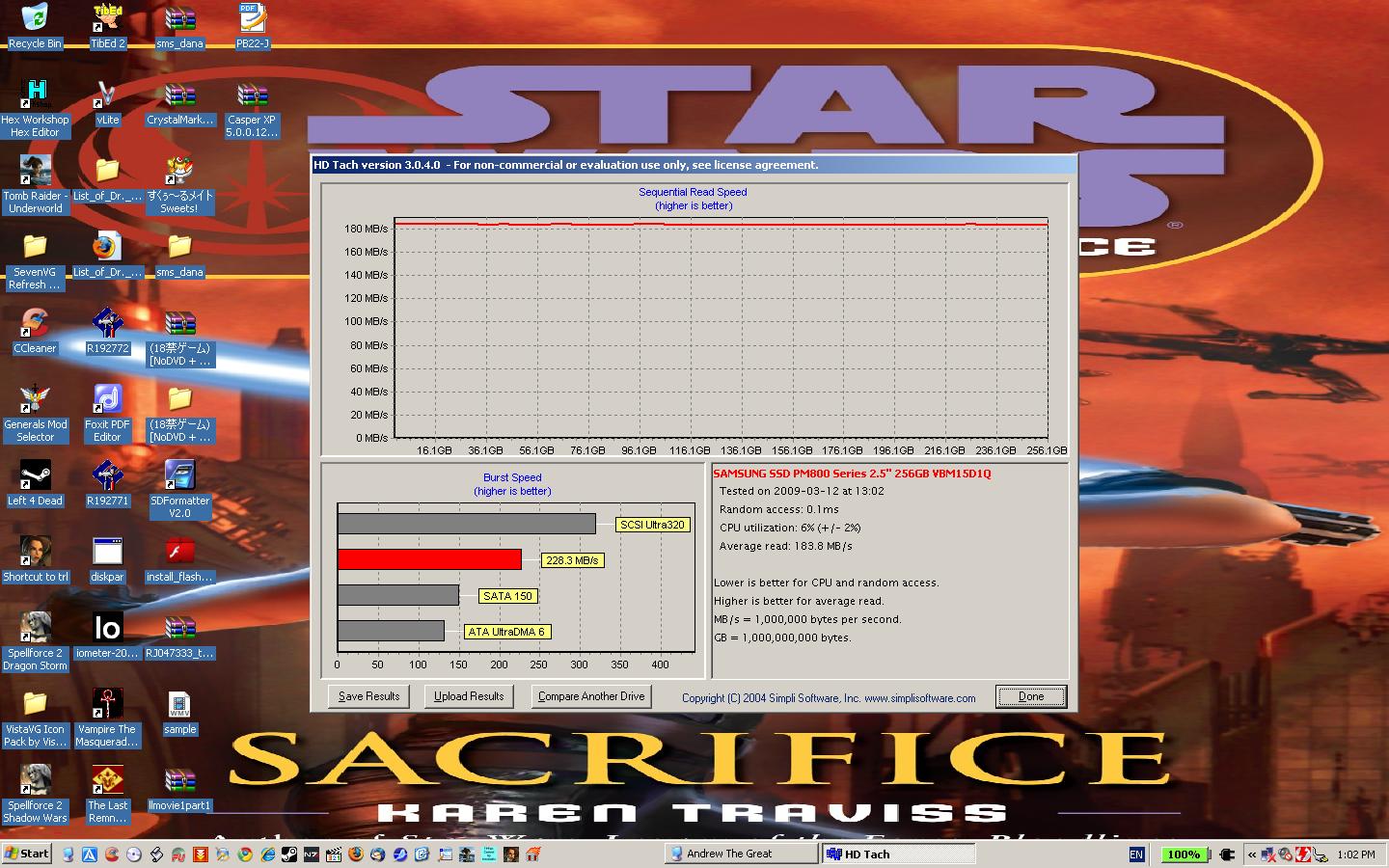
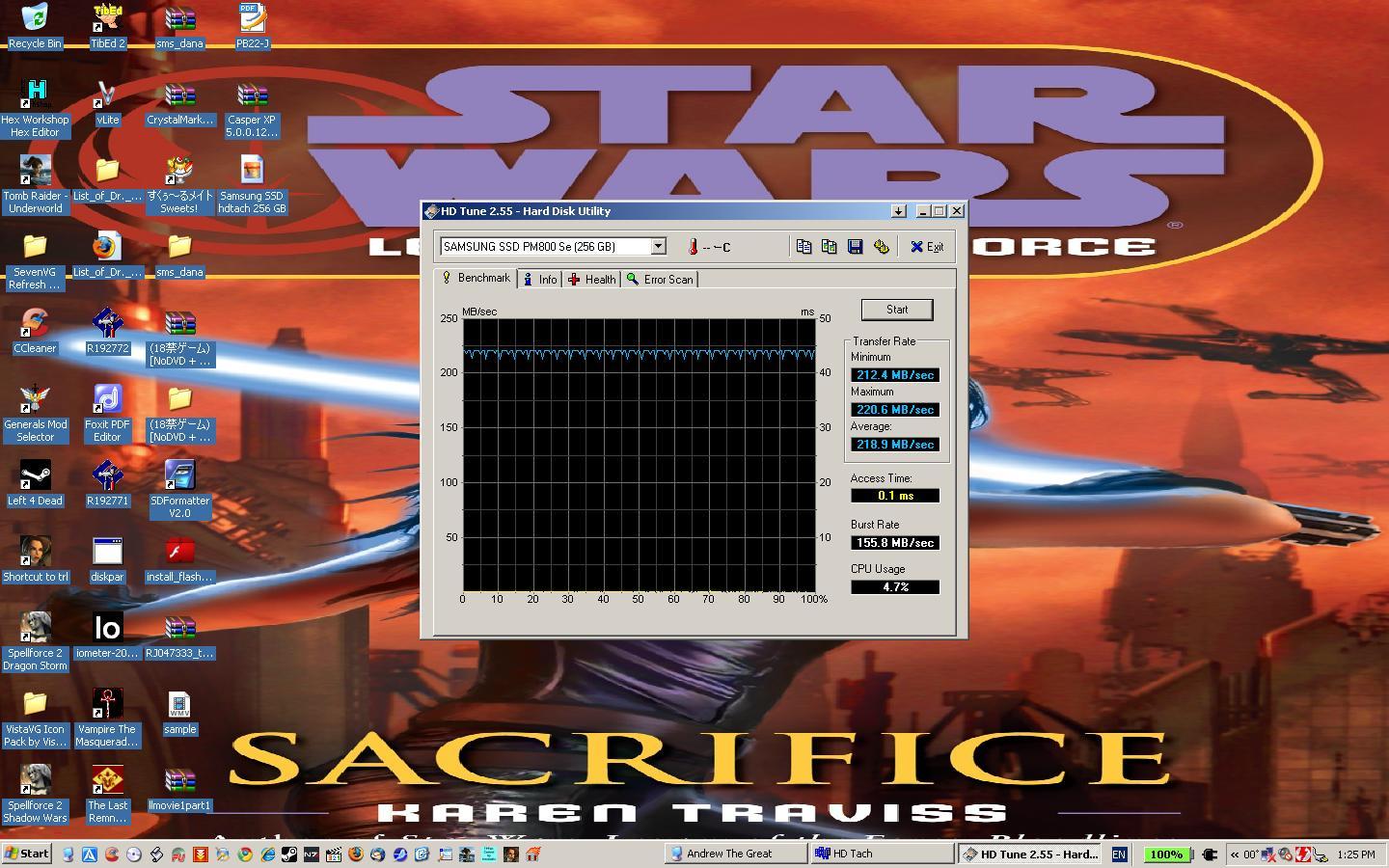
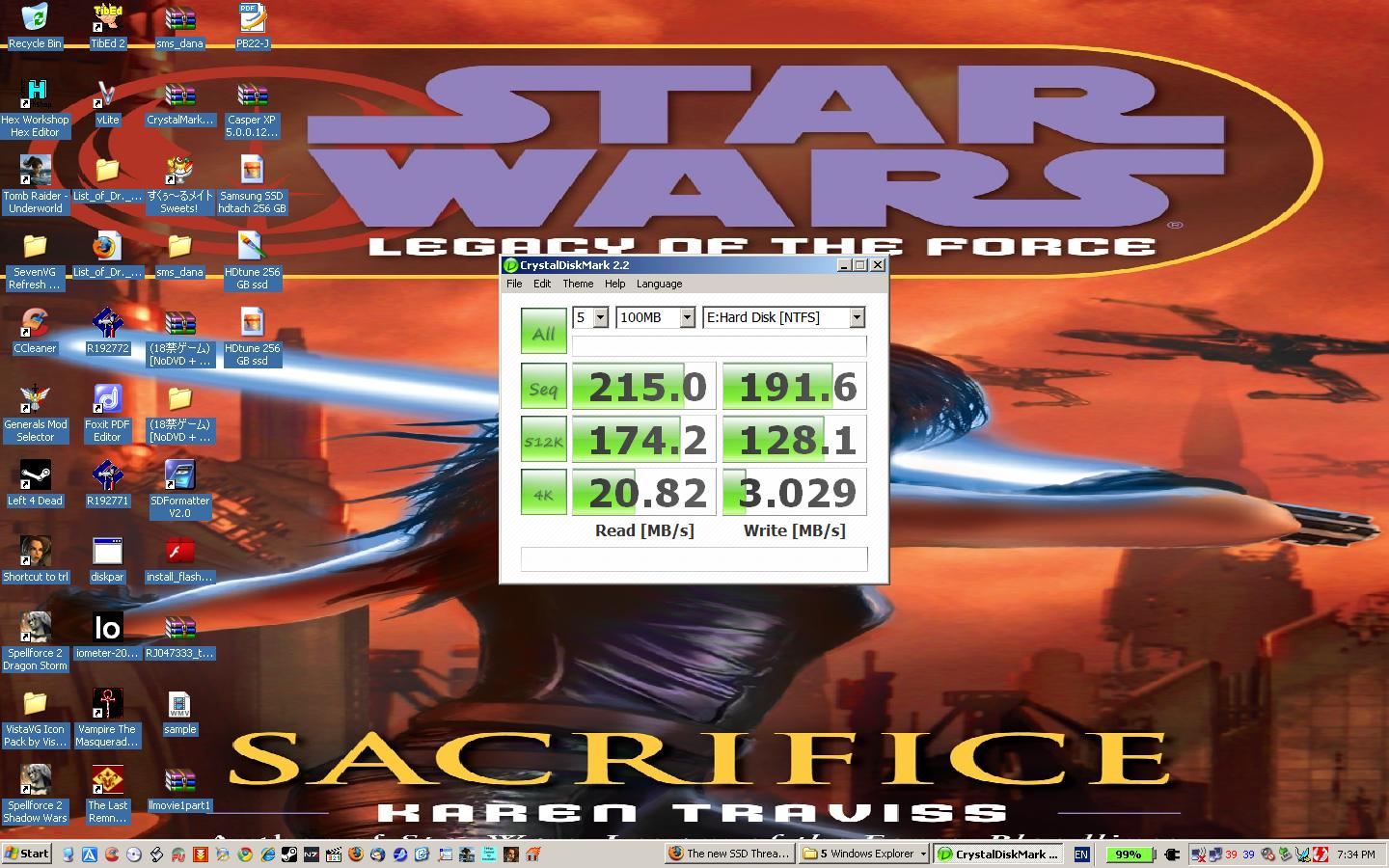
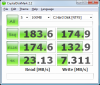
I cloned my corsair s128 to my new Samsung 256 GB drive. The results might be faster if I did a fresh install. This drive runs just as cool as the corsair s128.
Attached Files:
-
-
Jedisolo, how does the battery life of the Samsung 256gb compare to the battery life you used to get out of the Corsair?
-
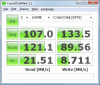
That's great... but makes me wonder why my two RAID 0'd Samsung 64 SLC drives are so much slower in the first two result rows???
Anyone know why CrystalDiskMark would report the attached results for two Samsung 64GB SLC drives RAID 0'd? Should it be faster than 107MB Seq read? I'm kind of bummed... though the system is definitely faster than my VelociRaptor.Attached Files:
-
-
I have a 4 cell in my notebook so I get about 4.5 hours of battery time. Out of the Corsair I got 4 hours. -
Looks pretty good. Random writes are a bit lower than the previous generation, but I'm guessing they wanted to sacrifice a little and bring the up sequential speeds? No stuttering and the like, yeah?
Is that an estimation via Windows or did you actually run it down all four and a half hours? -
from ur desktop, i saw u have whatever 18+ stuff.....
-
Jedisolo, can u do the test on SSD in ur Ultra Bay II?
I want to see whats the maximum IOP from Ultra Bay II. -
This is strange. I disabled Volume Write-Back Cache in the Matrix Storage Console and my results went up significantly (except for the 4K write).
Attached Files:
-
-
I used Norton Ghost.
There is no stuttering on the 256 GB Samsung drive that I can tell. I ran it down to the full 4.5 hours. -
is T400 Ultra Bay II SATA3.0Gb/s too?
-
Ronan zj I believe it is.
-
Man, I am hella impressed with these Sammy 256GB results!
-
Dell Small Business has 20% off coupon and it works with 256GB SSD
Coupon: LP$6290H2MKBDF
Get additional 1.5% cashback using fatwallet.com
This'll be my 2nd 256GB sammy and I'll do a RAID0 in my 15" MacBook Pro Unibody
-
What is IVA?
-
$49.50 you shouldn't have to spend!!!
-
@heavyharmonies
Were you ever able to format ur PATA drive? I got everything i need up and running on my sammy now i want to format my 7k200 spinner to use for storage and stuff but windows will not allow me to format it... -
Still battling.
I was able to get rid of the recovery partition on the PATA SSD and extend the remaining partition to cover the whole drive. I was able to change its drive letter to H:, but even though I was booting to the OS on the SATA SSD, I could not delete the "Program Files" or "Windows" hierarchy on the PATA SSD, even in safe mode, which boggles the mind.
I threw caution to the wind and went ahead and wiped the PATA SSD, and wound up with "NTLDR Missing. Press Ctrl + Alt + Del" to restart, so the system refused to boot from the SATA SSD even though there was nothing on the darned PATA drive.
I used OS discs to try to fix this error:
Boot to recovery console.
FIXMBR C:
FIXBOOT C:
COPY D:\I386\NTLDR C:\
COPY D:\I386\NTDETECT.COM C:\
BOOTCFG /rebuild
No dice. I'm out of ideas.
So I'm restarting from square 1 (again). The plan (such as it is):
1. Restore Vista and recovery partition to PATA SSD (done)
2. Uninstall as much crap as I can, including windows components to minimize install footprint
3. Reinstall XP Pro + SP3 on SATA SSD, making it the boot drive
4. Blow away restore partition on PATA SSD
5. Minimize as much of a presence remaining on the PATA SSD of the Vista files, and hide the folders; I'll simply make do with a few gig less disk space.
The logistics and functionality of the IDE-SATA architecture in the TZ is just bizarre (to me at any rate...) -
all it needs is always the ide to boot from. and on the ide, you have simply a redicted to the s-ata disk. so all you would need are the minimal bootfiles on the ide till the redirect. the os itself should be completely removable (means you should be able to delete every folder on c:, as well as remove any other partition on the ide device + resize c: to full size). you should lose some mb max.
but i know, it can be a terrible hazzle to try out such stuff. the trial-and-error can be hell. -
I might have ran into a similar problem when I was cloning my drive to an SSD. The problem was that my BIOS was set to boot off the wrong hard drive (a non-bootable one), so it never found NTLDR or whatever it was looking for. Once I changed the BIOS to try the HD I wanted to boot from first, then it worked. Perhaps you have some such BIOS setting?
-
I'm haveing no problem booting to the drive i want. Everytime i turn on my laptop it asks if i want to boot to "Windows Vista x64" or "Windows Vista x64" i just have to remember i think the one on top is the drive i was most recently in. I just cant seem to format the old spinner. and i made a quick attempt this morning to boot from the Vista DVD and format it there but it didn't give me the option (i'm gonna play more tonight). in fact before, it didn't give me the option it just booted to the Vista DVD regardless. Fun stuff anyway i love it! haha hell i don't mind screw stuff up just for the sake of trying to fix it later (as long as it can be resolved in a reasonable amt of time...)
-
Your Vista installation disk... it's a recovery disk isn't it? Not an OEM installation CD? What about your XP CD? Tl;dr, but if the XP CD can install straight to the PATA drive, why don't you just load that up first, and skip the Vista mess?
-
What's the best way to thoroughly test a SSD out when it's first received to make sure it's reliable before the return policy ends? Thx
-
Prolly HDTune,HDTac, ATTO, Crystal, and maybe install an OS on it a couple times would prolly throw it threw the ringer, right?
-
Yes, but the system will not allow me to delete the Windows and Program Files folders on the PATA SSD even when booting to the OS on the SATA SSD, even in safe mode. I get all sorts of access denied errors.
I have both Vista and XP recovery DVDs for the Vaio TZ. The problem is that they do not ask which SSD I want to restore to. They insist upon restoring ONLY to the PATA SSD, which is the problem. I don't want to boot from the PATA SSD. I want to boot from the SATA SSD (much faster drive).
I want the SATA drive to be my boot drive, and therein lies the problem.
That's what I thought initially as well, but unfortunately the TZ bios was never programmed with the notion of multiple hard drives or IDE versus SATA. There is no option to set a higher boot order for either of the hard drives or to choose SATA device over IDE device for booting. It just says "hard drive" in the boot options. If you choose hard drive, it automatically assumes the PATA device.
That's probably the underlying core of this whole problem that I'm trying to circumvent.
It looks like I can get 90% of the way to where I want to be as long as I'm willing to live with (1) the SATA boot drive being something other than the C:\ drive letter and (2) there being some leftover files on the PATA SSD that I just have to live with.
I think I'm just chasing my tail regarding a system that was never designed to boot from the SATA device... -
yes, because you access as user or admin the vista disk. system files are blocked even for users and admins. you have to get admin right to all the files. that means, change the owner of the files. there are tools for it, but in the end, it's just about rightclicking the folder/file, properties, permissions, advanced, ownership, change ownership.. something around that.
get owner of all the files you want to delete. and then, have fun.
edit: which system do you have on sata now? xp or vista? (i hope vista). in vista, you can hide drive letters (which i do), so you don't see them except on console, or in full filenames.. that way, you won't care about your c:\ d:\ anymore for ever again
-
What if you removed the PATA drive and were left with only the SATA drive then tried running the restore disk? it would have to go to the SATA right? or do you have the SATA drive in the optical bay? (i'm not overly familiar with your notebook)
Edit: thanks for the ownership tip davepermen. i'll give that a try myself. -
Therein may lie the rub. I'm booting to XP Pro on the SATA SSD.
YIPES! I am *NOT* opening this machine up again. Not friendly to user upgrades in the least. I'm far too fat-fingered to risk damaging this machine again. You have to remove the keyboard to get to the motherboard and drives, all of which are buried under a maze of ribbon connectors, and this is after you remove about 20 screws and one of the hinges.
Nope. The machine is in one piece and functioning. I'm not tempting fate.
[Furthermore, based on what I've experienced thus far, I believe the system has to be able to get to the PATA drive in order to be able to boot the SATA drive, otherwise I should have been able to boot to the SATA drive after blowing away the partitions on the PATA SSD...] -
if you want to minimize the space used could you install a different smaller OS on there? like linux?
The new SSD Thread (Benchmarks, Brands, News and Advice)
Discussion in 'Hardware Components and Aftermarket Upgrades' started by Les, Jan 14, 2008.