 Problems? See this thread at archive.org.
LOL!! Yep!
-
Hey justinkw1, check out what we did over at hphdx.net regarding your guide!
Link.
Thanks for everything you do bud! -
You can even add Rep to your post from there!
-
Hello
I appologize if this topic has already been addressed.
I recently upgraded my HDX16 to a retail version of Windows 7. So far ive been able to fix a lot of the major issues thanks to these forums. (E.g. fingerprint and mute button light) Before i continue i just want to send a thanks to all for contributing to these forums.
ok going back to my topic.Well i seem to have two more issues that i cant seem to resolve. Ive contacted HP and all they can do is tell me is that my issue cannot be resolved since i am using a retail version of Win7
Problem 1: When i configure the HP Mediasmart TV program the only signal resources available to me are, Analog TV(Antenna) and Analot TV(Cable). I remember that i was able to choose Digital TV(Antenna) before. I installed all the software and drivers recommended here and on HPs site and cant seem to enable the Digtial TV(Antenna). Did anyone else face this issue and find a work around?
Problem 2: When i run the Smartmedia Quick launch program, i dont seem to see the SmartTV icon on there. Its obviously installed on my comp since i can run the program but its not on the quick launch window,like all of the other HP Smartmedia programs like DVD, Photo and webcam. I uninstalled and reinstalled the quick launch program to see if it would refresh but it still is not there. Once again did anyone else face this issue and find a propper work around?
Thanks in advance -
Blkmagic,
I can't help you on these issues since I don't install all the smartmedia crapware...it's bloatware...tons of stuff for basic functionalities, I prefer to use W7 Media Center for TV.
I hope someone else will be able to assist you. -
fresh install of Win 7 took care of the issue. I'm finally back to ripping my dvd collection. after a days of issues thanks to HP Media Smart DVD. heh.
-
yes as the first reply states, thanks!! i was able to get those drivers from HP after they were already on your post !!
thats so cool!!
well i have a concern about my OSD on bass and treble
i managed to get the osd by installing in this order (with all the stuff avaiable)
audio driver sp45183 ( i think latest would do the job for all the )
Mediasmart menu v3 sp45140
quicklaun buttons sp44135
and the TONE SETUP utility SP45617
afther that i have full funcionality of OSD but is not Perfect
as it shows the osd Messed UP (dont shows the name but a barcode-like image and the bar is perfect (and moves perfect) as you will see)
i think the function of the TONE setup is to make it work
i attach an image of the buttons working
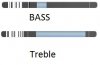 i put the names on the image it actually does not show the names
hope this get a work arround but at least with the latest bios f31 my bass treble doesnt go crazy any more
P.S. Does some one have installed Linux on this PC with all or most periferals working? i just installed ubuntu to try but is not yet perfect, i still love windows the most). i also have MACOSXinstalled but the flikin wifi dontwork heheh
you should add linux and mac drivers hehe just kidding.
seeya -
gierso,
please read the last 20 posts before yours...we discussed everything about the treble&bass issue. -
yes i readed indeed (rageman's and your help)
but i tought taht you were talking about the buttons not working at all, ?? so you were telling every one to install old Media smart
i was informing that i made them work almost percetly with listed drivers + the tone setup utility even if they show messy they do change the controls
i understood they didnt show up at all nor they changed the levels silently
sorry for missundertand
and thanks for you Post!
xD -
The transition to tables is complete!
The BIOS releases have been merged into one table now, categorized by model. Documentation for almost all current drivers are now available on the original post. Support for Windows XP has been dropped on the original post; nevertheless, some of the drivers posted are still compatible with Windows XP.
Softpaq releases come with both CVA and HTML documentation -- should I post up the HTML documentation too if it is available, or should I post one or the other? Sometimes the HTML documentation shows info that the CVA doesn't, but the CVA shows more technical info that I think is useful.
Other than that, no actual driver updates in the past few days (which is good because I was pretty busy).
-
I just did a fresh install of Windows 7 on my HDX16. I installed the sound driver along with the HP Quick Button drivers. Some reason, when i adjust my volume, it always minimizes whatever I am doing, whether watching a fullscreen movie or playing a game. Anyone have any ideas on how to fix this?
Thanks -
I could use some help on my Fingerprint reader. I installed all of the drivers in this forum last week. The fingerprint reader worked fine. For some reason (I guess I wasn't thinking), I went to the HP Site, saw there was an update for the Validity Fingerprint Driver (sp41660) and installed it. At the same time, I installed a few other updates that had November dates on them. I realized later that the Fingerprint reader was no longer found on the system. Rather than try to roll back the driver, I uninstalled and reinstalled the driver and Digital Persona software trying the drivers in this forum and the ones on the HP site. It didn't work. I spent the next few evenings trying to uninstall and reinstall the drivers and software. I also followed the instructions to delete the driver and search for system changes. I have had no luck. I even tried to do a system restore to an earlier date and that failed.
This shouldn't be this hard. I just can't figure out how to get this thing working. I really need some help! Any ideas? -
hey what kind of proble you have run into ??
you cant see the device? or you see it but cant install Drivers?
If you can see it try to manually select the validity drivers even if this tells you they are not.
or maybe it stopped being detected (happend to me with a vaio motioeye camera) in that case i dont know maybe the device died
either way you can try a new installation to see if it gets detected / or installed normally
Wish you best of Lucks!!
Serge -
i think bot of them would be useful
Hey congratulations for your hard work to keep us Updated!!!
and GRACIAS AMIGO!!!!!
hehe
by the way JustinKW1 have you seen my last posts? about the bass trebble?
in a previous post you stated that the TONE SETUP you didnt know what was supposed to do. well it adds support to the bass treble!! hahahaha
just kidding i know you already know that, and you said it doesnt do what is supposed to do..
well i got it working (no names on the OSD of bass/or treble, but full functionality
View attachment 40639
and the bas and treble appear at least) by installing the drivers in the given order on one my two hdx18 1020us
on the other hdx18 (my brother's) i did the same thing, but had bios F.03 so it had the crazy bass/treble problem enhanced i updated bios (thanks to rageman and Axel Foley for that Tip) and it worked for a Day, then the OS died of slowniness (dont know if i invented the word xD), restored a Backup then it worked the same way as mine
maybe seven didnt like the bios changing that much (f03 to 31 A) or it was a diferent problem, but anyway, i would recomend making a temporal backupimage with windows 7 before updating BIOS, to restore in case of collapse of the OS
maybe int can work for someone else too.
See ya and sorry for the LONG text, the bad english, and congratulations again for your WORK
Serge! -
I am able to install the driver without any problem. In Device Manager it seems to be installed fine. When I install the software, it tells me the device is not plugged in. When I reboot, it doesn't find the device at the Win sign on screen. Thanks
-
ok
try uninstalling the Digital persona,
the driver too, restart and install just the digital persona (think it has the driver)
so it will try to installit or ask you to install it, if so, do it at that moment and then restar again.
hope that works
Serge! -
I think you already answered your question...
I would link both information, CVA & HTML, since they're not consistent like you noticed, I think both are needed.
Thanks for your hard work Justin...it's really appreciated.
-
whats the diference between Windows update drivers, hp ones, or the original NVIDIA ones?
is there something specific that the hp ones are personalized for ? or is Ok to add either of them of your choice? -
Looks awesome justinkw1!!!
-
weird problem
i found out that bot my hdx slows as hell!
so it has to be a driver. ( and indeed an IDT process was eating resources like a beast) i unistalled and installed Windows update one . now is perfect
bot problems after bios f31 update. :/ has to be a relation there.
seeya -
All right, I updated the original post and added HTML documentation links for all HP Softpaq releases. I also fixed some documentation links that were wrong.
When I see the original post, there's more table markup than anything else now. Following the standard formatting for markup coding, the tables comprise of almost
1,900 lines of code.
-
For dv6/dv7 users, I found a new BIOS version:
ftp://ftp.hp.com/pub/softpaq/sp45501-46000/sp45955.exe
-
Anyone? I am still having problems with this even after reinstalling the drivers. It did not do this before I installed Windows 7.
-
@Axel: I posted this release here -- http://forum.notebookreview.com/showthread.php?t=433579. This BIOS is not compatible with the dv6t Quad Edition or dv7t Quad Edition, which is why it's not on the original post. The F.36 A BIOS is supported in the dv6-1000 and dv7-2000 notebook families, which are different from the Quads (dv6-2000 and dv7-3000 families).
@hydeclayes: No idea on how to fix this at the moment. Do older drivers do the same thing? -
It doesn't "minimize"...what happens is that if you have a fullscreen app running, when you press the volume keys the quicklaunch and smartmenu apps (the gui with the sliders) have to get focus so the full-screen app running (a game or a full-screen video from youtube) actually gets "windowed" again to let the gui panel get focus and show up.
It did this also in Vista IIRC, it's not W7 fault. -
Justin, thanks for the explanation...and sorry for my wrong advice.
-
Justin I was trying to help someone out ( here) and made reference to using the ProtectSmart driver for Win 7 (SP45135) you have posted on this driver page. However, KLF came on board and pointed out that the driver is for XP. I checked the CVA & HTML files and he is correct. Its listed as a XP driver.
Just a check-six, but you might want to look at this. -
Probably there was a problem while Justin was editing the tables.
Please check my post in this thread about the W7 ProtectSmart driver:
http://forum.notebookreview.com/showpost.php?p=5421061&postcount=297 -
You can overcome this problem by uninstalling Hp smart menu or...
like I do it.. If I'm gaming or something like that I just end the process pressing ctrl alt del.
If you do this the volume will still adjust, the only differce is that there is no bar on your screen witch indicates how loud your volume is.
the only problem then is that your music controls won't work.
It's just stupid the volume bar shows up on the screen. It's much more interesting if it just happens on the background. -
this thread, as a vehicle for announcing and cataloging new drivers, is becoming worthless.
Individual problems should have their own thread not just to keep this one 'clean' but to make it easier for others to search for and and find solutions to their own problems. -
In the Quick Launch Buttons Prefencens, untick the "Display HP Quick Launch Buttons Desktop Notification".
Then you'll miss the OSD display but movies and games say fullscreen/focused when changing volume.
That works on my laptop, QLB version is 06.40.17.02. -
Fixed the problem -- knew I missed an error somewhere. Thanks!
-
You can't configure the QLB with the latest version running on win 7.
I tried finding the preference button, but there just isn't any. -
KLF, that would be a great feature, but can you tell us how to access QLB preferences under W7? I'm not able to find it.
Thanks a lot.
-
It's a pleasure to give you back some help...
-
I don't agree at all on your first point: this thread, as a vehicle for announcing and cataloging drivers, has become a life-saver.
For troubleshooting, a single thread is not the best way to approach it, but with vBulletin users have the "search this thread" functionality in the upper-right. Before posting a problem they should use that.
It would be better if we could have a sub-forum for these 5 notebooks under the "HP, Compaq and Voodoo PC" main one. -
http://cid-d673326bbf1431bd.skydrive.live.com/self.aspx/Public/Notebookreview.com files/hpqlb.jpg
That's about best I can explain where it is on my computer I hope that helps.
-
I have no icon in the systray...
I'll solve it...you found me a new task to do...
-
Hmm I've never seen that in my life that's odd.. I see that you are running an old version (6.40.x instead of 6.50.x). I wonder if that makes a difference..
-
Sure it does...I didn't want to upgrade QBL and SM to the latest version because they gave me some problems...but I guess I'll have to retry and make them work...
-
New nVidia mobile drivers, for those who want the latest (beta version):
W7/Vista x64: http://www.nvidia.com/object/notebook_winvista_win7_x64_195.55.html
W7/Vista x32: http://www.nvidia.com/object/notebook_winvista_win7_195.55.html
XP x64: http://www.nvidia.com/object/notebook_winxp64_195.55.html
XP x32: http://www.nvidia.com/object/notebook_winxp_195.55.html
-
Are these WHQL signed?
-
Thanks guys...I'll be posting the general discussion thread for these drivers over at the Gaming (Software and Graphics Cards) for all notebook users to see. Please standby on WHQL status -- if they are WHQL certified, I will update all the driver threads.
-
hey...
what happened to the XP drivers
got lost on code between the tables!! ??
haha
i have a problem with the hp protect smart
cus is not detected in XP
i read over the thread, that you need a specifical version of Intel matrix storage. so i uninstalled new installed an old to see if this works..
i will keep you updated ..
Seeya -
Status update on the NVIDIA v195.55 drivers: they are not WHQL certified, but it still seems to be digitally signed though, by NVIDIA Corporation. I verified this in both DXDiag and the Device Manager. No driver signing warning appears when I install this driver. I am running the new driver now, and it's working fine at the moment.
General discussion thread on these drivers - http://forum.notebookreview.com/showthread.php?t=435320
Votes on whether I should update the original post with this driver?
-
Yeah this is the first time I've seen a digitally signed non WHQL driver.. I'm running it as well here
-
I get digitally signed, but non whql drivers from intel all of the time.
-
The updated NVIDIA graphics drivers are now up on the original post. Remember to remove all previous versions of the driver first before installing this new version.
11/18/2009
- Updated NVIDIA GeForce graphics driver to version 195.55.
-
You can use the current version of the Intel Matrix Storage Manager on the original post -- it works on Windows XP.
Did you install the Windows XP version of the HP ProtectSmart driver? If not, you can get it below.
Version: 1.10.7.1
Link: ftp://ftp.hp.com/pub/softpaq/sp45001-45500/sp45135.exe -
For my HDX X18-1180EL I also need HP Tone Control Utility on Windows 7 x86/x64.
ftp://ftp.hp.com/pub/softpaq/sp45501-46000/sp45617.exe
http://h10025.www1.hp.com/ewfrf/wc/...&dlc=it&cc=it&lang=it&os=4063&product=3885104
Thanks!
[Drivers] HP dv6-2XXX / dv7-3XXX / dv8 / HDX16 / HDX18 (INTEL)
Discussion in 'HP' started by justinkw1, Jul 30, 2009.


